
















「呐,你知道吗? 听说樱花飘落的速度是秒速五厘米哦。」
听到阿珍又念起这句经典台词,阿强,这个对自然界的花期不太敏感的程序员,也收到了“樱花开了”的讯号。
春天的樱花不能错过,赏樱是写进阿珍价值观的春日打卡动作。视频通话里,阿珍计划了一场远行——周末就回母校武大看樱花。但这一次,在外出差的阿强不能陪她一起去。
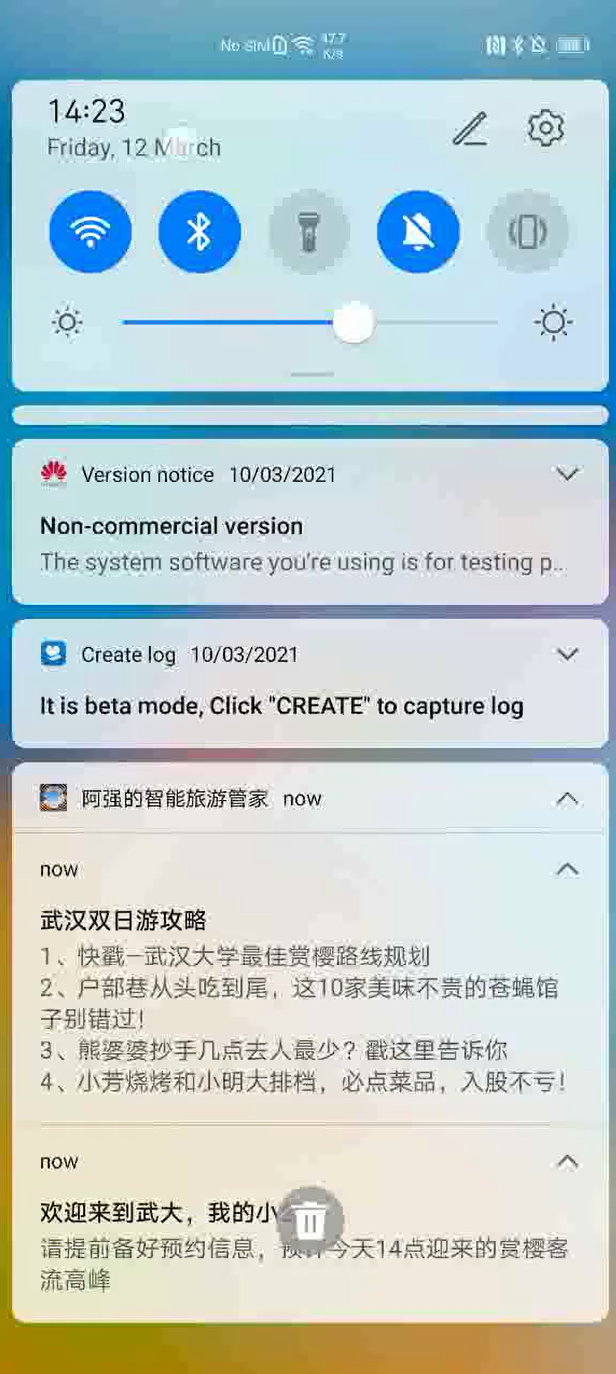
于是阿强,依然是拿出了自己吃饭的本事,将自己的周到关怀写进一个智能旅游管家APP,陪阿珍去武汉看樱花。即使不在身边,也要给她无微不至的出游体验:
出发行程不用记:出发前为她提醒出行时间,让她不再错过重要行程;
目的地天气早知道:根据目的地气象预报,提前给到出游装备和穿搭建议;
攻略玩法全推荐:让她省去做攻略的时间,抵达目的地,推送所需的游玩攻略和优惠政策……
以上管家式智能出行服务能力,有了华为情景感知服务(Awareness kit)的时间感知和天气感知能力、定位服务(Location Kit)的地理围栏能力,以及推送服务(Push kit)的加持,实现起来并不难。
点击视频查看示例
原理解释
情景感知服务能感知用户当前的时间、位置、活动状态、耳机状态、天气状况、环境光、车载连接状态、信标连接状态等场景,并通过能常驻后台运行的围栏能力,并且可自由组合这些感知能力,建立组合围栏。
定位服务采用GNSS、Wi-Fi、基站等多途径的混合定位模式进行定位,能快速、精准获取位置信息,实现全球定位服务能力。
推送服务是华为为开发者提供的消息推送平台,建立了从云端到终端的消息推送通道。开发者通过集成Push Kit可以实时推送消息到用户终端。
代码实战
1、集成情景感知服务
开发准备
情景感知服务的集成需如下3个关键步骤,可以参考华为开发者联盟的文档
1. AppGallery Connect配置
2.集成HMS Awareness SDK
3.配置混淆脚本
https://developer.huawei.com/consumer/cn/doc/development/HMS-Guides/awareness-preparation?ha_source=hms1
代码开发关键步骤
<uses-permission android:name="android.permission.ACCESS_FINE_LOCATION" />
<uses-permission android:name="android.permission.ACCESS_BACKGROUND_LOCATION" />
2. 实现通过城市名获取天气信息:
String city = edCity.getText().toString();
if (city != null && !city.equals("")) {
    WeatherPosition weatherPosition = new WeatherPosition();
    weatherPosition.setCity(city);
    //传入指明传入地址用的语言类型,例如“zh_CN”、“en_US”等,“语言码_国家码”的格式。
    weatherPosition.setLocale("zh_CN");
// 获取Awareness Kit的“Capture Client”,调用天气查询能力
    Awareness.getCaptureClient(getApplicationContext()).getWeatherByPosition(weatherPosition)
            .addOnSuccessListener(new OnSuccessListener<WeatherStatusResponse>() {
                @Override
                public void onSuccess(WeatherStatusResponse weatherStatusResponse) {
                    // 处理返回的天气数据
                    WeatherStatus weatherStatus = weatherStatusResponse.getWeatherStatus();
                    WeatherSituation weatherSituation = weatherStatus.getWeatherSituation();
                    Situation situation = weatherSituation.getSituation();
                    String weather;
                    // 将天气id与天气名称匹配
                    weather = getApplicationContext().getResources().getStringArray(R.array.cnWeather)[situation.getCnWeatherId()];
                    // 更新UI
                    ((TextView) findViewById(R.id.tv_weather)).setText(weather);
                    ((TextView) findViewById(R.id.tv_windDir)).setText(situation.getWindDir());
                    ((TextView) findViewById(R.id.tv_windSpeed)).setText(situation.getWindSpeed() + " km/h");
                    ((TextView) findViewById(R.id.tv_temperature)).setText(situation.getTemperatureC() + "℃");
                }
            }).addOnFailureListener(new OnFailureListener() {
        @Override
        public void onFailure(Exception e) {

        }
    });
}
3. 实现定时提醒和进入目的地后,接受到推送的消息:
(1) 因为需要在应用被杀死时也能接受通知,需要注册静态广播:
在Manifest中:
<receiver android:name=".BarrierReceiver">
<intent-filter>
    <action android:name="com.test.awarenessdemo.TimeBarrierReceiver.BARRIER_RECEIVER_ACTION"/>
</intent-filter>
</receiver>
在java代码中:
Intent intent = new Intent();
intent.setComponent(new ComponentName(MainActivity.this, BarrierReceiver.class));
mPendingIntent = PendingIntent.getBroadcast(this, 0, intent, PendingIntent.FLAG_UPDATE_CURRENT);
(2) 定义时间Barrier(围栏)和其对应的标签Label,然后添加Barrier:
// 获取输入的时间
String timeHour = edTimeHour.getText().toString();
String timeMinute = edTimeMinute.getText().toString();
int hour = 0;
int minute = 0;
if (!timeHour.equals("")) {
    hour = Integer.parseInt(timeHour);
    if (!timeMinute.equals("")) {
        minute = Integer.parseInt(timeMinute);
    }
}
long oneHourMilliSecond = 60 * 60 * 1000L;
long oneMinuteMilliSecond = 60 * 1000L;
// 定义"duringPeriodOfDay"围栏,在指定时区的指定时间段内发送通知
AwarenessBarrier periodOfDayBarrier = TimeBarrier.duringPeriodOfDay(TimeZone.getDefault(),
        // 这里设置的是提前2小时通知
        (hour - 2) * oneHourMilliSecond + minute * oneMinuteMilliSecond,
        hour * oneHourMilliSecond + minute * oneMinuteMilliSecond);

String timeBarrierLabel = "period of day barrier laber";
// 定义更新围栏的请求
BarrierUpdateRequest.Builder builder = new BarrierUpdateRequest.Builder();
BarrierUpdateRequest request = builder.addBarrier(timeBarrierLabel, periodOfDayBarrier, mPendingIntent).build();
Awareness.getBarrierClient(getApplicationContext()).updateBarriers(request)
        .addOnSuccessListener(new OnSuccessListener<Void>() {
            @Override
            public void onSuccess(Void aVoid) {
            }
        })
        .addOnFailureListener(new OnFailureListener() {
            @Override
            public void onFailure(Exception e) {
            }
        });
(3) 定义地理Barrier(围栏)和其对应的标签Label,然后添加Barrier:
if (city != null && !city.equals("")) {
    //根据城市名称获取城市经纬度,这里是从内部文件中获取
    String data = cityMap.get(city);
    if (data != null){
        int flag = data.indexOf(",");
        double latitude = Double.parseDouble(data.substring(flag+1));
        double longitude = Double.parseDouble(data.substring(0,flag));
        double radius = 50;
        long timeOfDuration = 5000;
        // 定义"stay"围栏,在进入指定区域并驻留超过指定时间后触发围栏事件上报
        AwarenessBarrier stayBarrier = LocationBarrier.stay(latitude, longitude, radius, timeOfDuration);
        String stayBarrierLabel = "stay barrier label";
        // 定义更新围栏的请求
        BarrierUpdateRequest.Builder builder = new BarrierUpdateRequest.Builder();
        BarrierUpdateRequest request = builder.addBarrier(stayBarrierLabel, stayBarrier, mPendingIntent).build();
        Awareness.getBarrierClient(getApplicationContext()).updateBarriers(request)
                .addOnSuccessListener(new OnSuccessListener<Void>() {
                    @Override
                    public void onSuccess(Void aVoid) {
                    }
                })
                .addOnFailureListener(new OnFailureListener() {
                    @Override
                    public void onFailure(Exception e) {
                    }
                });
    }
}
(4) 定义广播接收器,用于监听Barrier事件,收到事件后进行应用的业务处理:
class BarrierReceiver extends BroadcastReceiver {
    @Override
    public void onReceive(Context context, Intent intent) {
        BarrierStatus barrierStatus = BarrierStatus.extract(intent);
        String label = barrierStatus.getBarrierLabel();
        int barrierPresentStatus = barrierStatus.getPresentStatus();
        String city = intent.getStringExtra("city");
        switch (label) {
            case DURING_PERIOD_OF_DAT_BARRIER_LABEL:
                if (barrierPresentStatus == BarrierStatus.TRUE) {

                    initNotification(context,"1","time_channel","行程提醒","离出发还剩2小时");
                } else if (barrierPresentStatus == BarrierStatus.FALSE) {
                    showToast(context, "It's not between ");
                } else {
                    showToast(context, "The time status is unknown.");
                }
                break;

            case STAY_BARRIER_LABEL:
                if (barrierPresentStatus == BarrierStatus.TRUE) {

                    initNotification(context,"2","area_channel","欢迎来到"+city,"查看旅行攻略");
                } else if (barrierPresentStatus == BarrierStatus.FALSE) {
                    showToast(context,"You are not staying in the area set by locationBarrier" +
                            " or the time of duration is not enough.");
                } else {
                    showToast(context, "The location status is unknown.");
                }
                break;
        }
    }
}
2、基于位置的信息推送
开发准备
buildscript {
    repositories {
        maven { url 'http://developer.huawei.com/repo/'}
    }
dependencies {
        ...
        // 增加agcp配置。
        classpath 'com.huawei.agconnect:agcp:1.4.2.300'
    }
}allprojects {
    repositories {
        maven { url 'http://developer.huawei.com/repo/'}
    }
}
2. 在应用级的build.gradle里面加上SDK依赖
dependencies {
   implementation 'com.huawei.hms:location:5.0.2.300'
   implementation 'com.huawei.hms:push: 5.0.2.301'
}
关键步骤说明
1.在AndroidManifest.xml文件里面声明系统权限
因华为定位服务采用GNSS、Wi-Fi、基站等多种混合定位模式进行定位,需要用到网络,精确的位置权限,粗略的位置权限,如果需要应用程序在后台执行时也具备持续定位能力,需要在Manifest文件中申请ACCESS_BACKGROUND_LOCATION权限:
<uses-permission android:name="android.permission.INTERNET" />
<uses-permission android:name="android.permission.WRITE_EXTERNAL_STORAGE" />
<uses-permission android:name="android.permission.ACCESS_NETWORK_STATE" />
<uses-permission android:name="android.permission.ACCESS_WIFI_STATE" />
<uses-permission android:name="android.permission.WAKE_LOCK" />
<uses-permission android:name="android.permission.ACCESS_FINE_LOCATION" />
<uses-permission android:name="android.permission.ACCESS_COARSE_LOCATION" />
<uses-permission android:name="com.huawei.hms.permission.ACTIVITY_RECOGNITION" />
<uses-permission android:name="android.permission.ACTIVITY_RECOGNITION" />
注:由于ACCESS_FINE_LOCATION,WRITE_EXTERNAL_STORAGE和READ_EXTERNAL_STORAGE是危险的系统权限,因此,需要动态的申请这些权限。如果权限不足,Location Service将会拒绝为应用开启定位。
2. 创建触发围栏
先根据需要创建围栏\围栏组,填好相关参数。
LocationSettingsRequest.Builder builders = new LocationSettingsRequest.Builder();
builders.addLocationRequest(mLocationRequest);
LocationSettingsRequest locationSettingsRequest = builders.build();
// Before requesting location update, invoke checkLocationSettings to check device settings.
Task<LocationSettingsResponse> locationSettingsResponseTasks = mSettingsClient.checkLocationSettings(locationSettingsRequest);
locationSettingsResponseTasks.addOnSuccessListener(new OnSuccessListener<LocationSettingsResponse>() {
    @Override
    public void onSuccess(LocationSettingsResponse locationSettingsResponse) {
        Log.i(TAG, "check location settings success");
        mFusedLocationProviderClient
                .requestLocationUpdates(mLocationRequest, mLocationCallbacks, Looper.getMainLooper())
                .addOnSuccessListener(new OnSuccessListener<Void>() {
                    @Override
                    public void onSuccess(Void aVoid) {
                        LocationLog.i(TAG, "geoFence onSuccess");
                    }
                })
                .addOnFailureListener(new OnFailureListener() {
                    @Override
                    public void onFailure(Exception e) {
                        LocationLog.e(TAG,
                                "geoFence onFailure:" + e.getMessage());
                    }
                });
    }
})
3. 设置触发推送通知
在GeoFenceBroadcastReceiver的onReceive接收到围栏触发成功提示后发送推送通知,在通知栏接收通知并展示。
if (geofenceData != null) {
    int errorCode = geofenceData.getErrorCode();
    int conversion = geofenceData.getConversion();
    ArrayList<Geofence> list = (ArrayList<Geofence>) geofenceData.getConvertingGeofenceList();
    Location myLocation = geofenceData.getConvertingLocation();
    boolean status = geofenceData.isSuccess();
    sb.append("errorcode: " + errorCode + next);
    sb.append("conversion: " + conversion + next);
    if (list != null) {
        for (int i = 0; i < list.size(); i++) {
            sb.append("geoFence id :" + list.get(i).getUniqueId() + next);
        }
    }
    if (myLocation != null) {
        sb.append("location is :" + myLocation.getLongitude() + " " + myLocation.getLatitude() + next);
    }
    sb.append("is successful :" + status);
    LocationLog.i(TAG, sb.toString());
    Toast.makeText(context, "" + sb.toString(), Toast.LENGTH_LONG).show();
    //
    new PushSendUtils().netSendMsg(sb.toString());
}
注:此代码围栏创建成功后会触发两次回调,conversion:1和4,分别代表进入触发回调和驻留触发回调一次。代码中输入的Trigger输入7的含义表示回调包括所有情况,即进入、驻留、离开等各种情况。
欲了解更多详情,请参阅:
>>华为开发者联盟官网
>>获取开发指导文档
>>参与开发者讨论请到Reddit社区
>>下载demo和示例代码请到Github
>>解决集成问题请到Stack Overflow








 苏公安网备 32011402010933号