














 软通动力HOS
【软通动力】HarmonyOS基础技术赋能之分布式数据服务功能
引言
分布式数据服务(Distributed Data Service,DDS) 为应用程序提供不同设备间数据库数据分布式的能力。通过调用分布式数据接口,应用程序将数据保存到分布式数据库中。通过结合帐号、应用和数据库三元组,分布式数据服务对属于不同应用的数据进行各里,保证不同应用之间的数据不能通过分布式数据服务互相访问。在通过可信认证的设备间,分布式数据服务支持应用数据相互同步,为用户提供在多种终端设备上最终一致的数据访问体验。
功能介绍
此次通过HarmonyOS的分布式数据服务能力,一方面可以实现自身应用界面的数据实时更新;另一方面也可以实现不同设备之间的数据实时更新。前提是在不同设备之间,要实现分布式数据服务的同步能力,需要同一个华为账号登录、并一个应用包名、同一个网络之间进行,也可以两个设备同时开启蓝牙。
开发指南
- 在config.json中添加permisssion权限。
// 添加在abilities同一目录层级
"reqPermissions": [
{
"name": "ohos.permission.DISTRIBUTED_DATASYNC"
}
]
- 在MainAbility中添加权限
@Override
public void onStart(Intent intent) {
super.onStart(intent);
super.setMainRoute(MainAbilitySlice.class.getName());
//实现Ability的代码中显式声明需要使用多设备协同访问的权限
requestPermissionsFromUser(new String[]{
"ohos.permission.DISTRIBUTED_DATASYNC"}, 0);
}
- 根据配置构造分布式数据库管理类实例KvManager以及创建分布式数据库对象SingleKvStore。
//实现数据库的初始化
// 初入的参数context: Context context = getApplicationContext()获得;storeId为分布式数据库id,String类型,可自行定义,例如“testApp”。
public static SingleKvStore initOrGetDB(Context context, String storeId) {
KvManagerConfig kvManagerConfig = new KvManagerConfig(context);
kvManager = KvManagerFactory.getInstance().createKvManager(kvManagerConfig);
Options options = new Options();
options.setCreateIfMissing(true)
.setEncrypt(false)
.setKvStoreType(KvStoreType.SINGLE_VERSION) //数据库类型:单版本分布式数据库
.setAutoSync(true);//设置数据为自动同步
singleKvStore = kvManager.getKvStore(options, storeId);
return singleKvStore;
}
- 将数据写入单版本分布式数据库。
//以key-value形式存储到分布式数据库
try {
long id = System.currentTimeMillis();
singleKvStore.putString("key",
"{\"id\":" + id +
",\"temp\":" + temperature +
",\"humidity\":" + humidity +
",\"NH4\":" + 0.0 +
",\"H2S\":" + 0.0 +
",\"other\":" + gas + "}");
} catch (KvStoreException e) {
e.printStackTrace();
}
5. 订阅分布式数据变化。客户端需要实现KvStoreObserver接口,兼听数据变化。
try {
//订阅类型SubscribeType.SUBSCRIBE_TYPE_ALL意思可以同步到本机和其他外围设备
innerKvStoreObserver = new InnerKvStoreObserver();
singleKvStore.subscribe(SubscribeType.SUBSCRIBE_TYPE_ALL, innerKvStoreObserver);
} catch (KvStoreException e) {
e.printStackTrace();
}
public class InnerKvStoreObserver implements KvStoreObserver {
@Override
public void onChange(ChangeNotification changeNotification) {
//刷新页面上的数据,同样有一个坑,onChange方法实质上,在一个子线程里执行
MainAbilitySlice.taskDispatcher.asyncDispatch(() -> {
//在这里执行页面ui组件的显示刷新
flushUIData();
});
}
}
- 获取分布式数据库数据:
private void flushUIData() {
//查询分布式数据的数据,获取数据可以通过get(String key)/ getEntries(String key)方法获取数据
List<Entry> entries = singleKvStore.getEntries(“key”);
if (entries.size() > 0) {
ZSONObject zsonObject = ZSONObject.stringToZSON(entries.get(0).getValue().getString());
int temp = zsonObject.getIntValue("temp");
int humidity = zsonObject.getIntValue("humidity");
int other = zsonObject.getIntValue("other");
tvTemp.setText(temp+"℃");
tvHumi.setText(humidity+"% RH");
tvGas.setText(other+"% LEL");
}
- 解除订阅。一般在页面销毁时调用,也就是MainAbilitySlice的onStop()中调用:
if (singleKvStore != null) {
singleKvStore.unSubscribe(innerKvStoreObserver);
}
- 同步数据到其他设备。获取已连接的设备列表,选择同步方式进行数据同步。
List<DeviceInfo> deviceInfoList = kvManager.getConnectedDevicesInfo(DeviceFilterStrategy.NO_FILTER);
List<String> deviceIdList = new ArrayList<>();
for (DeviceInfo deviceInfo : deviceInfoList) {
deviceIdList.add(deviceInfo.getId());
}
singleKvStore.sync(deviceIdList, SyncMode.PUSH_ONLY);
项目中采用在后台service中开启定时任务,实时保存数据到分布式数据库,然后在主界面,兼听数据变化,实时更新数据。
结果演示:
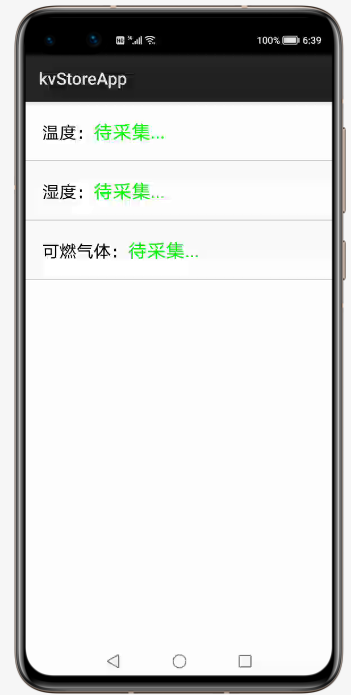
1.刚开始安装完成后效果:
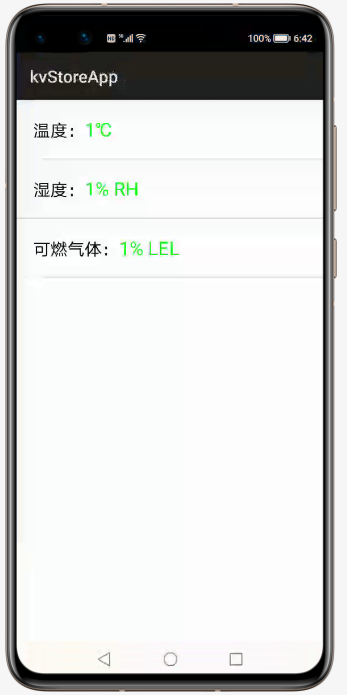
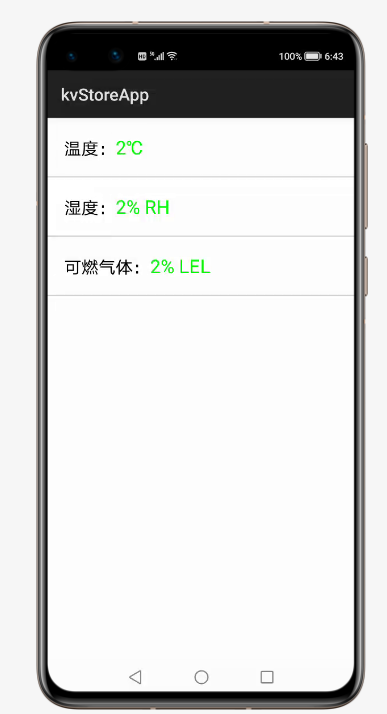
2.每隔3秒,界面数据都会发生变化:
附上源码:
1.MainAbilitySlice
public class MainAbilitySlice extends AbilitySlice {
private SingleKvStore singleKvStore;
private Text tvTemp;
private Text tvHumi;
private Text tvGas;
private Intent serviceIntent;
private InnerKvStoreObserver innerKvStoreObserver;
@Override
public void onStart(Intent intent) {
super.onStart(intent);
super.setUIContent(ResourceTable.Layout_ability_main);
tvTemp=(Text)findComponentById(ResourceTable.Id_tvTemp);
tvHumi=(Text)findComponentById(ResourceTable.Id_tvHumi);
tvGas=(Text)findComponentById(ResourceTable.Id_tvGas);
initService();
try {
//获取数据库
singleKvStore = DBUtils.initOrGetDB(this, DBUtils.STORE_ID);
innerKvStoreObserver = new InnerKvStoreObserver();
singleKvStore.subscribe(SubscribeType.SUBSCRIBE_TYPE_ALL, innerKvStoreObserver);
} catch (KvStoreException e) {
e.printStackTrace();
}
}
public class InnerKvStoreObserver implements KvStoreObserver {
@Override
public void onChange(ChangeNotification changeNotification) {
//刷新页面上的数据,同样有一个坑,onChange方法实质上,在一个子线程里执行
getUITaskDispatcher().asyncDispatch(() -> {
//在这里执行页面ui组件的显示刷新
flushUIData();
});
}
}
private void flushUIData() {
//查询分布式数据的数据
List<Entry> entries = singleKvStore.getEntries("key");
if (entries.size() > 0) {
ZSONObject zsonObject = ZSONObject.stringToZSON(entries.get(0).getValue().getString());
int temp = zsonObject.getIntValue("temp");
int humidity = zsonObject.getIntValue("humidity");
int other = zsonObject.getIntValue("other");
tvTemp.setText(temp+"℃");
tvHumi.setText(humidity+"% RH");
tvGas.setText(other+"% LEL");
}
}
private void initService() {
//启动ServiceAbility
serviceIntent = new Intent();
Operation operation = new Intent.OperationBuilder()
.withDeviceId("")
.withBundleName("com.isoftstone.kvstoreapp")
.withAbilityName("com.isoftstone.kvstoreapp.ServiceAbility")
.build();
serviceIntent.setOperation(operation);
startAbility(serviceIntent);
}
@Override
public void onActive() {
super.onActive();
}
@Override
public void onForeground(Intent intent) {
super.onForeground(intent);
}
@Override
protected void onStop() {
super.onStop();
//销毁service
stopAbility(serviceIntent);
//删除数据库
DBUtils.clearDB();
//解除订阅
if (singleKvStore != null) {
singleKvStore.unSubscribe(innerKvStoreObserver);
}
}
}
2.ServiceAbility
public class ServiceAbility extends Ability {
private static final HiLogLabel LABEL_LOG = new HiLogLabel(3, 0xD001100, "Demo");
private SingleKvStore singleKvStore;
private Timer timer;
private MyTimerTask myTimerTask;
private int temperature;
private int humidity;
private int gas;
@Override
public void onStart(Intent intent) {
super.onStart(intent);
singleKvStore = DBUtils.initOrGetDB(this, DBUtils.STORE_ID);
timer=new Timer();
myTimerTask=new MyTimerTask();
timer.schedule(myTimerTask,0,3000);
}
@Override
public void onBackground() {
super.onBackground();
HiLog.info(LABEL_LOG, "ServiceAbility::onBackground");
}
@Override
public void onStop() {
super.onStop();
if(myTimerTask!=null){
myTimerTask.cancel();
}
if(timer!=null){
timer.cancel();
}
}
@Override
public void onCommand(Intent intent, boolean restart, int startId) {
}
@Override
public IRemoteObject onConnect(Intent intent) {
return null;
}
@Override
public void onDisconnect(Intent intent) {
}
private class MyTimerTask extends TimerTask{
@Override
public void run() {
temperature++;
humidity++;
gas++;
try {
long id = System.currentTimeMillis();
singleKvStore.putString("key",
"{\"id\":" + id +
",\"temp\":" + temperature +
",\"humidity\":" + humidity +
",\"NH4\":" + 0.0 +
",\"H2S\":" + 0.0 +
",\"other\":" + gas + "}");
} catch (KvStoreException e) {
e.printStackTrace();
}
}
}
}
3.DBUtils
public class DBUtils {
//分布式数据库storeId
public static final String STORE_ID="kvStoreDB";
private static KvManager kvManager;
private static SingleKvStore singleKvStore;
//具体的实现数据库的初始化
public static SingleKvStore initOrGetDB(Context context, String storeId) {
KvManagerConfig kvManagerConfig = new KvManagerConfig(context);
kvManager = KvManagerFactory.getInstance().createKvManager(kvManagerConfig);
Options options = new Options();
options.setCreateIfMissing(true)
.setEncrypt(false)
.setKvStoreType(KvStoreType.SINGLE_VERSION)
.setAutoSync(true);//设置数据为自动同步
singleKvStore = kvManager.getKvStore(options, storeId);
return singleKvStore;
}
// 如果数据库中的字段有修改,只能先关闭,后删除,然后重新创建才生效
public static void clearDB() {
kvManager.closeKvStore(singleKvStore);
kvManager.deleteKvStore(STORE_ID);
}
}
4. MainAbility
public class MainAbility extends Ability {
@Override
public void onStart(Intent intent) {
super.onStart(intent);
super.setMainRoute(MainAbilitySlice.class.getName());
//实现Ability的代码中显式声明需要使用多设备协同访问的权限
requestPermissionsFromUser(new String[]{
"ohos.permission.DISTRIBUTED_DATASYNC"}, 0);
}
}
5. MyApplication
public class MyApplication extends AbilityPackage {
@Override
public void onInitialize() {
super.onInitialize();
}
}
6. config.json 文件
{
"app": {
"bundleName": "com.isoftstone.healthdata",
"vendor": "isoftstone",
"version": {
"code": 1000000,
"name": "1.0"
},
"apiVersion": {
"compatible": 4,
"target": 5,
"releaseType": "Release"
}
},
"deviceConfig": {},
"module": {
"package": "com.isoftstone.kvstoreapp",
"name": ".MyApplication",
"deviceType": [
"phone"
],
"distro": {
"deliveryWithInstall": true,
"moduleName": "entry",
"moduleType": "entry"
},
"reqPermissions": [
{
"name": "ohos.permission.DISTRIBUTED_DATASYNC"
}
],
"abilities": [
{
"skills": [
{
"entities": [
"entity.system.home"
],
"actions": [
"action.system.home"
]
}
],
"orientation": "unspecified",
"name": "com.isoftstone.kvstoreapp.MainAbility",
"icon": "$media:icon",
"description": "$string:mainability_description",
"label": "$string:app_name",
"type": "page",
"launchType": "standard"
},
{
"name": "com.isoftstone.kvstoreapp.ServiceAbility",
"icon": "$media:icon",
"description": "$string:serviceability_description",
"type": "service"
}
]
}
}
7.xml布局文件:
<?xml version="1.0" encoding="utf-8"?>
<DirectionalLayout
xmlns:ohos="http://schemas.huawei.com/res/ohos"
ohos:height="match_parent"
ohos:orientation="vertical"
ohos:width="match_parent">
<DirectionalLayout
ohos:padding="20vp"
ohos:height="match_content"
ohos:width="match_parent"
ohos:orientation="horizontal">
<Text
ohos:width="match_content"
ohos:height="match_content"
ohos:text_size="20vp"
ohos:text="温度:"/>
<Text
ohos:id="$+id:tvTemp"
ohos:width="0"
ohos:height="match_content"
ohos:text_size="22vp"
ohos:text_color="#00ff00"
ohos:text="待采集..."
ohos:weight="1"/>
</DirectionalLayout>
<DirectionalLayout
ohos:height="1vp"
ohos:width="match_parent"
ohos:background_element="#cccccc"/>
<DirectionalLayout
ohos:padding="20vp"
ohos:height="match_content"
ohos:width="match_parent"
ohos:orientation="horizontal">
<Text
ohos:width="match_content"
ohos:height="match_content"
ohos:text_size="20vp"
ohos:text="湿度:"/>
<Text
ohos:id="$+id:tvHumi"
ohos:width="0"
ohos:height="match_content"
ohos:text_size="22vp"
ohos:text_color="#00ff00"
ohos:text="待采集..."
ohos:weight="1"/>
</DirectionalLayout>
<DirectionalLayout
ohos:height="1vp"
ohos:width="match_parent"
ohos:background_element="#cccccc"/>
<DirectionalLayout
ohos:padding="20vp"
ohos:height="match_content"
ohos:width="match_parent"
ohos:orientation="horizontal">
<Text
ohos:width="match_content"
ohos:height="match_content"
ohos:text_size="20vp"
ohos:text="可燃气体:"/>
<Text
ohos:id="$+id:tvGas"
ohos:width="0"
ohos:height="match_content"
ohos:text_size="22vp"
ohos:text_color="#00ff00"
ohos:text="待采集..."
ohos:weight="1"/>
</DirectionalLayout>
<DirectionalLayout
ohos:height="1vp"
ohos:width="match_parent"
ohos:background_element="#cccccc"/>
</DirectionalLayout>
兼停、各里因违规词原因,故为代替词。


- 为了保障您的信息安全,请勿上传您的敏感个人信息(如您的密码等信息)和您的敏感资产信息(如关键源代码、签名私钥、调试安装包、业务日志等信息),且您需自行承担由此产生的信息泄露等安全风险。
- 如您发布的内容为转载内容,请注明内容来源。
我要发帖子


 苏公安网备 32011402010933号