














 周天
|
Media Kit
录制音频之后退出应用在启动,播放不了原来录制的音频
已解决



2


浏览100 编辑于2025-09-28 02:33湖北
全部评论
最多点赞
最新发布
最早发布
 匿名用户
采纳答复
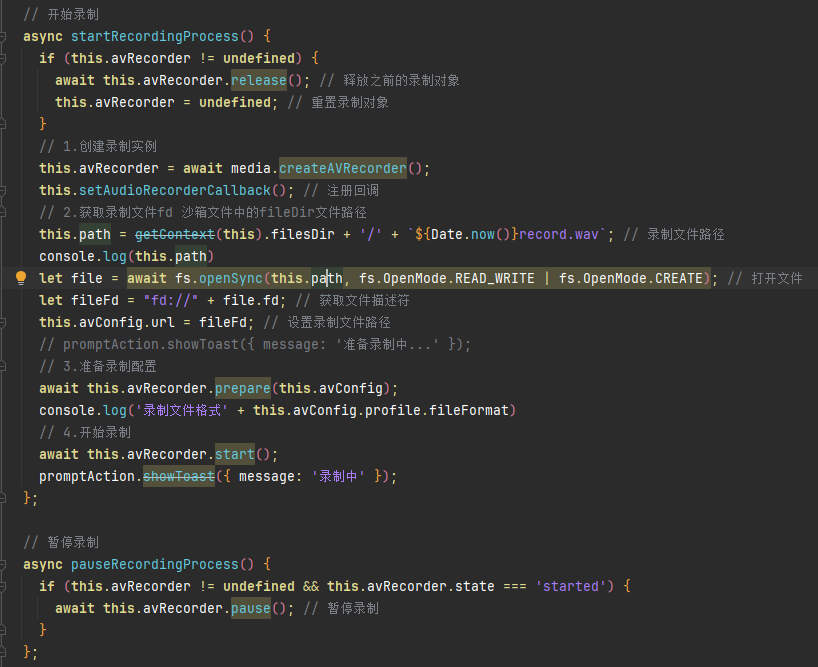
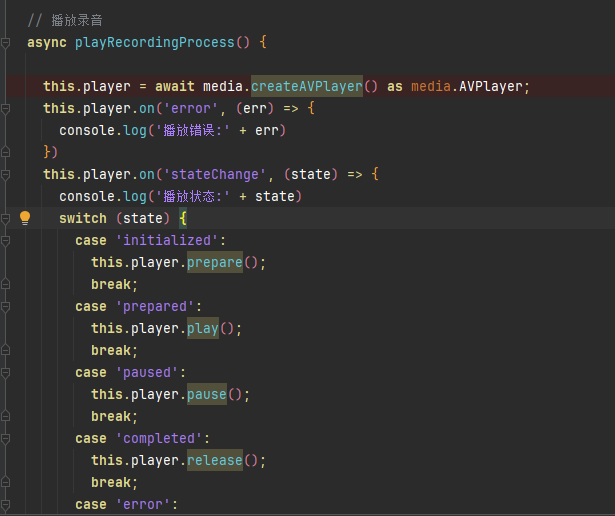
avConfig.url 是使用的文件打开状态的file.fd 应用退出过后,文件关闭file.fd 回收 ,所以重启应用点击播放的时候需要重新打开文件获取 file.fd 然后将file.fd 赋值进avConfig.url
核心问题是fd 的丢失,想要播放音频首先需要获取到文件路径,打开文件然后传入file.fd
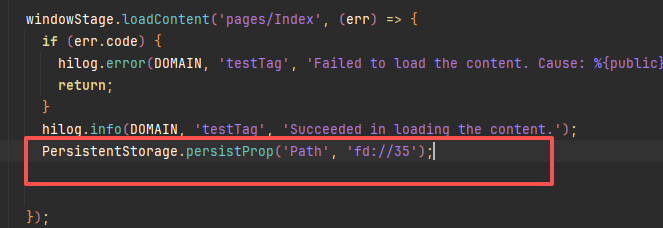
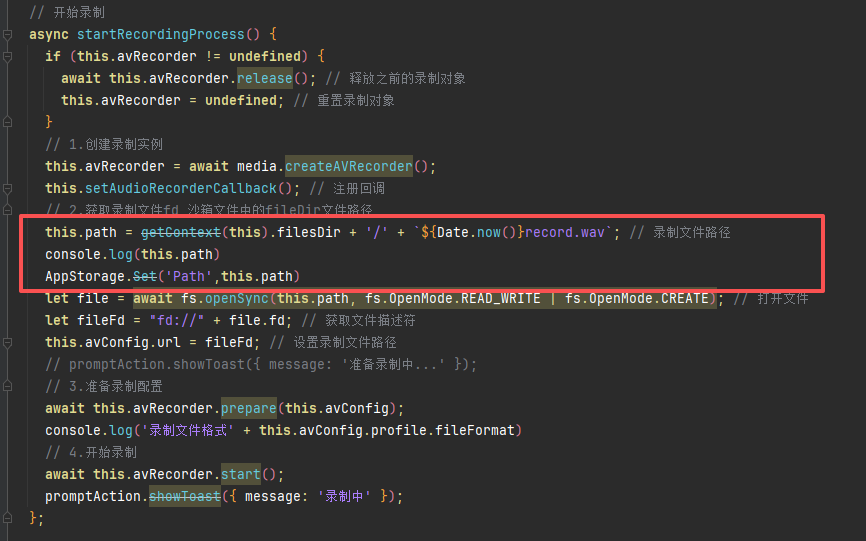
目前的解决方案是持久化上一次保存过后的沙箱路径,然后在播放的时候打开该文件,然后获取file.fd 赋值进avConfig.url
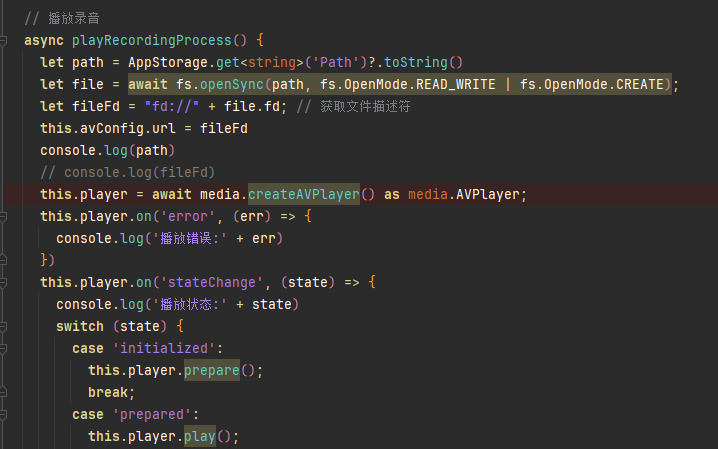
11楼回复于2025-09-25 02:15 来自湖北
 加密糖芯
【修改建议】
参考以下代码:
收起
自动换行
深色代码主题
复制
import { media } from '@kit.MediaKit';
import { BusinessError } from '@kit.BasicServicesKit';
import { fileIo as fs } from '@kit.CoreFileKit';
import { abilityAccessCtrl, WantAgent, wantAgent } from '@kit.AbilityKit';
import { backgroundTaskManager } from '@kit.BackgroundTasksKit';

@Entry
@Component
struct AudioCapturePage {
  private avRecorder: media.AVRecorder | undefined = undefined;
  private state: media.AVRecorderState | undefined = undefined;
  private avProfile: media.AVRecorderProfile = {
    audioBitrate: 112000, // 音频比特率。
    audioChannels: 2, // 音频声道数。
    audioCodec: media.CodecMimeType.AUDIO_AAC, // 音频编码格式,当前支持ACC,MP3,G711MU。
    audioSampleRate: 48000, // 音频采样率。
    fileFormat: media.ContainerFormatType.CFT_MPEG_4A, // 封装格式,当前支持MP4,M4A,MP3,WAV,AMR,AAC。
  };
  private avConfig: media.AVRecorderConfig = {
    audioSourceType: media.AudioSourceType.AUDIO_SOURCE_TYPE_MIC, // 音频输入源,这里设置为麦克风。
    profile: this.avProfile,
    url: 'fd://35', // 参考应用文件访问与管理开发示例新建并读写一个文件。
  };
  private uriPath: string = '';
  private filePath: string = '';
  private fileFd: number = 0;

  @State message: string = 'ContinuousTask';
  // 通过getUIContext().getHostContext()方法,来获取page所在的UIAbility上下文
  private context: Context | undefined = this.getUIContext().getHostContext();

  startContinuousTask() {
    let wantAgentInfo: wantAgent.WantAgentInfo = {
      // 点击通知后,将要执行的动作列表
      // 添加需要被拉起应用的bundleName和abilityName
      wants: [
        {
          bundleName: "com.example.testdemo",
          abilityName: "EntryAbility"
        }
      ],
      // 指定点击通知栏消息后的动作是拉起ability
      actionType: wantAgent.OperationType.START_ABILITY,
      // 使用者自定义的一个私有值
      requestCode: 0,
      // 点击通知后,动作执行属性
      actionFlags: [wantAgent.WantAgentFlags.UPDATE_PRESENT_FLAG],
      // 车钥匙长时任务子类型。只有申请bluetoothInteraction类型的长时任务,车钥匙子类型才能生效。
      // 确保extraInfo参数中的Key值为backgroundTaskManager.BackgroundModeType.SUB_MODE,否则子类型不生效。
      // extraInfo: { [backgroundTaskManager.BackgroundModeType.SUB_MODE] : backgroundTaskManager.BackgroundSubMode.CAR_KEY }
    };

    try {
      // 通过wantAgent模块下getWantAgent方法获取WantAgent对象
      wantAgent.getWantAgent(wantAgentInfo).then((wantAgentObj: WantAgent) => {
        try {
          let list: Array<string> = ["audioPlayback"];
          // let list: Array<string> = ["bluetoothInteraction"]; 长时任务类型包含bluetoothInteraction,CAR_KEY子类型合法
          backgroundTaskManager.startBackgroundRunning(this.context, list, wantAgentObj).then((res: backgroundTaskManager.ContinuousTaskNotification) => {
            console.info("Operation startBackgroundRunning succeeded");
            // 此处执行具体的长时任务逻辑,如录音,录制等。
            this.startRecordingProcess();
          }).catch((error: BusinessError) => {
            console.error(`Failed to Operation startBackgroundRunning. code is ${error.code} message is ${error.message}`);
          });
        } catch (error) {
          console.error(`Failed to Operation startBackgroundRunning. code is ${(error as BusinessError).code} message is ${(error as BusinessError).message}`);
        }
      });
    } catch (error) {
      console.error(`Failed to Operation getWantAgent. code is ${(error as BusinessError).code} message is ${(error as BusinessError).message}`);
    }
  }

  stopContinuousTask() {
    backgroundTaskManager.stopBackgroundRunning(this.context).then(() => {
      console.info(`Succeeded in operationing stopBackgroundRunning.`);
    }).catch((err: BusinessError) => {
      console.error(`Failed to operation stopBackgroundRunning. Code is ${err.code}, message is ${err.message}`);
    });
  }

  // 创建文件以及设置avConfig.url。
  async createAndSetFd(): Promise<void> {
    const context: Context = this.getUIContext().getHostContext()!; // 非空断言,Context类型且非空
    const path: string = context.filesDir + '/example.mp3'; // 文件沙箱路径,文件后缀名应与封装格式对应。
    const audioFile: fs.File = fs.openSync(path, fs.OpenMode.READ_WRITE | fs.OpenMode.CREATE);
    this.avConfig.url = 'fd://' + audioFile.fd; // 更新url。
    this.fileFd = audioFile.fd;
    this.filePath = path;
  }

  // 注册audioRecorder回调函数。
  setAudioRecorderCallback() {
    if (this.avRecorder != undefined) {
      // 状态机变化回调函数。
      this.avRecorder.on('stateChange', (state: media.AVRecorderState, reason: media.StateChangeReason) => {
        console.log(`AudioRecorder current state is ${state}`);
        this.state = state;
      })
      // 错误上报回调函数。
      this.avRecorder.on('error', (err: BusinessError) => {
        console.error(`AudioRecorder failed, code is ${err.code}, message is ${err.message}`);
      })
    }
  }

  // 开始录制对应的流程。
  async startRecordingProcess() {
    if (this.avRecorder != undefined) {
      await this.avRecorder.release();
      this.avRecorder = undefined;
    }
    // 1.创建录制实例。
    this.avRecorder = await media.createAVRecorder();
    this.setAudioRecorderCallback();
    // 2.获取录制文件fd赋予avConfig里的url;参考FilePicker文档。
    this.createAndSetFd();
    // 3.配置录制参数完成准备工作。
    await this.avRecorder.prepare(this.avConfig);
    // 4.开始录制。
    await this.avRecorder.start();
    // 5.申请长时任务。
    this.startContinuousTask();
  }

  // 暂停录制对应的流程。
  async pauseRecordingProcess() {
    if (this.avRecorder != undefined && this.avRecorder.state === 'started') { // 仅在started状态下调用pause为合理状态切换。
      await this.avRecorder.pause();
    }
  }

  // 恢复录制对应的流程。
  async resumeRecordingProcess() {
    // 仅在paused状态下调用resume为合理状态切换。
    if (this.avRecorder != undefined && this.avRecorder.state === 'paused') {
      await this.avRecorder.resume();
    }
  }

  // 停止录制对应的流程。
  async stopRecordingProcess() {
    if (this.avRecorder != undefined) {
      // 1.停止录制。
      if (this.avRecorder.state === 'started'
        || this.avRecorder.state === 'paused') { // 仅在started或者paused状态下调用stop为合理状态切换。
        await this.avRecorder.stop();
      }
      // 2.重置。
      await this.avRecorder.reset();
      // 3.释放录制实例。
      await this.avRecorder.release();
      this.avRecorder = undefined;
      // 4.关闭录制文件fd。
      await fs.close(this.fileFd);
      // 5.停止长时任务。
      this.stopContinuousTask();
    }
  }

  async checkPermissions(): Promise<void> {
    let atManager: abilityAccessCtrl.AtManager = abilityAccessCtrl.createAtManager();
    atManager.requestPermissionsFromUser(this.context, [
      "ohos.permission.MICROPHONE",
    ], () => {
      console.log("request camera permission")
    })
  }

  aboutToAppear(): void {
    this.checkPermissions();
    if (this.avRecorder != undefined) {
      if (this.avRecorder.state === 'paused') {
        this.resumeRecordingProcess()
      }
    }
  }

  aboutToDisappear(): void {
    if (this.avRecorder != undefined) {
      if (this.avRecorder.state === 'started') {
        this.pauseRecordingProcess()
      }
    }
  }

  build() {
    Column({space: 10}){
      Text(this.state?.toString())
        .width('100%')
        .height('30')
      Button('开始录音-申请长时任务')
        .onClick(() => {
          this.startRecordingProcess();
        })
      Button('停止录音-取消长时任务')
        .onClick(() => {
          this.stopRecordingProcess();
        })
    }
    .width('100%')
    .height('100%')
  }
}
展开全部 
2楼回复于2025-10-30 01:58 来自广东
写回答
所见即所得编辑器, editor1
工具栏 撤消 快捷键 Ctrl+Z 重做 快捷键 Ctrl+Y 格式刷 快捷键 Ctrl+Shift+C 清除格式 加粗 快捷键 Ctrl+B 倾斜 快捷键 Ctrl+I 下划线 快捷键 Ctrl+U 删除线格式调整字号 文本颜色 背景颜色 增加缩进量 减少缩进量 左对齐 居中 右对齐 两端对齐段落间距行间距 项目列表 编号列表 插入水平线 块引用 插入/编辑超链接 快捷键 Ctrl+K 取消超链接 图片 表格 上传附件 导入Word 插入代码 MD编辑器 全屏模式
0/50000
新增插入模板功能
一键使用模板,快速填写内容,轻松发帖~
知道了
- 为了保障您的信息安全,请勿上传您的敏感个人信息(如您的密码等信息)和您的敏感资产信息(如关键源代码、签名私钥、调试安装包、业务日志等信息),且您需自行承担由此产生的信息泄露等安全风险。
- 如您发布的内容为转载内容,请注明内容来源。
我要提问题
相关推荐
换一批
1
HarmonyOS router.back无法退出应用,如何解决?(API12+)
2
HarmonyOS 录制的音频在其它平台播放不了 (API12+)
3
HarmonyOS media.AVPlayer如何不使用扬声器播放?(API12+)
4
HarmonyOS 有没有启动后台任务的代码示例 (API12+)
5
HarmonyOS 使用AVRecorder 和AudioCapturer录音问题 (API12+)
6
播放音频被其他应用播放的音频打断,这个该如何处理?
7
ijkplayer音频播放与后台保活方案
8
HarmonyOS AVSession 如何监听播控中心被关闭 (API12+)
了解社区公约,与您携手共创和谐专业的开发者社区。


 苏公安网备 32011402010933号