小草飞上天|
HarmonyOS 5
骰子模拟器 + 掷骰历史记录
如何实现一个骰子模拟器呢?
1
浏览195 发布于2025-12-16 07:23北京
全部评论
最多点赞
最新发布
最早发布

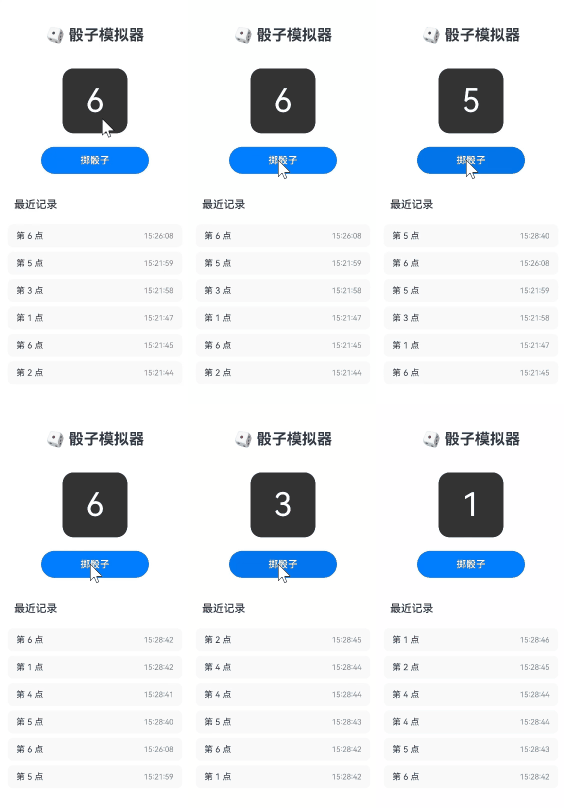
实现功能点:
- 点击按钮掷出 1~6 的随机骰子
- 带动画翻转效果(使用
animateTo) - 自动记录最近 10 次结果(带时间戳)
- 历史记录自动保存到本地,重启不丢失
实现思路
1、使用preferences记录,将历史记录保存在本地。
2、通过animateTo实现一个基础动画效果。
实现效果

完整代码
收起
自动换行
深色代码主题
复制
import preferences from '@ohos.data.preferences';
import { common } from '@kit.AbilityKit';
interface RollRecord {
value: number;
time: string; // ISO 字符串,如 "14:30:22"
}
@Entry
@Component
struct DiceRoller {
@State currentDice: number = 1;
@State history: RollRecord[] = [];
private prefs: preferences.Preferences = null!;
private context: common.UIAbilityContext = getContext(this) as common.UIAbilityContext;
aboutToAppear() {
preferences.getPreferences(this.context,'dice_app', (err, prefs) => {
if (!err) {
this.prefs = prefs;
prefs.get('history', '[]', (err, value) => {
if (!err) {
try {
this.history = JSON.parse(value as string);
} catch (e) {
console.warn('No valid history found');
}
}
});
}
});
}
private saveHistory() {
if (this.prefs) {
this.prefs.put('history', JSON.stringify(this.history), () => {});
this.prefs.flush(() => {});
}
}
private rollDice() {
// 获取当前时间(时:分:秒)
const now = new Date();
const timeStr = `${now.getHours().toString().padStart(2, '0')}:${now.getMinutes().toString().padStart(2, '0')}:${now.getSeconds().toString().padStart(2, '0')}`;
const newValue = Math.floor(Math.random() * 6) + 1;
// 触发动画:先翻转到背面(显示 7 - 当前值),再翻到新值
animateTo(
{ duration: 200, curve: Curve.EaseInOut ,
onFinish:()=>{
animateTo(
{ duration: 200, curve: Curve.EaseInOut ,
},
() => {
this.currentDice = newValue; // 显示新值
}
);
}},
() => {
this.currentDice = 7 - this.currentDice; // 翻转中间态
}
)
// 更新历史(最多保留10条)
this.history.unshift({ value: newValue, time: timeStr });
if (this.history.length > 10) {
this.history.pop();
}
this.saveHistory();
}
build() {
Column({ space: 25 }) {
Text('🎲 骰子模拟器')
.fontSize(28)
.fontWeight(FontWeight.Bold)
.margin({ top: 30 })
// 骰子显示区
Column() {
Text(this.currentDice.toString())
.fontSize(60)
.fontColor($r('sys.color.comp_background_list_card'))
.width(120)
.height(120)
.borderRadius(20)
.textAlign(TextAlign.Center)
.backgroundColor('#333333')
}
.margin({ top: 20 })
// 掷骰按钮
Button('掷骰子')
.width(200)
.height(50)
.fontSize(18)
.backgroundColor($r('sys.color.brand'))
.fontColor(Color.White)
.onClick(() => {
this.rollDice();
})
// 历史记录标题
if (this.history.length > 0) {
Text('最近记录')
.fontSize(20)
.fontWeight(FontWeight.Medium)
.alignSelf(ItemAlign.Start)
.margin({ top: 20, left: 30 })
}
// 历史列表
List({ space: 8 }) {
ForEach(
this.history,
(item: RollRecord) => {
ListItem() {
Row() {
Text(`第 ${item.value} 点`)
.fontSize(16)
.layoutWeight(1)
Text(item.time)
.fontSize(14)
.fontColor('#888')
}
.padding({ left: 16, right: 16, top: 12, bottom: 12 })
.width('100%')
.borderRadius(10)
.backgroundColor('#F9F9F9')
}
}
)
}
.width('90%')
.layoutWeight(1)
.margin({ bottom: 20 })
}
.width('100%')
.height('100%')
.justifyContent(FlexAlign.Start)
}
} 展开全部 
1楼回复于2025-12-16 07:32 来自北京
写回答
新增插入模板功能
一键使用模板,快速填写内容,轻松发帖~
知道了
- 为了保障您的信息安全,请勿上传您的敏感个人信息(如您的密码等信息)和您的敏感资产信息(如关键源代码、签名私钥、调试安装包、业务日志等信息),且您需自行承担由此产生的信息泄露等安全风险。
- 如您发布的内容为转载内容,请注明内容来源。
我要提问题
相关推荐
换一批
1
HarmonyOS 模拟器设置的亮度调节,修改没有展示效果 (API12+)
2
HarmonyOS X86模拟器不支持uniapp调试 (API12+)
3
HarmonyOS 模拟器可以验证打开摄像头、相册功能吗(API12+)
4
HarmonyOS 签名打包正式安装包后,模拟器安装不上 (API12+)
5
HarmonyOS 如何使用模拟器去实现端云一体化?(API12+)
6
HarmonyOS 模拟器怎么连接网络? (API12+)
7
HarmonyOS 模拟器怎么使用电脑的键盘输入 (API12+)
8
HarmonyOS 如何实现一个小球的公转运动?(API12+)
了解社区公约,与您携手共创和谐专业的开发者社区。


苏公安网备 32011402010933号