














 杨志鹏
0.72RN按照@gorhom/bottom-sheet指导文档运行demo报错
已解决
【问题描述】:0.72RN按照@gorhom/bottom-sheet指导文档运行上面的demo报错
1. 希望能优化一下指导文档上面的demo
2. 我看了下这个库本身是不含原生侧的代码的,指导文档上那个codegen应该不需要配置吧?是否能优化这点
【问题现象】:看报错信息是手势库的问题,但是我直接运行手势库的demo是正常的。
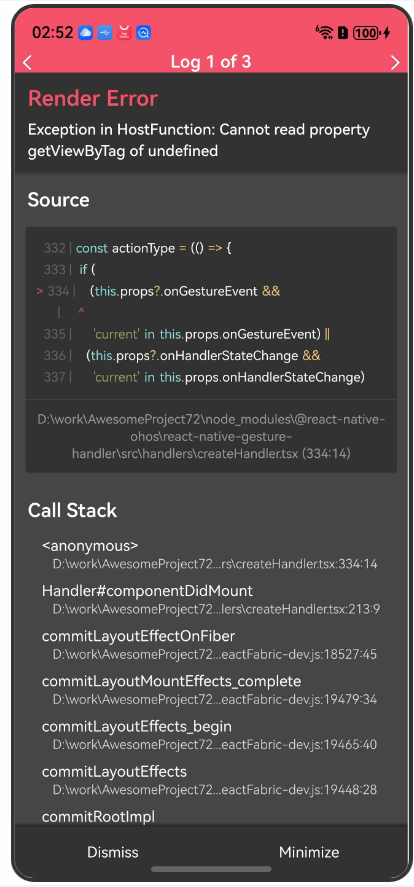
【版本信息】:
harmony:
"targetSdkVersion": "6.0.0(20)",
"compatibleSdkVersion": "5.0.0(12)",
package.json:
{
  "name": "AwesomeProject",
  "version": "0.0.1",
  "private": true,
  "scripts": {
    "android": "react-native run-android",
    "ios": "react-native run-ios",
    "lint": "eslint .",
    "start": "hdc rport tcp:8081 tcp:8081 && react-native start --config metro.config.harmony.js",
    "test": "jest",
    "codegen": "react-native codegen-harmony --cpp-output-path ./harmony/entry/src/main/cpp/generated --rnoh-module-path ./harmony/entry/oh_modules/@rnoh/react-native-openharmony",
    "dev": "react-native bundle-harmony --dev"
  },
  "dependencies": {
    "@react-native-oh-tpl/bottom-sheet": "^4.6.4-0.0.2",
    "@react-native-oh/react-native-harmony": "^0.72.96",
    "@react-native-ohos/react-native-gesture-handler": "^2.14.18-rc.3",
    "@react-native-ohos/react-native-reanimated": "^3.6.5-rc.2",
    "@react-native-ohos/react-native-webview": "^13.10.5-rc.5",
    "react": "18.2.0",
    "react-native": "0.72.5",
    "react-native-echarts-pro": "^1.9.1",
    "react-native-reanimated": "^3.6.0"
  },
  "devDependencies": {
    "@babel/core": "^7.20.0",
    "@babel/preset-env": "^7.20.0",
    "@babel/runtime": "^7.20.0",
    "@react-native/eslint-config": "^0.72.2",
    "@react-native/metro-config": "^0.72.11",
    "@tsconfig/react-native": "^3.0.0",
    "@types/react": "^18.0.24",
    "@types/react-test-renderer": "^18.0.0",
    "babel-jest": "^29.2.1",
    "eslint": "^8.19.0",
    "jest": "^29.2.1",
    "metro-react-native-babel-preset": "0.76.8",
    "prettier": "^2.4.1",
    "react-test-renderer": "18.2.0",
    "typescript": "4.8.4"
  },
  "engines": {
    "node": ">=16"
  }
}
【复现代码】:
// bottom-sheet组件
import React, { useCallback, useRef, useMemo } from "react";
import { StyleSheet, View, Text, Button } from "react-native";
import BottomSheet, { BottomSheetView } from "@gorhom/bottom-sheet";

const App = () => {
  // hooks
  const sheetRef = useRef<BottomSheet>(null);

  // variables
  const snapPoints = useMemo(() => ["25%", "50%", "90%"], []);

  // callbacks
  const handleSheetChange = useCallback((index) => {
    console.log("handleSheetChange", index);
  }, []);
  const handleSnapPress = useCallback((index) => {
    sheetRef.current?.snapToIndex(index);
  }, []);
  const handleClosePress = useCallback(() => {
    sheetRef.current?.close();
  }, []);

  // render
  return (
    <View style={styles.container}>
      <Button title="Snap To 90%" onPress={() => handleSnapPress(2)} />
      <Button title="Snap To 50%" onPress={() => handleSnapPress(1)} />
      <Button title="Snap To 25%" onPress={() => handleSnapPress(0)} />
      <Button title="Close" onPress={() => handleClosePress()} />
      <BottomSheet
        ref={sheetRef}
        snapPoints={snapPoints}
        onChange={handleSheetChange}
      >
        <BottomSheetView>
          <Text>Awesome 🔥</Text>
        </BottomSheetView>
      </BottomSheet>
    </View>
  );
};

const styles = StyleSheet.create({
  container: {
    flex: 1,
    paddingTop: 200,
  },
});

export default App;
【尝试解决方案】:


7


浏览184 编辑于2026-01-05 01:37湖北
全部评论
最多点赞
最新发布
最早发布




写回答
所见即所得编辑器, editor1
工具栏
0/50000
新增插入模板功能
一键使用模板,快速填写内容,轻松发帖~
知道了
- 为了保障您的信息安全,请勿上传您的敏感个人信息(如您的密码等信息)和您的敏感资产信息(如关键源代码、签名私钥、调试安装包、业务日志等信息),且您需自行承担由此产生的信息泄露等安全风险。
- 如您发布的内容为转载内容,请注明内容来源。
我要提问题
了解社区公约,与您携手共创和谐专业的开发者社区。


 苏公安网备 32011402010933号