


 苏公安网备 32011402010933号
智能客服
你问我答,随时在线为你解决问题















 算法研究小天才
在HarmonyOS PC的Qt项目中集成OpenGL实现图形渲染是Qt应用的高频使用场景之一,如CAD软件中,使用OpenGL进行3D模型的渲染和交互。 本示例基于商业版Qt,使用QOpenGLWidget及相关OpenGL模块,基于OpenGL核心配置与二十面体几何定义,完成了一个带有动态生成木纹纹理、黑色边线框且具备自动旋转动画的3D正二十面体的实时渲染场景。
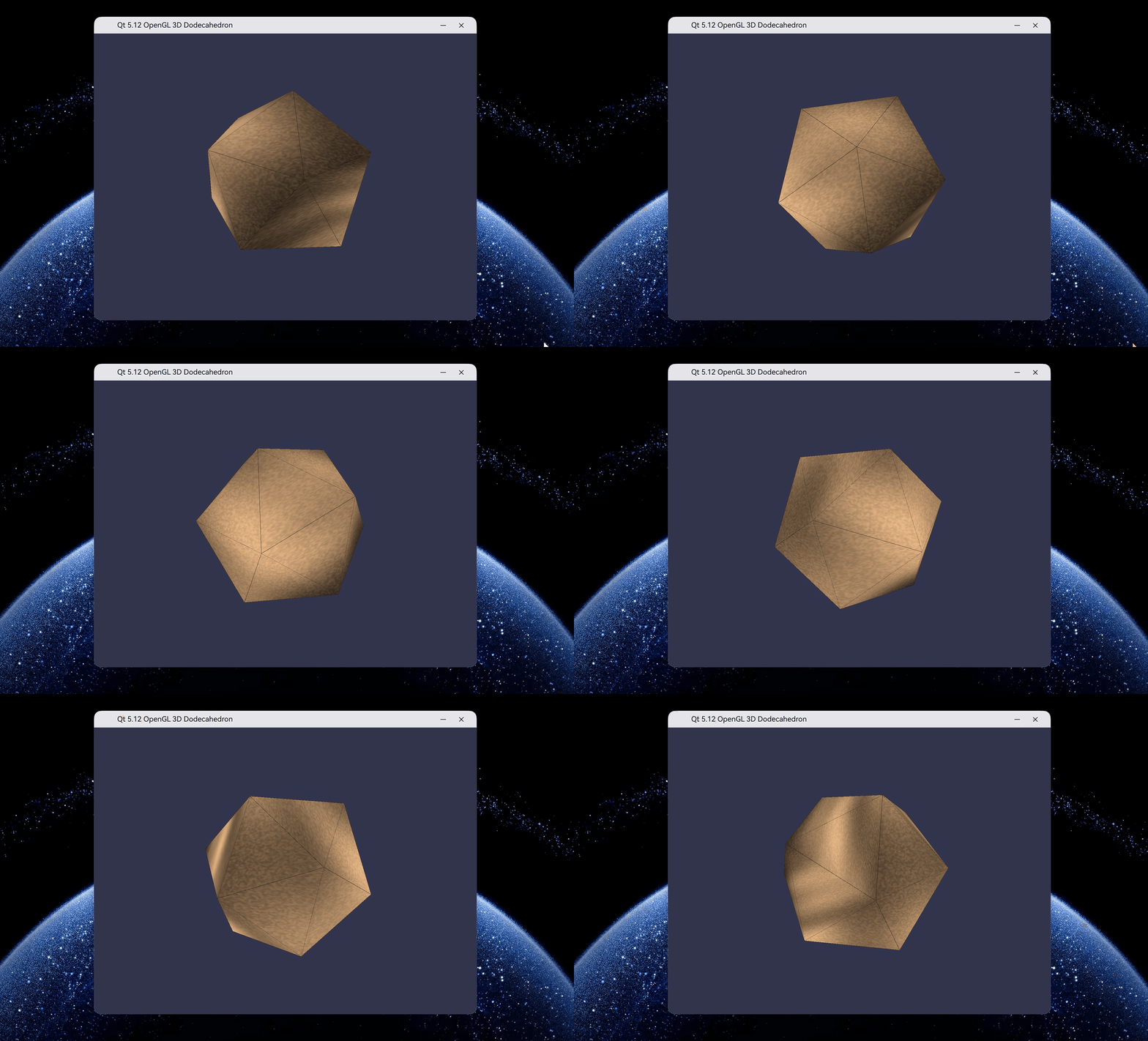
一、OpenGL集成。
libGLv4.so复制到HarmonyOS SDK的libs目录下(如:sdk/default/openharmony/native/sysroot/usr/lib/aarch64-linux-ohos)替换默认的libGLv4.so。diff --git a/mkspecs/ohos-clang/qmake.conf b/mkspecs/ohos-clang/qmake.conf
index 8b21b11e3c5..37c9accea2b 100644
--- a/mkspecs/ohos-clang/qmake.conf
+++ b/mkspecs/ohos-clang/qmake.conf
@@ -107,7 +107,9 @@ QMAKE_LINK_SHLIB = $$QMAKE_CXX
QMAKE_LFLAGS += $$OHOS_LINK_FLAGS
-QMAKE_LIBS_OPENGL_ES3 = -lGLESv3
+# Link against the OHOS OpenGL ES 3 and desktop OpenGL implementations.
+QMAKE_LIBS_OPENGL_ES3 = -lGLESv3 -lEGL
+QMAKE_LIBS_OPENGL = -lGLv4
armeabi-v7a.sdk = armeabi-v7a
armeabi-v7a.target = armeabi-v7a
diff --git a/src/gui/configure.json b/src/gui/configure.json
index 8d27273b803..04dcdbb9423 100644
--- a/src/gui/configure.json
+++ b/src/gui/configure.json
@@ -34,7 +34,7 @@
"mtdev": "boolean",
"opengl": { "type": "optionalString", "values": [ "no", "yes", "desktop", "es2", "dynamic" ] },
"opengl-es-2": { "type": "void", "name": "opengl", "value": "es2" },
- "opengles3": "boolean",
+ "opengles3": { "type": "void", "name": "opengl", "value": "es2" },
"openvg": "boolean",
"qpa": { "type": "string", "name": "qpa_default_platform" },
"qpa-platform-guard": "boolean",
@@ -424,6 +424,7 @@
},
"opengl": {
"label": "Desktop OpenGL",
+ "condition": "input.opengl == 'desktop'",
"test": {
"head": [
"#ifdef __APPLE__",
@@ -442,13 +443,13 @@
},
"headers": [
{
- "condition": "!config.darwin",
+ "condition": "!config.darwin && input.opengl == 'desktop'",
"headers": "GL/gl.h"
}
],
"sources": [
- { "type": "pkgConfig", "args": "gl", "condition": "!config.darwin" },
- { "type": "makeSpec", "spec": "OPENGL" }
+ { "type": "pkgConfig", "args": "gl", "condition": "!config.darwin && input.opengl == 'desktop'" },
+ { "type": "makeSpec", "spec": "OPENGL", "condition": "input.opengl == 'desktop'" }
]
},
"opengl_es2": {
diff --git a/src/plugins/platforms/ohos/qohosplatformintegration.cpp b/src/plugins/platforms/ohos/qohosplatformintegration.cpp
index 66ec904e9c7..97784ad2c85 100644
--- a/src/plugins/platforms/ohos/qohosplatformintegration.cpp
+++ b/src/plugins/platforms/ohos/qohosplatformintegration.cpp
@@ -166,8 +166,13 @@ QOhosPlatformIntegration::QOhosPlatformIntegration(const QStringList ¶mList)
if (Q_UNLIKELY(!eglInitialize(m_eglDisplay, &major, &minor)))
qFatal("Could not initialize egl display");
+#if defined(QT_OPENGL_ES_2)
if (Q_UNLIKELY(!eglBindAPI(EGL_OPENGL_ES_API)))
qFatal("Could not bind GL_ES API");
+#else
+ if (Q_UNLIKELY(!eglBindAPI(EGL_OPENGL_API)))
+ qFatal("Could not bind desktop GL API");
+#endif
}
m_screenManager = std::make_unique<QOhosScreenManager>();
diff --git a/src/plugins/platforms/ohos/render/qohosegl.h b/src/plugins/platforms/ohos/render/qohosegl.h
index 485018e0304..abad0d37f56 100644
--- a/src/plugins/platforms/ohos/render/qohosegl.h
+++ b/src/plugins/platforms/ohos/render/qohosegl.h
@@ -53,7 +53,6 @@
#include "EGL/egl.h"
#include "EGL/eglplatform.h"
-#include <GLES3/gl3.h>
#include <QSharedPointer>
#include <QtCore/qglobal.h>
tqtc-qt5的同级目录下:cd qtbase
git apply ../../diff.patch
"appEnvironments": [
    {
        "name":"NEED_OPENGL",
        "value": "1"
    }
]
二、实现3D正二十面体渲染。
// 设置OpenGL版本和格式
QSurfaceFormat format;
format.setVersion(3, 3);
format.setProfile(QSurfaceFormat::CoreProfile);
format.setDepthBufferSize(24);
setFormat(format);
m_timer = new QTimer(this);
connect(m_timer, &QTimer::timeout, this, &OpenGLWidget::updateRotation);
m_timer->start(16); // 60FPS
const float phi = (1.0f + sqrt(5.0f)) / 2.0f; // 黄金比例
// 正二十面体的12个顶点(归一化到单位球面)
m_vertices[0] = QVector3D(-1.0f,  phi, 0.0f).normalized();
m_vertices[1] = QVector3D( 1.0f,  phi, 0.0f).normalized();
// 顶部的5个面
m_faces[0] = {0, 11, 5};
m_faces[1] = {0, 5, 1};
QVector2D OpenGLWidget::SphericalMapping(const QVector3D& position)
{
    float u = 0.5f + atan2(position.z(), position.x()) / (2.0f * M_PI);
    float v = 0.5f - asin(position.y()) / M_PI;
    return QVector2D(u, v);
}
// 基础木材颜色
int baseR = 200, baseG = 160, baseB = 120;
// 木纹条纹效果
float woodGrain = sin(x * 0.02f + sin(y * 0.01f) * 5.0f) * 0.3f + 0.7f;
// 年轮效果
float distance = sqrt((x-128)*(x-128) + (y-128)*(y-128));
float rings = sin(distance * 0.05f) * 0.15f + 0.85f;
// 组合计算最终颜色
float pattern = woodGrain * rings + noise;
// 纹理VAO配置
m_program->enableAttributeArray(0); // 位置属性
m_program->setAttributeBuffer(0, GL_FLOAT, offsetof(VertexData, position), 3, sizeof(VertexData));
m_program->enableAttributeArray(1); // 纹理坐标属性
m_program->setAttributeBuffer(1, GL_FLOAT, offsetof(VertexData, texCoord), 2, sizeof(VertexData));
QSet<QPair<int, int>> edgeSet;
// 对每个面的三条边,检查是否已添加
QPair<int, int> edge1(qMin(v0, v1), qMax(v0, v1));
if (!edgeSet.contains(edge1)) {
    edgeSet.insert(edge1);
    // 添加这条边的两个顶点
}
float woodPattern = sin(fragTexCoord.x * 20.0 + fragTexCoord.y * 10.0 + time * 0.5) * 0.1 + 0.9;
texColor.rgb *= woodPattern;
// 设置模型视图矩阵
m_modelView.setToIdentity();
m_modelView.translate(0.0f, 0.0f, -4.0f); // 视点距离
m_modelView.rotate(m_rotationAngle, 0.0f, 1.0f, 0.0f); // 绕Y轴旋转
m_modelView.rotate(30.0f, 1.0f, 0.0f, 0.0f); // 倾斜角度

// 创建透视投影矩阵
m_projection.perspective(45.0f, aspect, 0.1f, 100.0f);
使用该示例需要完成以下操作:
将libs\arm64-v8a下的libqohos.so文件替换为本地Qt安装路径\plugins\platforms目录下的libqohos.so。
将商业版Qt安装路径配置到QT_PREFIX中,可以选择下面两个方案中的一个:
entry\src\main\cpp\qtModule\CMakeLists.txt中的set(QT_PREFIX "D:\\qtBusiness\\installDir")为编译出的Qt产物目录:# 检查环境变量是否存在
if(DEFINED ENV{WORKSPACE})
set(QT_PREFIX $ENV{WORKSPACE}/code/SDK/Qt/QtOpenSDK)
message(STATUS "get QT_PREFIX PATH: ${QT_PREFIX}")
else()
set(QT_PREFIX "D:\\qtBusiness\\installDir")
message(STATUS "WORKSPACE not defined, using default path: ${QT_PREFIX}")
endif()
entry\src\main\cpp\qtModule\CMakeLists.txt中的QT_PREFIX定义,并在entry\build-profile.json5中设置QT_PREFIX:"buildOption": {
"externalNativeOptions": {
"path": "./src/main/cpp/CMakeLists.txt",
"arguments": "-DQT_PREFIX=D:\\qtBusiness\\installDir",
"cppFlags": "",
"abiFilters": ["arm64-v8a"]
}
},
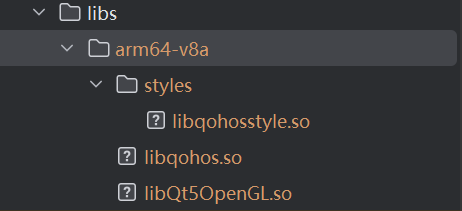
将libQt5OpenGL.so、libqohos.so和libqohosstyle.so拷贝到entry\libs\arm64-v8a目录下:
├─entry
│  ├─libs/arm64-v8a
│  │  └─libqohos.so                             // 商业版Qt产物so
│  └─src
│      ├─main
│      │  ├─cpp
│      │  │  ├─OpenGLIcosahedron                // OpenGL实现二十面体几何渲染
│      │  │  │ ├─main.cpp                       // Qt的主入口
│      │  │  │ ├─openglwidget.cpp               // OpenGL二十面体几何渲染类实现
│      │  │  │ ├─openglwidget.h                 // OpenGL二十面体几何渲染类头文件
│      │  │  │ └─CMakeLists.txt                 // OpenGL渲染实现CMakeList文件
│      │  │  ├─napi_Init.cpp
│      │  │  └─CMakeLists.txt                   // Qt项目CMakeList文件
│      │  ├─ets                                 // 与商业版Qt模板工程保持一致
│      │  │  ├─common
│      │  │  │  └─QtAppConstants.ets
│      │  │  ├─pages
│      │  │  │  ├─FloatWindowNativeNode.ets
│      │  │  │  ├─MainWindowNativeNode.ets
│      │  │  │  ├─SubWindowNativeNode.ets
│      │  │  │  └─UiExtensionNativeNode.ets
│      │  │  ├─process
│      │  │  │  └─QChildProcess.ets
│      │  │  ├─qability
│      │  │  │  ├─LocalStorageTsModule.ets
│      │  │  │  ├─OhosExportModules.ets
│      │  │  │  ├─QAbility.ets
│      │  │  │  ├─QEmbeddedComponentCreator.ets
│      │  │  │  ├─QEmbeddedComponentCreatorTsModule.ets
│      │  │  │  ├─QEmbeddedUiExtensionAbility.ets
│      │  │  │  └─QtUtils.ets
│      │  │  └─qabilitystage
│      │  │     └─QAbilityStage.ets
│      │  ├─qt                                             // 与商业版Qt模板工程保持一致
│      │  │  ├─libqohos.d.ts
│      │  │  └─oh-package.json5
│      │  ├─resources                                      // 应用资源目录
│      │  └─module.json5                                   // 模块级核心配置文件
│      ├─build-profile.json5                               // 工程结构/构建/定制化配置信息
│      └─oh-package.json5                                  // 描述全局配置
└─hvigor                                                   // 构建环境配置


我要提问题


