













 Tracy
#HarmonyOS技术训练营第四期#Ark UI 贪食蛇
这几天学习了HarmonyOS方舟开发框架(Ark UI),尝试了一下自己做了一个贪食蛇的小游戏,第一次尝试,也遇到了很多问题,一边查看API教程,一边不停实践。分享下我的开发和问题。
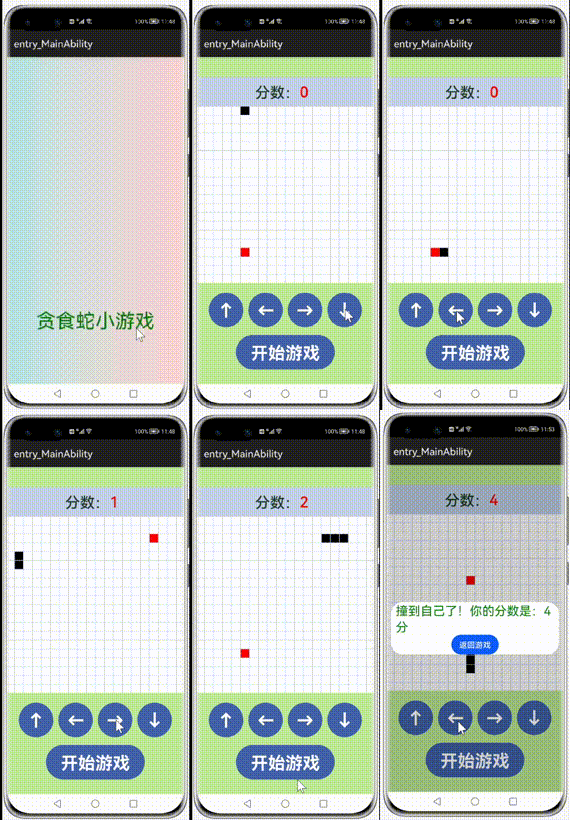
效果图:
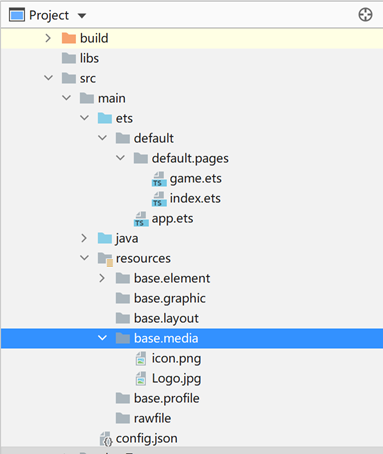
代码结构:
实现思路:
通过画一个20 * 20 的 Text排列模拟贪食蛇可活动的范围,改变Text的背景色表示生成的食物和模拟蛇的移动。
代码介绍:
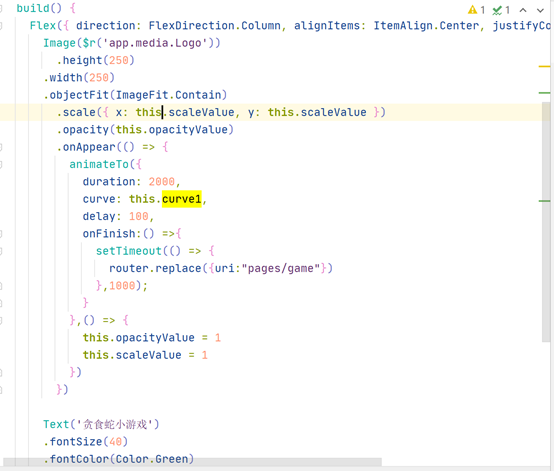
1、欢迎页面(index.ets)
animateTo实现Logo图标的渐出和放大效果;闪屏动画播放结束后定格1s,进入游戏页面。设置animateTo的onFinish回调接口,调用定时器Timer的setTimeout接口延时1s后,调用router.replace,显示游戏页面。
2、游戏页面(game.ets)
a、定义了一个常量用了表示格子不用状态下的背景色
const colors = ['#FFFFFF', '#ff0000', '#000000']b、初始化格子
initialize() { initialize() { this.gridColorIndex = new Array(); for (let i = 0; i < 20; i++) { this.gridColorIndex.push([0, 0, 0, 0, 0, 0, 0, 0, 0, 0, 0, 0, 0, 0, 0, 0, 0, 0, 0, 0]); } this.headX = 0; this.headY = 0; this.foodX = 0; this.foodY = 0; this.score = 0; this.gameOver = false; this.result = 0; this.times = 0; this.snake = new Array();}Grid() { ForEach(this.rowIndex, (row: number) => { ForEach(this.colIndex, (col: number) => { GridItem() { Text('') .backgroundColor(colors[this.gridColorIndex[row][col]]) .width(17) .height(17) } }, col => col.toString()) }, row => row.toString())}.columnsTemplate('1fr 1fr 1fr 1fr 1fr 1fr 1fr 1fr 1fr 1fr 1fr 1fr 1fr 1fr 1fr 1fr 1fr 1fr 1fr 1fr').rowsTemplate('1fr 1fr 1fr 1fr 1fr 1fr 1fr 1fr 1fr 1fr 1fr 1fr 1fr 1fr 1fr 1fr 1fr 1fr 1fr 1fr').rowsGap(2).columnsGap(2).backgroundColor('#C1D0E6').height(355)c、开始游戏把所有的状态数回归到初始化状态
Button('开始游戏') .height(70) .width(200) .fontSize(35) .fontWeight(FontWeight.Bold) .align(Alignment.Center) .backgroundColor('#4162AA') .fontColor(Color.White) .margin({ left: 5, top: 10, bottom: 5, right: 5 }) .onClick((event: ClickEvent) => { this.initialize() this.initSnake() this.setFood() this.move() })initialize() { this.gridColorIndex = new Array(); for (let i = 0; i < 20; i++) { this.gridColorIndex.push([0, 0, 0, 0, 0, 0, 0, 0, 0, 0, 0, 0, 0, 0, 0, 0, 0, 0, 0, 0]); } this.headX = 0; this.headY = 0; this.foodX = 0; this.foodY = 0; this.score = 0; this.gameOver = false; this.result = 0; this.times = 0; this.snake = new Array();}d、初始化一个只有蛇头的蛇出来,改变蛇头的格子状态数据,设置为黑色,设定默认的移动方向为向右移动
//初始化蛇 initSnake() { this.headX = 0; this.headY = 0; this.snake.push([this.headX, this.headY]); this.gridColorIndex[this.headX][this.headY] = 2; this.dir = 'right'; }e、随机产生食物
setFood() { do { this.foodX = Math.floor(Math.random() * 20); this.foodY = Math.floor(Math.random() * 20); } while (this.isFoodInSnake()); this.gridColorIndex[this.foodX][this.foodY] = 1; console.info('Tracy setFood foodX = ' + this.foodX + ' foodY = ' + this.foodY); }//判断食物是否在蛇身 isFoodInSnake() { for (var index = 0; index < this.snake.length; index++) { if (this.foodX == this.snake[index][0] && this.foodY == this.snake[index][1]) { return true; } } return false; }f、设定定时器,让蛇动起来
move() { console.info('Tracy move!!') var inervalID = setInterval(() => { this.times += 1; this.moveSnake() if (this.gameOver) { clearInterval(inervalID) this.dialogController.open(); } }, 500);}//移动蛇 moveSnake() { console.info('Tracy moveSnake!!') let step = 1 if (this.dir == 'left' || this.dir == 'up') { step = -1; } console.info('Tracy moveSnake step = ' + step); let newHead; if (this.dir == 'left' || this.dir == 'right') { this.headY += step; } else if (this.dir == 'up' || this.dir == 'down') { this.headX += step } console.info('Tracy moveSnake headX = ' + this.headX + '; headY = ' + this.headY); this.checkMove(this.headX, this.headY) newHead = [[this.headX, this.headY]]; newHead = newHead.concat(this.snake); this.snake = newHead; this.gridColorIndex[this.headX][this.headY] = 2; //吃到食物 if (this.headX == this.foodX && this.headY == this.foodY) { this.score += 1; this.setFood() //重新产生食物 } else { //没有吃到食物,删除蛇尾 let delItem = this.snake.pop(); console.info('Tracy snake lenght = ' + this.snake.length); console.info('Tracy delete delItemX = ' + delItem[0] + ' delItemY= ' + delItem[1]); this.gridColorIndex[delItem[0]][delItem[1]] = 0; } }checkMove(x, y) { //表示撞墙了 if (x < 0 || y < 0 || x > 19 || y > 19) { this.gameOver = true; this.result = 1; return; } else { for (let index = 0; index < this.snake.length; index++) { if (x == this.snake[index][0] && y == this.snake[index][1]) { this.gameOver = true; this.result = 2; return; } } } if (this.score >= 100) { this.gameOver = true; this.result = 0; return; }}g、方向按钮改变蛇移动的方向
Row() { setButton({ dirDesc: '↑', dir: 'up', direction: $dir }) setButton({ dirDesc: '←', dir: 'left', direction: $dir }) setButton({ dirDesc: '→', dir: 'right', direction: $dir }) setButton({ dirDesc: '↓', dir: 'down', direction: $dir })}struct setButton { private dirDesc: string private dir: string @Link direction: String build() { Button(this.dirDesc) .height(70) .width(70) .fontSize(35) .fontWeight(FontWeight.Bold) .align(Alignment.Center) .backgroundColor('#4162AA') .fontColor(Color.White) .margin({ left: 5, top: 20, bottom: 5, right: 5 }) .onClick((event: ClickEvent) => { this.direction = this.dir }) }}h、蛇移动过程中如果撞墙或者撞到自己,弹出提示框,游戏结束。
struct DialogResult { controller: CustomDialogController; @Link result: number @Link score: number build() { Column() { if (this.result == 0) { Text('好厉害,挑战成功!') .fontSize(25) .fontColor(Color.Red) } else if (this.result == 1) { Text('撞墙了!你的分数是:' + this.score + ' 分') .fontSize(25) .fontColor(Color.Green) } else if (this.result == 2) { Text('撞到自己了!你的分数是:' + this.score + ' 分') .fontSize(25) .fontColor(Color.Green) } Button('返回游戏') .onClick(() => { this.controller.close(); }) } }}在编写代码的过程中我也遇到了几个问题,初学者请教各路大神指点
1、以下代码刚开始我不是这样些的,没有定义常量的colors数组,而是根据this.gridColorIndex[row][col]的值用的条件渲染,但是我发现每次移动改变了背景颜色的格子就会排列到最后,不是在原位置改变颜色,不知道为什么会这样,所以增加了一个colors数组,去掉了if - else的条件判断。
GridItem() { Text('') .backgroundColor(colors[this.gridColorIndex[row][col]]) .width(17) .height(17) }2、定义的@State gridColorIndex: number[][]= new Array();状态数据改变的时候,UI没有刷新,我试了好多种方式都不刷新,然后我只有同步改变了另一个简单类型的状态数据,UI才刷新的。不知道为什么?







- 为了保障您的信息安全,请勿上传您的敏感个人信息(如您的密码等信息)和您的敏感资产信息(如关键源代码、签名私钥、调试安装包、业务日志等信息),且您需自行承担由此产生的信息泄露等安全风险。
- 如您发布的内容为转载内容,请注明内容来源。
我要发帖子


 苏公安网备 32011402010933号