




文档开发者中心
我的

安装DevEco Device Tool 3.0 Beta2问题

安装DevEco Device Tool 3.0 Beta2,文档说安装包里自带了hpm,但是DevEco Device Tool 3.0 Beta2安装好后终端里发hpm -V查不到版本,然后通过npm安装hpm,一直安装不成功,报错

npm ERR! Linux 5.4.0-84-generic 
npm ERR! argv "/usr/bin/node" "/usr/bin/npm" "install" "-g" "@ohos/hpm-cli@1.3.0" 
npm ERR! node v8.10.0 
npm ERR! npm  v3.5.2 
npm ERR! code EMISSINGARG 

npm ERR! typeerror Error: Missing required argument #1 
npm ERR! typeerror     at andLogAndFinish (/usr/share/npm/lib/fetch-package-metadata.js:31:3) 
npm ERR! typeerror     at fetchPackageMetadata (/usr/share/npm/lib/fetch-package-metadata.js:51:22) 
npm ERR! typeerror     at resolveWithNewModule (/usr/share/npm/lib/install/deps.js:456:12) 
npm ERR! typeerror     at /usr/share/npm/lib/install/deps.js:457:7 
npm ERR! typeerror     at /usr/share/npm/node_modules/iferr/index.js:13:50 
npm ERR! typeerror     at /usr/share/npm/lib/fetch-package-metadata.js:37:12 
npm ERR! typeerror     at addRequestedAndFinish (/usr/share/npm/lib/fetch-package-metadata.js:82:5) 
npm ERR! typeerror     at returnAndAddMetadata (/usr/share/npm/lib/fetch-package-metadata.js:117:7) 
npm ERR! typeerror     at pickVersionFromRegistryDocument (/usr/share/npm/lib/fetch-package-metadata.js:134:20) 
npm ERR! typeerror     at /usr/share/npm/node_modules/iferr/index.js:13:50 
npm ERR! typeerror This is an error with npm itself. Please report this error at: 
npm ERR! typeerror     <http://github.com/npm/npm/issues> 

npm ERR! Please include the following file with any support request: 
npm ERR!     /home/zzf/npm-debug.log 

点赞
2
收藏
回复
10
分享
举报
浏览876 编辑于2022-02-10 09:09未知归属地
全部评论
最多点赞
最新发布
最早发布
给你点赞
6楼回复于2022-02-11 08:57 未知归属地

我把ubuntu版本更新到20.4,重新安装DevEco Device Tool 3.0 Beta2,它还是不会自动安装hpm,需要手动安装npm(我安装的版本为node :16.14.0  npm:8.3.1),在安装hpm(sudo npm install -g @ohos/hpm-cli),就可以了

npm WARN deprecated @babel/polyfill@7.4.4: 🚨 This package has been deprecated in favor of separate inclusion of a polyfill and regenerator-runtime (when needed). See the @babel/polyfill docs (https://babeljs.io/docs/en/babel-polyfill) for more information.

npm WARN deprecated core-js@2.6.12: core-js@<3.4 is no longer maintained and not recommended for usage due to the number of issues. Because of the V8 engine whims, feature detection in old core-js versions could cause a slowdown up to 100x even if nothing is polyfilled. Please, upgrade your dependencies to the actual version of core-js.

npm WARN deprecated core-js@2.6.12: core-js@<3.4 is no longer maintained and not recommended for usage due to the number of issues. Because of the V8 engine whims, feature detection in old core-js versions could cause a slowdown up to 100x even if nothing is polyfilled. Please, upgrade your dependencies to the actual version of core-js.

added 225 packages, and audited 226 packages in 24s

15 packages are looking for funding

  run `npm fund` for details

found 0 vulnerabilities

npm notice 

npm notice New minor version of npm available! 8.3.1 -> 8.5.0

npm notice Changelog: https://github.com/npm/cli/releases/tag/v8.5.0

npm notice Run npm install -g npm@8.5.0 to update!

npm notice 

展开全部
5楼回复于2022-02-11 02:59 未知归属地

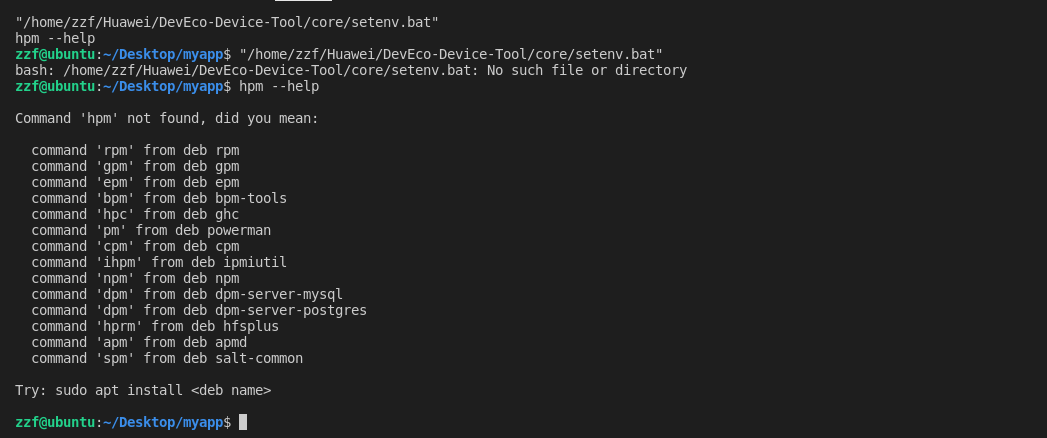
1644547080(1).png

添加环境变量后一样

我把npm也更新了重新下载hpm也不行

zzf@ubuntu:~$ node -v

v16.14.0

zzf@ubuntu:~$ npm -v

8.3.1

zzf@ubuntu:~$ npm config set registry https://repo.huaweicloud.com/repository/npm/

zzf@ubuntu:~$ npm cache clean -f

npm WARN using --force Recommended protections disabled.

zzf@ubuntu:~$ npm install -g @ohos/hpm-cli

npm ERR! code EACCES

npm ERR! syscall mkdir

npm ERR! path /usr/lib/node_modules/@ohos

npm ERR! errno -13

npm ERR! Error: EACCES: permission denied, mkdir '/usr/lib/node_modules/@ohos'

npm ERR!  [Error: EACCES: permission denied, mkdir '/usr/lib/node_modules/@ohos'] {

npm ERR!   errno: -13,

npm ERR!   code: 'EACCES',

npm ERR!   syscall: 'mkdir',

npm ERR!   path: '/usr/lib/node_modules/@ohos'

npm ERR! }

npm ERR! 

npm ERR! The operation was rejected by your operating system.

npm ERR! It is likely you do not have the permissions to access this file as the current user

npm ERR! 

npm ERR! If you believe this might be a permissions issue, please double-check the

npm ERR! permissions of the file and its containing directories, or try running

npm ERR! the command again as root/Administrator.

npm ERR! A complete log of this run can be found in:

npm ERR!     /home/zzf/.npm/_logs/2022-02-11T02_24_36_777Z-debug-0.log

展开全部
1
4楼回复于2022-02-11 02:39 未知归属地
  • 腹有诗书气自华
    嗯,其实这个问题,可以通过添加权限来解决。不过我看你下面说重新安装了Ubuntu,也是可以的
    2022-02-11 07:20 未知归属地

image.png

跟在Ubuntu下一样的 

2
3楼回复于2022-02-10 09:48 未知归属地
  • 腹有诗书气自华
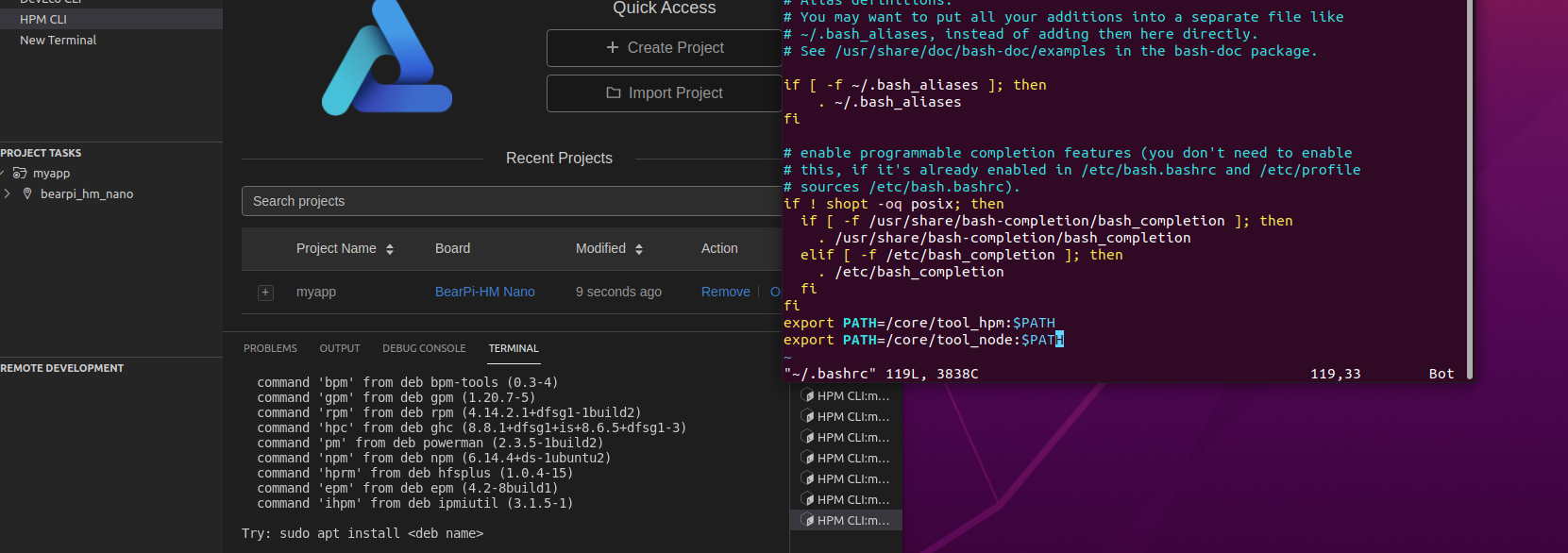
    这样看起来,可能是个bug。你这边手动将devicetool工具安装之后的core/tool_hpm和core/tool_node两个目录添加到环境变量中试一下【Ubuntu中添加环境变量,可以通过~/.bashrc文件来实现】
    2022-02-10 12:24 未知归属地
  • 腹有诗书气自华回复腹有诗书气自华
    刷新一下,应该是core/tool_hpm/bin和core/tool_node/bin这两个目录
    2022-02-11 09:40 未知归属地

针对通过npm无法安装HPM的问题,是因为你当前环境下的npm版本太低了,npm最低需要的是v12;

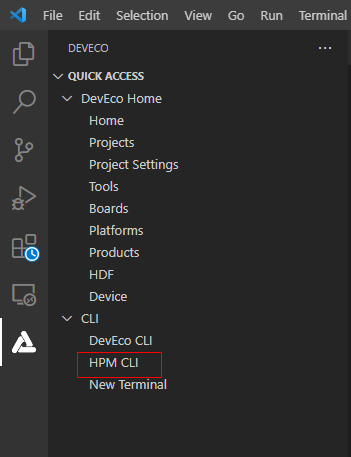
针对hpm -V查询失败的问题,请问一下,你是用Ubuntu中自带的终端窗口吗?你试一下打开VSCode之后,点击HPM CLI是什么现象的呢?

image.png

2楼回复于2022-02-10 09:29 未知归属地

开发者您好,相关问题已经反馈给工作人员,请耐心等待,感谢您对华为开发者论坛的支持。

1
1楼回复于2022-02-10 09:11 未知归属地
  • 杨泽锋
    ubuntu环境
    2022-02-10 09:16 未知归属地
写回答
新增插入模板功能
一键使用模板,快速填写内容,轻松发帖~
知道了
  • 为了保障您的信息安全,请勿上传您的敏感个人信息(如您的密码等信息)和您的敏感资产信息(如关键源代码、签名私钥、调试安装包、业务日志等信息),且您需自行承担由此产生的信息泄露等安全风险。
  • 如您发布的内容为转载内容,请注明内容来源。

我要发帖子

了解社区公约,与您携手共创和谐专业的开发者社区。