小草飞上天HarmonyOS 5
使用 pasteboard 实现复制与粘贴功能

使用场景
很多场景都需要使用到复制粘贴的功能点,如验证码、分享链接、优惠码等
实现思路
第一步:获取系统剪贴板服务,所有对剪贴板的操作都始于获取系统服务,这是一个异步操作,使用 pasteboard.getSystemPasteboard() 来获取全局的剪贴板服务实例。
第二步:写入剪贴板,首先,需要创建一个 PasteData 对象。PasteData 是剪贴板中数据的统一载体。对于纯文本,使用 PasteData.createData(pasteboard.MIMETYPE_TEXT_PLAIN, 'your text') 来创建一个包含指定文本的 PasteData 对象。调用剪贴板服务的 setData(pasteData) 方法,将创建好的数据对象放入系统剪贴板。
第三步:读取剪贴板,调用剪贴板服务的 getData() 方法,获取当前剪贴板中的 PasteData 对象。
关键步骤:剪贴板中可能存放着多种类型的数据(文本、图片、URI等)。在读取前,必须检查是否包含纯文本数据。
第四步:如果确认存在文本,再调用 pasteData.getPrimaryText() 来获取文本内容。
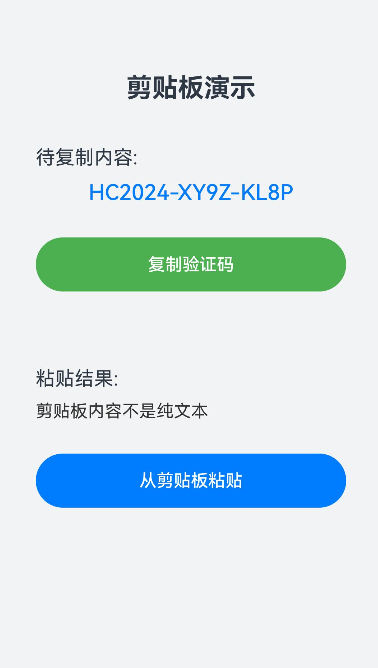
实现效果

完整实现代码
import pasteboard from '@ohos.pasteboard';
@Entry
@Component
struct ClipboardDemoPage {
@State textToCopy: string = 'HC2024-XY9Z-KL8P'; // 预设要复制的文本
@State pastedText: string = '点击下方按钮粘贴内容'; // 用于显示粘贴的内容
@State copyButtonText: string = '复制验证码';
private systemPasteboard: pasteboard.SystemPasteboard | null = null;
async aboutToAppear() {
// 页面初始化时获取系统剪贴板服务
try {
this.systemPasteboard = await pasteboard.getSystemPasteboard();
console.info('剪贴板服务获取成功');
} catch (error) {
console.error(`获取剪贴板服务失败: ${JSON.stringify(error)}`);
}
}
// 2. 写入剪贴板(复制)
async copyToClipboard() {
if (!this.systemPasteboard) {
console.error('剪贴板服务未初始化');
return;
}
try {
// 创建包含纯文本的PasteData对象
const pasteData = pasteboard.createData(pasteboard.MIMETYPE_TEXT_PLAIN, this.textToCopy);
// 将数据写入系统剪贴板
await this.systemPasteboard.setData(pasteData);
console.info(`成功复制到剪贴板: ${this.textToCopy}`);
this.copyButtonText = '已复制!';
// 2秒后恢复按钮文字
setTimeout(() => {
this.copyButtonText = '复制验证码';
}, 2000);
} catch (error) {
console.error(`复制失败: ${JSON.stringify(error)}`);
}
}
// 3. 读取剪贴板(粘贴)
async pasteFromClipboard() {
if (!this.systemPasteboard) {
console.error('剪贴板服务未初始化');
return;
}
try {
// 获取剪贴板数据
const pasteData = await this.systemPasteboard.getData();
// 检查是否包含纯文本
if (pasteData.hasMimeType(pasteboard.MIMETYPE_TEXT_PLAIN)) {
const text = pasteData.getPrimaryText();
this.pastedText = text || '剪贴板为空或内容不是文本';
console.info(`成功从剪贴板粘贴: ${this.pastedText}`);
} else {
this.pastedText = '剪贴板内容不是纯文本';
console.warn('剪贴板内容不是纯文本');
}
} catch (error) {
console.error(`粘贴失败: ${JSON.stringify(error)}`);
this.pastedText = '粘贴失败';
}
}
build() {
Column() {
Text('剪贴板演示')
.fontSize(24)
.fontWeight(FontWeight.Bold)
.margin({ top: 50, bottom: 40 })
Text('待复制内容:')
.fontSize(18)
.alignSelf(ItemAlign.Start)
.margin({ left: '10%', bottom: 10 })
Text(this.textToCopy)
.fontSize(20)
.fontColor('#007DFF')
.fontWeight(FontWeight.Medium)
.margin({ bottom: 30 })
Button(this.copyButtonText)
.width('80%')
.height(50)
.backgroundColor('#4CAF50')
.onClick(() => {
this.copyToClipboard();
})
Divider()
.width('80%')
.margin({ top: 40, bottom: 30 })
Text('粘贴结果:')
.fontSize(18)
.alignSelf(ItemAlign.Start)
.margin({ left: '10%', bottom: 10 })
Text(this.pastedText)
.fontSize(16)
.fontColor('#333333')
.maxLines(3)
.textOverflow({ overflow: TextOverflow.Ellipsis })
.width('80%')
.margin({ bottom: 30 })
Button('从剪贴板粘贴')
.width('80%')
.height(50)
.onClick(() => {
this.pasteFromClipboard();
})
}
.width('100%')
.height('100%')
.justifyContent(FlexAlign.Start)
.backgroundColor('#F1F3F5')
.padding({ top: 20 })
}
}
- 为了保障您的信息安全,请勿上传您的敏感个人信息(如您的密码等信息)和您的敏感资产信息(如关键源代码、签名私钥、调试安装包、业务日志等信息),且您需自行承担由此产生的信息泄露等安全风险。
- 如您发布的内容为转载内容,请注明内容来源。
我要提问题
HarmonyOS 复制富文本后在输入框长按粘贴,应用侧使用getMimeTypes的值作为下标i,调用getRecord[i],下标越界报错(API12+)
HarmonyOS PC中ctrl+c不能复制(API12+)
HarmonyOS 期望能直接跨段落复制文本,当前有没有什么方案实现?(API12+)
HarmonyOS 获取粘贴事件(API12+)
Hypium中如何复制粘贴系统剪贴板中的内容?
HarmonyOS 在A设备上复制了一段文字或者一段代码,是否可以在B设备上粘贴出来 (API12+)
HarmonyOS pasteboard.getSystemPasteboard 粘贴问题(API12+)
HarmonyOS pasteboard中的pasteStart/Complet具体作用是什么(API12+)


苏公安网备 32011402010933号