



 苏公安网备 32011402010933号
智能客服
你问我答,随时在线为你解决问题
 鸿蒙乾坤
鸿蒙乾坤新建了一个数据库能力,编译和运行都没有问题,运行起来效果也达到了,就是在手机文件夹里找生成的原始数据文件newsdataability.db的时候,不仅没有找到,连项目目录都没有生成,鸿蒙的系统工程师求解?
先看运行效果:
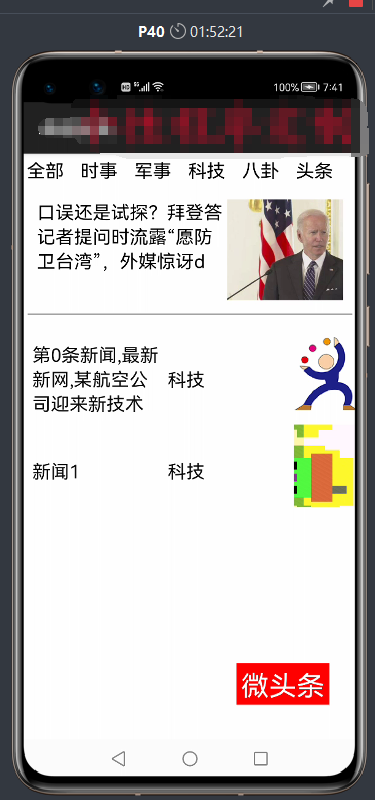
(向新闻列表里添加科技新闻1并配图(右边))
相关的代码如下:
public class newsDataAbility extends Ability {
    public static final HiLogLabel LABEL_LOG = new HiLogLabel(3, 0xD001100, "Demo");
    private static final String DB_NAME = "newsdataability.db";

    private static final String DB_TAB_NAME = "news";

    private static final String DB_COLUMN_PERSON_ID = "id";

    private static final String DB_COLUMN_TITLE = "title";

    private static final String DB_COLUMN_CONTENT = "content";

    private static final String DB_COLUMN_IMG = "newimgs";

    private static final String DB_COLUMN_TYPE = "newtype";

    private static final int DB_VERSION = 1;
    private StoreConfig config = StoreConfig.newDefaultConfig(DB_NAME);

    private RdbStore rdbStore;
    private RdbOpenCallback rdbOpenCallback = new RdbOpenCallback() {
        @Override
        public void onCreate(RdbStore store) {
            store.executeSql("create table if not exists "
                    + DB_TAB_NAME + " ("
                    + DB_COLUMN_PERSON_ID + " integer primary key, "
                    + DB_COLUMN_TITLE + " text not null, "
                    + DB_COLUMN_CONTENT + " text not null, "
                    + DB_COLUMN_IMG + " blob not null,"
                    + DB_COLUMN_TYPE + " text not null)");
        }

        @Override
        public void onUpgrade(RdbStore store, int oldVersion, int newVersion) {
        }
    };
    @Override
    public void onStart(Intent intent) {
        super.onStart(intent);
        //HiLog.info(LABEL_LOG, "newsDataAbility onStart");
        DatabaseHelper databaseHelper = new DatabaseHelper(this);
        rdbStore = databaseHelper.getRdbStore(config, DB_VERSION, rdbOpenCallback, null);
    }

    @Override
    public ResultSet query(Uri uri, String[] columns, DataAbilityPredicates predicates) {
        RdbPredicates rdbPredicates = DataAbilityUtils.createRdbPredicates(predicates, DB_TAB_NAME);
        ResultSet resultSet = rdbStore.query(rdbPredicates, columns);
        if (resultSet == null) {
            HiLog.info(LABEL_LOG, "resultSet is null");
        }
        return resultSet;
    }

    @Override
    public int insert(Uri uri, ValuesBucket value) {
        //HiLog.info(LABEL_LOG, "newsDataAbility insert");
        String path = uri.getLastPath();
        if (!"person".equals(path)) {
            HiLog.info(LABEL_LOG, "DataAbility insert path is not matched");
            return -1;
        }
        ValuesBucket values = new ValuesBucket();
        values.putInteger(DB_COLUMN_PERSON_ID, value.getInteger(DB_COLUMN_PERSON_ID));
        values.putString(DB_COLUMN_TITLE, value.getString(DB_COLUMN_TITLE));
        values.putString(DB_COLUMN_CONTENT, value.getString(DB_COLUMN_CONTENT));
        values.putByteArray(DB_COLUMN_IMG, value.getByteArray(DB_COLUMN_IMG));
        values.putString(DB_COLUMN_TITLE, value.getString(DB_COLUMN_TYPE));
        int index = (int) rdbStore.insert(DB_TAB_NAME, values);
        DataAbilityHelper.creator(this, uri).notifyChange(uri);
        return index;
    }

    @Override
    public int delete(Uri uri, DataAbilityPredicates predicates) {
        RdbPredicates rdbPredicates = DataAbilityUtils.createRdbPredicates(predicates, DB_TAB_NAME);
        int index = rdbStore.delete(rdbPredicates);
        HiLog.info(LABEL_LOG, "delete: " + index);
        DataAbilityHelper.creator(this, uri).notifyChange(uri);
        return index;
    }

    @Override
    public int update(Uri uri, ValuesBucket value, DataAbilityPredicates predicates) {
        RdbPredicates rdbPredicates = DataAbilityUtils.createRdbPredicates(predicates, DB_TAB_NAME);
        int index = rdbStore.update(value, rdbPredicates);
        HiLog.info(LABEL_LOG, "update: " + index);
        DataAbilityHelper.creator(this, uri).notifyChange(uri);
        return index;
    }}
数据库uri写在本机也没有报错,插入方法也没有报错,怎么就没有生成呢?所以得出结论:系统存在两个漏洞,1不生成数据库文件 2.不一定会生成项目目录
public static final String BASE_URI = "dataability:///ohos.samples.helloworld.newsDataAbility";相关的代码如下:
public class issue_informationSlice extends AbilitySlice {
    public static final String BASE_URI = "dataability:///ohos.samples.helloworld.newsDataAbility";
    public static final String DATA_PATH = "/news";

    public static final String DB_COLUMN_NEWS_ID = "id";

    public static final String DB_COLUMN_TITLE = "title";

    public static final String DB_COLUMN_CONTENT = "content";

    public static final String DB_COLUMN_IMG = "newimgs";

    private static final String DB_COLUMN_TYPE = "newtype";

    public static DataAbilityHelper databaseHelper;
    public static int n=0;
    TableLayout img_layout;
    DirectionalLayout img_dirct;

    public static Uri curUri;
    public static FileDescriptor filedescs;
    public static DataAbilityHelper helper;
    public static PixelMap[] pixelMaps=new PixelMap[20];

    @Override
    public void onStart(Intent intent) {
        super.onStart(intent);
        super.setUIContent(ResourceTable.Layout_ability_issue_information);
        databaseHelper = DataAbilityHelper.creator(this);
        Text typetext=(Text)findComponentById(ResourceTable.Id_text_type);
        TextField titles=(TextField) findComponentById(ResourceTable.Id_title);
        TextField informations=(TextField) findComponentById(ResourceTable.Id_information);
        Button sendBtn=(Button) findComponentById(ResourceTable.Id_send);

        Image chosicImgs=(Image) findComponentById(ResourceTable.Id_newsImgs);

        img_dirct = (DirectionalLayout)findComponentById(ResourceTable.Id_dir_img);
        img_dirct.removeAllComponents();
        img_layout = (TableLayout)findComponentById(ResourceTable.Id_layout_table);
        img_layout.setColumnCount(3);
img_layout.removeAllComponents();} public static void insert(String title, String content, int id, PixelMap imges, String type) {
ValuesBucket valuesBucket = new ValuesBucket();
valuesBucket.putInteger(DB_COLUMN_NEWS_ID, id);
valuesBucket.putString(DB_COLUMN_TITLE, title);
valuesBucket.putString(DB_COLUMN_CONTENT, content);
// ContentValues values = new ContentValues();
ImagePacker imagePacker = ImagePacker.create();
ImagePacker.PackingOptions packingOptions = new ImagePacker.PackingOptions();
packingOptions.format = "image/jpeg";
packingOptions.quality = 90;
if(curUri!=null) {
try {
filedescs = helper.openFile(curUri, "r");
} catch (DataAbilityRemoteException e) {
e.printStackTrace();
} catch (FileNotFoundException e) {
File file = new File("entry/resources/base/media/sport.png");
curUri = Uri.getUriFromFile(file);
e.printStackTrace();
}
try {
FileInputStream fis = new FileInputStream(filedescs);
ByteArrayOutputStream bos = new ByteArrayOutputStream();
byte[] data = new byte[1024];
int len = -1;
while ((len = fis.read(data)) != -1) {
bos.write(data, 0, len);
}
byte[] fileByte = bos.toByteArray();
valuesBucket.putByteArray(DB_COLUMN_IMG, fileByte);
} catch (FileNotFoundException e) {
e.printStackTrace();
} catch (IOException e) {
e.printStackTrace();
}
}else{
byte[] bytes=new byte[2];
bytes[0]=0x30;
bytes[1]=0x60;
valuesBucket.putByteArray(DB_COLUMN_IMG,bytes );
}
valuesBucket.putString(DB_COLUMN_TYPE, type);
pixelMaps[id]=imges;
list.add(new newsItem(title,content,id,imges,type));
ItemProvider.notifyDataChanged();
listContainer.setItemProvider(ItemProvider);
try {
if (databaseHelper.insert(Uri.parse(BASE_URI + DATA_PATH), valuesBucket) != -1) {
System.out.println( "insert successful");
// new ToastDialog(getContext()).setText("插入成功").show();
// HiLog.info(LABEL_LOG, "插入成功");
}
} catch (DataAbilityRemoteException | IllegalStateException exception) {
System.out.println("insert: dataRemote exception|illegalStateException"+exception);
//new ToastDialog(getContext()).setText("插入失败").show();
// HiLog.info(LABEL_LOG, "" + exception);
}
}
@Override
public void onActive() {
super.onActive();
}
@Override
public void onForeground(Intent intent) {
super.onForeground(intent);
}
public static void query() {
String[] columns = new String[] {DB_COLUMN_TITLE, DB_COLUMN_CONTENT,DB_COLUMN_NEWS_ID, DB_COLUMN_IMG,DB_COLUMN_TYPE};
// 构造查询条件
DataAbilityPredicates predicates = new DataAbilityPredicates();
predicates.between(DB_COLUMN_NEWS_ID, 1, 20);
try {
ResultSet resultSet = databaseHelper.query(Uri.parse(BASE_URI + DATA_PATH),columns, predicates);
if (resultSet == null || resultSet.getRowCount() == 0) {
System.out.println("query: resultSet is null or no result found");
return;
}
resultSet.goToFirstRow();
do {
int id = resultSet.getInt(resultSet.getColumnIndexForName(DB_COLUMN_NEWS_ID));
String titletxt = resultSet.getString(resultSet.getColumnIndexForName(DB_COLUMN_TITLE));
String contentxt = resultSet.getString(resultSet.getColumnIndexForName(DB_COLUMN_CONTENT));
//String imgtxt = resultSet.getString(resultSet.getColumnIndexForName(String.valueOf(DB_COLUMN_IMG)));
byte[] inimg = resultSet.getBlob(resultSet.getColumnIndexForName(DB_COLUMN_IMG));
String typetxt=resultSet.getString(resultSet.getColumnIndexForName(DB_COLUMN_TYPE));
ImageSource.SourceOptions srcOpts = new ImageSource.SourceOptions();
srcOpts.formatHint = "image/jpeg";
ImageSource imageSource = ImageSource.create(inimg, srcOpts);
PixelMap pixelMapNoOptions = imageSource.createPixelmap(null);
//Bitmap bit = BitmapFactory.decodeByteArray(in, 0, in.length);
Image testImg=new Image(resource.getContext());
testImg.setPixelMap(ResourceTable.Media_sport);
if(inimg==null){
list.add(new newsItem(titletxt, contentxt, id,testImg.getPixelMap(), typetxt));
}else {
list.add(new newsItem(titletxt, contentxt, id, pixelMapNoOptions, typetxt));
}
System.out.println("query: Id :" + id + " 标题 :" + titletxt + " 内容 :" + contentxt + " 图片 :");
} while (resultSet.goToNextRow());
} catch (DataAbilityRemoteException | IllegalStateException exception) {
exception.printStackTrace();
System.out.println("222222222"+exception);
//return;
}
}
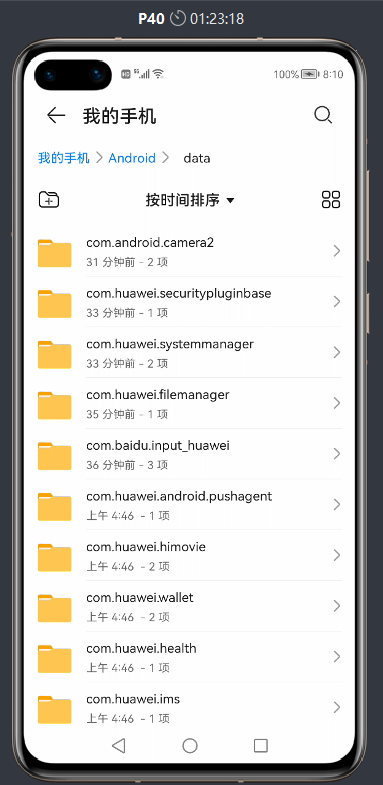
}鸿蒙P40运行项目后的文件夹图:(找遍所有都没有发现我的项目文件夹)
读写数据库的权限都赋予了:
"reqPermissions": [
  {
    "name": "ohos.permission.INTERNET"
  },
  {
    "name": "ohos.permission.GET_NETWORK_INFO"
  },
  {
    "name": "ohos.permission.DISTRIBUTED_DATASYNC"
  },
  {
    "name": "ohos.permission.GET_DISTRIBUTED_DEVICE_INFO"
  },
  {
    "name": "ohos.permission.READ_USER_STORAGE"
  },
  {
    "name": "ohos.permission.WRITE_USER_STORAGE"
  },
  {
    "name": "ohos.samples.helloworld.DataAbilityShellProvider.PROVIDER"
  },
  {
    "name": "dataability://ohos.samples.helloworld.newsDataAbility"
  }
],
"defPermissions": [
  {
    "name": "ohos.samples.helloworld.DataAbilityShellProvider.PROVIDER"
  }
]


我要提问题


