hid94763069HarmonyOS 5
download下载直接走到了fail
let context = getContext(this) as common.UIAbilityContext;
this.testIndex = this.testIndex + 1;
let filePath = context.cacheDir + param.fileName;
let url = param.downloadUrl
try {
request.downloadFile(context, {
url: url,
filePath: filePath
}).then((data: request.DownloadTask) => {
let downloadTask: request.DownloadTask = data;
// 下载进度的回调函数
let progressCallback = (receivedSize: number, totalSize: number) => {
console.info("download receivedSize:" + receivedSize + " totalSize:" + totalSize);
};
downloadTask.on('progress', progressCallback);
downloadTask.on('complete', () => {
console.info('download complete');
let file = fs.openSync(filePath, fs.OpenMode.READ_WRITE | fs.OpenMode.CREATE);
let arrayBuffer = new ArrayBuffer(4096000);
let readLen = fs.readSync(file.fd, arrayBuffer);
let buf = buffer.from(arrayBuffer, 0, readLen);
console.info(`content of File: ${buf.toString()}`);
let writeLen = fs.writeSync(file.fd, arrayBuffer);
fs.closeSync(file);
// this.filePath = filePath;
//以上可以下载到沙箱了
})
let failCallback = () => {
console.info('Download task fail.');
};
downloadTask.on('fail', failCallback);
}).catch((err: BusinessError) => {
console.error(`downLoadFileTask failed, code is ${err.code}, message is ${err.message}`);
});
} catch (error) {
console.error(`downLoadFileTask failed, code is ${error.code}, message is ${error.message}`);
}
云帆扬download下载直接走到了fail,具体报了什么错嘛,或者可以参考下面示例request.downloadFile下载文件是可以成功下载的
【背景知识】
request.downloadFile接口用于下载任务,支持配置后台下载(后台任务下载成功或者失败界面都会有弹窗提示,前台任务没有任何提示信息),支持暂停恢复下载,用on('complete')成功回调之后可以做一些业务操作,比如将图片保存到相册、进行页面展示等。
request接口中的filePath参数配置只支持沙箱路径,不支持用户uri地址
常用设置文件下载路径有两种方式:
filesDir获取应用的文件路径:
context = this.getUIContext().getHostContext() as common.UIAbilityContext; //context需在组件内获取
...
filePath = this.context.filesDir + '/' + fileName // /data/storage/el2/base/haps/entry/files/1751420076162987800.pngcacheDir获取应用的文件路径:
context = this.getUIContext().getHostContext() as common.UIAbilityContext;
...
filePath = this.context.cacheDir + '/' + fileName // /data/storage/el2/base/haps/entry/cache/1751420076162987800.png【解决方案】
完整示例
import { request, systemDateTime } from '@kit.BasicServicesKit';
import { common } from '@kit.AbilityKit';
import { promptAction } from '@kit.ArkUI';
interface DownloadResult {
isSuccess: boolean,
msg: string
}
@Entry
@Component
struct Index {
context = this.getUIContext().getHostContext() as common.UIAbilityContext;
@State downloadUrl: string ='https://www.example.com' // 需要手动将url替换为真实服务器的HTTP协议地址
@State filePath: string = ''
@State current: number = 0
@State total: number = 0
@State downloadTask: request.DownloadTask = {} as request.DownloadTask
@State downloadImage: string = ''
DownloadFile(url: string):Promise<DownloadResult>{
return new Promise(async(resolve,reject)=>{
const fileName = `${systemDateTime.getTime(true)}.png`
this.filePath = this.context.filesDir + '/' + fileName
this.downloadTask = await request.downloadFile(this.context, { url, filePath: this.filePath })
// 监听下载进度
this.downloadTask.on('progress', (receivedSize: number, totalSize: number) => {
this.current = receivedSize
this.total = totalSize
})
// 监听下载是否失败
this.downloadTask.on('fail', (err) => {
if (err){
return reject({ isSuccess: false, msg: "下载失败" });
}
})
// 监听下载是否完成
this.downloadTask.on('complete', () => {
this.downloadImage = "file://" + this.filePath
return resolve({ isSuccess: true, msg: 'Download task completed.' });
})
})
}
build() {
Column({ space: 10 }) {
Row({ space: 20 }) {
Progress({ value: this.current, total: this.total, type: ProgressType.ScaleRing }).width(100).height(100)
.backgroundColor(Color.Black)
.style({ strokeWidth: 15, scaleCount: 20, scaleWidth: 5 })
Row() {
Image(this.downloadImage)
}.width(100).height(100)
}
Button('download下载').onClick(() => {
this.DownloadFile(this.downloadUrl).then((result)=>{
if (result.isSuccess) {
console.log('下载成功');
} else {
console.error(`失败: ${result.msg}`);
console.log('下载失败');
}
})
})
}
.height('100%')
.width('100%')
}
}
城中的雾
Button('下载')
.fontSize(20)
.fontWeight(FontWeight.Bold)
.onClick(() => {
this.downloadFile("https://cdn-test.chujingservice.com/file/c8ff060bbf149bf231f628ba6cdd5aac.png",
systemDateTime.getTime(false) + ".png")
})downloadFile(url: string, fileName: string) {
let context = this.getUIContext().getHostContext() as common.UIAbilityContext;
let filePath = context.cacheDir + "/" + fileName;
try {
request.downloadFile(context, {
url: url,
filePath: filePath
}).then((data: request.DownloadTask) => {
let downloadTask: request.DownloadTask = data;
// 下载进度的回调函数
let progressCallback = (receivedSize: number, totalSize: number) => {
console.info("DownloadPage receivedSize:" + receivedSize + " totalSize:" + totalSize);
};
downloadTask.on('progress', progressCallback);
downloadTask.on('complete', () => {
console.info('DownloadPage complete');
let file = fs.openSync(filePath, fs.OpenMode.READ_WRITE | fs.OpenMode.CREATE);
let arrayBuffer = new ArrayBuffer(4096000);
let readLen = fs.readSync(file.fd, arrayBuffer);
let buf = buffer.from(arrayBuffer, 0, readLen);
console.info(`DownloadPage content of File: ${buf.toString()}`);
let writeLen = fs.writeSync(file.fd, arrayBuffer);
fs.closeSync(file);
// this.filePath = filePath;
//以上可以下载到沙箱了
})
let failCallback = (err: number) => {
console.error('DownloadPage task fail. err:' + JSON.stringify(err));
};
downloadTask.on('fail', failCallback);
}).catch((err: BusinessError) => {
console.error(`DownloadPage downLoadFileTask failed, code is ${err.code}, message is ${err.message}`);
});
} catch (error) {
console.error(`DownloadPage downLoadFileTask failed, code is ${error.code}, message is ${error.message}`);
}
}2.也可以尝试换一种下载方式:下面这个示例是下载一个图片的代码:
/**
* @dec 下载图片
* @params netFile:下载链接
* @params tempDir:下载位置
* @returns FormCardDownloadImg
* @date 2025/8/18
*/
async downloadOnlineImage(netFile?: string, tempDir?: string): Promise<FormCardDownloadImg> {
let formCardDownloadImg: FormCardDownloadImg = new FormCardDownloadImg()
let fileName = netFile
let folderPath = `${tempDir}/formImg`
// 参数校验
if (!netFile) {
LogUtil.e(Tag, 'netFile为空,卡片 icon 下载失败')
return formCardDownloadImg
}
if (!netFile.startsWith('http')) {
LogUtil.e(Tag, 'netFile 不是有效的网络图片地址')
return formCardDownloadImg
}
if (!tempDir) {
tempDir = this.context?.getApplicationContext().filesDir
}
try {
// 文件名 & 路径
fileName = await this.urlToReadableShortFileName(netFile.toString())
} catch (err) {
let code = (err as BusinessError).code;
let message = (err as BusinessError).message;
LogUtil.e(Tag, ' this.urlToReadableShortFileName', code, message)
}
// 确保文件夹存在
try {
await fs.mkdir(folderPath)
} catch (err) {
let code = (err as BusinessError).code;
let message = (err as BusinessError).message;
if (code === 13900015) {
LogUtil.d(Tag, 'mkdir failed: 目录:' + folderPath + '已存在', err)
} else {
LogUtil.e(Tag, 'mkdir failed: ' + folderPath, err)
}
}
const tmpFile = `${folderPath}/${fileName}`
let file: fs.File | null = null
try {
// 1. 检查文件是否已存在
let fileExists = false
try {
const stat = await fs.stat(tmpFile)
if (stat.isFile()) {
fileExists = true
}
} catch (err) {
let code = (err as BusinessError).code;
let message = (err as BusinessError).message;
if (code === 13900002) {
LogUtil.w(Tag, 'fs.stat 文件不存在:' + tmpFile + '准备下载文件', code, message)
} else {
LogUtil.e(Tag, 'fs.stat err', code, message)
}
}
// 2. 打开文件(可读写)
if (fileExists) {
file = await fs.open(tmpFile, fs.OpenMode.READ_WRITE)
LogUtil.d(Tag, `file exists, reuse: ${tmpFile}`)
} else {
// 文件不存在 → 下载
const httpRequest = http.createHttp()
const data = await httpRequest.request(netFile)
httpRequest.destroy()
if (data?.responseCode === http.ResponseCode.OK && data.result) {
// 创建新文件并写入内容
file = await fs.open(tmpFile, fs.OpenMode.READ_WRITE | fs.OpenMode.CREATE)
const buffer = data.result as ArrayBuffer
await fs.write(file.fd, buffer)
} else {
LogUtil.e(Tag, `download failed, responseCode: ${data?.responseCode}`)
return formCardDownloadImg
}
}
// 3. 设置返回对象
formCardDownloadImg.imgFd = file.fd
formCardDownloadImg.imgFileName = tmpFile
} catch (error) {
const err = error as BusinessError
LogUtil.e(Tag, `downloadOnlineImage failed: ${err.code}, ${err.message}`)
}
// 注意:不要在这里关闭文件,调用方负责用完后关闭
return formCardDownloadImg
}
丿未来丶背景知识:
首先使用 request.downloadFile() 是需要网络权限的,如下图提示,

需要在 module.json5 文件添加网络权限:

问题解决:
我按照你的代码写了一个例子,没有出现问题:
import { common } from '@kit.AbilityKit';
import { BusinessError, request, systemDateTime } from '@kit.BasicServicesKit';
import { buffer } from '@kit.ArkTS';
import fs from '@ohos.file.fs';
@Entry
@Component
struct DownloadPage {
@State message: string = '下载';
build() {
Column() {
Button(this.message)
.fontSize(20)
.fontWeight(FontWeight.Bold)
.onClick(() => {
this.downloadFile("http://192.168.20.198:8000/test.txt",systemDateTime.getTime(false) + ".text")
})
}
.height('100%')
.width('100%')
}
downloadFile(url: string,fileName:string) {
let context = this.getUIContext().getHostContext() as common.UIAbilityContext;
let filePath = context.cacheDir + "/" + fileName;
try {
request.downloadFile(context, {
url: url,
filePath: filePath
}).then((data: request.DownloadTask) => {
let downloadTask: request.DownloadTask = data;
// 下载进度的回调函数
let progressCallback = (receivedSize: number, totalSize: number) => {
console.info("DownloadPage receivedSize:" + receivedSize + " totalSize:" + totalSize);
};
downloadTask.on('progress', progressCallback);
downloadTask.on('complete', () => {
console.info('DownloadPage complete');
let file = fs.openSync(filePath, fs.OpenMode.READ_WRITE | fs.OpenMode.CREATE);
let arrayBuffer = new ArrayBuffer(4096000);
let readLen = fs.readSync(file.fd, arrayBuffer);
let buf = buffer.from(arrayBuffer, 0, readLen);
console.info(`DownloadPage content of File: ${buf.toString()}`);
let writeLen = fs.writeSync(file.fd, arrayBuffer);
fs.closeSync(file);
// this.filePath = filePath;
//以上可以下载到沙箱了
})
let failCallback = (err: number) => {
console.error('DownloadPage task fail. err:'+JSON.stringify(err));
};
downloadTask.on('fail', failCallback);
}).catch((err: BusinessError) => {
console.error(`DownloadPage downLoadFileTask failed, code is ${err.code}, message is ${err.message}`);
});
} catch (error) {
console.error(`DownloadPage downLoadFileTask failed, code is ${error.code}, message is ${error.message}`);
}
}
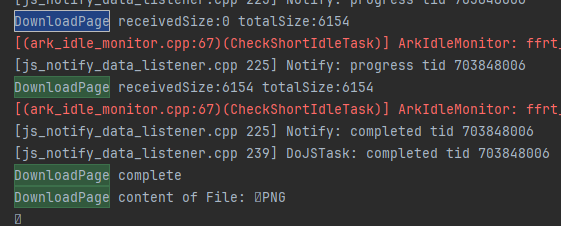
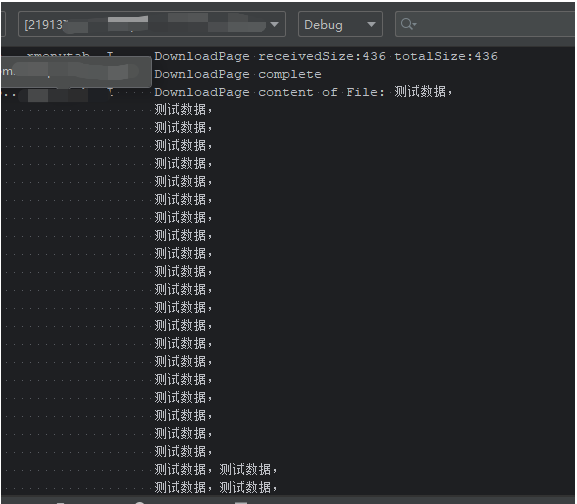
}日志:

如果还是出现问题,你可以在 failCallback 函数中添加一个返回值,将值打印出来到论坛上进行查询。
Yanyan
context.cacheDir路径可能未正确创建父级目录,或应用缺少存储权限。
沙箱环境下需确保路径符合规范(如filePath必须完整且父目录已存在)
// 确保路径父目录存在(以同步方式创建目录)
let parentDir = context.cacheDir;
if (!fs.accessSync(parentDir)) {
fs.mkdirsSync(parentDir);
}
// 完整文件路径示例
let filePath = parentDir + '/' + param.fileName;完整参考代码
let context = getContext(this) as common.UIAbilityContext;
let filePath = context.cacheDir + '/' + param.fileName;
// 确保目录存在
if (!fs.accessSync(context.cacheDir)) {
fs.mkdirsSync(context.cacheDir);
}
try {
request.downloadFile(context, {
url: param.downloadUrl,
filePath: filePath,
timeout: 30000,
retry: 2
}).then((downloadTask: request.DownloadTask) => {
downloadTask.on('progress', (received, total) => {
console.info(`Progress: ${received}/${total}`);
});
downloadTask.on('complete', async () => {
console.info('Download complete');
// 异步处理文件
});
downloadTask.on('fail', (err: BusinessError) => {
console.error(`Download failed. Code: ${err.code}, Msg: ${err.message}`);
});
}).catch((err: BusinessError) => {
console.error(`Task creation failed: ${err.message}`);
});
} catch (error) {
console.error(`Download init error: ${error.message}`);
}
哈莫尼OS楼主先在src/main/modules.json中下面权限:
"requestPermissions": [
{ "name": "ohos.permission.INTERNET" },
{ "name": "ohos.permission.WRITE_MEDIA" },
{ "name": "ohos.permission.READ_MEDIA" }
]filePath必须为包含完整父目录的绝对路径,要提前创建父目录:
let parentDir = context.cacheDir;
if (!fs.accessSync(parentDir)) {
fs.mkdirsSync(parentDir); // 这里确保目录存在
}另外你的沙箱路径规范一下
let filePath = `internal://app/cache/${param.fileName}`; 文件打开模式仅使用READ_WRITE模式
let file = fs.openSync(filePath, fs.OpenMode.READ_WRITE);如果还不行增强一下错误捕获
try {
request.downloadFile(context, {
url: url,
filePath: filePath
}).then((downloadTask: request.DownloadTask) => {
downloadTask.on('fail', (err: BusinessError) => {
console.error(`Download failed. Code: ${err.code}, Message: ${err.message}`);
// 重点排查2300023写入失败和13400001文件操作错误
});
});
} catch (error) {
// 捕获同步错误
console.error(`Init failed. Code: ${error.code}, Message: ${error.message}`);
}
hid94763069downloadTask.on('fail', (err: BusinessError) => { console.error(`Download failed. Code: ${err.code}, Message: ${err.message}`); }); 为什么我写这句代码直接报错2025-08-19 02:15 来自北京
码上好【背景知识】
@ohos.request:给应用提供上传下载文件、后台代理传输的基础功能。
【参考方案】
可参考文件下载预览示例,通过@ohos.request实现对文件的下载并保存至沙箱。
- 利用@ohos.request并通过网络路径从网页上下载对应的文件。
- 将下载的文件保存至沙箱中并储存路径。 收起自动换行深色代码主题复制
request.downloadFile(context, { url: url, filePath: filePath, enableMetered: true })
hid94763069还是不行啊2025-08-18 09:10 来自北京
- 为了保障您的信息安全,请勿上传您的敏感个人信息(如您的密码等信息)和您的敏感资产信息(如关键源代码、签名私钥、调试安装包、业务日志等信息),且您需自行承担由此产生的信息泄露等安全风险。
- 如您发布的内容为转载内容,请注明内容来源。
我要提问题
HarmonyOS downloadFile对应的C侧接口是什么(API12+)
HarmonyOS 为什么从应用市场下载的包体与实际AGC后台上传的包体大小不一致 (API12+)
HarmonyOS RCP是否支持下载相关的C++接口 (API12)
HarmonyOS 按需下载是否可以放到Taskpool处理?(API12+)
下载文件报错,13400001
HarmonyOS 用rcp的downloadToFile方法下载文件失败,链接用浏览器打开能正常下载 (API12+)
HarmonyOS 如何将文件下载到Download目录(API12+)
HarmonyOS Web组件下载资源到公共目录(API12+)


苏公安网备 32011402010933号