















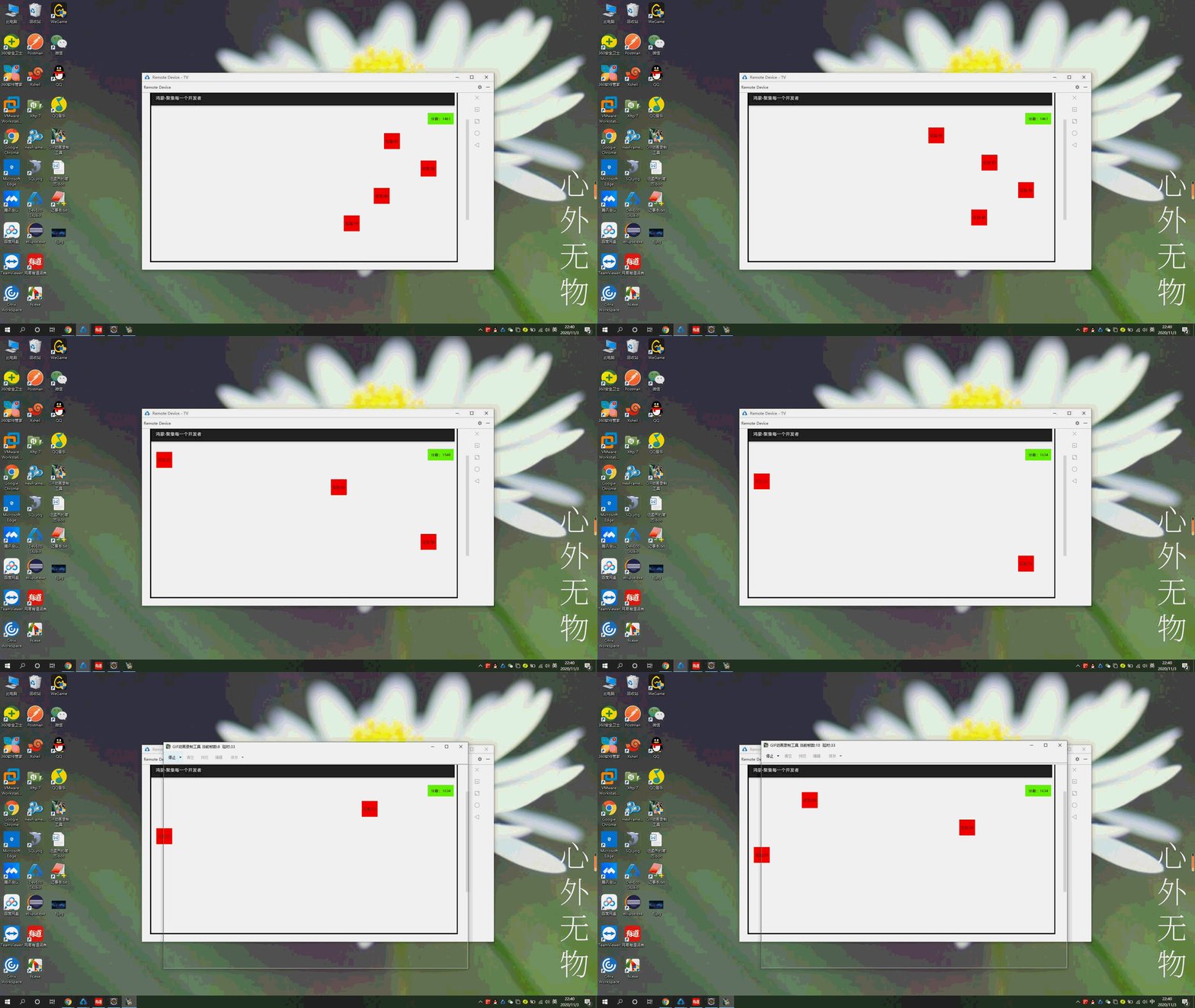
效果演示
说下遇到的问题
1 在XML中使用PositionLayout布局增加子组件后,子组件使用setContentPosition(x,y)造成定位失败。
2 无法父组件无法删除子组件,removeComponent()无效。
3 无法隐藏组件setVisibility();值是4或者8都无效。demo需要删除元素,无奈只能设置元素的width,height为0
以下是代码片段
<?xml version="1.0" encoding="utf-8"?>
<PositionLayout xmlns:ohos="http://schemas.huawei.com/res/ohos"
ohos:width="match_parent"
ohos:height="match_parent"
ohos:id="$+id:p">
<Text ohos:id="$+id:fenshu"
ohos:text="分数:0"
ohos:background_element="#66FF00"
ohos:padding="10vp">
</Text>
</PositionLayout>
--------------------------------------------
package com.example.tv.slice;
import com.example.tv.ResourceTable;
import ohos.aafwk.ability.AbilitySlice;
import ohos.aafwk.content.Intent;
import ohos.agp.animation.Animator;
import ohos.agp.animation.AnimatorProperty;
import ohos.agp.colors.RgbColor;
import ohos.agp.components.*;
import ohos.agp.components.element.ShapeElement;
import ohos.app.Context;
import java.util.Random;
import java.util.Timer;
import java.util.TimerTask;
//1920*1080
public class MainAbilitySlice extends AbilitySlice {
int count = 0;
@Override
public void onStart(Intent intent) {
super.onStart(intent);
super.setUIContent(ResourceTable.Layout_layout1);
System.out.println("MainAbilitySlice>>>>>>>>>>>>>>>>>>>>>>onStart");
Context context = this;
PositionLayout positionLayout = (PositionLayout) findComponentById(ResourceTable.Id_p);
Text text = (Text) findComponentById(ResourceTable.Id_fenshu);
text.setContentPosition(1750, 0);
text.setHeight(ComponentContainer.LayoutConfig.MATCH_CONTENT);
text.setWidth(ComponentContainer.LayoutConfig.MATCH_CONTENT);
Timer timer = new Timer();
timer.scheduleAtFixedRate(new TimerTask() {
public void run() {
Random random = new Random();
int rFenshu = random.nextInt(100);
Button button = new Button(context);
button.setWidth(100);
button.setHeight(100);
button.setText("红包:" + rFenshu);
button.setClickedListener((c) -> {
button.setWidth(0);
button.setHeight(0);
count += rFenshu;
text.setText("分数:" + count);
});
ShapeElement shapeElement = new ShapeElement();
shapeElement.setRgbColor(new RgbColor(255, 0, 0));
button.setBackground(shapeElement);
int i1 = random.nextInt(1720);
button.setContentPosition(i1, 0);
positionLayout.addComponent(button);
AnimatorProperty animatorProperty = button.createAnimatorProperty();
animatorProperty.moveToY(700).setDuration(4000);
animatorProperty.setStateChangedListener(new Animator.StateChangedListener() {
@Override
public void onStart(Animator animator) {
}
@Override
public void onStop(Animator animator) {
}
@Override
public void onCancel(Animator animator) {
}
@Override
public void onEnd(Animator animator) {
button.setWidth(0);
button.setHeight(0);
}
@Override
public void onPause(Animator animator) {
}
@Override
public void onResume(Animator animator) {
}
});
animatorProperty.start();
}
}, 1000,1000);
}
@Override
protected void onActive() {
super.onActive();
System.out.println("MainAbilitySlice>>>>>>>>>>>>>>>>>>>>>>onActive");
}
@Override
protected void onInactive() {
super.onInactive();
System.out.println("MainAbilitySlice>>>>>>>>>>>>>>>>>>>>>>onInactive");
}
@Override
protected void onBackground() {
super.onBackground();
System.out.println("MainAbilitySlice>>>>>>>>>>>>>>>>>>>>>>onBackground");
}
@Override
protected void onForeground(Intent intent) {
super.onForeground(intent);
System.out.println("MainAbilitySlice>>>>>>>>>>>>>>>>>>>>>>onForeground");
}
@Override
protected void onStop() {
super.onStop();
System.out.println("MainAbilitySlice>>>>>>>>>>>>>>>>>>>>>>onStop");
}
}
作者:顶风少年





 苏公安网备 32011402010933号