






王凡|
Media Library Kit
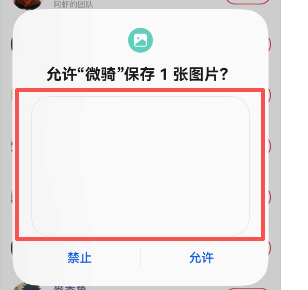
使用photoAccessHelper.showAssetsCreationDialog将沙箱中的图片保存到系统相册,工程中的icon和label也没有显示,弹框中间还有个矩形空白区域?
已解决
使用photoAccessHelper.showAssetsCreationDialog将沙箱中的图片保存到系统相册,工程中的icon和label也没有显示,弹框中间还有个矩形空白区域?(参考文档:使用弹窗授权保存媒体库资源)
1
浏览142 发布于2025-11-07 07:39湖北
全部评论
最多点赞
最新发布
最早发布
赵勇123456采纳答复
1.首先确认弹窗的图标不支持修改,是固定的,依赖于配置项的label和icon。
2.showAssetsCreationDialog参数srcFileUris为需保存到媒体库中的图片文件对应的媒体库uri,需要使用fileUri.getUriFromPath补全传入的路径,保存时即可预览图片。
●核心代码:
收起
自动换行
深色代码主题
复制
const srcUri = [fileUri.getUriFromPath(imagePath)]
const desFileUris = await phAccessHelper.showAwssetsCreationDialog(srcUri, config)●完整代码:
收起
自动换行
深色代码主题
复制
import { common } from '@kit.AbilityKit';
import { fileIo as fs, fileUri, ReadOptions, WriteOptions } from '@kit.CoreFileKit'
import { photoAccessHelper } from '@kit.MediaLibraryKit';
import json from '@ohos.util.json';
@Entry
@Component
struct Index {
@State message: string = 'Hello World';
filePath: string = '';
build() {
Column() {
Button('沙箱文件保存到相册')
.onClick(async () => {
// console.log('开始沙箱文件保存到相册')
// 把hello保存到沙箱
let context = this.getUIContext().getHostContext() as common.UIAbilityContext;;
let pathDir = context.filesDir; // 应用通用文件路径
let filePath = pathDir + '/hello.jpg'
let arrayBuff = context.resourceManager.getMediaContentSync($r('app.media.startIcon')).buffer
let file = fs.openSync(filePath, fs.OpenMode.READ_WRITE | fs.OpenMode.CREATE);
fs.writeSync(file.fd, arrayBuff)
fs.closeSync(file);
let dstPath = pathDir + "/hello.jpg";
this.filePath = fileUri.getUriFromPath(dstPath) //获取沙箱完整路径
console.log('wf==========' + JSON.stringify(filePath));
this.syncToSysAlbum(photoAccessHelper.PhotoType.IMAGE, 'png', this.filePath)
})
}
.height('100%')
.width('100%')
}
async syncToSysAlbum(fileType: photoAccessHelper.PhotoType, extension: string, ...filePath: string[]) {
//此处获取的phAccessHelper实例为全局对象,后续使用到phAccessHelper的地方默认为使用此处获取的对象,如未添加此段代码报phAccessHelper未定义的错误请自行添加
let context = this.getUIContext().getHostContext() as common.UIAbilityContext;;
let phAccessHelper = photoAccessHelper.getPhotoAccessHelper(context);
try {
const srcFileUris: string[] = []
filePath.forEach((path) => {
srcFileUris.push(path)
})
const config: photoAccessHelper.PhotoCreationConfig[] = []
config.push({
title: 'background', // 可选
fileNameExtension: extension,
photoType: fileType,
// subtype: photoAccessHelper.PhotoSubtype.DEFAULT, // 可选
})
console.log("syncToSysAlarm fileUri:" + json.stringify(srcFileUris) + ",config:" + json.stringify(config))
const desFileUris = await phAccessHelper.showAssetsCreationDialog(srcFileUris, config)
console.debug(`目标图片 uri is : ${JSON.stringify(desFileUris)}`)
if (desFileUris.length > 0) {
for (let index = 0; index < desFileUris.length; index++) {
this.copyFileContentTo(srcFileUris[index], desFileUris[index])
}
}
} catch (err) {
console.log("syncToSysAlarm filePath:" + filePath + ",error:" + json.stringify(err))
}
}
/**
* 复制文件内容到目标文件
* @param srcFilePath 源文件路径
* @param destFilePath 目标文件路径
*/
copyFileContentTo(srcFilePath: string, destFilePath: string) {
let srcFile = fs.openSync(srcFilePath, fs.OpenMode.READ_WRITE | fs.OpenMode.CREATE)
let destFile = fs.openSync(destFilePath, fs.OpenMode.READ_WRITE | fs.OpenMode.CREATE)
// 读取源文件内容并写入至目的文件
let bufSize = 4096;
let readSize = 0;
let buf = new ArrayBuffer(bufSize);
let readOptions: ReadOptions = {
offset: readSize,
length: bufSize
};
let readLen = fs.readSync(srcFile.fd, buf, readOptions);
while (readLen > 0) {
readSize += readLen;
let writeOptions: WriteOptions = {
length: readLen
};
fs.writeSync(destFile.fd, buf, writeOptions);
readOptions.offset = readSize;
readLen = fs.readSync(srcFile.fd, buf, readOptions);
}
// 关闭文件
fs.closeSync(srcFile);
fs.closeSync(destFile);
}
} 展开全部 
1楼编辑于2025-11-07 07:44 来自湖北
写回答
所见即所得编辑器, editor1
工具栏 撤消 快捷键 Ctrl+Z 重做 快捷键 Ctrl+Y 格式刷 快捷键 Ctrl+Shift+C 清除格式 加粗 快捷键 Ctrl+B 倾斜 快捷键 Ctrl+I 下划线 快捷键 Ctrl+U 删除线格式调整字号 文本颜色 背景颜色 增加缩进量 减少缩进量 左对齐 居中 右对齐 两端对齐段落间距行间距 项目列表 编号列表 插入水平线 块引用 插入/编辑超链接 快捷键 Ctrl+K 取消超链接 图片 表格 上传附件 导入Word 插入代码 MD编辑器 全屏模式
0/50000
新增插入模板功能
一键使用模板,快速填写内容,轻松发帖~
知道了
- 为了保障您的信息安全,请勿上传您的敏感个人信息(如您的密码等信息)和您的敏感资产信息(如关键源代码、签名私钥、调试安装包、业务日志等信息),且您需自行承担由此产生的信息泄露等安全风险。
- 如您发布的内容为转载内容,请注明内容来源。
我要提问题
相关推荐
换一批
1
HarmonyOS 组件截图后成功保存到沙箱,但是从沙箱保存到相册确失败报错13900012 (API12+)
2
HarmonyOS 三层架构中如何实现将应用中图片保存到手机相册 (API12+)
3
HarmonyOS 如何给photoAccessHelper.PhotoViewPicker()和cameraPicker.pick()获取到的图片添加水印并保存到本地?(API12+)
4
HarmonyOS 在使用SaveButton时,通过遍历想保存多个图片到相册但只能保存第一张,如何解决 (API12+)
5
HarmonyOS 使用弹窗授权保存媒体库资源配置问题 (API12+)
6
HarmonyOS 使用弹窗授权保存媒体库资源有空白区域 (API12+)
7
HarmonyOS showAssetsCreationDialog保存背景透明gif动图时,保存相片显示异常,如何解决?(API12+)
8
HarmonyOS Base64图片保存到沙箱,获取到的URL打开为空白,如何解决?(API12+)
了解社区公约,与您携手共创和谐专业的开发者社区。


苏公安网备 32011402010933号