文档开发者中心
我的
|

HarmonyOS 5

ArkUI

ArkTS

Scroll嵌套List,当Scroll滑动到底部,这时候向List添加N条数据,整个Scroll的内容区域没有发生改

22

示例4嵌套滚动父组件向子组件传递滚动

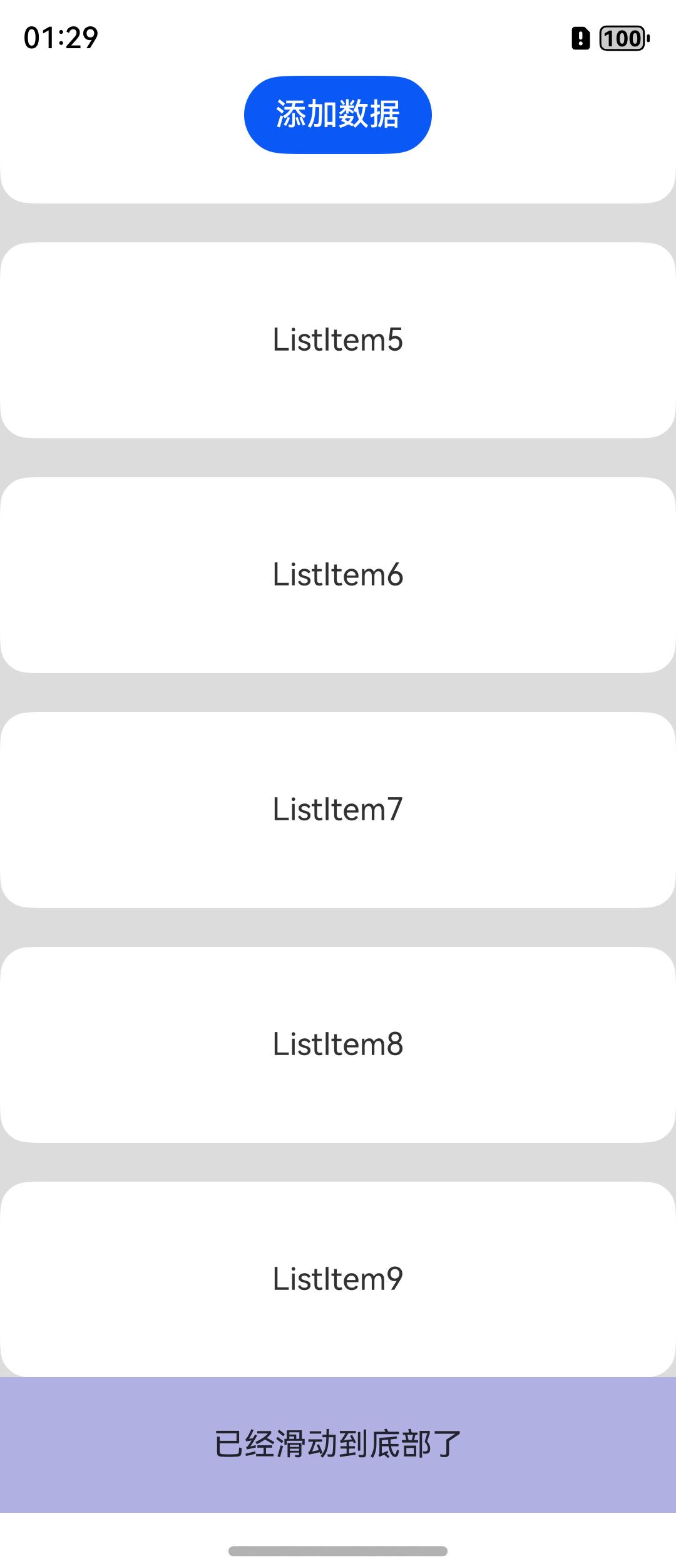
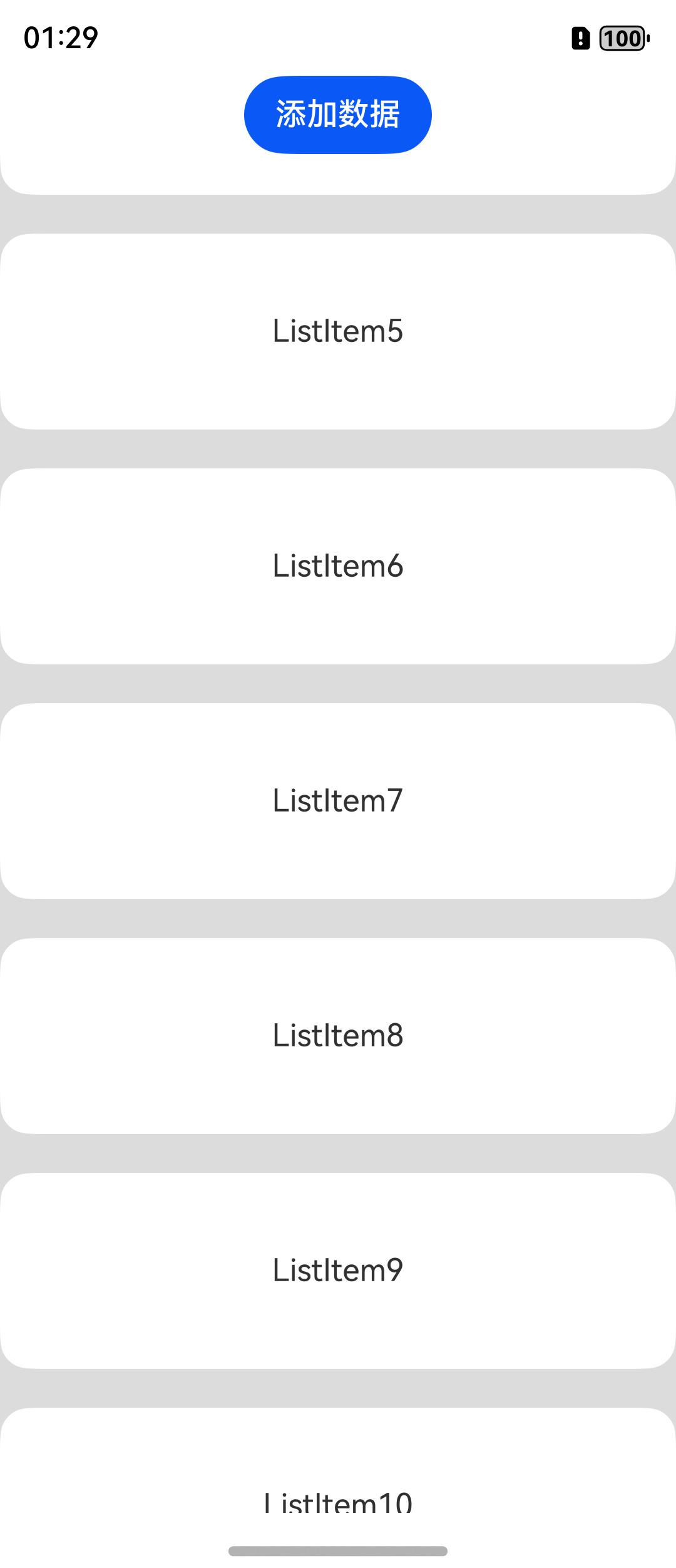
图一 图二

Scroll嵌套List,当Scroll滑动到底部,这时候点击按钮向list添加了10条数据,但是Scroll的内容区没有发生改变还是图一的效果,但是我想要的是添加完数据后得到图二的效果。

收起
自动换行
深色代码主题
复制
@Entry
@Component
struct NestedScroll {
  private headerHeight: number = 0;
  @State arr: number[] = [];
  private scrollerForParent: Scroller = new Scroller();
  private scrollerForChild: Scroller = new Scroller();

  aboutToAppear(): void {
    this.arr = this.getData(0, 10)
  }

  getData(start: number, count: number): Array<number> {
    const arr: Array<number> = []
    for (let i = 0; i < count; i++) {
      arr.push(i + start)
    }
    return arr
  }

  build() {
    Column() {
      Button('添加数据')
        .onClick(() => {
          const items = this.getData(this.arr.length, 10)
          this.arr.push(...items)
        })
      Scroll(this.scrollerForParent) {
        Column() {
          Text("header")
            .width("100%")
            .height("40%")
            .backgroundColor(0X330000FF)
            .fontSize(16)
            .textAlign(TextAlign.Center)
            .onSizeChange((oldValue: SizeOptions, newValue: SizeOptions) => {
              this.headerHeight = newValue.height! as number;
            })
          List({ space: 20, scroller: this.scrollerForChild }) {
            ForEach(this.arr, (item: number) => {
              ListItem() {
                Text("ListItem" + item)
                  .width("100%")
                  .height("100%")
                  .borderRadius(15)
                  .fontSize(16)
                  .textAlign(TextAlign.Center)
                  .backgroundColor(Color.White)
              }.width("100%").height(100)
            }, (item: string) => item)
          }
          .width("100%")
          .height("100%")
          .edgeEffect(EdgeEffect.None)
          .scrollBar(BarState.Off)
          .enableScrollInteraction(false)


          Text("已经滑动到底部了")
            .width("100%")
            .height("10%")
            .backgroundColor(0X330000FF)
            .fontSize(16)
            .textAlign(TextAlign.Center)

        }
      }
      .scrollBar(BarState.Off)
      .edgeEffect(EdgeEffect.Spring)
      .onScrollFrameBegin((offset: number, state: ScrollState) => {
        let retOffset = offset;
        let currOffset = this.scrollerForParent.currentOffset().yOffset;
        let newOffset = currOffset + offset;
        if (offset > 0) {
          if (this.scrollerForChild.isAtEnd()) {
            return { offsetRemain: offset };
          }
          if (newOffset > this.headerHeight) {
            retOffset = this.headerHeight - currOffset;
          }
          this.scrollerForChild.scrollBy(0, offset - retOffset);
        } else {
          if (this.scrollerForChild.currentOffset().yOffset <= 0) {
            return { offsetRemain: offset };
          }
          if (newOffset < this.headerHeight) {
            retOffset = this.headerHeight - currOffset;
          }
          this.scrollerForChild.scrollBy(0, offset - retOffset);
        }
        return { offsetRemain: retOffset };
      })
      .width("100%")
      .layoutWeight(1)
      .backgroundColor(0xDCDCDC)
    }
    .width("100%")
    .height("100%")
  }
}
点赞
收藏
回复
7
分享
举报
浏览347 发布于2025-06-20 05:39广东
全部评论
最多点赞
最新发布
最早发布
你试试在给数据源arr push新元素后 在给arr变量重新附一下值就好了,push有时候不会触发屏幕刷新。或者在list组件里推荐使用LazyForEach,数据比较多时性能会好很多
5楼回复于2025-06-23 03:43 来自北京

Scroll组件嵌套List组件,并且在Scroll滑动到底部时向List添加数据,通常会导致Scroll的内容区域发生变化。因为添加数据后,List的高度会增加,从而影响到外层Scroll的滚动行为。

使用nestedScroll属性 :可以试试在List组件上设置nestedScroll属性,这样List内部的滚动事件就不会与外层Scroll冲突。例:

收起
自动换行
深色代码主题
复制
@Component
export struct ScrollNestingList {
    build() {
        Scroll() {
            Column() {
                Text('This is the title')
                    .fontSize(50)
                    .fontWeight(FontWeight.Bold)
                List() {
                    ForEach(['1', '2', '3', '4', '5', '6', '7', '8', '9', '10'], (item: string) => {
                        ListItem() {
                            Text(item)
                                .fontSize(50)
                                .height(150)
                        }
                    }, (item: string) => item)
                }
                .nestedScroll({})
            }
        }
    }
}

这样设置后,List的滚动不会影响到外层Scroll的滚动行为,从而解决在滑动到底部并添加数据时遇到的问题。

监听Scroll的滚动事件 :也可以通过监听Scroll的滚动事件来动态调整内容区域。当检测到Scroll已滑动到底部时,程序可以自动添加数据到List中,同时更新Scroll的高度以适应新的内容。

展开全部
4楼回复于2025-06-21 03:14 来自河北

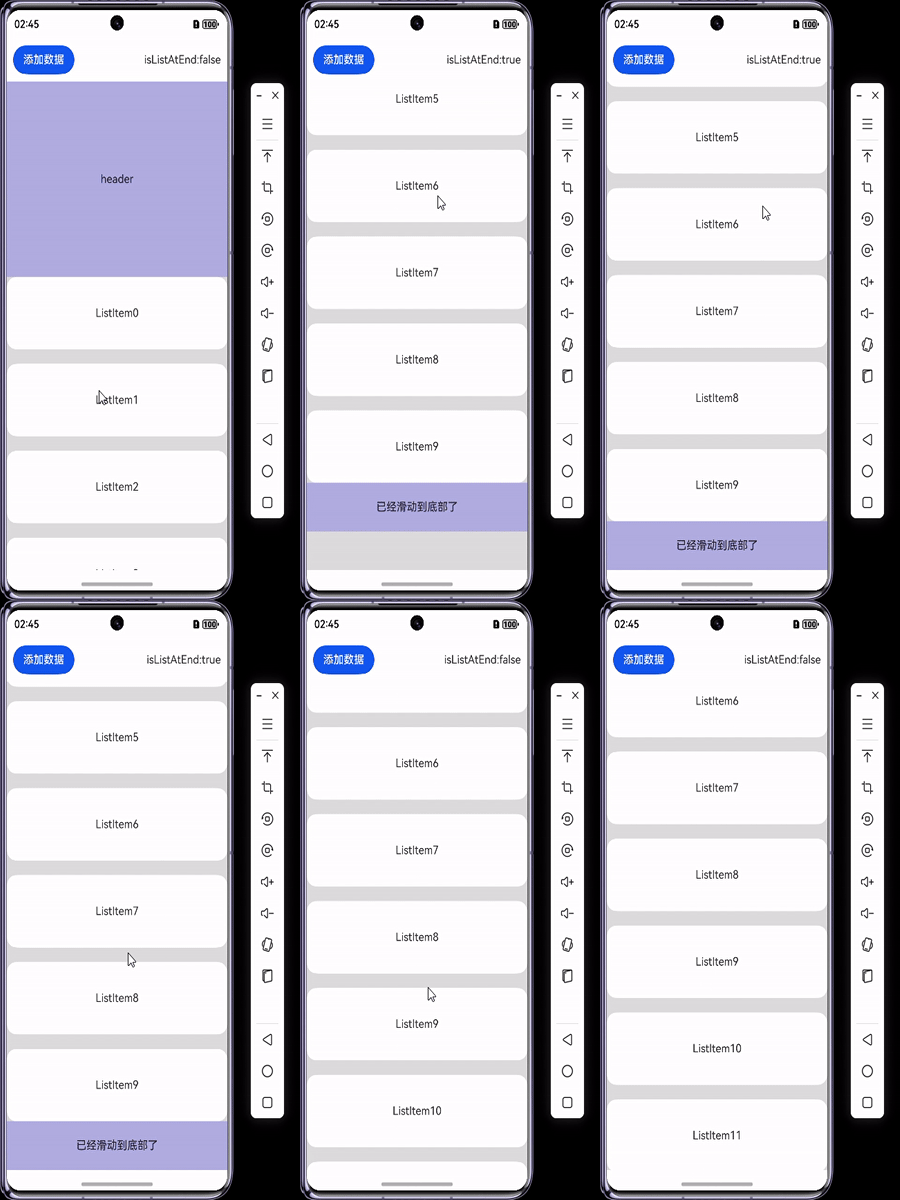
补充说明一下,点击按钮添加数据后内容区没变,然后再向下滑动它就正常了

7963e-32766.gif

1
3楼回复于2025-06-20 06:53 来自广东
  • 乌拉大乌拉
    可以试一下滚动事件,添加以后 触发向上滚动
    2025-06-20 07:45 来自河北

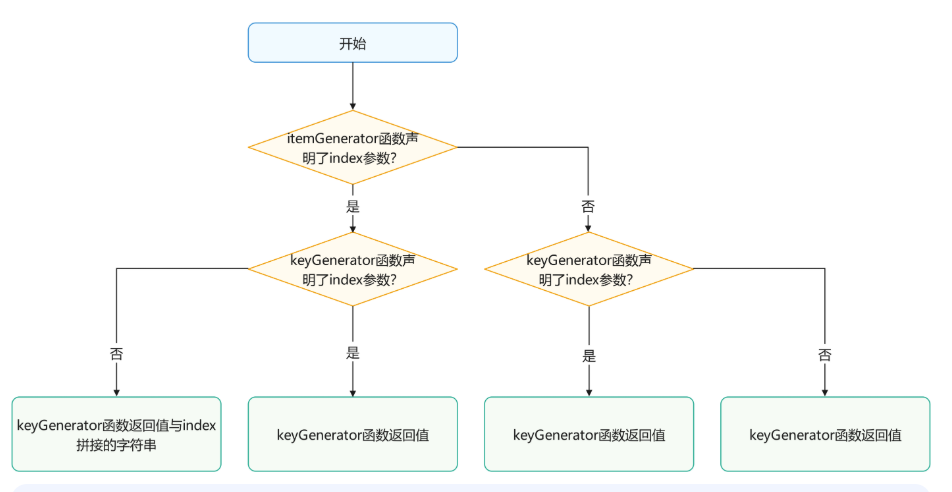
可以检查一下Foreach键值生成规则,在ForEach组件进行非首次渲染时,它会检查新生成的键值是否在上次渲染中已经存在。如果键值不存在,则会创建一个新的组件;如果键值存在,则不会创建新的组件,而是直接渲染该键值所对应的组件。如果键值生成规则不一致,会导致不渲染的情况ForEach:循环渲染-学习UI范式渲染控制-UI开发 (ArkTS声明式开发范式)-ArkUI(方舟UI框架)-应用框架 - 华为HarmonyOS开发者

cke_895.png

1
2楼回复于2025-06-20 06:32 来自河北
  • JackieHou
    ForEach(this.arr, (item: number) => { ListItem() { Text("ListItem" + item) .width("100%") .height("100%") .borderRadius(15) .fontSize(16) .textAlign(TextAlign.Center) .backgroundColor(Color.White) }.width("100%").height(100) }, (item: number,index:number) => item.toString()) 没注意,我改了一下keyGenerator,但是效果还是一样的,初始化的key是'0'到'9',点击添加的数据是'10'到'19'
    2025-06-20 06:43 来自广东
收起
自动换行
深色代码主题
复制
@Entry
@Component
struct TestPage {
  private headerHeight: number = 0;
  @State arr: number[] = [];
  private scrollerForParent: Scroller = new Scroller();
  private scrollerForChild: Scroller = new Scroller();

  aboutToAppear(): void {
    this.arr = this.getData(0, 10)
  }

  getData(start: number, count: number): Array<number> {
    const arr: Array<number> = []
    for (let i = 0; i < count; i++) {
      arr.push(i + start)
    }
    return arr
  }

  build() {
    Column() {
      Button('添加数据')
        .onClick(() => {
          const items = this.getData(this.arr.length, 10)
          this.arr.push(...items)
        })
      Scroll(this.scrollerForParent) {
        Column() {
          Text("header")
            .width("100%")
            .height("40%")
            .backgroundColor(0X330000FF)
            .fontSize(16)
            .textAlign(TextAlign.Center)
            .onSizeChange((oldValue: SizeOptions, newValue: SizeOptions) => {
              this.headerHeight = newValue.height! as number;
            })
          List({ space: 20, scroller: this.scrollerForChild }) {
            ForEach(this.arr, (item: number) => {
              ListItem() {
                Text("ListItem" + item)
                  .width("100%")
                  .height("100%")
                  .borderRadius(15)
                  .fontSize(16)
                  .textAlign(TextAlign.Center)
                  .backgroundColor(Color.White)
              }.width("100%").height(100)
            }, (item: string) => item)

            ListItem() {
              Text("已经滑动到底部了")
                .width("100%")
                .height("10%")
                .backgroundColor(0X330000FF)
                .fontSize(16)
                .textAlign(TextAlign.Center)
            }

          }
          .width("100%")
          .height("100%")
          .edgeEffect(EdgeEffect.None)
          .scrollBar(BarState.Off)
          .enableScrollInteraction(false)

        }
      }
      .scrollBar(BarState.Off)
      .edgeEffect(EdgeEffect.Spring)
      .onScrollFrameBegin((offset: number, state: ScrollState) => {
        let retOffset = offset;
        let currOffset = this.scrollerForParent.currentOffset().yOffset;
        let newOffset = currOffset + offset;
        if (offset > 0) {
          if (this.scrollerForChild.isAtEnd()) {
            return { offsetRemain: offset };
          }
          if (newOffset > this.headerHeight) {
            retOffset = this.headerHeight - currOffset;
          }
          this.scrollerForChild.scrollBy(0, offset - retOffset);
        } else {
          if (this.scrollerForChild.currentOffset().yOffset <= 0) {
            return { offsetRemain: offset };
          }
          if (newOffset < this.headerHeight) {
            retOffset = this.headerHeight - currOffset;
          }
          this.scrollerForChild.scrollBy(0, offset - retOffset);
        }
        return { offsetRemain: retOffset };
      })
      .width("100%")
      .layoutWeight(1)
      .backgroundColor(0xDCDCDC)
    }
    .width("100%")
    .height("100%")
  }
}
展开全部
1楼回复于2025-06-20 06:08 来自江苏
写回答
新增插入模板功能
一键使用模板,快速填写内容,轻松发帖~
知道了
  • 为了保障您的信息安全,请勿上传您的敏感个人信息(如您的密码等信息)和您的敏感资产信息(如关键源代码、签名私钥、调试安装包、业务日志等信息),且您需自行承担由此产生的信息泄露等安全风险。
  • 如您发布的内容为转载内容,请注明内容来源。

我要提问题

了解社区公约,与您携手共创和谐专业的开发者社区。