文档开发者中心
我的
|

ArkUI (方舟UI框架)

stack如何置底

已解决
收起
自动换行
深色代码主题
复制
@Entry
@Component
struct Index {
  build() {
    Column() {
      Column({ space: 10 }) {
        Row({ space: 10 }) {
          Image($r("app.media.img"))
            .width(30)
            .aspectRatio(1)
            .borderRadius(15)
          Row({ space: 8 }) {
            Image($r("app.media.sousuo"))
              .width(12)
              .height(12)
              .margin({ left: 12 })
            Text("请输入搜索内容")
              .fontColor("#79B9B7")
              .fontSize(12)
              .fontWeight(400)
              .lineHeight(12)
          }
          .width(268)
          .height(36)
          .borderRadius(19)
          .backgroundColor('rgba(255, 255, 255, 0.62)')
          .borderWidth(0.5)
          .borderColor("#ffffff")

          Image($r("app.media.lingdang"))
            .width(23.67)
            .height(24)
        }

        Column({ space: 10 }) {
          Text("欢迎使用\n" + "慧考帮")
            .fontColor("#000000")
            .fontSize(36)
            .fontWeight(700)
            .lineHeight(43)
          Text("你好,XXX")
            .textAlign(TextAlign.Center)
            .fontColor("#000000")
            .fontSize(12)
            .fontWeight(400)
            .lineHeight(12)
            .backgroundColor('rgba(247, 255, 3, 1)')
            .width(114)
            .height(27)
            .borderRadius(14)
        }
        .alignItems(HorizontalAlign.Start)

        Column({ space: 8 }) {
          Grid() {
            GridItem() {
              Image($r("app.media.img_1"))
                .height(142)
            }

            .rowStart(0)
            .rowEnd(1)

            GridItem() {
              Stack() {
                Image($r("app.media.img_4"))
                  .height(62)
                Column({ space: 6 }) {
                  Text("学情分析")
                    .fontColor("#FFFFFF")
                    .fontSize(16)
                    .fontWeight(400)
                    .lineHeight(16)
                  Text("随时知晓学情")
                    .fontColor("#FFFFFF")
                    .fontSize(12)
                    .fontWeight(300)
                    .lineHeight(14)
                }
                .alignItems(HorizontalAlign.Start)
                .padding(10)
              }
              .alignContent(Alignment.Start)
            }

            GridItem() {
              Image($r("app.media.img_3"))
                .height(142)
            }
            .rowStart(1)
            .rowEnd(2)

            GridItem() {
              Stack() {
                Image($r("app.media.img_2"))
                  .height(62)
                Column({ space: 6 }) {
                  Text("发布资源")
                    .fontColor("#FFFFFF")
                    .fontSize(16)
                    .fontWeight(400)
                    .lineHeight(16)
                  Text("随时高效共享")
                    .fontColor("#FFFFFF")
                    .fontSize(12)
                    .fontWeight(300)
                    .lineHeight(14)
                }
                .alignItems(HorizontalAlign.Start)
                .padding(10)
              }
              .alignContent(Alignment.Start)
            }
          }
          .columnsGap(4)
          .rowsGap(6)
          .rowsTemplate("1fr 1fr 1fr")

          Image($r("app.media.img_5"))
            .offset({ x: 2 })
            .margin({ top: 8 })
            .width(70)

          List({ space: 4 }) {
            ListItem() {
              RelativeContainer() {
                Stack() {
                  Image($r("app.media.img_6"))
                    .width(42)
                    .height(15.72)
                  Text("资源")
                    .fontColor("#FFFFFF")
                    .offset({ x: -8 })
                    .fontSize(10)
                    .fontWeight(400)
                    .lineHeight(12)
                }
                .width("100%")
                .alignContent(Alignment.End)


                Column({ space: 9 }) {
                  Text("这里是数据标题")
                    .fontColor("#333333")
                    .fontSize(16)
                    .fontWeight(500)
                    .lineHeight(19)
                  Row() {
                    Stack() {
                      Image($r("app.media.img_7"))

                      Row({ space: 10 }) {
                        Text("解题")
                          .fontColor("#00DDB4")
                          .fontSize(12)
                          .fontWeight(500)
                          .lineHeight(12)
                        Text("这里是解题思路这里是...")
                          .fontColor("#00AE8E")
                          .fontSize(10)
                          .fontWeight(400)
                          .lineHeight(12)
                      }
                      .padding(10)
                    }
                    .layoutWeight(1)
                    .alignContent(Alignment.Start)

                    Image($r("app.media.img_8"))
                      .width(36)
                      .height(29)
                  }
                  .width("100%")
                  .height(29)
                  .justifyContent(FlexAlign.SpaceBetween)

                  Row() {
                    Row({ space: 4 }) {
                      Image($r("app.media.img_9"))
                        .width(20)
                        .height(20)
                        .borderRadius(10)
                      Text("用户名称")
                        .fontColor("#ABABAB")
                        .fontSize(10)
                        .fontWeight(400)
                        .lineHeight(10)
                    }

                    Text("2025-12-14 14:23:21")
                      .fontColor("#ABABAB")
                      .fontSize(10)
                      .fontWeight(400)
                      .lineHeight(10)
                  }
                  .width("100%")
                  .justifyContent(FlexAlign.SpaceBetween)
                }

                .alignItems(HorizontalAlign.Start)
                .width("100%")
                .height("100%")
                .padding(10)
              }
            }
            .height(112)
            .borderRadius(12)
            .backgroundColor("#ffffff")

            ListItem() {
              RelativeContainer() {
                Stack() {
                  Image($r("app.media.img_6"))
                    .width(42)
                    .height(15.72)
                  Text("资源")
                    .fontColor("#FFFFFF")
                    .offset({ x: -8 })
                    .fontSize(10)
                    .fontWeight(400)
                    .lineHeight(12)
                }
                .width("100%")
                .alignContent(Alignment.End)


                Column({ space: 9 }) {
                  Text("这里是数据标题")
                    .fontColor("#333333")
                    .fontSize(16)
                    .fontWeight(500)
                    .lineHeight(19)
                  Row() {
                    Stack() {
                      Image($r("app.media.img_7"))

                      Row({ space: 10 }) {
                        Text("解题")
                          .fontColor("#00DDB4")
                          .fontSize(12)
                          .fontWeight(500)
                          .lineHeight(12)
                        Text("这里是解题思路这里是...")
                          .fontColor("#00AE8E")
                          .fontSize(10)
                          .fontWeight(400)
                          .lineHeight(12)
                      }
                      .padding(10)
                    }
                    .layoutWeight(1)
                    .alignContent(Alignment.Start)

                    Image($r("app.media.img_8"))
                      .width(36)
                      .height(29)
                  }
                  .width("100%")
                  .height(29)
                  .justifyContent(FlexAlign.SpaceBetween)

                  Row() {
                    Row({ space: 4 }) {
                      Image($r("app.media.img_9"))
                        .width(20)
                        .height(20)
                        .borderRadius(10)
                      Text("用户名称")
                        .fontColor("#ABABAB")
                        .fontSize(10)
                        .fontWeight(400)
                        .lineHeight(10)
                    }

                    Text("2025-12-14 14:23:21")
                      .fontColor("#ABABAB")
                      .fontSize(10)
                      .fontWeight(400)
                      .lineHeight(10)
                  }
                  .width("100%")
                  .justifyContent(FlexAlign.SpaceBetween)
                }

                .alignItems(HorizontalAlign.Start)
                .width("100%")
                .height("100%")
                .padding(10)
              }
            }
            .height(112)
            .borderRadius(12)
            .backgroundColor("#ffffff")
          }
          .width("100%")
          .height("100%")

        }
        .alignItems(HorizontalAlign.Start)
        .offset({ y: 24 })
        .height(221)
        .width("100%")
      }
      .padding(14)
      .alignItems(HorizontalAlign.Start)

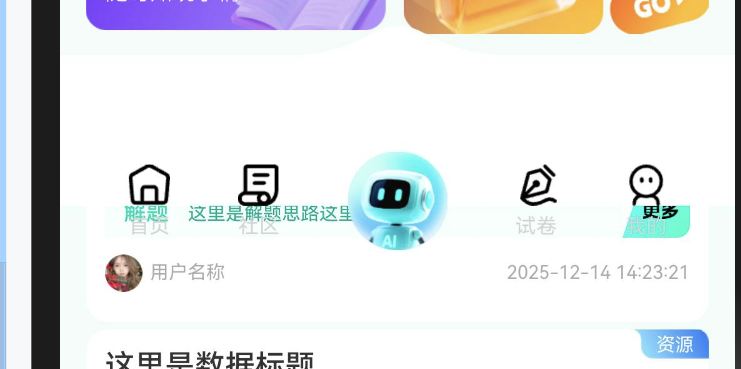
      Stack({ alignContent: Alignment.Bottom }) {
        Image($r("app.media.img_10"))
          .width("100%")
        Row() {
          Column({ space: 6 }) {
            Image($r("app.media.img_11"))
              .width(22)
              .height(22)
            Text("首页")
              .fontColor("#D4D4D4")
              .fontSize(11)
              .fontWeight(400)
              .lineHeight(11)
              .textAlign(TextAlign.Center)
          }

          Column({ space: 6 }) {
            Image($r("app.media.img_12"))
              .width(22)
              .height(22)
            Text("社区")
              .fontColor("#D4D4D4")
              .fontSize(11)
              .fontWeight(400)
              .lineHeight(11)
              .textAlign(TextAlign.Center)
          }

          Column({ space: 6 }) {
            Image($r("app.media.img_13"))
              .width(53)
              .height(52.49)

          }

          Column({ space: 6 }) {
            Image($r("app.media.img_14"))
              .width(22)
              .height(22)
            Text("试卷")
              .fontColor("#D4D4D4")
              .fontSize(11)
              .fontWeight(400)
              .lineHeight(11)
              .textAlign(TextAlign.Center)
          }

          Column({ space: 6 }) {
            Image($r("app.media.img_15"))
              .width(22)
              .height(22)
            Text("我的")
              .fontColor("#D4D4D4")
              .fontSize(11)
              .fontWeight(400)
              .lineHeight(11)
              .textAlign(TextAlign.Center)
          }

        }
        .offset({ y: 24 })
        .justifyContent(FlexAlign.SpaceEvenly)
        .width("100%")
      }

    }
    .expandSafeArea([SafeAreaType.SYSTEM], [SafeAreaEdge.TOP, SafeAreaEdge.BOTTOM])
    .width("100%")
    .height("100%")
    .backgroundColor("#F4FDFA")
    .backgroundImage($r("app.media.home_background"))

  }
}
cke_457.png

点赞
收藏
回复
3
分享
举报
浏览190 发布于2025-12-15 13:56广东
全部评论
最多点赞
最新发布
最早发布

|
采纳答复
一、嵌套Column容器实现底部定位

通过将需要置底的子组件嵌套在Column容器中,利用其垂直布局特性实现精准定位:

收起
自动换行
深色代码主题
复制
Stack() {
  // 其他子组件(默认位于上层)
  Text('上层内容')
    .fontSize(16)

  // 置底组件
  Column() {
    Text('底部内容')
      .fontSize(16)
  }
  .width('100%')
  .height('100%')
  .justifyContent(FlexAlign.End) // 关键属性:垂直方向对齐到底部
}
.width('100%')
.height(200) // 必须设置Stack明确的高度

关键点说明:

  • 通过justifyContent(FlexAlign.End)让Column内容垂直置底
  • Stack必须设置明确高度(百分比或固定值)
  • Column需设置width('100%')和height('100%')以填满Stack空间

二、使用相对布局组合方案

当需要更复杂布局时,可结合RelativeContainer实现绝对定位:

收起
自动换行
深色代码主题
复制
RelativeContainer() {
  Text('底部内容')
    .alignRules({
      bottom: { anchor: '__container__', align: VerticalAlign.Bottom }
    })
    .id('bottomContent')
}
.width('100%')
.height(200)

三、使用zIndex()来展示层级

使用属性zIndex(number)来确定视图展示的层级,数字越大展示在上面

展开全部
3楼回复于2025-12-18 16:25 来自广东
使用zindx控制
2楼回复于2025-12-16 08:24 来自山东
1楼回复于2025-12-16 00:38 来自河北
写回答
新增插入模板功能
一键使用模板,快速填写内容,轻松发帖~
知道了
  • 为了保障您的信息安全,请勿上传您的敏感个人信息(如您的密码等信息)和您的敏感资产信息(如关键源代码、签名私钥、调试安装包、业务日志等信息),且您需自行承担由此产生的信息泄露等安全风险。
  • 如您发布的内容为转载内容,请注明内容来源。

我要提问题

了解社区公约,与您携手共创和谐专业的开发者社区。