江城白丁Flutter
HarmonyOS 5
鸿蒙Flutter SDK如何实现扫码功能

在开发App时候,扫码功能往往是最基本和最常用的功能,本文将系统介绍如何用鸿蒙Flutter SDK完成扫码功能的开发,包括扫码结果处理、扫码框设计、闪光灯控制以及读取相册等。
引入第三方库
Flutter要实现扫码功能,可以使用第三方库mobile_scanner,不过不要直接使用pub.dev的库,要使用做过鸿蒙适配的第三方库,然后在pubspec.yml引用该库即可。

扫码界面
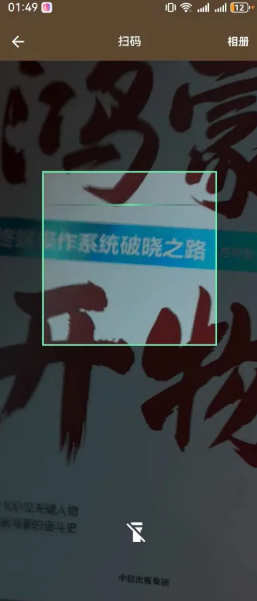
可以通过StatefulWidget实现扫码界面,在界面中间显示一个扫码框,在扫码框下方显示一个闪光灯图标,可以开启或者关闭闪光灯,标题栏右边显示相册文字,可以识别照片中的二维码,最终的效果如下:
扫码组件代码
可的定义一个MobileScannerController变量,并在initState对其进行初始化。
_scannerController = MobileScannerController(
detectionSpeed: DetectionSpeed.normal,
facing: CameraFacing.back, // 使用后置摄像头
torchEnabled: _isFlashOn, // 支持闪光灯
);然后在build方法中使用MobileScanner组件,并引入上面的_scannerController
MobileScanner(
controller: _scannerController,
onDetect: (capture) {
if (_isScanning && capture.barcodes.isNotEmpty) {
_handleScanResult(capture.barcodes);
}
},
),处理扫码获得的结果,当识别到多个码时,可以优先返回符合某一个规则的的码,比如https开头的码。
void _handleScanResult(List<Barcode>? barcodes) {
if (barcodes!.isEmpty) {
return;
}
for (Barcode barcode in barcodes) {
if (barcode.rawValue == null) {
continue;
}
if (barcode.rawValue!.startsWith("https")) {
_goBack(barcode);
return;
}
}
_goBack(barcodes.first);
}扫码框代码
扫码框为正方形,需要显示在界面正中间,扫码框的宽高是手机屏幕宽的三分之二。
final screenSize = MediaQuery.of(context).size; // 手机屏幕尺寸
final scanBoxSize = screenSize.width * 2 / 3; // 扫码框的宽高Positioned(
left: (screenSize.width - scanBoxSize) / 2,
top: (screenSize.height - scanBoxSize) / 4,
child: SizedBox(
width: scanBoxSize,
height: scanBoxSize,
child: Stack(
children: [
// 扫码框边框
CustomPaint(
painter: ScannerBorderPainter(),
size: Size(scanBoxSize, scanBoxSize),
),
],
),
),
),闪光灯代码
当闪光灯关闭时候,显示为闪光灯关闭的图标,当闪光灯打开时候,显示为闪关灯开启的图标,这个图标本质上是一个图标按钮IconButton,通过点击事件触发扫码_scannerController关闭或者开启闪光灯。
Positioned(
// bottom: 80,
// right: 50,
left: (screenSize.width - 30) / 2,
bottom: 80,
child: IconButton(
icon: Icon(
_isFlashOn ? Icons.flashlight_on : Icons.flashlight_off,
color: Colors.white,
size: 30,
),
onPressed: _toggleFlashlight,
),
),Future<void> _toggleFlashlight() async {
if (!_scannerController.value.isInitialized) return;
setState(() {
_isFlashOn = !_isFlashOn;
});
// print("torchState: ${_scannerController.value.torchState}");
if (_scannerController.value.torchState != TorchState.unavailable) {
await _scannerController.toggleTorch();
}
}相册代码
除了通过扫描识别二维码外,有时还需要识别图片中二维码,幸运的是,mobile_scanner库支持识别图片中的二维码,相册按钮显示在标题栏的右边,点击相册按钮就可以打开相册,然后从相册选择要识别二维码的图片。值得一提的是,可以使用image_picker第三方库读取相册。
appBar: AppBar(
title: const Text("扫码"),
centerTitle: true,
actions: [
TextButton(
onPressed: () {
_pickImageFromGallery();
},
child: const Text(
'相册',
style: TextStyle(
color: Colors.white,
fontWeight: FontWeight.bold,
fontSize: Global.textSizeBase),
))
],
),Future<void> _pickImageFromGallery() async {
final ImagePicker picker = ImagePicker();
final XFile? image = await picker.pickImage(source: ImageSource.gallery);
final BarcodeCapture? result = await _scannerController.analyzeImage(
File(image.path).path,
);
if (result?.barcodes.isNotEmpty == true) {
_handleScanResult(result?.barcodes);
} else {
ScaffoldMessenger.of(context).showSnackBar(
const SnackBar(content: Text("未识别到二维码")),
);
}
}到此,扫码功能就基本实现,扫码的结果可以返回给调用扫码界面的代码进一步处理。
- 为了保障您的信息安全,请勿上传您的敏感个人信息(如您的密码等信息)和您的敏感资产信息(如关键源代码、签名私钥、调试安装包、业务日志等信息),且您需自行承担由此产生的信息泄露等安全风险。
- 如您发布的内容为转载内容,请注明内容来源。
我要提问题
HarmonyOS 希望查看HarmonyOS支持的SDK的入口在哪里 (API12+)
HarmonyOS 是否有Scrcpy的SDK(API12+)
微信SDK是否支持免密支付/委托代扣
HarmonyOS ArkTS可以调用Java/kotlin吗?(API12+)
如何调试Flutter插件
HarmonyOS react-native项目如何扫码?(API12+)
HarmonyOS 开发中如何引入Flutter技术?(API12+)
HarmonyOS customScan扫二维码,如何实现连续扫码?(API12+)


苏公安网备 32011402010933号





