















版权声明:本文为博主原创文章,遵循 CC 4.0 BY-SA 版权协议,转载请附上原文出处链接和本声明。
本文链接:https://blog.csdn.net/qq_39045645/article/details/102817382
前言
排名不分先后,按自己的习惯来的。
总结经验,不喜勿喷哦~
一、tab切换
<view class=' {{currentTab==0 ? 'select' : ''}}' data-current='0' bindtap='swichNav'> tab1</view>
<view class=' {{currentTab==1 ? 'select' : ''}}' data-current='1' bindtap='swichNav'> tab2</view>
1
2
Page({
data:{
// tab切换
currentTab: 0,
},
swichNav: function (e) {
var that = this;
if (this.data.currentTab === e.target.dataset.current) {
return false;
} else {
that.setData({
currentTab: e.target.dataset.current
})
}
},
})
二、swiper切换
<view>
<text class=' {{currentTab==0 ? 'select' : ''}}' data-current='0' bindtap='swichNav'>tab1</text>
<text class=' {{currentTab==1 ? 'select' : ''}}' data-current='1' bindtap='swichNav'>tab2 </text>
<text class=' {{currentTab==2 ? 'select' : ''}}' data-current='2' bindtap='swichNav'>tab3 </text>
</view>
<swiper current='{{currentTab}}' bindchange='bindChange' style='height: {{aheight?aheight+'px':'auto'}}'>
<swiper-item>页面1</swiper-item>
<swiper-item>页面2</swiper-item>
<swiper-item>页面3</swiper-item>
</swiper>
Page({
data:{
currentTab: 0,
aheight: ''
},
// 滑动切换
bindChange: function (e) {
var that = this;
that.setData({
currentTab: e.detail.current
});
},
//点击tab切换
swichNav: function (e) {
var that = this;
if (this.data.currentTab === e.target.dataset.current) {
return false;
} else {
that.setData({
currentTab: e.target.dataset.current
})
}
},
// swiper 自适应高度
onLoad: function (options) {
var that = this
wx.getSystemInfo({
success: function (res) {
that.setData({
aheight: res.screenHeight
});
}
})
},
})
三、图片上传
<view class='ovf img_box'>
<block wx:for='{{img_arr}}' wx:key='{{item.id}}' bindtap='del'>
<view data-index='{{index}}'>
<view>
<image src='http://192.168.2.61/wx_ry/del.png' mode='widthFix' bindtap='deleteImage'></image>
</view>
<image src='{{item}}' mode='widthFix'></image>
</view>
</block>
<view>
<image src='http://192.168.2.61/wx_ry/add.png' mode='widthFix' bindtap='upimg'></image>
</view>
</view>
.upload { width: 20%; float: left; margin-top:33rpx ; }
.upload image{ width: 100%; }
.logoinfo{ width: 20%; float: left; margin-right:2% ; }
.del{ width: 20%; float: right; }
.del image{ width: 100%; }
.logoinfo image{ width: 100%; }
page({
data:{
img_arr: []
},
// 图片上传
upimg: function () {
var that = this;
if (this.data.img_arr.length < 3) {
wx.chooseImage({
sizeType: ['original', 'compressed'],
success: function (res) {
that.setData({
img_arr: that.data.img_arr.concat(res.tempFilePaths),
})
}
})
} else {
wx.showToast({
title: '最多上传三张图片',
icon: 'loading',
duration: 3000
});
}
},
// 删除图片
deleteImage: function (e) {
var that = this;
var index = e.currentTarget.dataset.index; //获取当前长按图片下标
console.log(that.data.img_arr)
wx.showModal({
title: '提示',
content: '确定要删除此图片吗?',
success: function (res) {
if (res.confirm) {
console.log('点击确定了');
that.data.img_arr.splice(index, 1);
} else if (res.cancel) {
console.log('点击取消了');
return false;
}
that.setData({
img_arr: that.data.img_arr
});
}
})
},
// 上传
upload: function () {
var that = this
for (var i = 0; i < this.data.img_arr.length; i++) {
wx.uploadFile({
url: 'https:***/submit',
filePath: that.data.img_arr[i],
name: 'content',
formData: adds,
success: function (res) {
console.log(res)
if (res) {
wx.showToast({
title: '已提交发布!',
duration: 3000
});
}
}
})
}
this.setData({
formdata: ''
})
},
// 提交
formSubmit: function (e) {
console.log('form发生了submit事件,携带数据为:', e.detail.value)
}
})
四、scroll-view滚动页
<scroll-view class='scroll-view_H ' scroll-x='true' bindscroll='scroll'>
<view style='display: inline-block'>
<view>1</view>
</view>
<view style='display: inline-block'>
<view>2</view>
</view>
</scroll-view>
.scroll-view_H{ white-space: nowrap; height: 600rpx; }
.listb{ padding: 25rpx; white-space: normal; }
五、授权登录
app.js
//app.js
App({
globalData: {
userInfo: null,
unionid:null,
token:''
},
onLaunch: function () {
/* 已授权之后,自动获取用户信息 */
// 判断是否授权
wx.getSetting({
success: (res) => { //箭头函数为了处理this的指向问题
if (res.authSetting['scope.userInfo']) {
console.log('已授权');
// 获取用户信息
wx.getUserInfo({
success: (res) => { //箭头函数为了处理this的指向问题
// this.globalData.isok=true
this.globalData.token='ok'
var that =this
console.log(res.userInfo); //用户信息结果
wx.getStorage({
key: 'unionid',
success(res) {
that.globalData.unionid=res.data
}
})
this.globalData.userInfo = res.userInfo;
if (this.userInfoReadyCallback) { //当index.js获取到了globalData就不需要回调函数了,所以回调函数需要做做一个判断,如果app.js中有和这个回调函数,那么就对这个函数进行调用,并将请求到的结果传到index.js中
this.userInfoReadyCallback(res.userInfo);
}
}
})
}
else{
console.log('未授权');
wx.removeStorage({
key: 'unionid'
})
}
}
})
}
})
wxml
<button open-type='getUserInfo' bindgetuserinfo='onGotUserInfo' data-url='../yzzs/yzzs'>
防疫针助手
</button>
index.js
// pages/index/index.js
const app = getApp()
Page({
data: {
token:''
},
onGotUserInfo: function (e) {
var that = this
if (this.data.token != 'ok' && app.globalData.token != 'ok') {
wx.getSetting({
success: (res) => { //箭头函数为了处理this的指向问题
if (res.authSetting['scope.userInfo']) {
wx.login({
success: function (data) {
console.log('获取登录 Code:' + data.code)
var postData = {
code: data.code
};
wx.request({
url: 'https://m.renyiwenzhen.com/rymember.php?mod=xcxlogin&code=' + postData.code + '&nickname=' + e.detail.userInfo.nickName,</span></p><p><span style="font-size: 16px;"> data: {},</span></p><p><span style="font-size: 16px;"> header: {</span></p><p><span style="font-size: 16px;"> 'content-type': 'application/json'
},
success: function (res) {
console.log(res.data);
that.data.token='ok';
wx.setStorage({
key: 'unionid',
data: res.data.unionid
})
wx.navigateTo({
url: e.target.dataset.url
})
},
fail: function () {
console.log('1');
}
})
},
fail: function () {
console.log('登录获取Code失败!');
}
})
}
}
})
} else{
wx.navigateTo({
url: e.target.dataset.url
})
}
}
})
六、发送请求
wx.request({
url: 'https://m.renyiwenzhen.com/xcx_ajax.php?action=babylist', //仅为示例,并非真实的接口地址
method: 'post',
data: {
unionid: uni
},
header: {
'content-type': 'application/x-www-form-urlencoded' // 默认值
},
success(res) {
// console.log(uni)
console.log(res.data)
that.setData({
list: res.data.bblist
})
}
})
七、标题栏及底部栏
全局标题栏
'window': {
'backgroundTextStyle': 'light',
'navigationBarBackgroundColor': '#3EC8C8',
'navigationBarTitleText': '乳孕呵护',
'navigationBarTextStyle': 'white'
}
局部标题栏
{
'usingComponents': {},
'navigationBarBackgroundColor': '#fff',
'navigationBarTextStyle': 'black',
'navigationBarTitleText': '附近医院'
}
全局底部栏
'tabBar': {
'color': '#e4e4e4',
'selectedColor': '#333',
'list': [
{
'pagePath': 'pages/index/index',
'text': '发现',
'iconPath': './images/find.png',
'selectedIconPath': './images/finded.png'
},
{
'pagePath': 'pages/his/his',
'text': '医院',
'iconPath': './images/his.png',
'selectedIconPath': './images/hised.png'
},
{
'pagePath': 'pages/stu/stu',
'text': '经验',
'iconPath': './images/stu.png',
'selectedIconPath': './images/stued.png'
},
{
'pagePath': 'pages/my/my',
'text': '我的',
'iconPath': './images/my.png',
'selectedIconPath': './images/myed.png'
}
]
}
八、navigator
1、wxml
<navigator url='/pages/hishome/hishome' open-type='navigate' hover-class='none'>
底部栏没有的路由
</navigator>
<navigator open-type='switchTab' url='/pages/his/his' hover-class='none'>
底部栏有的路由
</navigator>
2、js
go: function (e) {
wx.navigateTo({
url: '../eatxq/eatxq?id=' + e.currentTarget.dataset.id + '&name=' + e.currentTarget.dataset.name</span></p><p><span style="font-size: 16px;"> })</span></p><p><span style="font-size: 16px;"> }</span></p><p><br/></p><p><span style="font-size: 16px;">九、加载条</span></p><p><span style="font-size: 16px;"><loading hidden='{{onff}}'>加载中</loading>
<view>页面</view>
加载完成true
wx.request({
url: 'https://m.renyiwenzhen.com/xcx_ajax.php?action=caneatsearch',
method: 'post',
header: {
'content-type': 'application/x-www-form-urlencoded' // 默认值
},
data: {
search: options.search
},
success(res) {
that.setData({
list: res.data.fllist,
onff: true
})
}
})
十、富文本处理
<view>
<rich-text nodes='{{msg}}' ></rich-text>
</view>
利用正则修改收到的数据
wx.request({
url: 'https://m.renyiwenzhen.com/xcx_ajax.php?action=cjdetail',
method: 'post',
data: {
id: options.id
},
header: {
'content-type': 'application/x-www-form-urlencoded' // 默认值
},
success(res) {
that.setData({
msg: res.data.cjmag.cjxq.replace(/\<p>/g, '<p style='line-height: 24px; font-size:15px;text-align: justify;margin:15px 0;'>')
})
}
})
十一、filter过滤数据
1、在根目录下的utils文件夹里创建一个名为filter.wxs文件
2、写入自己要定义的条件
var xb=function (v) {
var xingb=''
if(v==1){
xingb='男宝宝'
}
else{
xingb='女宝宝'
}
return xingb
}
module.exports = {
xb:xb
}
3、在页面中引入使用
<wxs src='../../utils/filter.wxs' module='filter' />
<view><text>{{filter.xb(isxb)}}</text></view>
十二、检测版本更新
app.js
onLaunch: function () {
if (wx.canIUse('getUpdateManager')) {
const updateManager = wx.getUpdateManager()
updateManager.onCheckForUpdate(function (res) {
// 请求完新版本信息的回调
if (res.hasUpdate) {
updateManager.onUpdateReady(function () {
wx.showModal({
title: '更新提示',
content: '新版本已经准备好,是否重启应用?',
success: function (res) {
// res: {errMsg: “showModal: ok”, cancel: false, confirm: true}
if (res.confirm) {
// 新的版本已经下载好,调用 applyUpdate 应用新版本并重启
updateManager.applyUpdate()
}
}
})
})
updateManager.onUpdateFailed(function () {
// 新的版本下载失败
wx.showModal({
title: '已经有新版本了哟~',
content: '新版本已经上线啦,请您删除当前小程序,重新搜索打开哟'
})
})
}
})
}
}
十三、点击tab跳转对应的的项目页面
我们经常会遇到这种需求:
点击对应的的tab,这里比如说是A页。
跳转到对应项目的页面,这里比如说是B页。
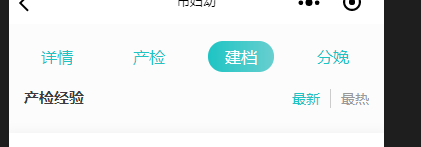
A页:
<view class='project_nab ovf'>
<view> 详情 </view>
<view bindtap='goitem' data-url='jd'>建档</view>
<view bindtap='goitem' data-url='cj'>产检</view>
<view bindtap='goitem' data-url='fm'>分娩</view>
</view>
goitem:function (e) {
wx.navigateTo({
url: '/pages/item/item?url=' + e.target.dataset.url</span></p><p><span style="font-size: 16px;"> })</span></p><p><span style="font-size: 16px;"> },</span></p><p><br/></p><p><span style="font-size: 16px;">B页:</span></p><p><span style="font-size: 16px;"><br/></span></p><p><span style="font-size: 16px;"> <view class='top1 ovf'>
<view class='' ><navigator url='/pages/hishome/hishome' open-type='navigate'>详情</navigator></view>
<view class=' {{currentTab==0 ? 'select' : ''}}' data-current='0' bindtap='swichNav'> 产检 </view>
<view class=' {{currentTab==1 ? 'select' : ''}}' data-current='1' bindtap='swichNav'> 建档 </view>
<view class=' {{currentTab==2 ? 'select' : ''}}' data-current='2' bindtap='swichNav'> 分娩 </view>
</view>
onLoad: function (options) {
var that = this;
console.log(options.url)
if (options.url === 'cj') {
that.setData({
currentTab: '0',
btn: '产检',
set: 'cj'
});
} else if (options.url === 'jd') {
that.setData({
currentTab: '1',
btn: '建档',
set: 'jd'
});
} else {
that.setData({
currentTab: '2',
btn: '分娩',
set: 'fm'
});
}
}
未完待续……
————————————————
版权声明:本文为CSDN博主「Vam的金豆之路」的原创文章,遵循 CC 4.0 BY-SA 版权协议,转载请附上原文出处链接及本声明。
原文链接:https://blog.csdn.net/qq_39045645/article/details/102817382


 苏公安网备 32011402010933号