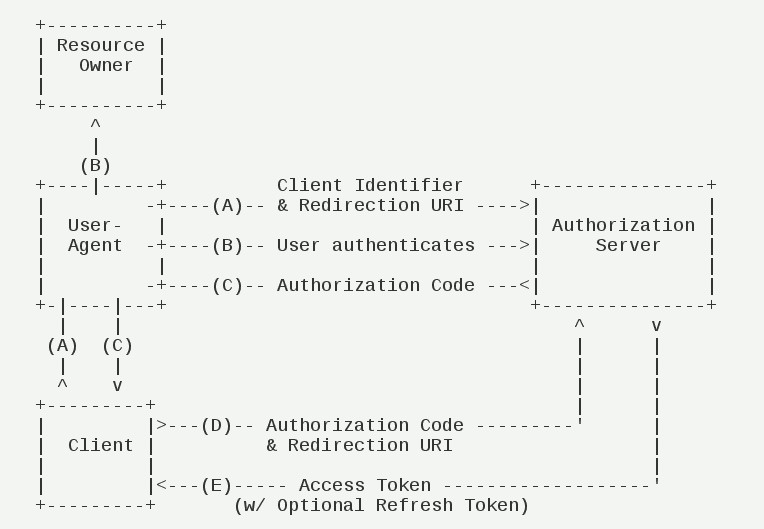
The open platform provides user access services for third-party apps through OAuth 2.0, an open authorization protocol. With this protocol, third-party apps can access resources authorized by users without obtaining user account names and passwords. For more information about OAuth 2.0, please visit the OAuth 2.0 official website.
Create and manage an app, and obtain the APP ID (passed as the value of client_id later) and APP SECRET (passed as the value of client_secret later).
1. The app sends an authorization request to the Huawei OAuth 2.0 service.
2. The Huawei OAuth 2.0 service displays an authorization page to notify the user of the information that the app will obtain.
3. After the user authorizes the app, it receives an authorization code.
The app sends a request to the Huawei OAuth 2.0 service to obtain an access token.
With the access token, the app can access the authorized data using Huawei's open APIs.
1. Obtain user authorization and generate an authorization code.
2. Send a request containing the authorization code to apply for an access token from Huawei OAuth 2.0.
In this mode, the app sends two requests:
(1) https://oauth-login.cloud.huawei.com/oauth2/v2/authorize
This request is initiated by the browser. An authorization code is generated and forwarded to the API (redirect_uri) of the app through 302 redirection of the browser.
(2) https://oauth-login.cloud.huawei.com/oauth2/v2/token
This request is initiated by the app server. After receiving the authorization code, the app calls the API (redirect_uri) to obtain the access token.
| Parameter | Optional/Mandatory | Description |
|---|---|---|
client_id | Mandatory | App ID obtained when the app is registered on HUAWEI Developer. |
response_type | Mandatory | In this case, this parameter must be set to code. |
redirect_uri | Mandatory | Redirection URI after authorization, that is, URI for receiving the authorization code. The value must be the same as the redirection address registered on HUAWEI Developer. Parameters can be added to the end of the value. For example, the redirection URI is https://www.thirdwebdemo.com/redirect_url, and the value of this parameter may like this after a parameter is added: https://www.thirdwebdemo.com/redirect_url?somearg=XXXXXX NOTE: Pass the value ofredirect_urithat you set here when you call theoauth2/v2/tokenAPI later. |
scope | Optional | Access scope of the access token, that is, the list of permissions assigned by users. |
state | Optional | State. When the authorization server performs redirection (redirecting a user's browser to the URI specified by redirect_uri), this parameter is returned in Query Parameter. According to the OAuth 2.0 protocol, you are advised to use the state parameter to prevent CSRF attacks. |
access_type | Optional | If refresh_token needs to be returned, set this parameter to offline. |
display | Optional | Display style of the sign-in and authorization pages. The default value is page. For the app with Huawei Mobile Services (APK), set this parameter to mobile. |
Example:
- https://oauth-login.cloud.huawei.com/oauth2/v2/authorize?response_type=code&client_id=59395&redirect_uri=https%3A%2F%2Fwww.example.com%2Foauth_redirect&access_type=offline&scope=https%3A%2F%2Fwww.huawei.com%2Fauth%2Faccount%2Fbase.profile%20https%3A%2F%2Fwww.huawei.com%2Fauth%2Faccount%2Fmobile.number
| Parameter | Description |
|---|---|
authorization_code | Authorization code. |
state | The value must be the same as the value of state passed when the oauth2/v2/authorize API is called. |
Example:
- HTTP/1.1 302 Found
- Location:
- https://www.example.com/oauth_redirectauthorization_code=CFwbd205%2B%2FPzudRlhvPW2E6NImLzsI77qX8rAPAfd7VF8jlEQqTqRQiZfQ2JQuFvgHMw2TIFT9zKTGw1X7V%2FDCYTPx5IqoVoek2YbNXbXb4kIR1oHIRfOpSQKHEAd5LoKsTlkcZrwTY3JgsJb5EfKEeVvfjjxkqbe%2B0dtfL%2F557cuS9wOeau%2BXpqvJn4zScY8mF5dD31fhs%2FAHiW%2Bg%2BX6r8N2WWUyn1wDOD6sKng9XZfukliGa21TFlXNRcliBO4v6fe3hvEgGCATMQsXvW2md5rJzZ4Wg%3D%3D&state=xjps23d
| Error Code | Sub-error Code | Description | Suggestion |
|---|---|---|---|
1102 | 20001 | The client_id parameter is left empty. | The redirection endpoint of the app does not receive the request. The error code is displayed on the browser. Locate the input parameter error based on the error code. |
1101 | 20002 | The format of client_id is incorrect. | |
1101 | 20003 | The client_id parameter does not exist in the system. | |
1102 | 20011 | The response_type parameter is empty. | |
1101 | 20012 | The format of response_type is incorrect. | |
1102 | 20021 | The redirect_uri parameter is empty. | |
1101 | 20022 | The format of redirect_uri is incorrect. | |
1101 | 20023 | The value of redirect_uri is different from the redirection address registered on HUAWEI Developer and is not whitelisted in the app's OAuth settings. | |
1101 | 20031 | The format of state is incorrect. | The redirection endpoint of the service receives the request, and an error code is appended to the end of the request URI. Locate the input parameter error based on the error code. |
1101 | 20041 | The format of scope is incorrect. | |
1101 | 20042 | The scope parameter does not exist in the system. | |
1101 | 20051 | The format of access_type is incorrect. | |
1101 | 20061 | The format of lang is incorrect. | |
1101 | 20071 | The format of display is incorrect. | |
1203 | Other error codes | Other errors, such as network disconnection between internal components. | If an error code other than those listed in the table is displayed, contact support personnel to locate the fault. |
Example:
If the verification of client_id and redirect_uri is successful, the HTTP response status code 302 is returned, and redirection is performed. The error code is appended to redirect_uri.
- HTTP/1.1 302 Found
- Location:
- https://www.example.com/?error=1101&error_description=The+request+is+invalid&sub_error=20041
If the verification of client_id and redirect_uri fails, the HTTP response status code 400 is returned with a body in JSON format.
- {"error":1101,"sub_error":20023,"error_description":"The request is invalid"}
Parameter | Mandatory/Optional | Type | Description |
grant_type | Mandatory | string | The value is always an authorization code. |
code | Mandatory | string | Authorization code obtained through the /oauth2/v2/authorize API. The code is one-off and has a validity period of only 5 minutes. The code obtained five minutes ago or the code that has been used cannot be used again. |
client_id | Mandatory | int | The value must be the same as the value of client_id passed when the /oauth2/v2/authorize API is called. |
client_secret | Mandatory | string | Client ID password, which can be queried from HUAWEI Developer. |
redirect_uri | Mandatory | string | The value must be the same as the value of redirect_uri passed when the /oauth2/v2/authorize API is called. |
Example:
- POST /oauth2/v2/token HTTP/1.1
- Host: oauth-login.cloud.huawei.com
- Content-Type: application/x-www-form-urlencoded
- grant_type=authorization_code&code=ANXxSNjwQDugOnqeikRMu2bKaXCdlLxn&client_id=12345&client_secret=0rDSjzQ20XUj5itV7WRtznPQSzr5pVw2&redirect_uri=https%3A%2F%2Fwww.example.com%2Foauth_redirect
Parameter | Type | Description |
access_token | string | Access token. When you run the CURL command or use the postman tool to manually obtain the access token, check whether the JSON string contains escape characters. The access token is correct only when \/ is restored to / in it. Otherwise, an error indicating that the access token is invalid is reported when the access token is used. For coding, any third-party library can be used to correctly parse the JSON string and obtain the correct access token. |
expires_in | string | Access token validity period, in seconds. |
refresh_token | string | Token used to refresh an access token. The default validity period is 180 days. The refresh_token parameter is returned only when the access_type parameter is set to offline when the /oauth2/v2/authorize API is called to obtain the authorization code. |
scope | string | Access scope of the access token, that is, the list of permissions assigned by users. |
Example:
- HTTP/1.1 200 OK
- Content-Type: text/html;charset=UTF-8
- {
- "access_token": "CFyJ21sNODl16eV9y2vu3CwQk9DBr32BkOcxxgAd7MZUR5th1giyTk5\/kA+QDAyxou+\/5U2zzBRcf3qgLkkFdtbbC+m
- M3zFV7xj7CCEMHc5Tw92al0Y=",
- "expires_in": 3600,
- "refresh_token": "CF13G0sRaGybtYt7SIyeUILNORtTFwMgz4ao5C7j7vtgLPt6ogmXKjdI8RS\/YlyS71z4DyP6kEMnOrRlmNK0KhdOUNW
- d+qVLLRsEEHkqRIKpuAkPvL8=",
- "scope": "https:\/\/www.huawei.com\/auth\/account\/base.profile",
- "token_type": "Bearer"
- }
Error Code | Sub-error Code | Description | Suggestion |
1102 | 20001 | The client_id parameter is left empty. | The input parameters are incorrect. Check the parameter settings. |
1101 | 20002 | The format of client_id is incorrect. | |
1102 | 20171 | The client_secret parameter is left empty. | |
1101 | 20172 | The format of client_secret is incorrect. | |
1102 | 20181 | The grant_type parameter is left empty. | |
1101 | 20182 | The value of grant_type is incorrect. | |
1203 | 12303 | The client_id parameter does not exist in the system. | |
1203 | 12304 | Incorrect client_secret. | |
1102 | 20151 | The code parameter is left empty. | |
1101 | 20152 | The format of code is incorrect. | |
1102 | 20021 | The redirect_uri parameter is empty. | |
1101 | 20022 | The format of redirect_uri is incorrect. | |
1103 | 20153 | The code parameter cannot be parsed. | |
1101 | 20154 | The value of client_id in code is different from that of the input parameter. | |
1101 | 20024 | The value of redirect_uri in code is different from that of the input parameter. | |
1101 | 20155 | The code parameter has expired. | A new value of code needs to be obtained. |
1101 | 20156 | The value of code has been used. | |
1203 | Other error codes | Other errors, such as network disconnection between internal components. | (1) It is recommended that you call the API again. The call may succeed. (2) Sub-error codes other than those mentioned above are included in this branch. (3) It is recommended that you print these sub-error codes on a piece of paper for fault locating. |
Example:
- HTTP/1.1 400 Bad Request
- Content-Type: text/html;charset=UTF-8
- {"error":1101,"sub_error":20023,"error_description":"The request is invalid"}
An access token is obtained using an app key. This mode is applicable to all apps.
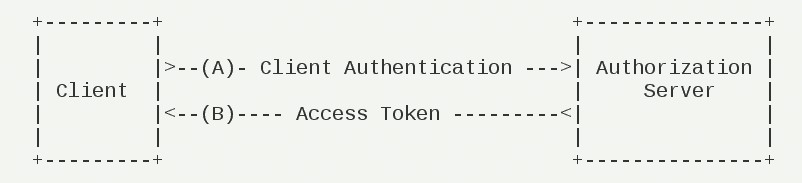
In this mode, user authorization is not required. The app server sends a request to Huawei OAuth2.0. The request address is as follows:
https://oauth-login.cloud.huawei.com/oauth2/v2/token
Parameter | Mandatory/Optional | Type | Description |
grant_type | Mandatory | string | The value is always client_credentials. |
client_id | Mandatory | int | App ID obtained when the app is created. |
client_secret | Mandatory | string | App ID password, which can be queried from HUAWEI Developer. |
Example:
- POST /oauth2/v2/token HTTP/1.1
- Host: oauth-login.cloud.huawei.com
- Content-Type: application/x-www-form-urlencoded
- grant_type=client_credentials&client_id=12345&client_secret=bKaZ0VE3EYrXaXCdCe3d2k9few
Parameter | Type | Description |
access_token | string | Access token.When you run the CURL command or use the postman tool to manually obtain the access token, check whether the JSON string contains escape characters. The access token is correct only when \/ is restored to / in it. Otherwise, an error indicating that the access token is invalid is reported when the access token is used. For coding, any third-party library can be used to correctly parse the JSON string and obtain the correct access token. |
expires_in | int | Validity period of an access token, in seconds. |
Example:
- HTTP/1.1 200 OK
- Content-Type: text/html;charset=UTF-8
- {"access_token":"CFyJ7eTl8WIPi9603E7Ro9Icy+K0JYe2qVjS8uzwCPltlO0fC7mZ0gzZX9p8CCwAaiU17nyP+N8+ORRzjjk1EA==","expires_in":3600,"token_type":"Bearer"}
ode | Sub-error Code | Description | Suggestion |
1102 | 20001 | The client_id parameter is left empty. | If the error is reported, check the parameter setting. |
1101 | 20002 | The format of client_id is incorrect. | |
1102 | 20171 | The client_secret parameter is left empty. | |
1101 | 20172 | The format of client_secret is incorrect. | |
1102 | 20181 | The grant_type parameter is left empty. | |
1101 | 20182 | The value of grant_type is incorrect. | |
1203 | 12303 | The client_id parameter does not exist in the system. | |
1203 | 12304 | Incorrect client_secret. | |
1101 | 20173 | The value of client_secret is incorrect. | |
1203 | Other error codes | Other errors, such as network disconnection between internal components. | (1) It is recommended that you call the API again. The call may succeed. (2) Sub-error codes other than those mentioned above are included in this branch. (3) It is recommended that you print these sub-error codes on a piece of paper for fault locating. |
Example:
- HTTP/1.1 400 Bad Request
- Content-Type: text/html;charset=UTF-8
- {"error":1203,"sub_error":12303,"error_description":"The request is invalid"}
In the authorization code mode, Huawei OAuth2.0 can return a refresh token. The validity period of the refresh token is much longer than that of the access token. When the access token is about to expire, the refresh token is used to obtain a new access token instead of triggering the foreground page redirection each time. If the error code returned by the API indicates that the refresh token has expired or becomes invalid, call the /oauht/v2/authorize API again.
Request URL: https://oauth-login.cloud.huawei.com/oauth2/v2/token
arameter | Mandatory/Optional | Type | Description |
grant_type | Mandatory | string | The value is always refresh_token. |
refresh_token | Mandatory | string | Enter refresh_token obtained in authorization code mode. |
client_id | Mandatory | int | The value of this parameter must be the same as that of client_id passed for calling the /oauth2/v2/authorize API. |
client_secret | Mandatory | string | Enter the password of the app ID, which can be obtained from HUAWEI Developer. |
Example (parameters set here only for your reference):
- POST /oauth2/v2/token HTTP/1.1
- Host: oauth-login.cloud.huawei.com
- Content-Type: application/x-www-form-urlencoded
- grant_type=refresh_token&client_id=12345&client_secret=bKaZ0VE3EYrXaXCdCe3d2k9few&refresh_token=CF2Mm03n0aos9iZZ8nIhfyDtoXy74CXeBi50gVVhMpB0IUzlv9ZwizEvTBhVoF820ZPim0JwNR9j2p1qgEQWnIVYZRlp4T6ezMgekUnsHBkvNev5rd2MdfQMLP
Parameter | Type | Description |
access_token | string | Access token.When you run the CURL command or use the postman tool to manually obtain the access token, check whether the JSON string contains escape characters. The access token is correct only when \/ is restored to / in it. Otherwise, an error indicating that the access token is invalid is reported when the access token is used. For coding, any third-party library can be used to correctly parse the JSON string and obtain the correct access token. |
expires_in | int | Validity period of an access token, in seconds. |
refresh_token | string | Refresh token used to refresh an access token. The default validity period of the refresh token is 180 days. Whether to return the refresh token can be set on the server. The returned refresh token may be a new refresh token (validity period: 180 days) or the same as the refresh token passed to the access token refresh request. |
scope | string | Access scope of the access token, that is, the list of permissions assigned by users. (Users may cancel certain request permissions on the authorization page.) |
Example:
- HTTP/1.1 200 OK
- Content-Type: text/html;charset=UTF-8
- {"access_token":"CFyfW\/LhbSmXglCBtzRGbHaHMsnpVfS1ny+AQes6jiY4ZV+TQjxf7DvXS0ywDuwWaiK0CUka3AWUpCHL01dikfKGalCNjS7PZWzolrIFInhHUm7Lzt0IYeiU3QSZHmWf","expires_in":3600,"scope":"
- https:\/\/www.huawei.com\/auth\/account\/accountlist
- https:\/\/www.huawei.com\/auth\/account\/mobile.number
- https:\/\/www.huawei.com\/auth\/account
- https:\/\/smarthome.com\/auth\/smarthome\/devices
- https:\/\/smarthome.com\/auth\/smarthome\/skill
- https:\/\/www.huawei.com\/auth\/account\/base.profile","token_type":"Bearer"}
Error Code | Sub-error Code | Description | Suggestion |
1102 | 20001 | The client_id parameter is left empty. | (1) It is recommended that only sub-error codes be identified to simplify the logic. Main error codes are used for compatibility with earlier versions. (2) These sub-error codes indicate parameter errors. These issues cannot be resolved by calling the API again. (3) Parameter errors usually occur in the debugging phase or in the initial phase of service rollout. If such an error occurs, it is recommended that you check the code or configuration items and do not forcibly sign out a user. |
1101 | 20002 | The format of client_id is incorrect. | |
1102 | 20171 | The client_secret parameter is left empty. | |
1101 | 20172 | The format of client_secret is incorrect. | |
1102 | 20181 | The grant_type parameter is left empty. | |
1101 | 20182 | The value of grant_type is incorrect. | |
1203 | 12303 | The client_id parameter does not exist in the system. | |
1203 | 12304 | Incorrect client_secret. | |
1102 | 20191 | The refresh_token parameter is left empty. | |
1101 | 20192 | The format of refresh_token is incorrect. | |
1101 | 20154 | The value of client_id in refresh_token is different from that in the input parameters. | |
1203 | 31218 | The refresh_token parameter does not meet the regular expression requirements. | |
1203 | 31202 | The refresh token cannot be parsed. The refresh token meets the regular expression requirements, but cannot be parsed. Example: The original refresh token is truncated or transcoded. | |
1203 | 11205 | The refresh token has expired. | If either of the two sub-error codes is returned, the app needs to call the /oauth2/v2/authorize API again to trigger re-authorization. |
1203 | 31204 | The refresh token is in the blacklist because the user changes the password or signs out. | |
1203 | Other error codes | Other errors, such as network disconnection between internal components. | (1) It is recommended that you call the API again. The call may succeed. (2) Sub-error codes other than those mentioned above are included in this branch. (3) It is recommended that you print these sub-error codes on a piece of paper for fault locating. |
Example:
- HTTP/1.1 400 Bad Request
- Content-Type: text/html;charset=UTF-8
- {"error":1203,"sub_error":31204,"error_description":"unknown error"}