This module provides entrances to main map functions.
Atomic service API: This API can be used in atomic services since API version 4.1.0(11).
Start version: 4.1.0(11)
This module provides the following classes or APIs to achieve functions such as moving maps and adding overlays.
Name | Type | Description |
|---|---|---|
MapComponentController | Main entrance for accessing functions of Map Kit. All map-related methods are accessed through this entrance. | |
BaseOverlay | Base class of overlays. Overlays such as Marker, MapCircle, and MapPolyline inherit from this base class. | |
Marker | Marker. | |
MapPolyline | MapPolyline. | |
MapPolygon | MapPolygon, which can be convex or concave. It can span the 180th meridian and have holes that are not filled in. | |
MapCircle | MapCircle. | |
CameraUpdate | Camera movement parameters. | |
BasePriorityOverlay | Base class, which defines overlays supporting priority settings. PointAnnotation and Bubble inherit from this base class. | |
PointAnnotation | PointAnnotation on the map. | |
Bubble | Bubble. | |
Projection | Used for conversion between screen coordinates and longitude-latitude coordinates. | |
LatLngBoundsUtils | LatLngBounds utility class. | |
Animation | Animation abstract class. | |
AlphaAnimation | Animation class for controlling transparency. | |
RotateAnimation | Animation class for controlling rotation. | |
ScaleAnimation | Animation class for controlling scaling. | |
TranslateAnimation | Animation class for controlling movement. | |
FontSizeAnimation | Animation class for controlling the font size. | |
PlayImageAnimation | Frame animation for playing multiple images. | |
AnimationSet | Set of animation classes. | |
ClusterOverlay | ClusterOverlay. | |
ImageOverlay | ImageOverlay. | |
BuildingOverlay | BuildingOverlay. | |
TraceOverlay | TraceOverlay. | |
MapArc | MapArc. | |
SpatialRelationUtil | Utility class for calculating point-surface relationships. | |
AnimateResult | Animation result class. | |
MarkerDelegate | Marker delegate. | |
MapEventManager | Map event listener manager. | |
AnimationFillMode | Enumeration class, which specifies the status after the animation ends. | |
AnimationRepeatMode | Enumeration class, which specifies the animation replay mode. |
This module provides the following methods to achieve functions such as resetting the map status, setting the longitude and latitude ranges, and zooming in or out on a map.
Name | Description |
|---|---|
Sets a new map camera position. | |
Sets the map center and zoom level. | |
Sets the longitude and latitude ranges of a map, and the padding between the map region and map edges. | |
Sets the longitude and latitude ranges of a map, the height and width of the longitude and latitude rectangle range, and the padding between the map region and map edges. | |
Sets the longitude and latitude ranges of a map, and the padding between the map region and the four map edges. | |
Moves the map center point by pixel. | |
Zooms in or out on a map by a specified value with the specified pixel point as the center. | |
Zooms in on a map by 1 level. | |
Zooms out on a map by 1 level. | |
Sets the zoom level of a map. | |
Calculates the distance between coordinate points. | |
Converts coordinates. The convertCoordinateSync API is recommended. | |
Converts coordinates. | |
Performs coordinate rectification. |
MapComponentController
Main entrance for accessing functions of Map Kit. All map-related methods are accessed through this entrance.
Model restriction: This API can be used only in the stage model.
Atomic service API: This API can be used in atomic services since API version 4.1.0(11).
System capability: SystemCapability.Map.Core
Start version: 4.1.0(11)
Example:
import { MapComponent, mapCommon, map } from '@kit.MapKit';
import { AsyncCallback } from '@kit.BasicServicesKit';

@Entry
@Component
struct HuaweiMapDemo {
  private TAG = "HuaweiMapDemo";
  private mapOptions?: mapCommon.MapOptions;
  private callback?: AsyncCallback<map.MapComponentController>;
  private mapController?: map.MapComponentController;
  private mapEventManager?: map.MapEventManager;

  aboutToAppear(): void {
    // Map initialization parameters used to set the coordinates of the map center point and zoom level.
    this.mapOptions = {
      position: {
        target: {
          latitude: 39.9,
          longitude: 116.4
        },
        zoom: 10
      }
    };

    // Map initialization callback.
    this.callback = async (err, mapController) => {
      if (!err) {
        // Obtain mapController to operate the map.
        this.mapController = mapController;
        // Return the event listener manager of the map component.
        this.mapEventManager = this.mapController.getEventManager();
        let callback = () => {
          console.info(this.TAG, `on-mapLoad`);
        }
        this.mapEventManager.on("mapLoad", callback);

        // Execute a customized method.
        this.customizedMethod();
      }
    };
  }

  // Customized method.
  private customizedMethod() {
    // ...
  }

  build() {
    Stack() {
      // Call the MapComponent component to initialize the map.
      MapComponent({ mapOptions: this.mapOptions, mapCallback: this.callback })
        .width('100%')
        .height('100%')
    }.height('100%')
  }
} 
The methods in MapComponentController need to be executed in the map initialization callback or in customized methods in the preceding example.
[h2]animateCamera
animateCamera(update: CameraUpdate, duration?: number): void
Updates the camera position in animation mode within a specified period of time.
Model restriction: This API can be used only in the stage model.
Atomic service API: This API can be used in atomic services since API version 4.1.0(11).
System capability: SystemCapability.Map.Core
Start version: 4.1.0(11)
Parameters:
Name | Type | Mandatory | Description |
|---|---|---|---|
update | Yes | Camera position change. | |
duration | number | No | Animation duration, in milliseconds. The default value is 250. The value must be greater than 0. If this parameter is set to a value less than or equal to 0, the default value will be used. |
Example:
let target: mapCommon.LatLng = {
  latitude: 39.9,
  longitude: 116.4
};
let cameraPosition: mapCommon.CameraPosition = {
  target: target,
  zoom: 10
};
// Create a CameraUpdate object.
let cameraUpdate: map.CameraUpdate = map.newCameraPosition(cameraPosition);
// Move the camera in animation mode within 1000 ms.
this.mapController.animateCamera(cameraUpdate, 1000);
[h2]animateCameraStatus
animateCameraStatus(update: CameraUpdate, duration?: number): Promise<AnimateResult>
Updates the camera position in animation mode within a specified period of time, and returns the animation result. This API returns the result asynchronously through a promise.
Model restriction: This API can be used only in the stage model.
Atomic service API: This API can be used in atomic services since API version 5.0.0(12).
System capability: SystemCapability.Map.Core
Start version: 5.0.0(12)
Parameters:
Name | Type | Mandatory | Description |
|---|---|---|---|
update | Yes | Camera position change. | |
duration | number | No | Animation duration, in milliseconds. The default value is 250. The value must be greater than 0. If this parameter is set to a value less than or equal to 0, the default value will be used. |
Returns:
Type | Description |
|---|---|
Promise<AnimateResult> | AnimateResult object returned through a promise. |
Error codes:
For details about the error codes, please refer to ArkTS API Error Codes.
Error Code | Error Message |
|---|---|
401 | Invalid input parameter. |
Example:
let target: mapCommon.LatLng = {
  latitude: 39.9,
  longitude: 116.4
};
let cameraPosition: mapCommon.CameraPosition = {
  target: target,
  zoom: 10
};
// Create a CameraUpdate object.
let cameraUpdate: map.CameraUpdate = map.newCameraPosition(cameraPosition);
// Move the camera in animation mode within 1000 ms.
let animateResult = await this.mapController.animateCameraStatus(cameraUpdate, 1000);
[h2]animateCameraWithMarker
animateCameraWithMarker(update: CameraUpdate, marker: Marker, duration: number): Promise<AnimateResult>
Updates the camera position in animation mode within a specified period of time, and update a specified Marker. This API returns the result asynchronously through a promise.
Model restriction: This API can be used only in the stage model.
Atomic service API: This API can be used in atomic services since API version 5.0.0(12).
System capability: SystemCapability.Map.Core
Start version: 5.0.0(12)
Parameters:
Name | Type | Mandatory | Description |
|---|---|---|---|
update | Yes | Camera position change. | |
marker | Yes | Marker. | |
duration | number | Yes | Animation duration, in milliseconds. The default value is 250. The value must be greater than 0. If this parameter is set to a value less than or equal to 0, the default value will be used. |
Returns:
Type | Description |
|---|---|
Promise<AnimateResult> | AnimateResult object returned through a promise. |
Example:
let target: mapCommon.LatLng = {
  latitude: 39.9,
  longitude: 116.4
};
let cameraPosition: mapCommon.CameraPosition = {
  target: target,
  zoom: 10
};
// Create a CameraUpdate object.
let cameraUpdate: map.CameraUpdate = map.newCameraPosition(cameraPosition);
// Marker initialization parameters.
let markerOptions: mapCommon.MarkerOptions = {
  position: {
    latitude: 39.9,
    longitude: 116.4
  },
  title: "dhw",
  icon: 'icon/icon.png',
  clickable: true
};
// Create a Marker.
let marker = await this.mapController?.addMarker(markerOptions);
// Move the camera in animation mode within 1000 ms and update the specified Marker.
await this.mapController.animateCameraWithMarker(cameraUpdate, marker, 1000);
[h2]animateCameraWithMarkers
animateCameraWithMarkers(update: CameraUpdate, markers: Array<Marker>, duration: number): Promise<AnimateResult>
Updates the camera position in animation mode within a specified period of time, and updates specified Markers. A group of Markers can be passed. This API returns the result asynchronously through a promise.
Model restriction: This API can be used only in the stage model.
Atomic service API: This API can be used in atomic services since API version 5.0.0(12).
System capability: SystemCapability.Map.Core
Start version: 5.0.0(12)
Parameters:
Name | Type | Mandatory | Description |
|---|---|---|---|
update | Yes | Camera position change. | |
markers | Array<Marker> | Yes | A group of Markers. NOTE: The positions of these Makers must be the same. Otherwise, error code 401 will be returned. |
duration | number | Yes | Animation duration, in milliseconds. The default value is 250. The value must be greater than 0. If this parameter is set to a value less than or equal to 0, the default value will be used. |
Returns:
Type | Description |
|---|---|
Promise<AnimateResult> | AnimateResult object returned through a promise. |
Error codes:
For details about the error codes, please refer to ArkTS API Error Codes.
Error Code | Error Message |
|---|---|
401 | Invalid input parameter. |
Example:
let target: mapCommon.LatLng = {
  latitude: 39.9,
  longitude: 116.4
};
let cameraPosition: mapCommon.CameraPosition = {
  target: target,
  zoom: 10
};
// Create a CameraUpdate object.
let cameraUpdate: map.CameraUpdate = map.newCameraPosition(cameraPosition);
// Marker 1 initialization parameters.
let markerOptions1: mapCommon.MarkerOptions = {
  position: {
    latitude: 31.984410259206815,
    longitude: 118.76625379397866
  },
  title: "icon",
  icon: 'icon/icon.png',
  clickable: true
};
let markerOptions2: mapCommon.MarkerOptions = {
  position: {
    latitude: 31.984410259206815,
    longitude: 118.76625379397866
  },
  title: "avocado",
  icon: 'icon/avocado.png',
  clickable: true,
  anchorU: 0.5,
  anchorV: 1
};
let marker1 = await this.mapController?.addMarker(markerOptions1);
// Marker 2 initialization parameters.
let marker2 = await this.mapController?.addMarker(markerOptions2);
// Move the camera in animation mode within 1000 ms and update the specified Markers.
await this.mapController.animateCameraWithMarkers(cameraUpdate, [marker1, marker2], 1000);
[h2]stopAnimation
stopAnimation(): void
Stops the current animation of the camera. When this method is called, the camera stops moving immediately and remains in that position.
Model restriction: This API can be used only in the stage model.
Atomic service API: This API can be used in atomic services since API version 4.1.0(11).
System capability: SystemCapability.Map.Core
Start version: 4.1.0(11)
Example:
this.mapController.stopAnimation();
[h2]clear
clear(): void
Removes all MapCircles, Markers, MapPolylines, and other overlays from a map.
Model restriction: This API can be used only in the stage model.
Atomic service API: This API can be used in atomic services since API version 4.1.0(11).
System capability: SystemCapability.Map.Core
Start version: 4.1.0(11)
Example:
this.mapController.clear();
[h2]moveCamera
moveCamera(update: CameraUpdate): void
Updates the camera position.
Model restriction: This API can be used only in the stage model.
Atomic service API: This API can be used in atomic services since API version 4.1.0(11).
System capability: SystemCapability.Map.Core
Start version: 4.1.0(11)
Parameters:
Name | Type | Mandatory | Description |
|---|---|---|---|
update | Yes | Camera position change. |
Example:
let target: mapCommon.LatLng = {
  latitude: 39.9,
  longitude: 116.4
};
let cameraPosition: mapCommon.CameraPosition = {
  target: target,
  zoom: 10
};
// Create a CameraUpdate object.
let cameraUpdate: map.CameraUpdate = map.newCameraPosition(cameraPosition);
// Move the camera.
this.mapController.moveCamera(cameraUpdate);
[h2]getCameraPosition
getCameraPosition(): mapCommon.CameraPosition
Obtains the current position of the camera.
Model restriction: This API can be used only in the stage model.
Atomic service API: This API can be used in atomic services since API version 4.1.0(11).
System capability: SystemCapability.Map.Core
Start version: 4.1.0(11)
Returns:
Type | Description |
|---|---|
Current position of the camera. |
Example:
let cameraPosition: mapCommon.CameraPosition = this.mapController.getCameraPosition();
[h2]setLatLngBounds
setLatLngBounds(bounds: mapCommon.LatLngBounds): void
Sets a mapCommon.LatLngBounds object to constrain the camera target so that the camera target does not move outside the bounds when a user scrolls the map. If new bounds are set, the new bounds will overwrite the existing ones.
Model restriction: This API can be used only in the stage model.
Atomic service API: This API can be used in atomic services since API version 4.1.0(11).
System capability: SystemCapability.Map.Core
Start version: 4.1.0(11)
Parameters:
Name | Type | Mandatory | Description |
|---|---|---|---|
bounds | Yes | Bounds for constraining the camera target. NOTE: This parameter does not take effect if the latitude of the southwest corner is greater than that of the northeast corner. |
Example:
let bounds:mapCommon.LatLngBounds = {
  northeast: {
    latitude: 31,
    longitude: 118
  },
  southwest: {
    latitude: 30,
    longitude: 117
  }
};
this.mapController.setLatLngBounds(bounds);
[h2]setPointToCenter
setPointToCenter(point: mapCommon.MapPoint): void
Sets a position with specified pixel coordinates on the screen as the center point of the map. After this method is used, the map is zoomed in, zoomed out, and rotated based on the screen coordinates. If an invalid value is passed, this API will not respond.
Model restriction: This API can be used only in the stage model.
Atomic service API: This API can be used in atomic services since API version 4.1.0(11).
System capability: SystemCapability.Map.Core
Start version: 4.1.0(11)
Parameters:
Name | Type | Mandatory | Description |
|---|---|---|---|
point | Yes | Fixed screen center for zooming. |
Example:
let point: mapCommon.MapPoint = {
  positionX: 1000,
  positionY: 1000
};
this.mapController.setPointToCenter(point);
[h2]setMaxZoom
setMaxZoom(maxZoom: number): void
Sets the maximum zoom level of the camera.
Model restriction: This API can be used only in the stage model.
Atomic service API: This API can be used in atomic services since API version 4.1.0(11).
System capability: SystemCapability.Map.Core
Start version: 4.1.0(11)
Parameters:
Name | Type | Mandatory | Description |
|---|---|---|---|
maxZoom | number | Yes | Maximum zoom level of the camera. The value ranges from 2 to 20. If the input value is greater than 20, the maximum zoom level will be 20. If the input value is less than 2, the maximum zoom level will be 2. If the input value is less than the current minZoom value, both the maximum zoom level and minimum zoom level will be set to the input value. |
Example:
this.mapController.setMaxZoom(10);
[h2]setMinZoom
setMinZoom(minZoom: number): void
Sets the minimum zoom level of the camera.
Model restriction: This API can be used only in the stage model.
Atomic service API: This API can be used in atomic services since API version 4.1.0(11).
System capability: SystemCapability.Map.Core
Start version: 4.1.0(11)
Parameters:
Name | Type | Mandatory | Description |
|---|---|---|---|
minZoom | number | Yes | Minimum zoom level of the camera. The value ranges from 2 to 20. If the input value is greater than 20, the minimum zoom level will be 20. If the input value is less than 2, the minimum zoom level will be 2. If the input value is greater than the current maxZoom value, both the maximum zoom level and minimum zoom level will be set to the input value. |
Example:
this.mapController.setMinZoom(3);
[h2]getMaxZoom
getMaxZoom(): number
Obtains the maximum zoom level of the camera.
Model restriction: This API can be used only in the stage model.
Atomic service API: This API can be used in atomic services since API version 4.1.0(11).
System capability: SystemCapability.Map.Core
Start version: 4.1.0(11)
Returns:
Type | Description |
|---|---|
number | Maximum zoom level of the camera. |
Example:
let maxZoom: number = this.mapController.getMaxZoom();
[h2]getMinZoom
getMinZoom(): number
Obtains the minimum zoom level of the camera.
Model restriction: This API can be used only in the stage model.
Atomic service API: This API can be used in atomic services since API version 4.1.0(11).
System capability: SystemCapability.Map.Core
Start version: 4.1.0(11)
Returns:
Type | Description |
|---|---|
number | Minimum zoom level of the camera. |
Example:
let minZoom: number = this.mapController.getMinZoom();
[h2]setTrafficEnabled
setTrafficEnabled(enabled: boolean): void
Sets whether to enable the traffic status layer.
Model restriction: This API can be used only in the stage model.
Atomic service API: This API can be used in atomic services since API version 4.1.0(11).
System capability: SystemCapability.Map.Core
Start version: 4.1.0(11)
Parameters:
Name | Type | Mandatory | Description |
|---|---|---|---|
enabled | boolean | Yes |
The default value is false. |
Example:
this.mapController.setTrafficEnabled(true);
[h2]isTrafficEnabled
isTrafficEnabled(): boolean
Checks whether the traffic status layer is enabled.
Model restriction: This API can be used only in the stage model.
Atomic service API: This API can be used in atomic services since API version 4.1.0(11).
System capability: SystemCapability.Map.Core
Start version: 4.1.0(11)
Returns:
Type | Description |
|---|---|
boolean |
|
Example:
let isTrafficEnabled: boolean = this.mapController.isTrafficEnabled();
[h2]setBuildingEnabled
setBuildingEnabled(enabled: boolean): void
Sets whether to enable the 3D building layer.
Model restriction: This API can be used only in the stage model.
Atomic service API: This API can be used in atomic services since API version 4.1.0(11).
System capability: SystemCapability.Map.Core
Start version: 4.1.0(11)
Parameters:
Name | Type | Mandatory | Description |
|---|---|---|---|
enabled | boolean | Yes |
The default value is false. NOTE: After the 3D building layer is enabled, zoom in or out the map to the visible building layer to display the 3D layer effect. |
Example:
this.mapController.setBuildingEnabled(true);
[h2]isBuildingEnabled
isBuildingEnabled(): boolean
Checks whether the 3D building layer is enabled.
Model restriction: This API can be used only in the stage model.
Atomic service API: This API can be used in atomic services since API version 4.1.0(11).
System capability: SystemCapability.Map.Core
Start version: 4.1.0(11)
Returns:
Type | Description |
|---|---|
boolean |
|
Example:
let isBuildingEnabled: boolean = this.mapController.isBuildingEnabled();
[h2]setMyLocationEnabled
setMyLocationEnabled(myLocationEnabled: boolean): void
Sets whether to enable the my-location layer function. By default, the continuous location capability of the system is used to display user locations. After the function is enabled, the my-location icon is displayed in the lower right corner of the map by default. When the my-location icon is tapped, the user's current location will be displayed in the center of the screen as a blue dot.
Model restriction: This API can be used only in the stage model.
Atomic service API: This API can be used in atomic services since API version 4.1.0(11).
System capability: SystemCapability.Map.Core
Start version: 4.1.0(11)
Parameters:
Name | Type | Mandatory | Description |
|---|---|---|---|
myLocationEnabled | boolean | Yes |
The default value is false. |
Example:
this.mapController.setMyLocationEnabled(true);
[h2]setMyLocation
setMyLocation(location: geoLocationManager.Location): void
By default, Map Kit uses the continuous location capability of the system to display user locations. If you want to customize the display frequency or accuracy, you can call this API to set the coordinates of my-location.
Model restriction: This API can be used only in the stage model.
Atomic service API: This API can be used in atomic services since API version 4.1.0(11).
System capability: SystemCapability.Map.Core
Start version: 4.1.0(11)
Parameters:
Name | Type | Mandatory | Description |
|---|---|---|---|
location | Yes | User location. NOTE: The value of the location parameter must be coordinates in the WGS84 coordinate system. |
Example:
// Import the @kit.LocationKit module.
import { geoLocationManager } from '@kit.LocationKit';

let location = await geoLocationManager.getCurrentLocation();
this.mapController.setMyLocation(location);
[h2]setMyLocationStyle
setMyLocationStyle(style: mapCommon.MyLocationStyle): Promise<void>
Sets the user location style. This API returns the result asynchronously through a promise.
Model restriction: This API can be used only in the stage model.
Atomic service API: This API can be used in atomic services since API version 4.1.0(11).
System capability: SystemCapability.Map.Core
Start version: 4.1.0(11)
Parameters:
Name | Type | Mandatory | Description |
|---|---|---|---|
style | Yes | User location style. NOTE: If displayType is set to FOLLOW_ROTATE, your app needs to apply for the sensor permission ohos.permission.ACCELEROMETER. |
Returns:
Type | Description |
|---|---|
Promise<void> | Promise that returns no value. |
Example:
let style: mapCommon.MyLocationStyle = {
  anchorU: 0.5,
  anchorV: 0.5,
  radiusFillColor: 0xffff0000,
  // Icons are custom resources stored in resources/rawfile. Set icon to what you need.
  icon: 'icon/avocado.png'
};
await this.mapController.setMyLocationStyle(style);
[h2]isMyLocationEnabled
isMyLocationEnabled(): boolean
Checks whether the my-location layer is enabled.
Model restriction: This API can be used only in the stage model.
Atomic service API: This API can be used in atomic services since API version 4.1.0(11).
System capability: SystemCapability.Map.Core
Start version: 4.1.0(11)
Returns:
Type | Description |
|---|---|
boolean | Indicates whether the my-location layer is enabled.
|
Example:
let isMyLocationEnabled: boolean = this.mapController.isMyLocationEnabled();
[h2]setZoomGesturesEnabled
setZoomGesturesEnabled(enabled: boolean): void
Sets whether to enable zoom gestures. By default, zoom gestures are enabled.
- If so, users can zoom the map camera with the following gestures:
- Double-tap the map with one finger to increase the zoom level by 1 (zoom-in), or tap the map with two fingers to decrease the zoom level by 1 (zoom-out).
- Stretch or pinch the map with two fingers to zoom in or out.
- Double-tap with one finger and long press the map upon the second tap, and slide up to zoom out on the map or down to zoom in on the map.
- If not, zoom gestures will be invalid. The setting neither affects the zoom controls nor affects map camera movement and animation through APIs.
Model restriction: This API can be used only in the stage model.
Atomic service API: This API can be used in atomic services since API version 4.1.0(11).
System capability: SystemCapability.Map.Core
Start version: 4.1.0(11)
Parameters:
Name | Type | Mandatory | Description |
|---|---|---|---|
enabled | boolean | Yes |
The default value is true. |
Example:
this.mapController.setZoomGesturesEnabled(true);
[h2]isZoomGesturesEnabled
isZoomGesturesEnabled(): boolean
Checks whether zoom gestures are enabled.
Model restriction: This API can be used only in the stage model.
Atomic service API: This API can be used in atomic services since API version 4.1.0(11).
System capability: SystemCapability.Map.Core
Start version: 4.1.0(11)
Returns:
Type | Description |
|---|---|
boolean | Indicates whether zoom gestures are enabled.
|
Example:
let isZoomGesturesEnabled: boolean = this.mapController.isZoomGesturesEnabled();
[h2]setScrollGesturesEnabled
setScrollGesturesEnabled(enabled: boolean): void
Sets whether to enable scroll gestures. By default, scroll gestures are enabled.
- If so, users can slide on the map to pan the map camera.
- If not, sliding on the map will not pan the map camera. The setting does not affect camera movement and animation through APIs.
Model restriction: This API can be used only in the stage model.
Atomic service API: This API can be used in atomic services since API version 4.1.0(11).
System capability: SystemCapability.Map.Core
Start version: 4.1.0(11)
Parameters:
Name | Type | Mandatory | Description |
|---|---|---|---|
enabled | boolean | Yes |
The default value is true. |
Example:
this.mapController.setScrollGesturesEnabled(true);
[h2]isScrollGesturesEnabled
isScrollGesturesEnabled(): boolean
Checks whether scroll gestures are enabled.
Model restriction: This API can be used only in the stage model.
Atomic service API: This API can be used in atomic services since API version 4.1.0(11).
System capability: SystemCapability.Map.Core
Start version: 4.1.0(11)
Returns:
Type | Description |
|---|---|
boolean | Indicates whether scroll gestures are enabled.
|
Example:
let isScrollGesturesEnabled: boolean = this.mapController.isScrollGesturesEnabled();
[h2]setRotateGesturesEnabled
setRotateGesturesEnabled(enabled: boolean): void
Sets whether to enable rotation gestures. By default, rotation gestures are enabled.
- If so, users can rotate the map camera with two fingers.
- If not, users cannot rotate the map camera through rotation gestures. However, users can still tap the compass to change the map camera orientation. The setting does not affect camera movement and animation through APIs.
Model restriction: This API can be used only in the stage model.
Atomic service API: This API can be used in atomic services since API version 4.1.0(11).
System capability: SystemCapability.Map.Core
Start version: 4.1.0(11)
Parameters:
Name | Type | Mandatory | Description |
|---|---|---|---|
enabled | boolean | Yes |
The default value is true. |
Example:
this.mapController.setRotateGesturesEnabled(true);
[h2]isRotateGesturesEnabled
isRotateGesturesEnabled(): boolean
Checks whether rotation gestures are enabled.
Model restriction: This API can be used only in the stage model.
Atomic service API: This API can be used in atomic services since API version 4.1.0(11).
System capability: SystemCapability.Map.Core
Start version: 4.1.0(11)
Returns:
Type | Description |
|---|---|
boolean | Indicates whether rotation gestures are enabled.
|
Example:
let isRotateGesturesEnabled: boolean = this.mapController.isRotateGesturesEnabled();
[h2]setTiltGesturesEnabled
setTiltGesturesEnabled(enabled: boolean): void
Sets whether to enable tilt gestures. By default, tilt gestures are enabled.
- If so, users can use two fingers to swipe up vertically to tilt the camera.
- If not, users cannot tilt the camera through tilt gestures.
Model restriction: This API can be used only in the stage model.
Atomic service API: This API can be used in atomic services since API version 4.1.0(11).
System capability: SystemCapability.Map.Core
Start version: 4.1.0(11)
Parameters:
Name | Type | Mandatory | Description |
|---|---|---|---|
enabled | boolean | Yes |
The default value is true. |
Example:
this.mapController.setTiltGesturesEnabled(true);
[h2]isTiltGesturesEnabled
isTiltGesturesEnabled(): boolean
Checks whether tilt gestures are enabled.
Model restriction: This API can be used only in the stage model.
Atomic service API: This API can be used in atomic services since API version 4.1.0(11).
System capability: SystemCapability.Map.Core
Start version: 4.1.0(11)
Returns:
Type | Description |
|---|---|
boolean | Indicates whether tilt gestures are enabled.
|
Example:
let isTiltGesturesEnabled: boolean = this.mapController.isTiltGesturesEnabled();
[h2]setZoomControlsEnabled
setZoomControlsEnabled(enabled: boolean): void
Sets whether to enable zoom controls. By default, zoom controls are enabled.
- If so, a pair of zoom controls will be displayed on the map. When a user taps the zoom controls, the map camera zoom level will increase (or decrease) by 1.
- If not, the zoom controls will be hidden.
Model restriction: This API can be used only in the stage model.
Atomic service API: This API can be used in atomic services since API version 4.1.0(11).
System capability: SystemCapability.Map.Core
Start version: 4.1.0(11)
Parameters:
Name | Type | Mandatory | Description |
|---|---|---|---|
enabled | boolean | Yes |
The default value is true. |
Example:
this.mapController.setZoomControlsEnabled(true);
[h2]isZoomControlsEnabled
isZoomControlsEnabled(): boolean
Checks whether zoom controls are enabled.
Model restriction: This API can be used only in the stage model.
Atomic service API: This API can be used in atomic services since API version 4.1.0(11).
System capability: SystemCapability.Map.Core
Start version: 4.1.0(11)
Returns:
Type | Description |
|---|---|
boolean | Indicates whether zoom controls are enabled.
|
Example:
let isZoomControlsEnabled: boolean = this.mapController.isZoomControlsEnabled();
[h2]setMyLocationControlsEnabled
setMyLocationControlsEnabled(enabled: boolean): void
Sets whether to enable the my-location icon. If the my-location layer function is disabled, the system does not respond when the icon is tapped.
Model restriction: This API can be used only in the stage model.
Atomic service API: This API can be used in atomic services since API version 4.1.0(11).
System capability: SystemCapability.Map.Core
Start version: 4.1.0(11)
Parameters:
Name | Type | Mandatory | Description |
|---|---|---|---|
enabled | boolean | Yes |
The default value is false. |
Example:
this.mapController.setMyLocationControlsEnabled(true);
[h2]isMyLocationControlsEnabled
isMyLocationControlsEnabled(): boolean
Checks whether the my-location icon is enabled.
Model restriction: This API can be used only in the stage model.
Atomic service API: This API can be used in atomic services since API version 4.1.0(11).
System capability: SystemCapability.Map.Core
Start version: 4.1.0(11)
Returns:
Type | Description |
|---|---|
boolean | Indicates whether the my-location icon is enabled.
|
Example:
let isMyLocationControlsEnabled: boolean = this.mapController.isMyLocationControlsEnabled();
[h2]setScaleControlsEnabled
setScaleControlsEnabled(enabled: boolean): void
Sets whether to enable the scale.
Model restriction: This API can be used only in the stage model.
Atomic service API: This API can be used in atomic services since API version 4.1.0(11).
System capability: SystemCapability.Map.Core
Start version: 4.1.0(11)
Parameters:
Name | Type | Mandatory | Description |
|---|---|---|---|
enabled | boolean | Yes |
The default value is false. |
Example:
this.mapController.setScaleControlsEnabled(true);
[h2]isScaleControlsEnabled
isScaleControlsEnabled(): boolean
Checks whether the scale is enabled.
Model restriction: This API can be used only in the stage model.
Atomic service API: This API can be used in atomic services since API version 4.1.0(11).
System capability: SystemCapability.Map.Core
Start version: 4.1.0(11)
Returns:
Type | Description |
|---|---|
boolean | Indicates whether the scale is enabled.
|
Example:
let isScaleControlsEnabled: boolean = this.mapController.isScaleControlsEnabled();
[h2]setCompassControlsEnabled
setCompassControlsEnabled(enabled: boolean): void
Sets whether to enable the compass.
Model restriction: This API can be used only in the stage model.
Atomic service API: This API can be used in atomic services since API version 4.1.0(11).
System capability: SystemCapability.Map.Core
Start version: 4.1.0(11)
Parameters:
Name | Type | Mandatory | Description |
|---|---|---|---|
enabled | boolean | Yes |
The default value is true. |
Example:
this.mapController.setCompassControlsEnabled(true);
[h2]isCompassControlsEnabled
isCompassControlsEnabled(): boolean
Checks whether the compass is enabled.
Model restriction: This API can be used only in the stage model.
Atomic service API: This API can be used in atomic services since API version 4.1.0(11).
System capability: SystemCapability.Map.Core
Start version: 4.1.0(11)
Returns:
Type | Description |
|---|---|
boolean | Indicates whether the compass is enabled.
|
Example:
let isCompassControlsEnabled: boolean = this.mapController.isCompassControlsEnabled();
[h2]setGestureScaleByMapCenter
setGestureScaleByMapCenter(enabled: boolean): void
Sets whether a fixed screen center can be passed for zooming. By default, this function is disabled.
- If this function is enabled, the map will be zoomed based on the passed fixed screen center. You can call the setPointToCenter method to set the screen center coordinates.
- If this function is disabled, the map will be zoomed based on the tap point on the screen.
Model restriction: This API can be used only in the stage model.
Atomic service API: This API can be used in atomic services since API version 4.1.0(11).
System capability: SystemCapability.Map.Core
Start version: 4.1.0(11)
Parameters:
Name | Type | Mandatory | Description |
|---|---|---|---|
enabled | boolean | Yes |
The default value is false. |
Example:
this.mapController.setGestureScaleByMapCenter(true);
[h2]isGestureScaleByMapCenter
isGestureScaleByMapCenter(): boolean
Checks whether a fixed screen center can be passed for zooming.
Model restriction: This API can be used only in the stage model.
Atomic service API: This API can be used in atomic services since API version 4.1.0(11).
System capability: SystemCapability.Map.Core
Start version: 4.1.0(11)
Returns:
Type | Description |
|---|---|
boolean | Indicates whether a fixed screen center can be passed for zooming.
|
Example:
let isGestureScaleByMapCenter: boolean = this.mapController.isGestureScaleByMapCenter();
[h2]setLogoAlignment
setLogoAlignment(alignment: mapCommon.LogoAlignment): void
Sets the map logo alignment mode.
Model restriction: This API can be used only in the stage model.
Atomic service API: This API can be used in atomic services since API version 4.1.0(11).
System capability: SystemCapability.Map.Core
Start version: 4.1.0(11)
Parameters:
Name | Type | Mandatory | Description |
|---|---|---|---|
alignment | Yes | Map logo alignment mode. The default value is LogoAlignment.BOTTOM_START. |
Example:
this.mapController.setLogoAlignment(mapCommon.LogoAlignment.BOTTOM_START);
[h2]setLogoPadding
setLogoPadding(padding: mapCommon.Padding): void
Sets the padding between the logo and map edges. The logo remains unchanged when the screen orientation changes, and the logo size remains unchanged when the map zoom level changes.
- The logo position remains unchanged if any padding value is out of the valid range (for example, the value is a negative number or the padding is out of the map edges).
- The left and bottom parameters take effect if the logo is in the lower left corner.
- The right and top parameters take effect if the logo is in the upper right corner. This rule also applies to other corners.

When setting the padding between the logo and map edges, do not hide or cover the logo.
Model restriction: This API can be used only in the stage model.
Atomic service API: This API can be used in atomic services since API version 4.1.0(11).
System capability: SystemCapability.Map.Core
Start version: 4.1.0(11)
Parameters:
Name | Type | Mandatory | Description |
|---|---|---|---|
padding | Yes | Padding between map edges and the logo. |
Example:
let padding: mapCommon.Padding = {
  left: 0,
  bottom: 50
};
this.mapController.setLogoPadding(padding);
[h2]getScalePerPixel
getScalePerPixel(): number
Obtains the length corresponding to one pixel point on the map at the current zoom level, in meters.
Model restriction: This API can be used only in the stage model.
Atomic service API: This API can be used in atomic services since API version 4.1.0(11).
System capability: SystemCapability.Map.Core
Start version: 4.1.0(11)
Returns:
Type | Description |
|---|---|
number | Length corresponding to one pixel point on the map at the current zoom level, in meters. |
Example:
let scalePerPixel: number = this.mapController.getScalePerPixel();
[h2]addMarker
addMarker(options: mapCommon.MarkerOptions): Promise<Marker>
Adds a Marker to a map. This API returns the result asynchronously through a promise.
Model restriction: This API can be used only in the stage model.
Atomic service API: This API can be used in atomic services since API version 4.1.0(11).
System capability: SystemCapability.Map.Core
Start version: 4.1.0(11)
Parameters:
Name | Type | Mandatory | Description |
|---|---|---|---|
options | Yes | Attributes of a Marker. |
Returns:
Error codes:
For details about the error codes, please refer to ArkTS API Error Codes.
Error Code | Error Message |
|---|---|
401 | Invalid input parameter. |
1002601001 | The object to be operated does not exist. |
Example:
// Marker initialization parameters.
let markerOptions: mapCommon.MarkerOptions = {
  position: {
    latitude: 39.9,
    longitude: 116.4
  },
  rotation: 0,
  visible: true,
  zIndex: 0,
  alpha: 1,
  anchorU: 0.5,
  anchorV: 1,
  clickable: true,
  draggable: true,
  flat: false,
  // The icon is stored in resources/rawfile.
  icon: 'test.png'
};
// Add a Marker to the map.
let marker: map.Marker = await this.mapController.addMarker(markerOptions);
[h2]addCircle
addCircle(options: mapCommon.MapCircleOptions): Promise<MapCircle>
Adds a MapCircle to a map. The longitude and latitude of the center and the radius are specified for the MapCircle to indicate the surrounding area of a location. This API returns the result asynchronously through a promise.
Model restriction: This API can be used only in the stage model.
Atomic service API: This API can be used in atomic services since API version 4.1.0(11).
System capability: SystemCapability.Map.Core
Start version: 4.1.0(11)
Parameters:
Name | Type | Mandatory | Description |
|---|---|---|---|
options | Yes | Attributes of a MapCircle. |
Returns:
Error codes:
For details about the error codes, please refer to ArkTS API Error Codes.
Error Code | Error Message |
|---|---|
401 | Invalid input parameter. |
1002601001 | The object to be operated does not exist. |
Example:
// MapCircle initialization parameters.
let mapCircleOptions: mapCommon.MapCircleOptions = {
  center: {
    latitude: 39.9,
    longitude: 116.4
  },
  patterns:[{ type: 0, length: 100 }, { type: 1, length: 100 }, { type: 2, length: 100 }],
  radius: 700,
  fillColor: 0XFF00FFFF,
  strokeColor: 0xFFFF0000,
  strokeWidth: 10,
  zIndex: 15
};
// Add a MapCircle to the map.
let mapCircle: map.MapCircle = await this.mapController.addCircle(mapCircleOptions);
[h2]addPolyline
addPolyline(options: mapCommon.MapPolylineOptions): Promise<MapPolyline>
Adds a MapPolyline to a map. This API returns the result asynchronously through a promise.
Model restriction: This API can be used only in the stage model.
Atomic service API: This API can be used in atomic services since API version 4.1.0(11).
System capability: SystemCapability.Map.Core
Start version: 4.1.0(11)
Parameters:
Name | Type | Mandatory | Description |
|---|---|---|---|
options | Yes | Attributes of a MapPolyline. |
Returns:
Type | Description |
|---|---|
Promise<MapPolyline> | MapPolyline object returned through a promise. |
Error codes:
For details about the error codes, please refer to ArkTS API Error Codes.
Error Code | Error Message |
|---|---|
401 | Invalid input parameter. |
1002601001 | The object to be operated does not exist. |
Example:
// Initialization parameters.
let polylineOption: mapCommon.MapPolylineOptions = {
  // MapPolyline coordinates, which are mandatory.
  points: [{ latitude: 31.984410, longitude: 118.7662537 },
    { latitude: 31.084410, longitude: 118.0662537 }
  ],
  clickable: true,
  color: 0xff000000,
  startCap: mapCommon.CapStyle.BUTT,
  endCap: mapCommon.CapStyle.BUTT,
  geodesic: false,
  jointType: mapCommon.JointType.DEFAULT,
  visible: true,
  width: 10,
  zIndex: 0,
  gradient: false
};
// Add a MapPolyline to a map.
let mapPolyline: map.MapPolyline = await this.mapController.addPolyline(polylineOption);
[h2]addPolygon
addPolygon(options: mapCommon.MapPolygonOptions): Promise<MapPolygon>
Adds a MapPolygon to a map. This API returns the result asynchronously through a promise.
Model restriction: This API can be used only in the stage model.
Atomic service API: This API can be used in atomic services since API version 4.1.0(11).
System capability: SystemCapability.Map.Core
Start version: 4.1.0(11)
Parameters:
Name | Type | Mandatory | Description |
|---|---|---|---|
options | Yes | Attributes of a MapPolygon. |
Returns:
Type | Description |
|---|---|
Promise<MapPolygon> | MapPolygon object returned through a promise. |
Error codes:
For details about the error codes, please refer to ArkTS API Error Codes.
Error Code | Error Message |
|---|---|
401 | Invalid input parameter. |
1002601001 | The object to be operated does not exist. |
// Initialization parameters.
let polygonOptions: mapCommon.MapPolygonOptions = {
  // MapPolygon coordinates, which are mandatory.
  points: [{ latitude: 31.98441, longitude: 118.066253 },
    {latitude: 31.98441, longitude: 118.766253},
    { latitude: 32.98441, longitude: 118.766253 },
    { latitude: 32.98441, longitude: 118.066253 }
  ],
  clickable: true,
  fillColor: 0xff00DE00,
  geodesic: false,
  strokeColor: 0xff000000,
  jointType: mapCommon.JointType.DEFAULT,
  strokeWidth: 10,
  visible: true,
  zIndex: 10
};
// Add a MapPolygon to a map.
let mapPolygon: map.MapPolygon = await this.mapController.addPolygon(polygonOptions);
[h2]addPointAnnotation
addPointAnnotation(params: mapCommon.PointAnnotationParams): Promise<PointAnnotation>
Adds a PointAnnotation to a map. This API returns the result asynchronously through a promise.
Model restriction: This API can be used only in the stage model.
Atomic service API: This API can be used in atomic services since API version 4.1.0(11).
System capability: SystemCapability.Map.Core
Start version: 4.1.0(11)
Parameters:
Name | Type | Mandatory | Description |
|---|---|---|---|
params | Yes | Attributes of a PointAnnotation. |
Returns:
Type | Description |
|---|---|
Promise<PointAnnotation> | PointAnnotation object returned through a promise. |
Error codes:
For details about the error codes, please refer to ArkTS API Error Codes.
Error Code | Error Message |
|---|---|
401 | Invalid input parameter. |
1002601001 | The object to be operated does not exist. |
Example:
let pointAnnotationOptions: mapCommon.PointAnnotationParams = {
  // Define the anchor for the icon of a PointAnnotation.
  position: {
    latitude: 39.918,
    longitude: 116.397
  },
  // Define whether to support deduplication when the PointAnnotation name is the same as a map POI name.
  repeatable: true,
  // Define the collision rule of the PointAnnotation.
  collisionRule: mapCommon.CollisionRule.NAME,
  // Define PointAnnotation titles. The minimum length of the array is 1 and the maximum length is 3.
  titles: [{
    // Define the title content.
    content: "Title1",
    // Define the title text color.
    color: 0xFF000000,
    // Define the title text font size.
    fontSize: 15,
    // Define the title stroke color.
    strokeColor: 0xFFFFFFFF,
    // Define the title stroke width.
    strokeWidth: 2,
    // Define the title text font style.
    fontStyle: mapCommon.FontStyle.ITALIC
  }],
  // Define an icon for the PointAnnotation. The icon is stored in resources/rawfile.
  icon: "icon/avocado.png",
  // Define whether to display the icon for the PointAnnotation.
  showIcon: true,
  // Define the horizontal position of the anchor of the PointAnnotation.
  anchorU: 0.5,
  // Define the vertical position of the anchor of the PointAnnotation.
  anchorV: 1,
  // Define the display attribute of the PointAnnotation. If it is set to true, the PointAnnotation remains visible after collision.
  forceVisible: false,
  // Define the collision priority. A larger value indicates a lower priority.
  priority: 3,
  // Define the minimum zoom level for PointAnnotation display.
  minZoom: 2,
  // Define the maximum zoom level for PointAnnotation display.
  maxZoom: 20,
  // Define whether the PointAnnotation is visible.
  visible: true,
  // Define the overlay level attribute of the PointAnnotation.
  zIndex: 10
};
let pointAnnotation: map.PointAnnotation = await this.mapController.addPointAnnotation(pointAnnotationOptions);
[h2]addBubble
addBubble(params: mapCommon.BubbleParams): Promise<Bubble>
Adds a Bubble to a map. This API returns the result asynchronously through a promise.
Model restriction: This API can be used only in the stage model.
Atomic service API: This API can be used in atomic services since API version 4.1.0(11).
System capability: SystemCapability.Map.Core
Start version: 4.1.0(11)
Parameters:
Name | Type | Mandatory | Description |
|---|---|---|---|
params | Yes | Attributes of a Bubble. |
Returns:
Error codes:
For details about the error codes, please refer to ArkTS API Error Codes.
Error Code | Error Message |
|---|---|
401 | Invalid input parameter. |
1002601001 | The object to be operated does not exist. |
Example:
let bubbleOptions: mapCommon.BubbleParams = {
  // Bubble position.
  positions: [[{ latitude: 31, longitude: 118 }]],
  // Bubble icons. Icons in four directions need to be passed. The icons are stored in resources/rawfile.
  icons: [
    'icon.png',
    'icon.png',
    'icon.png',
    'icon.png'
  ],
  // Define the display attribute of the Bubble. If it is set to true, the Bubble remains visible after collision.
  forceVisible: true,
  // Define the Bubble collision priority. A larger value indicates a lower priority.
  priority: 3,
  // Define the minimum zoom level for Bubble display.
  minZoom: 2,
  // Define the maximum zoom level for Bubble display.
  maxZoom: 20,
  // Define whether the Bubble is visible.
  visible: true,
  // Define the overlay level attribute of the Bubble.
  zIndex: 1
};
let bubble: map.Bubble = await this.mapController.addBubble(bubbleOptions);
[h2]setPadding
setPadding(padding?: mapCommon.Padding): void
Sets the padding between the map and its edges to define the visible region of a map. Map layer elements will adapt to the padding. For example, icons such as the zoom controls and compass will be moved to adapt to the visible region, and the camera will move in relative to the center of the visible region.
Model restriction: This API can be used only in the stage model.
Atomic service API: This API can be used in atomic services since API version 4.1.0(11).
System capability: SystemCapability.Map.Core
Start version: 4.1.0(11)
Parameters:
Name | Type | Mandatory | Description |
|---|---|---|---|
padding | No | Padding between the map and its edges. The default value is { left: 0, right: 0, top: 0, bottom: 0 }. |
Example:
// Initialization parameters. The left padding is 0 and the bottom padding is 50.
let padding: mapCommon.Padding = {
  left: 0,
  bottom: 50
};
this.mapController.setPadding(padding);
[h2]getProjection
getProjection(): Projection
Obtains a Projection object that can be used to convert between the screen coordinates and the longitude/latitude coordinates.
Model restriction: This API can be used only in the stage model.
Atomic service API: This API can be used in atomic services since API version 4.1.0(11).
System capability: SystemCapability.Map.Core
Start version: 4.1.0(11)
Returns:
Type | Description |
|---|---|
Projection object. |
Example:
let projection: map.Projection = this.mapController.getProjection();
[h2]setCustomMapStyle
setCustomMapStyle(customMapStyleOptions: mapCommon.CustomMapStyleOptions): Promise<void>
Sets the map style to a custom style. This API returns the result asynchronously through a promise.
Model restriction: This API can be used only in the stage model.
Atomic service API: This API can be used in atomic services since API version 5.0.0(12).
System capability: SystemCapability.Map.Core
Start version: 5.0.0(12)
Parameters:
Name | Type | Mandatory | Description |
|---|---|---|---|
customMapStyleOptions | Yes | Custom style parameters. |
Returns:
Type | Description |
|---|---|
Promise<void> | Promise that returns no value. |
Error codes:
For details about the error codes, please refer to ArkTS API Error Codes.
Error Code | Error Message |
|---|---|
1002601002 | The custom map style file does not exist. |
1002601004 | The style content format is incorrect. |
Example:
// Replace the value of styleId with your own style ID. The style ID can be created on the Petal Maps Studio platform.
let param: mapCommon.CustomMapStyleOptions = {
  styleId: "xxxxxxx"
};
await this.mapController.setCustomMapStyle(param);
[h2]getDayNightMode
getDayNightMode(): mapCommon.DayNightMode
Obtains the day/dark mode of a map.
Model restriction: This API can be used only in the stage model.
Atomic service API: This API can be used in atomic services since API version 5.0.0(12).
System capability: SystemCapability.Map.Core
Start version: 5.0.0(12)
Returns:
Type | Description |
|---|---|
Day/Dark mode. |
Example:
let mode = this.mapController.getDayNightMode();
[h2]setDayNightMode
setDayNightMode(mode: mapCommon.DayNightMode): void
Sets the day/dark mode of a map.
Model restriction: This API can be used only in the stage model.
Atomic service API: This API can be used in atomic services since API version 5.0.0(12).
System capability: SystemCapability.Map.Core
Start version: 5.0.0(12)
Parameters:
Name | Type | Mandatory | Description |
|---|---|---|---|
mode | Yes | Day/Dark mode. |
Example:
this.mapController.setDayNightMode(mapCommon.DayNightMode.AUTO);
[h2]getMapType
getMapType(): mapCommon.MapType
Obtains the map type.
Model restriction: This API can be used only in the stage model.
Atomic service API: This API can be used in atomic services since API version 5.0.0(12).
System capability: SystemCapability.Map.Core
Start version: 5.0.0(12)
Returns:
Type | Description |
|---|---|
Map type. |
Example:
let mapType = this.mapController.getMapType();
[h2]setMapType
setMapType(mapType: mapCommon.MapType): void
Sets the map type.
Model restriction: This API can be used only in the stage model.
Atomic service API: This API can be used in atomic services since API version 5.0.0(12).
System capability: SystemCapability.Map.Core
Start version: 5.0.0(12)
Parameters:
Name | Type | Mandatory | Description |
|---|---|---|---|
mapType | Yes | Map type. |
Example:
this.mapController.setMapType(mapCommon.MapType.TERRAIN);
[h2]setScalePosition
setScalePosition(point: mapCommon.MapPoint): void
Sets the position of the scale control.
Model restriction: This API can be used only in the stage model.
Atomic service API: This API can be used in atomic services since API version 5.0.0(12).
System capability: SystemCapability.Map.Core
Start version: 5.0.0(12)
Parameters:
Name | Type | Mandatory | Description |
|---|---|---|---|
point | Yes | Position of the scale control. |
Example:
let point: mapCommon.MapPoint = {
  // Use the upper left corner of the current map component as the origin and move 1000 pixels rightwards.
  positionX: 1000,
  // Use the upper left corner of the current map component as the origin and move 1000 pixels downwards.
  positionY: 1000
};
this.mapController.setScalePosition(point);
[h2]getScaleLevel
getScaleLevel(): number
Obtains the scale at the current zoom level.
Model restriction: This API can be used only in the stage model.
Atomic service API: This API can be used in atomic services since API version 5.0.0(12).
System capability: SystemCapability.Map.Core
Start version: 5.0.0(12)
Returns:
Type | Description |
|---|---|
number | Text number on the scale, in meters. |
Example:
let level = this.mapController.getScaleLevel();
[h2]setCompassPosition
setCompassPosition(point: mapCommon.MapPoint): void
Sets the compass position.
Model restriction: This API can be used only in the stage model.
Atomic service API: This API can be used in atomic services since API version 5.0.0(12).
System capability: SystemCapability.Map.Core
Start version: 5.0.0(12)
Parameters:
Name | Type | Mandatory | Description |
|---|---|---|---|
point | Yes | Compass position, which is the offset of the upper left corner of the compass relative to the upper left corner of the map component, in pixels. |
Example:
let point: mapCommon.MapPoint = {
  positionX: 10,
  positionY: 10
};
this.mapController.setCompassPosition(point);
[h2]setAllGesturesEnabled
setAllGesturesEnabled(enabled: boolean): void
Sets whether to enable all gestures.
Model restriction: This API can be used only in the stage model.
Atomic service API: This API can be used in atomic services since API version 5.0.0(12).
System capability: SystemCapability.Map.Core
Start version: 5.0.0(12)
Parameters:
Name | Type | Mandatory | Description |
|---|---|---|---|
enabled | boolean | Yes |
The default value is true. |
Example:
this.mapController.setAllGesturesEnabled(true);
[h2]getScaleControlsHeight
getScaleControlsHeight(): number
Obtains the height of the scale control.
Model restriction: This API can be used only in the stage model.
Atomic service API: This API can be used in atomic services since API version 5.0.0(12).
System capability: SystemCapability.Map.Core
Start version: 5.0.0(12)
Returns:
Type | Description |
|---|---|
number | Height of the scale control, in vp. |
Example:
let height = this.mapController.getScaleControlsHeight();
[h2]getScaleControlsWidth
getScaleControlsWidth(): number
Obtains the width of the scale control.
Model restriction: This API can be used only in the stage model.
Atomic service API: This API can be used in atomic services since API version 5.0.0(12).
System capability: SystemCapability.Map.Core
Start version: 5.0.0(12)
Returns:
Type | Description |
|---|---|
number | Width of the scale control, in vp. |
Example:
let width = this.mapController.getScaleControlsWidth();
[h2]setAlwaysShowScaleEnabled
setAlwaysShowScaleEnabled(enabled: boolean): void
Sets whether to always display the scale.
Model restriction: This API can be used only in the stage model.
Atomic service API: This API can be used in atomic services since API version 5.0.0(12).
System capability: SystemCapability.Map.Core
Start version: 5.0.0(12)
Parameters:
Name | Type | Mandatory | Description |
|---|---|---|---|
enabled | boolean | Yes |
The default value is false. |
Example:
this.mapController.setAlwaysShowScaleEnabled(true);
[h2]isAlwaysShowScaleEnabled
isAlwaysShowScaleEnabled(): boolean
Checks whether the scale is configured to be always displayed.
Model restriction: This API can be used only in the stage model.
Atomic service API: This API can be used in atomic services since API version 5.0.0(12).
System capability: SystemCapability.Map.Core
Start version: 5.0.0(12)
Returns:
Type | Description |
|---|---|
boolean |
|
Example:
let scaleEnabled: boolean = this.mapController.isAlwaysShowScaleEnabled();
[h2]addClusterOverlay
addClusterOverlay(params: mapCommon.ClusterOverlayParams): Promise<ClusterOverlay>
Adds a ClusterOverlay. This API returns the result asynchronously through a promise.
Model restriction: This API can be used only in the stage model.
Atomic service API: This API can be used in atomic services since API version 5.0.0(12).
System capability: SystemCapability.Map.Core
Start version: 5.0.0(12)
Parameters:
Name | Type | Mandatory | Description |
|---|---|---|---|
params | Yes | ClusterOverlay parameters. |
Returns:
Type | Description |
|---|---|
Promise<ClusterOverlay> | ClusterOverlay object returned through a promise. |
Error codes:
For details about the error codes, please refer to ArkTS API Error Codes.
Error Code | Error Message |
|---|---|
401 | Invalid input parameter. |
1002601001 | The object to be operated does not exist. |
Example:
let clusterItem1: mapCommon.ClusterItem = {
  position: {
    latitude: 31.98,
    longitude: 118.766
  }
};
let clusterItem2: mapCommon.ClusterItem = {
  position: {
    latitude: 31.68,
    longitude: 118.366
  }
};
let array: Array<mapCommon.ClusterItem> = [
  clusterItem1,
  clusterItem2
];
let clusterOverlayParams: mapCommon.ClusterOverlayParams = { distance: 40, clusterItems: array };
let clusterOverlay: map.ClusterOverlay = await this.mapController.addClusterOverlay(clusterOverlayParams);
[h2]addImageOverlay
addImageOverlay(params: mapCommon.ImageOverlayParams): Promise<ImageOverlay>
Adds an ImageOverlay. This API returns the result asynchronously through a promise.
Model restriction: This API can be used only in the stage model.
Atomic service API: This API can be used in atomic services since API version 5.0.0(12).
System capability: SystemCapability.Map.Core
Start version: 5.0.0(12)
Parameters:
Name | Type | Mandatory | Description |
|---|---|---|---|
params | Yes | ImageOverlay parameters. |
Returns:
Type | Description |
|---|---|
Promise<ImageOverlay> | ImageOverlay object returned through a promise. |
Error codes:
For details about the error codes, please refer to ArkTS API Error Codes.
Error Code | Error Message |
|---|---|
401 | Invalid input parameter. |
1002601001 | The object to be operated does not exist. |
Example:
let imageOverlayParams: mapCommon.ImageOverlayParams = {
  bounds: {
    southwest: { latitude: 32, longitude: 118 },
    northeast: { latitude: 32.4, longitude: 118.4 }
  },
  image: 'icon/icon.png',
  transparency: 0.3,
  zIndex: 101,
  anchorU: 0.5,
  anchorV: 0.5,
  clickable: true,
  visible: true,
  bearing: 0
};
let imageOverlay = await this.mapController?.addImageOverlay(imageOverlayParams);
[h2]snapshot
snapshot(): Promise<image.PixelMap>
Generates a map snapshot. This API returns the result asynchronously through a promise.
Model restriction: This API can be used only in the stage model.
Atomic service API: This API can be used in atomic services since API version 5.0.0(12).
System capability: SystemCapability.Map.Core
Start version: 5.0.0(12)
Returns:
Type | Description |
|---|---|
Promise<image.PixelMap> | image.PixelMap object returned through a promise. |
Example:
import { image } from '@kit.ImageKit';

let image: image.PixelMap = await this.mapController.snapshot();
[h2]addBuildingOverlay
addBuildingOverlay(params: mapCommon.BuildingOverlayParams): Promise<BuildingOverlay>
Adds a BuildingOverlay. This API returns the result asynchronously through a promise.
Model restriction: This API can be used only in the stage model.
Atomic service API: This API can be used in atomic services since API version 5.0.0(12).
System capability: SystemCapability.Map.Core
Start version: 5.0.0(12)
Parameters:
Name | Type | Mandatory | Description |
|---|---|---|---|
params | Yes | BuildingOverlay attributes. |
Returns:
Type | Description |
|---|---|
Promise<BuildingOverlay> | BuildingOverlay object returned through a promise. |
Error codes:
For details about the error codes, please refer to ArkTS API Error Codes.
Error Code | Error Message |
|---|---|
401 | Invalid input parameter. |
1002601001 | The object to be operated does not exist. |
Example:
let points: Array<mapCommon.LatLng> = [
  {
    latitude: 31.984794,
    longitude: 118.765865
  },
  {
    latitude: 31.98468,
    longitude: 118.766076
  },
  {
    latitude: 31.98472,
    longitude: 118.766116
  },
  {
    latitude: 31.98463,
    longitude: 118.766292
  },
  {
    latitude: 31.984586,
    longitude: 118.766251
  },
  {
    latitude: 31.984536,
    longitude: 118.766344
  },
  {
    latitude: 31.984633,
    longitude: 118.766446
  },
  {
    latitude: 31.9848,
    longitude: 118.766285
  },
  {
    latitude: 31.984925,
    longitude: 118.766312
  },
  {
    latitude: 31.985282,
    longitude: 118.766661
  },
  {
    latitude: 31.985438,
    longitude: 118.766419
  },
  {
    latitude: 31.985801,
    longitude: 118.766755
  },
  {
    latitude: 31.985856,
    longitude: 118.766504
  },
  {
    latitude: 31.985785,
    longitude: 118.766434
  },
  {
    latitude: 31.985821,
    longitude: 118.766278
  },
  {
    latitude: 31.985897,
    longitude: 118.766311
  },
  {
    latitude: 31.985944,
    longitude: 118.766095
  },
  {
    latitude: 31.985909,
    longitude: 118.766069
  },
  {
    latitude: 31.985794,
    longitude: 118.765989
  },
  {
    latitude: 31.9857,
    longitude: 118.766029
  },
  {
    latitude: 31.985658,
    longitude: 118.766164
  },
  {
    latitude: 31.985647,
    longitude: 118.766271
  },
  {
    latitude: 31.985574,
    longitude: 118.766297
  },
  {
    latitude: 31.985458,
    longitude: 118.766285
  },
  {
    latitude: 31.985271,
    longitude: 118.766002
  },
  {
    latitude: 31.985219,
    longitude: 118.766002
  },
  {
    latitude: 31.985135,
    longitude: 118.766029
  },
  {
    latitude: 31.985093,
    longitude: 118.766083
  },
  {
    latitude: 31.985019,
    longitude: 118.766109
  },
  {
    latitude: 31.984978,
    longitude: 118.766083
  },
  {
    latitude: 31.984794,
    longitude: 118.765865
  }
];
points.reverse();
// BuildingOverlay parameters.
let buildingOverlayOptions: mapCommon.BuildingOverlayParams =
  {
    // BuildingOverlay range parameters (the points are drawn clockwise).
    points: points,
    // Height of the BuildingOverlay.
    totalHeight: 51,
    // Height of the selected floor in the BuildingOverlay.
    floorBottomHeight: 33,
    // Color of the BuildingOverlay's rooftop.
    topFaceColor: 0xffa4b8f7,
    // Color of the BuildingOverlay's lateral surface.
    sideFaceColor: 0x44a4b8f7,
    // Color of the selected floor in the BuildingOverlay.
    floorColor: 0xff000000,
    // Floor from which the BuildingOverlay starts to be displayed.
    showLevel: 14,
    // Duration of the animation of the selected floor in the BuildingOverlay rising from the bottom.
    animationDuration: 5000,
    // Texture of the BuildingOverlay's lateral surface.
    sideTexture: { image: $r("app.media.side_tex"), height: 3, width: 3 },
    // Texture of the selected floor in the BuildingOverlay.
    floorTexture: { image: $r("app.media.floor_tex"), height: 3, width: 3 }
  };
let cameraUpdate = map.newCameraPosition({
  target: {
    latitude: 31.984794,
    longitude: 118.765865
  },
  zoom: 18, tilt: 70
});
// Move the map camera to focus on the BuildingOverlay area.
this.mapController?.moveCamera(cameraUpdate);
// Create a BuildingOverlay.
let buildingOverlay: map.BuildingOverlay = await this.mapController?.addBuildingOverlay(buildingOverlayOptions);
[h2]addTraceOverlay
addTraceOverlay(params: mapCommon.TraceOverlayParams, markers?: Array<Marker>): Promise<TraceOverlay>
Draws a TraceOverlay. A group of Markers can be passed. The Markers can move with the TraceOverlay. This API returns the result asynchronously through a promise.
Model restriction: This API can be used only in the stage model.
Atomic service API: This API can be used in atomic services since API version 5.0.0(12).
System capability: SystemCapability.Map.Core
Start version: 5.0.0(12)
Parameters:
Name | Type | Mandatory | Description |
|---|---|---|---|
params | Yes | TraceOverlay parameters. | |
markers | Array<Marker> | No | Image array of a TraceOverlay. NOTE: The positions of the passed Markers must be the same. |
Returns:
Type | Description |
|---|---|
Promise<TraceOverlay> | TraceOverlay object returned through a promise. |
Error codes:
For details about the error codes, please refer to ArkTS API Error Codes.
Error Code | Error Message |
|---|---|
401 | Invalid input parameter. |
1002601001 | The object to be operated does not exist. |
Example:
// Parameters of Marker1.
let markerOptions1: mapCommon.MarkerOptions = {
  position: {
    latitude: 31.99227173519985,
    longitude: 118.7622219990476
  },
  icon: $r("app.media.track_setting_sport_map_marker_22"),
  anchorU: 0.5,
  anchorV: 1,
  visible: true
};
// Add Marker 1.
let markerBoy1 = await this.mapController.addMarker(markerOptions1);
let boyImages1: map.PlayImageAnimation = new map.PlayImageAnimation();
boyImages1.setDuration(1000);
let resoureArray: Array<Resource> = new Array();
resoureArray.push($r("app.media.side_0"));
resoureArray.push($r("app.media.side_1"));
resoureArray.push($r("app.media.side_2"));
resoureArray.push($r("app.media.side_3"));
resoureArray.push($r("app.media.side_4"));
resoureArray.push($r("app.media.side_5"));
resoureArray.push($r("app.media.side_6"));
resoureArray.push($r("app.media.side_7"));
resoureArray.push($r("app.media.side_8"));
resoureArray.push($r("app.media.side_9"));
resoureArray.push($r("app.media.side_10"));
resoureArray.push($r("app.media.side_11"));
resoureArray.push($r("app.media.side_12"));
resoureArray.push($r("app.media.side_13"));
resoureArray.push($r("app.media.side_14"));
resoureArray.push($r("app.media.side_15"));
resoureArray.push($r("app.media.side_16"));
resoureArray.push($r("app.media.side_17"));
resoureArray.push($r("app.media.side_18"));
resoureArray.push($r("app.media.side_19"));
resoureArray.push($r("app.media.side_20"));
await boyImages1.addImages(resoureArray);
boyImages1.setRepeatCount(-1);

// Add an animation for Marker 1.
markerBoy1.setAnimation(boyImages1);
markerBoy1.startAnimation();

// Parameters of Marker 2.
let markerOptions2: mapCommon.MarkerOptions = {
  position: {
    latitude: 31.99227173519985,
    longitude: 118.7622219990476
  },
  icon: $r("app.media.track_setting_sport_map_marker_22"),
  anchorU: 0.5,
  anchorV: 1,
  visible: false
};
// Add Marker 2.
let markerBoy2 = await this.mapController.addMarker(markerOptions2);
let boyImages2: map.PlayImageAnimation = new map.PlayImageAnimation();
boyImages2.setDuration(1000);
let resoureArray2: Array<Resource> = new Array();
resoureArray2.push($r("app.media.behavior_front_cycling_boy_000"));
resoureArray2.push($r("app.media.behavior_front_cycling_boy_001"));
resoureArray2.push($r("app.media.behavior_front_cycling_boy_002"));
resoureArray2.push($r("app.media.behavior_front_cycling_boy_003"));
resoureArray2.push($r("app.media.behavior_front_cycling_boy_004"));
resoureArray2.push($r("app.media.behavior_front_cycling_boy_005"));
resoureArray2.push($r("app.media.behavior_front_cycling_boy_006"));
resoureArray2.push($r("app.media.behavior_front_cycling_boy_007"));
resoureArray2.push($r("app.media.behavior_front_cycling_boy_008"));
resoureArray2.push($r("app.media.behavior_front_cycling_boy_009"));
resoureArray2.push($r("app.media.behavior_front_cycling_boy_010"));
resoureArray2.push($r("app.media.behavior_front_cycling_boy_011"));
resoureArray2.push($r("app.media.behavior_front_cycling_boy_012"));
resoureArray2.push($r("app.media.behavior_front_cycling_boy_013"));
resoureArray2.push($r("app.media.behavior_front_cycling_boy_014"));
resoureArray2.push($r("app.media.behavior_front_cycling_boy_015"));
resoureArray2.push($r("app.media.behavior_front_cycling_boy_016"));
resoureArray2.push($r("app.media.behavior_front_cycling_boy_017"));
resoureArray2.push($r("app.media.behavior_front_cycling_boy_018"));
await boyImages2.addImages(resoureArray2);
boyImages2.setRepeatCount(-1);
// Add an animation for Marker 2.
markerBoy2.setAnimation(boyImages2);
markerBoy2.startAnimation();

let points: Array<mapCommon.LatLng> = new Array();
points.push({ latitude: 31.99685233070878, longitude: 118.75846023442728 });
points.push({ latitude: 31.99671325810786, longitude: 118.75846738985165 });
points.push({ latitude: 31.99659191076709, longitude: 118.7585347621686 });
points.push({ latitude: 31.99648202537233, longitude: 118.7586266510386 });
points.push({ latitude: 31.99637707201552, longitude: 118.75872004590596 });
points.push({ latitude: 31.996278207010903, longitude: 118.75880449946251 });
points.push({ latitude: 31.996187481969695, longitude: 118.7588781960278 });
points.push({ latitude: 31.996092248919354, longitude: 118.75895330554488 });
points.push({ latitude: 31.995962740450565, longitude: 118.75904721407304 });
points.push({ latitude: 31.995792921394, longitude: 118.75916904998051 });
points.push({ latitude: 31.995601885713416, longitude: 118.7593235241019 });
points.push({ latitude: 31.995398221178277, longitude: 118.75949998588176 });
points.push({ latitude: 31.995185902197715, longitude: 118.7596871082939 });
points.push({ latitude: 31.994983473052656, longitude: 118.75987334062296 });
points.push({ latitude: 31.99482433699269, longitude: 118.76002095184032 });
points.push({ latitude: 31.994709073721708, longitude: 118.76012902920532 });
points.push({ latitude: 31.99460732100702, longitude: 118.76023892576234 });
points.push({ latitude: 31.99449284962087, longitude: 118.7603694232856 });
points.push({ latitude: 31.99435358179254, longitude: 118.76053622438056 });
points.push({ latitude: 31.99420771148339, longitude: 118.76072790126692 });
points.push({ latitude: 31.994075194901523, longitude: 118.7609100960977 });
points.push({ latitude: 31.993952686158877, longitude: 118.7610741329013 });
points.push({ latitude: 31.993840180644217, longitude: 118.7612193418965 });
points.push({ latitude: 31.993733787150244, longitude: 118.76135383115654 });
points.push({ latitude: 31.993617206525155, longitude: 118.76150529647698 });

// Input parameters of the TraceOverlay.
let tranceOptions: mapCommon.TraceOverlayParams = {
  // Trajectory points.
  points: points,
  // TraceOverlay animation duration.
  animationDuration: 5000,
  // Whether the camera follows the animation path.
  isMapMoving: true,
  // TraceOverlay color.
  color: 0xAAFFAA00,
  // TraceOverlay width.
  width: 20,
  // TraceOverlay animation callback (using the trajectory point index).
  animationCallback: (pointIndex) => {
    // Change to cycling.
    if (pointIndex === 10) {
      markerBoy1.setVisible(false);
      markerBoy2.setVisible(true);
    }
  }
};
let markers: Array<map.Marker> = new Array();
markers.push(markerBoy1, markerBoy2);
// Add a trajectory point animation.
let traceOverlay: map.TraceOverlay = await this.mapController.addTraceOverlay(tranceOptions, markers);
[h2]addArc
addArc(params: mapCommon.MapArcParams): MapArc
Adds a MapArc to a map.
Model restriction: This API can be used only in the stage model.
Atomic service API: This API can be used in atomic services since API version 5.0.0(12).
System capability: SystemCapability.Map.Core
Start version: 5.0.0(12)
Parameters:
Name | Type | Mandatory | Description |
|---|---|---|---|
params | Yes | MapArc attributes. |
Returns:
Type | Description |
|---|---|
MapArc |
Error codes:
For details about the error codes, please refer to ArkTS API Error Codes.
Error Code | Error Message |
|---|---|
401 | Invalid input parameter. |
1002601001 | The object to be operated does not exist. |
Example:
// Set MapArc parameters.
let mapArcParams: mapCommon.MapArcParams = {
  // Coordinates of the MapArc start point.
  startPoint: {
    latitude: 39.913138,
    longitude: 116.415112
  },
  // Coordinates of the MapArc end point.
  endPoint: {
    latitude: 28.239473,
    longitude: 112.954094
  },
  // Coordinates of the MapArc center point.
  centerPoint: {
    latitude: 33.86970399048567,
    longitude: 112.08633528544145
  },
  width: 10,
  color: 0xffff0000,
  visible: true,
  zIndex: 100
};
// Add a MapArc.
this.mapController.addArc(mapArcParams);
[h2]show
show(): void
Switches the map to the foreground. You can call this API in onPageShow, which is a function in the page lifecycle.
Model restriction: This API can be used only in the stage model.
Atomic service API: This API can be used in atomic services since API version 5.0.0(12).
System capability: SystemCapability.Map.Core
Start version: 5.0.0(12)
Example:
// This is called each time a page is displayed, for example, during page redirection or when the app is switched to the foreground. It works only for the custom components decorated by @Entry.
onPageShow(): void {
  // Switch the map to the foreground.
  if (this.mapController !== undefined) {
    this.mapController.show();
  }
}
[h2]hide
hide(): void
Switches the map to the background. You can call this API in onPageHide, which is a function in the page lifecycle.
Model restriction: This API can be used only in the stage model.
Atomic service API: This API can be used in atomic services since API version 5.0.0(12).
System capability: SystemCapability.Map.Core
Start version: 5.0.0(12)
Example:
// This is called each time a page is hidden, for example, during page redirection or when the app is switched to the background. It works only for the custom components decorated by @Entry.
onPageHide(): void {
  // Switch the map to the background.
  if (this.mapController !== undefined) {
    this.mapController.hide();
  }
}
[h2]getEventManager
getEventManager(): MapEventManager
Gets the map event listener manager.
Model restriction: This API can be used only in the stage model.
Atomic service API: This API can be used in atomic services since API version 5.0.0(12).
System capability: SystemCapability.Map.Core
Start version: 5.0.0(12)
Returns:
Type | Description |
|---|---|
Map event listener manager. |
Example:
let mapEventManager: map.MapEventManager = this.mapController.getEventManager();
[h2]setDisplayOrder
setDisplayOrder(types: Array<mapCommon.MapElementType>): void
Sets the overlay order of map elements from bottom to top, which means that later overlays will cover earlier ones.
Model restriction: This API can be used only in the stage model.
Atomic service API: This API can be used in atomic services since API version 5.0.0(12).
System capability: SystemCapability.Map.Core
Start version: 5.0.0(12)
Parameters:
Name | Type | Mandatory | Description |
|---|---|---|---|
types | Array<mapCommon.MapElementType> | Yes | Overlay order of the map elements. The default order is [1, 2, 3, 4]. The parameter value length must be 4. Each element in the parameter value must be an enumerated value defined in mapCommon.MapElementType. Otherwise, error code 401 is returned. |
Error codes:
For details about the error codes, please refer to ArkTS API Error Codes.
Error Code | Error Message |
|---|---|
401 | Invalid input parameter. |
Example:
let mapElementTypeArr: Array<mapCommon.MapElementType> = [
  mapCommon.MapElementType.OVERLAY,
  mapCommon.MapElementType.POI,
  mapCommon.MapElementType.CUSTOM_POI,
  mapCommon.MapElementType.MARKER];
this.mapController.setDisplayOrder(mapElementTypeArr);
[h2]on(type: 'cameraChange')
on(type: 'cameraChange', callback: Callback<mapCommon.LatLng>): void
Listens for status change events of the map camera. This API returns the result asynchronously through a callback. The callback is not triggered during animation. Instead, it is triggered when the animation ends.
You are advised to use MapEventManager.on(type: 'cameraChange').
Model restriction: This API can be used only in the stage model.
Atomic service API: This API can be used in atomic services since API version 4.1.0(11).
System capability: SystemCapability.Map.Core
Start version: 4.1.0(11)
Parameters:
Name | Type | Mandatory | Description |
|---|---|---|---|
type | string | Yes | 'cameraChange': listens for status change events of the map camera. |
callback | Callback<mapCommon.LatLng> | Yes | Callback function, which returns mapCommon.LatLng to listen for status change events of the map camera. The callback is not triggered during animation. Instead, it is triggered when the animation ends. |
Example:
this.mapController.on("cameraChange", (position) => {
  console.info("cameraChange", `on-cameraChange position = ${position.longitude}`);
});
[h2]off(type: 'cameraChange')
off(type: 'cameraChange', callback: Callback<void>): void
Cancels listening for status change events of the map camera. This API returns the result asynchronously through a callback.
You are advised to use MapEventManager.off(type: 'cameraChange').
Model restriction: This API can be used only in the stage model.
Atomic service API: This API can be used in atomic services since API version 4.1.0(11).
System capability: SystemCapability.Map.Core
Start version: 4.1.0(11)
Parameters:
Name | Type | Mandatory | Description |
|---|---|---|---|
type | string | Yes | 'cameraChange': listens for status change events of the map camera. |
callback | Callback<void> | Yes | Callback function that returns no value. |
Example:
this.mapController.off("cameraChange", (position) => {
  console.info("cameraChange", `off-cameraChange`);
});
[h2]on(type: 'cameraIdle')
on(type: 'cameraIdle', callback: Callback<void>): void
Listens for camera movement end events. This API returns the result asynchronously through a callback.
You are advised to use MapEventManager.on(type: 'cameraIdle').
Model restriction: This API can be used only in the stage model.
Atomic service API: This API can be used in atomic services since API version 4.1.0(11).
System capability: SystemCapability.Map.Core
Start version: 4.1.0(11)
Parameters:
Name | Type | Mandatory | Description |
|---|---|---|---|
type | string | Yes | 'cameraIdle': listens for camera movement end events. |
callback | Callback<void> | Yes | Callback function that returns no value. |
Example:
this.mapController.on("cameraIdle", () => {
  console.info("cameraIdle", `on-cameraIdle`);
});
[h2]off(type: 'cameraIdle')
off(type: 'cameraIdle', callback: Callback<void>): void
Cancels listening for camera movement end events. This API returns the result asynchronously through a callback.
You are advised to use MapEventManager.off(type: 'cameraIdle').
Model restriction: This API can be used only in the stage model.
Atomic service API: This API can be used in atomic services since API version 4.1.0(11).
System capability: SystemCapability.Map.Core
Start version: 4.1.0(11)
Parameters:
Name | Type | Mandatory | Description |
|---|---|---|---|
type | string | Yes | 'cameraIdle': listens for camera movement end events. |
callback | Callback<void> | Yes | Callback function. No result is returned. |
Example:
this.mapController.off("cameraIdle", () => {
  console.info("cameraIdle", `off-cameraIdle`);
});
[h2]on(type: 'cameraMoveCancel')
on(type: 'cameraMoveCancel', callback: Callback<void>): void
Listens for camera movement cancellation events. This API returns the result asynchronously through a callback.
You are advised to use MapEventManager.on(type: 'cameraMoveCancel').
Model restriction: This API can be used only in the stage model.
Atomic service API: This API can be used in atomic services since API version 4.1.0(11).
System capability: SystemCapability.Map.Core
Start version: 4.1.0(11)
Parameters:
Name | Type | Mandatory | Description |
|---|---|---|---|
type | string | Yes | 'cameraMoveCancel': listens for camera movement cancellation events. |
callback | Callback<void> | Yes | Callback function. No result is returned. |
Example:
this.mapController.on("cameraMoveCancel", () => {
  console.info("cameraMoveCancel", `on-cameraMoveCancel`);
});
[h2]off(type: 'cameraMoveCancel')
off(type: 'cameraMoveCancel', callback: Callback<void>): void
Cancels listening for camera movement cancellation events. This API returns the result asynchronously through a callback.
You are advised to use MapEventManager.off(type: 'cameraMoveCancel').
Model restriction: This API can be used only in the stage model.
Atomic service API: This API can be used in atomic services since API version 4.1.0(11).
System capability: SystemCapability.Map.Core
Start version: 4.1.0(11)
Parameters:
Name | Type | Mandatory | Description |
|---|---|---|---|
type | string | Yes | 'cameraMoveCancel': listens for camera movement cancellation events. |
callback | Callback<void> | Yes | Callback function. No result is returned. |
Example:
this.mapController.off("cameraMoveCancel", () => {
  console.info("cameraMoveCancel", `off-cameraMoveCancel`);
});
[h2]on(type: 'cameraMove')
on(type: 'cameraMove', callback: Callback<void>): void
Listens for camera movement events. This API returns the result asynchronously through a callback.
You are advised to use MapEventManager.on(type: 'cameraMove').
Model restriction: This API can be used only in the stage model.
Atomic service API: This API can be used in atomic services since API version 4.1.0(11).
System capability: SystemCapability.Map.Core
Start version: 4.1.0(11)
Parameters:
Name | Type | Mandatory | Description |
|---|---|---|---|
type | string | Yes | 'cameraMove': listens for camera movement events. |
callback | Callback<void> | Yes | Callback function. No result is returned. |
Example:
this.mapController.on("cameraMove", () => {
  console.info("cameraMove", `on-cameraMove`);
});
[h2]off(type: 'cameraMove')
off(type: 'cameraMove', callback: Callback<void>): void
Cancels listening for camera movement events. This API returns the result asynchronously through a callback.
You are advised to use MapEventManager.off(type: 'cameraMove').
Model restriction: This API can be used only in the stage model.
Atomic service API: This API can be used in atomic services since API version 4.1.0(11).
System capability: SystemCapability.Map.Core
Start version: 4.1.0(11)
Parameters:
Name | Type | Mandatory | Description |
|---|---|---|---|
type | string | Yes | 'cameraMove': listens for camera movement events. |
callback | Callback<void> | Yes | Callback function. No result is returned. |
Example:
this.mapController.off("cameraMove", () => {
  console.info("cameraMove", `off-cameraMove`);
});
[h2]on(type: 'cameraMoveStart')
on(type: 'cameraMoveStart', callback: Callback<number>): void
Listens for camera movement start events. This API returns the result asynchronously through a callback.
You are advised to use MapEventManager.on(type: 'cameraMoveStart').
Model restriction: This API can be used only in the stage model.
Atomic service API: This API can be used in atomic services since API version 4.1.0(11).
System capability: SystemCapability.Map.Core
Start version: 4.1.0(11)
Parameters:
Name | Type | Mandatory | Description |
|---|---|---|---|
type | string | Yes | 'cameraMoveStart': listens for camera movement start events. |
callback | Callback<number> | Yes | Callback function, which returns number. number indicates the reason why the camera moves.
|
Example:
this.mapController.on("cameraMoveStart", (reason) => {
  console.info("cameraMoveStart", `on-cameraMoveStart reason = ${reason}`);
});
[h2]off(type: 'cameraMoveStart')
off(type: 'cameraMoveStart', callback: Callback<void>): void
Cancels listening for camera movement start events. This API returns the result asynchronously through a callback.
You are advised to use MapEventManager.off(type: 'cameraMoveStart').
Model restriction: This API can be used only in the stage model.
Atomic service API: This API can be used in atomic services since API version 4.1.0(11).
System capability: SystemCapability.Map.Core
Start version: 4.1.0(11)
Parameters:
Name | Type | Mandatory | Description |
|---|---|---|---|
type | string | Yes | 'cameraMoveStart': listens for camera movement start events. |
callback | Callback<void> | Yes | Callback function. No result is returned. |
Example:
this.mapController.off("cameraMoveStart", () => {
  console.info("cameraMoveStart", `off-cameraMoveStart`);
});
[h2]on(type: 'mapClick')
on(type: 'mapClick', callback: Callback<mapCommon.LatLng>): void
Listens for map click events. This API returns the result asynchronously through a callback.
You are advised to use MapEventManager.on(type: 'mapClick').
Model restriction: This API can be used only in the stage model.
Atomic service API: This API can be used in atomic services since API version 4.1.0(11).
System capability: SystemCapability.Map.Core
Start version: 4.1.0(11)
Parameters:
Name | Type | Mandatory | Description |
|---|---|---|---|
type | string | Yes | 'mapClick': listens for map click events. |
callback | Callback<mapCommon.LatLng> | Yes | Callback function, which returns mapCommon.LatLng. |
Example:
this.mapController.on("mapClick", (position) => {
  console.info("mapClick", `on-mapClick position = ${position.longitude}`);
});
[h2]off(type: 'mapClick')
off(type: 'mapClick', callback: Callback<void>): void
Cancels listening for map click events. This API returns the result asynchronously through a callback.
You are advised to use MapEventManager.off(type: 'mapClick').
Model restriction: This API can be used only in the stage model.
Atomic service API: This API can be used in atomic services since API version 4.1.0(11).
System capability: SystemCapability.Map.Core
Start version: 4.1.0(11)
Parameters:
Name | Type | Mandatory | Description |
|---|---|---|---|
type | string | Yes | 'mapClick': listens for map click events. |
callback | Callback<void> | Yes | Callback function. No result is returned. |
Example:
this.mapController.off("mapClick", () => {
  console.info("mapClick", `off-mapClick`);
});
[h2]on(type: 'mapLoad')
on(type: 'mapLoad', callback: Callback<void>): void
Listens for map load events. This API returns the result asynchronously through a callback.
You are advised to use MapEventManager.on(type: 'mapLoad').
Model restriction: This API can be used only in the stage model.
Atomic service API: This API can be used in atomic services since API version 4.1.0(11).
System capability: SystemCapability.Map.Core
Start version: 4.1.0(11)
Parameters:
Name | Type | Mandatory | Description |
|---|---|---|---|
type | string | Yes | 'mapLoad': listens for map load events. |
callback | Callback<void> | Yes | Callback function. No result is returned. |
Example:
this.mapController.on("mapLoad", () => {
  console.info("mapLoad", `on-mapLoad`);
});
[h2]off(type: 'mapLoad')
off(type: 'mapLoad', callback: Callback<void>): void
Cancels listening for map load events. This API returns the result asynchronously through a callback.
You are advised to use MapEventManager.off(type: 'mapLoad').
Model restriction: This API can be used only in the stage model.
Atomic service API: This API can be used in atomic services since API version 4.1.0(11).
System capability: SystemCapability.Map.Core
Start version: 4.1.0(11)
Parameters:
Name | Type | Mandatory | Description |
|---|---|---|---|
type | string | Yes | 'mapLoad': listens for map load events. |
callback | Callback<void> | Yes | Callback function. No result is returned. |
Example:
this.mapController.off("mapLoad", () => {
  console.info("mapLoad", `off-mapLoad`);
});
[h2]on(type: 'mapLongClick')
on(type: 'mapLongClick', callback: Callback<mapCommon.LatLng>): void
Listens for map long-press events. This API returns the result asynchronously through a callback.
You are advised to use MapEventManager.on(type: 'mapLongClick').
Model restriction: This API can be used only in the stage model.
Atomic service API: This API can be used in atomic services since API version 4.1.0(11).
System capability: SystemCapability.Map.Core
Start version: 4.1.0(11)
Parameters:
Name | Type | Mandatory | Description |
|---|---|---|---|
type | string | Yes | 'mapLongClick': listens for map long-press events. |
callback | Callback<mapCommon.LatLng> | Yes | Callback function, which returns mapCommon.LatLng. |
Example:
this.mapController.on("mapLongClick", () => {
  console.info("mapLongClick", `on-mapLongClick`);
});
[h2]off(type: 'mapLongClick')
off(type: 'mapLongClick', callback: Callback<void>): void
Cancels listening for map long-press events. This API returns the result asynchronously through a callback.
You are advised to use MapEventManager.off(type: 'mapLongClick').
Model restriction: This API can be used only in the stage model.
Atomic service API: This API can be used in atomic services since API version 4.1.0(11).
System capability: SystemCapability.Map.Core
Start version: 4.1.0(11)
Parameters:
Name | Type | Mandatory | Description |
|---|---|---|---|
type | string | Yes | 'mapLongClick': listens for map long-press events. |
callback | Callback<void> | Yes | Callback function. No result is returned. |
Example:
this.mapController.off("mapLongClick", () => {
  console.info("mapLongClick", `off-mapLongClick`);
});
[h2]on(type: 'myLocationButtonClick')
on(type: 'myLocationButtonClick', callback: Callback<void>): void
Listens for my-location icon click events. This API returns the result asynchronously through a callback.
You are advised to use MapEventManager.on(type: 'myLocationButtonClick').
Model restriction: This API can be used only in the stage model.
Atomic service API: This API can be used in atomic services since API version 4.1.0(11).
System capability: SystemCapability.Map.Core
Start version: 4.1.0(11)
Parameters:
Name | Type | Mandatory | Description |
|---|---|---|---|
type | string | Yes | 'myLocationButtonClick': listens for my-location icon click events. |
callback | Callback<void> | Yes | Callback function. No result is returned. |
Example:
this.mapController.on("myLocationButtonClick", () => {
  console.info("myLocationButtonClick", `on-myLocationButtonClick`);
});
[h2]off(type: 'myLocationButtonClick')
off(type: 'myLocationButtonClick', callback: Callback<void>): void
Cancels listening for my-location icon click events. This API returns the result asynchronously through a callback.
You are advised to use MapEventManager.off(type: 'myLocationButtonClick').
Model restriction: This API can be used only in the stage model.
Atomic service API: This API can be used in atomic services since API version 4.1.0(11).
System capability: SystemCapability.Map.Core
Start version: 4.1.0(11)
Parameters:
Name | Type | Mandatory | Description |
|---|---|---|---|
type | string | Yes | 'myLocationButtonClick': listens for my-location icon click events. |
callback | Callback<void> | Yes | Callback function. No result is returned. |
Example:
this.mapController.off("myLocationButtonClick", () => {
  console.info("myLocationButtonClick", `off-myLocationButtonClick`);
});
[h2]on(type: 'myLocationClick')
on(type: 'myLocationClick', callback: Callback<mapCommon.LatLng>): void
Listens for my-location click events. This API returns the result asynchronously through a callback.
You are advised to use MapEventManager.on(type: 'myLocationClick').
Model restriction: This API can be used only in the stage model.
Atomic service API: This API can be used in atomic services since API version 4.1.0(11).
System capability: SystemCapability.Map.Core
Start version: 4.1.0(11)
Parameters:
Name | Type | Mandatory | Description |
|---|---|---|---|
type | string | Yes | 'myLocationClick': listens for my-location click events. |
callback | Callback<mapCommon.LatLng> | Yes | Callback function, which returns mapCommon.LatLng. |
Example:
this.mapController.on("myLocationClick", (position) => {
  console.info("myLocationClick", `on-myLocationClick position = ${position.longitude}`);
});
[h2]off(type: 'myLocationClick')
off(type: 'myLocationClick', callback: Callback<void>): void
Cancels listening for my-location click events. This API returns the result asynchronously through a callback.
You are advised to use MapEventManager.off(type: 'myLocationClick').
Model restriction: This API can be used only in the stage model.
Atomic service API: This API can be used in atomic services since API version 4.1.0(11).
System capability: SystemCapability.Map.Core
Start version: 4.1.0(11)
Parameters:
Name | Type | Mandatory | Description |
|---|---|---|---|
type | string | Yes | 'myLocationClick': listens for my-location click events. |
callback | Callback<void> | Yes | Callback function. No result is returned. |
Example:
this.mapController.off("myLocationClick", () => {
  console.info("myLocationClick", `off-myLocationClick`);
});
[h2]on(type: 'poiClick')
on(type: 'poiClick', callback: Callback<mapCommon.Poi>): void
Listens for POI click events. This API returns the result asynchronously through a callback.
You are advised to use MapEventManager.on(type: 'poiClick').
Model restriction: This API can be used only in the stage model.
Atomic service API: This API can be used in atomic services since API version 4.1.0(11).
System capability: SystemCapability.Map.Core
Start version: 4.1.0(11)
Parameters:
Name | Type | Mandatory | Description |
|---|---|---|---|
type | string | Yes | 'poiClick': listens for POI click events. |
callback | Callback<mapCommon.Poi> | Yes | Callback function, which returns mapCommon.Poi. |
Example:
this.mapController.on("poiClick", (poi) => {
  console.info("poiClick", `on-poiClick poi = ${poi.id}`);
});
[h2]off(type: 'poiClick')
off(type: 'poiClick', callback: Callback<void>): void
Cancels listening for POI click events. This API returns the result asynchronously through a callback.
You are advised to use MapEventManager.off(type: 'poiClick').
Model restriction: This API can be used only in the stage model.
Atomic service API: This API can be used in atomic services since API version 4.1.0(11).
System capability: SystemCapability.Map.Core
Start version: 4.1.0(11)
Parameters:
Name | Type | Mandatory | Description |
|---|---|---|---|
type | string | Yes | 'poiClick': listens for POI click events. |
callback | Callback<void> | Yes | Callback function. No result is returned. |
Example:
this.mapController.off("poiClick", () => {
 console.info("poiClick", `off-poiClick`);
});
[h2]on(type: 'markerClick')
on(type: 'markerClick', callback: Callback<Marker>): void
Listens for Marker click events. This API returns the result asynchronously through a callback.
You are advised to use MapEventManager.on(type: 'markerClick').
Model restriction: This API can be used only in the stage model.
Atomic service API: This API can be used in atomic services since API version 4.1.0(11).
System capability: SystemCapability.Map.Core
Start version: 4.1.0(11)
Parameters:
Name | Type | Mandatory | Description |
|---|---|---|---|
type | string | Yes | 'markerClick': listens for Marker click events. |
callback | Callback<Marker> | Yes | Callback function, which returns Marker. |
Example:
this.mapController.on("markerClick", (marker) => {
 console.info("markerClick", `on-markerClick position = ${marker.getId()}`);
});
[h2]off(type: 'markerClick')
off(type: 'markerClick', callback: Callback<void>): void
Cancels listening for Marker click events. This API returns the result asynchronously through a callback.
You are advised to use MapEventManager.off(type: 'markerClick').
Model restriction: This API can be used only in the stage model.
Atomic service API: This API can be used in atomic services since API version 4.1.0(11).
System capability: SystemCapability.Map.Core
Start version: 4.1.0(11)
Parameters:
Name | Type | Mandatory | Description |
|---|---|---|---|
type | string | Yes | 'markerClick': listens for Marker click events. |
callback | Callback<void> | Yes | Callback function. No result is returned. |
Example:
this.mapController.off("markerClick", () => {
 console.info("markerClick", `off-markerClick`);
});
[h2]on(type: 'markerDragStart')
on(type: 'markerDragStart', callback: Callback<Marker>): void
Listens for Marker drag start events. This API returns the result asynchronously through a callback.
You are advised to use MapEventManager.on(type: 'markerDragStart').
Model restriction: This API can be used only in the stage model.
Atomic service API: This API can be used in atomic services since API version 4.1.0(11).
System capability: SystemCapability.Map.Core
Start version: 4.1.0(11)
Parameters:
Name | Type | Mandatory | Description |
|---|---|---|---|
type | string | Yes | 'markerDragStart': listens for Marker drag start events. |
callback | Callback<Marker> | Yes | Callback function, which returns Marker. |
Example:
this.mapController.on("markerDragStart", (marker) => {
 console.info("markerDragStart", `on-markerDragStart position = ${marker.getId()}`);
});
[h2]off(type: 'markerDragStart')
off(type: 'markerDragStart', callback: Callback<void>): void
Cancels listening for Marker drag start events. This API returns the result asynchronously through a callback.
You are advised to use MapEventManager.off(type: 'markerDragStart').
Model restriction: This API can be used only in the stage model.
Atomic service API: This API can be used in atomic services since API version 4.1.0(11).
System capability: SystemCapability.Map.Core
Start version: 4.1.0(11)
Parameters:
Name | Type | Mandatory | Description |
|---|---|---|---|
type | string | Yes | 'markerDragStart': listens for Marker drag start events. |
callback | Callback<void> | Yes | Callback function. No result is returned. |
Example:
this.mapController.off("markerDragStart", () => {
 console.info("markerDragStart", `off-markerDragStart`);
});
[h2]on(type: 'markerDrag')
on(type: 'markerDrag', callback: Callback<Marker>): void
Listens for Marker drag events. This API returns the result asynchronously through a callback.
You are advised to use MapEventManager.on(type: 'markerDrag').
Model restriction: This API can be used only in the stage model.
Atomic service API: This API can be used in atomic services since API version 4.1.0(11).
System capability: SystemCapability.Map.Core
Start version: 4.1.0(11)
Parameters:
Name | Type | Mandatory | Description |
|---|---|---|---|
type | string | Yes | 'markerDrag': listens for Marker drag events. |
callback | Callback<Marker> | Yes | Callback function, which returns Marker. |
Example:
this.mapController.on("markerDrag", (marker) => {
 console.info("markerDrag", `on-markerDrag position = ${marker.getId()}`);
});
[h2]off(type: 'markerDrag')
off(type: 'markerDrag', callback: Callback<void>): void
Cancels listening for Marker drag events. This API returns the result asynchronously through a callback.
You are advised to use MapEventManager.off(type: 'markerDrag').
Model restriction: This API can be used only in the stage model.
Atomic service API: This API can be used in atomic services since API version 4.1.0(11).
System capability: SystemCapability.Map.Core
Start version: 4.1.0(11)
Parameters:
Name | Type | Mandatory | Description |
|---|---|---|---|
type | string | Yes | 'markerDrag': listens for Marker drag events. |
callback | Callback<void> | Yes | Callback function. No result is returned. |
Example:
this.mapController.off("markerDrag", () => {
 console.info("markerDrag", `off-markerDrag`);
});
[h2]on(type: 'markerDragEnd')
on(type: 'markerDragEnd', callback: Callback<Marker>): void
Listens for Marker drag end events. This API returns the result asynchronously through a callback.
You are advised to use MapEventManager.on(type: 'markerDragEnd').
Model restriction: This API can be used only in the stage model.
Atomic service API: This API can be used in atomic services since API version 4.1.0(11).
System capability: SystemCapability.Map.Core
Start version: 4.1.0(11)
Parameters:
Name | Type | Mandatory | Description |
|---|---|---|---|
type | string | Yes | 'markerDragEnd': listens for Marker drag end events. |
callback | Callback<Marker> | Yes | Callback function, which returns Marker. |
Example:
this.mapController.on("markerDragEnd", (marker) => {
 console.info("markerDragEnd", `on-markerDragEnd position = ${marker.getId()}`);
});
[h2]off(type: 'markerDragEnd')
off(type: 'markerDragEnd', callback: Callback<void>): void
Cancels listening for Marker drag end events. This API returns the result asynchronously through a callback.
You are advised to use MapEventManager.off(type: 'markerDragEnd').
Model restriction: This API can be used only in the stage model.
Atomic service API: This API can be used in atomic services since API version 4.1.0(11).
System capability: SystemCapability.Map.Core
Start version: 4.1.0(11)
Parameters:
Name | Type | Mandatory | Description |
|---|---|---|---|
type | string | Yes | 'markerDragEnd': listens for Marker drag end events. |
callback | Callback<void> | Yes | Callback function. No result is returned. |
Example:
this.mapController.off("markerDragEnd", () => {
 console.info("markerDragEnd", `off-markerDragEnd`);
});
[h2]on(type: 'circleClick')
on(type: 'circleClick', callback: Callback<MapCircle>): void
Listens for MapCircle click events. This API returns the result asynchronously through a callback.
You are advised to use MapEventManager.on(type: 'circleClick').
Model restriction: This API can be used only in the stage model.
Atomic service API: This API can be used in atomic services since API version 4.1.0(11).
System capability: SystemCapability.Map.Core
Start version: 4.1.0(11)
Parameters:
Name | Type | Mandatory | Description |
|---|---|---|---|
type | string | Yes | 'circleClick': listens for MapCircle click events. |
callback | Callback<MapCircle> | Yes | Callback function, which returns MapCircle. |
Example:
this.mapController.on("circleClick", (position) => {
 console.info("circleClick", `on-circleClick position = ${position.getCenter().longitude}`);
});
[h2]off(type: 'circleClick')
off(type: 'circleClick', callback: Callback<void>): void
Cancels listening for MapCircle click events. This API returns the result asynchronously through a callback.
You are advised to use MapEventManager.off(type: 'circleClick').
Model restriction: This API can be used only in the stage model.
Atomic service API: This API can be used in atomic services since API version 4.1.0(11).
System capability: SystemCapability.Map.Core
Start version: 4.1.0(11)
Parameters:
Name | Type | Mandatory | Description |
|---|---|---|---|
type | string | Yes | 'circleClick': listens for MapCircle click events. |
callback | Callback<void> | Yes | Callback function. No result is returned. |
Example:
this.mapController.off("circleClick", () => {
 console.info("circleClick", `off-circleClick`);
});
[h2]on(type: 'polylineClick')
on(type: 'polylineClick', callback: Callback<MapPolyline>): void
Listens for MapPolyline click events. This API returns the result asynchronously through a callback.
You are advised to use MapEventManager.on(type: 'polylineClick').
Model restriction: This API can be used only in the stage model.
Atomic service API: This API can be used in atomic services since API version 4.1.0(11).
System capability: SystemCapability.Map.Core
Start version: 4.1.0(11)
Parameters:
Name | Type | Mandatory | Description |
|---|---|---|---|
type | string | Yes | 'polylineClick': listens for MapPolyline click events. |
callback | Callback<MapPolyline> | Yes | Callback function, which returns MapPolyline. |
Example:
this.mapController.on("polylineClick", (polyline) => {
  console.info("polylineClick", `on-polylineClick position = ${polyline.getId()}`);
});
[h2]off(type: 'polylineClick')
off(type: 'polylineClick', callback: Callback<void>): void
Cancels listening for MapPolyline click events. This API returns the result asynchronously through a callback.
You are advised to use MapEventManager.off(type: 'polylineClick').
Model restriction: This API can be used only in the stage model.
Atomic service API: This API can be used in atomic services since API version 4.1.0(11).
System capability: SystemCapability.Map.Core
Start version: 4.1.0(11)
Parameters:
Name | Type | Mandatory | Description |
|---|---|---|---|
type | string | Yes | 'polylineClick': listens for MapPolyline click events. |
callback | Callback<void> | Yes | Callback function. No result is returned. |
Example:
this.mapController.off("polylineClick", () => {
 console.info("polylineClick", `off-polylineClick`);
});
[h2]on(type: 'polygonClick')
on(type: 'polygonClick', callback: Callback<MapPolygon>): void
Listens for MapPolygon click events. This API returns the result asynchronously through a callback.
You are advised to use MapEventManager.on(type: 'polygonClick').
Model restriction: This API can be used only in the stage model.
Atomic service API: This API can be used in atomic services since API version 4.1.0(11).
System capability: SystemCapability.Map.Core
Start version: 4.1.0(11)
Parameters:
Name | Type | Mandatory | Description |
|---|---|---|---|
type | string | Yes | 'polygonClick': listens for MapPolygon click events. |
callback | Callback<MapPolygon> | Yes | Callback function, which returns MapPolygon. |
Example:
this.mapController.on("polygonClick", (polygon) => {
  console.info("polygonClick", `on-polygonClick position = ${polygon.getId()}`);
});
[h2]off(type: 'polygonClick')
off(type: 'polygonClick', callback: Callback<void>): void
Cancels listening for MapPolygon click events. This API returns the result asynchronously through a callback.
You are advised to use MapEventManager.off(type: 'polygonClick').
Model restriction: This API can be used only in the stage model.
Atomic service API: This API can be used in atomic services since API version 4.1.0(11).
System capability: SystemCapability.Map.Core
Start version: 4.1.0(11)
Parameters:
Name | Type | Mandatory | Description |
|---|---|---|---|
type | string | Yes | 'polygonClick': listens for MapPolygon click events. |
callback | Callback<void> | Yes | Callback function. No result is returned. |
Example:
this.mapController.off("polygonClick", () => {
 console.info("polygonClick", `off-polygonClick`);
});
[h2]on(type: 'infoWindowClick')
on(type: 'infoWindowClick', callback: Callback<Marker>): void
Listens for information window click events. This API returns the result asynchronously through a callback.
You are advised to use MapEventManager.on(type: 'infoWindowClick').
Model restriction: This API can be used only in the stage model.
Atomic service API: This API can be used in atomic services since API version 4.1.0(11).
System capability: SystemCapability.Map.Core
Start version: 4.1.0(11)
Parameters:
Name | Type | Mandatory | Description |
|---|---|---|---|
type | string | Yes | 'infoWindowClick': listens for information window click events. |
callback | Callback<Marker> | Yes | Callback function, which returns Marker. |
Example:
this.mapController.on("infoWindowClick", (infoWindow) => {
 console.info("infoWindowClick", `on-infoWindowClick infoWindow = ${infoWindow.getId()}`);
});
[h2]off(type: 'infoWindowClick')
off(type: 'infoWindowClick', callback: Callback<void>): void
Cancels listening for information window click events. This API returns the result asynchronously through a callback.
You are advised to use MapEventManager.off(type: 'infoWindowClick').
Model restriction: This API can be used only in the stage model.
Atomic service API: This API can be used in atomic services since API version 4.1.0(11).
System capability: SystemCapability.Map.Core
Start version: 4.1.0(11)
Parameters:
Name | Type | Mandatory | Description |
|---|---|---|---|
type | string | Yes | 'infoWindowClick': listens for information window click events. |
callback | Callback<void> | Yes | Callback function. No result is returned. |
Example:
this.mapController.off("infoWindowClick", () => {
 console.info("infoWindowClick", `off-infoWindowClick`);
});
[h2]on(type: 'infoWindowClose')
on(type: 'infoWindowClose', callback: Callback<Marker>): void
Listens for information window close events. This API returns the result asynchronously through a callback.
You are advised to use MapEventManager.on(type: 'infoWindowClose').
Model restriction: This API can be used only in the stage model.
Atomic service API: This API can be used in atomic services since API version 4.1.0(11).
System capability: SystemCapability.Map.Core
Start version: 4.1.0(11)
Parameters:
Name | Type | Mandatory | Description |
|---|---|---|---|
type | string | Yes | 'infoWindowClose': listens for information window close events. |
callback | Callback<Marker> | Yes | Callback function, which returns Marker. |
Example:
this.mapController.on("infoWindowClose", (infoWindowClose) => {
 console.info("infoWindowClose", `on-infoWindowClose infoWindowClose = ${infoWindowClose.getId()}`);
});
[h2]off(type: 'infoWindowClose')
off(type: 'infoWindowClose', callback: Callback<void>): void
Cancels listening for information window close events. This API returns the result asynchronously through a callback.
You are advised to use MapEventManager.off(type: 'infoWindowClose').
Model restriction: This API can be used only in the stage model.
Atomic service API: This API can be used in atomic services since API version 4.1.0(11).
System capability: SystemCapability.Map.Core
Start version: 4.1.0(11)
Parameters:
Name | Type | Mandatory | Description |
|---|---|---|---|
type | string | Yes | 'infoWindowClose': listens for information window close events. |
callback | Callback<void> | Yes | Callback function. No result is returned. |
Example:
this.mapController.off("infoWindowClose", () => {
 console.info("infoWindowClose", `off-infoWindowClose`);
});
[h2]on(type: 'pointAnnotationClick')
on(type: 'pointAnnotationClick', callback: Callback<PointAnnotation>): void
Listens for PointAnnotation click events. This API returns the result asynchronously through a callback.
You are advised to use MapEventManager.on(type: 'pointAnnotationClick').
Model restriction: This API can be used only in the stage model.
Atomic service API: This API can be used in atomic services since API version 4.1.0(11).
System capability: SystemCapability.Map.Core
Start version: 4.1.0(11)
Parameters:
Name | Type | Mandatory | Description |
|---|---|---|---|
type | string | Yes | 'pointAnnotationClick': listens for PointAnnotation click events. |
callback | Callback<PointAnnotation> | Yes | Callback function, which returns PointAnnotation. |
Example:
this.mapController.on("pointAnnotationClick", (pointAnnotation) => {
 console.info("pointAnnotationClick", `on-PointAnnotationClick pointAnnotation = ${pointAnnotation.getId()}`);
});
[h2]off(type: 'pointAnnotationClick')
off(type: 'pointAnnotationClick', callback: Callback<void>): void
Cancels listening for PointAnnotation click events. This API returns the result asynchronously through a callback.
You are advised to use MapEventManager.off(type: 'pointAnnotationClick').
Model restriction: This API can be used only in the stage model.
Atomic service API: This API can be used in atomic services since API version 4.1.0(11).
System capability: SystemCapability.Map.Core
Start version: 4.1.0(11)
Parameters:
Name | Type | Mandatory | Description |
|---|---|---|---|
type | string | Yes | 'pointAnnotationClick': listens for PointAnnotation click events. |
callback | Callback<void> | Yes | Callback function. No result is returned. |
Example:
this.mapController.off("pointAnnotationClick", () => {
 console.info("pointAnnotationClick", `off-PointAnnotationClick`);
});
[h2]on(type: 'bubbleClick')
on(type: 'bubbleClick', callback: Callback<Bubble>): void
Listens for Bubble click events. This API returns the result asynchronously through a callback.
You are advised to use MapEventManager.on(type: 'bubbleClick').
Model restriction: This API can be used only in the stage model.
Atomic service API: This API can be used in atomic services since API version 4.1.0(11).
System capability: SystemCapability.Map.Core
Start version: 4.1.0(11)
Parameters:
Name | Type | Mandatory | Description |
|---|---|---|---|
type | string | Yes | 'bubbleClick': listens for Bubble click events. |
callback | Callback<Bubble> | Yes | Callback function, which returns Bubble. |
Example:
this.mapController.on("bubbleClick", (bubble) => {
 console.info("bubbleClick", `on-BubbleClick bubble = ${bubble.getId()}`);
});
[h2]off(type: 'bubbleClick')
off(type: 'bubbleClick', callback: Callback<void>): void
Cancels listening for Bubble click events. This API returns the result asynchronously through a callback.
You are advised to use MapEventManager.off(type: 'bubbleClick').
Model restriction: This API can be used only in the stage model.
Atomic service API: This API can be used in atomic services since API version 4.1.0(11).
System capability: SystemCapability.Map.Core
Start version: 4.1.0(11)
Parameters:
Name | Type | Mandatory | Description |
|---|---|---|---|
type | string | Yes | 'bubbleClick': listens for Bubble click events. |
callback | Callback<void> | Yes | Callback function. No result is returned. |
Example:
this.mapController.off("bubbleClick", () => {
 console.info("bubbleClick", `off-BubbleClick`);
});
[h2]on(type: 'imageOverlayClick')
on(type: 'imageOverlayClick', callback: Callback<ImageOverlay>): void
Listens for ImageOverlay click events. This API returns the result asynchronously through a callback.
You are advised to use MapEventManager.on(type: 'imageOverlayClick').
Model restriction: This API can be used only in the stage model.
Atomic service API: This API can be used in atomic services since API version 5.0.0(12).
System capability: SystemCapability.Map.Core
Start version: 5.0.0(12)
Parameters:
Name | Type | Mandatory | Description |
|---|---|---|---|
type | string | Yes | 'imageOverlayClick': listens for ImageOverlay click events. |
callback | Callback<ImageOverlay> | Yes | Callback function, which returns ImageOverlay. |
Example:
// Callback for listening for ImageOverlay click events.
let imageOverlayCallback: Callback<map.ImageOverlay> = (imageOverlay:map.ImageOverlay) => {
  console.info("imageOverlay:" + imageOverlay?.getId());
};
this.mapController.on("imageOverlayClick", imageOverlayCallback)
[h2]off(type: 'imageOverlayClick')
off(type: 'imageOverlayClick', callback?: Callback<ImageOverlay>): void
Cancels listening for ImageOverlay click events. This API returns the result asynchronously through a callback.
You are advised to use MapEventManager.off(type: 'imageOverlayClick')
Model restriction: This API can be used only in the stage model.
Atomic service API: This API can be used in atomic services since API version 5.0.0(12).
System capability: SystemCapability.Map.Core
Start version: 5.0.0(12)
Parameters:
Name | Type | Mandatory | Description |
|---|---|---|---|
type | string | Yes | 'imageOverlayClick': listens for ImageOverlay click events. |
callback | Callback<ImageOverlay> | No | Callback function, which returns ImageOverlay. If this parameter is not passed, all callbacks will be cleared. |
Example:
let imageOverlayCallback: Callback<map.ImageOverlay> = (imageOverlay:map.ImageOverlay) => {
  console.info("imageOverlay:" + imageOverlay?.getId());
};
this.mapController.off("imageOverlayClick", imageOverlayCallback);
[h2]on(type: 'error')
on(type: 'error', callback: ErrorCallback): void
Listens for error events.
You are advised to use MapEventManager.on(type: 'error').
Model restriction: This API can be used only in the stage model.
Atomic service API: This API can be used in atomic services since API version 4.1.0(11).
System capability: SystemCapability.Map.Core
Start version: 4.1.0(11)
Parameters:
Name | Type | Mandatory | Description |
|---|---|---|---|
type | string | Yes | 'error': listens for error events. |
callback | Yes | Callback function used to listen for error events. |
Example:
this.mapController.on("error", (error) => {
  console.error("error", `on-error: Code: ${error.code}, message: ${error.message}`);
});
[h2]off(type: 'error')
off(type: 'error', callback: Callback<void>): void
Cancels listening for error events. This API returns the result asynchronously through a callback.
You are advised to use MapEventManager.off(type: 'error').
Model restriction: This API can be used only in the stage model.
Atomic service API: This API can be used in atomic services since API version 4.1.0(11).
System capability: SystemCapability.Map.Core
Start version: 4.1.0(11)
Parameters:
Name | Type | Mandatory | Description |
|---|---|---|---|
type | string | Yes | 'error': listens for error events. |
callback | Callback<void> | Yes | Callback function. No result is returned. |
Example:
this.mapController.off("error", () => {
console.error("error", `off-error`);
});
BaseOverlay
Base class of overlays. Overlays such as Marker, MapPolyline, MapPolygon, MapCircle, MapArc, ImageOverlay, and BasePriorityOverlay inherits from this base class.
Model restriction: This API can be used only in the stage model.
Atomic service API: This API can be used in atomic services since API version 4.1.0(11).
System capability: SystemCapability.Map.Core
Start version: 4.1.0(11)
Return Type | Method |
|---|---|
string | getId() Obtains the ID of an overlay. |
number | Obtains the z-index of an overlay. |
Object | getTag() Obtains the tag of an overlay. |
boolean | Checks whether an overlay is visible. |
void | remove() Removes an overlay from a map. |
void | setZIndex(zIndex: number) Sets the z-index of an overlay. |
void | setTag(tag: Object) Sets the tag of an overlay. |
void | setVisible(visible: boolean) Sets whether an overlay is visible. |
[h2]getId
getId(): string
Obtains the ID of an overlay.
Model restriction: This API can be used only in the stage model.
Atomic service API: This API can be used in atomic services since API version 4.1.0(11).
System capability: SystemCapability.Map.Core
Start version: 4.1.0(11)
Returns:
Type | Description |
|---|---|
string | ID of an overlay. |
Example:
// Use a Marker as an example.
let markerOptions: mapCommon.MarkerOptions = {
  position: {latitude: 39.9, longitude: 116.4}
};
let marker: map.Marker = await this.mapController.addMarker(markerOptions);
let id: string = marker.getId();
[h2]getZIndex
getZIndex(): number
Obtains the z-index of an overlay.
Model restriction: This API can be used only in the stage model.
Atomic service API: This API can be used in atomic services since API version 4.1.0(11).
System capability: SystemCapability.Map.Core
Start version: 4.1.0(11)
Returns:
Type | Description |
|---|---|
number | Z-index of an overlay. The z-index indicates the overlay order of an overlay. An overlay with a larger z-index covers that with a smaller z-index. Overlays with the same z-index cover each other by the order in which they are added. If the z-index is not set during overlay initialization, the default value 0 will be used. If an invalid value is passed, the default value will be used. |
Example:
// Use a Marker as an example.
let zIndex: number = marker.getZIndex();
[h2]getTag
getTag(): Object
Obtains the tag of an overlay.
Model restriction: This API can be used only in the stage model.
Atomic service API: This API can be used in atomic services since API version 4.1.0(11).
System capability: SystemCapability.Map.Core
Start version: 4.1.0(11)
Returns:
Type | Description |
|---|---|
Object | Tag of an overlay. |
Example:
// Use a Marker as an example.
let tag: Object = marker.getTag();
[h2]isVisible
isVisible(): boolean
Checks whether an overlay is visible.
Model restriction: This API can be used only in the stage model.
Atomic service API: This API can be used in atomic services since API version 4.1.0(11).
System capability: SystemCapability.Map.Core
Start version: 4.1.0(11)
Returns:
Type | Description |
|---|---|
boolean | Indicates whether an overlay is visible.
|
Example:
// Use a Marker as an example.
let isVisible: boolean = marker.isVisible();
[h2]remove
remove(): void
Removes an overlay from a map.
Model restriction: This API can be used only in the stage model.
Atomic service API: This API can be used in atomic services since API version 4.1.0(11).
System capability: SystemCapability.Map.Core
Start version: 4.1.0(11)
Example:
// Use a Marker as an example.
marker.remove();
[h2]setZIndex
setZIndex(zIndex: number): void
Sets the z-index of an overlay.
Model restriction: This API can be used only in the stage model.
Atomic service API: This API can be used in atomic services since API version 4.1.0(11).
System capability: SystemCapability.Map.Core
Start version: 4.1.0(11)
Parameters:
Name | Type | Mandatory | Description |
|---|---|---|---|
zIndex | number | Yes | Z-index of an overlay. The z-index indicates the overlay order of an overlay. An overlay with a larger z-index covers that with a smaller z-index. Overlays with the same z-index cover each other by the order in which they are added. If the z-index is not set during overlay initialization, the default value 0 will be used. If an invalid value is passed, the default value will be used. |
Example:
// Use a Marker as an example.
marker.setZIndex(3);
[h2]setTag
setTag(tag: Object): void
Sets the tag of an overlay. The tag can be any object. If you change the parameter value to null, the original tag will be cleared. When you no longer need a tag, call setTag(null) or setTag(undefined) to clear it to prevent memory leakage from occurring on the app.
Model restriction: This API can be used only in the stage model.
Atomic service API: This API can be used in atomic services since API version 4.1.0(11).
System capability: SystemCapability.Map.Core
Start version: 4.1.0(11)
Parameters:
Name | Type | Mandatory | Description |
|---|---|---|---|
tag | Object | Yes | Tag of an overlay. |
Example:
// Use a Marker as an example.
let tag = "tag-1";
marker.setTag(tag);
[h2]setVisible
setVisible(visible: boolean): void
Sets whether an overlay is visible. By default, an overlay is visible.
Model restriction: This API can be used only in the stage model.
Atomic service API: This API can be used in atomic services since API version 4.1.0(11).
System capability: SystemCapability.Map.Core
Start version: 4.1.0(11)
Parameters:
Name | Type | Mandatory | Description |
|---|---|---|---|
visible | boolean | Yes | Indicates whether an overlay is visible.
The default value is true. |
Example:
// Use a Marker as an example.
marker.setVisible(true);
Marker
Maker, which inherits from BaseOverlay. An instance of this type will be returned when the addMarker method in the map.MapComponentController class is called.
Model restriction: This API can be used only in the stage model.
Atomic service API: This API can be used in atomic services since API version 4.1.0(11).
System capability: SystemCapability.Map.Core
Start version: 4.1.0(11)
The module provides the following methods to update and query Marker attributes. For details about other methods, please refer to BaseOverlay.
Return Type | Method |
|---|---|
string | getTitle() Obtains the title of an information window. |
string | Obtains the subtitle of an information window. |
number | getAlpha() Obtains the opacity of a Marker. The value ranges from 0 to 1. |
| Obtains the position of a Marker. | |
number | Obtains the rotation angle of a Marker. |
boolean | Checks whether a Marker is clickable. |
boolean | Checks whether users can long press a Marker to drag it. |
boolean | isFlat() Checks whether a Marker is flatly attached to the map. |
void | setAlpha(alpha: number) Sets the opacity of a Marker. |
void | setClickable(clickable: boolean) Sets whether a Marker is clickable. |
void | setDraggable(draggable: boolean) Sets whether users can long press a Marker to drag it. |
void | setFlat(flat: boolean) Sets whether to flatly attach a Marker to the map. |
Promise<void> | setIcon(icon: string | image.PixelMap | Resource) Sets the icon of a Marker. This API returns the result asynchronously through a promise. |
void | setMarkerAnchor(anchorU: number, anchorV: number) Sets the anchor position of a Marker. |
void | setPosition(latLng: mapCommon.LatLng) Sets the position coordinates of a Marker. |
void | setRotation(rotation: number) Sets the rotation angle of a Marker. |
void | setTitle(title: string) Sets the title of an information window. |
void | setSnippet(snippet: string) Sets the subtitle of an information window. |
void | setInfoWindowAnchor(anchorU: number, anchorV: number) Sets the anchor position of an information window. |
void | setInfoWindowVisible(visible: boolean) Sets whether an information window is visible. |
boolean | Checks whether an information window is visible. |
void | setAnimation(animation: Animation) Sets the animation of a Marker. FontSizeAnimation is not supported. |
void | Starts the animation of a Marker. |
void | Clears the animation of a Marker. |
number | Obtains the altitude. Start version: 5.0.0(12) Atomic service API: This API can be used in atomic services since API version 5.0.0(12). |
void | setAltitude(altitude: number) Sets the altitude. Start version: 5.0.0(12) Atomic service API: This API can be used in atomic services since API version 5.0.0(12). |
Example:
let markerOptions: mapCommon.MarkerOptions = {
  position: {latitude: 39.9, longitude: 116.4}
};
let marker: map.Marker = await this.mapController.addMarker(markerOptions);
[h2]getTitle
getTitle(): string
Obtains the title of an information window.
Model restriction: This API can be used only in the stage model.
Atomic service API: This API can be used in atomic services since API version 4.1.0(11).
System capability: SystemCapability.Map.Core
Start version: 4.1.0(11)
Returns:
Type | Description |
|---|---|
string | Title of an information window. |
Example:
let title: string = marker.getTitle();
[h2]getSnippet
getSnippet(): string
Obtains the subtitle of an information window.
Model restriction: This API can be used only in the stage model.
Atomic service API: This API can be used in atomic services since API version 4.1.0(11).
System capability: SystemCapability.Map.Core
Start version: 4.1.0(11)
Returns:
Type | Description |
|---|---|
string | Subtitle of an information window. |
Example:
let snippet: string = marker.getSnippet();
[h2]getAlpha
getAlpha(): number
Obtains the opacity of a Marker.
Model restriction: This API can be used only in the stage model.
Atomic service API: This API can be used in atomic services since API version 4.1.0(11).
System capability: SystemCapability.Map.Core
Start version: 4.1.0(11)
Returns:
Type | Description |
|---|---|
number | Opacity of a Marker. The value ranges from 0 to 1. |
Example:
let alpha: number = marker.getAlpha();
[h2]getPosition
getPosition(): mapCommon.LatLng
Obtains the position of a Marker.
Model restriction: This API can be used only in the stage model.
Atomic service API: This API can be used in atomic services since API version 4.1.0(11).
System capability: SystemCapability.Map.Core
Start version: 4.1.0(11)
Returns:
Type | Description |
|---|---|
Position of a Marker. |
Example:
let position: mapCommon.LatLng = marker.getPosition();
[h2]getRotation
getRotation(): number
Obtains the rotation angle of a Marker.
Model restriction: This API can be used only in the stage model.
Atomic service API: This API can be used in atomic services since API version 4.1.0(11).
System capability: SystemCapability.Map.Core
Start version: 4.1.0(11)
Returns:
Type | Description |
|---|---|
number | Rotation angle of a Marker. |
Example:
let rotation: number = marker.getRotation();
[h2]isClickable
isClickable(): boolean
Checks whether a Marker is clickable.
Model restriction: This API can be used only in the stage model.
Atomic service API: This API can be used in atomic services since API version 4.1.0(11).
System capability: SystemCapability.Map.Core
Start version: 4.1.0(11)
Returns:
Type | Description |
|---|---|
boolean | Indicates whether a Marker is clickable.
|
Example:
let isClickable: boolean = marker.isClickable();
[h2]isDraggable
isDraggable(): boolean
Checks whether users can long press a Marker to drag it.
Model restriction: This API can be used only in the stage model.
Atomic service API: This API can be used in atomic services since API version 4.1.0(11).
System capability: SystemCapability.Map.Core
Start version: 4.1.0(11)
Returns:
Type | Description |
|---|---|
boolean | Indicates whether users can long press a Marker to drag it.
|
Example:
let isDraggable: boolean = marker.isDraggable();
[h2]isFlat
isFlat(): boolean
Checks whether a Marker is flatly attached to the map.
Model restriction: This API can be used only in the stage model.
Atomic service API: This API can be used in atomic services since API version 4.1.0(11).
System capability: SystemCapability.Map.Core
Start version: 4.1.0(11)
Returns:
Type | Description |
|---|---|
boolean | Indicates whether a Marker is flatly attached to the map.
|
Example:
let isFlat: boolean = marker.isFlat();
[h2]setAlpha
setAlpha(alpha: number): void
Sets the opacity of a Marker.
Model restriction: This API can be used only in the stage model.
Atomic service API: This API can be used in atomic services since API version 4.1.0(11).
System capability: SystemCapability.Map.Core
Start version: 4.1.0(11)
Parameters:
Name | Type | Mandatory | Description |
|---|---|---|---|
alpha | number | Yes | Opacity of a Marker. The value ranges from 0 to 1. The default value is 1.
|
Example:
marker.setAlpha(0.5);
[h2]setClickable
setClickable(clickable: boolean): void
Sets whether a Marker is clickable.
Model restriction: This API can be used only in the stage model.
Atomic service API: This API can be used in atomic services since API version 4.1.0(11).
System capability: SystemCapability.Map.Core
Start version: 4.1.0(11)
Parameters:
Name | Type | Mandatory | Description |
|---|---|---|---|
clickable | boolean | Yes | Indicates whether a Marker is clickable. The default value is false.
|
Example:
marker.setClickable(true);
[h2]setDraggable
setDraggable(draggable: boolean): void
Sets whether users can long press a Marker to drag it.
Model restriction: This API can be used only in the stage model.
Atomic service API: This API can be used in atomic services since API version 4.1.0(11).
System capability: SystemCapability.Map.Core
Start version: 4.1.0(11)
Parameters:
Name | Type | Mandatory | Description |
|---|---|---|---|
draggable | boolean | Yes | Indicates whether users can long press a Marker to drag it. The default value is false.
|
Example:
marker.setDraggable(true);
[h2]setFlat
setFlat(flat: boolean): void
Sets whether to flatly attach a Marker to the map. If the Marker is flatly attached to the map, it will stay on the map when the camera rotates or tilts, and remain the same size when the camera zooms in or out. If the Marker faces the camera, it will always be drawn facing the camera and rotate or tilt with the camera.
Model restriction: This API can be used only in the stage model.
Atomic service API: This API can be used in atomic services since API version 4.1.0(11).
System capability: SystemCapability.Map.Core
Start version: 4.1.0(11)
Parameters:
Name | Type | Mandatory | Description |
|---|---|---|---|
flat | boolean | Yes | Indicates whether to flatly attach a Marker to the map. The default value is false.
|
Example:
marker.setFlat(true);
[h2]setIcon
setIcon(icon: string | image.PixelMap | Resource): Promise<void>
Sets the icon of a Marker. This API returns the result asynchronously through a promise.
Model restriction: This API can be used only in the stage model.
Atomic service API: This API can be used in atomic services since API version 4.1.0(11).
System capability: SystemCapability.Map.Core
Start version: 4.1.0(11)
Parameters:
Name | Type | Mandatory | Description |
|---|---|---|---|
icon | string | image.PixelMap | Resource | Yes | Icon of a Marker.
NOTE: The icon parameter starts to support the Resource and image.PixelMap types from version 5.0.0(12) on. |
Returns:
Type | Description |
|---|---|
Promise<void> | Promise that returns no value. |
Example:
await marker.setIcon('icon/test.png'); [h2]setMarkerAnchor
setMarkerAnchor(anchorU: number, anchorV: number): void
Sets the anchor position of a Marker. The anchor is used to anchor a Marker icon to the map. The coordinates (0, 0), (1, 0), (0, 1), and (1, 1) respectively indicate the top-left, top-right, bottom-left, and bottom-right corners of the Marker icon. The following figure shows a Marker's anchor X whose coordinates are (0.5, 0.3).
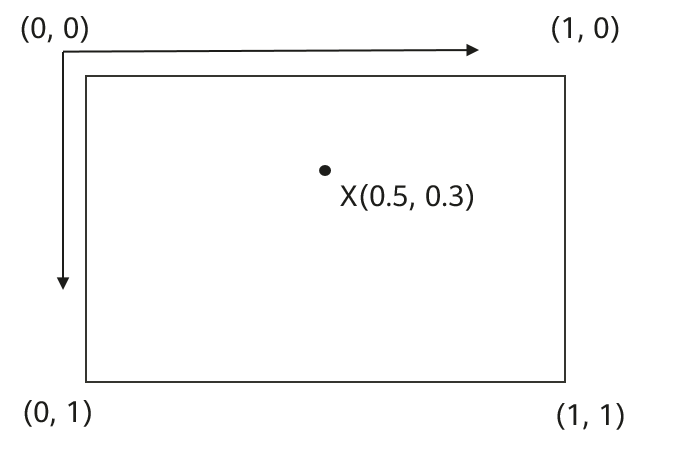
Model restriction: This API can be used only in the stage model.
Atomic service API: This API can be used in atomic services since API version 4.1.0(11).
System capability: SystemCapability.Map.Core
Start version: 4.1.0(11)
Parameters:
Name | Type | Mandatory | Description |
|---|---|---|---|
anchorU | number | Yes | Horizontal coordinate of an anchor, expressed in a proportion of the image width. The value ranges from 0 to 1. |
anchorV | number | Yes | Vertical coordinate of an anchor, expressed in a proportion of the image height. The value ranges from 0 to 1. |
Example:
marker.setMarkerAnchor(1.0, 1.0);
[h2]setPosition
setPosition(latLng: mapCommon.LatLng): void
Sets the position coordinates of a Marker.
Model restriction: This API can be used only in the stage model.
Atomic service API: This API can be used in atomic services since API version 4.1.0(11).
System capability: SystemCapability.Map.Core
Start version: 4.1.0(11)
Parameters:
Name | Type | Mandatory | Description |
|---|---|---|---|
latLng | Yes | Position coordinates of a Marker. |
Example:
let position: mapCommon.LatLng = {latitude: 39.9, longitude: 116.4};
marker.setPosition(position);
[h2]setRotation
setRotation(rotation: number): void
Sets the rotation angle of a Marker, that is, the angle in which the Marker rotates around the anchor clockwise. The rotation axis is perpendicular to the Marker. By default, the Marker is north aligned, and the rotation angle is 0 degrees.
Model restriction: This API can be used only in the stage model.
Atomic service API: This API can be used in atomic services since API version 4.1.0(11).
System capability: SystemCapability.Map.Core
Start version: 4.1.0(11)
Parameters:
Name | Type | Mandatory | Description |
|---|---|---|---|
rotation | number | Yes | Rotation angle of a Marker. 0 degrees is due north, and angles increase clockwise. The value range is [0, 360). The default value is 0. Values that fall outside the valid range will be adjusted to values within the range. For instance, the value 361 would be converted to 1, and the value -1 would be converted to 359. |
Example:
marker.setRotation(30);
[h2]setTitle
setTitle(title: string): void
Sets the title of an information window.
Model restriction: This API can be used only in the stage model.
Atomic service API: This API can be used in atomic services since API version 4.1.0(11).
System capability: SystemCapability.Map.Core
Start version: 4.1.0(11)
Parameters:
Name | Type | Mandatory | Description |
|---|---|---|---|
title | string | Yes | Title of an information window. |
Example:
marker.setTitle("title"); [h2]setSnippet
setSnippet(snippet: string): void
Sets the subtitle of an information window.
Model restriction: This API can be used only in the stage model.
Atomic service API: This API can be used in atomic services since API version 4.1.0(11).
System capability: SystemCapability.Map.Core
Start version: 4.1.0(11)
Parameters:
Name | Type | Mandatory | Description |
|---|---|---|---|
snippet | string | Yes | Subtitle of an information window. |
Example:
marker.setSnippet("su"); [h2]setInfoWindowAnchor
setInfoWindowAnchor(anchorU: number, anchorV: number): void
Sets the anchor position of an information window.
Model restriction: This API can be used only in the stage model.
Atomic service API: This API can be used in atomic services since API version 4.1.0(11).
System capability: SystemCapability.Map.Core
Start version: 4.1.0(11)
Parameters:
Name | Type | Mandatory | Description |
|---|---|---|---|
anchorU | number | Yes | Horizontal coordinate of an anchor. The value ranges from 0 to 1. |
anchorV | number | Yes | Vertical coordinate of an anchor. The value ranges from 0 to 1. |
Example:
marker.setInfoWindowAnchor(0.5, 0.5);
[h2]setInfoWindowVisible
setInfoWindowVisible(visible: boolean): void
Sets whether an information window is visible.
Model restriction: This API can be used only in the stage model.
Atomic service API: This API can be used in atomic services since API version 4.1.0(11).
System capability: SystemCapability.Map.Core
Start version: 4.1.0(11)
Parameters:
Name | Type | Mandatory | Description |
|---|---|---|---|
visible | boolean | Yes | Indicates whether an information window is visible.
|
Example:
marker.setInfoWindowVisible(true);
[h2]isInfoWindowVisible
isInfoWindowVisible(): boolean
Checks whether an information window is visible.
Model restriction: This API can be used only in the stage model.
Atomic service API: This API can be used in atomic services since API version 4.1.0(11).
System capability: SystemCapability.Map.Core
Start version: 4.1.0(11)
Returns:
Type | Description |
|---|---|
boolean | Indicates whether an information window is visible.
|
Example:
let visible: boolean = marker.isInfoWindowVisible();
[h2]setAnimation
setAnimation(animation: Animation): void
Sets the animation of a Marker. FontSizeAnimation is not supported.
Model restriction: This API can be used only in the stage model.
Atomic service API: This API can be used in atomic services since API version 4.1.0(11).
System capability: SystemCapability.Map.Core
Start version: 4.1.0(11)
Parameters:
Name | Type | Mandatory | Description |
|---|---|---|---|
animation | Yes | Animation. |
Example:
let animation: map.AlphaAnimation = new map.AlphaAnimation(0.2, 1);
animation.setDuration(3000);
let callbackStart = () => {
  console.info("animationStart", `callback`);
};
let callbackEnd = () => {
  console.info("animationEnd", `callback`);
};
animation.on("animationStart", callbackStart);
animation.on("animationEnd", callbackEnd);
animation.setFillMode(map.AnimationFillMode.BACKWARDS);
animation.setRepeatMode(map.AnimationRepeatMode.RESTART);
animation.setRepeatCount(100);

marker.setAnimation(animation);
[h2]startAnimation
startAnimation(): void
Starts the animation of a Marker.
Model restriction: This API can be used only in the stage model.
Atomic service API: This API can be used in atomic services since API version 4.1.0(11).
System capability: SystemCapability.Map.Core
Start version: 4.1.0(11)
Example:
let animation: map.AlphaAnimation = new map.AlphaAnimation(0.2, 1);
animation.setDuration(3000);
let callbackStart = () => {
  console.info("animationStart", `callback`);
};
let callbackEnd = () => {
  console.info("animationEnd", `callback`);
};
animation.on("animationStart", callbackStart);
animation.on("animationEnd", callbackEnd);
animation.setFillMode(map.AnimationFillMode.BACKWARDS);
animation.setRepeatMode(map.AnimationRepeatMode.RESTART);
animation.setRepeatCount(100);

marker.setAnimation(animation);
marker.startAnimation();
[h2]clearAnimation
clearAnimation(): void
Clears the animation of a Marker.
Model restriction: This API can be used only in the stage model.
Atomic service API: This API can be used in atomic services since API version 4.1.0(11).
System capability: SystemCapability.Map.Core
Start version: 4.1.0(11)
Example:
marker.clearAnimation();
[h2]getAltitude
getAltitude(): number
Obtains the altitude.
Model restriction: This API can be used only in the stage model.
Atomic service API: This API can be used in atomic services since API version 5.0.0(12).
System capability: SystemCapability.Map.Core
Start version: 5.0.0(12)
Returns:
Type | Description |
|---|---|
number | Altitude, in meters. |
Example:
let altitude: number = marker.getAltitude();
[h2]setAltitude
setAltitude(altitude: number): void
Sets the altitude.
Model restriction: This API can be used only in the stage model.
Atomic service API: This API can be used in atomic services since API version 5.0.0(12).
System capability: SystemCapability.Map.Core
Start version: 5.0.0(12)
Parameters:
Name | Type | Mandatory | Description |
|---|---|---|---|
altitude | number | Yes | Altitude, in meters. |
Example:
marker.setAltitude(500);
MapPolyline
MapPolyline, which inherits from BaseOverlay. An instance of this type will be returned when the addPolyline method in the map.MapComponentController class is called.
Model restriction: This API can be used only in the stage model.
Atomic service API: This API can be used in atomic services since API version 4.1.0(11).
System capability: SystemCapability.Map.Core
Start version: 4.1.0(11)
The module provides the following methods to update and query MapPolyline attributes. For details about other methods, please refer to BaseOverlay.
Return Type | Method |
|---|---|
number | getColor() Obtains the color of a MapPolyline. |
Array<number> | Obtains colors of different segments of a MapPolyline. |
| Obtains the end vertex style of a MapPolyline. | |
| Obtains the joint type of all vertices of a MapPolyline, except the start and end vertices. | |
Array<mapCommon.PatternItem> | Obtains the pattern of a MapPolyline. |
Array<mapCommon.LatLng> | Obtains the vertex coordinates of a MapPolyline. |
| Obtains the start vertex style of a MapPolyline. | |
number | getWidth() Obtains the width of a MapPolyline. |
boolean | Checks whether a MapPolyline is clickable. |
boolean | Checks whether segments of a MapPolyline are geodesics. |
boolean | Checks whether a MapPolyline is gradient. |
void | setClickable(clickable: boolean) Sets whether a MapPolyline is clickable. |
void | setColor(color: number) Sets the color of a MapPolyline. |
void | setColors(colors: Array<number>) Sets colors for different segments of a MapPolyline. |
void | setEndCap(endCap: mapCommon.CapStyle) Sets the end vertex style of a MapPolyline. |
void | setGeodesic(geodesic: boolean) Sets whether to draw each segment of a MapPolyline as a geodesic. |
void | setGradient(gradient: boolean) Sets whether a MapPolyline is gradient. |
void | setJointType(jointType: mapCommon.JointType) Sets the joint type of all vertices of a MapPolyline, except the start and end vertices. |
void | setPatterns(patterns: Array<mapCommon.PatternItem>) Sets patterns of a MapPolyline. |
void | setPoints(points: Array<mapCommon.LatLng>) Sets the vertex coordinates of a MapPolyline. |
void | setStartCap(startCap: mapCommon.CapStyle) Sets the start vertex style of a MapPolyline. |
void | setWidth(width: number) Sets the width of a MapPolyline. |
Promise<void> | setCustomTexture(customTexture: ResourceStr | image.PixelMap) Sets the texture of a MapPolyline. This API returns the result asynchronously through a promise. |
Example:
let polylineOption: mapCommon.MapPolylineOptions = {
  points: [
    { latitude: 31.68, longitude: 118.166 },
    { latitude: 31.48, longitude: 118.366 },
    { latitude: 31.28, longitude: 118.766 }
  ]
};
let mapPolyline = await this.mapController.addPolyline(polylineOption);
[h2]getColor
getColor(): number
Obtains the color of a MapPolyline.
Model restriction: This API can be used only in the stage model.
Atomic service API: This API can be used in atomic services since API version 4.1.0(11).
System capability: SystemCapability.Map.Core
Start version: 4.1.0(11)
Returns:
Type | Description |
|---|---|
number | Color in ARGB format. |
Example:
let color: number = mapPolyline.getColor();
[h2]getColors
getColors(): Array<number>
Obtains colors of different segments of a MapPolyline.
Model restriction: This API can be used only in the stage model.
Atomic service API: This API can be used in atomic services since API version 4.1.0(11).
System capability: SystemCapability.Map.Core
Start version: 4.1.0(11)
Returns:
Type | Description |
|---|---|
Array<number> | Array of colors of different segments in a MapPolyline. |
Example:
let colors: Array<number> = mapPolyline.getColors();
[h2]getEndCap
getEndCap(): mapCommon.CapStyle
Obtains the end vertex style of a MapPolyline.
Model restriction: This API can be used only in the stage model.
Atomic service API: This API can be used in atomic services since API version 4.1.0(11).
System capability: SystemCapability.Map.Core
Start version: 4.1.0(11)
Returns:
Type | Description |
|---|---|
End vertex style of a MapPolyline. |
Example:
let endCap: mapCommon.CapStyle = mapPolyline.getEndCap();
[h2]getJointType
getJointType(): mapCommon.JointType
Obtains the joint type of all vertices of a MapPolyline, except the start and end vertices.
Model restriction: This API can be used only in the stage model.
Atomic service API: This API can be used in atomic services since API version 4.1.0(11).
System capability: SystemCapability.Map.Core
Start version: 4.1.0(11)
Returns:
Type | Description |
|---|---|
Joint type of all vertices of a MapPolyline, except the start and end vertices. |
Example:
let jointType: mapCommon.JointType = mapPolyline.getJointType();
[h2]getPatterns
getPatterns(): Array<mapCommon.PatternItem>
Obtains the pattern of a MapPolyline.
Model restriction: This API can be used only in the stage model.
Atomic service API: This API can be used in atomic services since API version 4.1.0(11).
System capability: SystemCapability.Map.Core
Start version: 4.1.0(11)
Returns:
Type | Description |
|---|---|
Array<mapCommon.PatternItem> | Pattern of a MapPolyline. |
Example:
let patterns: Array<mapCommon.PatternItem> = mapPolyline.getPatterns();
[h2]getPoints
getPoints(): Array<mapCommon.LatLng>
Obtains the vertex coordinates of a MapPolyline.
Model restriction: This API can be used only in the stage model.
Atomic service API: This API can be used in atomic services since API version 4.1.0(11).
System capability: SystemCapability.Map.Core
Start version: 4.1.0(11)
Returns:
Type | Description |
|---|---|
Array<mapCommon.LatLng> | Vertex coordinates of a MapPolyline. |
Example:
let points: Array<mapCommon.LatLng> = mapPolyline.getPoints();
[h2]getStartCap
getStartCap(): mapCommon.CapStyle
Obtains the start vertex style of a MapPolyline.
Model restriction: This API can be used only in the stage model.
Atomic service API: This API can be used in atomic services since API version 4.1.0(11).
System capability: SystemCapability.Map.Core
Start version: 4.1.0(11)
Returns:
Type | Description |
|---|---|
Start vertex style of a MapPolyline. |
Example:
let startCap: mapCommon.CapStyle = mapPolyline.getStartCap();
[h2]getWidth
getWidth(): number
Obtains the width of a MapPolyline.
Model restriction: This API can be used only in the stage model.
Atomic service API: This API can be used in atomic services since API version 4.1.0(11).
System capability: SystemCapability.Map.Core
Start version: 4.1.0(11)
Returns:
Type | Description |
|---|---|
number | Width of a MapPolyline, in pixels. |
Example:
let width: number = mapPolyline.getWidth();
[h2]isClickable
isClickable(): boolean
Checks whether a MapPolyline is clickable.
Model restriction: This API can be used only in the stage model.
Atomic service API: This API can be used in atomic services since API version 4.1.0(11).
System capability: SystemCapability.Map.Core
Start version: 4.1.0(11)
Returns:
Type | Description |
|---|---|
boolean | Indicates whether a MapPolyline is clickable.
|
Example:
let isClickable: boolean = mapPolyline.isClickable();
[h2]isGeodesic
isGeodesic(): boolean
Checks whether segments of a MapPolyline are geodesics.
Model restriction: This API can be used only in the stage model.
Atomic service API: This API can be used in atomic services since API version 4.1.0(11).
System capability: SystemCapability.Map.Core
Start version: 4.1.0(11)
Returns:
Type | Description |
|---|---|
boolean | Indicates whether segments of a MapPolyline are geodesics.
|
Example:
let isGeodesic: boolean = mapPolyline.isGeodesic();
[h2]isGradient
isGradient(): boolean
Checks whether a MapPolyline is gradient.
Model restriction: This API can be used only in the stage model.
Atomic service API: This API can be used in atomic services since API version 4.1.0(11).
System capability: SystemCapability.Map.Core
Start version: 4.1.0(11)
Returns:
Type | Description |
|---|---|
boolean | Indicates whether a MapPolyline is gradient.
|
Example:
let isGradient: boolean = mapPolyline.isGradient();
[h2]setClickable
setClickable(clickable: boolean): void
Sets whether a MapPolyline is clickable.
Model restriction: This API can be used only in the stage model.
Atomic service API: This API can be used in atomic services since API version 4.1.0(11).
System capability: SystemCapability.Map.Core
Start version: 4.1.0(11)
Parameters:
Name | Type | Mandatory | Description |
|---|---|---|---|
clickable | boolean | Yes | Indicates whether a MapPolyline is clickable. The default value is false.
|
Example:
mapPolyline.setClickable(true);
[h2]setColor
setColor(color: number): void
Sets the color of a MapPolyline.
Model restriction: This API can be used only in the stage model.
Atomic service API: This API can be used in atomic services since API version 4.1.0(11).
System capability: SystemCapability.Map.Core
Start version: 4.1.0(11)
Parameters:
Name | Type | Mandatory | Description |
|---|---|---|---|
color | number | Yes | Color in ARGB format. |
Example:
mapPolyline.setColor(0xff000000);
[h2]setColors
setColors(colors: Array<number>): void
Sets colors for different segments of a MapPolyline.
Model restriction: This API can be used only in the stage model.
Atomic service API: This API can be used in atomic services since API version 4.1.0(11).
System capability: SystemCapability.Map.Core
Start version: 4.1.0(11)
Parameters:
Name | Type | Mandatory | Description |
|---|---|---|---|
colors | Array<number> | Yes | Array of colors of different segments in a MapPolyline, in ARGB format. |
Example:
mapPolyline.setColors([0xffffff00, 0xff000000]);
[h2]setEndCap
setEndCap(endCap: mapCommon.CapStyle): void
Sets the end vertex style of a MapPolyline.
Model restriction: This API can be used only in the stage model.
Atomic service API: This API can be used in atomic services since API version 4.1.0(11).
System capability: SystemCapability.Map.Core
Start version: 4.1.0(11)
Parameters:
Name | Type | Mandatory | Description |
|---|---|---|---|
endCap | Yes | End vertex style of a MapPolyline. |
Example:
mapPolyline.setEndCap(mapCommon.CapStyle.BUTT);
[h2]setGeodesic
setGeodesic(geodesic: boolean): void
Sets whether to draw each segment of a MapPolyline as a geodesic.
Model restriction: This API can be used only in the stage model.
Atomic service API: This API can be used in atomic services since API version 4.1.0(11).
System capability: SystemCapability.Map.Core
Start version: 4.1.0(11)
Parameters:
Name | Type | Mandatory | Description |
|---|---|---|---|
geodesic | boolean | Yes | Indicates whether to draw each segment of a MapPolyline as a geodesic. The default value is false.
|
Example:
mapPolyline.setGeodesic(true);
[h2]setGradient
setGradient(gradient: boolean): void
Sets whether a MapPolyline is gradient.
Model restriction: This API can be used only in the stage model.
Atomic service API: This API can be used in atomic services since API version 4.1.0(11).
System capability: SystemCapability.Map.Core
Start version: 4.1.0(11)
Parameters:
Name | Type | Mandatory | Description |
|---|---|---|---|
gradient | boolean | Yes | Indicates whether a MapPolyline is gradient. The default value is false.
|
Example:
mapPolyline.setGradient(true);
[h2]setJointType
setJointType(jointType: mapCommon.JointType): void
Sets the joint type of all vertices of a MapPolyline, except the start and end vertices.
Model restriction: This API can be used only in the stage model.
Atomic service API: This API can be used in atomic services since API version 4.1.0(11).
System capability: SystemCapability.Map.Core
Start version: 4.1.0(11)
Parameters:
Name | Type | Mandatory | Description |
|---|---|---|---|
jointType | Yes | Joint type. |
Example:
mapPolyline.setJointType(mapCommon.JointType.DEFAULT);
[h2]setPatterns
setPatterns(patterns: Array<mapCommon.PatternItem>): void
Sets patterns of a MapPolyline.
Model restriction: This API can be used only in the stage model.
Atomic service API: This API can be used in atomic services since API version 4.1.0(11).
System capability: SystemCapability.Map.Core
Start version: 4.1.0(11)
Parameters:
Name | Type | Mandatory | Description |
|---|---|---|---|
patterns | Array<mapCommon.PatternItem> | Yes | Array of PatternItem objects. |
Example:
let linePattern: Array<mapCommon.PatternItem> = [
  { type: mapCommon.PatternItemType.DASH, length: 100 },
  { type: mapCommon.PatternItemType.DOT, length: 100 },
  { type: mapCommon.PatternItemType.GAP, length: 100 }
];
mapPolyline.setPatterns(linePattern);
[h2]setPoints
setPoints(points: Array<mapCommon.LatLng>): void
Sets the vertex coordinates of a MapPolyline.
Model restriction: This API can be used only in the stage model.
Atomic service API: This API can be used in atomic services since API version 4.1.0(11).
System capability: SystemCapability.Map.Core
Start version: 4.1.0(11)
Parameters:
Name | Type | Mandatory | Description |
|---|---|---|---|
points | Array<mapCommon.LatLng> | Yes | Array of vertices of a MapPolyline. A MapPolyline is open by default. To form a closed MapPolyline, its start and end vertices must coincide. |
Example:
let points: Array<mapCommon.LatLng> = [
  { latitude: 31.18, longitude: 118.766 },
  { latitude: 31.38, longitude: 118.366 },
  { latitude: 31.68, longitude: 118.566 },
  { latitude: 31.98, longitude: 118.266 },
  { latitude: 31.88, longitude: 118.866 }
];
mapPolyline.setPoints(points);
[h2]setStartCap
setStartCap(startCap: mapCommon.CapStyle): void
Sets the start vertex style of a MapPolyline.
Model restriction: This API can be used only in the stage model.
Atomic service API: This API can be used in atomic services since API version 4.1.0(11).
System capability: SystemCapability.Map.Core
Start version: 4.1.0(11)
Parameters:
Name | Type | Mandatory | Description |
|---|---|---|---|
startCap | Yes | Start vertex style of a MapPolyline. |
Example:
mapPolyline.setStartCap(mapCommon.CapStyle.BUTT);
[h2]setWidth
setWidth(width: number): void
Sets the width of a MapPolyline.
Model restriction: This API can be used only in the stage model.
Atomic service API: This API can be used in atomic services since API version 4.1.0(11).
System capability: SystemCapability.Map.Core
Start version: 4.1.0(11)
Parameters:
Name | Type | Mandatory | Description |
|---|---|---|---|
width | number | Yes | Width of a MapPolyline, in pixels. The value must be greater than or equal to 0. |
Example:
mapPolyline.setWidth(20);
[h2]setCustomTexture
setCustomTexture(customTexture: ResourceStr | image.PixelMap): Promise<void>
Sets the texture of a MapPolyline. This API returns the result asynchronously through a promise.
Model restriction: This API can be used only in the stage model.
Atomic service API: This API can be used in atomic services since API version 5.0.0(12).
System capability: SystemCapability.Map.Core
Start version: 5.0.0(12)
Parameters:
Name | Type | Mandatory | Description |
|---|---|---|---|
customTexture | Yes | Texture of a MapPolyline. You are advised to use an image with a transparent background as the texture. |
Returns:
Type | Description |
|---|---|
Promise<void> | Promise that returns no value. |
Example:
await mapPolyline.setCustomTexture("icon/naviline_arrow.png"); MapPolygon
MapPolygon, which inherits from BaseOverlay. A MapPolygon can be convex or concave. It can span the 180th meridian and have holes that are not filled in. An instance of this type will be returned when the addPolygon method in the map.MapComponentController class is called.
Model restriction: This API can be used only in the stage model.
Atomic service API: This API can be used in atomic services since API version 4.1.0(11).
System capability: SystemCapability.Map.Core
Start version: 4.1.0(11)
The module provides the following methods to update and query MapPolygon attributes. For details about other methods, please refer to BaseOverlay.
Return Type | Method |
|---|---|
number | Obtains the fill color of a MapPolygon, in ARGB format. |
Array<Array<mapCommon.LatLng>> | getHoles() Obtains holes in a MapPolygon. |
Array<mapCommon.LatLng> | Obtains vertex coordinates of a MapPolygon. |
number | Obtains the stroke color of a MapPolygon's outline. |
| Obtains the vertex style of a MapPolygon. | |
Array<mapCommon.PatternItem> | Obtains the pattern of a MapPolygon's outline. |
number | Obtains the stroke width of a MapPolygon's outline. |
boolean | Checks whether a MapPolygon is clickable. |
boolean | Checks whether segments of a MapPolygon are geodesics. |
void | setClickable(clickable: boolean) Sets whether a MapPolygon is clickable. |
void | setFillColor(color: number) Sets the fill color of a MapPolygon. |
void | setGeodesic(geodesic: boolean) Sets whether to draw each segment of a MapPolygon as a geodesic. |
void | setHoles(holes: Array<Array<mapCommon.LatLng>>) Sets holes in a MapPolygon. |
void | setPoints(points: Array<mapCommon.LatLng>) Sets the vertex coordinates of a MapPolygon. |
void | setStrokeColor(color: number) Sets the stroke color of a MapPolygon's outline. |
void | setJointType(jointType: mapCommon.JointType) Sets the vertex style of a MapPolygon. |
void | setPatterns(patterns: Array<mapCommon.PatternItem>) Sets the pattern of a MapPolygon's outline. |
void | setStrokeWidth(width: number) Sets the stroke width of a MapPolygon's outline. |
Example:
let polygonOptions: mapCommon.MapPolygonOptions = {
  points: [
    { latitude: 31.9844102, longitude: 118.7662 },
    { latitude: 31.9844102, longitude: 123.7662 },
    { latitude: 36.9844102, longitude: 123.7662 },
    { latitude: 36.9844102, longitude: 118.7662 }
  ]
};
let mapPolygon = await this.mapController.addPolygon(polygonOptions);
[h2]getFillColor
getFillColor(): number
Obtains the fill color of a MapPolygon, in ARGB format.
Model restriction: This API can be used only in the stage model.
Atomic service API: This API can be used in atomic services since API version 4.1.0(11).
System capability: SystemCapability.Map.Core
Start version: 4.1.0(11)
Returns:
Type | Description |
|---|---|
number | Color in ARGB format. |
Example:
let fillColor: number = mapPolygon.getFillColor();
[h2]getHoles
getHoles(): Array<Array<mapCommon.LatLng>>
Obtains holes in a MapPolygon.
Model restriction: This API can be used only in the stage model.
Atomic service API: This API can be used in atomic services since API version 4.1.0(11).
System capability: SystemCapability.Map.Core
Start version: 4.1.0(11)
Returns:
Type | Description |
|---|---|
Array<Array<mapCommon.LatLng>> | Array of holes in a MapPolygon, which is a LatLng array. |
Example:
let holes: Array<Array<mapCommon.LatLng>> = mapPolygon.getHoles();
[h2]getPoints
getPoints(): Array<mapCommon.LatLng>
Obtains vertex coordinates of a MapPolygon.
Model restriction: This API can be used only in the stage model.
Atomic service API: This API can be used in atomic services since API version 4.1.0(11).
System capability: SystemCapability.Map.Core
Start version: 4.1.0(11)
Returns:
Type | Description |
|---|---|
Array<mapCommon.LatLng> | Vertex coordinates of a MapPolygon. |
Example:
let points: Array<mapCommon.LatLng> = mapPolygon.getPoints();
[h2]getStrokeColor
getStrokeColor(): number
Obtains the stroke color of a MapPolygon's outline.
Model restriction: This API can be used only in the stage model.
Atomic service API: This API can be used in atomic services since API version 4.1.0(11).
System capability: SystemCapability.Map.Core
Start version: 4.1.0(11)
Returns:
Type | Description |
|---|---|
number | Color in ARGB format. By default, the stroke color is 0xff000000 (black). |
Example:
let strokeColor: number = mapPolygon.getStrokeColor();
[h2]getJointType
getJointType(): mapCommon.JointType
Obtains the vertex style of a MapPolygon.
Model restriction: This API can be used only in the stage model.
Atomic service API: This API can be used in atomic services since API version 4.1.0(11).
System capability: SystemCapability.Map.Core
Start version: 4.1.0(11)
Returns:
Type | Description |
|---|---|
Vertex style of a MapPolygon. |
Example:
let jointType: mapCommon.JointType = mapPolygon.getJointType();
[h2]getPatterns
getPatterns(): Array<mapCommon.PatternItem>
Obtains the pattern of a MapPolygon's outline.
Model restriction: This API can be used only in the stage model.
Atomic service API: This API can be used in atomic services since API version 4.1.0(11).
System capability: SystemCapability.Map.Core
Start version: 4.1.0(11)
Returns:
Type | Description |
|---|---|
Array<mapCommon.PatternItem> | Pattern of a MapPolygon's outline. |
Example:
let patterns: Array<mapCommon.PatternItem> = mapPolygon.getPatterns();
[h2]getStrokeWidth
getStrokeWidth(): number
Obtains the stroke width of a MapPolygon's outline.
Model restriction: This API can be used only in the stage model.
Atomic service API: This API can be used in atomic services since API version 4.1.0(11).
System capability: SystemCapability.Map.Core
Start version: 4.1.0(11)
Returns:
Type | Description |
|---|---|
number | Stroke width of a MapPolygon's outline, in pixels. |
Example:
let strokeWidth: number = mapPolygon.getStrokeWidth();
[h2]isClickable
isClickable(): boolean
Checks whether a MapPolygon is clickable.
Model restriction: This API can be used only in the stage model.
Atomic service API: This API can be used in atomic services since API version 4.1.0(11).
System capability: SystemCapability.Map.Core
Start version: 4.1.0(11)
Returns:
Type | Description |
|---|---|
boolean | Indicates whether a MapPolygon is clickable.
|
Example:
let clickable: boolean = mapPolygon.isClickable();
[h2]isGeodesic
isGeodesic(): boolean
Checks whether segments of a MapPolygon are geodesics.
Model restriction: This API can be used only in the stage model.
Atomic service API: This API can be used in atomic services since API version 4.1.0(11).
System capability: SystemCapability.Map.Core
Start version: 4.1.0(11)
Returns:
Type | Description |
|---|---|
boolean | Indicates whether each segment of a polygon is drawn as a geodesic.
|
Example:
let geodesic: boolean = mapPolygon.isGeodesic();
[h2]setClickable
setClickable(clickable: boolean): void
Sets whether a MapPolygon is clickable.
Model restriction: This API can be used only in the stage model.
Atomic service API: This API can be used in atomic services since API version 4.1.0(11).
System capability: SystemCapability.Map.Core
Start version: 4.1.0(11)
Parameters:
Name | Type | Mandatory | Description |
|---|---|---|---|
clickable | boolean | Yes | Indicates whether a MapPolygon is clickable. The default value is false.
|
Example:
mapPolygon.setClickable(true);
[h2]setFillColor
setFillColor(color: number): void
Sets the fill color of a MapPolygon.
Model restriction: This API can be used only in the stage model.
Atomic service API: This API can be used in atomic services since API version 4.1.0(11).
System capability: SystemCapability.Map.Core
Start version: 4.1.0(11)
Parameters:
Name | Type | Mandatory | Description |
|---|---|---|---|
color | number | Yes | Color value in ARGB format. The default value is 0x00000000 (transparent). |
Example:
mapPolygon.setFillColor(0xff000FFF);
[h2]setGeodesic
setGeodesic(geodesic: boolean): void
Sets whether to draw each segment of a MapPolygon as a geodesic.
Model restriction: This API can be used only in the stage model.
Atomic service API: This API can be used in atomic services since API version 4.1.0(11).
System capability: SystemCapability.Map.Core
Start version: 4.1.0(11)
Parameters:
Name | Type | Mandatory | Description |
|---|---|---|---|
geodesic | boolean | Yes | Indicates whether to draw each segment of a MapPolygon as a geodesic. The default value is false.
|
Example:
mapPolygon.setGeodesic(true);
[h2]setHoles
setHoles(holes: Array<Array<mapCommon.LatLng>>): void
Sets holes in a MapPolygon.
Model restriction: This API can be used only in the stage model.
Atomic service API: This API can be used in atomic services since API version 4.1.0(11).
System capability: SystemCapability.Map.Core
Start version: 4.1.0(11)
Parameters:
Name | Type | Mandatory | Description |
|---|---|---|---|
holes | Array<Array<mapCommon.LatLng>> | Yes | Array of holes in a MapPolygon, which is a LatLng array. |
Example:
let holes: Array<Array<mapCommon.LatLng>> = [[
  { latitude: 31.98, longitude: 115.76 }, { latitude:31.98, longitude: 118.76 },
  { latitude: 35.98, longitude: 118.76 }, { latitude: 35.98, longitude: 118.76 }
]];
mapPolygon.setHoles(holes); 
When coordinates of holes attach an edge of a MapPolygon, the extra hole area will be rendered abnormally.
[h2]setPoints
setPoints(points: Array<mapCommon.LatLng>): void
Sets the vertex coordinates of a MapPolygon.
Model restriction: This API can be used only in the stage model.
Atomic service API: This API can be used in atomic services since API version 4.1.0(11).
System capability: SystemCapability.Map.Core
Start version: 4.1.0(11)
Parameters:
Name | Type | Mandatory | Description |
|---|---|---|---|
points | Array<mapCommon.LatLng> | Yes | Array of vertex coordinates of a MapPolygon. |
Example:
let points: Array<mapCommon.LatLng> = [
  { latitude: 31.98, longitude: 115.76 }, { latitude: 31.98, longitude: 118.76 },
  { latitude: 35.98, longitude: 118.76 }, { latitude: 35.98, longitude: 118.76 }
];
mapPolygon.setPoints(points);
[h2]setStrokeColor
setStrokeColor(color: number): void
Sets the stroke color of a MapPolygon's outline.
Model restriction: This API can be used only in the stage model.
Atomic service API: This API can be used in atomic services since API version 4.1.0(11).
System capability: SystemCapability.Map.Core
Start version: 4.1.0(11)
Parameters:
Name | Type | Mandatory | Description |
|---|---|---|---|
color | number | Yes | Color in ARGB format. By default, the stroke color is 0xff000000 (black). |
Example:
mapPolygon.setStrokeColor(0xff00DB93);
[h2]setJointType
setJointType(jointType: mapCommon.JointType): void
Sets the vertex style of a MapPolygon.
Model restriction: This API can be used only in the stage model.
Atomic service API: This API can be used in atomic services since API version 4.1.0(11).
System capability: SystemCapability.Map.Core
Start version: 4.1.0(11)
Parameters:
Name | Type | Mandatory | Description |
|---|---|---|---|
jointType | Yes | Vertex style. The default value is JointType.DEFAULT. |
Example:
mapPolygon.setJointType(mapCommon.JointType.ROUND);
[h2]setPatterns
setPatterns(patterns: Array<mapCommon.PatternItem>): void
Sets the pattern of a MapPolygon's outline.
Model restriction: This API can be used only in the stage model.
Atomic service API: This API can be used in atomic services since API version 4.1.0(11).
System capability: SystemCapability.Map.Core
Start version: 4.1.0(11)
Parameters:
Name | Type | Mandatory | Description |
|---|---|---|---|
patterns | Array<mapCommon.PatternItem> | Yes | Array of PatternItem objects. The default outline style is solid. |
Example:
let linePatterns: Array<mapCommon.PatternItem> = [
  { type: mapCommon.PatternItemType.DASH, length: 100 },
  { type: mapCommon.PatternItemType.DOT, length: 100 },
  { type: mapCommon.PatternItemType.GAP, length: 100 }
];
mapPolygon.setPatterns(linePatterns);
[h2]setStrokeWidth
setStrokeWidth(width: number): void
Sets the stroke width of a MapPolygon's outline.
Model restriction: This API can be used only in the stage model.
Atomic service API: This API can be used in atomic services since API version 4.1.0(11).
System capability: SystemCapability.Map.Core
Start version: 4.1.0(11)
Parameters:
Name | Type | Mandatory | Description |
|---|---|---|---|
width | number | Yes | Stroke width, in pixels. The default value is 10. The value must be greater than or equal to 0. |
Example:
mapPolygon.setStrokeWidth(30);
MapCircle
Updates and queries MapCircles. This API inherits from BaseOverlay. An instance of this type will be returned when the addCircle method in the map.MapComponentController class is called.
Model restriction: This API can be used only in the stage model.
Atomic service API: This API can be used in atomic services since API version 4.1.0(11).
System capability: SystemCapability.Map.Core
Start version: 4.1.0(11)
The module provides the following methods to update and query MapCircle attributes. For details about other methods, please refer to BaseOverlay.
Return Type | Method |
|---|---|
| Obtains the longitude and latitude of the center of a MapCircle. | |
number | Obtains the fill color of a MapCircle. |
number | Obtains the radius of a MapCircle. |
number | Obtains the stroke color of a MapCircle's outline. |
Array<mapCommon.PatternItem> | Obtains the pattern of a MapCircle's outline. |
number | Obtains the stroke width of a MapCircle's outline. |
boolean | Checks whether a MapCircle is clickable. |
void | setCenter(center: mapCommon.LatLng) Sets the longitude and latitude of the center of a MapCircle. |
void | setClickable(clickable: boolean) Sets whether a MapCircle is clickable. |
void | setFillColor(color: number) Sets the fill color of a MapCircle. |
void | setRadius(radius: number) Sets the radius of a MapCircle. |
void | setStrokeColor(color: number) Sets the stroke color of a MapCircle's outline. |
void | setPatterns(patterns: Array<mapCommon.PatternItem>) Sets the pattern of a MapCircle's outline. |
void | setStrokeWidth(width: number) Sets the stroke width of a MapCircle's outline. |
let mapCircleOptions: mapCommon.MapCircleOptions = {
	center: {
	  latitude: 39.9,
	  longitude: 116.4
	},
	radius: 5000,
	fillColor: 0XFF00FFFF,
	strokeColor: 0xFFFF0000,
	strokeWidth: 10,
	zIndex: 15
};
let mapCircle = await this.mapController.addCircle(mapCircleOptions);
[h2]getCenter
getCenter(): mapCommon.LatLng
Obtains the longitude and latitude of the center of a MapCircle.
Model restriction: This API can be used only in the stage model.
Atomic service API: This API can be used in atomic services since API version 4.1.0(11).
System capability: SystemCapability.Map.Core
Start version: 4.1.0(11)
Returns:
Type | Description |
|---|---|
mapCommon.LatLng | Longitude and latitude of the center of a MapCircle. |
Example:
let center: mapCommon.LatLng = mapCircle.getCenter();
[h2]getFillColor
getFillColor(): number
Obtains the fill color of a MapCircle.
Model restriction: This API can be used only in the stage model.
Atomic service API: This API can be used in atomic services since API version 4.1.0(11).
System capability: SystemCapability.Map.Core
Start version: 4.1.0(11)
Returns:
Type | Description |
|---|---|
number | Fill color of a MapCircle. |
Example:
let fillColor: number = mapCircle.getFillColor();
[h2]getRadius
getRadius(): number
Obtains the radius of a MapCircle.
Model restriction: This API can be used only in the stage model.
Atomic service API: This API can be used in atomic services since API version 4.1.0(11).
System capability: SystemCapability.Map.Core
Start version: 4.1.0(11)
Returns:
Type | Description |
|---|---|
number | Radius of a MapCircle, in meters. |
Example:
let radius: number = mapCircle.getRadius();
[h2]getStrokeColor
getStrokeColor(): number
Obtains the stroke color of a MapCircle's outline.
Model restriction: This API can be used only in the stage model.
Atomic service API: This API can be used in atomic services since API version 4.1.0(11).
System capability: SystemCapability.Map.Core
Start version: 4.1.0(11)
Returns:
Type | Description |
|---|---|
number | Color in ARGB format. By default, the stroke color is 0xff000000 (black). |
Example:
let strokeColor: number = mapCircle.getStrokeColor();
[h2]getPatterns
getPatterns(): Array<mapCommon.PatternItem>
Obtains the pattern of a MapCircle's outline.
Model restriction: This API can be used only in the stage model.
Atomic service API: This API can be used in atomic services since API version 4.1.0(11).
System capability: SystemCapability.Map.Core
Start version: 4.1.0(11)
Returns:
Type | Description |
|---|---|
Array<mapCommon.PatternItem> | Pattern of a MapCircle's outline. |
Example:
let patterns: Array<mapCommon.PatternItem> = mapCircle.getPatterns();
[h2]getStrokeWidth
getStrokeWidth(): number
Obtains the stroke width of a MapCircle's outline.
Model restriction: This API can be used only in the stage model.
Atomic service API: This API can be used in atomic services since API version 4.1.0(11).
System capability: SystemCapability.Map.Core
Start version: 4.1.0(11)
Returns:
Type | Description |
|---|---|
number | Stroke width of a MapCircle's outline. |
Example:
let strokeWidth: number = mapCircle.getStrokeWidth();
[h2]isClickable
isClickable(): boolean
Checks whether a MapCircle is clickable.
Model restriction: This API can be used only in the stage model.
Atomic service API: This API can be used in atomic services since API version 4.1.0(11).
System capability: SystemCapability.Map.Core
Start version: 4.1.0(11)
Returns:
Type | Description |
|---|---|
boolean | Indicates whether a MapCircle is clickable.
|
Example:
let clickable: boolean = mapCircle.isClickable();
[h2]setCenter
setCenter(center: mapCommon.LatLng): void
Sets the longitude and latitude of the center of a MapCircle.
Model restriction: This API can be used only in the stage model.
Atomic service API: This API can be used in atomic services since API version 4.1.0(11).
System capability: SystemCapability.Map.Core
Start version: 4.1.0(11)
Parameters:
Name | Type | Mandatory | Description |
|---|---|---|---|
center | Yes | Longitude-latitude coordinates of the center of a MapCircle. A MapCircle can be drawn only when the latitude of its center is within the range from -85.051119 to 85.051119. If the latitude of the circle center is -85.051119 or 85.051119, a MapCircle with a radius of 1 meter can be drawn exactly. |
Example:
let center: mapCommon.LatLng = {latitude: 31.98, longitude: 116.4};
mapCircle.setCenter(center);
[h2]setClickable
setClickable(clickable: boolean): void
Sets whether a MapCircle is clickable.
Model restriction: This API can be used only in the stage model.
Atomic service API: This API can be used in atomic services since API version 4.1.0(11).
System capability: SystemCapability.Map.Core
Start version: 4.1.0(11)
Parameters:
Name | Type | Mandatory | Description |
|---|---|---|---|
clickable | boolean | Yes | Indicates whether a MapCircle is clickable. The default value is false.
|
Example:
let clickable = true;
mapCircle.setClickable(clickable);
[h2]setFillColor
setFillColor(color: number): void
Sets the fill color of a MapCircle.
Model restriction: This API can be used only in the stage model.
Atomic service API: This API can be used in atomic services since API version 4.1.0(11).
System capability: SystemCapability.Map.Core
Start version: 4.1.0(11)
Parameters:
Name | Type | Mandatory | Description |
|---|---|---|---|
color | number | Yes | Fill color of a MapCircle. The color value is in ARGB format. |
Example:
let fillColor = 0xFF00FFFF;
mapCircle.setFillColor(fillColor);
[h2]setRadius
setRadius(radius: number): void
Sets the radius of a MapCircle.
Model restriction: This API can be used only in the stage model.
Atomic service API: This API can be used in atomic services since API version 4.1.0(11).
System capability: SystemCapability.Map.Core
Start version: 4.1.0(11)
Parameters:
Name | Type | Mandatory | Description |
|---|---|---|---|
radius | number | Yes | Radius, in meters. The value must be greater than or equal to 0. |
Example:
let radius = 300;
mapCircle.setRadius(radius);
[h2]setStrokeColor
setStrokeColor(color: number): void
Sets the stroke color of a MapCircle's outline.
Model restriction: This API can be used only in the stage model.
Atomic service API: This API can be used in atomic services since API version 4.1.0(11).
System capability: SystemCapability.Map.Core
Start version: 4.1.0(11)
Parameters:
Name | Type | Mandatory | Description |
|---|---|---|---|
color | number | Yes | Color in ARGB format. By default, the stroke color is 0xff000000 (black). |
Example:
let strokeColor = 0xFFFF0000;
mapCircle.setStrokeColor(strokeColor);
[h2]setPatterns
setPatterns(patterns: Array<mapCommon.PatternItem>): void
Sets the pattern of a MapCircle's outline.
Model restriction: This API can be used only in the stage model.
Atomic service API: This API can be used in atomic services since API version 4.1.0(11).
System capability: SystemCapability.Map.Core
Start version: 4.1.0(11)
Parameters:
Name | Type | Mandatory | Description |
|---|---|---|---|
patterns | Array<mapCommon.PatternItem> | Yes | Pattern of a MapCircle's outline. |
Example:
let patterns: Array<mapCommon.PatternItem> = [
  { type: 0, length: 100 },
  { type: 1, length: 100 },
  { type: 2, length: 100 }];
mapCircle.setPatterns(patterns);
[h2]setStrokeWidth
setStrokeWidth(width: number): void
Sets the stroke width of a MapCircle's outline.
Model restriction: This API can be used only in the stage model.
Atomic service API: This API can be used in atomic services since API version 4.1.0(11).
System capability: SystemCapability.Map.Core
Start version: 4.1.0(11)
Parameters:
Name | Type | Mandatory | Description |
|---|---|---|---|
width | number | Yes | Stroke width of a MapCircle's outline, in pixels. The value must be greater than or equal to 0. |
Example:
let width = 10;
mapCircle.setStrokeWidth(width);
BasePriorityOverlay
Base class of overlays with priority control, which inherits from BaseOverlay. PointAnnotation and Bubble inherit from this base class.
Model restriction: This API can be used only in the stage model.
Atomic service API: This API can be used in atomic services since API version 4.1.0(11).
System capability: SystemCapability.Map.Core
Start version: 4.1.0(11)
The module provides the following methods to update and query the attributes of overlays with priority control. For details about other methods, please refer to BaseOverlay.
Return Value | Description |
|---|---|
number | Obtains the maximum zoom level of an overlay. |
number | Obtains the minimum zoom level of an overlay. |
void | setPriority(priority: number) Sets the collision priority of an overlay. |
void | setZoom(minZoom: number, maxZoom: number) Sets the maximum and minimum zoom levels of an overlay. |
void | setAnimation(animation: Animation) Sets the animation of an overlay. Only AlphaAnimation, ScaleAnimation, and AnimationSet are supported. |
void | Starts the animation of an overlay. |
void | Clears the animation of an overlay. |
[h2]getMaxZoom
getMaxZoom(): number
Obtains the maximum zoom level of an overlay.
Model restriction: This API can be used only in the stage model.
Atomic service API: This API can be used in atomic services since API version 4.1.0(11).
System capability: SystemCapability.Map.Core
Start version: 4.1.0(11)
Returns:
Type | Description |
|---|---|
number | Maximum zoom level of an overlay. |
Example:
// Use a PointAnnotation as an example.
let pointAnnotationOptions: mapCommon.PointAnnotationParams = {
  position: {
    latitude: 32.120750,
    longitude: 118.788765
  },
  titles: [{
    content: "Nanjing Confucius Temple",
  }],
  icon: 'icon.png'
};
let pointAnnotation: map.PointAnnotation = await this.mapController.addPointAnnotation(pointAnnotationOptions);
let maxZoom: number = pointAnnotation.getMaxZoom();
[h2]getMinZoom
getMinZoom(): number
Obtains the minimum zoom level of an overlay.
Model restriction: This API can be used only in the stage model.
Atomic service API: This API can be used in atomic services since API version 4.1.0(11).
System capability: SystemCapability.Map.Core
Start version: 4.1.0(11)
Returns:
Type | Description |
|---|---|
number | Minimum zoom level of an overlay. |
Example:
// Use a PointAnnotation as an example.
let minZoom: number = pointAnnotation.getMinZoom();
[h2]setPriority
setPriority(priority: number): void
Sets the collision priority of an overlay. A larger value indicates a lower priority.
Model restriction: This API can be used only in the stage model.
System capability: SystemCapability.Map.Core
Start version: 4.1.0(11)
Parameters:
Name | Type | Mandatory | Description |
|---|---|---|---|
priority | number | Yes | Collision priority of an overlay. |
Example:
// Use a PointAnnotation as an example.
pointAnnotation.setPriority(100);
[h2]setZoom
setZoom(minZoom: number, maxZoom: number): void
Sets the zoom levels of an overlay.
Model restriction: This API can be used only in the stage model.
Atomic service API: This API can be used in atomic services since API version 4.1.0(11).
System capability: SystemCapability.Map.Core
Start version: 4.1.0(11)
Parameters:
Name | Type | Mandatory | Description |
|---|---|---|---|
minZoom | number | Yes | Minimum zoom level of an overlay. The value ranges from 2 to 20. If the input value is greater than 20, the minimum zoom level will be 20. If the input value is less than 2, the minimum zoom level will be 2. NOTE: If the value of minZoom is greater than that of maxZoom, this method is not working. |
maxZoom | number | Yes | Maximum zoom level of an overlay. The value ranges from 2 to 20. If the input value is greater than 20, the maximum zoom level will be 20. If the input value is less than 2, the maximum zoom level will be 2. |
Example:
// Use a PointAnnotation as an example.
pointAnnotation.setZoom(3, 10);
[h2]setAnimation
setAnimation(animation: Animation): void
Sets the animation of an overlay. Only AlphaAnimation, ScaleAnimation, and AnimationSet are supported.
Model restriction: This API can be used only in the stage model.
Atomic service API: This API can be used in atomic services since API version 4.1.0(11).
System capability: SystemCapability.Map.Core
Start version: 4.1.0(11)
Parameters:
Name | Type | Mandatory | Description |
|---|---|---|---|
animation | Yes | Animation. |
Example:
let animation: map.AlphaAnimation = new map.AlphaAnimation(0.2, 1);
animation.setDuration(3000);
let callbackStart = () => {
  console.info("animationStart", `callback`);
};
let callbackEnd = () => {
  console.info("animationEnd", `callback`);
};
animation.on("animationStart", callbackStart);
animation.on("animationEnd", callbackEnd);
animation.setFillMode(map.AnimationFillMode.BACKWARDS);
animation.setRepeatMode(map.AnimationRepeatMode.RESTART);
animation.setRepeatCount(100);

pointAnnotation.setAnimation(animation);
[h2]startAnimation
startAnimation(): void
Starts the animation of an overlay.
Model restriction: This API can be used only in the stage model.
Atomic service API: This API can be used in atomic services since API version 4.1.0(11).
System capability: SystemCapability.Map.Core
Start version: 4.1.0(11)
Example:
let animation: map.AlphaAnimation = new map.AlphaAnimation(0.2, 1);
animation.setDuration(3000);
let callbackStart = () => {
  console.info("animationStart", `callback`);
};
let callbackEnd = () => {
  console.info("animationEnd", `callback`);
};
animation.on("animationStart", callbackStart);
animation.on("animationEnd", callbackEnd);
animation.setFillMode(map.AnimationFillMode.BACKWARDS);
animation.setRepeatMode(map.AnimationRepeatMode.RESTART);
animation.setRepeatCount(100);

pointAnnotation.setAnimation(animation);
pointAnnotation.startAnimation();
[h2]clearAnimation
clearAnimation(): void
Clears the animation of an overlay.
Model restriction: This API can be used only in the stage model.
Atomic service API: This API can be used in atomic services since API version 4.1.0(11).
System capability: SystemCapability.Map.Core
Start version: 4.1.0(11)
Example:
pointAnnotation.clearAnimation();
PointAnnotation
PointAnnotation, which inherits from BasePriorityOverlay. An instance of this type will be returned when the addPointAnnotation method in the map.MapComponentController class is called.
Model restriction: This API can be used only in the stage model.
Atomic service API: This API can be used in atomic services since API version 4.1.0(11).
System capability: SystemCapability.Map.Core
Start version: 4.1.0(11)
The module provides the following methods to update and query PointAnnotation attributes. For details about other methods, please refer to BasePriorityOverlay.
Return Value | Description |
|---|---|
| Gets the anchor coordinates of a PointAnnotation. | |
| Gets the attributes of a PointAnnotation's first title. | |
void | setTitleText(text: mapCommon.Text) Sets the attributes of a PointAnnotation's first title (content excluded). |
void | setTitleAnimation(animation: FontSizeAnimation) Sets the title animation of a PointAnnotation. |
void | Starts the animation of a PointAnnotation. |
Example:
let pointAnnotationOptions: mapCommon.PointAnnotationParams = {
  position: {
    latitude: 32.120750,
    longitude: 118.788765
  },
  titles: [{
    content: "Nanjing Confucius Temple",
  }],
  icon: 'icon.png'
};
let pointAnnotation: map.PointAnnotation = await this.mapController.addPointAnnotation(pointAnnotationOptions);
[h2]getPosition
getPosition(): mapCommon.LatLng
Gets the anchor coordinates of a PointAnnotation.
Model restriction: This API can be used only in the stage model.
Atomic service API: This API can be used in atomic services since API version 4.1.0(11).
System capability: SystemCapability.Map.Core
Start version: 4.1.0(11)
Returns:
Type | Description |
|---|---|
Anchor coordinates of a PointAnnotation. |
Example:
let position: mapCommon.LatLng = pointAnnotation.getPosition();
[h2]getTitleText
getTitleText(): mapCommon.Text
Gets the attributes of a PointAnnotation's first title.
Model restriction: This API can be used only in the stage model.
Atomic service API: This API can be used in atomic services since API version 4.1.0(11).
System capability: SystemCapability.Map.Core
Start version: 4.1.0(11)
Returns:
Type | Description |
|---|---|
Attributes of a PointAnnotation's first title. |
Example:
let titleText: mapCommon.Text = pointAnnotation.getTitleText();
[h2]setTitleText
setTitleText(text: mapCommon.Text): void
Sets the attributes of a PointAnnotation's first title (content excluded).
Model restriction: This API can be used only in the stage model.
Atomic service API: This API can be used in atomic services since API version 4.1.0(11).
System capability: SystemCapability.Map.Core
Start version: 4.1.0(11)
Parameters:
Name | Type | Mandatory | Description |
|---|---|---|---|
text | Yes | Attributes of a PointAnnotation's first title (content excluded). NOTE: Constraints: The values of fontSize and strokeWidth must be greater than or equal to 0. |
Example:
// Use a PointAnnotation as an example.
pointAnnotation.setTitleText({
  content: '',
  color: 0xff00ffff,
  fontSize: 15,
  strokeColor: 0xff00ff00,
  strokeWidth: 2,
  fontStyle: mapCommon.FontStyle.BOLD_ITALIC
});
[h2]setTitleAnimation
setTitleAnimation(animation: FontSizeAnimation): void
Sets the title animation of a PointAnnotation.
Model restriction: This API can be used only in the stage model.
Atomic service API: This API can be used in atomic services since API version 4.1.0(11).
System capability: SystemCapability.Map.Core
Start version: 4.1.0(11)
Parameters:
Name | Type | Mandatory | Description |
|---|---|---|---|
animation | Yes | Title animation of a PointAnnotation. |
Example:
let animation: map.FontSizeAnimation = new map.FontSizeAnimation(5, 25);
animation.setDuration(3000);
animation.on("start",() => {
  console.info('start Font Animation');
});
animation.on("end",() => {
  console.info('end Font Animation');
});
// Set the status after the animation ends.
animation.setFillMode(map.AnimationFillMode.BACKWARDS);
// Set the animation replay mode.
animation.setRepeatMode(map.AnimationRepeatMode.REVERSE);
// Set an animation interpolator.
animation.setInterpolator(Curve.Linear);
// Set the number of times the animation is replayed.
animation.setRepeatCount(100);
pointAnnotation.setTitleAnimation(animation);
pointAnnotation.startTitleAnimation();
[h2]startTitleAnimation
startTitleAnimation(): void
Starts the title animation of a PointAnnotation.
Model restriction: This API can be used only in the stage model.
Atomic service API: This API can be used in atomic services since API version 4.1.0(11).
System capability: SystemCapability.Map.Core
Start version: 4.1.0(11)
Example:
pointAnnotation.startTitleAnimation();
Bubble
Bubble. This API inherits from BasePriorityOverlay. An instance of this type will be returned when the addBubble method in the map.MapComponentController class is called.
Model restriction: This API can be used only in the stage model.
Atomic service API: This API can be used in atomic services since API version 4.1.0(11).
System capability: SystemCapability.Map.Core
Start version: 4.1.0(11)
The module provides the following methods to update and query Bubble attributes. For details about other methods, please refer to BasePriorityOverlay.
Return Value | Description |
|---|---|
Promise<void> | setIcons(icons: Array<string | image.PixelMap | Resource>) Sets the icon of a Bubble. This API returns the result asynchronously through a promise. |
void | setPositions(positions: Array<Array<mapCommon.LatLng>>) Sets the candidate position coordinates of a Bubble. |
Example:
let bubbleOptions: mapCommon.BubbleParams = {
  positions: [[{
    latitude: 31.98, longitude: 118.766
  }]],
  icons: [
    'icon.png',
    'icon.png',
    'icon.png',
    'icon.png'
  ],
  forceVisible: true,
  priority: 3,
  minZoom: 2,
  maxZoom: 20,
  visible: true,
  zIndex: 1
};
let bubble: map.Bubble = await this.mapController.addBubble(bubbleOptions);
[h2]setIcons
setIcons(icons: Array<string | image.PixelMap | Resource>): Promise<void>
Sets the icon of a Bubble. This API returns the result asynchronously through a promise.
Model restriction: This API can be used only in the stage model.
Atomic service API: This API can be used in atomic services since API version 4.1.0(11).
System capability: SystemCapability.Map.Core
Start version: 4.1.0(11)
Parameters:
Name | Type | Mandatory | Description |
|---|---|---|---|
icons | Array<string | image.PixelMap | Resource> | Yes | Icon of a Bubble.
NOTE: The icon parameter starts to support the Resource and image.PixelMap types from version 5.0.0(12) on. |
Returns:
Type | Description |
|---|---|
Promise<void> | Promise that returns no value. |
Example:
import { image } from '@kit.ImageKit';

let icons: Array<string | image.PixelMap | Resource> = [
  'test1.png',
  'test2.png',
  'test3.png',
  'test4.png'
];
await bubble.setIcons(icons);
[h2]setPositions
setPositions(positions: Array<Array<mapCommon.LatLng>>): void
Sets the candidate position coordinates of a Bubble.
Model restriction: This API can be used only in the stage model.
Atomic service API: This API can be used in atomic services since API version 4.1.0(11).
System capability: SystemCapability.Map.Core
Start version: 4.1.0(11)
Parameters:
Name | Type | Mandatory | Description |
|---|---|---|---|
positions | Array<Array<mapCommon.LatLng>> | Yes | Candidate position coordinates of a Bubble. |
Example:
let positions: Array<Array<mapCommon.LatLng>> = [[
  { latitude: 31.9844, longitude: 118.7112 },
  { latitude: 31.9844, longitude: 118.7262 },
  { latitude: 31.9844, longitude: 118.7362 },
  { latitude: 31.9844, longitude: 118.7462 },
  { latitude: 31.9844, longitude: 118.7562 },
  { latitude: 31.9844, longitude: 118.7662 },
  { latitude: 31.9844, longitude: 118.7762 }
]];
bubble.setPositions(positions);
CameraUpdate
Defines camera movement parameters. For details about how to create a CameraUpdate object, please refer to newCameraPosition.
Model restriction: This API can be used only in the stage model.
Atomic service API: This API can be used in atomic services since API version 4.1.0(11).
System capability: SystemCapability.Map.Core
Start version: 4.1.0(11)
Example:
let target: mapCommon.LatLng = {
  latitude: 39.9,
  longitude: 116.4
};
let cameraPosition: mapCommon.CameraPosition = {
  target: target,
  zoom: 10
};
// Create a CameraUpdate object.
let cameraUpdate: map.CameraUpdate = map.newCameraPosition(cameraPosition);
// Move the camera.
this.mapController.moveCamera(cameraUpdate);
Projection
Converts between screen coordinates and longitude-latitude coordinates. An instance of this type will be returned when the getProjection method in the map.MapComponentController class is called.
Model restriction: This API can be used only in the stage model.
Atomic service API: This API can be used in atomic services since API version 4.1.0(11).
System capability: SystemCapability.Map.Core
Start version: 4.1.0(11)
The module provides the following methods.
Return Type | Method |
|---|---|
fromScreenLocation(point: mapCommon.MapPoint) Converts screen coordinates to longitude-latitude coordinates. | |
toScreenLocation(position: mapCommon.LatLng) Converts longitude-latitude coordinates to screen coordinates. | |
| Obtains the visible region after conversion between the screen coordinates and longitude-latitude coordinates. | |
getMapBounds(center: mapCommon.LatLng, zoom: number) Obtains the destination region corresponding to the map control based on the center point and the zoom level of the map. |
let projection: map.Projection = this.mapController?.getProjection();
[h2]fromScreenLocation
fromScreenLocation(point: mapCommon.MapPoint): mapCommon.LatLng
Converts screen coordinates to longitude-latitude coordinates. The location on the screen is specified in screen pixels (instead of display pixels) relative to the top left corner of the map (instead of the top left corner of the screen).
Model restriction: This API can be used only in the stage model.
Atomic service API: This API can be used in atomic services since API version 4.1.0(11).
System capability: SystemCapability.Map.Core
Start version: 4.1.0(11)
Parameters:
Name | Type | Mandatory | Description |
|---|---|---|---|
point | Yes | Coordinates on the screen, in pixels. |
Returns:
Type | Description |
|---|---|
Longitude-latitude coordinates. Number.NaN will be returned for any invalid value. |
Example:
let point: mapCommon.MapPoint = {
  positionX: 10,
  positionY: 10
};
let latLng: mapCommon.LatLng = projection.fromScreenLocation(point); Converts longitude-latitude coordinates to screen coordinates. The location on the screen is specified in screen pixels (instead of display pixels) relative to the top left corner of the map (instead of the top left corner of the screen).
Model restriction: This API can be used only in the stage model.
Atomic service API: This API can be used in atomic services since API version 4.1.0(11).
System capability: SystemCapability.Map.Core
Start version: 4.1.0(11)
Parameters:
Name | Type | Mandatory | Description |
|---|---|---|---|
position | Yes | Longitude-latitude coordinates. The value ranges from -180 to 180 for the longitude and from -85.05 to 85.05 for the latitude. |
Returns:
Type | Description |
|---|---|
Coordinates on the screen, in pixels. An invalid value is processed and 0 is returned. |
Example:
let position: mapCommon.MapPoint = projection.toScreenLocation({ latitude: 31.984, longitude: 118.766 }); [h2]getVisibleRegion
getVisibleRegion(): mapCommon.VisibleRegion
Obtains the visible region after conversion between the screen coordinates and longitude-latitude coordinates.
Model restriction: This API can be used only in the stage model.
Atomic service API: This API can be used in atomic services since API version 4.1.0(11).
System capability: SystemCapability.Map.Core
Start version: 4.1.0(11)
Returns:
Type | Description |
|---|---|
Visible region. |
Example:
let visibleRegion: mapCommon.VisibleRegion = projection.getVisibleRegion();
[h2]getMapBounds
getMapBounds(center: mapCommon.LatLng, zoom: number): mapCommon.LatLngBounds
Obtains the destination region corresponding to the map control based on the center point and the zoom level of the map.
Model restriction: This API can be used only in the stage model.
Atomic service API: This API can be used in atomic services since API version 5.0.0(12).
System capability: SystemCapability.Map.Core
Start version: 5.0.0(12)
Parameters:
Name | Type | Mandatory | Description |
|---|---|---|---|
center | Yes | Longitude-latitude coordinates of the center point. | |
zoom | number | Yes | Zoom level. |
Returns:
Type | Description |
|---|---|
Destination region. |
Example:
let position: mapCommon.LatLng = {
  latitude: 31.98, longitude: 118.766
};
let result: mapCommon.LatLngBounds = projection.getMapBounds(position, 10);
LatLngBoundsUtils
LatLngBounds utility class.
Model restriction: This API can be used only in the stage model.
Atomic service API: This API can be used in atomic services since API version 4.1.0(11).
System capability: SystemCapability.Map.Core
Start version: 4.1.0(11)
The module provides the following methods.
Return Type | Method |
|---|---|
boolean | static contains(bounds: mapCommon.LatLngBounds, position: mapCommon.LatLng) Checks whether a LatLngBounds object contains specified location coordinates. |
boolean | static contains(src: mapCommon.LatLngBounds, target: mapCommon.LatLngBounds) Checks whether a LatLngBounds object contains the destination region. |
static getCenter(bounds: mapCommon.LatLngBounds) Obtains the longitude-latitude coordinates of the center of a LatLngBounds object. | |
static include(position: mapCommon.LatLng, bounds?: mapCommon.LatLngBounds) Obtains a LatLngBounds object that contains a specified location. |
[h2]contains
static contains(bounds: mapCommon.LatLngBounds, position: mapCommon.LatLng): boolean
Checks whether a LatLngBounds object contains specified location coordinates.
Model restriction: This API can be used only in the stage model.
Atomic service API: This API can be used in atomic services since API version 4.1.0(11).
System capability: SystemCapability.Map.Core
Start version: 4.1.0(11)
Parameters:
Name | Type | Mandatory | Description |
|---|---|---|---|
bounds | Yes | LatLngBounds object. | |
position | Yes | Location coordinates. |
Returns:
Type | Description |
|---|---|
boolean | true: The LatLngBounds object contains the location. false: The LatLngBounds object does not contain the location. |
Error codes:
For details about the error codes, please refer to ArkTS API Error Codes.
Error Code | Error Message |
|---|---|
401 | Invalid input parameter. |
Example:
let bounds: mapCommon.LatLngBounds = {
  southwest: {
    latitude: 31.98, longitude: 118.766
  },
  northeast: {
    latitude: 32.08, longitude: 118.066
  }
};
let result: boolean = map.LatLngBoundsUtils.contains(bounds, { latitude: 15, longitude: 15 });
[h2]contains
static contains(src: mapCommon.LatLngBounds, target: mapCommon.LatLngBounds): boolean
Checks whether a LatLngBounds object contains the destination region.
Model restriction: This API can be used only in the stage model.
Atomic service API: This API can be used in atomic services since API version 4.1.0(11).
System capability: SystemCapability.Map.Core
Start version: 4.1.0(11)
Parameters:
Name | Type | Mandatory | Description |
|---|---|---|---|
src | Yes | LatLngBounds object. | |
target | Yes | Destination region. |
Returns:
Type | Description |
|---|---|
boolean | true: The LatLngBounds object contains the destination region. false: The LatLngBounds object does not contain the destination region. |
Error codes:
For details about the error codes, please refer to ArkTS API Error Codes.
Error Code | Error Message |
|---|---|
401 | Invalid input parameter. |
Example:
let src: mapCommon.LatLngBounds = {
  southwest: {
    latitude: 31.98, longitude: 118
  },
  northeast: {
    latitude: 31.08, longitude: 119
  }
};
let target: mapCommon.LatLngBounds = {
  southwest: {
    latitude: 33, longitude: 120
  },
  northeast: {
    latitude: 34, longitude: 121
  }
};

let result: boolean = map.LatLngBoundsUtils.contains(src, target);
[h2]getCenter
static getCenter(bounds: mapCommon.LatLngBounds): mapCommon.LatLng
Obtains the longitude-latitude coordinates of the center of a LatLngBounds object.
Model restriction: This API can be used only in the stage model.
Atomic service API: This API can be used in atomic services since API version 4.1.0(11).
System capability: SystemCapability.Map.Core
Start version: 4.1.0(11)
Parameters:
Name | Type | Mandatory | Description |
|---|---|---|---|
bounds | Yes | LatLngBounds object. |
Returns:
Type | Description |
|---|---|
Longitude-latitude coordinates of the center. |
Error codes:
For details about the error codes, please refer to ArkTS API Error Codes.
Error Code | Error Message |
|---|---|
401 | Invalid input parameter. |
Example:
let bounds: mapCommon.LatLngBounds = {
  southwest: {
    latitude: 31, longitude: 118
  },
  northeast: {
    latitude: 33, longitude: 119
  }
};
let center: mapCommon.LatLng = map.LatLngBoundsUtils.getCenter(bounds);
[h2]include
static include(position: mapCommon.LatLng, bounds?: mapCommon.LatLngBounds): mapCommon.LatLngBounds
Obtains a LatLngBounds object that contains a specified location.
Model restriction: This API can be used only in the stage model.
Atomic service API: This API can be used in atomic services since API version 4.1.0(11).
System capability: SystemCapability.Map.Core
Start version: 4.1.0(11)
Parameters:
Name | Type | Mandatory | Description |
|---|---|---|---|
position | Yes | Location coordinates. | |
bounds | No | LatLngBounds object. |
Returns:
Type | Description |
|---|---|
LatLngBounds object that contains a specified location. |
Error codes:
For details about the error codes, please refer to ArkTS API Error Codes.
Error Code | Error Message |
|---|---|
401 | Invalid input parameter. |
Example:
let resultBounds: mapCommon.LatLngBounds = map.LatLngBoundsUtils.include({ latitude: 31, longitude: 118 }); Animation
Animation abstract class.
Model restriction: This API can be used only in the stage model.
Atomic service API: This API can be used in atomic services since API version 4.1.0(11).
System capability: SystemCapability.Map.Core
Start version: 4.1.0(11)
The module provides the following methods.
Return Type | Method |
|---|---|
void | setDuration(duration: number) Sets the animation duration. |
void | setFillMode(fillMode: AnimationFillMode) Sets the status after the animation ends. |
void | setInterpolator(curve: Curves.Curve) Sets an animation interpolator. |
void | setRepeatCount(repeatCount: number) Sets the number of times that an animation is replayed. |
void | setRepeatMode(repeatMode: AnimationRepeatMode) Sets the animation replay mode. By default, the animation is replayed from the start. |
void | on(type: 'start', callback: Callback<void>) Callback function used to listen for animation start events. You are advised to use animation.on(type: 'animationStart'). |
void | off(type: 'start', callback: Callback<void>) Callback function used to cancel the listening for animation start events. You are advised to use animation.off(type: 'animationStart'). |
void | on(type: 'end', callback: Callback<void>) Callback function used to listen for animation stop events. You are advised to use animation.on(type: 'animationEnd'). |
void | off(type: 'end', callback: Callback<void>) Callback function used to cancel the listening for animation stop events. You are advised to use animation.off(type: 'animationEnd'). |
void | on(type: 'animationStart', callback: Callback<void>) Callback function used to listen for animation start events. |
void | off(type: 'animationStart', callback?: Callback<void>) Callback function used to cancel the listening for animation start events. |
void | on(type: 'animationEnd', callback: Callback<void>) Callback function used to listen for animation stop events. |
void | off(type: 'animationEnd', callback?: Callback<void>) Callback function used to cancel the listening for animation stop events. |
Example:
let animation = new map.RotateAnimation(0, 270);
// Animation execution period.
animation.setDuration(2000);

// Animation end status.
animation.setFillMode(map.AnimationFillMode.BACKWARDS);

// Animation replay mode.
animation.setRepeatMode(map.AnimationRepeatMode.REVERSE);

// Number of times that the animation is replayed.
animation.setRepeatCount(100);

// Set the animation listener based on the development requirements.
let callbackStart = () => {
  console.info("animationStart", `callback`);
};
let callbackEnd = () => {
  console.info("animationEnd", `callback`);
};
animation.on("animationStart", callbackStart);
animation.on("animationEnd", callbackEnd);
[h2]setDuration
setDuration(duration: number): void
Sets the animation duration.
Model restriction: This API can be used only in the stage model.
Atomic service API: This API can be used in atomic services since API version 4.1.0(11).
System capability: SystemCapability.Map.Core
Start version: 4.1.0(11)
Parameters:
Name | Type | Mandatory | Description |
|---|---|---|---|
duration | number | Yes | Animation duration, in milliseconds. The default value is 250. The value must be greater than or equal to 0. |
Example:
animation.setDuration(3000);
[h2]setFillMode
setFillMode(fillMode: AnimationFillMode): void
Sets the status after the animation ends.
Model restriction: This API can be used only in the stage model.
Atomic service API: This API can be used in atomic services since API version 4.1.0(11).
System capability: SystemCapability.Map.Core
Start version: 4.1.0(11)
Parameters:
Name | Type | Mandatory | Description |
|---|---|---|---|
fillMode | Yes | Status after the animation ends. The default value is AnimationFillMode.FORWARDS. |
Example:
animation.setFillMode(map.AnimationFillMode.BACKWARDS);
[h2]setInterpolator
setInterpolator(curve: Curves.Curve): void
Sets an animation interpolator.
Model restriction: This API can be used only in the stage model.
Atomic service API: This API can be used in atomic services since API version 4.1.0(11).
System capability: SystemCapability.Map.Core
Start version: 4.1.0(11)
Parameters:
Name | Type | Mandatory | Description |
|---|---|---|---|
curve | Yes | Animation interpolator. The default value is Curve.Linear. |
Example:
animation.setInterpolator(Curve.Linear);
[h2]setRepeatCount
setRepeatCount(repeatCount: number): void
Sets the number of times that an animation is replayed.
Model restriction: This API can be used only in the stage model.
Atomic service API: This API can be used in atomic services since API version 4.1.0(11).
System capability: SystemCapability.Map.Core
Start version: 4.1.0(11)
Parameters:
Name | Type | Mandatory | Description |
|---|---|---|---|
repeatCount | number | Yes | Number of times that an animation is replayed. The default value is 0.
|
Example:
animation.setRepeatCount(100);
[h2]setRepeatMode
setRepeatMode(repeatMode: AnimationRepeatMode): void
Sets the animation replay mode. By default, the animation is replayed from the start.
Model restriction: This API can be used only in the stage model.
Atomic service API: This API can be used in atomic services since API version 4.1.0(11).
System capability: SystemCapability.Map.Core
Start version: 4.1.0(11)
Parameters:
Name | Type | Mandatory | Description |
|---|---|---|---|
repeatMode | Yes | Animation replay mode. The default value is AnimationRepeatMode.RESTART. |
Example:
animation.setRepeatMode(map.AnimationRepeatMode.RESTART);
[h2]on(type: 'start')
on(type: 'start', callback: Callback<void>): void
Listens for animation start events. This API returns the result asynchronously through a callback.
You are advised to use animation.on(type: 'animationStart').
Model restriction: This API can be used only in the stage model.
Atomic service API: This API can be used in atomic services since API version 4.1.0(11).
System capability: SystemCapability.Map.Core
Start version: 4.1.0(11)
Parameters:
Name | Type | Mandatory | Description |
|---|---|---|---|
type | string | Yes | 'start': Animation start events. |
callback | Callback<void> | Yes | Callback function that returns no value. |
Example:
animation.on("start", () => {
  console.info(`start alphaAnimation`);
});
[h2]off(type: 'start')
off(type: 'start', callback: Callback<void>): void
Cancels listening for animation start events. This API returns the result asynchronously through a callback.
You are advised to use animation.off(type: 'animationStart').
Model restriction: This API can be used only in the stage model.
Atomic service API: This API can be used in atomic services since API version 4.1.0(11).
System capability: SystemCapability.Map.Core
Start version: 4.1.0(11)
Parameters:
Name | Type | Mandatory | Description |
|---|---|---|---|
type | string | Yes | 'start': Animation start events. |
callback | Callback<void> | Yes | Callback function. No result is returned. |
Example:
animation.off("start", () => {
  console.info(`start alphaAnimation`);
});
[h2]on(type: 'end')
on(type: 'end', callback: Callback<void>): void
Listens for animation end events. This API returns the result asynchronously through a callback.
You are advised to use animation.on(type: 'animationEnd').
Model restriction: This API can be used only in the stage model.
Atomic service API: This API can be used in atomic services since API version 4.1.0(11).
System capability: SystemCapability.Map.Core
Start version: 4.1.0(11)
Parameters:
Name | Type | Mandatory | Description |
|---|---|---|---|
type | string | Yes | 'end': Animation end events. |
callback | Callback<void> | Yes | Callback function. No result is returned. |
Example:
animation.on("end", () => {
  console.info(`end alphaAnimation`);
});
[h2]off(type: 'end')
off(type: 'end', callback: Callback<void>): void
Cancels listening for animation end events. This API returns the result asynchronously through a callback.
You are advised to use animation.off(type: 'animationEnd').
Model restriction: This API can be used only in the stage model.
Atomic service API: This API can be used in atomic services since API version 4.1.0(11).
System capability: SystemCapability.Map.Core
Start version: 4.1.0(11)
Parameters:
Name | Type | Mandatory | Description |
|---|---|---|---|
type | string | Yes | 'end': Animation end events. |
callback | Callback<void> | Yes | Callback function. No result is returned. |
Example:
animation.off("end", () => {
  console.info(`end alphaAnimation`);
});
[h2]on(type: 'animationStart')
on(type: 'animationStart', callback: Callback<void>): void
Listens for animation start events. This API can use multiple asynchronous callbacks to return the result.
Model restriction: This API can be used only in the stage model.
Atomic service API: This API can be used in atomic services since API version 5.0.0(12).
System capability: SystemCapability.Map.Core
Start version: 5.0.0(12)
Parameters:
Name | Type | Mandatory | Description |
|---|---|---|---|
type | string | Yes | 'animationStart': Listens for animation start events. |
callback | Callback<void> | Yes | Callback function. No result is returned. This callback is used to listen for animation start events. |
Example:
let callback1 = () => {
  console.info("animationStart", `callback1`);
};
let callback2 = () => {
  console.info("animationStart", `callback2`);
};
let callback3 = () => {
  console.info("animationStart", `callback3`);
};
animation.on("animationStart", callback1);
animation.on("animationStart", callback2);
animation.on("animationStart", callback3);
[h2]off(type: 'animationStart')
off(type: 'animationStart', callback?: Callback<void>): void
Cancels listening for animation start events. This API can use multiple asynchronous callbacks to return the result.
Model restriction: This API can be used only in the stage model.
Atomic service API: This API can be used in atomic services since API version 5.0.0(12).
System capability: SystemCapability.Map.Core
Start version: 5.0.0(12)
Parameters:
Name | Type | Mandatory | Description |
|---|---|---|---|
type | string | Yes | 'animationStart': Listens for animation start events. |
callback | Callback<void> | No | Callback function. No result is returned. This callback is used to cancel the listening for animation start events.
|
Example:
let callback1 = () => {
  console.info("animationStart", `callback1`);
};
let callback2 = () => {
  console.info("animationStart", `callback2`);
};
let callback3 = () => {
  console.info("animationStart", `callback3`);
};
animation.on("animationStart", callback1);
animation.on("animationStart", callback2);
animation.on("animationStart", callback3);

// Cancel only the event response of the callback1 object. When a animationStart event occurs, callback2 and callback3 will be called.
animation.off('animationStart', callback1);
// Cancel all animationStart event responses.
animation.off('animationStart');
[h2]on(type: 'animationEnd')
on(type: 'animationEnd', callback: Callback<void>): void
Listens for animation end events. This API can use multiple asynchronous callbacks to return the result.
Model restriction: This API can be used only in the stage model.
Atomic service API: This API can be used in atomic services since API version 5.0.0(12).
System capability: SystemCapability.Map.Core
Start version: 5.0.0(12)
Parameters:
Name | Type | Mandatory | Description |
|---|---|---|---|
type | string | Yes | 'animationEnd': Animation end events. |
callback | Callback<void> | Yes | Callback function. No result is returned. This callback is used to listen for animation end events. |
Example:
let callback1 = () => {
  console.info("animationEnd", `callback1`);
};
let callback2 = () => {
  console.info("animationEnd", `callback2`);
};
let callback3 = () => {
  console.info("animationEnd", `callback3`);
};
animation.on("animationEnd", callback1);
animation.on("animationEnd", callback2);
animation.on("animationEnd", callback3);
[h2]off(type: 'animationEnd')
off(type: 'animationEnd', callback?: Callback<void>): void
Cancels listening for animation end events. This API can use multiple asynchronous callbacks to return the result.
Model restriction: This API can be used only in the stage model.
Atomic service API: This API can be used in atomic services since API version 5.0.0(12).
System capability: SystemCapability.Map.Core
Start version: 5.0.0(12)
Parameters:
Name | Type | Mandatory | Description |
|---|---|---|---|
type | string | Yes | 'animationEnd': Listens for animation end events. |
callback | Callback<void> | No | Callback function. No result is returned. This callback is used to cancel the listening for animation end events.
|
Example:
let callback1 = () => {
  console.info("animationEnd", `callback1`);
};
let callback2 = () => {
  console.info("animationEnd", `callback2`);
};
let callback3 = () => {
  console.info("animationEnd", `callback3`);
};
animation.on("animationEnd", callback1);
animation.on("animationEnd", callback2);
animation.on("animationEnd", callback3);

// Cancel only the event response of the callback1 object. When a animationEnd event occurs, callback2 and callback3 will be called.
animation.off('animationEnd', callback1);
// Cancel all animationEnd event responses.
animation.off('animationEnd');
AlphaAnimation
AlphaAnimation(fromAlpha: number, toAlpha: number)
Animation class for controlling transparency, which inherits from Animation.
Model restriction: This API can be used only in the stage model.
Atomic service API: This API can be used in atomic services since API version 4.1.0(11).
System capability: SystemCapability.Map.Core
Start version: 4.1.0(11)
Constructor
Name | Type | Mandatory | Description |
|---|---|---|---|
fromAlpha | number | Yes | Initial transparency. The value ranges from 0 (completely transparent) to 1 (opaque). |
toAlpha | number | Yes | Target transparency. The value ranges from 0 (completely transparent) to 1 (opaque). |
Example:
let animation: map.AlphaAnimation = new map.AlphaAnimation(0.2, 1);
RotateAnimation
RotateAnimation(fromDegree: number, toDegree: number)
Animation class for controlling rotation, which inherits from Animation.
Model restriction: This API can be used only in the stage model.
Atomic service API: This API can be used in atomic services since API version 4.1.0(11).
System capability: SystemCapability.Map.Core
Start version: 4.1.0(11)
Constructor
Name | Type | Mandatory | Description |
|---|---|---|---|
fromDegree | number | Yes | Initial angle. The value ranges from 0 to 360. |
toDegree | number | Yes | Target angle. The value ranges from 0 to 360. |
Example:
let animation: map.RotateAnimation = new map.RotateAnimation(15, 150);
ScaleAnimation
ScaleAnimation(fromX: number, toX: number, fromY: number, toY: number)
Animation class for controlling scaling, which inherits from Animation.

The value 0 indicates that an animation zooms out until it disappears.
The value 1 indicates no scaling.
A value less than 1 indicates zoom-out.
A value greater than 1 indicates zoom-in.
Model restriction: This API can be used only in the stage model.
Atomic service API: This API can be used in atomic services since API version 4.1.0(11).
System capability: SystemCapability.Map.Core
Start version: 4.1.0(11)
Constructor
Name | Type | Mandatory | Description |
|---|---|---|---|
fromX | number | Yes | Horizontal scale ratio when the animation starts. |
toX | number | Yes | Horizontal scale ratio when the animation ends. |
fromY | number | Yes | Vertical scale ratio when the animation starts. |
toY | number | Yes | Vertical scale ratio when the animation ends. |
Example:
let animation: map.ScaleAnimation = new map.ScaleAnimation(1, 3, 1, 3);
TranslateAnimation
TranslateAnimation(target: mapCommon.LatLng)
Animation class for controlling movement, which inherits from Animation.
Model restriction: This API can be used only in the stage model.
Atomic service API: This API can be used in atomic services since API version 4.1.0(11).
System capability: SystemCapability.Map.Core
Start version: 4.1.0(11)
Constructor
Name | Type | Mandatory | Description |
|---|---|---|---|
target | Yes | Latitude and longitude of the movement target position. |
Example:
let target: mapCommon.LatLng = { latitude: 31, longitude: 118 };
let animation: map.TranslateAnimation = new map.TranslateAnimation(target);
FontSizeAnimation
FontSizeAnimation(fromSize: number, toSize: number)
Animation class for controlling the font size, which inherits from Animation.
Model restriction: This API can be used only in the stage model.
Atomic service API: This API can be used in atomic services since API version 4.1.0(11).
System capability: SystemCapability.Map.Core
Start version: 4.1.0(11)
Constructor
Name | Type | Mandatory | Description |
|---|---|---|---|
fromSize | number | Yes | Initial font size. |
toSize | number | Yes | Target font size. |
Example:
let animation: map.FontSizeAnimation = new map.FontSizeAnimation(5, 25);
PlayImageAnimation
Frame animation for controlling multiple images, which inherits from Animation.
Model restriction: This API can be used only in the stage model.
Atomic service API: This API can be used in atomic services since API version 5.0.0(12).
System capability: SystemCapability.Map.Core
Start version: 5.0.0(12)
The module provides the following methods.
Return Type | Method |
|---|---|
Promise<void> | addImages(images: Array<ResourceStr | image.PixelMap>) Adds images. This API returns the result asynchronously through a promise. |
Example:
import { image } from '@kit.ImageKit';

let images: Array<ResourceStr | image.PixelMap> = [
   'test1.png',
   'test2.png',
   'test3.png',
   'test4.png'
];
let playImageAnimation: map.PlayImageAnimation = new map.PlayImageAnimation();
await playImageAnimation.addImages(images);
[h2]addImages
addImages(images: Array<ResourceStr | image.PixelMap>): Promise<void>
Adds image resources of an animation. This API returns the result asynchronously through a promise.
Model restriction: This API can be used only in the stage model.
Atomic service API: This API can be used in atomic services since API version 5.0.0(12).
System capability: SystemCapability.Map.Core
Start version: 5.0.0(12)
Parameters:
Name | Type | Mandatory | Description |
|---|---|---|---|
images | Array<ResourceStr | image.PixelMap> | Yes | Image resources of an animation. NOTE:
|
Returns:
Type | Description |
|---|---|
Promise<void> | Promise that returns no value. |
Error codes:
For details about the error codes, please refer to ArkTS API Error Codes.
Error Code | Error Message |
|---|---|
401 | Invalid input parameter. |
Example:
import { image } from '@kit.ImageKit';

let images: Array<ResourceStr | image.PixelMap> = [
   'test1.png',
   'test2.png',
   'test3.png',
   'test4.png'
];
await playImageAnimation.addImages(images);
AnimationSet
AnimationSet(shareInterpolator: boolean)
Set of animation classes, which inherit from Animation.

This API inherits from the Animation method. The interpolator is shared only when shareInterpolator is set to true. Other attributes are not shared and cannot be set.
Model restriction: This API can be used only in the stage model.
Atomic service API: This API can be used in atomic services since API version 4.1.0(11).
System capability: SystemCapability.Map.Core
Start version: 4.1.0(11)
Constructor
Name | Type | Mandatory | Description |
|---|---|---|---|
shareInterpolator | boolean | Yes | Indicates whether to share the interpolator.
|
The module provides the following methods.
Return Type | Method |
|---|---|
void | addAnimation(animation: Animation) Adds animations. |
void | clearAnimation(): void Deletes animations. |
Example:
let animation1: map.AlphaAnimation = new map.AlphaAnimation(0.2, 1);
let animation2: map.RotateAnimation = new map.RotateAnimation(15, 150);
let animation3: map.ScaleAnimation = new map.ScaleAnimation(1, 3, 1, 3);
let animation = new map.AnimationSet(true);
animation.setInterpolator(Curve.Linear);
animation.addAnimation(animation1);
animation.addAnimation(animation2);
animation.addAnimation(animation3);
animation.clearAnimation();
[h2]addAnimation
addAnimation(animation: Animation): void
Adds animations.
Model restriction: This API can be used only in the stage model.
Atomic service API: This API can be used in atomic services since API version 4.1.0(11).
System capability: SystemCapability.Map.Core
Start version: 4.1.0(11)
Parameters:
Name | Type | Mandatory | Description |
|---|---|---|---|
animation | Yes | Animation to be added. |
Example:
let animation1: map.AlphaAnimation = new map.AlphaAnimation(0.2, 1);
let animation2: map.RotateAnimation = new map.RotateAnimation(15, 150);
let animation3: map.ScaleAnimation = new map.ScaleAnimation(1, 3, 1, 3);
let animation = new map.AnimationSet(true);
animation.addAnimation(animation1);
animation.addAnimation(animation2);
animation.addAnimation(animation3);
[h2]clearAnimation
clearAnimation(): void
Deletes animations.
Model restriction: This API can be used only in the stage model.
Atomic service API: This API can be used in atomic services since API version 4.1.0(11).
System capability: SystemCapability.Map.Core
Start version: 4.1.0(11)
Example:
let animation1: map.AlphaAnimation = new map.AlphaAnimation(0.2, 1);
let animation2: map.RotateAnimation = new map.RotateAnimation(15, 150);
let animation3: map.ScaleAnimation = new map.ScaleAnimation(1, 3, 1, 3);
let animation = new map.AnimationSet(true);
animation.addAnimation(animation1);
animation.addAnimation(animation2);
animation.addAnimation(animation3);
animation.clearAnimation();
Model restriction: This API can be used only in the stage model.
Atomic service API: This API can be used in atomic services since API version 5.0.0(12).
System capability: SystemCapability.Map.Core
Start version: 5.0.0(12)
The module provides the following methods to update and query ClusterOverlay attributes.
Return Value | Description |
|---|---|
void | on(type: 'clusterClick', callback: Callback<Array<mapCommon.ClusterItem>>) Listens for ClusterOverlay click events. You are advised to use ClusterOverlay.on(type: 'click'). |
void | off(type: 'clusterClick', callback?: Callback<void>) Cancels listening for ClusterOverlay click events. You are advised to use ClusterOverlay.off(type: 'click'). |
void | on(type: 'click', callback: Callback<Array<mapCommon.ClusterItem>>) Listens for ClusterOverlay click events. |
void | off(type: 'click', callback?: Callback<Array<mapCommon.ClusterItem>>) Cancels listening for ClusterOverlay click events. |
Promise<void> | addItem(item: mapCommon.ClusterItem) Adds a ClusterItem. This API returns the result asynchronously through a promise. |
Promise<void> | remove() Removes a ClusterOverlay. This API returns the result asynchronously through a promise. |
Example:
let clusterItem1: mapCommon.ClusterItem = {
  position: {
    latitude: 31.984,
    longitude: 118.766
  }
};
let clusterItem2: mapCommon.ClusterItem = {
  position: {
    latitude: 31.974,
    longitude:118.75
  }
};
let array: Array<mapCommon.ClusterItem> = [
  clusterItem1,
  clusterItem2
];
let clusterOverlayParams: mapCommon.ClusterOverlayParams = { distance: 40, clusterItems: array };
let clusterOverlay: map.ClusterOverlay = await this.mapController.addClusterOverlay(clusterOverlayParams);
[h2]on(type: 'clusterClick')
on(type: 'clusterClick', callback: Callback<Array<mapCommon.ClusterItem>>): void
Listens for ClusterOverlay click events. This API returns the result asynchronously through a callback.
You are advised to use ClusterOverlay.on(type: 'click').
Model restriction: This API can be used only in the stage model.
Atomic service API: This API can be used in atomic services since API version 5.0.0(12).
System capability: SystemCapability.Map.Core
Start version: 5.0.0(12)
Parameters:
Name | Type | Mandatory | Description |
|---|---|---|---|
type | string | Yes | 'clusterClick': listens for events when ClusterItems of a ClusterOverlay are clicked. |
callback | Callback<Array<mapCommon.ClusterItem>> | Yes | Callback function, which returns Array<mapCommon.ClusterItem>. |
Example:
clusterOverlay.on("clusterClick", (clusterItems) => {
  console.info(`callback: ${clusterItems.length}`);
});
[h2]off(type: 'clusterClick')
off(type: 'clusterClick', callback?: Callback<void>): void
Cancels listening for ClusterOverlay click events. This API returns the result asynchronously through a callback.
You are advised to use ClusterOverlay.off(type: 'click').
Model restriction: This API can be used only in the stage model.
Atomic service API: This API can be used in atomic services since API version 5.0.0(12).
System capability: SystemCapability.Map.Core
Start version: 5.0.0(12)
Parameters:
Name | Type | Mandatory | Description |
|---|---|---|---|
type | string | Yes | 'clusterClick': listens for events when ClusterItems of a ClusterOverlay are clicked. |
callback | Callback<void> | No | Callback function. No result is returned. |
Example:
clusterOverlay.off("clusterClick", () => {
  console.info("callback off");
});
[h2]on(type: 'click')
on(type: 'click', callback: Callback<Array<mapCommon.ClusterItem>>): void
Listens for cluster item click events. This API can use multiple asynchronous callbacks to return the result.
Model restriction: This API can be used only in the stage model.
Atomic service API: This API can be used in atomic services since API version 5.0.0(12).
System capability: SystemCapability.Map.Core
Start version: 5.0.0(12)
Parameters:
Name | Type | Mandatory | Description |
|---|---|---|---|
type | string | Yes | 'click': Listens for cluster item click events. |
callback | Callback<Array<mapCommon.ClusterItem>> | Yes | Callback function, which returns Array<mapCommon.ClusterItem>. This callback is used to listen for cluster item click events. |
Example:
let callback1 = (clusterItem: Array<mapCommon.ClusterItem>) => {
  console.info("click", `callback1 clusterItem length: ${clusterItem.length}`);
};
let callback2 = (clusterItem: Array<mapCommon.ClusterItem>) => {
  console.info("click", `callback2 clusterItem length: ${clusterItem.length}`);
};
let callback3 = (clusterItem: Array<mapCommon.ClusterItem>) => {
  console.info("click", `callback3 clusterItem length: ${clusterItem.length}`);
};
clusterOverlay.on("click", callback1);
clusterOverlay.on("click", callback2);
clusterOverlay.on("click", callback3);
[h2]off(type: 'click')
off(type: 'click', callback?: Callback<Array<mapCommon.ClusterItem>>): void
Cancels listening for cluster item click events. This API can use multiple asynchronous callbacks to return the result.
Model restriction: This API can be used only in the stage model.
Atomic service API: This API can be used in atomic services since API version 5.0.0(12).
System capability: SystemCapability.Map.Core
Start version: 5.0.0(12)
Parameters:
Name | Type | Mandatory | Description |
|---|---|---|---|
type | string | Yes | 'click': Listens for cluster item click events. |
callback | Callback<Array<mapCommon.ClusterItem>> | No | Callback function, which returns Array<mapCommon.ClusterItem>. This callback is used to canceling the listening for cluster item click events.
|
Example:
let callback1 = (clusterItem: Array<mapCommon.ClusterItem>) => {
  console.info("click", `callback1 clusterItem`);
};
let callback2 = (clusterItem: Array<mapCommon.ClusterItem>) => {
  console.info("click", `callback2 clusterItem`);
};
let callback3 = (clusterItem: Array<mapCommon.ClusterItem>) => {
  console.info("click", `callback3 clusterItem`);
};
clusterOverlay.on("click", callback1);
clusterOverlay.on("click", callback2);
clusterOverlay.on("click", callback3);

// Cancel only the event response of the callback1 object. When a click event occurs, callback2 and callback3 will be called.
clusterOverlay.off('click', callback1);
// Cancel all click event responses.
clusterOverlay.off('click');
[h2]addItem
addItem(item: mapCommon.ClusterItem): Promise<void>
Adds a ClusterItem. This API returns the result asynchronously through a promise.
Model restriction: This API can be used only in the stage model.
Atomic service API: This API can be used in atomic services since API version 5.0.0(12).
System capability: SystemCapability.Map.Core
Start version: 5.0.0(12)
Parameters:
Name | Type | Mandatory | Description |
|---|---|---|---|
item | mapCommon.ClusterItem | Yes | ClusterItem to be added. |
Returns:
Type | Description |
|---|---|
Promise<void> | Promise that returns no value. |
Example:
let clusterItem: mapCommon.ClusterItem = {
  position: {
    latitude: 31.98,
    longitude: 118.766
  }
};
await clusterOverlay.addItem(clusterItem);
[h2]remove
remove(): Promise<void>
Removes a ClusterOverlay. This API returns the result asynchronously through a promise.
Model restriction: This API can be used only in the stage model.
Atomic service API: This API can be used in atomic services since API version 5.0.0(12).
System capability: SystemCapability.Map.Core
Start version: 5.0.0(12)
Returns:
Type | Description |
|---|---|
Promise<void> | Promise that returns no value. |
Example:
await clusterOverlay.remove();
Model restriction: This API can be used only in the stage model.
Atomic service API: This API can be used in atomic services since API version 5.0.0(12).
System capability: SystemCapability.Map.Core
Start version: 5.0.0(12)
The module provides the following methods to update and query ImageOverlay attributes. For details about other methods, please refer to BaseOverlay.
Return Value | Description |
|---|---|
number | Obtains the rotation angle of an ImageOverlay. |
| Obtains the bounds of an ImageOverlay. | |
number | Obtains the height of an ImageOverlay. |
number | getWidth() Obtains the width of an ImageOverlay. |
| Obtains the position of an ImageOverlay. | |
number | Obtains the transparency of an ImageOverlay. |
boolean | Checks whether an ImageOverlay is clickable. |
void | setBearing(bearing: number) Sets the rotation angle of an ImageOverlay. |
void | setClickable(clickable: boolean) Sets whether an ImageOverlay is clickable. |
void | setDimensions(width: number, height?: number) Sets the width and height of an ImageOverlay. |
Promise<void> | setImage(image: ResourceStr | image.PixelMap) Sets the image of an ImageOverlay. This API returns the result asynchronously through a promise. |
void | setBounds(bounds: mapCommon.LatLngBounds) Sets the bounds of an ImageOverlay. |
void | setPosition(position: mapCommon.LatLng) Sets the position of an ImageOverlay. |
void | setTransparency(transparency: number) Sets the transparency of an ImageOverlay. |
Example:
let imageOverlayParams: mapCommon.ImageOverlayParams = {
  bounds: {
    southwest: { latitude: 32, longitude: 118 },
    northeast: { latitude: 32.4, longitude: 118.4 }
  },
  image: 'icon.png',
  transparency: 0.3,
  zIndex: 101,
  anchorU: 0.5,
  anchorV: 0.5,
  clickable: true,
  visible: true,
  bearing: 0
};
let imageOverlay = await this.mapController?.addImageOverlay(imageOverlayParams);
imageOverlay.setBearing(180);
let bearing: number = imageOverlay.getBearing();
[h2]getBearing
getBearing(): number
Obtains the rotation angle of an ImageOverlay.
Model restriction: This API can be used only in the stage model.
Atomic service API: This API can be used in atomic services since API version 5.0.0(12).
System capability: SystemCapability.Map.Core
Start version: 5.0.0(12)
Returns:
Type | Description |
|---|---|
number | Rotation angle of an ImageOverlay. |
Example:
let bearing: number = imageOverlay.getBearing();
[h2]getBounds
getBounds(): mapCommon.LatLngBounds
Obtains the bounds of an ImageOverlay.
Model restriction: This API can be used only in the stage model.
Atomic service API: This API can be used in atomic services since API version 5.0.0(12).
System capability: SystemCapability.Map.Core
Start version: 5.0.0(12)
Returns:
Type | Description |
|---|---|
Bounds of an ImageOverlay. |
Example:
let bounds: mapCommon.LatLngBounds = imageOverlay.getBounds();
[h2]getHeight
getHeight(): number
Obtains the height of an ImageOverlay.
Model restriction: This API can be used only in the stage model.
Atomic service API: This API can be used in atomic services since API version 5.0.0(12).
System capability: SystemCapability.Map.Core
Start version: 5.0.0(12)
Returns:
Type | Description |
|---|---|
number | Height of an ImageOverlay, in meters. |
Example:
let height: number = imageOverlay.getHeight();
[h2]getWidth
getWidth(): number
Obtains the width of an ImageOverlay.
Model restriction: This API can be used only in the stage model.
Atomic service API: This API can be used in atomic services since API version 5.0.0(12).
System capability: SystemCapability.Map.Core
Start version: 5.0.0(12)
Returns:
Type | Description |
|---|---|
number | Width of an ImageOverlay, in meters. |
Example:
let width: number = imageOverlay.getWidth();
[h2]getPosition
getPosition(): mapCommon.LatLng
Obtains the position of an ImageOverlay.
Model restriction: This API can be used only in the stage model.
Atomic service API: This API can be used in atomic services since API version 5.0.0(12).
System capability: SystemCapability.Map.Core
Start version: 5.0.0(12)
Returns:
Type | Description |
|---|---|
Position of an ImageOverlay. |
Example:
let position: mapCommon.LatLng = imageOverlay.getPosition();
[h2]getTransparency
getTransparency(): number
Obtains the transparency of an ImageOverlay.
Model restriction: This API can be used only in the stage model.
Atomic service API: This API can be used in atomic services since API version 5.0.0(12).
System capability: SystemCapability.Map.Core
Start version: 5.0.0(12)
Returns:
Type | Description |
|---|---|
number | Transparency of an ImageOverlay. The value ranges from 0 to 1. The value 1 indicates completely transparent, and the value 0 indicates completely opaque. |
Example:
let transparency: number = imageOverlay.getTransparency();
[h2]isClickable
isClickable(): boolean
Checks whether an ImageOverlay is clickable.
Model restriction: This API can be used only in the stage model.
Atomic service API: This API can be used in atomic services since API version 5.0.0(12).
System capability: SystemCapability.Map.Core
Start version: 5.0.0(12)
Returns:
Type | Description |
|---|---|
boolean | Indicates whether an ImageOverlay is clickable.
|
Example:
let click: boolean = imageOverlay.isClickable();
[h2]setBearing
setBearing(bearing: number): void
Sets the rotation angle of an ImageOverlay.
Model restriction: This API can be used only in the stage model.
Atomic service API: This API can be used in atomic services since API version 5.0.0(12).
System capability: SystemCapability.Map.Core
Start version: 5.0.0(12)
Parameters:
Name | Type | Mandatory | Description |
|---|---|---|---|
bearing | number | Yes | Rotation angle of an ImageOverlay. 0 degrees is due north, and angles increase clockwise. The value range is [0, 360). The default value is 0. Values that fall outside the valid range will be adjusted to values within the range. For instance, the value 361 would be converted to 1, and the value -1 would be converted to 359. |
Example:
imageOverlay.setBearing(180);
[h2]setClickable
setClickable(clickable: boolean): void
Sets whether an ImageOverlay is clickable.
Model restriction: This API can be used only in the stage model.
Atomic service API: This API can be used in atomic services since API version 5.0.0(12).
System capability: SystemCapability.Map.Core
Start version: 5.0.0(12)
Parameters:
Name | Type | Mandatory | Description |
|---|---|---|---|
clickable | boolean | Yes | Indicates whether an ImageOverlay is clickable.
|
Example:
imageOverlay.setClickable(false);
[h2]setDimensions
setDimensions(width: number, height?: number): void
Sets the width and height of an ImageOverlay.
Model restriction: This API can be used only in the stage model.
Atomic service API: This API can be used in atomic services since API version 5.0.0(12).
System capability: SystemCapability.Map.Core
Start version: 5.0.0(12)
Parameters:
Name | Type | Mandatory | Description |
|---|---|---|---|
width | number | Yes | Width, in meters. The value must be a positive integer. |
height | number | No | Height, in meters. The value must be a positive integer. |
Example:
imageOverlay.setDimensions(100000, 100000);
[h2]setImage
setImage(image: ResourceStr | image.PixelMap): Promise<void>
Sets the image of an ImageOverlay. This API returns the result asynchronously through a promise.
Model restriction: This API can be used only in the stage model.
Atomic service API: This API can be used in atomic services since API version 5.0.0(12).
System capability: SystemCapability.Map.Core
Start version: 5.0.0(12)
Parameters:
Name | Type | Mandatory | Description |
|---|---|---|---|
image | Yes | Image of an ImageOverlay. Images in JPG, JPEG, PNG, GIF, WEBP, and SVG formats are supported. NOTE: ResourceStr indicates either resource type or string type. Input parameters of the string type can be in either of the following formats:
|
Returns:
Type | Description |
|---|---|
Promise<void> | Promise that returns no value. |
Example:
await imageOverlay.setImage("icon.png"); [h2]setBounds
setBounds(bounds: mapCommon.LatLngBounds): void
Sets the bounds of an ImageOverlay.
Model restriction: This API can be used only in the stage model.
Atomic service API: This API can be used in atomic services since API version 5.0.0(12).
System capability: SystemCapability.Map.Core
Start version: 5.0.0(12)
Parameters:
Name | Type | Mandatory | Description |
|---|---|---|---|
bounds | Yes | Bounds of an ImageOverlay. |
Example:
let bounds: mapCommon.LatLngBounds = {
  southwest: { longitude: 118, latitude: 31 },
  northeast: { longitude: 119, latitude: 32 }
};
imageOverlay.setBounds(bounds);
[h2]setPosition
setPosition(position: mapCommon.LatLng): void
Sets the position of an ImageOverlay.
Model restriction: This API can be used only in the stage model.
Atomic service API: This API can be used in atomic services since API version 5.0.0(12).
System capability: SystemCapability.Map.Core
Start version: 5.0.0(12)
Parameters:
Name | Type | Mandatory | Description |
|---|---|---|---|
position | Yes | Position of an ImageOverlay. |
Example:
let position: mapCommon.LatLng = { longitude: 118, latitude: 31 };
imageOverlay.setPosition(position);
[h2]setTransparency
setTransparency(transparency: number): void
Sets the transparency of an ImageOverlay.
Model restriction: This API can be used only in the stage model.
Atomic service API: This API can be used in atomic services since API version 5.0.0(12).
System capability: SystemCapability.Map.Core
Start version: 5.0.0(12)
Parameters:
Name | Type | Mandatory | Description |
|---|---|---|---|
transparency | number | Yes | Transparency of an ImageOverlay. The value ranges from 0 to 1. The value 1 indicates completely transparent, and the value 0 indicates completely opaque. |
Example:
imageOverlay.setTransparency(0.1);
BuildingOverlay
BuildingOverlay. 3D building effects will only be displayed when the map is zoomed in to the building level.
Model restriction: This API can be used only in the stage model.
Atomic service API: This API can be used in atomic services since API version 5.0.0(12).
System capability: SystemCapability.Map.Core
Start version: 5.0.0(12)
The module provides the following methods to update and query BuildingOverlay attributes. For details about other methods, please refer to BaseOverlay.
Return Value | Description |
|---|---|
string | getId() Obtains the ID of a BuildingOverlay. |
void | remove() Removes a BuildingOverlay. |
void | setSideVisible(visible: boolean) Sets whether to display the lateral surface and rooftop of a BuildingOverlay. If you do not want to display the BuildingOverlay, set both setSideVisible and setFloorVisible to false. |
void | setFloorVisible(visible: boolean) Sets whether to display a selected floor. |
void | setFloorBottomHeight(height: number) Sets the height from the bottom of a selected floor to the ground. |
Example:
let points: Array<mapCommon.LatLng> = [
  {
    latitude: 31.984794,
    longitude: 118.765865
  },
  {
    latitude: 31.98468,
    longitude: 118.766076
  },
  {
    latitude: 31.98472,
    longitude: 118.766116
  },
  {
    latitude: 31.98463,
    longitude: 118.766292
  },
  {
    latitude: 31.984586,
    longitude: 118.766251
  },
  {
    latitude: 31.984536,
    longitude: 118.766344
  },
  {
    latitude: 31.984633,
    longitude: 118.766446
  },
  {
    latitude: 31.9848,
    longitude: 118.766285
  },
  {
    latitude: 31.984925,
    longitude: 118.766312
  },
  {
    latitude: 31.985282,
    longitude: 118.766661
  },
  {
    latitude: 31.985438,
    longitude: 118.766419
  },
  {
    latitude: 31.985801,
    longitude: 118.766755
  },
  {
    latitude: 31.985856,
    longitude: 118.766504
  },
  {
    latitude: 31.985785,
    longitude: 118.766434
  },
  {
    latitude: 31.985821,
    longitude: 118.766278
  },
  {
    latitude: 31.985897,
    longitude: 118.766311
  },
  {
    latitude: 31.985944,
    longitude: 118.766095
  },
  {
    latitude: 31.985909,
    longitude: 118.766069
  },
  {
    latitude: 31.985794,
    longitude: 118.765989
  },
  {
    latitude: 31.9857,
    longitude: 118.766029
  },
  {
    latitude: 31.985658,
    longitude: 118.766164
  },
  {
    latitude: 31.985647,
    longitude: 118.766271
  },
  {
    latitude: 31.985574,
    longitude: 118.766297
  },
  {
    latitude: 31.985458,
    longitude: 118.766285
  },
  {
    latitude: 31.985271,
    longitude: 118.766002
  },
  {
    latitude: 31.985219,
    longitude: 118.766002
  },
  {
    latitude: 31.985135,
    longitude: 118.766029
  },
  {
    latitude: 31.985093,
    longitude: 118.766083
  },
  {
    latitude: 31.985019,
    longitude: 118.766109
  },
  {
    latitude: 31.984978,
    longitude: 118.766083
  },
  {
    latitude: 31.984794,
    longitude: 118.765865
  }
];
points.reverse();
// BuildingOverlay parameters.
let buildingOverlayOptions: mapCommon.BuildingOverlayParams =
  {
    // BuildingOverlay range parameters (the points are drawn clockwise).
    points: points,
    // Height of the BuildingOverlay.
    totalHeight: 51,
    // Height of the selected floor in the BuildingOverlay.
    floorBottomHeight: 33,
    // Color of the BuildingOverlay's rooftop.
    topFaceColor: 0xffa4b8f7,
    // Color of the BuildingOverlay's lateral surface.
    sideFaceColor: 0x44a4b8f7,
    // Color of the selected floor in the BuildingOverlay.
    floorColor: 0xff000000,
    // Floor from which the BuildingOverlay starts to be displayed.
    showLevel: 14,
    // Duration of the animation of the selected floor in the BuildingOverlay rising from the bottom.
    animationDuration: 5000,
    // Texture of the BuildingOverlay's lateral surface.
    sideTexture: { image: $r("app.media.side_tex"), height: 3, width: 3 },
    // Texture of the selected floor in the BuildingOverlay.
    floorTexture: { image: $r("app.media.floor_tex"), height: 3, width: 3 }
  }
let buildingOverlay: map.BuildingOverlay= await this.mapController?.addBuildingOverlay(buildingOverlayOptions);
[h2]getId
getId(): string
Obtains the ID of a BuildingOverlay.
Model restriction: This API can be used only in the stage model.
Atomic service API: This API can be used in atomic services since API version 5.0.0(12).
System capability: SystemCapability.Map.Core
Start version: 5.0.0(12)
Returns:
Type | Description |
|---|---|
string | ID of a BuildingOverlay. |
Example:
let id: String = buildingOverlay.getId();
[h2]remove
remove(): void
Removes a BuildingOverlay.
Model restriction: This API can be used only in the stage model.
Atomic service API: This API can be used in atomic services since API version 5.0.0(12).
System capability: SystemCapability.Map.Core
Start version: 5.0.0(12)
Example:
buildingOverlay.remove();
[h2]setSideVisible
setSideVisible(visible: boolean): void
Sets whether to display the lateral surface and rooftop of a BuildingOverlay. If you do not want to display the BuildingOverlay, set both setSideVisible and setFloorVisible to false.
Model restriction: This API can be used only in the stage model.
Atomic service API: This API can be used in atomic services since API version 5.0.0(12).
System capability: SystemCapability.Map.Core
Start version: 5.0.0(12)
Parameters:
Name | Type | Mandatory | Description |
|---|---|---|---|
visible | boolean | Yes | Indicates whether to display the lateral surface and rooftop of a BuildingOverlay.
|
Example:
buildingOverlay.setSideVisible(true);
[h2]setFloorVisible
setFloorVisible(visible: boolean): void
Sets whether to display a selected floor.
Model restriction: This API can be used only in the stage model.
Atomic service API: This API can be used in atomic services since API version 5.0.0(12).
System capability: SystemCapability.Map.Core
Start version: 5.0.0(12)
Parameters:
Name | Type | Mandatory | Description |
|---|---|---|---|
visible | boolean | Yes | Indicates whether to display a selected floor of a BuildingOverlay.
|
Example:
buildingOverlay.setFloorVisible(true);
[h2]setFloorBottomHeight
setFloorBottomHeight(height: number): void
Sets the height from the bottom of a selected floor to the ground.
Model restriction: This API can be used only in the stage model.
Atomic service API: This API can be used in atomic services since API version 5.0.0(12).
System capability: SystemCapability.Map.Core
Start version: 5.0.0(12)
Parameters:
Name | Type | Mandatory | Description |
|---|---|---|---|
height | number | Yes | Height from the bottom of a selected floor to the ground, in meters. The value must be greater than or equal to 0. |
Example:
buildingOverlay.setFloorBottomHeight(80);
TraceOverlay
TraceOverlay.
Model restriction: This API can be used only in the stage model.
Atomic service API: This API can be used in atomic services since API version 5.0.0(12).
System capability: SystemCapability.Map.Core
Start version: 5.0.0(12)
The module provides the following methods to update and query TraceOverlay attributes.
Return Value | Description |
|---|---|
string | getId() Obtains the ID of a TraceOverlay. |
void | remove() Deletes a TraceOverlay. |
void | pause() Pauses TraceOverlay playback. |
void | resume() Resumes TraceOverlay playback. |
Example:
// Parameters of Marker1.
let markerOptions1: mapCommon.MarkerOptions = {
  position: {
    latitude: 31.99227173519985,
    longitude: 118.7622219990476
  },
  icon: $r("app.media.track_setting_sport_map_marker_22"),
  anchorU: 0.5,
  anchorV: 1,
  visible: true
};
// Add Marker 1.
let markerBoy1 = await this.mapController.addMarker(markerOptions1);
let boyImages1: map.PlayImageAnimation = new map.PlayImageAnimation();
boyImages1.setDuration(1000);
let resoureArray: Array<Resource> = new Array();
resoureArray.push($r("app.media.side_0"));
resoureArray.push($r("app.media.side_1"));
resoureArray.push($r("app.media.side_2"));
resoureArray.push($r("app.media.side_3"));
resoureArray.push($r("app.media.side_4"));
resoureArray.push($r("app.media.side_5"));
resoureArray.push($r("app.media.side_6"));
resoureArray.push($r("app.media.side_7"));
resoureArray.push($r("app.media.side_8"));
resoureArray.push($r("app.media.side_9"));
resoureArray.push($r("app.media.side_10"));
resoureArray.push($r("app.media.side_11"));
resoureArray.push($r("app.media.side_12"));
resoureArray.push($r("app.media.side_13"));
resoureArray.push($r("app.media.side_14"));
resoureArray.push($r("app.media.side_15"));
resoureArray.push($r("app.media.side_16"));
resoureArray.push($r("app.media.side_17"));
resoureArray.push($r("app.media.side_18"));
resoureArray.push($r("app.media.side_19"));
resoureArray.push($r("app.media.side_20"));
await boyImages1.addImages(resoureArray);
boyImages1.setRepeatCount(-1);

// Add an animation for Marker 1.
markerBoy1.setAnimation(boyImages1);
markerBoy1.startAnimation();

// Parameters of Marker 2.
let markerOptions2: mapCommon.MarkerOptions = {
  position: {
    latitude: 31.99227173519985,
    longitude: 118.7622219990476
  },
  icon: $r("app.media.track_setting_sport_map_marker_22"),
  anchorU: 0.5,
  anchorV: 1,
  visible: false
};
// Add Marker 2.
let markerBoy2 = await this.mapController.addMarker(markerOptions2);
let boyImages2: map.PlayImageAnimation = new map.PlayImageAnimation();
boyImages2.setDuration(1000);
let resoureArray2: Array<Resource> = new Array();
resoureArray2.push($r("app.media.behavior_front_cycling_boy_000"));
resoureArray2.push($r("app.media.behavior_front_cycling_boy_001"));
resoureArray2.push($r("app.media.behavior_front_cycling_boy_002"));
resoureArray2.push($r("app.media.behavior_front_cycling_boy_003"));
resoureArray2.push($r("app.media.behavior_front_cycling_boy_004"));
resoureArray2.push($r("app.media.behavior_front_cycling_boy_005"));
resoureArray2.push($r("app.media.behavior_front_cycling_boy_006"));
resoureArray2.push($r("app.media.behavior_front_cycling_boy_007"));
resoureArray2.push($r("app.media.behavior_front_cycling_boy_008"));
resoureArray2.push($r("app.media.behavior_front_cycling_boy_009"));
resoureArray2.push($r("app.media.behavior_front_cycling_boy_010"));
resoureArray2.push($r("app.media.behavior_front_cycling_boy_011"));
resoureArray2.push($r("app.media.behavior_front_cycling_boy_012"));
resoureArray2.push($r("app.media.behavior_front_cycling_boy_013"));
resoureArray2.push($r("app.media.behavior_front_cycling_boy_014"));
resoureArray2.push($r("app.media.behavior_front_cycling_boy_015"));
resoureArray2.push($r("app.media.behavior_front_cycling_boy_016"));
resoureArray2.push($r("app.media.behavior_front_cycling_boy_017"));
resoureArray2.push($r("app.media.behavior_front_cycling_boy_018"));
await boyImages2.addImages(resoureArray2);
boyImages2.setRepeatCount(-1);
// Add an animation for Marker 2.
markerBoy2.setAnimation(boyImages2);
markerBoy2.startAnimation();

let points: Array<mapCommon.LatLng> = new Array();
points.push({ latitude: 31.99685233070878, longitude: 118.75846023442728 });
points.push({ latitude: 31.99671325810786, longitude: 118.75846738985165 });
points.push({ latitude: 31.99659191076709, longitude: 118.7585347621686 });
points.push({ latitude: 31.99648202537233, longitude: 118.7586266510386 });
points.push({ latitude: 31.99637707201552, longitude: 118.75872004590596 });
points.push({ latitude: 31.996278207010903, longitude: 118.75880449946251 });
points.push({ latitude: 31.996187481969695, longitude: 118.7588781960278 });
points.push({ latitude: 31.996092248919354, longitude: 118.75895330554488 });
points.push({ latitude: 31.995962740450565, longitude: 118.75904721407304 });
points.push({ latitude: 31.995792921394, longitude: 118.75916904998051 });
points.push({ latitude: 31.995601885713416, longitude: 118.7593235241019 });
points.push({ latitude: 31.995398221178277, longitude: 118.75949998588176 });
points.push({ latitude: 31.995185902197715, longitude: 118.7596871082939 });
points.push({ latitude: 31.994983473052656, longitude: 118.75987334062296 });
points.push({ latitude: 31.99482433699269, longitude: 118.76002095184032 });
points.push({ latitude: 31.994709073721708, longitude: 118.76012902920532 });
points.push({ latitude: 31.99460732100702, longitude: 118.76023892576234 });
points.push({ latitude: 31.99449284962087, longitude: 118.7603694232856 });
points.push({ latitude: 31.99435358179254, longitude: 118.76053622438056 });
points.push({ latitude: 31.99420771148339, longitude: 118.76072790126692 });
points.push({ latitude: 31.994075194901523, longitude: 118.7609100960977 });
points.push({ latitude: 31.993952686158877, longitude: 118.7610741329013 });
points.push({ latitude: 31.993840180644217, longitude: 118.7612193418965 });
points.push({ latitude: 31.993733787150244, longitude: 118.76135383115654 });
points.push({ latitude: 31.993617206525155, longitude: 118.76150529647698 });

// Input parameters of the TraceOverlay.
let tranceOptions: mapCommon.TraceOverlayParams = {
  // Trajectory points.
  points: points,
  // TraceOverlay animation duration.
  animationDuration: 5000,
  // Whether the camera follows the animation path.
  isMapMoving: true,
  // TraceOverlay color.
  color: 0xAAFFAA00,
  // TraceOverlay width.
  width: 20,
  // TraceOverlay animation callback (using the trajectory point index).
  animationCallback: (pointIndex) => {
    // Change to cycling.
    if (pointIndex === 10) {
      markerBoy1.setVisible(false);
      markerBoy2.setVisible(true);
    }
  }
};
let markers: Array<map.Marker> = new Array();
markers.push(markerBoy1, markerBoy2);
// Add a trajectory point animation.
let traceOverlay: map.TraceOverlay = await this.mapController.addTraceOverlay(tranceOptions, markers);
[h2]getId
getId(): string
Obtains the ID of a TraceOverlay.
Model restriction: This API can be used only in the stage model.
Atomic service API: This API can be used in atomic services since API version 5.0.0(12).
System capability: SystemCapability.Map.Core
Start version: 5.0.0(12)
Returns:
Type | Description |
|---|---|
string | ID of a TraceOverlay. |
Example:
let id: string = traceOverlay.getId();
[h2]remove
remove(): void
Deletes a TraceOverlay.
Model restriction: This API can be used only in the stage model.
Atomic service API: This API can be used in atomic services since API version 5.0.0(12).
System capability: SystemCapability.Map.Core
Start version: 5.0.0(12)
Example:
traceOverlay.remove();
[h2]pause
pause(): void
Pauses TraceOverlay playback.
Model restriction: This API can be used only in the stage model.
Atomic service API: This API can be used in atomic services since API version 5.0.0(12).
System capability: SystemCapability.Map.Core
Start version: 5.0.0(12)
Example:
traceOverlay.pause();
[h2]resume
resume(): void
Resumes TraceOverlay playback.
Model restriction: This API can be used only in the stage model.
Atomic service API: This API can be used in atomic services since API version 5.0.0(12).
System capability: SystemCapability.Map.Core
Start version: 5.0.0(12)
Example:
traceOverlay.resume();
MapArc
MapArc. This API inherits from BaseOverlay. An instance of this type will be returned when the addArc method in the map.MapComponentController class is called.
Model restriction: This API can be used only in the stage model.
Atomic service API: This API can be used in atomic services since API version 5.0.0(12).
System capability: SystemCapability.Map.Core
Start version: 5.0.0(12)
The module provides the following methods to update and query MapArc attributes.
Return Value | Description |
|---|---|
number | getColor() Obtains the color of a MapArc. |
number | getWidth() Obtains the width of a MapArc. |
void | setColor(color: number) Sets the color of a MapArc. The color value is in ARGB format. |
void | setWidth(width: number) Sets the width of a MapArc. |
Example:
// Set MapArc parameters.
let mapArcParams: mapCommon.MapArcParams = {
  // Coordinates of the MapArc start point.
  startPoint: {
    latitude: 39.913138,
    longitude: 116.415112
  },
  // Coordinates of the MapArc end point.
  endPoint: {
    latitude: 28.239473,
    longitude: 112.954094
  },
  // Coordinates of the MapArc center point.
  centerPoint: {
    latitude: 33.86970399048567,
    longitude: 112.08633528544145
  },
  width: 10,
  color: 0xffff0000,
  visible: true,
  zIndex: 100
};
// Add a MapArc.
let mapArc: map.MapArc = this.mapController.addArc(mapArcParams);
[h2]getColor
getColor(): number
Obtains the color of a MapArc.
Model restriction: This API can be used only in the stage model.
Atomic service API: This API can be used in atomic services since API version 5.0.0(12).
System capability: SystemCapability.Map.Core
Start version: 5.0.0(12)
Returns:
Type | Description |
|---|---|
number | Color in ARGB format. |
Example:
let color: number = mapArc.getColor();
[h2]getWidth
getWidth(): number
Obtains the width of a MapArc.
Model restriction: This API can be used only in the stage model.
Atomic service API: This API can be used in atomic services since API version 5.0.0(12).
System capability: SystemCapability.Map.Core
Start version: 5.0.0(12)
Returns:
Type | Description |
|---|---|
number | Width of a MapArc. |
Example:
let width: number = mapArc.getWidth();
[h2]setColor
setColor(color: number): void
Sets the color of a MapArc.
Model restriction: This API can be used only in the stage model.
Atomic service API: This API can be used in atomic services since API version 5.0.0(12).
System capability: SystemCapability.Map.Core
Start version: 5.0.0(12)
Parameters:
Name | Type | Mandatory | Description |
|---|---|---|---|
color | number | Yes | Color in ARGB format. |
Example:
mapArc.setColor(0xffff00ff);
[h2]setWidth
setWidth(width: number): void
Sets the width of a MapArc.
Model restriction: This API can be used only in the stage model.
Atomic service API: This API can be used in atomic services since API version 5.0.0(12).
System capability: SystemCapability.Map.Core
Start version: 5.0.0(12)
Parameters:
Name | Type | Mandatory | Description |
|---|---|---|---|
width | number | Yes | Width of a MapArc, in pixels. The value must be greater than or equal to 0. |
Example:
mapArc.setWidth(20);
SpatialRelationUtil
Utility class for calculating point-surface relationships.
Model restriction: This API can be used only in the stage model.
Atomic service API: This API can be used in atomic services since API version 5.0.0(12).
System capability: SystemCapability.Map.Core
Start version: 5.0.0(12)
[h2]isPointContainedInPolygon
static isPointContainedInPolygon(points: Array<mapCommon.LatLng>, point: mapCommon.LatLng): boolean
Determines whether a point is within a polygon.
Model restriction: This API can be used only in the stage model.
Atomic service API: This API can be used in atomic services since API version 5.0.0(12).
System capability: SystemCapability.Map.Core
Start version: 5.0.0(12)
Parameters:
Name | Type | Mandatory | Description |
|---|---|---|---|
points | Array<mapCommon.LatLng> | Yes | Coordinates of a polygon. |
point | Yes | Coordinates of the point to be checked. |
Returns:
Type | Description |
|---|---|
boolean | Indicates whether a point is within a polygon.
|
Error codes:
For details about the error codes, please refer to ArkTS API Error Codes.
Error Code | Error Message |
|---|---|
401 | Invalid input parameter. |
Example:
// Import the mapCommon module.
import { mapCommon } from '@kit.MapKit';

let points: Array<mapCommon.LatLng> = [
  { latitude: 31.693478, longitude: 118.434595 },
  { latitude: 31.693478, longitude: 118.534595 },
  { latitude: 32.993478, longitude: 118.734595 },
  { latitude: 32.993478, longitude: 118.934595 }
];
let point: mapCommon.LatLng = { latitude: 31.984, longitude: 118.766 };
let result: boolean = map.SpatialRelationUtil.isPointContainedInPolygon(points, point);
AnimateResult
Animation result class.
Model restriction: This API can be used only in the stage model.
Atomic service API: This API can be used in atomic services since API version 5.0.0(12).
System capability: SystemCapability.Map.Core
Start version: 5.0.0(12)
Parameters:
Name | Type | Read-only | Optional | Description |
|---|---|---|---|---|
isFinished | boolean | No | Yes | Indicates whether an animation has ended.
|
isCanceled | boolean | No | Yes | Indicates whether an animation is canceled.
|
MarkerDelegate
Marker delegate.
Model restriction: This API can be used only in the stage model.
Atomic service API: This API can be used in atomic services since API version 5.0.0(12).
System capability: SystemCapability.Map.Core
Start version: 5.0.0(12)
Parameters:
Name | Type | Read-only | Optional | Description |
|---|---|---|---|---|
marker | No | Yes | Marker that requires a delegate. |
MapEventManager
Map event listener manager.
Model restriction: This API can be used only in the stage model.
Atomic service API: This API can be used in atomic services since API version 5.0.0(12).
System capability: SystemCapability.Map.Core
Start version: 5.0.0(12)
Example:
let mapEventManager: map.MapEventManager = this.mapController.getEventManager();
[h2]on(type: 'cameraChange')
on(type: 'cameraChange', callback: Callback<mapCommon.LatLng>): void
Listens for status changes of the map camera. This API can use multiple asynchronous callbacks to return the result. The callback is not triggered during animation. Instead, it is triggered when the animation ends.
Model restriction: This API can be used only in the stage model.
Atomic service API: This API can be used in atomic services since API version 5.0.0(12).
System capability: SystemCapability.Map.Core
Start version: 5.0.0(12)
Parameters:
Name | Type | Mandatory | Description |
|---|---|---|---|
type | string | Yes | 'cameraChange': listens for status change events of the map camera. |
callback | Callback<mapCommon.LatLng> | Yes | Callback function, which returns mapCommon.LatLng to listen for status change events of the map camera. The callback is not triggered during animation. Instead, it is triggered when the animation ends. |
Example:
let callback1 = (position: mapCommon.LatLng) => {
  console.info("cameraChange", `callback1 position = ${position.longitude}`);
};
let callback2 = (position: mapCommon.LatLng) => {
  console.info("cameraChange", `callback2 position = ${position.longitude}`);
};
let callback3 = (position: mapCommon.LatLng) => {
  console.info("cameraChange", `callback3 position = ${position.longitude}`);
};
mapEventManager.on("cameraChange", callback1);
mapEventManager.on("cameraChange", callback2);
mapEventManager.on("cameraChange", callback3);
[h2]off(type: 'cameraChange')
off(type: 'cameraChange', callback?: Callback<mapCommon.LatLng>): void
Cancels listening for status change events of the map camera. This API can use multiple asynchronous callbacks to return the result.
Model restriction: This API can be used only in the stage model.
Atomic service API: This API can be used in atomic services since API version 5.0.0(12).
System capability: SystemCapability.Map.Core
Start version: 5.0.0(12)
Parameters:
Name | Type | Mandatory | Description |
|---|---|---|---|
type | string | Yes | 'cameraChange': listens for status change events of the map camera. |
callback | Callback<mapCommon.LatLng> | No | Callback function, which returns mapCommon.LatLng to cancel listening for status change events of the map camera.
|
Example:
let callback1 = (position: mapCommon.LatLng) => {
  console.info("cameraChange", `callback1 position`);
};
let callback2 = (position: mapCommon.LatLng) => {
  console.info("cameraChange", `callback2 position`);
};
let callback3 = (position: mapCommon.LatLng) => {
  console.info("cameraChange", `callback3 position`);
};
mapEventManager.on("cameraChange", callback1);
mapEventManager.on("cameraChange", callback2);
mapEventManager.on("cameraChange", callback3);
// Cancel only the event response of the callback1 object. When a cameraChange event occurs, callback2 and callback3 will be called.
mapEventManager.off('cameraChange', callback1);
// Cancel all cameraChange event responses.
mapEventManager.off('cameraChange');
[h2]on(type: 'cameraIdle')
on(type: 'cameraIdle', callback: Callback<void>): void
Listens for camera movement end events. This API can use multiple asynchronous callbacks to return the result.
Model restriction: This API can be used only in the stage model.
Atomic service API: This API can be used in atomic services since API version 5.0.0(12).
System capability: SystemCapability.Map.Core
Start version: 5.0.0(12)
Parameters:
Name | Type | Mandatory | Description |
|---|---|---|---|
type | string | Yes | 'cameraIdle': listens for camera movement end events. |
callback | Callback<void> | Yes | Callback function. No result is returned. This callback is used to listen for camera movement end events. |
Example:
let callback1 = () => {
  console.info("cameraIdle", `callback1`);
};
let callback2 = () => {
  console.info("cameraIdle", `callback2`);
};
let callback3 = () => {
  console.info("cameraIdle", `callback3`);
};
mapEventManager.on("cameraIdle", callback1);
mapEventManager.on("cameraIdle", callback2);
mapEventManager.on("cameraIdle", callback3);
[h2]off(type: 'cameraIdle')
off(type: 'cameraIdle', callback?: Callback<void>): void
Cancels listening for camera movement end events. This API can use multiple asynchronous callbacks to return the result.
Model restriction: This API can be used only in the stage model.
Atomic service API: This API can be used in atomic services since API version 5.0.0(12).
System capability: SystemCapability.Map.Core
Start version: 5.0.0(12)
Parameters:
Name | Type | Mandatory | Description |
|---|---|---|---|
type | string | Yes | 'cameraIdle': listens for camera movement end events. |
callback | Callback<void> | No | Callback function. No result is returned. This callback is used to cancel listening for camera movement end events.
|
Example:
let callback1 = () => {
  console.info("cameraIdle", `callback1`);
};
let callback2 = () => {
  console.info("cameraIdle", `callback2`);
};
let callback3 = () => {
  console.info("cameraIdle", `callback3`);
};
mapEventManager.on("cameraIdle", callback1);
mapEventManager.on("cameraIdle", callback2);
mapEventManager.on("cameraIdle", callback3);
// Cancel only the event response of the callback1 object. When a cameraIdle event occurs, callback2 and callback3 will be called.
mapEventManager.off('cameraIdle', callback1);
// Cancel all cameraIdle event responses.
mapEventManager.off('cameraIdle');
[h2]on(type: 'cameraMoveCancel')
on(type: 'cameraMoveCancel', callback: Callback<void>): void
Listens for camera movement cancellation events. This API can use multiple asynchronous callbacks to return the result.
Model restriction: This API can be used only in the stage model.
Atomic service API: This API can be used in atomic services since API version 5.0.0(12).
System capability: SystemCapability.Map.Core
Start version: 5.0.0(12)
Parameters:
Name | Type | Mandatory | Description |
|---|---|---|---|
type | string | Yes | 'cameraMoveCancel': listens for camera movement cancellation events. |
callback | Callback<void> | Yes | Callback function. No result is returned. This callback is used to listen for camera movement cancellation events. |
Example:
let callback1 = () => {
  console.info("cameraMoveCancel", `callback1`);
};
let callback2 = () => {
  console.info("cameraMoveCancel", `callback2`);
};
let callback3 = () => {
  console.info("cameraMoveCancel", `callback3`);
};
mapEventManager.on("cameraMoveCancel", callback1);
mapEventManager.on("cameraMoveCancel", callback2);
mapEventManager.on("cameraMoveCancel", callback3);
[h2]off(type: 'cameraMoveCancel')
off(type: 'cameraMoveCancel', callback?: Callback<void>): void
Cancels listening for camera movement cancellation events. This API can use multiple asynchronous callbacks to return the result.
Model restriction: This API can be used only in the stage model.
Atomic service API: This API can be used in atomic services since API version 5.0.0(12).
System capability: SystemCapability.Map.Core
Start version: 5.0.0(12)
Parameters:
Name | Type | Mandatory | Description |
|---|---|---|---|
type | string | Yes | 'cameraMoveCancel': listens for camera movement cancellation events. |
callback | Callback<void> | No | Callback function. No result is returned. This callback is used to cancel listening for camera movement cancellation events.
|
Example:
let callback1 = () => {
  console.info("cameraMoveCancel", `callback1`);
};
let callback2 = () => {
  console.info("cameraMoveCancel", `callback2`);
};
let callback3 = () => {
  console.info("cameraMoveCancel", `callback3`);
};
mapEventManager.on("cameraMoveCancel", callback1);
mapEventManager.on("cameraMoveCancel", callback2);
mapEventManager.on("cameraMoveCancel", callback3);
// Cancel only the event response of the callback1 object. When a cameraMoveCancel event occurs, callback2 and callback3 will be called.
mapEventManager.off('cameraMoveCancel', callback1);
// Cancel all cameraMoveCancel event responses.
mapEventManager.off('cameraMoveCancel');
[h2]on(type: 'cameraMove')
on(type: 'cameraMove', callback: Callback<void>): void
Listens for camera movement events. This API can use multiple asynchronous callbacks to return the result.
Model restriction: This API can be used only in the stage model.
Atomic service API: This API can be used in atomic services since API version 5.0.0(12).
System capability: SystemCapability.Map.Core
Start version: 5.0.0(12)
Parameters:
Name | Type | Mandatory | Description |
|---|---|---|---|
type | string | Yes | 'cameraMove': listens for camera movement events. |
callback | Callback<void> | Yes | Callback function. No result is returned. This callback is used to listen for camera movement events. |
Example:
let callback1 = () => {
  console.info("cameraMove", `callback1`);
};
let callback2 = () => {
  console.info("cameraMove", `callback2`);
};
let callback3 = () => {
  console.info("cameraMove", `callback3`);
};
mapEventManager.on("cameraMove", callback1);
mapEventManager.on("cameraMove", callback2);
mapEventManager.on("cameraMove", callback3);
[h2]off(type: 'cameraMove')
off(type: 'cameraMove', callback?: Callback<void>): void
Cancels listening for camera movement events. This API can use multiple asynchronous callbacks to return the result.
Model restriction: This API can be used only in the stage model.
Atomic service API: This API can be used in atomic services since API version 5.0.0(12).
System capability: SystemCapability.Map.Core
Start version: 5.0.0(12)
Parameters:
Name | Type | Mandatory | Description |
|---|---|---|---|
type | string | Yes | 'cameraMove': listens for camera movement events. |
callback | Callback<void> | No | Callback function. No result is returned. This callback is used to cancel listening for camera movement events.
|
Example:
let callback1 = () => {
  console.info("cameraMove", `callback1`);
};
let callback2 = () => {
  console.info("cameraMove", `callback2`);
};
let callback3 = () => {
  console.info("cameraMove", `callback3`);
};
mapEventManager.on("cameraMove", callback1);
mapEventManager.on("cameraMove", callback2);
mapEventManager.on("cameraMove", callback3);
// Cancel only the event response of the callback1 object. When a cameraMove event occurs, callback2 and callback3 will be called.
mapEventManager.off('cameraMove', callback1);
// Cancel all cameraMove event responses.
mapEventManager.off('cameraMove');
[h2]on(type: 'cameraMoveStart')
on(type: 'cameraMoveStart', callback: Callback<number>): void
Listens for camera movement start events. This API can use multiple asynchronous callbacks to return the result.
Model restriction: This API can be used only in the stage model.
Atomic service API: This API can be used in atomic services since API version 5.0.0(12).
System capability: SystemCapability.Map.Core
Start version: 5.0.0(12)
Parameters:
Name | Type | Mandatory | Description |
|---|---|---|---|
type | string | Yes | 'cameraMoveStart': listens for camera movement start events. |
callback | Callback<number> | Yes | Callback used to listen for camera movement start events. It returns number. number indicates the reason why the camera moves.
|
Example:
let callback1 = (reason: number) => {
  console.info("cameraMoveStart", `callback1 reason = ${reason}`);
};
let callback2 = (reason: number) => {
  console.info("cameraMoveStart", `callback2 reason = ${reason}`);
};
let callback3 = (reason: number) => {
  console.info("cameraMoveStart", `callback3 reason = ${reason}`);
};
mapEventManager.on("cameraMoveStart", callback1);
mapEventManager.on("cameraMoveStart", callback2);
mapEventManager.on("cameraMoveStart", callback3);
[h2]off(type: 'cameraMoveStart')
off(type: 'cameraMoveStart', callback?: Callback<number>): void
Cancels listening for camera movement start events. This API can use multiple asynchronous callbacks to return the result.
Model restriction: This API can be used only in the stage model.
Atomic service API: This API can be used in atomic services since API version 5.0.0(12).
System capability: SystemCapability.Map.Core
Start version: 5.0.0(12)
Parameters:
Name | Type | Mandatory | Description |
|---|---|---|---|
type | string | Yes | 'cameraMoveStart': listens for camera movement start events. |
callback | Callback<number> | No | Callback used to cancel listening for camera movement start events. It returns number.
number indicates the reason why the camera moves.
|
Example:
let callback1 = (reason: number) => {
  console.info("cameraMoveStart", `callback1`);
};
let callback2 = (reason: number) => {
  console.info("cameraMoveStart", `callback2`);
};
let callback3 = (reason: number) => {
  console.info("cameraMoveStart", `callback3`);
};
mapEventManager.on("cameraMoveStart", callback1);
mapEventManager.on("cameraMoveStart", callback2);
mapEventManager.on("cameraMoveStart", callback3);

// Cancel only the event response of the callback1 object. When a cameraMoveStart event occurs, callback2 and callback3 will be called.
mapEventManager.off('cameraMoveStart', callback1);
// Cancel all cameraMoveStart event responses.
mapEventManager.off('cameraMoveStart');
[h2]on(type: 'mapClick')
on(type: 'mapClick', callback: Callback<mapCommon.LatLng>): void
Listens for map click events. This API can use multiple asynchronous callbacks to return the result.
Model restriction: This API can be used only in the stage model.
Atomic service API: This API can be used in atomic services since API version 5.0.0(12).
System capability: SystemCapability.Map.Core
Start version: 5.0.0(12)
Parameters:
Name | Type | Mandatory | Description |
|---|---|---|---|
type | string | Yes | 'mapClick': listens for map click events. |
callback | Callback<mapCommon.LatLng> | Yes | Callback function, which returns mapCommon.LatLng. This callback is used to listen for map click events. |
Example:
let callback1 = (position: mapCommon.LatLng) => {
  console.info("mapClick", `callback1 position = ${position.longitude}`);
};
let callback2 = (position: mapCommon.LatLng) => {
  console.info("mapClick", `callback2 position = ${position.longitude}`);
};
let callback3 = (position: mapCommon.LatLng) => {
  console.info("mapClick", `callback3 position = ${position.longitude}`);
};
mapEventManager.on("mapClick", callback1);
mapEventManager.on("mapClick", callback2);
mapEventManager.on("mapClick", callback3);
[h2]off(type: 'mapClick')
off(type: 'mapClick', callback?: Callback<mapCommon.LatLng>): void
Cancels listening for map click events. This API can use multiple asynchronous callbacks to return the result.
Model restriction: This API can be used only in the stage model.
Atomic service API: This API can be used in atomic services since API version 5.0.0(12).
System capability: SystemCapability.Map.Core
Start version: 5.0.0(12)
Parameters:
Name | Type | Mandatory | Description |
|---|---|---|---|
type | string | Yes | 'mapClick': listens for map click events. |
callback | Callback<mapCommon.LatLng> | No | Callback function, which returns mapCommon.LatLng. This callback is used to cancel listening for map click events.
|
Example:
let callback1 = (position: mapCommon.LatLng) => {
  console.info("mapClick", `callback1 position`);
};
let callback2 = (position: mapCommon.LatLng) => {
  console.info("mapClick", `callback2 position`);
};
let callback3 = (position: mapCommon.LatLng) => {
  console.info("mapClick", `callback3 position`);
};
mapEventManager.on("mapClick", callback1);
mapEventManager.on("mapClick", callback2);
mapEventManager.on("mapClick", callback3);

// Cancel only the event response of the callback1 object. When a mapClick event occurs, callback2 and callback3 will be called.
mapEventManager.off('mapClick', callback1);
// Cancel all mapClick event responses.
mapEventManager.off('mapClick');
[h2]on(type: 'mapLoad')
on(type: 'mapLoad', callback: Callback<void>): void
Listens for map load events. This API can use multiple asynchronous callbacks to return the result.
Model restriction: This API can be used only in the stage model.
Atomic service API: This API can be used in atomic services since API version 5.0.0(12).
System capability: SystemCapability.Map.Core
Start version: 5.0.0(12)
Parameters:
Name | Type | Mandatory | Description |
|---|---|---|---|
type | string | Yes | 'mapLoad': listens for map load events. |
callback | Callback<void> | Yes | Callback function. No result is returned. This callback is used to listen for map load events. |
Example:
let callback1 = () => {
  console.info("mapLoad", `callback1`);
};
let callback2 = () => {
  console.info("mapLoad", `callback2`);
};
let callback3 = () => {
  console.info("mapLoad", `callback3`);
};
mapEventManager.on("mapLoad", callback1);
mapEventManager.on("mapLoad", callback2);
mapEventManager.on("mapLoad", callback3);
[h2]off(type: 'mapLoad')
off(type: 'mapLoad', callback?: Callback<void>): void
Cancels listening for map load events. This API can use multiple asynchronous callbacks to return the result.
Model restriction: This API can be used only in the stage model.
Atomic service API: This API can be used in atomic services since API version 5.0.0(12).
System capability: SystemCapability.Map.Core
Start version: 5.0.0(12)
Parameters:
Name | Type | Mandatory | Description |
|---|---|---|---|
type | string | Yes | 'mapLoad': listens for map load events. |
callback | Callback<void> | No | Callback function. No result is returned. This callback is used to cancel listening for map load events.
|
Example:
let callback1 = () => {
  console.info("mapLoad", `callback1`);
};
let callback2 = () => {
  console.info("mapLoad", `callback2`);
};
let callback3 = () => {
  console.info("mapLoad", `callback3`);
};
mapEventManager.on("mapLoad", callback1);
mapEventManager.on("mapLoad", callback2);
mapEventManager.on("mapLoad", callback3);

// Cancel only the event response of the callback1 object. When a mapLoad event occurs, callback2 and callback3 will be called.
mapEventManager.off('mapLoad', callback1);
// Cancel all mapLoad event responses.
mapEventManager.off('mapLoad');
[h2]on(type: 'mapLongClick')
on(type: 'mapLongClick', callback: Callback<mapCommon.LatLng>): void
Listens for map long-press events. This API can use multiple asynchronous callbacks to return the result.
Model restriction: This API can be used only in the stage model.
Atomic service API: This API can be used in atomic services since API version 5.0.0(12).
System capability: SystemCapability.Map.Core
Start version: 5.0.0(12)
Parameters:
Name | Type | Mandatory | Description |
|---|---|---|---|
type | string | Yes | 'mapLongClick': listens for map long-press events. |
callback | Callback<mapCommon.LatLng> | Yes | Callback function, which returns mapCommon.LatLng. This callback is used to listen for map long-press events. |
Example:
let callback1 = (position: mapCommon.LatLng) => {
  console.info("mapLongClick", `callback1 position = ${position.longitude}`);
};
let callback2 = (position: mapCommon.LatLng) => {
  console.info("mapLongClick", `callback2 position = ${position.longitude}`);
};
let callback3 = (position: mapCommon.LatLng) => {
  console.info("mapLongClick", `callback3 position = ${position.longitude}`);
};
mapEventManager.on("mapLongClick", callback1);
mapEventManager.on("mapLongClick", callback2);
mapEventManager.on("mapLongClick", callback3);
[h2]off(type: 'mapLongClick')
off(type: 'mapLongClick', callback?: Callback<mapCommon.LatLng>): void
Cancels listening for map long-press events. This API can use multiple asynchronous callbacks to return the result.
Model restriction: This API can be used only in the stage model.
Atomic service API: This API can be used in atomic services since API version 5.0.0(12).
System capability: SystemCapability.Map.Core
Start version: 5.0.0(12)
Parameters:
Name | Type | Mandatory | Description |
|---|---|---|---|
type | string | Yes | 'mapLongClick': listens for map long-press events. |
callback | Callback<mapCommon.LatLng> | No | Callback function, which returns mapCommon.LatLng. This callback is used to cancel listening for map long-press events.
|
Example:
let callback1 = (position: mapCommon.LatLng) => {
  console.info("mapLongClick", `callback1 position`);
};
let callback2 = (position: mapCommon.LatLng) => {
  console.info("mapLongClick", `callback2 position`);
};
let callback3 = (position: mapCommon.LatLng) => {
  console.info("mapLongClick", `callback3 position`);
};
mapEventManager.on("mapLongClick", callback1);
mapEventManager.on("mapLongClick", callback2);
mapEventManager.on("mapLongClick", callback3);

// Cancel only the event response of the callback1 object. When a mapLongClick event occurs, callback2 and callback3 will be called.
mapEventManager.off('mapLongClick', callback1);
// Cancel all mapLongClick event responses.
mapEventManager.off('mapLongClick');
[h2]on(type: 'myLocationButtonClick')
on(type: 'myLocationButtonClick', callback: Callback<void>): void
Listens for my-location icon click events. This API can use multiple asynchronous callbacks to return the result.
Model restriction: This API can be used only in the stage model.
Atomic service API: This API can be used in atomic services since API version 5.0.0(12).
System capability: SystemCapability.Map.Core
Start version: 5.0.0(12)
Parameters:
Name | Type | Mandatory | Description |
|---|---|---|---|
type | string | Yes | 'myLocationButtonClick': listens for my-location icon click events. |
callback | Callback<void> | Yes | Callback function. No result is returned. This callback is used to listen for my-location icon click events. |
Example:
let callback1 = () => {
  console.info("myLocationButtonClick", `callback1`);
};
let callback2 = () => {
  console.info("myLocationButtonClick", `callback2`);
};
let callback3 = () => {
  console.info("myLocationButtonClick", `callback3`);
};
mapEventManager.on("myLocationButtonClick", callback1);
mapEventManager.on("myLocationButtonClick", callback2);
mapEventManager.on("myLocationButtonClick", callback3);
[h2]off(type: 'myLocationButtonClick')
off(type: 'myLocationButtonClick', callback?: Callback<void>): void
Cancels listening for my-location icon click events. This API can use multiple asynchronous callbacks to return the result.
Model restriction: This API can be used only in the stage model.
Atomic service API: This API can be used in atomic services since API version 5.0.0(12).
System capability: SystemCapability.Map.Core
Start version: 5.0.0(12)
Parameters:
Name | Type | Mandatory | Description |
|---|---|---|---|
type | string | Yes | 'myLocationButtonClick': listens for my-location icon click events. |
callback | Callback<void> | No | Callback function. No result is returned. This callback is used to cancel listening for my-location icon click events.
|
Example:
let callback1 = () => {
  console.info("myLocationButtonClick", `callback1`);
};
let callback2 = () => {
  console.info("myLocationButtonClick", `callback2`);
};
let callback3 = () => {
  console.info("myLocationButtonClick", `callback3`);
};
mapEventManager.on("myLocationButtonClick", callback1);
mapEventManager.on("myLocationButtonClick", callback2);
mapEventManager.on("myLocationButtonClick", callback3);

// Cancel only the event response of the callback1 object. When a myLocationButtonClick event occurs, callback2 and callback3 will be called.
mapEventManager.off('myLocationButtonClick', callback1);
// Cancel all myLocationButtonClick event responses.
mapEventManager.off('myLocationButtonClick');
[h2]on(type: 'myLocationClick')
on(type: 'myLocationClick', callback: Callback<mapCommon.LatLng>): void
Listens for my-location click events. This API can use multiple asynchronous callbacks to return the result.
Model restriction: This API can be used only in the stage model.
Atomic service API: This API can be used in atomic services since API version 5.0.0(12).
System capability: SystemCapability.Map.Core
Start version: 5.0.0(12)
Parameters:
Name | Type | Mandatory | Description |
|---|---|---|---|
type | string | Yes | 'myLocationClick': listens for my-location click events. |
callback | Callback<mapCommon.LatLng> | Yes | Callback function, which returns mapCommon.LatLng. This callback is used to listen for my-location click events. |
Example:
let callback1 = (position: mapCommon.LatLng) => {
  console.info("myLocationClick", `callback1 position = ${position.longitude}`);
};
let callback2 = (position: mapCommon.LatLng) => {
  console.info("myLocationClick", `callback2 position = ${position.longitude}`);
};
let callback3 = (position: mapCommon.LatLng) => {
  console.info("myLocationClick", `callback3 position = ${position.longitude}`);
};
mapEventManager.on("myLocationClick", callback1);
mapEventManager.on("myLocationClick", callback2);
mapEventManager.on("myLocationClick", callback3);
[h2]off(type: 'myLocationClick')
off(type: 'myLocationClick', callback?: Callback<mapCommon.LatLng>): void
Cancels listening for my-location click events. This API can use multiple asynchronous callbacks to return the result.
Model restriction: This API can be used only in the stage model.
Atomic service API: This API can be used in atomic services since API version 5.0.0(12).
System capability: SystemCapability.Map.Core
Start version: 5.0.0(12)
Parameters:
Name | Type | Mandatory | Description |
|---|---|---|---|
type | string | Yes | 'myLocationClick': listens for my-location click events. |
callback | Callback<mapCommon.LatLng> | No | Callback function, which returns mapCommon.LatLng. This callback is used to cancel listening for my-location click events.
|
Example:
let callback1 = (position: mapCommon.LatLng) => {
  console.info("myLocationClick", `callback1 position`);
};
let callback2 = (position: mapCommon.LatLng) => {
  console.info("myLocationClick", `callback2 position`);
};
let callback3 = (position: mapCommon.LatLng) => {
  console.info("myLocationClick", `callback3 position`);
};
mapEventManager.on("myLocationClick", callback1);
mapEventManager.on("myLocationClick", callback2);
mapEventManager.on("myLocationClick", callback3);

// Cancel only the event response of the callback1 object. When a myLocationClick event occurs, callback2 and callback3 will be called.
mapEventManager.off('myLocationClick', callback1);
// Cancel all myLocationClick event responses.
mapEventManager.off('myLocationClick');
[h2]on(type: 'poiClick')
on(type: 'poiClick', callback: Callback<mapCommon.Poi>): void
Listens for POI click events. This API can use multiple asynchronous callbacks to return the result.
Model restriction: This API can be used only in the stage model.
Atomic service API: This API can be used in atomic services since API version 5.0.0(12).
System capability: SystemCapability.Map.Core
Start version: 5.0.0(12)
Parameters:
Name | Type | Mandatory | Description |
|---|---|---|---|
type | string | Yes | 'poiClick': listens for POI click events. |
callback | Callback<mapCommon.Poi> | Yes | Callback function, which returns mapCommon.Poi. This callback is used to listen for POI click events. |
Example:
let callback1 = (poi: mapCommon.Poi) => {
  console.info("poiClick", `callback1 poi = ${poi.id}`);
};
let callback2 = (poi: mapCommon.Poi) => {
  console.info("poiClick", `callback2 poi = ${poi.id}`);
};
let callback3 = (poi: mapCommon.Poi) => {
  console.info("poiClick", `callback3 poi = ${poi.id}`);
};
mapEventManager.on("poiClick", callback1);
mapEventManager.on("poiClick", callback2);
mapEventManager.on("poiClick", callback3);
[h2]off(type: 'poiClick')
off(type: 'poiClick', callback?: Callback<mapCommon.Poi>): void
Cancels listening for POI click events. This API can use multiple asynchronous callbacks to return the result.
Model restriction: This API can be used only in the stage model.
Atomic service API: This API can be used in atomic services since API version 5.0.0(12).
System capability: SystemCapability.Map.Core
Start version: 5.0.0(12)
Parameters:
Name | Type | Mandatory | Description |
|---|---|---|---|
type | string | Yes | 'poiClick': listens for POI click events. |
callback | Callback<mapCommon.Poi> | No | Callback function, which returns mapCommon.Poi. This callback is used to cancel listening for POI click events.
|
Example:
let callback1 = (poi: mapCommon.Poi) => {
  console.info("poiClick", `callback1 poi`);
};
let callback2 = (poi: mapCommon.Poi) => {
  console.info("poiClick", `callback2 poi`);
};
let callback3 = (poi: mapCommon.Poi) => {
  console.info("poiClick", `callback3 poi`);
};
mapEventManager.on("poiClick", callback1);
mapEventManager.on("poiClick", callback2);
mapEventManager.on("poiClick", callback3);

// Cancel only the event response of the callback1 object. When a poiClick event occurs, callback2 and callback3 will be called.
mapEventManager.off('poiClick', callback1);
// Cancel all poiClick event responses.
mapEventManager.off('poiClick');
[h2]on(type: 'markerClick')
on(type: 'markerClick', callback: Callback<Marker>): void
Listens for Marker click events. This API can use multiple asynchronous callbacks to return the result.
Model restriction: This API can be used only in the stage model.
Atomic service API: This API can be used in atomic services since API version 5.0.0(12).
System capability: SystemCapability.Map.Core
Start version: 5.0.0(12)
Parameters:
Name | Type | Mandatory | Description |
|---|---|---|---|
type | string | Yes | 'markerClick': listens for Marker click events. |
callback | Callback<Marker> | Yes | Callback function, which returns Marker. This callback is used to listen for Marker click events. |
Example:
let callback1 = (marker: map.Marker) => {
  console.info("markerClick", `callback1 marker = ${marker.getId()}`);
};
let callback2 = (marker: map.Marker) => {
  console.info("markerClick", `callback2 marker = ${marker.getId()}`);
};
let callback3 = (marker: map.Marker) => {
  console.info("markerClick", `callback3 marker = ${marker.getId()}`);
};
mapEventManager.on("markerClick", callback1);
mapEventManager.on("markerClick", callback2);
mapEventManager.on("markerClick", callback3);
[h2]off(type: 'markerClick')
off(type: 'markerClick', callback?: Callback<Marker>): void
Cancels listening for Marker click events. This API can use multiple asynchronous callbacks to return the result.
Model restriction: This API can be used only in the stage model.
Atomic service API: This API can be used in atomic services since API version 5.0.0(12).
System capability: SystemCapability.Map.Core
Start version: 5.0.0(12)
Parameters:
Name | Type | Mandatory | Description |
|---|---|---|---|
type | string | Yes | 'markerClick': listens for Marker click events. |
callback | Callback<Marker> | No | Callback function, which returns Marker. This callback is used to cancel listening for Marker click events.
|
Example:
let callback1 = (marker: map.Marker) => {
  console.info("markerClick", `callback1 marker`);
};
let callback2 = (marker: map.Marker) => {
  console.info("markerClick", `callback2 marker`);
};
let callback3 = (marker: map.Marker) => {
  console.info("markerClick", `callback3 marker`);
};
mapEventManager.on("markerClick", callback1);
mapEventManager.on("markerClick", callback2);
mapEventManager.on("markerClick", callback3);

// Cancel only the event response of the callback1 object. When a markerClick event occurs, callback2 and callback3 will be called.
mapEventManager.off('markerClick', callback1);
// Cancel all markerClick event responses.
mapEventManager.off('markerClick');
[h2]on(type: 'markerDragStart')
on(type: 'markerDragStart', callback: Callback<Marker>): void
Listens for Marker drag start events. This API can use multiple asynchronous callbacks to return the result.
Model restriction: This API can be used only in the stage model.
Atomic service API: This API can be used in atomic services since API version 5.0.0(12).
System capability: SystemCapability.Map.Core
Start version: 5.0.0(12)
Parameters:
Name | Type | Mandatory | Description |
|---|---|---|---|
type | string | Yes | 'markerDragStart': listens for Marker drag start events. |
callback | Callback<Marker> | Yes | Callback function, which returns Marker. This callback is used to listen for Marker drag start events. |
Example:
let callback1 = (marker: map.Marker) => {
  console.info("markerDragStart", `callback1 marker = ${marker.getId()}`);
};
let callback2 = (marker: map.Marker) => {
  console.info("markerDragStart", `callback2 marker = ${marker.getId()}`);
};
let callback3 = (marker: map.Marker) => {
  console.info("markerDragStart", `callback3 marker = ${marker.getId()}`);
};
mapEventManager.on("markerDragStart", callback1);
mapEventManager.on("markerDragStart", callback2);
mapEventManager.on("markerDragStart", callback3);
[h2]off(type: 'markerDragStart')
off(type: 'markerDragStart', callback?: Callback<Marker>): void
Cancels listening for Marker drag start events. This API can use multiple asynchronous callbacks to return the result.
Model restriction: This API can be used only in the stage model.
Atomic service API: This API can be used in atomic services since API version 5.0.0(12).
System capability: SystemCapability.Map.Core
Start version: 5.0.0(12)
Parameters:
Name | Type | Mandatory | Description |
|---|---|---|---|
type | string | Yes | 'markerDragStart': listens for Marker drag start events. |
callback | Callback<Marker> | No | Callback function, which returns Marker. This callback is used to cancel listening for Marker drag start events.
|
Example:
let callback1 = (marker: map.Marker) => {
  console.info("markerDragStart", `callback1 marker`);
};
let callback2 = (marker: map.Marker) => {
  console.info("markerDragStart", `callback2 marker`);
};
let callback3 = (marker: map.Marker) => {
  console.info("markerDragStart", `callback3 marker`);
};
mapEventManager.on("markerDragStart", callback1);
mapEventManager.on("markerDragStart", callback2);
mapEventManager.on("markerDragStart", callback3);

// Cancel only the event response of the callback1 object. When a markerDragStart event occurs, callback2 and callback3 will be called.
mapEventManager.off('markerDragStart', callback1);
// Cancel all markerDragStart event responses.
mapEventManager.off('markerDragStart');
[h2]on(type: 'markerDrag')
on(type: 'markerDrag', callback: Callback<Marker>): void
Listens for Marker drag events. This API can use multiple asynchronous callbacks to return the result.
Model restriction: This API can be used only in the stage model.
Atomic service API: This API can be used in atomic services since API version 5.0.0(12).
System capability: SystemCapability.Map.Core
Start version: 5.0.0(12)
Parameters:
Name | Type | Mandatory | Description |
|---|---|---|---|
type | string | Yes | 'markerDrag': listens for Marker drag events. |
callback | Callback<Marker> | Yes | Callback function, which returns Marker. This callback is used to listen for Marker drag events. |
Example:
let callback1 = (marker: map.Marker) => {
  console.info("markerDrag", `callback1 marker = ${marker.getId()}`);
};
let callback2 = (marker: map.Marker) => {
  console.info("markerDrag", `callback2 marker = ${marker.getId()}`);
};
let callback3 = (marker: map.Marker) => {
  console.info("markerDrag", `callback3 marker = ${marker.getId()}`);
};
mapEventManager.on("markerDrag", callback1);
mapEventManager.on("markerDrag", callback2);
mapEventManager.on("markerDrag", callback3);
[h2]off(type: 'markerDrag')
off(type: 'markerDrag', callback?: Callback<Marker>): void
Cancels listening for Marker drag events. This API can use multiple asynchronous callbacks to return the result.
Model restriction: This API can be used only in the stage model.
Atomic service API: This API can be used in atomic services since API version 5.0.0(12).
System capability: SystemCapability.Map.Core
Start version: 5.0.0(12)
Parameters:
Name | Type | Mandatory | Description |
|---|---|---|---|
type | string | Yes | 'markerDrag': listens for Marker drag events. |
callback | Callback<Marker> | No | Callback function, which returns Marker. This callback is used to cancel listening for Marker drag events.
|
Example:
let callback1 = (marker: map.Marker) => {
  console.info("markerDrag", `callback1 marker`);
};
let callback2 = (marker: map.Marker) => {
  console.info("markerDrag", `callback2 marker`);
};
let callback3 = (marker: map.Marker) => {
  console.info("markerDrag", `callback3 marker`);
};
mapEventManager.on("markerDrag", callback1);
mapEventManager.on("markerDrag", callback2);
mapEventManager.on("markerDrag", callback3);

// Cancel only the event response of the callback1 object. When a markerDrag event occurs, callback2 and callback3 will be called.
mapEventManager.off('markerDrag', callback1);
// Cancel all markerDrag event responses.
mapEventManager.off('markerDrag');
[h2]on(type: 'markerDragEnd')
on(type: 'markerDragEnd', callback: Callback<Marker>): void
Listens for Marker drag end events. This API can use multiple asynchronous callbacks to return the result.
Model restriction: This API can be used only in the stage model.
Atomic service API: This API can be used in atomic services since API version 5.0.0(12).
System capability: SystemCapability.Map.Core
Start version: 5.0.0(12)
Parameters:
Name | Type | Mandatory | Description |
|---|---|---|---|
type | string | Yes | 'markerDragEnd': listens for Marker drag end events. |
callback | Callback<Marker> | Yes | Callback function, which returns Marker. This callback is used to listen for Marker drag end events. |
Example:
let callback1 = (marker: map.Marker) => {
  console.info("markerDragEnd", `callback1 marker = ${marker.getId()}`);
};
let callback2 = (marker: map.Marker) => {
  console.info("markerDragEnd", `callback2 marker = ${marker.getId()}`);
};
let callback3 = (marker: map.Marker) => {
  console.info("markerDragEnd", `callback3 marker = ${marker.getId()}`);
};
mapEventManager.on("markerDragEnd", callback1);
mapEventManager.on("markerDragEnd", callback2);
mapEventManager.on("markerDragEnd", callback3);
[h2]off(type: 'markerDragEnd')
off(type: 'markerDragEnd', callback?: Callback<Marker>): void
Cancels listening for Marker drag end events. This API can use multiple asynchronous callbacks to return the result.
Model restriction: This API can be used only in the stage model.
Atomic service API: This API can be used in atomic services since API version 5.0.0(12).
System capability: SystemCapability.Map.Core
Start version: 5.0.0(12)
Parameters:
Name | Type | Mandatory | Description |
|---|---|---|---|
type | string | Yes | 'markerDragEnd': listens for Marker drag end events. |
callback | Callback<Marker> | No | Callback function, which returns Marker. This callback is used to cancel listening for Marker drag end events.
|
Example:
let callback1 = (marker: map.Marker) => {
  console.info("markerDragEnd", `callback1 marker`);
};
let callback2 = (marker: map.Marker) => {
  console.info("markerDragEnd", `callback2 marker`);
};
let callback3 = (marker: map.Marker) => {
  console.info("markerDragEnd", `callback3 marker`);
};
mapEventManager.on("markerDragEnd", callback1);
mapEventManager.on("markerDragEnd", callback2);
mapEventManager.on("markerDragEnd", callback3);

// Cancel only the event response of the callback1 object. When a markerDragEnd event occurs, callback2 and callback3 will be called.
mapEventManager.off('markerDragEnd', callback1);
// Cancel all markerDragEnd event responses.
mapEventManager.off('markerDragEnd');
[h2]on(type: 'circleClick')
on(type: 'circleClick', callback: Callback<MapCircle>): void
Listens for MapCircle click events. This API can use multiple asynchronous callbacks to return the result.
Model restriction: This API can be used only in the stage model.
Atomic service API: This API can be used in atomic services since API version 5.0.0(12).
System capability: SystemCapability.Map.Core
Start version: 5.0.0(12)
Parameters:
Name | Type | Mandatory | Description |
|---|---|---|---|
type | string | Yes | 'circleClick': listens for MapCircle click events. |
callback | Callback<MapCircle> | Yes | Callback function, which returns MapCircle. This callback is used to listen for MapCircle click events. |
Example:
let callback1 = (circle: map.MapCircle) => {
  console.info("circleClick", `callback1 circle = ${circle.getId()}`);
};
let callback2 = (circle: map.MapCircle) => {
  console.info("circleClick", `callback2 circle = ${circle.getId()}`);
};
let callback3 = (circle: map.MapCircle) => {
  console.info("circleClick", `callback3 circle = ${circle.getId()}`);
};
mapEventManager.on("circleClick", callback1);
mapEventManager.on("circleClick", callback2);
mapEventManager.on("circleClick", callback3);
[h2]off(type: 'circleClick')
off(type: 'circleClick', callback?: Callback<MapCircle>): void
Cancels listening for MapCircle click events. This API can use multiple asynchronous callbacks to return the result.
Model restriction: This API can be used only in the stage model.
Atomic service API: This API can be used in atomic services since API version 5.0.0(12).
System capability: SystemCapability.Map.Core
Start version: 5.0.0(12)
Parameters:
Name | Type | Mandatory | Description |
|---|---|---|---|
type | string | Yes | 'circleClick': listens for MapCircle click events. |
callback | Callback<MapCircle> | No | Callback function, which returns MapCircle. This callback is used to cancel listening for MapCircle click events.
|
Example:
let callback1 = (circle: map.MapCircle) => {
  console.info("circleClick", `callback1 circle`);
};
let callback2 = (circle: map.MapCircle) => {
  console.info("circleClick", `callback2 circle`);
};
let callback3 = (circle: map.MapCircle) => {
  console.info("circleClick", `callback3 circle`);
};
mapEventManager.on("circleClick", callback1);
mapEventManager.on("circleClick", callback2);
mapEventManager.on("circleClick", callback3);

// Cancel only the event response of the callback1 object. When a circleClick event occurs, callback2 and callback3 will be called.
mapEventManager.off('circleClick', callback1);
// Cancel all circleClick event responses.
mapEventManager.off('circleClick');
[h2]on(type: 'polylineClick')
on(type: 'polylineClick', callback: Callback<MapPolyline>): void
Listens for MapPolyline click events. This API can use multiple asynchronous callbacks to return the result.
Model restriction: This API can be used only in the stage model.
Atomic service API: This API can be used in atomic services since API version 5.0.0(12).
System capability: SystemCapability.Map.Core
Start version: 5.0.0(12)
Parameters:
Name | Type | Mandatory | Description |
|---|---|---|---|
type | string | Yes | 'polylineClick': listens for MapPolyline click events. |
callback | Callback<MapPolyline> | Yes | Callback function, which returns MapPolyline. This callback is used to listen for MapPolyline click events. |
Example:
let callback1 = (polyline: map.MapPolyline) => {
  console.info("polylineClick", `callback1 polyline = ${polyline.getId()}`);
};
let callback2 = (polyline: map.MapPolyline) => {
  console.info("polylineClick", `callback2 polyline = ${polyline.getId()}`);
};
let callback3 = (polyline: map.MapPolyline) => {
  console.info("polylineClick", `callback3 polyline = ${polyline.getId()}`);
};
mapEventManager.on("polylineClick", callback1);
mapEventManager.on("polylineClick", callback2);
mapEventManager.on("polylineClick", callback3);
[h2]off(type: 'polylineClick')
off(type: 'polylineClick', callback?: Callback<MapPolyline>): void
Cancels listening for MapPolyline click events. This API can use multiple asynchronous callbacks to return the result.
Model restriction: This API can be used only in the stage model.
Atomic service API: This API can be used in atomic services since API version 5.0.0(12).
System capability: SystemCapability.Map.Core
Start version: 5.0.0(12)
Parameters:
Name | Type | Mandatory | Description |
|---|---|---|---|
type | string | Yes | 'polylineClick': listens for MapPolyline click events. |
callback | Callback<MapPolyline> | No | Callback function, which returns MapPolyline. This callback is used to cancel listening for MapPolyline click events.
|
Example:
let callback1 = (polyline: map.MapPolyline) => {
  console.info("polylineClick", `callback1 polyline`);
};
let callback2 = (polyline: map.MapPolyline) => {
  console.info("polylineClick", `callback2 polyline`);
};
let callback3 = (polyline: map.MapPolyline) => {
  console.info("polylineClick", `callback3 polyline`);
};
mapEventManager.on("polylineClick", callback1);
mapEventManager.on("polylineClick", callback2);
mapEventManager.on("polylineClick", callback3);

// Cancel only the event response of the callback1 object. When a polylineClick event occurs, callback2 and callback3 will be called.
mapEventManager.off('polylineClick', callback1);
// Cancel all polylineClick event responses.
mapEventManager.off('polylineClick');
[h2]on(type: 'polygonClick')
on(type: 'polygonClick', callback: Callback<MapPolygon>): void
Listens for MapPolygon click events. This API can use multiple asynchronous callbacks to return the result.
Model restriction: This API can be used only in the stage model.
Atomic service API: This API can be used in atomic services since API version 5.0.0(12).
System capability: SystemCapability.Map.Core
Start version: 5.0.0(12)
Parameters:
Name | Type | Mandatory | Description |
|---|---|---|---|
type | string | Yes | 'polygonClick': listens for MapPolygon click events. |
callback | Callback<MapPolygon> | Yes | Callback function, which returns MapPolygon. This callback is used to listen for MapPolygon click events. |
Example:
let callback1 = (polygon: map.MapPolygon) => {
  console.info("polygonClick", `callback1 polygon = ${polygon.getId()}`);
};
let callback2 = (polygon: map.MapPolygon) => {
  console.info("polygonClick", `callback2 polygon = ${polygon.getId()}`);
};
let callback3 = (polygon: map.MapPolygon) => {
  console.info("polygonClick", `callback3 polygon = ${polygon.getId()}`);
};
mapEventManager.on("polygonClick", callback1);
mapEventManager.on("polygonClick", callback2);
mapEventManager.on("polygonClick", callback3);
[h2]off(type: 'polygonClick')
off(type: 'polygonClick', callback?: Callback<MapPolygon>): void
Cancels listening for MapPolygon click events. This API can use multiple asynchronous callbacks to return the result.
Model restriction: This API can be used only in the stage model.
Atomic service API: This API can be used in atomic services since API version 5.0.0(12).
System capability: SystemCapability.Map.Core
Start version: 5.0.0(12)
Parameters:
Name | Type | Mandatory | Description |
|---|---|---|---|
type | string | Yes | 'polygonClick': listens for MapPolygon click events. |
callback | Callback<MapPolygon> | No | Callback function, which returns MapPolygon. This callback is used to cancel listening for MapPolygon click events.
|
Example:
let callback1 = (polygon: map.MapPolygon) => {
  console.info("polygonClick", `callback1 polygon`);
};
let callback2 = (polygon: map.MapPolygon) => {
  console.info("polygonClick", `callback2 polygon`);
};
let callback3 = (polygon: map.MapPolygon) => {
  console.info("polygonClick", `callback3 polygon`);
};
mapEventManager.on("polygonClick", callback1);
mapEventManager.on("polygonClick", callback2);
mapEventManager.on("polygonClick", callback3);

// Cancel only the event response of the callback1 object. When a polygonClick event occurs, callback2 and callback3 will be called.
mapEventManager.off('polygonClick', callback1);
// Cancel all polygonClick event responses.
mapEventManager.off('polygonClick');
[h2]on(type: 'infoWindowClick')
on(type: 'infoWindowClick', callback: Callback<Marker>): void
Listens for information window click events. This API can use multiple asynchronous callbacks to return the result.
Model restriction: This API can be used only in the stage model.
Atomic service API: This API can be used in atomic services since API version 5.0.0(12).
System capability: SystemCapability.Map.Core
Start version: 5.0.0(12)
Parameters:
Name | Type | Mandatory | Description |
|---|---|---|---|
type | string | Yes | 'infoWindowClick': listens for information window click events. |
callback | Callback<Marker> | Yes | Callback function, which returns Marker. This callback is used to listen for information window click events. |
Example:
let callback1 = (infoWindow: map.Marker) => {
  console.info("infoWindowClick", `callback1 infoWindow = ${infoWindow.getId()}`);
};
let callback2 = (infoWindow: map.Marker) => {
  console.info("infoWindowClick", `callback2 infoWindow = ${infoWindow.getId()}`);
};
let callback3 = (infoWindow: map.Marker) => {
  console.info("infoWindowClick", `callback3 infoWindow = ${infoWindow.getId()}`);
};
mapEventManager.on("infoWindowClick", callback1);
mapEventManager.on("infoWindowClick", callback2);
mapEventManager.on("infoWindowClick", callback3);
[h2]off(type: 'infoWindowClick')
off(type: 'infoWindowClick', callback?: Callback<Marker>): void
Cancels listening for information window click events. This API can use multiple asynchronous callbacks to return the result.
Model restriction: This API can be used only in the stage model.
Atomic service API: This API can be used in atomic services since API version 5.0.0(12).
System capability: SystemCapability.Map.Core
Start version: 5.0.0(12)
Parameters:
Name | Type | Mandatory | Description |
|---|---|---|---|
type | string | Yes | 'infoWindowClick': listens for information window click events. |
callback | Callback<Marker> | No | Callback function, which returns Marker. This callback is used to cancel listening for information window click events.
|
Example:
let callback1 = (infoWindow: map.Marker) => {
  console.info("infoWindowClick", `callback1 infoWindow`);
};
let callback2 = (infoWindow: map.Marker) => {
  console.info("infoWindowClick", `callback2 infoWindow`);
};
let callback3 = (infoWindow: map.Marker) => {
  console.info("infoWindowClick", `callback3 infoWindow`);
};
mapEventManager.on("infoWindowClick", callback1);
mapEventManager.on("infoWindowClick", callback2);
mapEventManager.on("infoWindowClick", callback3);

// Cancel only the event response of the callback1 object. When an infoWindowClick event occurs, callback2 and callback3 will be called.
mapEventManager.off('infoWindowClick', callback1);
// Cancel all infoWindowClick event responses.
mapEventManager.off('infoWindowClick');
[h2]on(type: 'infoWindowClose')
on(type: 'infoWindowClose', callback: Callback<Marker>): void
Listens for information window close events. This API can use multiple asynchronous callbacks to return the result.
Model restriction: This API can be used only in the stage model.
Atomic service API: This API can be used in atomic services since API version 5.0.0(12).
System capability: SystemCapability.Map.Core
Start version: 5.0.0(12)
Parameters:
Name | Type | Mandatory | Description |
|---|---|---|---|
type | string | Yes | 'infoWindowClose': listens for information window close events. |
callback | Callback<Marker> | Yes | Callback function, which returns Marker. This callback is used to listen for information window close events. |
Example:
let callback1 = (infoWindow: map.Marker) => {
  console.info("infoWindowClose", `callback1 infoWindowClose = ${infoWindow.getId()}`);
};
let callback2 = (infoWindow: map.Marker) => {
  console.info("infoWindowClose", `callback2 infoWindowClose = ${infoWindow.getId()}`);
};
let callback3 = (infoWindow: map.Marker) => {
  console.info("infoWindowClose", `callback3 infoWindowClose = ${infoWindow.getId()}`);
};
mapEventManager.on("infoWindowClose", callback1);
mapEventManager.on("infoWindowClose", callback2);
mapEventManager.on("infoWindowClose", callback3);
[h2]off(type: 'infoWindowClose')
off(type: 'infoWindowClose', callback?: Callback<Marker>): void
Cancels listening for information window close events. This API can use multiple asynchronous callbacks to return the result.
Model restriction: This API can be used only in the stage model.
Atomic service API: This API can be used in atomic services since API version 5.0.0(12).
System capability: SystemCapability.Map.Core
Start version: 5.0.0(12)
Parameters:
Name | Type | Mandatory | Description |
|---|---|---|---|
type | string | Yes | 'infoWindowClose': listens for information window close events. |
callback | Callback<Marker> | No | Callback function, which returns Marker. This callback is used to cancel listening for information window close events.
|
Example:
let callback1 = (infoWindow: map.Marker) => {
  console.info("infoWindowClose", `callback1 infoWindowClose`);
};
let callback2 = (infoWindow: map.Marker) => {
  console.info("infoWindowClose", `callback2 infoWindowClose`);
};
let callback3 = (infoWindow: map.Marker) => {
  console.info("infoWindowClose", `callback3 infoWindowClose`);
};
mapEventManager.on("infoWindowClose", callback1);
mapEventManager.on("infoWindowClose", callback2);
mapEventManager.on("infoWindowClose", callback3);

// Cancel only the event response of the callback1 object. When an infoWindowClose event occurs, callback2 and callback3 will be called.
mapEventManager.off('infoWindowClose', callback1);
// Cancel all infoWindowClose event responses.
mapEventManager.off('infoWindowClose');
[h2]on(type: 'pointAnnotationClick')
on(type: 'pointAnnotationClick', callback: Callback<PointAnnotation>): void
Listens for PointAnnotation click events. This API can use multiple asynchronous callbacks to return the result.
Model restriction: This API can be used only in the stage model.
Atomic service API: This API can be used in atomic services since API version 5.0.0(12).
System capability: SystemCapability.Map.Core
Start version: 5.0.0(12)
Parameters:
Name | Type | Mandatory | Description |
|---|---|---|---|
type | string | Yes | 'pointAnnotationClick': listens for PointAnnotation click events. |
callback | Callback<PointAnnotation> | Yes | Callback function, which returns PointAnnotation. This callback is used to listen for PointAnnotation click events. |
Example:
let callback1 = (pointAnnotation: map.PointAnnotation) => {
  console.info("pointAnnotationClick", `callback1 pointAnnotation = ${pointAnnotation.getId()}`);
};
let callback2 = (pointAnnotation: map.PointAnnotation) => {
  console.info("pointAnnotationClick", `callback2 pointAnnotation = ${pointAnnotation.getId()}`);
};
let callback3 = (pointAnnotation: map.PointAnnotation) => {
  console.info("pointAnnotationClick", `callback3 pointAnnotation = ${pointAnnotation.getId()}`);
};
mapEventManager.on("pointAnnotationClick", callback1);
mapEventManager.on("pointAnnotationClick", callback2);
mapEventManager.on("pointAnnotationClick", callback3);
[h2]off(type: 'pointAnnotationClick')
off(type: 'pointAnnotationClick', callback?: Callback<PointAnnotation>): void
Cancels listening for PointAnnotation click events. This API can use multiple asynchronous callbacks to return the result.
Model restriction: This API can be used only in the stage model.
Atomic service API: This API can be used in atomic services since API version 5.0.0(12).
System capability: SystemCapability.Map.Core
Start version: 5.0.0(12)
Parameters:
Name | Type | Mandatory | Description |
|---|---|---|---|
type | string | Yes | 'pointAnnotationClick': listens for PointAnnotation click events. |
callback | Callback<PointAnnotation> | No | Callback function, which returns PointAnnotation. This callback is used to cancel listening for PointAnnotation click events.
|
Example:
let callback1 = (pointAnnotation: map.PointAnnotation) => {
  console.info("pointAnnotationClick", `callback1 pointAnnotation`);
};
let callback2 = (pointAnnotation: map.PointAnnotation) => {
  console.info("pointAnnotationClick", `callback2 pointAnnotation`);
};
let callback3 = (pointAnnotation: map.PointAnnotation) => {
  console.info("pointAnnotationClick", `callback3 pointAnnotation`);
};
mapEventManager.on("pointAnnotationClick", callback1);
mapEventManager.on("pointAnnotationClick", callback2);
mapEventManager.on("pointAnnotationClick", callback3);

// Cancel only the event response of the callback1 object. When a pointAnnotationClick event occurs, callback2 and callback3 will be called.
mapEventManager.off('pointAnnotationClick', callback1);
// Cancel all pointAnnotationClick event responses.
mapEventManager.off('pointAnnotationClick');
[h2]on(type: 'bubbleClick')
on(type: 'bubbleClick', callback: Callback<Bubble>): void
Listens for Bubble click events. This API can use multiple asynchronous callbacks to return the result.
Model restriction: This API can be used only in the stage model.
Atomic service API: This API can be used in atomic services since API version 5.0.0(12).
System capability: SystemCapability.Map.Core
Start version: 5.0.0(12)
Parameters:
Name | Type | Mandatory | Description |
|---|---|---|---|
type | string | Yes | 'bubbleClick': listens for Bubble click events. |
callback | Callback<Bubble> | Yes | Callback function, which returns Bubble. This callback is used to listen for Bubble click events. |
Example:
let callback1 = (bubble: map.Bubble) => {
  console.info("bubbleClick", `callback1 bubble = ${bubble.getId()}`);
};
let callback2 = (bubble: map.Bubble) => {
  console.info("bubbleClick", `callback2 bubble = ${bubble.getId()}`);
};
let callback3 = (bubble: map.Bubble) => {
  console.info("bubbleClick", `callback3 bubble = ${bubble.getId()}`);
};
mapEventManager.on("bubbleClick", callback1);
mapEventManager.on("bubbleClick", callback2);
mapEventManager.on("bubbleClick", callback3);
[h2]off(type: 'bubbleClick')
off(type: 'bubbleClick', callback?: Callback<Bubble>): void
Cancels listening for Bubble click events. This API can use multiple asynchronous callbacks to return the result.
Model restriction: This API can be used only in the stage model.
Atomic service API: This API can be used in atomic services since API version 5.0.0(12).
System capability: SystemCapability.Map.Core
Start version: 5.0.0(12)
Parameters:
Name | Type | Mandatory | Description |
|---|---|---|---|
type | string | Yes | 'bubbleClick': listens for Bubble click events. |
callback | Callback<Bubble> | No | Callback function, which returns Bubble. This callback is used to cancel listening for Bubble click events.
|
Example:
let callback1 = (bubble: map.Bubble) => {
  console.info("bubbleClick", `callback1 bubble`);
};
let callback2 = (bubble: map.Bubble) => {
  console.info("bubbleClick", `callback2 bubble`);
};
let callback3 = (bubble: map.Bubble) => {
  console.info("bubbleClick", `callback3 bubble`);
};
mapEventManager.on("bubbleClick", callback1);
mapEventManager.on("bubbleClick", callback2);
mapEventManager.on("bubbleClick", callback3);

// Cancel only the event response of the callback1 object. When a bubbleClick event occurs, callback2 and callback3 will be called.
mapEventManager.off('bubbleClick', callback1);
// Cancel all bubbleClick event responses.
mapEventManager.off('bubbleClick');
[h2]on(type: 'imageOverlayClick')
on(type: 'imageOverlayClick', callback: Callback<ImageOverlay>): void
Listens for ImageOverlay click events. This API can use multiple asynchronous callbacks to return the result.
Model restriction: This API can be used only in the stage model.
Atomic service API: This API can be used in atomic services since API version 5.0.0(12).
System capability: SystemCapability.Map.Core
Start version: 5.0.0(12)
Parameters:
Name | Type | Mandatory | Description |
|---|---|---|---|
type | string | Yes | 'imageOverlayClick': listens for ImageOverlay click events. |
callback | Callback<ImageOverlay> | Yes | Callback function, which returns ImageOverlay. This callback is used to listen for ImageOverlay click events. |
Example:
let callback1 = (imageOverlay: map.ImageOverlay) => {
  console.info("imageOverlayClick", `callback1 imageOverlay = ${imageOverlay.getId()}`);
};
let callback2 = (imageOverlay: map.ImageOverlay) => {
  console.info("imageOverlayClick", `callback2 imageOverlay = ${imageOverlay.getId()}`);
};
let callback3 = (imageOverlay: map.ImageOverlay) => {
  console.info("imageOverlayClick", `callback3 imageOverlay = ${imageOverlay.getId()}`);
};
mapEventManager.on("imageOverlayClick", callback1);
mapEventManager.on("imageOverlayClick", callback2);
mapEventManager.on("imageOverlayClick", callback3);
[h2]off(type: 'imageOverlayClick')
off(type: 'imageOverlayClick', callback?: Callback<ImageOverlay>): void
Cancels listening for ImageOverlay click events. This API can use multiple asynchronous callbacks to return the result.
Model restriction: This API can be used only in the stage model.
Atomic service API: This API can be used in atomic services since API version 5.0.0(12).
System capability: SystemCapability.Map.Core
Start version: 5.0.0(12)
Parameters:
Name | Type | Mandatory | Description |
|---|---|---|---|
type | string | Yes | 'imageOverlayClick': listens for ImageOverlay click events. |
callback | Callback<ImageOverlay> | No | Callback function, which returns ImageOverlay. This callback is used to cancel listening for ImageOverlay click events.
|
Example:
let callback1 = (imageOverlay: map.ImageOverlay) => {
  console.info("imageOverlayClick", `callback1 imageOverlay`);
};
let callback2 = (imageOverlay: map.ImageOverlay) => {
  console.info("imageOverlayClick", `callback2 imageOverlay`);
};
let callback3 = (imageOverlay: map.ImageOverlay) => {
  console.info("imageOverlayClick", `callback3 imageOverlay`);
};
mapEventManager.on("imageOverlayClick", callback1);
mapEventManager.on("imageOverlayClick", callback2);
mapEventManager.on("imageOverlayClick", callback3);

// Cancel only the event response of the callback1 object. When an imageOverlayClick event occurs, callback2 and callback3 will be called.
mapEventManager.off('imageOverlayClick', callback1);
// Cancel all imageOverlayClick event responses.
mapEventManager.off('imageOverlayClick');
[h2]on(type: 'error')
on(type: 'error', callback: ErrorCallback): void
Listens for error events. This API can use multiple asynchronous callbacks to return the result.
Model restriction: This API can be used only in the stage model.
Atomic service API: This API can be used in atomic services since API version 5.0.0(12).
System capability: SystemCapability.Map.Core
Start version: 5.0.0(12)
Parameters:
Name | Type | Mandatory | Description |
|---|---|---|---|
type | string | Yes | 'error': listens for error events. |
callback | Yes | Callback function, which returns ErrorCallback. This callback is used to listen for error events. |
Example:
import { BusinessError } from '@kit.BasicServicesKit';

let callback1 = (error: BusinessError) => {
  console.info("error", `callback1 code: ${error.code}, message: ${error.message}`);
};
let callback2 = (error: BusinessError) => {
  console.info("error", `callback2 code: ${error.code}, message: ${error.message}`);
};
let callback3 = (error: BusinessError) => {
  console.info("error", `callback3 code: ${error.code}, message: ${error.message}`);
};
mapEventManager.on("error", callback1);
mapEventManager.on("error", callback2);
mapEventManager.on("error", callback3);
[h2]off(type: 'error')
off(type: 'error', callback?: ErrorCallback): void
Cancel listening for error events. This API can use multiple asynchronous callbacks to return the result.
Model restriction: This API can be used only in the stage model.
Atomic service API: This API can be used in atomic services since API version 5.0.0(12).
System capability: SystemCapability.Map.Core
Start version: 5.0.0(12)
Parameters:
Name | Type | Mandatory | Description |
|---|---|---|---|
type | string | Yes | 'error': listens for error events. |
callback | No | Callback function, which returns ErrorCallback. This callback is used to cancel listening for error events.
|
Example:
import { BusinessError } from '@kit.BasicServicesKit';

let callback1 = (error: BusinessError) => {
  console.info("error", `callback1`);
};
let callback2 = (error: BusinessError) => {
  console.info("error", `callback2`);
};
let callback3 = (error: BusinessError) => {
  console.info("error", `callback3`);
};
mapEventManager.on("error", callback1);
mapEventManager.on("error", callback2);
mapEventManager.on("error", callback3);

// Cancel only the event response of the callback1 object. When an error event occurs, callback2 and callback3 will be called.
mapEventManager.off('error', callback1);
// Cancel all error event responses.
mapEventManager.off('error');
AnimationFillMode
Status after the animation ends.
Model restriction: This API can be used only in the stage model.
Atomic service API: This API can be used in atomic services since API version 4.1.0(11).
System capability: SystemCapability.Map.Core
Start version: 4.1.0(11)
Name | Value | Description |
|---|---|---|
FORWARDS | 0 | The last frame is displayed after an animation ends. |
BACKWARDS | 1 | The first frame is displayed after an animation ends. |
AnimationRepeatMode
Animation replay mode.
Model restriction: This API can be used only in the stage model.
Atomic service API: This API can be used in atomic services since API version 4.1.0(11).
System capability: SystemCapability.Map.Core
Start version: 4.1.0(11)
Name | Value | Description |
|---|---|---|
RESTART | 0 | An animation is replayed from the start after it ends. |
REVERSE | 1 | An animation is replayed from the end in reverse order after it ends. |
newCameraPosition
newCameraPosition(cameraPosition: mapCommon.CameraPosition): CameraUpdate
Creates a CameraUpdate object to update the camera position.
Model restriction: This API can be used only in the stage model.
Atomic service API: This API can be used in atomic services since API version 4.1.0(11).
System capability: SystemCapability.Map.Core
Start version: 4.1.0(11)
Parameters:
Name | Type | Mandatory | Description |
|---|---|---|---|
cameraPosition | Yes | New map camera position. |
Returns:
Type | Description |
|---|---|
Description of changes to the camera position. |
Error codes:
For details about the error codes, please refer to ArkTS API Error Codes.
Error Code | Error Message |
|---|---|
401 | Invalid input parameter. |
let target: mapCommon.LatLng = {
  latitude: 39.9,
  longitude: 116.4
};
let cameraPosition: mapCommon.CameraPosition = {
  target: target,
  zoom: 10
};
let cameraUpdate: map.CameraUpdate = map.newCameraPosition(cameraPosition);
newLatLng
newLatLng(latLng: mapCommon.LatLng, zoom?: number): CameraUpdate
Sets the map center and zoom level.
Model restriction: This API can be used only in the stage model.
Atomic service API: This API can be used in atomic services since API version 4.1.0(11).
System capability: SystemCapability.Map.Core
Start version: 4.1.0(11)
Parameters:
Name | Type | Mandatory | Description |
|---|---|---|---|
latLng | Yes | Longitude and latitude of the map center. | |
zoom | number | No | Zoom level. |
Returns:
Type | Description |
|---|---|
Description of changes to the camera position. |
Error codes:
For details about the error codes, please refer to ArkTS API Error Codes.
Error Code | Error Message |
|---|---|
401 | Invalid input parameter. |
let latLng: mapCommon.LatLng = {
latitude: 39.9,
longitude: 116.4
};
let cameraUpdate: map.CameraUpdate = map.newLatLng(latLng); newLatLngBounds
newLatLngBounds(bounds: mapCommon.LatLngBounds, padding?: number): CameraUpdate
Sets the longitude and latitude ranges of a map, and the padding between the map region and map edges.
Model restriction: This API can be used only in the stage model.
Atomic service API: This API can be used in atomic services since API version 4.1.0(11).
System capability: SystemCapability.Map.Core
Start version: 4.1.0(11)
Parameters:
Name | Type | Mandatory | Description |
|---|---|---|---|
bounds | Yes | Longitude and latitude ranges for displaying a map. | |
padding | number | No | Padding between the map region and map edges, in pixels. The default value is 0. |
Returns:
Type | Description |
|---|---|
Description of changes to the camera position. |
Error codes:
For details about the error codes, please refer to ArkTS API Error Codes.
Error Code | Error Message |
|---|---|
401 | Invalid input parameter. |
let bounds: mapCommon.LatLngBounds = {
northeast: {
latitude: 33,
longitude: 118
},
southwest: {
latitude: 32,
longitude: 119
}
};
let cameraUpdate: map.CameraUpdate = map.newLatLngBounds(bounds, 5); newLatLngBounds
newLatLngBounds(bounds: mapCommon.LatLngBounds, width: number, height: number, padding: number): CameraUpdate
Sets the longitude and latitude ranges of a map, the height and width of the longitude and latitude rectangle range, and the padding between the map region and map edges.
Model restriction: This API can be used only in the stage model.
Atomic service API: This API can be used in atomic services since API version 5.0.0(12).
System capability: SystemCapability.Map.Core
Start version: 5.0.0(12)
Parameters:
Name | Type | Mandatory | Description |
|---|---|---|---|
bounds | Yes | Longitude and latitude ranges for displaying a map. | |
width | number | Yes | Screen width of the longitude and latitude rectangle range, in pixels. The value must be greater than or equal to 0. |
height | number | Yes | Screen height of the longitude and latitude rectangle range, in pixels. The value must be greater than or equal to 0. |
padding | number | Yes | Padding between the map region and map edges, in pixels. The default value is 0. |
Returns:
Type | Description |
|---|---|
Description of changes to the camera position. |
Error codes:
For details about the error codes, please refer to ArkTS API Error Codes.
Error Code | Error Message |
|---|---|
401 | Invalid input parameter. |
let bounds: mapCommon.LatLngBounds = {
northeast: {
latitude: 31,
longitude: 118
},
southwest: {
latitude: 30.5,
longitude: 123
}
};
// Set the longitude and latitude ranges of the map. Set the width and height of the longitude and latitude rectangle to 1000 pixels and 1000 pixels respectively, and set the padding between the map area and edges to 100 pixels.
let cameraUpdate: map.CameraUpdate = map.newLatLngBounds(bounds, 1000, 1000, 100); newLatLngBounds
newLatLngBounds(bounds: mapCommon.LatLngBounds, padding: mapCommon.Padding): CameraUpdate
Sets the longitude and latitude ranges of a map, and the padding between the map region and the four map edges.
Model restriction: This API can be used only in the stage model.
Atomic service API: This API can be used in atomic services since API version 5.0.1(13).
System capability: SystemCapability.Map.Core
Start version: 5.0.1(13)
Parameters:
Name | Type | Mandatory | Description |
|---|---|---|---|
bounds | Yes | Longitude and latitude ranges for displaying a map. | |
padding | Yes | Padding between the map region and map edges, in pixels. The default value is 0. |
Returns:
Type | Description |
|---|---|
Description of changes to the camera position. |
Error codes:
For details about the error codes, please refer to ArkTS API Error Codes.
Error Code | Error Message |
|---|---|
401 | Invalid input parameter. |
let bounds: mapCommon.LatLngBounds = {
northeast: {
latitude: 31,
longitude: 118
},
southwest: {
latitude: 30.5,
longitude: 123
}
};
// Initialization parameters. The left padding is 0 and the bottom padding is 50.
let padding: mapCommon.Padding = {
left: 0,
bottom: 50
};
let cameraUpdate: map.CameraUpdate = map.newLatLngBounds(bounds, padding); scrollBy
scrollBy(x: number, y: number): CameraUpdate
Moves the map center point by pixel.
Model restriction: This API can be used only in the stage model.
Atomic service API: This API can be used in atomic services since API version 4.1.0(11).
System capability: SystemCapability.Map.Core
Start version: 4.1.0(11)
Parameters:
Name | Type | Mandatory | Description |
|---|---|---|---|
x | number | Yes | Number of pixels to scroll horizontally. A positive value indicates that the visible region moves rightwards, while a negative value indicates that the visible region moves leftwards. |
y | number | Yes | Number of pixels to scroll vertically. A positive value indicates that the visible region moves downwards, while a negative value indicates that the visible region moves upwards. |
Returns:
Type | Description |
|---|---|
Description of changes to the camera position. |
Error codes:
For details about the error codes, please refer to ArkTS API Error Codes.
Error Code | Error Message |
|---|---|
401 | Invalid input parameter. |
let cameraUpdate: map.CameraUpdate = map.scrollBy(100, 200);
zoomBy
zoomBy(amount: number, focus?: mapCommon.MapPoint): CameraUpdate
Zooms in or out on a map by a specified value with the specified pixel point as the center.
The upper left vertex of the screen is used as the (0, 0) point. A positive value of focus.positionX indicates that the visible region moves rightwards, while a negative value indicates that the visible region moves leftwards. A positive value of focus.positionY indicates that the visible region moves downwards, while a negative value indicates that the visible region moves upwards.
Model restriction: This API can be used only in the stage model.
Atomic service API: This API can be used in atomic services since API version 4.1.0(11).
System capability: SystemCapability.Map.Core
Start version: 4.1.0(11)
Parameters:
Name | Type | Mandatory | Description |
|---|---|---|---|
amount | number | Yes | Increment of the map zoom level. |
focus | No | Map center's coordinates on the screen. |
Returns:
Type | Description |
|---|---|
Description of changes to the camera position. |
Error codes:
For details about the error codes, please refer to ArkTS API Error Codes.
Error Code | Error Message |
|---|---|
401 | Invalid input parameter. |
let focus: mapCommon.MapPoint = {
positionX: 100,
positionY: 200
};
let cameraUpdate: map.CameraUpdate = map.zoomBy(10, focus); zoomIn
zoomIn(): CameraUpdate
Zooms in on a map by 1 level.
Model restriction: This API can be used only in the stage model.
Atomic service API: This API can be used in atomic services since API version 4.1.0(11).
System capability: SystemCapability.Map.Core
Start version: 4.1.0(11)
Returns:
Type | Description |
|---|---|
Description of changes to the camera position. |
let cameraUpdate: map.CameraUpdate = map.zoomIn();
zoomOut
zoomOut(): CameraUpdate
Zooms out on a map by 1 level.
Model restriction: This API can be used only in the stage model.
Atomic service API: This API can be used in atomic services since API version 4.1.0(11).
System capability: SystemCapability.Map.Core
Start version: 4.1.0(11)
Returns:
Type | Description |
|---|---|
Description of changes to the camera position. |
let cameraUpdate: map.CameraUpdate = map.zoomOut();
zoomTo
zoomTo(zoom: number): CameraUpdate
Sets the zoom level of a map.
Model restriction: This API can be used only in the stage model.
Atomic service API: This API can be used in atomic services since API version 4.1.0(11).
System capability: SystemCapability.Map.Core
Start version: 4.1.0(11)
Parameters:
Name | Type | Mandatory | Description |
|---|---|---|---|
zoom | number | Yes | Map zoom level. The value ranges from 2 to 20. |
Returns:
Type | Description |
|---|---|
Description of changes to the camera position. |
Error codes:
For details about the error codes, please refer to ArkTS API Error Codes.
Error Code | Error Message |
|---|---|
401 | Invalid input parameter. |
let cameraUpdate: map.CameraUpdate = map.zoomTo(10);
calculateDistance
calculateDistance(from: mapCommon.LatLng, to: mapCommon.LatLng): number
Calculates the distance between coordinate points.
Model restriction: This API can be used only in the stage model.
Atomic service API: This API can be used in atomic services since API version 4.1.0(11).
System capability: SystemCapability.Map.Core
Start version: 4.1.0(11)
Parameters:
Name | Type | Mandatory | Description |
|---|---|---|---|
from | Yes | Coordinates of the start point. | |
to | Yes | Coordinates of the end point. |
Returns:
Type | Description |
|---|---|
number | Distance between the specified two coordinate points, in meters. An invalid value is processed and 0 is returned. |
let fromLatLng: mapCommon.LatLng = {
latitude: 38,
longitude: 118
};
let toLatLng: mapCommon.LatLng = {
latitude: 39,
longitude: 119
};
let distance = map.calculateDistance(fromLatLng, toLatLng); convertCoordinate
convertCoordinate(fromType: mapCommon.CoordinateType, toType: mapCommon.CoordinateType, location: mapCommon.LatLng): Promise<mapCommon.LatLng>
Converts the coordinate system. Currently, this API supports only conversion from WGS84 coordinates to GCJ02 coordinates. This API returns the result asynchronously through a promise.
The convertCoordinateSync API is recommended.
Model restriction: This API can be used only in the stage model.
Atomic service API: This API can be used in atomic services since API version 4.1.0(11).
System capability: SystemCapability.Map.Core
Start version: 4.1.0(11)
Parameters:
Name | Type | Mandatory | Description |
|---|---|---|---|
fromType | Yes | Original coordinate type. Currently, only WGS84 is supported. | |
toType | Yes | Target coordinate type. Currently, only GCJ02 is supported. | |
location | Yes | Coordinates to be converted. |
Returns:
Type | Description |
|---|---|
Promise<mapCommon.LatLng> | mapCommon.LatLng object returned through a promise. |
Error codes:
For details about the error codes, please refer to ArkTS API Error Codes.
Error Code | Error Message |
|---|---|
401 | Invalid input parameter. |
let wgs84Position: mapCommon.LatLng = {
latitude: 30,
longitude: 118
};
let gcj02Position: mapCommon.LatLng = await map.convertCoordinate(mapCommon.CoordinateType.WGS84, mapCommon.CoordinateType.GCJ02,wgs84Position); convertCoordinateSync
convertCoordinateSync(fromType: mapCommon.CoordinateType, toType: mapCommon.CoordinateType, location: mapCommon.LatLng): mapCommon.LatLng
Converts coordinates. Currently, this API supports only conversion from WGS84 coordinates to GCJ02 coordinates.
Model restriction: This API can be used only in the stage model.
Atomic service API: This API can be used in atomic services since API version 5.0.0(12).
System capability: SystemCapability.Map.Core
Start version: 5.0.0(12)
Parameters:
Name | Type | Mandatory | Description |
|---|---|---|---|
fromType | Yes | Original coordinate type. Currently, only WGS84 is supported. | |
toType | Yes | Target coordinate type. Currently, only GCJ02 is supported. | |
location | Yes | Coordinates to be converted. |
Returns:
Type | Description |
|---|---|
mapCommon.LatLng object returned through a promise. |
Error codes:
For details about the error codes, please refer to ArkTS API Error Codes.
Error Code | Error Message |
|---|---|
401 | Invalid input parameter. |
Example:
let wgs84Position: mapCommon.LatLng = {
latitude: 30,
longitude: 118
};
// Convert the longitude-latitude coordinates.
let gcj02Position: mapCommon.LatLng =
map.convertCoordinateSync(mapCommon.CoordinateType.WGS84, mapCommon.CoordinateType.GCJ02, wgs84Position); rectifyCoordinate
rectifyCoordinate(context: common.Context, locations: Array<mapCommon.CoordinateLatLng>): Promise<Array<mapCommon.CoordinateLatLng>>
Checks whether the input coordinates need to be rectified based on the input coordinates, input coordinate system, and obtained current route location. If yes, this API returns the rectified coordinate system and coordinates. This API is solely designed to address the display offset of original coordinates on a Huawei map. This API returns the result asynchronously through a promise.
The rules are as follows:
- The input coordinate system is GCJ02, and the current route location is Chinese mainland.
Check whether the input coordinates are within the Chinese mainland, Hong Kong (China), or Macao (China). If yes, return the GCJ02 coordinate system and the original input coordinates. If not, return the WGS84 coordinate system and the original input coordinates.
- The input coordinate system is GCJ02, and the current route location is not Chinese mainland.
Return the WGS84 coordinate system and the original input coordinates.
- The input coordinate system is WGS84, and the current route location is Chinese mainland.
Check whether the input coordinates are within the Chinese mainland, Hong Kong (China), or Macao (China). If yes, return the GCJ02 coordinate system and the coordinates converted from WGS84 to GCJ02. If not, return the WGS84 coordinate system and the original input coordinates.
- The input coordinate system is WGS84, and the current route location is not Chinese mainland.
Return the WGS84 coordinate system and the original input coordinates.
Model restriction: This API can be used only in the stage model.
Atomic service API: This API can be used in atomic services since API version 5.0.0(12).
System capability: SystemCapability.Map.Core
Start version: 5.0.0(12)
Parameters:
Name | Type | Mandatory | Description |
|---|---|---|---|
context | Yes | Context. | |
locations | Array<mapCommon.CoordinateLatLng> | Yes | Coordinate system and coordinates. |
Returns:
Type | Description |
|---|---|
Promise<Array<mapCommon.CoordinateLatLng>> | Rectified coordinate system and coordinates, which are returned through a promise. |
Error codes:
For details about the error codes, please refer to ArkTS API Error Codes.
Error Code | Error Message |
|---|---|
401 | Invalid input parameter. |
1002600013 | The current routing location is unknown. Try again later. |
Example:
let locations: Array<mapCommon.CoordinateLatLng> = [
{
// Enter coordinates within Paris and the GCJ02 coordinate system. The WGS84 coordinate system and the original input coordinates are returned.
coordinateType: mapCommon.CoordinateType.GCJ02,
location: { latitude: 42.860000, longitude: 2.340000 }
},
{
// Enter coordinates within Hong Kong (China) and the GCJ02 coordinate system. The GCJ02 coordinate system and the original input coordinates are returned.
coordinateType: mapCommon.CoordinateType.GCJ02,
location: { latitude: 22.280556, longitude: 114.984000 }
},
{
// Enter coordinates within Hong Kong (China) and the WGS84 coordinate system. If the current map site uses the GCJ02 coordinate system, the GCJ02 coordinate system and the coordinates converted from WGS84 to GCJ02 are returned.
// If the current map site uses the WGS84 coordinate system, the WGS84 coordinate system and the original input coordinates are returned.
coordinateType: mapCommon.CoordinateType.WGS84,
location: { latitude: 22.280556, longitude: 114.984000 }
},
{
// Enter coordinates within Paris and the WGS84 coordinate system. The WGS84 coordinate system and the original input coordinates are returned.
coordinateType: mapCommon.CoordinateType.WGS84,
location: { latitude: 42.860000, longitude: 2.340000 }
}
];
let arr: Array<mapCommon.CoordinateLatLng> = await map.rectifyCoordinate(getContext(), locations);