目前,多数应用存在性能优化的诉求,而并行化改造是一项有效的性能优化措施。并行化改造通过合理设计和重构,使原本在主线程中串行执行的任务能够并行执行,从而提升应用性能和处理效率。多个头部应用均已进行针对性的并行化改造,显著提升了性能。
目前并行化改造的主要实现方案有两种:一是使用TaskPool或Worker创建子线程,将耗时逻辑迁移至子线程执行;二是使用Sendable加速数据传递,避免跨线程间的数据拷贝耗时。
本文将通过实际场景介绍并行化改造的过程和思路,为开发者提供性能优化方法。

[h2]场景描述
某应用首页的业务逻辑如下图所示:首先从网络端获取数据,解析数据,生成数据类,随后与业务对象结合以渲染页面。上述业务逻辑均在主线程执行(耗时100ms+),由于主线程阻塞时间较长,导致出现丢帧现象。

[h2]实现原理
逻辑迁移到子线程的改造:上述业务逻辑中,网络库下载JSON字符串、解析及生成Model数据类这三个阶段均涉及数据操作,且无需在主线程中执行,因此可将上述业务逻辑迁移到子线程中。优化后整体流程如下图所示:
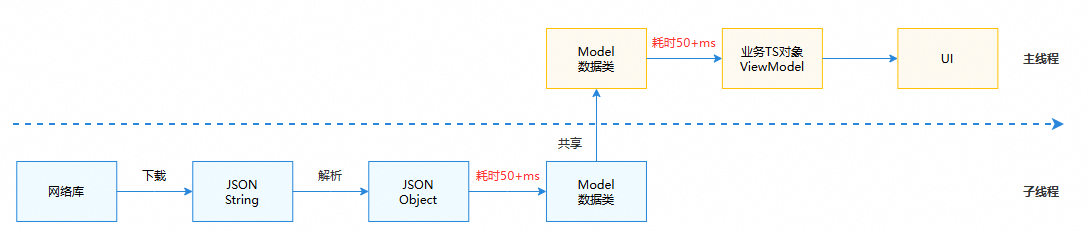
数据进行线程间共享改造:业务逻辑迁移到子线程后,为避免跨线程通信导致的数据拷贝消耗,可基于Sendable思想,将通信数据改造成多线程间共享对象。由于UI逻辑无法在子线程中执行,实际操作中需将数据结构解耦,分离数据与UI。将数据抽取为Sendable类,剥离UI相关部分,从而在子线程中完成数据的请求、解析和生成。
如下图所示,在原实际场景中,业务逻辑存在三个主要类结构,并且相互持有。组件LightArtUIComponent可获取上下文说明document,并调用其中的方法。LightArtViewModel使用了装饰器@Observed,该UI装饰器无法在子线程中执行,导致并行化难以实现。
应用业务逻辑为:首先生成LightArtDocument对象。该对象作为组件树的上下文,包含树结构和方法等信息。接着,通过LightArtDocument记录的节点和方法,递归生成树,即对LightArtUIComponent填充数据,形成数据模型。最后递归生成LightArtViewModel。因此,数据结构中存在互相持有及数据与UI耦合的情况。
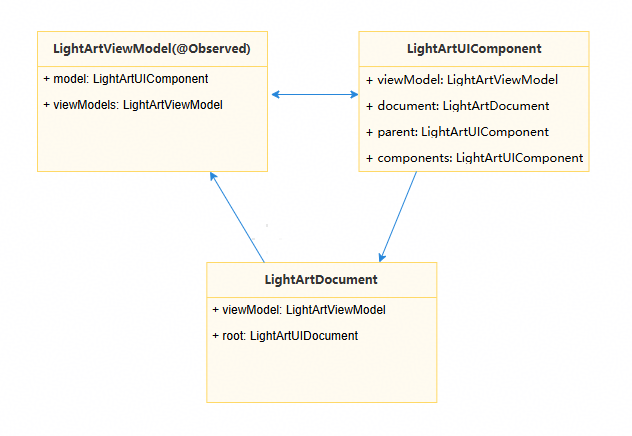
针对上述三大主要结构的整改,主要是将数据生成部分迁移至子线程,在子线程中完成数据下载与解析,并封装成Sendable数据,返回主线程后将数据组装到UI中进行渲染。
如下是相关修改的伪代码:
// LightArt.ets
import { lang } from '@kit.ArkTS';

/*
 * The data to be shared is encapsulated into four Sendable classes: LightArtDataModel,
 * LightArtDataDocument, LightArtViewModel, and LightArtDataComponent.
 * UI data is encapsulated into the UI class.
 * The data of the Sendable class is generated in a child thread.
 */
@Sendable
class LightArtDataModel {}

@Sendable
class LightArtDataDocument {}

@Sendable
class LightArtViewModel {}

class UI {}

interface ISerializableType<T> extends lang.ISendable {}

@Sendable
class LightArtDataComponent {
  public dataModel?: LightArtDataModel;
  public document?: LightArtDataDocument;
  public parent?: LightArtDataComponent;
  public components?: LightArtDataComponent;
  // ...
  public fromJson(jsonObj: object) {
    // ...
  }

  public mergeFrom(jsonObj: object) {
    // ...
  }
}

/*
 * Assemble the Sendable class and the UI data class into LightArtUIComponent.
 * LightArtUIComponent assembles the data based on the data returned by the child thread.
 */
class LightArtUIComponent {
  public data?: LightArtDataComponent;
  public model?: LightArtViewModel;
  public parent?: LightArtUIComponent;
  public components?: LightArtUIComponent;
  // ...
  public uiData?: UI;
}

// Fill in the data to LightArtDataComponent.
@Sendable
export class LightArtDataComponentType implements ISerializableType<LightArtDataComponent> {
  public fromJson(jsonObj: object): LightArtDataComponent {
    let ans = new LightArtDataComponent();
    ans.mergeFrom(jsonObj);
    return ans;
  }
  public static instance: LightArtDataComponentType = new LightArtDataComponentType();
} 优化前,数据下载至解析生成Model数据类的耗时有130ms+。

优化后,数据下载至解析生成Model数据类的操作已全部移至子线程执行,主线程耗时下降至40ms,共优化90ms+。


1. Sendable对象及其成员必须均为Sendable类型。
2. 若类中包含非Sendable属性,可将该类拆分,将支持Sendable的属性组合成一个Sendable类,挂载于该类上,再进行序列化传递。
[h2]实现原理
首先,对于端侧应用而言,主线程的非UI操作耗时大多与网络数据驱动相关,流程如下图所示,因此并行化改造主要集中在网络数据的请求和处理上。在改造前,需对图中各步骤的时间开销进行合理评估,依据改造的投入产出比,确定改造范围。
- 在子线程范围1进行改造:如果Network下发的数据为JSON格式,且网络库能够将数据以ArrayBuffer形式返回,则可以在此范围内进行改造。改造时,可使用ASON.parse()将Network下发的字符串反序列化成可共享的JSON对象。还需对部分Model对象进行Sendable处理,使其能够在子线程中完成JSON对象到Model对象的转换。
- 在子线程范围2进行改造:在此改造范围内,网络请求需在子线程发起,因此网络请求所需的全局对象数据必须在子线程中可访问,这部分数据需进行相应的Sendable改造。

其次,在改造过程中,应先尝试并行化改造,再考虑Sendable改造。仅在需要跨线程传递方法或传递较大对象时,才需进行Sendable改造。
最后,此处的并行化和Sendable改造均是基于ArkTS改造,因此并不适用于一些特别底层的场景,比如小程序框架。

TS/JS(ArkTS默认继承了这种行为)多线程之间默认内存隔离,在多线程之间传递信息时,非sendable的普通对象存在以下限制:
- 不同线程之间只能传递数据,函数无法在多线程间传递。
- 包含Function成员变量的类型也不能在多线程间传递(将Function作为成员变量的对象在跨线程传递时会直接失败)。
- JS的private properties也不能跨线程传递(以#开头的成员变量)。
本案例主要描述子线程范围2中使用全局对象信息调用网络库请求网络数据的场景。以Axios(基于Promise的网络请求库,需要安装后使用)为例,进行相关并行化改造。
- 抽取网络库相关配置并封装为一个Sendable类。
// AxiosConfig.ets
import { collections, lang } from '@kit.ArkTS';
import { AxiosResponse, InternalAxiosRequestConfig } from '@ohos/axios';

// Transforming the Request Interceptor into a Sendable interface
export interface IRequestInterceptor extends lang.ISendable {
  handle(data: InternalAxiosRequestConfig<object>): InternalAxiosRequestConfig<object> |
    Promise<InternalAxiosRequestConfig<object>>;
  handleError(error: object): object;
}

// Transforming the Response Interceptor into a Sendable interface
export interface IResponseInterceptor extends lang.ISendable {
  handle(data: AxiosResponse<object, object>): AxiosResponse<object, object> |
    Promise<AxiosResponse<object, object>>;
  handleError(error: object): object;
}

// Transforming the Auth into a Sendable interface
export interface IAuth extends lang.ISendable {
  username: string;
  password: string;
}

// Transforming the HttpProxy into a Sendable interface
export interface IHttpProxy extends lang.ISendable {
  protocol: string;
  host: string;
  port: number;
  auth: IAuth;
  exclusionList: collections.Array<string>;
}

// Encapsulate Axios configuration, which needs to be initialized on the main thread
@Sendable
export class AxiosGlobalConfig {
  private constructor() {
    this.requestInterceptors = new collections.Array<IRequestInterceptor>();
    this.responseInterceptors = new collections.Array<IResponseInterceptor>();
    this.headers = new collections.Map<string, string>();
  }

  public baseURL?: string;
  public headers: collections.Map<string, string>;
  public timeout?: number;
  public proxy?: IHttpProxy;
  public xsrfCookieName?: string;
  public xsrfHeaderName?: string;
  public maxContentLength?: number;
  public maxBodyLength?: number;
  // ...

  public requestInterceptors: collections.Array<IRequestInterceptor>;
  public responseInterceptors: collections.Array<IResponseInterceptor>;
  public static instance: AxiosGlobalConfig = new AxiosGlobalConfig();
}
- 结合配置类生成Axios对象。
// AxiosAdapter.ets
import axios, { Axios, AxiosInstance, AxiosProxyConfig, AxiosResponse, InternalAxiosRequestConfig } from '@ohos/axios';
import { AxiosGlobalConfig } from './AxiosConfig';

// Initialize axios object according to configuration and return the object.
export function getAxios(): Axios {
  let instance: AxiosInstance = axios.create();
  if (AxiosGlobalConfig.instance.baseURL) {
    instance.defaults.url = AxiosGlobalConfig.instance.baseURL;
  }
  for (let entry of AxiosGlobalConfig.instance.headers.entries()) {
    instance.defaults.headers[entry[0]] = entry[1];
  }
  if (AxiosGlobalConfig.instance.timeout) {
    instance.defaults.timeout = AxiosGlobalConfig.instance.timeout;
  }
  if (AxiosGlobalConfig.instance.proxy) {
    let config: AxiosProxyConfig = {
      host: AxiosGlobalConfig.instance.proxy.host,
      port: AxiosGlobalConfig.instance.proxy.port,
      exclusionList: []
    };
    instance.defaults.proxy = config;
  }
  for (let interceptor of AxiosGlobalConfig.instance.requestInterceptors.values()) {
    axios.interceptors.request.use((config: InternalAxiosRequestConfig<object>): InternalAxiosRequestConfig<object> |
      Promise<InternalAxiosRequestConfig<object>> => interceptor.handle(config),
      (error: object) => interceptor.handleError(error));
  }
  for (let interceptor of AxiosGlobalConfig.instance.responseInterceptors.values()) {
    axios.interceptors.response.use((response: AxiosResponse<object, object>): AxiosResponse<object, object> |
      Promise<AxiosResponse<object, object>> => interceptor.handle(response),
      (error: object) => interceptor.handleError(error));
  }
  return axios;
}
- 对相关类进行Sendable改造。
// Interceptor.ets
import { AxiosResponse, InternalAxiosRequestConfig } from '@ohos/axios';
import { IRequestInterceptor, IResponseInterceptor } from './AxiosConfig';

// Request interceptor encapsulated as sendable
@Sendable
export class RequestInterceptor implements IRequestInterceptor {
  handle(data: InternalAxiosRequestConfig<object>): InternalAxiosRequestConfig<object> |
    Promise<InternalAxiosRequestConfig<object>> {
    return data;
  }
  handleError(error: object): object {
    return error;
  }
}

// Response interceptor encapsulated as sendable
@Sendable
export class ResponseInterceptor implements IResponseInterceptor {
  handle(data: AxiosResponse<object, object>): AxiosResponse<object, object> |
    Promise<AxiosResponse<object, object>> {
    return data;
  }
  handleError(error: object): object {
    return error;
  }
}
- 在子线程中执行相关逻辑。
结合TaskPool,使Axios在主线程初始化,并在子线程中执行相关逻辑。
// Sample7.ets
import { taskpool } from '@kit.ArkTS';
import { AxiosError, AxiosResponse } from '@ohos/axios';
import { getAxios } from './AxiosAdapter';
import { AxiosGlobalConfig, IRequestInterceptor, IResponseInterceptor } from './AxiosConfig';
import { RequestInterceptor, ResponseInterceptor } from './Interceptor';

function initAxios(url: string): void {
  // init axios config
  AxiosGlobalConfig.instance.baseURL = url;
  let requestInterceptors: IRequestInterceptor = new RequestInterceptor();
  let responseInterceptors: IResponseInterceptor = new ResponseInterceptor();
  AxiosGlobalConfig.instance.requestInterceptors.push(requestInterceptors);
  AxiosGlobalConfig.instance.responseInterceptors.push(responseInterceptors);
  AxiosGlobalConfig.instance.timeout = 1000;
}

@Concurrent
function testAxios(config: AxiosGlobalConfig) {
  // taskpool function
  AxiosGlobalConfig.instance = config;
  let adapter = getAxios();
  adapter.get(AxiosGlobalConfig.instance.baseURL).then((res: AxiosResponse) => {
    console.log('testAxios: ' + JSON.stringify(res.data));
  }).catch((error: AxiosError) => {
    console.error('error: ' + error.message);
  });
}

function demo() {
  let url = ''; // internet url
  initAxios(url);
  for (let i = 0; i < 5; i++) {
    // TaskPool thread use Axios
    let task: taskpool.Task = new taskpool.Task(testAxios, AxiosGlobalConfig.instance);
    taskpool.execute(task);
  }
}

@Entry
@Component
struct Sample7 {
  @State message: string = 'Hello World';

  build() {
    Row() {
      Column({ space: 12 }) {
        Button('test')
          .height(40)
          .width('100%')
          .onClick(() => {
            demo();
          })
      }
      .height('100%')
      .width('100%')
      .padding(16)
      .justifyContent(FlexAlign.Center)
    }
    .height('100%')
  }
}