概述
本文面向新闻与小说阅读类应用,介绍如何组合使用悬浮布局、沉浸光感、智感握姿和Share Kit,减少固定控件对内容区域的占用,并提升宽屏设备上的阅读和操作体验。全文围绕新闻首页、新闻详情页和小说阅读页三个典型场景,提供16项功能的关键实现与示例代码,覆盖直板机、折叠屏和平板等设备形态。
每个场景包括场景描述、实现原理、开发步骤和常见问题。正文代码仅展示关键逻辑,完整实现及运行环境以示例工程为准。
UX设计与参数说明: 组件选型与交互设计参考华为UX设计指南的组件概览,具体设计要求以相应组件的设计子页面为准。除特别注明外,本文中的尺寸、圆角、间距、字号、透明度、动画时长和布局比例等数值均为本示例的实现取值,源自官方依据的推荐值;实际项目应结合业务内容、设备形态和可用窗口尺寸调整。
表1:新闻首页功能与关键能力映射表
功能 | 关键组件/Kit/API |
|---|---|
功能1:[顶部导航栏、底部页签栏沉浸光感] | Navigation/HdsNavigation、Tabs/HdsTabs |
功能2:[底部页签栏滑动隐藏] | List、Tabs/HdsTabs |
功能3:[底部页签栏智感握姿] | Tabs/HdsTabs |
表2:新闻详情页功能与关键能力映射表
功能 | 关键组件/Kit/API |
|---|---|
功能1:[新闻详情页沉浸光感] | Navigation/HdsNavigation、Tabs/HdsTabs |
功能2:[新闻详情页滑动隐藏] | List |
功能3:[新闻详情页工具栏智感握姿] | Tabs/HdsTabs |
功能4:[新闻详情系统分享] | Share Kit |
功能5:[新闻详情划线分享] | Share Kit |
功能6:[新闻详情页边看边评] | List、Divider |
表3:小说阅读页功能与关键能力映射表
功能 | 关键组件/Kit/API |
|---|---|
功能1:[小说阅读页沉浸光感] | Toggle |
功能2:[小说阅读页智感握姿] | TouchObject |
功能3:[双页模式] | / |
功能4:[翻页设计] | Stack、List |
功能5:[小说阅读系统分享] | Share Kit |
功能6:[小说阅读划线分享] | Share Kit |
功能7:[听书页面多设备适配] | Slider、Text |
[h2]场景描述
新闻首页通过悬浮布局与沉浸光感扩大内容显示区域,并结合滑动隐藏和智感握姿提升浏览与宽屏操作体验。本场景的目标效果如下:
功能1:顶部导航栏、底部页签栏沉浸光感。 内容列表延伸到状态栏下方,搜索栏与频道页签悬浮在列表之上。标题栏内的容器开启沉浸光感材质(systemMaterial),底层内容自然透出,系统材质有助于保持文字与背景的视觉层次,仍需验证不同内容下的对比度。底部页签栏以悬浮样式放置在内容之上,背景为沉浸光感材质。
功能2:底部页签栏滑动隐藏。 向上滑动新闻列表并超过累积阈值后,隐藏底部页签栏。反向滚动并超过累积阈值后,页签栏恢复。切换到“我的”页签时恢复显示。
功能3:底部页签栏智感握姿。 在折叠屏展开态、平板横屏态上,推荐开启智感握姿,感知用户握持/操作设备的手势,页签栏可随交互手自动切换左右位置。
表4:新闻首页 功能×机型 适配矩阵
功能 \ 机型 | 直板机 | 双折叠(展开态) | 阔折叠(折叠态) | 阔折叠(展开态)/三折叠(全展开态)/平板横屏 |
|---|---|---|---|---|
顶部导航栏、底部页签栏沉浸光感 |
|
|
|
|
底部页签栏滑动隐藏 |
|
|
|
|
底部页签栏智感握姿 | / |
| / |
|


阔折叠展开态、三折叠全展开态、平板横屏态三种形态表现一致,合并为一列;表中“/”说明不推荐在该机型上做此功能。新闻详情页、小说阅读页场景适配矩阵规则一致。
[h2]实现原理
功能1:顶部导航栏、底部页签栏沉浸光感
页面骨架用Navigation组件搭建,标题栏取STACK样式,内容区延伸到标题栏与状态栏下方。搜索栏与频道页签作为浮层放进标题栏。底部页签栏用Tabs的barFloatingStyle悬浮样式置于内容之上。
标题栏内部容器经属性修改器 (AttributeModifier)挂systemMaterial,取超厚(ULTRA_THICK)档并关闭阴影,提升标题文字在复杂背景上的可读性;页签栏悬浮样式内传入systemMaterial,取超薄(ULTRA_THIN)档并开启交互与点光源反馈。标题栏同时开启滚动渐变模糊特效,滚动56vp内标题栏背景由透明渐变到全模糊。底层列表从浮层下方透出,系统材质有助于保持文字可读。

悬浮需三个条件同时满足:barOverlap为true、vertical取默认false、barPosition取BarPosition.End。不传材质时只保留悬浮布局。API 23至API 25改用UIDesignKit的HdsNavigation (导航根视图容器)与HdsTabs,材质经systemMaterialEffect取自适应类型与自适应等级,并支持渐变模糊滚动特效。

沉浸光感材质(参见沉浸光感简介)自API 26起提供,材质实例集中保存到主题常量,按sdkApiVersion判断后创建,构造失败时置空、调用方判空再挂载,避免低版本设备启动崩溃。开启沉浸光感需确保应用的targetSdkVersion不低于26.0.0。entry模块的module.json5中,ohos.arkui.UIMaterial.state为default或enable时开启,为disable时全局禁用;全局disable时,应用级与组件级开启均不生效。
功能2:底部页签栏滑动隐藏
使用List与LazyForEach承载新闻列表。List的onDidScroll回调携带每帧滚动增量,累积滚动增量判断方向:正向累积超过阈值(默认10vp)切换为隐藏,反向累积超过阈值恢复显示。
状态切换经UIContext的显式动画 (animateTo)完成。页签栏里的Tabs随hidden状态切换translate位移、opacity透明度与hitTestBehavior触摸测试,收起时下移淡出并退出触摸测试。切换到“我的”页签时经@Monitor重置隐藏状态。

动画时长250ms,曲线取摩擦曲线(Curve.Friction)。

滚动回调里只更新目标状态,动画负责过渡,不要逐帧修改位置。
功能3:底部页签栏智感握姿
使用Tabs悬浮样式内置的智感握姿能力。把barFloatingStyle的adaptToHandedness设为true,页签栏随交互手自动切换左右位置,单手握持时镜像到握持一侧。无需监听姿态,也无需申请权限。

API 23至API 25的HdsTabs分支同样在悬浮样式里开启该开关。
[h2]开发步骤
功能1:顶部导航栏、底部页签栏沉浸光感
步骤1:搭建页面骨架,并开启标题栏滚动渐变模糊。标题栏取STACK样式,内容区延伸到标题栏与状态栏下方,标题高度叠加状态栏安全区。
build() {
  if (Theme.USES_HDS_MATERIAL) {
    HdsNavigation() {
      this.HomeBody();
    }
    .titleBar(this.hdsTitleBarOptions())
    .mode(NavigationMode.Stack)
    .hideBackButton(true)
    .width('100%')
    .height('100%')
  } else {
    Navigation() {
      this.HomeBody();
    }
    .title({ builder: this.NavTitle, height: this.strategy.navTitleHeightVp + this.topInsetVp },
      this.plainTitleOptions())
    .mode(NavigationMode.Stack)
    .width('100%')
    .height('100%')
  }
}
build() {
if (Theme.USES_HDS_MATERIAL) {
HdsNavigation() {
this.HomeBody();
}
.titleBar(this.hdsTitleBarOptions())
// ...
} else {
Navigation() {
this.HomeBody();
}
.title({ builder: this.NavTitle, height: this.strategy.navTitleHeightVp + this.topInsetVp },
this.plainTitleOptions())
// ...
}
} 开启标题栏滚动渐变模糊:API 26及以上经Navigation标题选项的scrollEffectOptions配置ScrollEffectType.GRADUAL_BLUR特效;API 23至API 25的HdsNavigation分支在标题栏样式里配置对应的HdsScrollEffectType.GRADIENT_BLUR特效。
private plainTitleOptions(): NavigationTitleOptions {
  const options: NavigationTitleOptions = {
    barStyle: BarStyle.STACK
  };
  if (deviceInfo.sdkApiVersion >= Theme.IMMERSIVE_MATERIAL_MIN_API_VERSION) {
    try {
      options.scrollEffectOptions = {
        scrollEffectType: ScrollEffectType.GRADUAL_BLUR,
        blurEffectiveEndOffset: LengthMetrics.vp(56)
      };
    } catch (_err) {
      Logger.info(TAG, 'setScrollBlur: beta missing gradual blur, fallback common blur');
    }

  }
  return options;
}

private hdsTitleBarOptions(): HdsNavigationTitleBarOptions {
  const maskExtra: number = this.strategy.headlineColumnCount === 1 ? 56 : 56;
  const options: HdsNavigationTitleBarOptions = {
    content: {
      stackBuilder: (): void => {
        this.NavTitle();
      }
    },
    style: {
      scrollEffectOpts: {
        scrollEffectType: HdsScrollEffectType.GRADIENT_BLUR
      },
      originalStyle: {
        backgroundStyle: {
          maskExtraHeight: maskExtra
        }
      },
      scrollEffectStyle: {
        backgroundStyle: {
          maskExtraHeight: maskExtra
        }
      },
      systemMaterialEffect: {
        materialType: hdsMaterial.MaterialType.ADAPTIVE,
        materialLevel: hdsMaterial.MaterialLevel.ADAPTIVE
      }
    }
  };
  return options;
}
/** Gradual blur ends at 56vp to match the HDS default below API 26 */
private plainTitleOptions(): NavigationTitleOptions {
const options: NavigationTitleOptions = { barStyle: BarStyle.STACK };
if (deviceInfo.sdkApiVersion >= Theme.IMMERSIVE_MATERIAL_MIN_API_VERSION) {
// ...
options.scrollEffectOptions = {
scrollEffectType: ScrollEffectType.GRADUAL_BLUR,
// ...
};
// ...
}
private hdsTitleBarOptions(): HdsNavigationTitleBarOptions {
// ...
style: {
scrollEffectOpts: {
scrollEffectType: HdsScrollEffectType.GRADIENT_BLUR
},
// ...
};
// ...
} 
GRADUAL_BLUR与GRADIENT_BLUR是同一类滚动渐变模糊特效在两套API中的不同枚举名,类型不同、不能互换。前者属于ArkUI的ScrollEffectType,配API 26及以上的Navigation;后者属于UIDesignKit的HdsScrollEffectType,配API 23至API 25的HdsNavigation,Hds前缀即UIDesignKit标识。
步骤2:把搜索栏与频道页签放进标题栏。标题栏容器保持透明,材质下沉到内部元素。搜索栏建议采用胶囊按钮样式:高40vp、圆角24vp,内边距左右12vp、上下9vp;内部搜索图标16vp见方,提示文字字号为16fp、行高为22vp,使用次级文字色,以弱化其视觉存在感。胶囊经共享AttributeModifier实例挂systemMaterial。
@Builder
SearchBar() {
  Row({ space: 8 }) {
    Image($r('app.media.icon_search'))
      .width(16)
      .height(16)
    Text($r('app.string.search_placeholder'))
      .fontSize(16)
      .fontColor(Theme.TEXT_SECONDARY)
      .lineHeight(22)
  }
  .padding({ left: 12, top: 9, right: 12, bottom: 9 })
  .borderRadius(24)
  .width('100%')
  .height(40)
  .attributeModifier(SEARCH_BAR_PANEL_MODIFIER)
}
@Builder
SearchBar() {
Row({ space: 8 }) {
Image($r('app.media.icon_search'))
.width(16)
.height(16)
Text($r('app.string.search_placeholder'))
.fontSize(16)
.fontColor(Theme.TEXT_SECONDARY)
.lineHeight(22)
}
.padding({ left: 12, top: 9, right: 12, bottom: 9 })
.borderRadius(24)
.width('100%')
.height(40)
.attributeModifier(SEARCH_BAR_PANEL_MODIFIER)
} 实现面板材质修饰器:API 26及以上挂systemMaterial,低版本降级为背景模糊。降级策略与开发场景3的小说阅读页悬浮层不同:面板降级后保留磨砂表面;悬浮层覆盖密集正文,实机验证半透明背板下正文内容透出影响观感,改用不透明实底加轻阴影。
export class PanelMaterialRowModifier implements AttributeModifier<RowAttribute> {
  applyNormalAttribute(instance: RowAttribute): void {
    if (deviceInfo.sdkApiVersion >= Theme.IMMERSIVE_MATERIAL_MIN_API_VERSION) {
      if (deviceInfo.apiAvailable('26.0.0')) {
        if (Theme.NAV_BAR_MATERIAL !== null) {
          instance.systemMaterial(Theme.NAV_BAR_MATERIAL);
          return;
        }
      }
    }
    instance.backgroundBlurStyle(BlurStyle.COMPONENT_THICK);
  }
}
/** Falls back to COMPONENT_THICK blur below API 26 */
export class PanelMaterialRowModifier implements AttributeModifier<RowAttribute> {
applyNormalAttribute(instance: RowAttribute): void {
if (deviceInfo.sdkApiVersion >= Theme.IMMERSIVE_MATERIAL_MIN_API_VERSION &&
deviceInfo.apiAvailable('26.0.0') && Theme.NAV_BAR_MATERIAL !== null) {
instance.systemMaterial(Theme.NAV_BAR_MATERIAL);
} else {
instance.backgroundBlurStyle(BlurStyle.COMPONENT_THICK);
}
}
} 步骤3:集中预创建材质实例。创建页签栏、按钮与标题栏三档材质:页签栏取超薄(ULTRA_THIN)档并开启交互与点光源,按钮取薄(THIN)档,标题栏取超厚(ULTRA_THICK)档并关闭阴影。按钮档经按钮类修饰器挂载到标题栏按钮(BUTTON_MODIFIER等),搜索框使用共享面板材质修饰器。
export class Theme {
  public static readonly IMMERSIVE_MATERIAL_MIN_API_VERSION: number = 26;
  public static readonly HDS_MATERIAL_MIN_API_VERSION: number = 23;
  public static readonly BRAND_BLUE: Resource = $r('app.color.brand_blue');
  public static readonly TEXT_PRIMARY: Resource = $r('app.color.text_primary');
  public static readonly TEXT_SECONDARY: Resource = $r('app.color.text_secondary');
  public static readonly TEXT_TERTIARY: Resource = $r('app.color.text_tertiary');
  public static readonly PURE_BLACK: Resource = $r('app.color.pure_black');
  public static readonly PURE_WHITE: Resource = $r('app.color.pure_white');
  public static readonly DOT_GRAY: Resource = $r('app.color.dot_gray');
  public static readonly BADGE_RED: Resource = $r('app.color.badge_red');
  public static readonly CAROUSEL_DOT_DIM: Resource = $r('app.color.carousel_dot_dim');
  public static readonly COMMENT_INPUT_BG: Resource = $r('app.color.comment_input_bg');
  public static readonly SPLIT_DIVIDER: Resource = $r('app.color.split_divider');
  public static readonly COMMENT_BAR_BG: Resource = $r('app.color.comment_bar_bg');
  public static readonly COMMENT_BAR_SHADOW: Resource = $r('app.color.comment_bar_shadow');
  public static readonly CARD_BORDER: Resource = $r('app.color.card_border');
  public static readonly CARD_SURFACE: Resource = $r('app.color.card_surface');
  public static readonly TOAST_BG: Resource = $r('app.color.toast_bg');
  public static readonly TOAST_SHADOW: Resource = $r('app.color.toast_shadow');
  public static readonly GRADIENT_END: Resource = $r('app.color.gradient_end');
  public static readonly BIG_CARD_OVERLAY_START: Resource = $r('app.color.big_card_overlay_start');
  public static readonly BIG_CARD_OVERLAY_END: Resource = $r('app.color.big_card_overlay_end');
  public static readonly SUPPORTS_IMMERSIVE_MATERIAL: boolean =
    deviceInfo.sdkApiVersion >= Theme.IMMERSIVE_MATERIAL_MIN_API_VERSION;
  public static readonly USES_HDS_MATERIAL: boolean = deviceInfo.sdkApiVersion >= Theme.HDS_MATERIAL_MIN_API_VERSION &&
    deviceInfo.sdkApiVersion < Theme.IMMERSIVE_MATERIAL_MIN_API_VERSION;
  public static readonly BAR_MATERIAL: uiMaterial.ImmersiveMaterial | null = Theme.createBarMaterial();
  public static readonly BUTTON_MATERIAL: uiMaterial.ImmersiveMaterial | null = Theme.createButtonMaterial();
  public static readonly NAV_BAR_MATERIAL: uiMaterial.ImmersiveMaterial | null = Theme.createNavBarMaterial();

  private static createBarMaterial(): uiMaterial.ImmersiveMaterial | null {
    if (!Theme.SUPPORTS_IMMERSIVE_MATERIAL) {
      return null;
    }
    try {
      return new uiMaterial.ImmersiveMaterial({
        style: uiMaterial.ImmersiveStyle.ULTRA_THIN,
        interactive: true,
        lightEffect: {}
      });
    } catch {
      return null;
    }
  }

  private static createButtonMaterial(): uiMaterial.ImmersiveMaterial | null {
    if (!Theme.SUPPORTS_IMMERSIVE_MATERIAL) {
      return null;
    }
    try {
      return new uiMaterial.ImmersiveMaterial({
        style: uiMaterial.ImmersiveStyle.THIN,
        interactive: true,
        lightEffect: {}
      });
    } catch {
      return null;
    }
  }

  private static createNavBarMaterial(): uiMaterial.ImmersiveMaterial | null {
    if (!Theme.SUPPORTS_IMMERSIVE_MATERIAL) {
      return null;
    }
    try {
      return new uiMaterial.ImmersiveMaterial({
        style: uiMaterial.ImmersiveStyle.ULTRA_THICK,
        applyShadow: false
      });
    } catch {
      return null;
    }
  }
}
export class Theme {
// ...
public static readonly BAR_MATERIAL: uiMaterial.ImmersiveMaterial | null = Theme.createBarMaterial();
public static readonly BUTTON_MATERIAL: uiMaterial.ImmersiveMaterial | null = Theme.createButtonMaterial();
public static readonly NAV_BAR_MATERIAL: uiMaterial.ImmersiveMaterial | null = Theme.createNavBarMaterial();
private static createBarMaterial(): uiMaterial.ImmersiveMaterial | null {
// ...
return new uiMaterial.ImmersiveMaterial({
style: uiMaterial.ImmersiveStyle.ULTRA_THIN, interactive: true, lightEffect: {}
});
// ...
}
private static createButtonMaterial(): uiMaterial.ImmersiveMaterial | null {
// ...
return new uiMaterial.ImmersiveMaterial({
style: uiMaterial.ImmersiveStyle.THIN, interactive: true, lightEffect: {}
});
// ...
}
private static createNavBarMaterial(): uiMaterial.ImmersiveMaterial | null {
// ...
return new uiMaterial.ImmersiveMaterial({
style: uiMaterial.ImmersiveStyle.ULTRA_THICK, applyShadow: false
});
// ...
}
} 步骤4:让页签栏进入悬浮样式。Tabs经AttributeModifier挂barFloatingStyle。barOverlap为true。宽度窄屏占满全屏、宽屏收缩为内容区宽度,两种宽度下页签都保持可达。
Tabs({ barPosition: BarPosition.End, index: this.vm.currentTabIndex, controller: this.tabsController }) {
  this.TabContents();
}
.attributeModifier(new BarFloatingStyleModifier(this.barFloatingOptions()))
.barOverlap(true)
.scrollable(false)
.width(this.ws.isSmLayout() ? '100%' : this.ws.contentWidthVp())
.height(100)
.onChange((index: number) => this.vm.switchTab(index))
.translate({ y: this.hidden ? 120 : 0 })
.opacity(this.hidden ? 0 : 1)
.hitTestBehavior(this.hidden ? HitTestMode.None : HitTestMode.Default)
Tabs({ barPosition: BarPosition.End, index: this.vm.currentTabIndex, controller: this.tabsController }) {
this.TabContents(); // TabContent and tabBar tab items
}
.attributeModifier(new BarFloatingStyleModifier(this.barFloatingOptions())) // Version-guarded barFloatingStyle
.barOverlap(true) // Floating condition: overlaps the content
.scrollable(false)
.width(this.ws.isSmLayout() ? '100%' : this.ws.contentWidthVp())
.onChange((index: number) => this.vm.switchTab(index)) 功能2:底部页签栏滑动隐藏
步骤1:声明隐藏状态,并在列表滚动回调中驱动显隐。增量通过追踪器累积。状态变化时用显式动画更新。
List({ space: this.strategy.listSpacingVp }) {
  ListItem() {
    Column()
      .width('100%')
      .height(this.strategy.topSpacerHeightVp + this.topInsetVp)
  }
  ListItem() {
    this.HeadlineBlock();
  }
  ListItem() {
    this.BigCardSection();
  }
  if (this.strategy.textCardDisplay === TextCardDisplay.VERTICAL_LIST) {
    LazyForEach(this.musicCardSource, (item: NewsCardViewModel) => {
      ListItem() {
        NewsMusicCard({ item: item, onCardClick: this.onOpenArticle })
      }
    }, (item: NewsCardViewModel) => item.articleId)
    LazyForEach(this.textCardSource, (item: NewsCardViewModel) => {
      ListItem() {
        NewsImageTextCard({ item: item, onCardClick: this.onOpenArticle })
      }
    }, (item: NewsCardViewModel) => item.articleId)
  } else {
    if (this.strategy.musicCardDisplay === MusicCardDisplay.HORIZONTAL_ROW) {
      ListItem() {
        this.MusicCardRow();
      }
    } else {
      LazyForEach(this.musicCardSource, (item: NewsCardViewModel) => {
        ListItem() {
          NewsMusicCard({ item: item, onCardClick: this.onOpenArticle })
        }
      }, (item: NewsCardViewModel) => item.articleId)
    }
    ForEach(this.textCardRowStartIndices(), (startIndex: number) => {
      ListItem() {
        this.TextCardGridRow(startIndex);
      }
    }, (startIndex: number) => `text_pair_${startIndex}`)
  }
  ListItem() {
    Column()
      .width('100%')
      .height(116 + this.bottomInsetVp)
  }
}
.clip(false)
.padding({ left: this.ws.pageMargin(), right: this.ws.pageMargin() })
.cachedCount(5)
.scrollBar(BarState.Off)
.edgeEffect(EdgeEffect.None)
.width('100%')
.height('100%')
.onDidScroll((scrollOffset: number) => {
  const hidden = this.tabBarTracker.nextHidden(this.tabBarHidden, scrollOffset);
  if (hidden !== this.tabBarHidden) {
    this.tabBarTracker.animateHidden(this.getUIContext(), () => {
      this.tabBarHidden = hidden;
    });
  }
})
/** Tab bar hidden state (driven by list scroll direction) + scroll-hide tracker (accumulates deltas by threshold) */
@Local tabBarHidden: boolean = false;
private tabBarTracker: ScrollHideTracker = new ScrollHideTracker();
List({ space: this.strategy.listSpacingVp }) {
// ...
}
// List scroll callback: accumulate deltas, animate the switch
.onDidScroll((scrollOffset: number) => {
const hidden = this.tabBarTracker.nextHidden(this.tabBarHidden, scrollOffset);
if (hidden !== this.tabBarHidden) {
this.tabBarTracker.animateHidden(this.getUIContext(), () => {
this.tabBarHidden = hidden;
});
}
}) 步骤2:页签栏随状态收起。收起时向下平移120vp并淡出,同时退出触摸测试,滚动期间不误触。
.translate({ y: this.hidden ? 120 : 0 })
.opacity(this.hidden ? 0 : 1)
.hitTestBehavior(this.hidden ? HitTestMode.None : HitTestMode.Default)
Tabs() {
this.TabContents();
}
.translate({ y: this.hidden ? 120 : 0 })
.opacity(this.hidden ? 0 : 1)
.hitTestBehavior(this.hidden ? HitTestMode.None : HitTestMode.Default) 步骤3:切换页签时恢复显示。“我的”页签不参与滑动隐藏。切换到该页签时重置隐藏状态。
@Monitor('vm.currentTabIndex')
onCurrentTabChange(): void {
  if (this.vm.currentTabIndex === MINE_TAB_INDEX) {
    this.tabBarHidden = false;
  }
}
@Monitor('vm.currentTabIndex')
onCurrentTabChange(): void {
if (this.vm.currentTabIndex === MINE_TAB_INDEX) {
this.tabBarHidden = false;
}
} 功能3:底部页签栏智感握姿
步骤1:配置悬浮样式并开启智感握姿。barBottomMargin(设置悬浮页签距离屏幕底部的边距)取底部安全区,悬浮栏与系统导航栏分离。API 26及以上的Tabs分支经barFloatingOptions把功能1步骤3预创建的材质实例注入systemMaterial,材质不可用时退化为仅保留边距与智感握姿的悬浮样式;API 23至API 25的HdsTabs分支经hdsBarFloatingStyle传自适应材质(systemMaterialEffect)。
private hdsBarFloatingStyle(): HdsTabsFloatingStyle {
  const style: HdsTabsFloatingStyle = {
    barBottomMargin: this.bottomInsetVp,
    systemMaterialEffect: {
      materialType: hdsMaterial.MaterialType.ADAPTIVE,
      materialLevel: hdsMaterial.MaterialLevel.ADAPTIVE
    }
  };
  return style;
}

private barFloatingOptions(): FloatingTabBarStyle {
  if (Theme.BAR_MATERIAL !== null) {
    const style: FloatingTabBarStyle = {
      barBottomMargin: this.bottomInsetVp,
      maskHeight: 0,
      systemMaterial: Theme.BAR_MATERIAL,
      adaptToHandedness: true
    };
    return style;
  }
  const fallbackStyle: FloatingTabBarStyle = {
    barBottomMargin: this.bottomInsetVp,
    maskHeight: 0,
    adaptToHandedness: true
  };
  return fallbackStyle;
}
private barFloatingOptions(): FloatingTabBarStyle {
if (Theme.BAR_MATERIAL !== null) {
const style: FloatingTabBarStyle = {
barBottomMargin: this.bottomInsetVp,
maskHeight: 0,
systemMaterial: Theme.BAR_MATERIAL,
adaptToHandedness: true
};
return style;
}
const fallbackStyle: FloatingTabBarStyle = {
barBottomMargin: this.bottomInsetVp,
maskHeight: 0,
adaptToHandedness: true
};
return fallbackStyle;
} [h2]常见问题
- 问题1:设置了材质却看不到效果。组件不在生效范围内。沉浸光感只在标题栏、底部页签栏、弹窗,以及Toggle、Slider、Select上生效。请把需要材质的组件放进这些区域,或改用backgroundColor兜底。处理思路参见沉浸光感常见问题。
- 问题2:底部页签的材质不生效。检查三个悬浮条件是否同时满足。缺少任一条件时悬浮样式不成立,systemMaterial也不生效。另外不要同时设置barBackgroundColor或barBackgroundBlurStyle,否则会遮住材质。API 23至API 25的HdsTabs分支通过systemMaterialEffect使用自适应材质。API 26及以上的普通Tabs分支通过systemMaterial挂载材质,该分支在API 26以下不调用barFloatingStyle。
- 问题3:低版本设备启动崩溃。uiMaterial模块自API 26起提供,低版本设备上在构造期触碰该模块会崩溃。材质实例要按sdkApiVersion判断后创建,并用try-catch兜底置空。调用方判空再挂载。
- 问题4:页面出现卡顿或发热。每个材质浮层会增加一次高斯模糊采样,单个页面材质层数建议不超过3层。同一子树只设置一次材质,不与backgroundBlurStyle等模糊属性叠加。优化要点参见沉浸光感功耗优化。
[h2]场景描述
新闻详情页结合沉浸光感、滑动隐藏、智感握姿与宽屏分栏,减少阅读干扰并支持边读边评。本场景的目标效果如下:
功能1:新闻详情页沉浸光感。 底部工具栏(收藏、点赞、分享)以Tabs悬浮栏形态覆盖在正文之上,背景为沉浸光感材质。正文滚动后状态栏安全区渐变模糊。
功能2:新闻详情页滑动隐藏。 向上滚动正文并超过累积阈值后,工具栏收起;反向滚动并超过累积阈值后,工具栏重新出现。顶部导航栏随同一显隐状态收起与恢复。
功能3:新闻详情页工具栏智感握姿。 在折叠屏展开态、平板横屏态上,推荐开启智感握姿,底部悬浮工具栏随交互手自动切换左右位置。
功能4:新闻详情系统分享。 点击工具栏分享按钮,通过系统分享面板分享文章标题、链接与摘要,接收方可通过链接回访文章。
功能5:新闻详情划线分享。 选中语段后构造文本分享记录并附加阅读分享拓展数据记录,系统据此生成海报卡片。分享面板以详情预览拉起,海报大卡与文本卡片同时展示;阅读分享拓展数据记录构建失败时不生成海报卡片,仅保留文本卡片。接收方通过卡片回到原文语段。
功能6:新闻详情页边看边评。 在宽屏设备上按需切换正文与评论双栏,左侧阅读、右侧查看评论,两栏独立滚动。评论输入框与收藏、点赞、分享共用底部工具栏。顶部右上角分栏按钮为左右分栏开关,点击后评论栏在屏幕右侧展开,无需离开正文页面。
表5:新闻详情页 功能×机型 适配矩阵
功能 \ 机型 | 直板机 | 双折叠(展开态) | 阔折叠(折叠态) | 阔折叠(展开态)/三折叠(全展开态)/平板横屏 |
|---|---|---|---|---|
新闻详情页沉浸光感 |
|
|
|
|
新闻详情页滑动隐藏 |
|
|
|
|
新闻详情页工具栏智感握姿 | / |
| / |
|
新闻详情系统分享 |
|
|
|
|
新闻详情划线分享 |
|
|
|
|
新闻详情页边看边评 | / |
| / |
|


[h2]实现原理
功能1:新闻详情页沉浸光感
页面骨架用Navigation组件搭建,标题栏取STACK样式。正文用List承载段落与评论,外层Stack贴底对齐放置底部工具栏。工具栏用Tabs悬浮栏承载:barPosition取End、barOverlap为true,悬浮样式barFloatingStyle经AttributeModifier挂载并传入systemMaterial,材质从主题常量取实例。工具栏不参与正文滚动。正文向上滚动后,状态栏区域渐显一条模糊条:模糊条用backgroundEffect实现,下边缘经DST_IN线性渐变遮罩淡出,整体离屏合成,触摸穿透。

悬浮三条件与材质预创建见开发场景1。
功能2:新闻详情页滑动隐藏
正文列表的onDidScroll滚动回调携带每帧增量,累积判断方向。累积超过阈值切换工具栏显隐。收起与恢复经UIContext的animateTo显式动画完成。顶部导航栏随同一显隐状态联动收起与恢复。正文列表底部需预留占位,高度随显隐状态切换并叠加底部安全区。同一滚动回调同步推进状态栏模糊条的模糊半径。

阈值与动画参数同开发场景1。

工具栏显隐只更新目标状态,不逐帧修改工具栏位置。
功能3:新闻详情页工具栏智感握姿
使用Tabs悬浮样式内置的智感握姿能力。工具栏声明智感握姿开关参数,透传到悬浮样式的adaptToHandedness。全宽单栏与分栏模式均传true,悬浮栏随交互手自动切换左右位置。

组件内置该能力,无需监听姿态,也无需申请权限。
功能4:新闻详情系统分享
引入Share Kit系统能力。Share Kit(分享服务)负责构建分享面板并把内容分发到目标应用,应用只需构造分享数据并拉起面板。整篇文章用Hyperlink(UTD数据类型HYPERLINK)承载标题、链接与摘要(构建系统分享时data.selectedText填入文章首段文字,即摘要)。统一SharePanel组件负责注册面板关闭监听。

context经AppContext.getUIAbilityContext()获取并判空。
功能5:新闻详情划线分享
使用Share Kit的阅读分享拓展数据记录能力。在正文选中菜单里追加分享项,取选中文字与前后文、来源与链接构成阅读分享拓展数据记录(ReadingExtendedShareRecordData),附加在文本分享记录上,系统据此生成海报卡片。分享面板以详情预览模式(SharePreviewMode.DETAIL)拉起,展示系统生成的海报卡片大卡,文本记录的文本卡片同时保留在面板中。阅读分享拓展数据记录构建失败时不生成海报卡片,仅保留文本卡片,内容为选中文字加链接行。分享链接以hl参数携带段落索引与高亮起止字符偏移,接收方可通过卡片解析定位参数,实现原文划线片段的精准跳转。

按SDK约定先在缓存目录创建空PNG文件并转成文件URI填入generatedImageUri,系统把生成的卡片图写入该文件。module.json5的skills声明immnews与immreader自定义URL协议,系统海报卡片的appLink使用https webLink;webLink为空时构造失败,不生成海报卡片,仅保留文本卡片。
功能6:新闻详情页边看边评
窗口宽度达到md断点(≥600vp)且分栏开关开启时,正文与评论按3:2分为双列,中间以0.5vp细分界线分隔,两栏各自持有Scroller独立滚动、共用同一显隐状态,顶部右上角分栏按钮负责切换页面单栏与分栏状态。评论输入框与收藏、点赞、分享共用底部工具栏:点击评论输入框后,工具栏区域从Tabs悬浮栏切换为评论输入框。

分栏时工具栏保持智感握姿开启,随交互手悬浮于双列之上。评论输入框显隐状态由宿主页面统一持有,工具栏只负责触发状态变更。点击正文或返回时统一收起评论输入框。
[h2]开发步骤
功能1:新闻详情页沉浸光感
步骤1:搭建页面骨架。Navigation作为根容器,标题栏取STACK样式并叠加状态栏安全区;根据窗口宽度与分栏开关选择双栏或单栏布局。
根容器与布局分流代码如下:
Navigation() {
  Column() {
    if (this.ws.isWideLayout() && this.splitCommentMode) {
      this.SplitLayout();
    } else {
      this.FullTextLayout();
    }
  }
  .width('100%')
  .height('100%')
  .accessibilityRole(AccessibilityRoleType.COLUMN)
}
.title({ builder: this.TopBar, height: DetailConstants.TOP_BAR_HEIGHT + this.topInsetVp },
  { barStyle: BarStyle.STACK })
.mode(NavigationMode.Stack)
.width('100%')
.height('100%')
Navigation() {
Column() {
if (this.ws.isWideLayout() && this.splitCommentMode) {
this.SplitLayout(); // Wide split layout: body 3 / comments 2, two independently scrolling columns
} else {
this.FullTextLayout(); // Full-width column: body + comments in a single scrolling column
}
}
// ...
}
.title({ builder: this.TopBar, height: DetailConstants.TOP_BAR_HEIGHT + this.topInsetVp },
{ barStyle: BarStyle.STACK }) 全宽单栏中的正文列表、模糊条与底部工具栏组合如下:
@Builder
FullTextLayout() {
  Stack({ alignContent: Alignment.Bottom }) {
    Stack({ alignContent: Alignment.Top }) {
      this.DetailScrollList();
      this.TopBlurStrip();
    }
    .width('100%')
    .height('100%')

    DetailToolBar({
      vm: this.vm,
      hidden: this.toolBarHidden,
      adaptHandedness: true,
      bottomInsetVp: this.bottomInsetVp,
      commentBarVisible: this.commentBarVisible,
      onCommentBarVisibleChange: (visible: boolean): void => this.onCommentBarVisibleChange(visible),
      onShareClick: (): void => this.onToolbarShare(),
      onToast: (message: ResourceStr): void => this.showDetailToast(message)
    })
  }
  .width('100%')
  .height('100%')
  .accessibilityRole(AccessibilityRoleType.STACK)
}
@Builder
FullTextLayout() {
Stack({ alignContent: Alignment.Bottom }) {
Stack({ alignContent: Alignment.Top }) {
this.DetailScrollList();
this.TopBlurStrip();
}
.width('100%')
.height('100%')
DetailToolBar({
vm: this.vm,
hidden: this.toolBarHidden,
adaptHandedness: true,
bottomInsetVp: this.bottomInsetVp,
commentBarVisible: this.commentBarVisible,
onCommentBarVisibleChange: (visible: boolean): void => this.onCommentBarVisibleChange(visible),
onShareClick: (): void => this.onToolbarShare(),
onToast: (message: ResourceStr): void => this.showDetailToast(message)
})
}
.width('100%')
.height('100%')
.accessibilityRole(AccessibilityRoleType.STACK)
} @Builder
FullTextLayout() {
Stack({ alignContent: Alignment.Bottom }) {
Stack({ alignContent: Alignment.Top }) {
this.DetailScrollList();
this.TopBlurStrip();
}
DetailToolBar({ adaptHandedness: true, /* ... */ })
}
} 步骤2:实现状态栏滚动渐变模糊。模糊条以状态栏安全区为主体、下缘渐隐延伸;内层线性渐变遮罩经DST_IN混合淡化下边缘,外层离屏合成避免遮罩影响底层内容;触摸穿透。
@Builder
TopBlurStrip() {
  if (this.topInsetVp > 0) {
    Stack() {
      Column()
        .width('100%')
        .height('100%')
        .linearGradient({
          angle: 180,
          colors: [
            [Color.White, 0],
            [Color.White, this.getBlurTailSolidFraction()],
            [Color.Transparent, 1]
          ]
        })
        .blendMode(BlendMode.DST_IN)
    }
    .width('100%')
    .height(this.topInsetVp + DetailConstants.STATUS_BAR_BLUR_EXTRA_VP + DetailConstants.STATUS_BAR_BLUR_FADE_TAIL_VP)
    .backgroundEffect({
      radius: this.statusBarBlurProgress * DetailConstants.STATUS_BAR_BLUR_MAX_RADIUS_VP,
      saturation: 1,
      brightness: DetailConstants.STATUS_BAR_BLUR_BRIGHTNESS
    })
    .blendMode(BlendMode.SRC_OVER, BlendApplyType.OFFSCREEN)
    .position({ x: 0, y: 0 })
    .hitTestBehavior(HitTestMode.None)
  }
}
/** Backdrop blur strip with DST_IN fade tail */
@Builder
TopBlurStrip() {
if (this.topInsetVp > 0) {
Stack() {
Column()
.linearGradient({
angle: 180,
colors: [[Color.White, 0], [Color.White, this.getBlurTailSolidFraction()], [Color.Transparent, 1]]
})
.blendMode(BlendMode.DST_IN)
}
.height(this.topInsetVp + DetailConstants.STATUS_BAR_BLUR_EXTRA_VP
+ DetailConstants.STATUS_BAR_BLUR_FADE_TAIL_VP)
.backgroundEffect({
radius: this.statusBarBlurProgress * DetailConstants.STATUS_BAR_BLUR_MAX_RADIUS_VP
// ...
})
.blendMode(BlendMode.SRC_OVER, BlendApplyType.OFFSCREEN)
.position({ x: 0, y: 0 })
.hitTestBehavior(HitTestMode.None)
}
} 同帧推进模糊半径:滚动偏移在12vp内映射到0至1的进度,变化小于0.001时跳过状态更新。分栏模式下两栏独立滚动,取两栏滚动偏移的最大值推进。
private updateStatusBarBlur(): void {
  let yOffset = this.scroller.currentOffset().yOffset;
  if (this.ws.isWideLayout() && this.splitCommentMode) {
    yOffset = Math.max(yOffset, this.commentScroller.currentOffset().yOffset);
  }
  const progress = Math.min(Math.max(yOffset / DetailConstants.STATUS_BAR_BLUR_END_OFFSET_VP, 0), 1);
  if (Math.abs(progress - this.statusBarBlurProgress) > DetailConstants.STATUS_BAR_BLUR_PROGRESS_EPSILON) {
    this.statusBarBlurProgress = progress;
  }
}
/** Blur grows with scroll; split layout takes max of both columns' offsets */
private updateStatusBarBlur(): void {
let yOffset = this.scroller.currentOffset().yOffset;
if (this.ws.isWideLayout() && this.splitCommentMode) {
yOffset = Math.max(yOffset, this.commentScroller.currentOffset().yOffset);
}
const progress = Math.min(Math.max(yOffset / DetailConstants.STATUS_BAR_BLUR_END_OFFSET_VP, 0), 1);
if (Math.abs(progress - this.statusBarBlurProgress) > DetailConstants.STATUS_BAR_BLUR_PROGRESS_EPSILON) {
this.statusBarBlurProgress = progress;
}
} 步骤3:用Tabs悬浮栏承载工具栏。工具栏封装为独立组件DetailToolBar。悬浮样式经AttributeModifier挂载。悬浮样式构造同开发场景1 功能3,另含barWidth按断点取328vp/428vp。工具栏高度96vp;宽度窄屏占满全屏,宽屏收缩为窗口宽度减32vp(两侧各留16vp边距);收起时下移130vp并淡出。
工具栏只挂一个TabContent,通过tabBar(this.ToolbarContent())注册。
Tabs({ barPosition: BarPosition.End, controller: this.tabsController }) {
  this.TabContents();
}
.attributeModifier(new BarFloatingStyleModifier(this.barFloatingOptions()))
.barOverlap(true)
.scrollable(false)
.width(this.ws.isSmLayout() ? '100%' : Math.max(0, this.ws.screenWidthVp - 32))
.height(96)
.translate({ y: this.hidden ? 130 : 0 })
.opacity(this.hidden ? 0 : 1)
.hitTestBehavior(this.hidden ? HitTestMode.None : HitTestMode.Default)
Tabs({ barPosition: BarPosition.End, controller: this.tabsController }) {
TabContent() {
this.EmptyContent();
}
.tabBar(this.ToolbarContent()) // Single tabBar: trigger pill + fixed action zone
}
.attributeModifier(new BarFloatingStyleModifier(this.barFloatingOptions()))
.barOverlap(true)
.scrollable(false)
.width(this.ws.isSmLayout() ? '100%' : Math.max(0, this.ws.screenWidthVp - 32))
.height(96)
.translate({ y: this.hidden ? 130 : 0 })
.opacity(this.hidden ? 0 : 1)
.hitTestBehavior(this.hidden ? HitTestMode.None : HitTestMode.Default) 功能2:新闻详情页滑动隐藏
步骤1:滚动增量经追踪器累积后,通过显式动画联动工具栏与顶部导航栏显隐,并调用功能1 步骤2的updateStatusBarBlur推进状态栏模糊半径。
正文滚动监听及统一处理入口如下:
Column() {
  List({ scroller: this.scroller }) {
    this.ArticleContent();
    this.ListBottomSpacer();
  }
  .scrollBar(BarState.Off)
  .edgeEffect(EdgeEffect.None)
  .width('100%')
  .height('100%')
  .id(DetailConstants.DETAIL_SCROLL_ID)
  .onDidScroll((scrollOffset: number) => {
    this.handleArticleScroll(scrollOffset);
  })
  .onClick(() => this.closeCommentBar())
}
.layoutWeight(3)
.height('100%')
List({ scroller: this.scroller }) {
// ...
}
// Body list scroll callback: onDidScroll carries the per-frame delta
.onDidScroll((scrollOffset: number) => {
this.handleArticleScroll(scrollOffset);
})
// Same delta drives the toolbar, the top bar and the status bar blur strip
private handleArticleScroll(scrollOffset: number): void {
const hidden = this.toolBarTracker.nextHidden(this.toolBarHidden, scrollOffset);
if (hidden !== this.toolBarHidden) {
this.toolBarTracker.animateHidden(this.getUIContext(), () => {
this.toolBarHidden = hidden;
});
}
this.updateStatusBarBlur();
} 顶部导航栏与工具栏按同一显隐状态收起与恢复(含状态栏安全区补偿)。
@Builder
TopBar() {
  DetailTopBar({
    onBack: this.onBack,
    showSquareButton: this.ws.isWideLayout(),
    topInsetVp: this.topInsetVp,
    onSquareClick: () => {
      this.splitCommentMode = !this.splitCommentMode;
      Logger.info(TAG, `detail layout switched, splitCommentMode: ${this.splitCommentMode}`);
    },
    onSearch: (): void => this.onSearchClick(),
    onShare: (): void => this.onToolbarShare()
  })
  .translate({ y: this.toolBarHidden ? -(DetailConstants.TOP_BAR_HEIGHT + this.topInsetVp) : 0 })
  .opacity(this.toolBarHidden ? 0 : 1)
  .hitTestBehavior(this.toolBarHidden ? HitTestMode.None : HitTestMode.Default)
}
// Top nav bar collapses and restores with the same state
DetailTopBar({ /* ... */ })
.translate({ y: this.toolBarHidden ? -(DetailConstants.TOP_BAR_HEIGHT + this.topInsetVp) : 0 })
.opacity(this.toolBarHidden ? 0 : 1)
.hitTestBehavior(this.toolBarHidden ? HitTestMode.None : HitTestMode.Default) 步骤2:处理底部占位与多设备适配。占位高度随显隐状态切换并叠加底部安全区,保证正文末段能滚出工具栏遮挡区。宽屏全宽单栏下,正文图片按65%宽度居中;宽屏可切换正文与评论分栏。
@Builder
ListBottomSpacer() {
  ListItem() {
    Column().width('100%')
      .height(this.toolBarHidden ? DetailConstants.BOTTOM_SPACER_COLLAPSED + this.bottomInsetVp :
        DetailConstants.BOTTOM_SPACER_EXPANDED + this.bottomInsetVp)
  }
}
@Builder
ListBottomSpacer() {
ListItem() {
Column().width('100%')
.height(this.toolBarHidden ? DetailConstants.BOTTOM_SPACER_COLLAPSED + this.bottomInsetVp :
DetailConstants.BOTTOM_SPACER_EXPANDED + this.bottomInsetVp) // Narrow when hidden, inset-aware
}
} 功能3:新闻详情页工具栏智感握姿
步骤1:透传智感握姿开关。全宽单栏与分栏调用DetailToolBar时均传true。DetailToolBar声明adaptHandedness参数(默认false仅作兜底),写入悬浮样式的adaptToHandedness(见开发场景1 功能3)。
@Param adaptHandedness: boolean = false;
DetailToolBar({ adaptHandedness: true, /* ... */ })

/** Offsets the floating bar toward the handedness side */
@Param adaptHandedness: boolean = false;

private barFloatingOptions(): FloatingTabBarStyle {
  if (Theme.BAR_MATERIAL !== null) {
    const style: FloatingTabBarStyle = {
      // ...
      systemMaterial: Theme.BAR_MATERIAL,
      adaptToHandedness: this.adaptHandedness
    };
    return style;
  }
  const fallbackStyle: FloatingTabBarStyle = {
    // ...
    adaptToHandedness: this.adaptHandedness
  };
  return fallbackStyle;
}
功能4:新闻详情系统分享
步骤1:构造整篇文章分享数据并拉起面板。分享记录包含标题、链接与摘要,面板采用单选模式并监听关闭事件。
文章分享记录的构造如下:
const data = this.vm.buildArticleShareData();
const record: systemShare.SharedRecord = {
  utd: utd.UniformDataType.HYPERLINK,
  content: data.schemeLink,
  title: data.sourceTitle,
  description: data.selectedText
};
this.showSharePanel(record);
const record: systemShare.SharedRecord = {
utd: utd.UniformDataType.HYPERLINK,
content: data.schemeLink, // In-app scheme link (built by SchemeLinkConfig)
title: data.sourceTitle,
description: data.selectedText
};
this.showSharePanel(record); 拉起系统分享面板:详情页仅负责获取并校验context,再委托SharePanel.show拉起面板。
private showSharePanel(record: systemShare.SharedRecord, options?: SharePanelOptions): void {
  const context = AppContext.getUIAbilityContext();
  if (context === undefined) {
    Logger.error(TAG, 'showSharePanel: ui ability context unavailable');
    return;
  }
  SharePanel.show(context, record, options);
}
private showSharePanel(record: systemShare.SharedRecord, options?: SharePanelOptions): void {
const context = AppContext.getUIAbilityContext();
if (context === undefined) { return; }
SharePanel.show(context, record, options);
} 
统一面板组件SharePanel(独立分享模块)承载SharedData构造、ShareController与关闭监听。锚点与预览模式由调用方经options指定,新闻与阅读共用。
功能5:新闻详情划线分享
步骤1:在正文段落上启用选择菜单并追加分享项。Text开启copyOption后长按弹出选择菜单,onCreateMenu判重后追加分享菜单项,onMenuItemClick把段落号与选区起止传给分享流程;段落id同时作为后续滚动定位的锚点。划线高亮与正文排版的富文本渲染见锚点源文件。
@Builder
ParagraphText(index: number) {
  Text() {
    ForEach(this.vm.getSegments(index), (segment: ParagraphSegment) => {
      if (segment.highlighted) {
        Span(segment.text)
          .fontColor(Theme.TEXT_PRIMARY)
          .decoration({
            type: TextDecorationType.Underline, color: Theme.BRAND_BLUE, style: TextDecorationStyle.DASHED
          })
      } else {
        Span(segment.text)
          .fontColor(Theme.TEXT_PRIMARY)
      }
    }, (segment: ParagraphSegment) => `${segment.highlighted ? '1' : '0'}_${segment.text}`)
  }
  .fontSize(17)
  .lineHeight(25.6)
  .width('100%')
  .textAlign(TextAlign.JUSTIFY)
  .id(`paragraph_${index}`)
  .copyOption(CopyOptions.LocalDevice)
  .editMenuOptions({
    onCreateMenu: (menuItems: TextMenuItem[]): TextMenuItem[] => {
      const items: TextMenuItem[] = menuItems.slice();
      let hasShare = false;
      for (let i = 0; i < items.length; i++) {
        if (items[i].id.equals(TextMenuItemId.SHARE)) {
          hasShare = true;
          break;
        }
      }
      if (!hasShare) {
        const shareItem: TextMenuItem = {
          id: TextMenuItemId.SHARE,
          content: $r('app.string.text_menu_share')
        };
        items.push(shareItem);
      }
      return items;
    },
    onMenuItemClick: (menuItem: TextMenuItem, range: TextRange): boolean => {
      if (menuItem.id.equals(TextMenuItemId.SHARE)) {
        this.shareHighlight(index, range.start, range.end);
        return true;
      }
      return false;
    }
  })
}
@Builder
ParagraphText(index: number) {
Text() { // ... }
.id(`paragraph_${index}`)
.copyOption(CopyOptions.LocalDevice)
.editMenuOptions({
onCreateMenu: (menuItems: TextMenuItem[]): TextMenuItem[] => {
const items: TextMenuItem[] = menuItems.slice();
let hasShare = false;
for (let i = 0; i < items.length; i++) {
if (items[i].id.equals(TextMenuItemId.SHARE)) {
hasShare = true;
break;
}
}
if (!hasShare) {
const shareItem: TextMenuItem = {
id: TextMenuItemId.SHARE,
content: $r('app.string.text_menu_share')
};
items.push(shareItem);
}
return items;
},
onMenuItemClick: (menuItem: TextMenuItem, range: TextRange): boolean => {
if (menuItem.id.equals(TextMenuItemId.SHARE)) {
this.shareHighlight(index, range.start, range.end);
return true;
}
return false;
}
})
} 步骤2:构造划线分享数据。选中文字前后各取最多30字符。链接携带段落号与选区起止。
const data = new HighlightShareData();
data.selectedText = paragraph.substring(clampedStart, clampedEnd);
data.prefixText =
  paragraph.substring(Math.max(0, clampedStart - SHARE_CONTEXT_MAX_CHARS), clampedStart).trim();
data.suffixText =
  paragraph.substring(clampedEnd, Math.min(paragraph.length, clampedEnd + SHARE_CONTEXT_MAX_CHARS)).trim();
data.sourceTitle = this.title;
data.authorName = this.authorName;
data.publishDate = TextUtils.parsePublishDate(this.authorMeta);
const extraInfo = `?hl=${paragraphIndex},${clampedStart},${clampedEnd}`;
const linkConfig = SchemeLinkConfig.get('news', 'link_config.json');
data.schemeLink = `${linkConfig.getSchemeLinkBase()}${this.articleId}${extraInfo}`;
if (linkConfig.getWebLinkBase() !== '') {
  data.webLink = `${linkConfig.getWebLinkBase()}${this.articleId}${extraInfo}`;
}
/** Build share data; undefined for invalid ranges */
buildHighlightShareData(paragraphIndex: number, start: number, end: number): HighlightShareData | undefined {
try {
const data = new HighlightShareData();
data.selectedText = paragraph.substring(clampedStart, clampedEnd);
data.prefixText =
paragraph.substring(Math.max(0, clampedStart - SHARE_CONTEXT_MAX_CHARS), clampedStart).trim();
data.suffixText =
paragraph.substring(clampedEnd, Math.min(paragraph.length, clampedEnd + SHARE_CONTEXT_MAX_CHARS)).trim();
// ...
const extraInfo = `?hl=${paragraphIndex},${clampedStart},${clampedEnd}`;
const linkConfig = SchemeLinkConfig.get('news', 'link_config.json');
data.schemeLink = `${linkConfig.getSchemeLinkBase()}${this.articleId}${extraInfo}`;
// ...
return data;
} catch (e) {
return undefined;
}
} 步骤3:构造阅读分享拓展数据记录。webLink为空时抛错,再创建空PNG文件并转成文件URI。阅读分享拓展数据记录填入卡片类型、图片URI、来源标题、链接、前后文等字段。
private buildRevisitShareData(data: HighlightShareData,
  context: common.UIAbilityContext): systemShare.ReadingExtendedShareRecordData {
  if (data.webLink === '') {
    throw new Error('revisit share requires an https webLink');
  }
  const posterPath = `${context.cacheDir}/share_system_poster_${Date.now()}.png`;
  try {
    const posterFile = fileIo.openSync(posterPath, fileIo.OpenMode.READ_WRITE | fileIo.OpenMode.CREATE);
    fileIo.closeSync(posterFile);
  } catch (e) {
    const error = e as BusinessError;
    Logger.error(TAG, `create empty system poster file failed: ${error.code} ${error.message}`);
    throw new Error('create empty system poster file failed');
  }
  const revisit: systemShare.ReadingExtendedShareRecordData = {
    revisitShareRecordType: systemShare.RevisitShareRecordType.READING_SHARE,
    generatedImageUri: fileUri.getUriFromPath(posterPath),
    sourceTitle: data.sourceTitle,
    appLink: data.webLink !== '' ? data.webLink : data.schemeLink,
    readingShareStyle: systemShare.ReadingShareRecordStyle.STYLE_HIGHLIGHT_CONTENT,
    prefixText: data.prefixText,
    suffixText: data.suffixText,
    author: data.authorName,
    publishDate: data.publishDate,
    sharerName: data.sharerName,
    appSlogan: data.appSlogan
  };
  return revisit;
}
/** Empty PNG created at output path first: the system writes the generated card image there */
private buildRevisitShareData(data: HighlightShareData,
context: common.UIAbilityContext): systemShare.ReadingExtendedShareRecordData {
if (data.webLink === '') {
throw new Error('revisit share requires an https webLink');
}
const posterPath = `${context.cacheDir}/share_system_poster_${Date.now()}.png`;
try {
const posterFile = fileIo.openSync(posterPath, fileIo.OpenMode.READ_WRITE | fileIo.OpenMode.CREATE);
fileIo.closeSync(posterFile);
} catch (e) {
throw new Error('create empty system poster file failed');
}
const revisit: systemShare.ReadingExtendedShareRecordData = {
revisitShareRecordType: systemShare.RevisitShareRecordType.READING_SHARE,
generatedImageUri: fileUri.getUriFromPath(posterPath),
sourceTitle: data.sourceTitle,
appLink: data.webLink !== '' ? data.webLink : data.schemeLink,
readingShareStyle: systemShare.ReadingShareRecordStyle.STYLE_HIGHLIGHT_CONTENT
// ...
};
return revisit;
} 步骤4:构造系统海报卡片记录。记录本体为文本记录,携带阅读分享拓展数据记录字段,面板中文本卡片与海报大卡并存。构建失败时不生成海报卡片,仅保留文本卡片。
private buildSystemPosterRecord(data: HighlightShareData): systemShare.SharedRecord {
  const context = AppContext.getUIAbilityContext();
  let revisit: systemShare.ReadingExtendedShareRecordData | undefined = undefined;
  if (context !== undefined) {
    try {
      revisit = this.buildRevisitShareData(data, context);
    } catch (e) {
      const error = e as BusinessError;
      Logger.error(TAG, `buildRevisitShareData failed: ${error.code} ${error.message}`);
    }
  }
  const record: systemShare.SharedRecord = {
    utd: utd.UniformDataType.TEXT,
    content: revisit === undefined ? this.buildShareTextContent(data) : data.selectedText,
    title: data.sourceTitle,
    revisitShareRecordData: revisit
  };
  return record;
}
/** Text record with revisit data; degrades to plain text when context unavailable */
private buildSystemPosterRecord(data: HighlightShareData): systemShare.SharedRecord {
const context = AppContext.getUIAbilityContext();
let revisit: systemShare.ReadingExtendedShareRecordData | undefined = undefined;
if (context !== undefined) {
try {
revisit = this.buildRevisitShareData(data, context);
} catch (e) {
// ...
}
}
const record: systemShare.SharedRecord = {
utd: utd.UniformDataType.TEXT,
content: revisit === undefined ? this.buildShareTextContent(data) : data.selectedText,
title: data.sourceTitle,
revisitShareRecordData: revisit
};
return record;
} 步骤5:以详情预览大卡拉起面板。补建划线高亮后构造展示选项,previewMode取DETAIL。
private invokeHighlightShare(paragraphIndex: number, start: number, end: number, data: HighlightShareData): void {
  try {
    this.vm.addHighlight(paragraphIndex, start, end);
    const options = new SharePanelOptions();
    options.previewMode = systemShare.SharePreviewMode.DETAIL;
    this.showSharePanel(this.buildSystemPosterRecord(data), options);
    Logger.info(TAG, `highlight system-poster share invoked: [${start}, ${end})`);
  } catch (e) {
    const error = e as BusinessError;
    Logger.error(TAG, `invokeHighlightShare failed: ${error.code} ${error.message}`);
  }
}
/** Open share panel with system poster record (DETAIL preview); degrades to plain text on failure */
private invokeHighlightShare(paragraphIndex: number, start: number, end: number, data: HighlightShareData): void {
try {
this.vm.addHighlight(paragraphIndex, start, end);
const options = new SharePanelOptions();
options.previewMode = systemShare.SharePreviewMode.DETAIL;
this.showSharePanel(this.buildSystemPosterRecord(data), options);
} catch (e) {
// ...
}
} 步骤6:支持链接拉起应用。module.json5声明可响应的技能。入口Ability在冷/热启动路径下捕获并解析链接参数。

链接格式为immnews://article/{articleId}?hl={paragraph},{start},{end}:articleId标识文章,hl携带划线定位参数(段落索引与高亮起止字符偏移)。回访按栈顶状态分流:栈顶为同一篇文章详情页时,经emitter事件通知携带定位参数,直接滚动到划线段落,不重复压栈;栈顶为其他文章详情页时replaceUrl替换;不在详情页时push新页面;UIContext未就绪时暂存uri延后处理。详情页监听目标段落,段落锚点(paragraph_{index})测量就绪后滚动定位;锚点未挂载时按次数上限轮询等待,超时兜底直接滚动。
在module.json5中声明可响应的技能:注册https、immnews与immreader三协议(immreader为阅读器深链),使链接可拉起应用。
{
  "module": {
    "name": "immersivereadingsample",
    "type": "entry",
    "description": "$string:module_desc",
    "mainElement": "ImmersiveReadingAbility",
    "deviceTypes": [
      "phone",
      "tablet"
    ],
    "deliveryWithInstall": true,
    "installationFree": false,
    "pages": "$profile:main_pages",
    "routerMap": "$profile:route_map",
    "metadata": [
      {
        "name": "ohos.arkui.UIMaterial.state",
        "value": "enable"
      }
    ],
    "abilities": [
      {
        "name": "ImmersiveReadingAbility",
        "srcEntry": "./ets/entryability/EntryAbility.ets",
        "description": "$string:entry_ability_desc",
        "icon": "$media:layered_image",
        "label": "$string:entry_ability_label",
        "startWindowIcon": "$media:startIcon",
        "startWindowBackground": "$color:start_window_background",
        "exported": true,
        "skills": [
          {
            "entities": [
              "entity.system.home"
            ],
            "actions": [
              "ohos.want.action.home"
            ]
          },
          {
            "entities": [
              "entity.system.browsable"
            ],
            "actions": [
              "ohos.want.action.viewData"
            ],
            "uris": [
              {
                "scheme": "https",
                "host": "news.example.com"
              },
              {
                "scheme": "immnews"
              },
              {
                "scheme": "immreader"
              }
            ]
          }
        ]
      }
    ],
    "extensionAbilities": [
      {
        "name": "EntryBackupAbility",
        "srcEntry": "./ets/entrybackupability/EntryBackupAbility.ets",
        "type": "backup",
        "exported": false,
        "metadata": [
          {
            "name": "ohos.extension.backup",
            "resource": "$profile:backup_config"
          }
        ],
      }
    ]
  }
}
// module.json5: declare the skill that can be launched via link
"skills": [
{
"entities": ["entity.system.browsable"],
"actions": ["ohos.want.action.viewData"],
"uris": [
{ "scheme": "https", "host": "news.example.com" },
{ "scheme": "immnews" },
{ "scheme": "immreader" }
]
}
] 
上述skills仅声明应用可响应的链接类型,不代表已完成App Linking配置。若启用https App Linking,应将https单独放在一个skill对象中,并在该对象与uris同级设置"domainVerify": true,而不是写入uris数组项;同时还需开通App Linking服务,在AGC中关联实际域名,在域名服务器配置/.well-known/applinking.json并完成调试。news.example.com为示例域名,实际项目需替换;immnews和immreader为自定义协议深链,不依赖App Linking域名校验。
在入口Ability冷/热启动路径捕获深链:冷启动暂存uri,窗口创建后按协议分流派发;热启动直接路由。
private pendingUri: string = '';
private uiContextRef: UIContext | undefined = undefined;
private mainWindow: window.Window | undefined = undefined;
private windowState: WindowSizeState | undefined = undefined;

// launchParam unused but kept to match the standard UIAbility onCreate signature (review fix)
onCreate(want: Want, launchParam: AbilityConstant.LaunchParam): void {
  try {
    this.context.getApplicationContext().setColorMode(ConfigurationConstant.ColorMode.COLOR_MODE_NOT_SET);
  } catch (e) {
    const error = e as BusinessError;
    Logger.error(TAG, `Failed to set color mode: ${error.code} ${error.message}`);
  }
  Logger.info(TAG, 'onCreate');
  GlobalContext.getContext().setObject('abilityWant', want);
  GlobalContext.getContext().setObject('abilityContext', this.context);
  AppContext.setUIAbilityContext(this.context);
  // Write the current system color mode on cold start (later updated by onConfigurationUpdate)
  AppStorage.setOrCreate('immersivereading_systemColorMode', this.context.config.colorMode);
  PreferencesUtil.createFontPreferences(this.context);
  // Capture the deep link uri; dispatched in onWindowStageCreate on cold start
  const uri = want?.uri;
  if (uri !== undefined && uri !== '') {
    this.pendingUri = uri;
  }
}

onConfigurationUpdate(newConfig: Configuration): void {
  // Write system dark mode changes into AppStorage for the reading page's 'follow system' linkage
  AppStorage.setOrCreate('immersivereading_systemColorMode', newConfig.colorMode);
  Logger.info(TAG, `onConfigurationUpdate colorMode=${newConfig.colorMode}`);
  // Re-apply the status bar color so the visible page switches with the system mode
  StatusBarUtils.applyAdaptiveContentColor(this.context);
}

onNewWant(want: Want, launchParam: AbilityConstant.LaunchParam): void {
  // Hot-start deep link: dispatch by scheme shape (news detail / reader book)
  const uri = want?.uri;
  if (uri !== undefined && uri !== '') {
    this.dispatchDeepLink(uri);
  }
  Logger.info(TAG, `onNewWant, launch reason: ${launchParam.launchReason}`);
}

onDestroy(): void {
  Logger.info(TAG, 'onDestroy');
}

onWindowStageCreate(windowStage: window.WindowStage): void {
  Logger.info(TAG, 'onWindowStageCreate');
  try {
    const windowClass: window.Window = windowStage.getMainWindowSync();
    this.mainWindow = windowClass;
    // Immersive full-screen layout, set once per app lifecycle
      windowClass.setWindowLayoutFullScreen(true)
        .catch((err: BusinessError): void => {
          Logger.error(TAG, `setWindowLayoutFullScreen failed: ${err.code} ${err.message}`);
        });
      // Full-screen may hide system bars (observed on tablets); keep them explicitly visible
      windowClass.setWindowSystemBarEnable(['status', 'navigation'])
        .catch((err: BusinessError): void => {
          Logger.error(TAG, `setWindowSystemBarEnable failed: ${err.code} ${err.message}`);
        });
    // Frozen after first collection: status bar toggling must not re-layout reading text
    let insetsCaptured: boolean = false;
    let updateAvoidArea = (): void => {
      if (insetsCaptured) {
        return;
      }
      let systemRect = windowClass.getWindowAvoidArea(window.AvoidAreaType.TYPE_SYSTEM);
      let navRect = windowClass.getWindowAvoidArea(window.AvoidAreaType.TYPE_NAVIGATION_INDICATOR);
      AppStorage.setOrCreate('immersivereading_topRectHeight', systemRect.topRect.height + systemRect.topRect.top);
      AppStorage.setOrCreate('immersivereading_bottomRectHeight',
        Math.max(systemRect.bottomRect.height, navRect.bottomRect.height));
      insetsCaptured = true;
    };
    updateAvoidArea();
    windowClass.on('avoidAreaChange', updateAvoidArea);
  } catch (e) {
    const error = e as BusinessError;
    Logger.error(TAG, `Failed to setup main window: ${error.code} ${error.message}`);
  }
  if (this.pendingUri !== '') {
    const detailParams = DeepLinkParser.parseDetailUri(this.pendingUri);
    const readerParams = detailParams === undefined ? ReaderLinkParser.parseBookUri(this.pendingUri) : undefined;
    if (detailParams !== undefined) {
      DetailRouteState.get().setPendingParams(detailParams);
      AppStorage.setOrCreate('immersivereading_pendingDeepLinkUrl', AppConstants.ROUTE_DETAIL);
      AppStorage.setOrCreate('immersivereading_pendingDeepLinkParams', detailParams);
    } else if (readerParams !== undefined) {
      // Stash params; the home page pushes the target in onPageShow (avoids a router race)
      ReaderRouteState.get().setPendingParams(readerParams);
      AppStorage.setOrCreate('immersivereading_pendingDeepLinkUrl', 'pages/ReaderPage');
      AppStorage.setOrCreate('immersivereading_pendingDeepLinkParams', readerParams);
    } else {
      // Unrecognized URI: keep the default home page (pages/Index)
    }
    this.pendingUri = '';
  }
  // Window size baseline collection (dependency of the news-side breakpoint layout)
  try {
    const displayInfo = display.getDefaultDisplaySync();
    WindowSizeState.stashInitialSize(displayInfo.width, displayInfo.height, displayInfo.densityPixels);
  } catch (e) {
    const error = e as BusinessError;
    Logger.error(TAG, `Failed to stash initial display size: ${error.code} ${error.message}`);
  }
  windowStage.loadContent('pages/Index', (err: BusinessError<void>) => {
    if (err.code) {
      Logger.error(TAG, `Failed to load the content. Cause: ${err.code} ${err.message}`);
      return;
    }
    const mainWindow = this.mainWindow;
    if (mainWindow === undefined) {
      Logger.error(TAG, 'Main window unavailable, skip ui context init');
      return;
    }
    try {
      this.uiContextRef = mainWindow.getUIContext();
    } catch (e) {
      const error = e as BusinessError;
      Logger.error(TAG, `Failed to get ui context: ${error.code} ${error.message}`);
      return;
    }
    this.initWindowState();
    Logger.info(TAG, 'Succeeded in loading the content: pages/Index');
  });
}

/** Truncate a deep link uri for logging (full links may carry query content; keep logs lean) */
private safeUriForLog(uri: string): string {
  const maxUriLogLen: number = 64;
  return uri.length <= maxUriLogLen ? uri : `${uri.substring(0, maxUriLogLen)}...`;
}

private routeToDetail(uri: string): void {
  const shortUri: string = this.safeUriForLog(uri);
  try {
    const params = DeepLinkParser.parseDetailUri(uri);
    if (params === undefined) {
      Logger.warn(TAG, `No article marker in uri: ${shortUri}`);
      return;
    }
    if (this.uiContextRef === undefined) {
      Logger.warn(TAG, `UIContext not ready, uri deferred: ${shortUri}`);
      this.pendingUri = uri;
      return;
    }
    const router = this.uiContextRef.getRouter();
    const state = router.getState();
    Logger.info(TAG, `route state: index=${state.index}, path=[${state.path}], name=[${state.name}]`);
    if (state.name === 'NewsDetailPage') {
      const routeState = DetailRouteState.get();
      if (routeState.currentArticleId !== '' && routeState.currentArticleId === params.articleId) {
        const eventData: emitter.EventData = {
          data: { 'paragraph': params.targetParagraph, 'start': params.highlightStart, 'end': params.highlightEnd }
        };
        emitter.emit({ eventId: AppConstants.EVENT_SCROLL_REQUEST }, eventData);
        Logger.info(TAG, `Same article on top, request highlight scroll: ${shortUri}`);
        return;
      }
      router.replaceUrl({ url: AppConstants.ROUTE_DETAIL, params: params })
        .catch((err: BusinessError): void => {
          Logger.error(TAG, `replaceUrl detail failed: ${err.code} ${err.message}`);
        });
      Logger.info(TAG, `Replaced top detail by uri: ${shortUri}`);
    } else {
      RouterUtils.safePush(this.uiContextRef, AppConstants.ROUTE_DETAIL, params);
      Logger.info(TAG, `Routed to detail by uri: ${shortUri}`);
    }
  } catch (err) {
    const error = err as BusinessError;
    Logger.error(TAG, `routeToDetail failed: ${error.code} ${error.message}`);
  }
}

/** Hot-start deep link dispatch: news article link → detail route, reader book link → reader route */
private dispatchDeepLink(uri: string): void {
  if (DeepLinkParser.parseDetailUri(uri) !== undefined) {
    this.routeToDetail(uri);
    return;
  }
  if (ReaderLinkParser.parseBookUri(uri) !== undefined) {
    this.routeToReader(uri);
  }
}
// Entry Ability: capture the deep link uri on cold start (dispatched in onWindowStageCreate),
// route on hot start by scheme (news detail / reader book)
private pendingUri: string = '';
onCreate(want: Want): void {
const uri = want?.uri;
if (uri !== undefined && uri !== '') {
this.pendingUri = uri;
}
}
onNewWant(want: Want, launchParam: AbilityConstant.LaunchParam): void {
// Hot-start deep link: dispatch by scheme shape (news detail / reader book)
const uri = want?.uri;
if (uri !== undefined && uri !== '') {
this.dispatchDeepLink(uri);
}
}
/** Hot-start deep link dispatch: news article link → detail route, reader book link → reader route */
private dispatchDeepLink(uri: string): void {
if (DeepLinkParser.parseDetailUri(uri) !== undefined) {
this.routeToDetail(uri);
return;
}
if (ReaderLinkParser.parseBookUri(uri) !== undefined) {
this.routeToReader(uri);
}
} 
launchParam为框架传入的默认参数,示例未在onCreate()使用该参数,故省略。
功能6:新闻详情页边看边评
步骤1:在宽屏下开启正文与评论双栏。顶部右上角分栏按钮切换splitCommentMode。SplitLayout按3:2布置正文与评论,中间以0.5vp细分界线分隔(颜色取不透明度为5%的黑色,仅提示分界,降低视觉干扰),两栏独立滚动且共用同一显隐状态。
@Builder
SplitLayout() {
  Stack({ alignContent: Alignment.Bottom }) {
    Stack({ alignContent: Alignment.Top }) {
      Row() {
        Column() {
          List({ scroller: this.scroller }) {
            this.ArticleContent();
            this.ListBottomSpacer();
          }
          .scrollBar(BarState.Off)
          .edgeEffect(EdgeEffect.None)
          .width('100%')
          .height('100%')
          .id(DetailConstants.DETAIL_SCROLL_ID)
          .onDidScroll((scrollOffset: number) => {
            this.handleArticleScroll(scrollOffset);
          })
          .onClick(() => this.closeCommentBar())
        }
        .layoutWeight(3)
        .height('100%')

        Divider()
          .vertical(true)
          .height('100%')
          .strokeWidth(0.5)
          .color(Theme.SPLIT_DIVIDER)

        Column() {
          List({ scroller: this.commentScroller }) {
            this.CommentsContent(true);
            this.ListBottomSpacer();
          }
          .scrollBar(BarState.Off)
          .edgeEffect(EdgeEffect.None)
          .width('100%')
          .height('100%')
          .onDidScroll((scrollOffset: number) => {
            this.handleArticleScroll(scrollOffset);
          })
          .onClick(() => this.closeCommentBar())
        }
        .layoutWeight(2)
        .height('100%')
      }
      .width('100%')
      .height('100%')

      this.TopBlurStrip();
    }
    .width('100%')
    .height('100%')

    DetailToolBar({
      vm: this.vm,
      hidden: this.toolBarHidden,
      adaptHandedness: true,
      bottomInsetVp: this.bottomInsetVp,
      commentBarVisible: this.commentBarVisible,
      onCommentBarVisibleChange: (visible: boolean): void => this.onCommentBarVisibleChange(visible),
      onShareClick: (): void => this.onToolbarShare(),
      onToast: (message: ResourceStr): void => this.showDetailToast(message)
    })
  }
  .width('100%')
  .height('100%')
  .accessibilityRole(AccessibilityRoleType.STACK)
}
@Builder
SplitLayout() {
Stack({ alignContent: Alignment.Bottom }) {
Row() {
Column() {
List({ scroller: this.scroller }) {
this.ArticleContent();
// ...
}
.onDidScroll((scrollOffset: number) => this.handleArticleScroll(scrollOffset))
}
.layoutWeight(3)
Divider().vertical(true).strokeWidth(0.5).color(Theme.SPLIT_DIVIDER)
Column() {
List({ scroller: this.commentScroller }) {
this.CommentsContent(true);
// ...
}
.onDidScroll((scrollOffset: number) => this.handleArticleScroll(scrollOffset))
}
.layoutWeight(2)
}
// ...
DetailToolBar({ adaptHandedness: true /* ... */ })
}
} 步骤2:复用底部工具栏的评论输入框。点击评论输入框后切换commentBarVisible,工具栏区域从Tabs悬浮栏切换为内联CommentBox。发送或收起后恢复悬浮栏。
Column() {
  if (this.commentBarVisible) {
    this.CommentBox();
  }
  if (!this.commentBarVisible) {
    if (Theme.USES_HDS_MATERIAL) {
      HdsTabs({ barPosition: BarPosition.End, controller: this.hdsTabsController }) {
        this.TabContents();
      }
      .barFloatingStyle(this.hdsBarFloatingStyle())
      .barOverlap(true)
      .scrollable(false)
      .width(this.ws.isSmLayout() ? '100%' : Math.max(0, this.ws.screenWidthVp - 32))
      .height(96)
      .translate({ y: this.hidden ? 130 : 0 })
      .opacity(this.hidden ? 0 : 1)
      .hitTestBehavior(this.hidden ? HitTestMode.None : HitTestMode.Default)
    } else {
      Tabs({ barPosition: BarPosition.End, controller: this.tabsController }) {
        this.TabContents();
      }
      .attributeModifier(new BarFloatingStyleModifier(this.barFloatingOptions()))
      .barOverlap(true)
      .scrollable(false)
      .width(this.ws.isSmLayout() ? '100%' : Math.max(0, this.ws.screenWidthVp - 32))
      .height(96)
      .translate({ y: this.hidden ? 130 : 0 })
      .opacity(this.hidden ? 0 : 1)
      .hitTestBehavior(this.hidden ? HitTestMode.None : HitTestMode.Default)
    }
  }
}
.width('100%')
.accessibilityLevel('no')
// Toolbar build: the inline comment bar and the floating bar are mutually exclusive
Column() {
if (this.commentBarVisible) {
this.CommentBox();
}
if (!this.commentBarVisible) {
Tabs({ barPosition: BarPosition.End, controller: this.tabsController }) {
this.TabContents(); // Same floating toolbar Tabs as feature 1 step 3
}
.attributeModifier(new BarFloatingStyleModifier(this.barFloatingOptions()))
.barOverlap(true)
}
}
.width('100%') [h2]常见问题
- 问题1:工具栏隐藏与恢复时抖动。滚动回调触发频率高,不要逐帧修改工具栏位置。回调中只更新工具栏显隐目标状态,由显式动画完成过渡。用累积增量加阈值判断方向,避免小幅度滚动反复触发相反方向的动画。
- 问题2:正文最后一段滑不出工具栏遮挡区域。未隐藏工具栏时,正文列表底部需要预留与工具栏遮挡区对应的占位(高度随工具栏显隐切换,并叠加底部安全区)。工具栏隐藏后该占位随之收缩,避免出现空白跳变。
- 问题3:分享失败并提示参数错误。检查记录是否同时缺少content与uri,以及内容是否超过200KB或500条的限制。错误码说明参见ArkTS API错误码。
- 问题4:其他分享问题。参见Share Kit常见问题。
[h2]场景描述
小说阅读页结合沉浸光感、智感握姿、双页与多种翻页方式,并提供适配不同宽度的听书全屏页。本场景的目标效果如下:
功能1:小说阅读页沉浸光感。 底部工具栏、听书悬浮按钮及其迷你播控和进度胶囊使用沉浸光感材质,正文从浮层下方穿过;顶部区域为透明悬浮条,正文直接透出。浮层默认隐藏,点击正文中央呼出,再次点击正文区关闭浮层。
功能2:小说阅读页智感握姿。 支持镜像的菜单态控件(如听书悬浮按钮、底部工具栏和进度胶囊)可根据交互手调整位置:默认居中或贴右,识别到左手时按相同边距贴左。
功能3:双页模式。 直板机、双折叠、阔折叠折叠态推荐单页展示,阔折叠展开态、三折叠全展开态、平板横屏可采用左右两页并排,模拟纸质书翻阅。
功能4:翻页设计。 直板机、双折叠、阔折叠折叠态支持覆盖、仿真、上下三种翻页方式。阔折叠展开态、三折叠全展开态、平板横屏额外支持双页覆盖翻页。
功能5:小说阅读系统分享。 点击顶栏分享按钮分享整本书。分享数据用Hyperlink携带书名与当前章节。分享面板在按钮一侧按锚点拉起。
功能6:小说阅读划线分享。 划线分享由系统生成引用语段的海报卡片。分享面板以大卡形式直接预览。生成失败时降级为文本卡片。
功能7:听书页面多设备适配。 通过全屏模态页展示封面、听书文本与播放控件,按断点分为单栏与双栏两种样式。在sm断点(窗口宽度[320,600))下,封面与书籍信息横排置顶,中部为听书文本视图,底部为进度与播控。
在md及以上断点(md [600,840)、lg [840,+∞))下,播控与听书文本建议采用双栏布局。左列为播放器,右列放听书文本,也可放章节列表或推荐听书。播放/暂停、进度拖动和听书文本高亮共享同一播放状态,退出听书页后保留播放进度,并可在阅读页迷你播控中继续操作。
表6:小说阅读页 功能×机型 适配矩阵
功能 \ 机型 | 直板机 | 双折叠(展开态) | 阔折叠(折叠态) | 阔折叠(展开态)/三折叠(全展开态)/平板横屏 |
|---|---|---|---|---|
小说阅读页沉浸光感 |
|
|
|
|
小说阅读页智感握姿 | / |
| / |
|
双页模式 | / | / | / |
|
翻页设计-覆盖翻页 |
|
|
|
|
翻页设计-仿真翻页 |
|
|
|
|
翻页设计-上下翻页 |
|
|
|
|
小说阅读系统分享 |
|
|
|
|
小说阅读划线分享 |
|
|
|
|
听书页面多设备适配 |
|
|
|
|


[h2]实现原理
功能1:小说阅读页沉浸光感
沉浸光感材质承载按场景选择:弹窗类组件及Toggle、Slider、Select可在全页面承载,其他组件可在标题栏、底部工具栏等系统区域承载材质。本示例以Toggle(Button)承载底部工具栏、听书悬浮按钮及其迷你播控与进度胶囊,白色主题工具栏取常规(REGULAR)样式、其他浅色取薄(THIN)样式。
浅色主题下顶部标题区域全透明,白色背景上透明按钮与正文对比不足。本示例在标题栏区域叠加顶部渐变暗遮罩(28%不透明度黑色渐隐),仅菜单唤醒时淡入,使材质按钮从正文背景中凸显。
功能2:小说阅读页智感握姿
触摸事件TouchObject携带交互手枚举InteractionHand(NONE、LEFT、RIGHT),该能力从API 15起支持。交互手类型判定需要接触时长,本示例只在抬起事件采样。全工程触摸冒泡至根容器,根容器统一采样,无需在各子组件重复监听。菜单唤醒时取最近一次采样的交互手做一次确认:左手把菜单态控件镜像到另一侧同边距,中心对称;右手或未识别保持默认。镜像用定位容器的justifyContent与padding直接计算水平位置,只改边距方向,不做位移动画。

仅折叠屏展开态、平板横屏态推荐使用智感握姿,直板机与折叠屏折叠态恒用默认布局。交互手为NONE或形态切换时保持默认布局,新形态菜单唤醒时重新确认。
功能3:双页模式
双页栏宽随阅读区可用宽度自适应,按阅读区可用宽度减去两侧外边距与栏距后均分;用户选择双页但形态不支持时回落为切换前的单页方式,持久化值不回写。版心变化后按字符偏移重定位,不用页码定位。两页交界处叠加静态书缝阴影,模拟纸质书摊开后的中缝装订效果。
功能4:翻页设计
上下翻页:使用List与ListItem组件承载平铺页,通过LazyForEach按需加载,滚动索引同步阅读进度。
覆盖翻页:使用Stack堆叠容器构建由上一页、当前页和下一页组成的三页栈,借助translate控制页面位置,通过PanGesture记录滑动方向与距离;手势结束后通过显式动画 (animateTo)完成翻页或回弹,并重建三页窗口。

仿真翻页:仿真翻页基于覆盖翻页的页面布局,使用系统接口将当前页或上一页截图保存为PixelMap,传递至ArkGraphics 2D的@ohos.graphics.drawing (绘制模块)的相关绘制接口实现当前页、背页、阴影等区域的绘制。页面绘制通过滑动手势事件PanGesture触发,获取手指在屏幕上的位置,通过该位置信息计算仿真翻页曲线所依赖的相关点位。手势结束时使用定时器模拟滑动触摸的点位并触发页面绘制,判断结束条件终止绘制。
仿真翻页绘制的关键点如下:
- 仿真翻页控制点。仿真翻页可以看作下图三个区域的组合。要绘制出其中曲线及直线,需要计算出一组特定的坐标点。
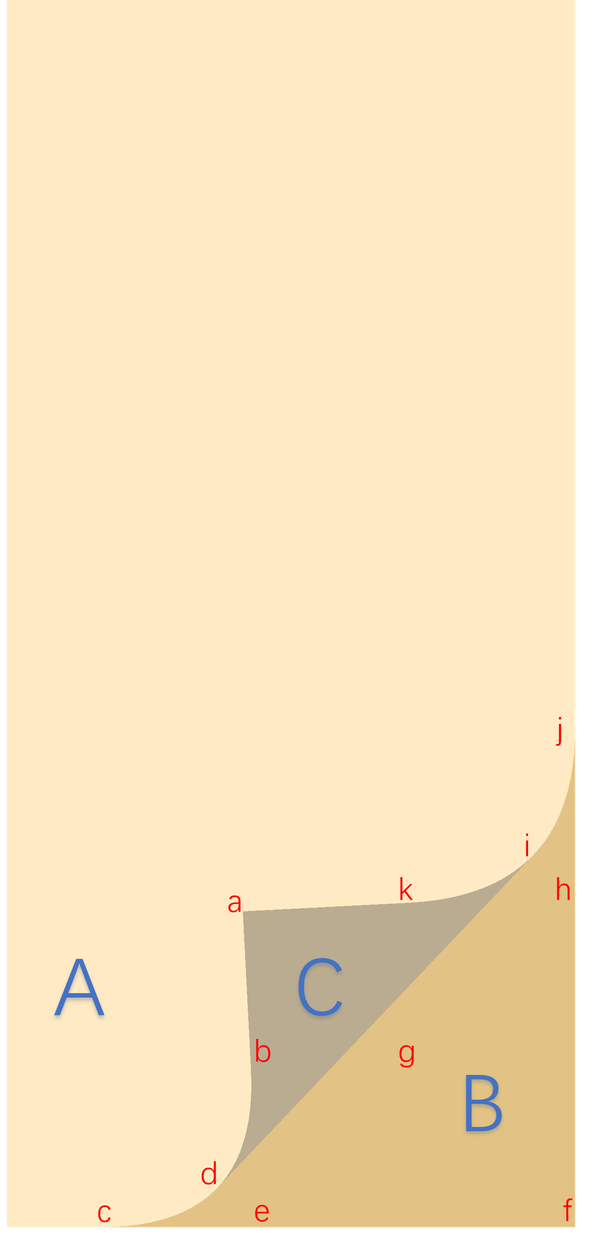
曲线绘制。为使用上述坐标点绘制出曲线,需要使用@ohos.graphics.drawing (绘制模块)的相关接口实现,如Path.lineTo()连接线段;Path.quadTo()实现二阶贝塞尔曲线;Canvas.clipPath()实现对画布裁剪等。
内容绘制。仿真翻页绘制的内容来源于使用Class (ComponentSnapshot)的get()接口获取的组件截图PixelMap,然后使用@ohos.graphics.drawing (绘制模块)的Canvas.drawPixelMapMesh()实现绘制。
阴影效果渲染。主要使用了@ohos.graphics.drawing (绘制模块)的Class (ShaderEffect)着色器实现。通过为画刷设置着色器效果,并设置相关参数,完成了渐变阴影的绘制。
功能5:小说阅读系统分享
引入Share Kit系统能力。整书分享用Hyperlink(UTD数据类型HYPERLINK)携带端内深链与书名章节,接收方点击回到对应章节。分享面板按窗口坐标锚点拉起,锚点取顶栏分享按钮一侧。
功能6:小说阅读划线分享
分享流程与开发场景2 功能5同源,都用Share Kit构造分享数据并拉起系统面板。划线分享走系统海报卡片:选中文字与章节来源构成阅读分享拓展数据记录,系统据此生成海报卡片,面板以详情预览大卡展示,失败降级为文本卡片(引文、书名章节与链接行)。
功能7:听书页面多设备适配
听书页用bindContentCover全屏模态承载,由听书可见状态驱动显隐。窄屏顶部横排放置封面与书籍信息,中部为听书文本视图,底部为进度与播控;宽屏左侧放封面、信息和播控,右侧放等高的听书文本视图。播放状态由独立状态对象统一维护:播放时使用单一定时器按秒推进,拖动时暂停写入进度,拖动结束后统一提交。章节正文切分为听书文本行,按播放进度计算活跃行、字号颜色与纵向位移。

[h2]开发步骤
功能1:小说阅读页沉浸光感
步骤1:搭建悬浮菜单层。悬浮层空白区域保持触摸穿透,点击正文中央切换菜单显隐,显隐过程由透明度、位移、动画与可见性共同控制。
搭建阅读页根Stack:阅读内容层、悬浮菜单层、菜单拦截层与听书悬浮按钮按层级叠放,根容器始终扩展到顶部和底部系统安全区。
Stack() {
  // Reading content (full height is constant; HDS bar visibility changes don't reflow the body text)
  this.ReaderContent();

  // Floating menu layer (touches on blank areas pass through)
  ReaderHdsOverlay({
    menuVm: this.menuVm,
    theme: ReaderConstants.THEMES[this.settingsVm.themeIndex],
    barWidthVp: this.controlClusterWidthVp(),
    barScale: this.formLayout.controlBarScale,
    barSideMarginVp: this.anchorMarginH(),
    titleBarMarginVp: this.formLayout.titleBarMarginH,
    anchorRight: this.anchorRight(),
    gripMirrored: this.formLayout.gripMirrorDx !== 0,
    topInsetVp: this.uiContext.px2vp(this.topRectHeight),
    bottomInsetVp: this.uiContext.px2vp(this.bottomRectHeight),
    onBack: () => {
      this.uiContext.getRouter().back();
    },
    onShare: () => {
      this.shareBook();
    }
  })

  // Close-menu interception; above the hit-testable HDS overlay; yields to panel masks
  if (this.menuVm.menuVisible && this.menuVm.activePanel === '') {
    Column() {
      Blank()
        .height(this.uiContext.px2vp(this.topRectHeight) + 76)
        .hitTestBehavior(HitTestMode.None)
      Row() {
        Column()
          .layoutWeight(1)
          .height('100%')
          .accessibilityText($r('app.string.reader_accessibility_reader_menu'))
          .accessibilityRole(AccessibilityRoleType.BUTTON)
          .priorityGesture(
            TapGesture()
              .onAction(() => {
                this.onContentCenterTap();
              })
          )
          .parallelGesture(
            PanGesture({ direction: PanDirection.All })
              .onActionStart(() => {
              })
              .onActionUpdate(() => {
              })
              .onActionEnd(() => {
              })
          )
        Blank()
          .width(72)
          .hitTestBehavior(HitTestMode.None)
      }
      .width('100%')
      .layoutWeight(1)
      .accessibilityLevel('no')
      Blank()
        .height(146)
        .hitTestBehavior(HitTestMode.None)
    }
    .width('100%')
    .height('100%')
    .accessibilityLevel('no')
    .hitTestBehavior(HitTestMode.None)
  }

  // Topmost: the HDS overlay is hit-testable; Transparent wrapper avoids blocking below
  ListenControl({
    theme: ReaderConstants.THEMES[this.settingsVm.themeIndex],
    rightMarginVp: this.formLayout.listenButtonMarginH,
    popupLeftVp: this.listenPopupLeftVp(),
    gripMirrored: this.formLayout.gripMirrorDx !== 0,
    bottomInsetVp: this.uiContext.px2vp(this.bottomRectHeight),
    visible: this.menuVm.menuVisible && this.menuVm.activePanel === '',
    audioVm: this.audioVm,
    onOpenAudioBook: () => {
      this.openAudioBookFlow();
    }
  })
    .opacity(this.menuVm.menuVisible && this.menuVm.activePanel === '' ? 1 : 0)
    .animation({ duration: MENU_ANIMATION_DURATION_MS })
    .visibility(this.menuVm.menuVisible && this.menuVm.activePanel === '' ?
      Visibility.Visible : Visibility.Hidden)
    .hitTestBehavior(HitTestMode.Transparent)
}
.width('100%')
.height('100%')
.alignContent(Alignment.TopStart)
.backgroundColor(ReaderConstants.THEMES[this.settingsVm.themeIndex].bg)
.accessibilityLevel('no')
// Always expand into the system safe area (status bar visibility changes no longer resize/move the content area)
.expandSafeArea([SafeAreaType.SYSTEM], [SafeAreaEdge.TOP, SafeAreaEdge.BOTTOM])
// Listen cover: side-swipe back only collapses it; timing keeps running while hidden
.bindContentCover(this.audioVm.audioBookVisible, this.AudioBookCoverBuilder(), {
  // Replaces ModalTransition.DEFAULT: enter keeps the friction slide, exit is shorter (no slow tail)
  transition: TransitionEffect.asymmetric(
    TransitionEffect.translate({ y: '100%' })
      .animation({ duration: CONTENT_COVER_ENTER_MS, curve: Curve.Friction }),
    TransitionEffect.translate({ y: '100%' })
      .animation({ duration: CONTENT_COVER_EXIT_MS, curve: Curve.EaseInOut })
  ),
  backgroundColor: Color.Transparent,
  onWillDismiss: () => {
    this.audioVm.closeAudioBook();
  },
  onDisappear: () => {
    void this.restoreReaderSystemBarsAfterAudio();
  }
})
// Touch hand sampling for menu wake-up
.onTouch((event: TouchEvent) => {
  this.onRootTouch(event);
})
Stack() {
// Reading content (full height is constant; HDS bar visibility changes don't reflow the body text)
this.ReaderContent();
// Floating menu layer: title bar + bottom floating tab bar (transparent overlay; touches on blank areas pass
// through to the reading view)
ReaderHdsOverlay({
// ...
})
// Close-menu interception layer: inline if block covering the body-text band (shown below)
if (this.menuVm.menuVisible && this.menuVm.activePanel === '') {
// ...
}
// listen floating button: topmost layer, shown below
ListenControl({
// ...
})
}
.width('100%')
.height('100%')
.expandSafeArea([SafeAreaType.SYSTEM], [SafeAreaEdge.TOP, SafeAreaEdge.BOTTOM]) 实现悬浮菜单层:根Stack内直接调用ReaderHdsOverlay组件,传参含形态布局参数(栏宽、缩放、锚定、镜像)与回调。
ReaderHdsOverlay({
  menuVm: this.menuVm,
  theme: ReaderConstants.THEMES[this.settingsVm.themeIndex],
  barWidthVp: this.controlClusterWidthVp(),
  barScale: this.formLayout.controlBarScale,
  barSideMarginVp: this.anchorMarginH(),
  titleBarMarginVp: this.formLayout.titleBarMarginH,
  anchorRight: this.anchorRight(),
  gripMirrored: this.formLayout.gripMirrorDx !== 0,
  topInsetVp: this.uiContext.px2vp(this.topRectHeight),
  bottomInsetVp: this.uiContext.px2vp(this.bottomRectHeight),
  onBack: () => {
    this.uiContext.getRouter().back();
  },
  onShare: () => {
    this.shareBook();
  }
})
ReaderHdsOverlay({
menuVm: this.menuVm,
theme: ReaderConstants.THEMES[this.settingsVm.themeIndex],
barWidthVp: this.controlClusterWidthVp(),
barScale: this.formLayout.controlBarScale,
barSideMarginVp: this.anchorMarginH(),
titleBarMarginVp: this.formLayout.titleBarMarginH,
anchorRight: this.anchorRight(),
gripMirrored: this.formLayout.gripMirrorDx !== 0,
topInsetVp: this.uiContext.px2vp(this.topRectHeight),
bottomInsetVp: this.uiContext.px2vp(this.bottomRectHeight),
onBack: () => {
this.uiContext.getRouter().back();
},
onShare: () => {
this.shareBook();
}
}) 实现顶部渐变暗遮罩:浅色主题菜单展开时,在顶栏背后增加一层向下渐隐的暗色渐变,将悬浮按钮与正文内容视觉分层。
Column()
  .width('100%')
  .height(this.topInsetVp + TITLE_BAR_HEIGHT + TITLE_GRADIENT_TAIL_VP)
  .position({ x: 0, y: 0 })
  .linearGradient({
    direction: GradientDirection.Bottom,
    colors: TITLE_GRADIENT_COLORS
  })
  .opacity(!this.theme.isDark && this.menuVm.menuVisible && this.menuVm.activePanel === '' ? 1 : 0)
  .animation({ duration: 250, curve: Curve.EaseInOut })
  .visibility(!this.theme.isDark && this.menuVm.menuVisible && this.menuVm.activePanel === '' ?
    Visibility.Visible : Visibility.Hidden)
  .hitTestBehavior(HitTestMode.None)
  .accessibilityLevel('no')
Column()
.width('100%')
.height(this.topInsetVp + TITLE_BAR_HEIGHT + TITLE_GRADIENT_TAIL_VP)
.position({ x: 0, y: 0 })
.linearGradient({
direction: GradientDirection.Bottom,
colors: TITLE_GRADIENT_COLORS
})
.opacity(!this.theme.isDark && this.menuVm.menuVisible && this.menuVm.activePanel === '' ? 1 : 0)
.animation({ duration: 250, curve: Curve.EaseInOut }) 实现菜单拦截层:菜单可见且无面板展开时,在根Stack内联一层全屏拦截层,点击正文中央切换菜单显隐。由于该层位于顶栏、底部工具栏与听书悬浮按钮之上,若整层可命中会遮挡这些控件,因此外层容器与顶部(安全区+76vp)、右侧(72vp)、底部(146vp)三条避让带均配置hitTestBehavior(HitTestMode.None)穿透触摸,仅中央正文列可命中;该列用priorityGesture接管点击,并以parallelGesture空回调消费滑动手势,避免菜单态下中心滑动误触翻页。
if (this.menuVm.menuVisible && this.menuVm.activePanel === '') {
  Column() {
    Blank()
      .height(this.uiContext.px2vp(this.topRectHeight) + 76)
      .hitTestBehavior(HitTestMode.None)
    Row() {
      Column()
        .layoutWeight(1)
        .height('100%')
        .accessibilityText($r('app.string.reader_accessibility_reader_menu'))
        .accessibilityRole(AccessibilityRoleType.BUTTON)
        .priorityGesture(
          TapGesture()
            .onAction(() => {
              this.onContentCenterTap();
            })
        )
        .parallelGesture(
          PanGesture({ direction: PanDirection.All })
            .onActionStart(() => {
            })
            .onActionUpdate(() => {
            })
            .onActionEnd(() => {
            })
        )
      Blank()
        .width(72)
        .hitTestBehavior(HitTestMode.None)
    }
    .width('100%')
    .layoutWeight(1)
    .accessibilityLevel('no')
    Blank()
      .height(146)
      .hitTestBehavior(HitTestMode.None)
  }
  .width('100%')
  .height('100%')
  .accessibilityLevel('no')
  .hitTestBehavior(HitTestMode.None)
}
if (this.menuVm.menuVisible && this.menuVm.activePanel === '') {
Column() {
// Top pass-through strip: safe area + 76 vp, the title bar keeps its own touches
Blank()
.height(this.uiContext.px2vp(this.topRectHeight) + 76)
.hitTestBehavior(HitTestMode.None)
Row() {
Column()
.layoutWeight(1)
.height('100%')
.accessibilityText($r('app.string.reader_accessibility_reader_menu'))
.accessibilityRole(AccessibilityRoleType.BUTTON)
.priorityGesture(TapGesture().onAction(() => this.onContentCenterTap()))
.parallelGesture(PanGesture({ direction: PanDirection.All })) // No-op callbacks consume pans only
Blank() // Right pass-through strip (72 vp)
.width(72)
.hitTestBehavior(HitTestMode.None)
}
.width('100%')
.layoutWeight(1)
.accessibilityLevel('no')
// Bottom pass-through strip (146 vp): the toolbar keeps its own touches
Blank()
.height(146)
.hitTestBehavior(HitTestMode.None)
}
.width('100%').height('100%')
.accessibilityLevel('no')
.hitTestBehavior(HitTestMode.None)
} 实现听书悬浮按钮:根Stack顶层内联调用ListenControl组件,菜单可见且无面板展开时淡入,触摸对下层透明。
ListenControl({
  theme: ReaderConstants.THEMES[this.settingsVm.themeIndex],
  rightMarginVp: this.formLayout.listenButtonMarginH,
  popupLeftVp: this.listenPopupLeftVp(),
  gripMirrored: this.formLayout.gripMirrorDx !== 0,
  bottomInsetVp: this.uiContext.px2vp(this.bottomRectHeight),
  visible: this.menuVm.menuVisible && this.menuVm.activePanel === '',
  audioVm: this.audioVm,
  onOpenAudioBook: () => {
    this.openAudioBookFlow();
  }
})
  .opacity(this.menuVm.menuVisible && this.menuVm.activePanel === '' ? 1 : 0)
  .animation({ duration: MENU_ANIMATION_DURATION_MS })
  .visibility(this.menuVm.menuVisible && this.menuVm.activePanel === '' ?
    Visibility.Visible : Visibility.Hidden)
  .hitTestBehavior(HitTestMode.Transparent)
// Listen floating button: called inline at the top of the root Stack
ListenControl({
theme: ReaderConstants.THEMES[this.settingsVm.themeIndex],
rightMarginVp: this.formLayout.listenButtonMarginH,
popupLeftVp: this.listenPopupLeftVp(),
gripMirrored: this.formLayout.gripMirrorDx !== 0,
bottomInsetVp: this.uiContext.px2vp(this.bottomRectHeight),
visible: this.menuVm.menuVisible && this.menuVm.activePanel === '',
audioVm: this.audioVm,
onOpenAudioBook: () => {
this.openAudioBookFlow();
}
})
.opacity(this.menuVm.menuVisible && this.menuVm.activePanel === '' ? 1 : 0)
.animation({ duration: MENU_ANIMATION_DURATION_MS })
.visibility(this.menuVm.menuVisible && this.menuVm.activePanel === '' ?
Visibility.Visible : Visibility.Hidden)
.hitTestBehavior(HitTestMode.Transparent) 步骤2:选用Toggle承载浮层材质。工具栏、听书悬浮按钮、进度胶囊与迷你播控使用Toggle(Button)做载体。工具栏宽高乘barScale(宽形态1.15倍缩放),白色主题取常规(REGULAR)档、其他浅色主题取薄(THIN)档。听书悬浮按钮取薄档加白色点光源,进度胶囊取厚档。显隐由透明度、位移(translate y:24)、动画(工具栏与进度胶囊250ms、迷你播控200ms,EaseInOut)与可见性共同控制。子功能项点击穿透载体。
底部工具栏的Toggle载体与显隐配置如下:
Toggle({ type: ToggleType.Button, isOn: $$this.barCarrierOn }) {
  Row() {
    this.ToolTab(0);
    this.ToolTab(1);
    this.ToolTab(2);
    this.ToolTab(3);
  }
  .width('100%')
  .height('100%')
}
.width(this.barWidthVp * this.barScale)
.height(TAB_BAR_HEIGHT * this.barScale)
.borderRadius(TAB_BAR_HEIGHT * this.barScale / 2)
.selectedColor(Color.Transparent)
.attributeModifier(this.isWhiteTheme() ? IMMERSIVE_REGULAR_TOGGLE : IMMERSIVE_THIN_TOGGLE)
.onChange((isOn: boolean) => {
  if (isOn) {
    this.barCarrierOn = false;
  }
})
.opacity(this.menuVm.menuVisible ? 1 : 0)
.translate({ x: 0, y: this.menuVm.menuVisible ? 0 : 24 })
.animation({ duration: 250, curve: Curve.EaseInOut })
.visibility(this.menuVm.menuVisible ? Visibility.Visible : Visibility.Hidden)
.accessibilityLevel('no')
Toggle({ type: ToggleType.Button, isOn: $$this.barCarrierOn }) {
Row() {
this.ToolTab(0); // Catalog
this.ToolTab(1); // Font size
this.ToolTab(2); // Background
this.ToolTab(3); // Page flip
}
.width('100%')
.height('100%')
}
.width(this.barWidthVp * this.barScale) // Tri-fold/tablet landscape scale the bar by 1.15
.height(TAB_BAR_HEIGHT * this.barScale)
.borderRadius(TAB_BAR_HEIGHT * this.barScale / 2)
.selectedColor(Color.Transparent)
.attributeModifier(this.isWhiteTheme() ? IMMERSIVE_REGULAR_TOGGLE : IMMERSIVE_THIN_TOGGLE) // theme-dependent
.opacity(this.menuVm.menuVisible ? 1 : 0)
.translate({ x: 0, y: this.menuVm.menuVisible ? 0 : 24 })
.animation({ duration: 250, curve: Curve.EaseInOut })
.visibility(this.menuVm.menuVisible ? Visibility.Visible : Visibility.Hidden) 步骤3:用修饰器做版本兼容。版本判断内联在applyNormalAttribute()内:先按sdkApiVersion与最小版本常量比较并短路,再以apiAvailable('26.0.0')二次校验。API 26及以上挂系统材质,API 23至API 25降级为不透明实底加轻阴影。档位、点光源与交互形变经构造参数注入。

此修饰器为通用基础接口,建议全工程仅实现一份并放入公共模块统一维护,各页面通过构造参数复用,勿在业务代码中重复实现版本判断。
export class ImmersiveToggleModifier implements AttributeModifier<ToggleAttribute> {
  private readonly level: ImmersiveMaterialLevel;
  private readonly lightEffectColor: ResourceColor | undefined;
  private readonly interactive: boolean;

  constructor(level: ImmersiveMaterialLevel, lightEffectColor: ResourceColor | undefined, interactive: boolean) {
    this.level = level;
    this.lightEffectColor = lightEffectColor;
    this.interactive = interactive;
  }

  applyNormalAttribute(instance: ToggleAttribute): void {
    // Minimum SDK version constant guard first: apiAvailable is itself @since 26.0.0,
    // so short-circuit it by sdkApiVersion >= 26 first
    if (deviceInfo.sdkApiVersion >= IMMERSIVE_MATERIAL_MIN_API_VERSION) {
      // Official dotted-version double check on API 26+ devices
      if (deviceInfo.apiAvailable('26.0.0')) {
        // API 26+: material takes over background and shadow; resolve the local level only inside this guard
        let style: uiMaterial.ImmersiveStyle;
        if (this.level === ImmersiveMaterialLevel.ULTRA_THIN) {
          style = uiMaterial.ImmersiveStyle.ULTRA_THIN;
        } else if (this.level === ImmersiveMaterialLevel.THIN) {
          style = uiMaterial.ImmersiveStyle.THIN;
        } else if (this.level === ImmersiveMaterialLevel.THICK) {
          style = uiMaterial.ImmersiveStyle.THICK;
        } else if (this.level === ImmersiveMaterialLevel.ULTRA_THICK) {
          style = uiMaterial.ImmersiveStyle.ULTRA_THICK;
        } else {
          style = uiMaterial.ImmersiveStyle.REGULAR;
        }
        instance.systemMaterial(new uiMaterial.ImmersiveMaterial({
          style: style,
          interactive: this.interactive,
          lightEffect: this.lightEffectColor !== undefined ? { color: this.lightEffectColor } : undefined
        }));
        return;
      }
    }
    // API 23~25: opaque solid backdrop + light shadow fallback (no blur)
    instance.backgroundColor(IMMERSIVE_FALLBACK_BG);
    instance.shadow(IMMERSIVE_FALLBACK_SHADOW);
  }
}
export class ImmersiveToggleModifier implements AttributeModifier<ToggleAttribute> {
constructor(level: ImmersiveMaterialLevel, lightEffectColor: ResourceColor | undefined, interactive: boolean) {
// level / lightEffectColor / interactive stored as private readonly fields
}
applyNormalAttribute(instance: ToggleAttribute): void {
// Bare sdkApiVersion literal guard first: apiAvailable is @since 26.0.0, never called alone on lower versions
if (deviceInfo.sdkApiVersion >= IMMERSIVE_MATERIAL_MIN_API_VERSION) {
// Official dotted-version double check on API 26+ devices
if (deviceInfo.apiAvailable('26.0.0')) {
// Resolve the local level mirror to the SDK enum strictly inside this guard
let style: uiMaterial.ImmersiveStyle;
if (this.level === ImmersiveMaterialLevel.ULTRA_THIN) {
style = uiMaterial.ImmersiveStyle.ULTRA_THIN;
} else if (this.level === ImmersiveMaterialLevel.THIN) {
style = uiMaterial.ImmersiveStyle.THIN;
} else if (this.level === ImmersiveMaterialLevel.THICK) {
style = uiMaterial.ImmersiveStyle.THICK;
} else if (this.level === ImmersiveMaterialLevel.ULTRA_THICK) {
style = uiMaterial.ImmersiveStyle.ULTRA_THICK;
} else {
style = uiMaterial.ImmersiveStyle.REGULAR;
}
instance.systemMaterial(new uiMaterial.ImmersiveMaterial({
style: style,
interactive: this.interactive,
lightEffect: this.lightEffectColor !== undefined ? { color: this.lightEffectColor } : undefined
}));
return;
}
}
// API 23 to API 25: opaque solid backdrop + light shadow fallback (no blur)
instance.backgroundColor(IMMERSIVE_FALLBACK_BG);
instance.shadow(IMMERSIVE_FALLBACK_SHADOW);
}
} 功能2:小说阅读页智感握姿
步骤1:在根容器上采样交互手。本示例只在抬起阶段采样,onTouch事件默认向上冒泡;在事件未被拦截或停止传播时,由根容器统一采样。
在根容器上采样交互手:仅在抬起事件取InteractionHand,空值回退NONE。
private onRootTouch(event: TouchEvent): void {
  if (event.type !== TouchType.Up) {
    return;
  }
  let touches: TouchObject[] = event.changedTouches;
  if (!touches || touches.length === 0) {
    return;
  }
  this.lastTouchHand = touches[0].hand ?? InteractionHand.NONE;
}
private lastTouchHand: InteractionHand = InteractionHand.NONE;
private onRootTouch(event: TouchEvent): void {
if (event.type !== TouchType.Up) {
return;
}
let touches: TouchObject[] = event.changedTouches;
if (!touches || touches.length === 0) {
return;
}
this.lastTouchHand = touches[0].hand ?? InteractionHand.NONE;
}
// the root Stack of the page(
Stack() {
}
.onTouch((event: TouchEvent) => {
this.onRootTouch(event);
}) 步骤2:在折叠屏展开态、平板横屏态唤醒菜单时确认交互手。识别到左手时置GripMode.LEFT并重算形态布局参数。右手或未识别时保持默认布局。
private applyInteractionHand(): void {
  let grip: GripMode = GripMode.BOTH;
  if (this.isFoldInnerForm() && this.lastTouchHand === InteractionHand.LEFT) {
    grip = GripMode.LEFT;
  }
  if (grip !== this.gripMode) {
    this.gripMode = grip;
    this.formLayout = FormFactorLayout.layoutParamsOf(this.formFactor, grip, this.areaWidthVp);
  }
}

/** Foldable inner-screen form factors: hand recognition enabled only here */
private isFoldInnerForm(): boolean {
  return this.formFactor === FormFactor.FOLD_INNER_LAND ||
    this.formFactor === FormFactor.FOLD_INNER_PORT ||
    this.formFactor === FormFactor.DUAL_FOLD ||
    this.formFactor === FormFactor.PAD_TRI_LAND;
}

/** Sample TouchObject.hand on Up only (classification needs contact duration; Down is always NONE) */
private onRootTouch(event: TouchEvent): void {
  if (event.type !== TouchType.Up) {
    return;
  }
  let touches: TouchObject[] = event.changedTouches;
  if (!touches || touches.length === 0) {
    return;
  }
  this.lastTouchHand = touches[0].hand ?? InteractionHand.NONE;
}

private onAreaReady(width: number, height: number): void {
  let widthChanged: boolean = Math.abs(width - this.areaWidthVp) > 0.01;
  this.areaWidthVp = width;
  this.paddingTopVp = this.uiContext.px2vp(this.topRectHeight) + 8;
  this.paddingBottomVp = this.uiContext.px2vp(this.bottomRectHeight) + ReaderConstants.INFO_BAR_HEIGHT + 4;
  let factor: FormFactor = FormFactorLayout.detectFormFactor(width, height);
  if (factor !== this.formFactor) {
    this.formFactor = factor;
    // Reset hand confirmation on form factor switch (re-confirm at next menu wake-up)
    this.gripMode = GripMode.BOTH;
    this.formLayout = FormFactorLayout.layoutParamsOf(factor, GripMode.BOTH, width);
  } else if (widthChanged && this.formLayout.dualColumnWidthVp > 0) {
    // Recalculate layout params when the reading-area width changes (dual-column width adapts)
    this.formLayout = FormFactorLayout.layoutParamsOf(factor, this.gripMode, width);
  } else {
    // Keep the current layout params
  }
}

private updateTime(): void {
  this.nowDate.setTime(Date.now());
  let hours: string = this.nowDate.getHours().toString().padStart(2, '0');
  let minutes: string = this.nowDate.getMinutes().toString().padStart(2, '0');
  this.nowTime = hours + ':' + minutes;
}

/** batteryInfo has no change subscription; polled by the minute timer (-1 hides when unsupported) */
private updateBattery(): void {
  if (!canIUse('SystemCapability.PowerManager.BatteryManager.Core')) {
    return;
  }
  this.batterySoc = batteryInfo.batterySOC;
  this.batteryCharging = batteryInfo.chargingStatus === batteryInfo.BatteryChargeState.ENABLE;
}

private onContentCenterTap(): void {
  if (!this.menuVm.menuVisible) {
    // Confirm the menu side from the waking touch before waking the menu
    this.applyInteractionHand();
  }
  this.menuVm.toggleMenu();
}
private applyInteractionHand(): void {
let grip: GripMode = GripMode.BOTH;
if (this.isFoldInnerForm() && this.lastTouchHand === InteractionHand.LEFT) {
grip = GripMode.LEFT;
}
if (grip !== this.gripMode) {
this.gripMode = grip;
this.formLayout = FormFactorLayout.layoutParamsOf(this.formFactor, grip, this.areaWidthVp);
}
}
// ...
// When tapping the body center to wake the menu, confirm the hand first, then toggle the menu
private onContentCenterTap(): void {
if (!this.menuVm.menuVisible) {
this.applyInteractionHand();
}
this.menuVm.toggleMenu();
} 步骤3:菜单态控件按交互手镜像锚定。定位容器的justifyContent与padding直接计算水平位置。默认居中或贴右,左手时贴左侧边缘同边距。
定位容器的镜像锚定配置如下:
Row() {
  if (this.theme.isDark) {
    // Dark theme: self-drawn dark frosted tab bar (light frost doesn't match dark UX)
    Row() {
      this.ToolTab(0);
      this.ToolTab(1);
      this.ToolTab(2);
      this.ToolTab(3);
    }
    .width(this.barWidthVp * this.barScale)
    .height(TAB_BAR_HEIGHT * this.barScale)
    .borderRadius(TAB_BAR_HEIGHT * this.barScale / 2)
    .backgroundColor(ReaderConstants.DARK_SURFACE_ALPHA)
    .backgroundBlurStyle(BlurStyle.Regular, { colorMode: ThemeColorMode.DARK })
    .shadow({ radius: 12, color: 'rgba(0,0,0,0.15)', offsetY: 2 })
    .opacity(this.menuVm.menuVisible ? 1 : 0)
    .translate({ x: 0, y: this.menuVm.menuVisible ? 0 : 24 })
    .animation({ duration: 250, curve: Curve.EaseInOut })
    .visibility(this.menuVm.menuVisible ? Visibility.Visible : Visibility.Hidden)
    .accessibilityLevel('no')
  } else {
    // REGULAR on white, THIN on other light themes; child onClick passes through
    Toggle({ type: ToggleType.Button, isOn: $$this.barCarrierOn }) {
      Row() {
        this.ToolTab(0);
        this.ToolTab(1);
        this.ToolTab(2);
        this.ToolTab(3);
      }
      .width('100%')
      .height('100%')
    }
    .width(this.barWidthVp * this.barScale)
    .height(TAB_BAR_HEIGHT * this.barScale)
    .borderRadius(TAB_BAR_HEIGHT * this.barScale / 2)
    .selectedColor(Color.Transparent)
    .attributeModifier(this.isWhiteTheme() ? IMMERSIVE_REGULAR_TOGGLE : IMMERSIVE_THIN_TOGGLE)
    .onChange((isOn: boolean) => {
      if (isOn) {
        this.barCarrierOn = false;
      }
    })
    .opacity(this.menuVm.menuVisible ? 1 : 0)
    .translate({ x: 0, y: this.menuVm.menuVisible ? 0 : 24 })
    .animation({ duration: 250, curve: Curve.EaseInOut })
    .visibility(this.menuVm.menuVisible ? Visibility.Visible : Visibility.Hidden)
    .accessibilityLevel('no')
  }
}
.width('100%')
.height('100%')
.justifyContent(!this.anchorRight ? FlexAlign.Center :
  (this.gripMirrored ? FlexAlign.Start : FlexAlign.End))
.alignItems(VerticalAlign.Bottom)
.padding({
  left: this.anchorRight && this.gripMirrored ? this.barSideMarginVp : 0,
  right: this.anchorRight && !this.gripMirrored ? this.barSideMarginVp : 0,
  bottom: this.bottomInsetVp
})
.hitTestBehavior(HitTestMode.Transparent)
.accessibilityLevel('no')
Row() { /* bar container holding the tab bar */ }
.width('100%')
.justifyContent(!this.anchorRight ? FlexAlign.Center :
(this.gripMirrored ? FlexAlign.Start : FlexAlign.End))
.padding({
left: this.anchorRight && this.gripMirrored ? this.barSideMarginVp : 0,
right: this.anchorRight && !this.gripMirrored ? this.barSideMarginVp : 0,
bottom: this.bottomInsetVp
}) 功能3:双页模式
步骤1:按形态读取布局参数并下发。布局参数表转出正文边距、双页栏宽、控件宽度与锚定策略。双页栏宽随屏宽自适应。
let dualColumnWidthVp: number = base.dualColumnWidthVp;
if (base.dualColumnWidthVp > 0 && areaWidthVp > base.dualMarginH * 2 + base.dualColumnGapVp) {
  dualColumnWidthVp = (areaWidthVp - base.dualMarginH * 2 - base.dualColumnGapVp) / 2;
}
// Inside FormFactorLayout.layoutParamsOf: dual-page column width adapts to the reading-area width
let dualColumnWidthVp: number = base.dualColumnWidthVp;
if (base.dualColumnWidthVp > 0 && areaWidthVp > base.dualMarginH * 2 + base.dualColumnGapVp) {
dualColumnWidthVp = (areaWidthVp - base.dualMarginH * 2 - base.dualColumnGapVp) / 2;
} 步骤2:双页能力按形态回落。形态不支持双栏时回落为切换前的单页方式。持久化值不回写,形态恢复后自动回到双页。
/** Dual-column form factors show the "dual-page" menu option */
private dualPageAvailable(): boolean {
  return this.formLayout.contentColumns === 2 && this.formLayout.dualColumnWidthVp > 0;
}

/** Fall back to the last single-page mode when dual-page is unsupported; persisted value untouched */
private effectivePageMode(): number {
  if (this.settingsVm.pageMode === PageMode.DUAL && !this.dualPageAvailable()) {
    return this.lastSinglePageMode;
  }
  return this.settingsVm.pageMode;
}
private dualPageAvailable(): boolean {
return this.formLayout.contentColumns === 2 && this.formLayout.dualColumnWidthVp > 0;
}
private effectivePageMode(): number {
if (this.settingsVm.pageMode === PageMode.DUAL && !this.dualPageAvailable()) {
return this.lastSinglePageMode;
}
return this.settingsVm.pageMode;
} 步骤3:版式变化后按字符偏移重定位。重排分页后按当前页首字符偏移找新页码。折叠过程中参数未变不重排。
private applyLayout(reanchor: boolean): void {
  let next: PageLayout = {
    areaWidthVp: this.layout.areaWidthVp,
    areaHeightVp: this.layout.areaHeightVp,
    paddingTopVp: this.paddingTopVp,
    paddingBottomVp: this.paddingBottomVp,
    contentPaddingH: this.contentPaddingH,
    columnWidthVp: this.isDualActive() ? this.dualColumnWidthVp : 0,
    fontSize: this.fontSize,
    lineSpacingRatio: this.lineSpacingRatio
  };
  let hash: string = this.paginator.layoutHashOf(next);
  if (hash === this.layoutHash) {
    return;
  }
  this.layoutHash = hash;
  this.layout = next;
  this.layoutVersion++;
  if (reanchor) {
    let page: number = this.paginator.findPageByChar(this.curChapter, this.curStartChar, this.layout);
    this.curPage = page;
    // Recompute the book-wide page number immediately after re-pagination
    this.reportPageNumber(this.curChapter, page);
  }
  if (this.childHooks !== null) {
    this.childHooks.syncPosition();
  }
}
private applyLayout(reanchor: boolean): void {
let next: PageLayout = {
// ... layout parameters built in-place (area size, insets, column width, font size, ...)
columnWidthVp: this.isDualActive() ? this.dualColumnWidthVp : 0
};
const hash: string = this.paginator.layoutHashOf(next);
if (hash === this.layoutHash) {
return; // Parameters unchanged, skip re-layout
}
this.layoutHash = hash;
this.layout = next;
this.layoutVersion++; // Drives the list rebuild in scroll mode
if (reanchor) {
this.curPage = this.paginator.findPageByChar(this.curChapter, this.curStartChar, this.layout);
this.reportPageNumber(this.curChapter, this.curPage); // Recompute the flat page number immediately
}
if (this.childHooks !== null) {
this.childHooks.syncPosition(); // Sync the child flip views
}
} 步骤4:绘制中间书缝。双页并排时在两页交界处叠加书缝阴影,模拟纸质书摊开后的中缝装订效果。书缝总宽随形态由布局参数表下发(dualSpineWidthVp,示例按形态取值,实际结合栏宽与设备宽度设计);两条全高渐变矩形各占一半、分别从中缝两侧向内渐隐,以低透明度黑色贴合纸书装订阴影的观感(渐变色值与内缩余量均为本示例取值,仅供参考,实际按视觉目标设计)。书缝为静态装饰,上一页、当前页、下一页三个跨页各自叠加同一绘制;本示例未实现双页仿真翻页,书缝不随翻页手势变化,如需跟随翻页曲线变形可在该基线上扩展。
/** Spine half width (vp, each of the two gradient rectangles takes one) */
private spineHalfW(): number {
  return Math.max(this.dualSpineWidthVp / 2 - 3, 0);
}

/** Static spine gutter decoration (two gradient rectangles), shared by the three spreads */
@Builder
private SpineDecor() {
  if (this.dualSpineWidthVp > 0 && this.areaWidthVp > 0) {
    Column()
      .width(this.spineHalfW())
      .height('100%')
      .position({
        x: this.areaWidthVp / 2 - this.dualSpineWidthVp / 2 + 4,
        y: 0
      })
      .linearGradient({
        direction: GradientDirection.Right,
        colors: SPINE_GRADIENT_IN
      })
    Column()
      .width(this.spineHalfW())
      .height('100%')
      .position({
        x: this.areaWidthVp / 2 + 1,
        y: 0
      })
      .linearGradient({
        direction: GradientDirection.Right,
        colors: SPINE_GRADIENT_OUT
      })
  }
}
const SPINE_GRADIENT_IN: [ResourceColor, number][] = [['#00000000', 0], ['#0F000000', 1]];
const SPINE_GRADIENT_OUT: [ResourceColor, number][] = [['#0F000000', 0], ['#00000000', 1]];
private spineHalfW(): number {
return Math.max(this.dualSpineWidthVp / 2 - 3, 0);
}
// Static spine gutter decoration (two gradient rectangles), shared by the three spreads
@Builder
private SpineDecor() {
if (this.dualSpineWidthVp > 0 && this.areaWidthVp > 0) {
Column()
.width(this.spineHalfW())
.height('100%')
.position({ x: this.areaWidthVp / 2 - this.dualSpineWidthVp / 2 + 4, y: 0 })
.linearGradient({ direction: GradientDirection.Right, colors: SPINE_GRADIENT_IN })
Column()
.width(this.spineHalfW())
.height('100%')
.position({ x: this.areaWidthVp / 2 + 1, y: 0 })
.linearGradient({ direction: GradientDirection.Right, colors: SPINE_GRADIENT_OUT })
}
} 功能4:翻页设计
步骤1:定义翻页方式与设置项。四种方式:覆盖、仿真、上下、双页(仅阔折叠展开态、平板横屏态)。双页仅双栏形态在菜单显示,选择结果持久化到偏好。
export enum PageMode {
  COVER = 0,
  SIMULATE = 1,
  SCROLL = 2,
  DUAL = 3
}
export enum PageMode {
COVER = 0, // Cover flip
SIMULATE = 1, // Simulate flip
SCROLL = 2, // Scroll (vertical) flip
DUAL = 3 // Dual-page flip, only in two-column form
} 步骤2:实现覆盖翻页。三页栈加PanGesture。回调记录位移并限制首末页边界。手势结束后调用pageAnimateTo()按位移与死区(±10vp常量)判定翻页或回弹,onFinish回调中复位偏移、重建三页并解锁动画。
覆盖翻页的三页栈与手势处理代码如下:
Stack() {
  // Next page (bottom layer)
  if (this.rightPage !== null) {
    FlipPageContent({
      page: this.rightPage,
      theme: this.theme,
      fontSize: this.fontSize,
      lineSpacingRatio: this.lineSpacingRatio,
      paddingTopVp: this.paddingTopVp,
      paddingBottomVp: this.paddingBottomVp,
      contentPaddingH: this.contentPaddingH,
      footerTime: this.footerTime,
      footerProgressText: this.footerProgressText,
      footerBandVp: this.footerBandVp,
      footerBatterySoc: this.footerBatterySoc,
      footerBatteryCharging: this.footerBatteryCharging,
      selectionEnabled: this.selectionEnabled,
      highlightVm: this.highlightVm,
      highlightController: this.highlightController
    })
  }

  // Current page (shifts left to yield when flipping backward)
  if (this.midPage !== null) {
    FlipPageContent({
      page: this.midPage,
      theme: this.theme,
      fontSize: this.fontSize,
      lineSpacingRatio: this.lineSpacingRatio,
      paddingTopVp: this.paddingTopVp,
      paddingBottomVp: this.paddingBottomVp,
      contentPaddingH: this.contentPaddingH,
      footerTime: this.footerTime,
      footerProgressText: this.footerProgressText,
      footerBandVp: this.footerBandVp,
      footerBatterySoc: this.footerBatterySoc,
      footerBatteryCharging: this.footerBatteryCharging,
      selectionEnabled: this.selectionEnabled,
      highlightVm: this.highlightVm,
      highlightController: this.highlightController
    })
      .translate({ x: this.offsetX >= 0 ? 0 : this.offsetX })
      .shadow({
        radius: 40,
        color: Color.Gray,
        offsetX: 0,
        offsetY: 0
      })
  }

  // Previous page (slides in from the left when flipping forward)
  if (this.leftPage !== null) {
    FlipPageContent({
      page: this.leftPage,
      theme: this.theme,
      fontSize: this.fontSize,
      lineSpacingRatio: this.lineSpacingRatio,
      paddingTopVp: this.paddingTopVp,
      paddingBottomVp: this.paddingBottomVp,
      contentPaddingH: this.contentPaddingH,
      footerTime: this.footerTime,
      footerProgressText: this.footerProgressText,
      footerBandVp: this.footerBandVp,
      footerBatterySoc: this.footerBatterySoc,
      footerBatteryCharging: this.footerBatteryCharging,
      selectionEnabled: this.selectionEnabled,
      highlightVm: this.highlightVm,
      highlightController: this.highlightController
    })
      .translate({ x: -this.screenWVp() + this.offsetX })
      .shadow({
        radius: 40,
        color: this.offsetX > 0 ? Color.Gray : Color.Transparent,
        offsetX: 0,
        offsetY: 0
      })
  }
}
.width('100%')
.height('100%')
.accessibilityLevel('no')
.gesture(
  PanGesture(this.panOption)
    .onActionUpdate((event?: GestureEvent) => {
      if (!event || event.fingerList.length <= 0) {
        return;
      }
      // Sliding disabled while a slide or animation is in progress
      if (!this.isAllowPanGesture || this.isAnimating) {
        return;
      }
      // Record the horizontal axis of the first sliding point
      if (this.panStartPositionX === INVALID_PAN_START_X) {
        this.panStartPositionX = event.fingerList[0].localX;
        this.lastPanPositionX = this.panStartPositionX;
        return;
      }

      let tmpFingerInfo: FingerInfo = event.fingerList[0];
      if (!tmpFingerInfo) {
        return;
      }
      if (!this.isPanGestureStart) {
        // Determine slide direction and first/last page; out-of-bounds slides are disabled with a toast
        if (!this.isPageValid(tmpFingerInfo)) {
          return;
        }
        this.isPanGestureStart = true;
        this.isPageForward = this.panStartPositionX < tmpFingerInfo.localX;
      }

      // Record the current gesture direction
      this.isGestureForward = this.lastPanPositionX < tmpFingerInfo.localX;
      this.lastPanPositionX = tmpFingerInfo.localX;

      // Restrict sliding on first/last page
      if ((this.leftPage === null && event.offsetX >= 0) ||
        (this.rightPage === null && event.offsetX <= 0)) {
        this.offsetX = 0;
      } else {
        this.offsetX = event.offsetX;
      }
    })
    .onActionEnd(() => {
      if (!this.isAllowPanGesture) {
        this.isAllowPanGesture = true;
        return;
      }
      if (!this.isAnimating) {
        this.pageAnimateTo(false);
      }
      this.isPanGestureStart = false;
      this.panStartPositionX = INVALID_PAN_START_X;
    })
    .onActionCancel(() => {
      // System-interrupted gesture: reset state and bounce back, so no residue leaks into the next gesture
      if (!this.isAllowPanGesture) {
        this.isAllowPanGesture = true;
      }
      if (!this.isAnimating && this.offsetX !== 0) {
        this.pageAnimateTo(false);
      }
      this.isPanGestureStart = false;
      this.panStartPositionX = INVALID_PAN_START_X;
    })
)
.onTouch((event: TouchEvent) => {
  // Selectable Text swallows onClick; onTouch re-checks taps (forwarder deduplicates to prevent double triggers)
  this.tapForwarder.onTouch(event, (xVp: number) => {
    this.handleZoneTap(xVp);
  });
})
.onClick((event: ClickEvent) => {
  // Tap outside the text area: record consumption for the forwarder's re-check
  this.tapForwarder.consume();
  this.handleZoneTap(event.x);
})
Stack() {
FlipPageContent({ page: this.rightPage, /* theme, font and footer params */ }) // Next page underneath
FlipPageContent({ page: this.midPage, /* theme, font and footer params */ }) // Current page
.translate({ x: this.offsetX >= 0 ? 0 : this.offsetX })
FlipPageContent({ page: this.leftPage, /* theme, font and footer params */ }) // Previous page pre-placed left
.translate({ x: -this.screenWVp() + this.offsetX })
}
.gesture(
PanGesture(this.panOption) // PanGestureOptions: direction Left | Right
.onActionUpdate((event: GestureEvent) => {
// Restrict sliding on the first/last page
if ((this.leftPage === null && event.offsetX >= 0) ||
(this.rightPage === null && event.offsetX <= 0)) {
this.offsetX = 0;
} else {
this.offsetX = event.offsetX; // Only record the offset, no animation here
}
})
.onActionEnd(() => {
if (!this.isAnimating) {
this.pageAnimateTo(false); // Flip if beyond +/-10vp, otherwise rebound
}
})
) pageAnimateTo动画及完成回调如下:
private pageAnimateTo(isClick: boolean, isLeft?: boolean): void {
  // Mark animating at entry: rejects re-entrant triggers until onFinish resets
  this.isAnimating = true;
  this.getUIContext().animateTo({
    duration: FLIP_DURATION,
    curve: Curve.EaseOut,
    onFinish: () => {
      if (this.offsetX > RIGHT_FLIP_OFFSET_X && this.leftPage !== null) {
        this.curChapter = this.leftPage.chapterIndex;
        this.curPage = this.leftPage.pageIndex;
        this.onPageChanged(this.curChapter, this.curPage, this.leftPage.startChar);
      } else if (this.offsetX < LEFT_FLIP_OFFSET_X && this.rightPage !== null) {
        this.curChapter = this.rightPage.chapterIndex;
        this.curPage = this.rightPage.pageIndex;
        this.onPageChanged(this.curChapter, this.curPage, this.rightPage.startChar);
      } else {
        // Offset within the dead zone: flip cancelled, keep the current page
      }
      this.offsetX = 0;
      this.updatePages();
      this.isAnimating = false;
    }
  }, () => {
    if (isClick) {
      if (isLeft) {
        this.offsetX = this.screenWVp();
      } else {
        this.offsetX = -this.screenWVp();
      }
    } else {
      if (!this.isPageForward && !this.isGestureForward && this.offsetX < RIGHT_FLIP_OFFSET_X &&
        this.rightPage !== null) {
        // Both directions backward, not the last page: flip backward
        this.offsetX = -this.screenWVp();
      } else if (this.isPageForward && this.isGestureForward && this.offsetX > LEFT_FLIP_OFFSET_X &&
        this.leftPage !== null) {
        // Both directions forward, not the first page: flip forward
        this.offsetX = this.screenWVp();
      } else if (this.isPageForward && !this.isGestureForward &&
        this.lastPanPositionX < this.panStartPositionX && this.rightPage !== null) {
        // Forward then backward, final position left of start: flip backward
        this.offsetX = -this.screenWVp();
      } else if (!this.isPageForward && this.isGestureForward &&
        this.lastPanPositionX > this.panStartPositionX && this.leftPage !== null) {
        // Backward then forward, final position right of start: flip forward
        this.offsetX = this.screenWVp();
      } else {
        // All other cases: bounce back
        this.offsetX = 0;
      }
    }
  });
}
// pageAnimateTo onFinish: decide flip/rebound by the dead-zone constants, then reset
private pageAnimateTo(isClick: boolean, isLeft?: boolean): void {
this.isAnimating = true; // Lock tap, gesture and programmatic flip paths at entry
this.getUIContext().animateTo({
duration: FLIP_DURATION, // 300ms
curve: Curve.EaseOut,
onFinish: () => {
if (this.offsetX > RIGHT_FLIP_OFFSET_X && this.leftPage !== null) {
// ... advance to the previous page (10vp dead zone)
} else if (this.offsetX < LEFT_FLIP_OFFSET_X && this.rightPage !== null) {
// ... advance to the next page (-10vp dead zone)
}
// else: offset within the dead zone — flip cancelled, keep the current page
this.offsetX = 0; // Reset the offset
this.updatePages(); // Rebuild the three-page window
this.isAnimating = false; // Unlock the next gesture
}
}, () => {
// ... set the target offset (click flip / gesture release)
});
} 步骤3:实现仿真翻页。手势确认方向后同步截图,自绘节点随手指绘制。手势结束后定时器步进完成剩余动画,结束清理定时器与PixelMap。
手势方向确认后,先确定要截取的页面对象,再对该组件截图;截图返回后按方向隐藏当前页、创建自绘节点并挂出。
private firstDrawingInit(tmpFingerInfo: FingerInfo): void {
  if (this.panPositionX < tmpFingerInfo.localX) {
    // Forward flip: snapshot the previous page
    this.pageMoveForward = MoveForward.MF_FORWARD;
    this.snapPageId = 'flipLeftPage';
    this.drawPosition = DrawPosition.DP_MIDDLE;
  } else {
    // Backward flip: snapshot the current page
    this.pageMoveForward = MoveForward.MF_BACKWARD;
    this.snapPageId = 'flipMidPage';
  }

  this.isDrawing = true;
  void this.preparePanDrawing();
}

private async preparePanDrawing(): Promise<void> {
  const ready: boolean = await this.takeSnapshot();
  if (!ready || !this.isAlive || !this.isDrawing) {
    return;
  }
  if (this.pageMoveForward === MoveForward.MF_BACKWARD) {
    this.isMiddlePageHide = true;
  }
  this.newRectNode();
  this.isNodeShow = true;
  if (this.panEndPending) {
    this.panEndPending = false;
    this.autoFlipPage();
    this.isDrawing = false;
  }
}

private drawing(tmpFingerInfo: FingerInfo): void {
  // Track the latest gesture direction to decide flip/cancel on release
  if (this.panPositionX < tmpFingerInfo.localX) {
    this.gestureMoveForward = MoveForward.MF_FORWARD;
    this.panPositionX = tmpFingerInfo.localX;
  } else {
    this.gestureMoveForward = MoveForward.MF_BACKWARD;
    this.panPositionX = tmpFingerInfo.localX;
  }
  AppStorage.setOrCreate('immersivereading_drawState', DrawState.DS_MOVING);

  // Canvas px vs touch vp: needs vp2px
  this.positionX = this.getUIContext().vp2px(tmpFingerInfo.localX);
  this.positionY = this.getUIContext().vp2px(tmpFingerInfo.localY);
  AppStorage.setOrCreate('immersivereading_positionX', this.positionX);
  AppStorage.setOrCreate('immersivereading_positionY', this.positionY);

  this.newRectNode();
}

/** Snapshot the drawn page; page bg color is also written for drawing nodes */
private async takeSnapshot(): Promise<boolean> {
  this.writePageBgToStorage();
  const version: number = ++this.snapshotVersion;
  this.snapshotPending = true;
  try {
    const newPixelMap: image.PixelMap =
      await this.getUIContext().getComponentSnapshot().get(this.snapPageId);
    if (!this.isAlive || version !== this.snapshotVersion) {
      void newPixelMap.release();
      return false;
    }
    const previousPixelMap: image.PixelMap | undefined = this.pagePixelMap;
    this.pagePixelMap = newPixelMap;
    this.snapshotPending = false;
    if (previousPixelMap !== undefined) {
      void previousPixelMap.release();
    }
    return true;
  } catch {
    if (!this.isAlive || version !== this.snapshotVersion) {
      return false;
    }
    this.snapshotPending = false;
    if (this.pagePixelMap !== undefined) {
      return true;
    }
    this.cancelFlip();
    return false;
  }
}
private firstDrawingInit(tmpFingerInfo: FingerInfo): void {
if (this.panPositionX < tmpFingerInfo.localX) {
this.pageMoveForward = MoveForward.MF_FORWARD;
this.snapPageId = 'flipLeftPage';
this.drawPosition = DrawPosition.DP_MIDDLE;
} else {
this.pageMoveForward = MoveForward.MF_BACKWARD;
this.snapPageId = 'flipMidPage';
}
this.isDrawing = true;
void this.preparePanDrawing();
}
private async preparePanDrawing(): Promise<void> {
const ready: boolean = await this.takeSnapshot();
if (!ready || !this.isAlive || !this.isDrawing) { return; }
// ... create the custom draw node (newRectNode) and show it (isNodeShow = true)
}
private async takeSnapshot(): Promise<boolean> {
// ...
const newPixelMap: image.PixelMap =
await this.getUIContext().getComponentSnapshot().get(this.snapPageId);
// ...
this.pagePixelMap = newPixelMap;
return true;
} 手指滑动期间,首个触点仅记录位置;确认方向并完成首次绘制准备后,每次移动都会用最新坐标重建自绘节点。
if (!event || event.fingerList.length <= 0) {
  return;
}

if (!this.isAllowPanGesture) {
  return;
}

// If the timer has not ended at the beginning of the slide, end the timer and end the page flipping.
if (this.timeID !== -1) {
  this.finishLastGesture();
  return;
}

// Record the first point, then confirm direction on move before drawing
let tmpFingerInfo: FingerInfo = event.fingerList[0];
if (!tmpFingerInfo) {
  return;
}
if (this.panPositionX === 0) {
  this.initPanPositionX(tmpFingerInfo);
  return;
}

if (!this.isDrawing) {
  // Out-of-bounds first/last page: reject the slide and toast
  if (!this.isPageValid(tmpFingerInfo)) {
    return;
  }
  this.firstDrawingInit(tmpFingerInfo);
}
this.drawing(tmpFingerInfo);
Stack() {
// ...
}
.gesture(
PanGesture({ fingers: 1 })
.onActionUpdate((event: GestureEvent) => {
// ...
let tmpFingerInfo: FingerInfo = event.fingerList[0];
if (!tmpFingerInfo) {
return;
}
if (this.panPositionX === 0) {
this.initPanPositionX(tmpFingerInfo);
return;
}
if (!this.isDrawing) {
// Out-of-bounds first/last page: reject the slide and toast
if (!this.isPageValid(tmpFingerInfo)) {
return;
}
this.firstDrawingInit(tmpFingerInfo);
}
this.drawing(tmpFingerInfo);
})
)
private drawing(tmpFingerInfo: FingerInfo): void {
// ...
this.positionX = this.getUIContext().vp2px(tmpFingerInfo.localX);
this.positionY = this.getUIContext().vp2px(tmpFingerInfo.localY);
// ...
this.newRectNode();
} 手指抬起即结束手势:若自绘节点未挂出,说明翻页未生效,取消并复位状态;否则自动完成剩余翻页。动画结束时统一收尾,停止定时器并释放截图 PixelMap。
if (!this.isAllowPanGesture) {
  this.isAllowPanGesture = true;
  return;
}
if (this.snapshotPending) {
  this.panEndPending = true;
  return;
}
if (!this.isNodeShow) {
  this.cancelFlip();
  return;
}

this.autoFlipPage();
this.isDrawing = false;
Stack() {
// ...
}
.gesture(
PanGesture({ fingers: 1 })
.onActionEnd(() => {
// ...
if (!this.isNodeShow) {
this.cancelFlip();
return;
}
this.autoFlipPage();
this.isDrawing = false;
})
)
private cancelFlip(): void {
this.pageMoveForward = MoveForward.MF_NONE;
this.gestureMoveForward = MoveForward.MF_NONE;
this.finishLastGesture();
}
private finishLastGesture() {
clearInterval(this.timeID);
this.timeID = -1;
// ...
this.releasePageSnapshot();
} 定时器每个周期读取当前坐标并叠加步长,越过页面边界时结束动画;否则回写坐标并触发重绘。向后翻页同理,以绘制区域越出屏幕作为结束条件。
private setTimer(xDiff: number, yDiff: number, drawNode: () => void) {
  // Automatically flip forward.
  if (this.gestureMoveForward === MoveForward.MF_FORWARD) {
    this.timeID = setInterval((xDiff: number, yDiff: number, drawNode: () => void) => {
      let x = AppStorage.get('immersivereading_positionX') as number + xDiff;
      let y = AppStorage.get('immersivereading_positionY') as number + yDiff;
      // Page forward termination condition.
      const limitX: number = (AppStorage.get('immersivereading_windowWidth') as number) - 1;
      const limitY: number = AppStorage.get('immersivereading_windowHeight') as number;
      if (x >= limitX || y >= limitY || y <= 0) {
        this.finishLastGesture();
      } else {
        AppStorage.setOrCreate('immersivereading_positionX', x);
        AppStorage.setOrCreate('immersivereading_positionY', y);
        drawNode();
      }
    }, Constants.TIMER_DURATION, xDiff, yDiff, drawNode);
  } else {
    // Automatically flip backwards.
    AppStorage.setOrCreate('immersivereading_isFinished', false);
    this.timeID = setInterval((xDiff: number, _: number, drawNode: () => void) => {
      let x = AppStorage.get('immersivereading_positionX') as number + xDiff;
      let y = AppStorage.get('immersivereading_positionY') as number;
      // Obtain the termination condition for determining when flipping back to draw.
      let isFinished: boolean = AppStorage.get('immersivereading_isFinished') as boolean;
      if (isFinished) {
        // End automatic drawing.
        this.finishLastGesture();
      } else {
        AppStorage.setOrCreate('immersivereading_positionX', x);
        AppStorage.setOrCreate('immersivereading_positionY', y);
        drawNode();
      }
    }, Constants.TIMER_DURATION, xDiff, yDiff, drawNode);
  }
}
private setTimer(xDiff: number, yDiff: number, drawNode: () => void) {
if (this.gestureMoveForward === MoveForward.MF_FORWARD) {
this.timeID = setInterval((xDiff: number, yDiff: number, drawNode: () => void) => {
let x = AppStorage.get('immersivereading_positionX') as number + xDiff;
let y = AppStorage.get('immersivereading_positionY') as number + yDiff;
const limitX: number = (AppStorage.get('immersivereading_windowWidth') as number) - 1;
const limitY: number = AppStorage.get('immersivereading_windowHeight') as number;
if (x >= limitX || y >= limitY || y <= 0) {
this.finishLastGesture();
} else {
AppStorage.setOrCreate('immersivereading_positionX', x);
AppStorage.setOrCreate('immersivereading_positionY', y);
drawNode();
}
}, Constants.TIMER_DURATION, xDiff, yDiff, drawNode);
} else {
// ...
}
} 步骤4:实现上下翻页。List加LazyForEach承载全书平铺页,滚动索引经全局索引定位转二维坐标(章节、页)后同步进度。
List({ initialIndex: this.curGlobal, scroller: this.scroller }) {
  // FlipPageContent cannot be @Reusable (reuse reclaiming mid-flip caused blank-page crashes)
  // eslint-disable-next-line @performance/hp-arkui-use-reusable-component
  LazyForEach(this.data, (item: PageData, index: number) => {
    ListItem() {
      FlipPageContent({
        page: item,
        theme: this.theme,
        fontSize: this.fontSize,
        lineSpacingRatio: this.lineSpacingRatio,
        contentPaddingH: this.contentPaddingH,
        // Top inset on every item (bottom inset only on the last)
        paddingTopVp: 0,
        paddingBottomVp: 0,
        // Fixed footer is handled by this view, not per page
        footerTime: '',
        footerProgressText: '',
        footerBandVp: 0,
        // Item takes natural content height
        fitContent: true,
        // AI notice line handled by this view
        showAiNotice: false,
        selectionEnabled: this.selectionEnabled,
        highlightVm: this.highlightVm,
        highlightController: this.highlightController
      })
    }
    .padding({
      top: this.paddingTopVp,
      bottom: index === this.data.totalCount() - 1 ? this.paddingBottomVp : 0
    })
  }, (item: PageData) => item.chapterIndex + '_' + item.pageIndex + '_' +
    this.layoutVersion)
}
.width('100%')
.height('100%')
.scrollBar(BarState.Off)
.cachedCount(Constants.PAGE_FLIP_CACHE_COUNT)
// onScrollIndex converts to 2D coordinates and reports progress/persistence
.onScrollIndex((firstIndex: number) => {
  let page: PageData | null = this.locateGlobal(firstIndex);
  if (page !== null) {
    this.curGlobal = firstIndex;
    this.curChapter = page.chapterIndex;
    this.curPage = page.pageIndex;
    this.onPageChanged(page.chapterIndex, page.pageIndex, page.startChar);
  }
})

// Fixed top band (cutout + AI notice): opaque background masks scrolling text; passes touches
Column() {
  Text(ReaderConstants.AI_DECLARE_TEXT)
    .fontSize(12)
    .fontColor(this.theme.secondary)
    .width('100%')
    .margin({ top: ReaderConstants.AI_DECLARE_OFFSET_VP, bottom: ReaderConstants.AI_DECLARE_GAP_VP })
}
.width('100%')
.padding({
  top: this.paddingTopVp,
  left: this.contentPaddingH,
  right: this.contentPaddingH
})
// Strip the bg alpha so the band stays opaque even with a translucent theme bg
.backgroundColor(this.getOpaqueBandBg())
.position({ x: 0, y: 0 })
.hitTestBehavior(HitTestMode.Transparent)

// Fixed bottom mask band: masks text scrolling under the footer; passes touches
if (this.footerBandVp > 0) {
  Column() {
    Row() {
      Row({ space: 4 }) {
        Text(this.footerTime)
          .fontSize(10)
          .fontColor(this.theme.secondary)
        if (this.footerBatterySoc >= 0) {
          FooterBatteryIcon({
            theme: this.theme,
            soc: this.footerBatterySoc,
            charging: this.footerBatteryCharging
          })
        }
      }
      Text(this.footerProgressText)
        .fontSize(10)
        .fontColor(this.theme.secondary)
    }
    .width('100%')
    .height(this.footerBandVp)
    .justifyContent(FlexAlign.SpaceBetween)
    .padding({
      left: this.contentPaddingH,
      right: this.contentPaddingH
    })
  }
  .width('100%')
  .height(this.paddingBottomVp)
  .backgroundColor(this.getOpaqueBandBg())
  .hitTestBehavior(HitTestMode.Transparent)
}
List({ initialIndex: this.curGlobal, scroller: this.scroller }) {
LazyForEach(this.data, (item: PageData) => {
ListItem() {
FlipPageContent({ page: item, /* theme, font and footer params */ })
}
}, (item: PageData) => item.chapterIndex + '_' + item.pageIndex + '_' + this.layoutVersion)
}
.cachedCount(Constants.PAGE_FLIP_CACHE_COUNT) // PAGE_FLIP_CACHE_COUNT = 3
.onScrollIndex((firstIndex: number) => {
// Convert the flat index to 2D (chapter, page) coordinates and report progress/persistence
const page: PageData | null = this.locateGlobal(firstIndex);
if (page !== null) {
this.curGlobal = firstIndex;
this.onPageChanged(page.chapterIndex, page.pageIndex, page.startChar);
}
}) 功能5:小说阅读系统分享
步骤1:统一分享面板封装。面板封装为独立分享模块的SharePanel组件,核心入口实现如下。show包装单记录入口并委托showRecords。showRecords将选择模式(未传回退SINGLE)、预览模式(未传回退DEFAULT)与锚点坐标组合为同一份拉起参数后一次性拉起,锚点可与选择、预览模式叠加。阅读场景传入anchorX与anchorY,面板在分享按钮附近按窗口坐标锚点拉起。
static show(context: common.Context, record: systemShare.SharedRecord, options?: SharePanelOptions): void {
  const records: systemShare.SharedRecord[] = [record];
  SharePanel.showRecords(context, records, options);
}

/** Open the panel with multiple records (single-select by default; 500 records/200 KB limit) */
static showRecords(context: common.Context, records: systemShare.SharedRecord[],
  options?: SharePanelOptions): void {
  try {
    if (records.length === 0) {
      Logger.error(TAG, 'showRecords: empty records');
      return;
    }
    const abilityContext = context as common.UIAbilityContext;
    const shareData = new systemShare.SharedData(records[0]);
    for (let i = 1; i < records.length; i++) {
      shareData.addRecord(records[i]);
    }
    const controller = new systemShare.ShareController(shareData);
    const dismissCallback = (): void => {
      Logger.info(TAG, 'share panel dismissed');
      controller.off('dismiss', dismissCallback);
    };
    controller.on('dismiss', dismissCallback);
    const onShown = (): void => {
      Logger.info(TAG, 'share panel shown');
    };
    const onShowFailed = (err: BusinessError): void => {
      Logger.error(TAG, `share panel show failed: ${err.code} ${err.message}`);
      controller.off('dismiss', dismissCallback);
    };
    const selectionMode = options !== undefined && options.selectionMode !== undefined ?
      options.selectionMode : systemShare.SelectionMode.SINGLE;
    const previewMode = options !== undefined && options.previewMode !== undefined ?
      options.previewMode : systemShare.SharePreviewMode.DEFAULT;
    const showOptions: systemShare.ShareControllerOptions = {
      selectionMode: selectionMode,
      previewMode: previewMode
    };
    if (options !== undefined && options.anchorX !== undefined && options.anchorY !== undefined) {
      // Anchor positioning stacks with selection/preview modes instead of being mutually exclusive
      showOptions.anchor = { windowOffset: { x: options.anchorX, y: options.anchorY } };
    }
    // show() may throw synchronously (outer try-catch) and returns a promise (caught at call site)
    controller.show(abilityContext, showOptions).then(onShown).catch(onShowFailed);
  } catch (e) {
    const error = e as BusinessError;
    Logger.error(TAG, `show share panel failed: ${error.code} ${error.message}`);
  }
}
static show(context: common.Context, record: systemShare.SharedRecord,
options?: SharePanelOptions): void {
SharePanel.showRecords(context, [record], options); // Single-record wrapper delegates to showRecords
}
static showRecords(context: common.Context, records: systemShare.SharedRecord[],
options?: SharePanelOptions): void {
try {
if (records.length === 0) { return; } // log and bail on empty records
const shareData = new systemShare.SharedData(records[0]);
for (let i = 1; i < records.length; i++) {
shareData.addRecord(records[i]);
}
const controller = new systemShare.ShareController(shareData);
// ... register dismiss / shown / failed callbacks on the controller
const selectionMode = options !== undefined && options.selectionMode !== undefined ?
options.selectionMode : systemShare.SelectionMode.SINGLE;
const previewMode = options !== undefined && options.previewMode !== undefined ?
options.previewMode : systemShare.SharePreviewMode.DEFAULT;
const showOptions: systemShare.ShareControllerOptions = {
selectionMode: selectionMode,
previewMode: previewMode
};
if (options !== undefined && options.anchorX !== undefined && options.anchorY !== undefined) {
// Anchor stacks with selection/preview modes instead of being mutually exclusive
showOptions.anchor = { windowOffset: { x: options.anchorX, y: options.anchorY } };
}
controller.show(context as common.UIAbilityContext, showOptions).then(onShown).catch(onShowFailed);
} catch (e) { /* ... log the BusinessError */ }
} 步骤2:实现整书分享。Hyperlink携带端内深链与书名章节。锚点取顶栏分享按钮一侧:x先经vp2px转像素再减常量,y直接传像素常量。
/** Share the in-app book scheme link (peer-device deep link) via Share Kit, anchored top-right */
private shareBook(): void {
  const context: Context | undefined = this.hostContext();
  if (!context) {
    Logger.error(TAG, 'share failed: host context unavailable');
    return;
  }
  const chapterTitle: string = this.progressVm.currentTitle();
  const record: systemShare.SharedRecord = {
    utd: utd.UniformDataType.HYPERLINK,
    content: ReaderLinkParser.buildBookLink(this.progressVm.chapterIndex),
    title: `《${ReaderConstants.bookName()}》 ${chapterTitle}`,
    description: chapterTitle
  };
  const anchorX: number = this.uiContext.vp2px(this.areaWidthVp) - SHARE_PANEL_WIDTH_INSET_PX;
  SharePanel.show(context, record, this.buildPanelOptions(anchorX));
  Logger.info(TAG, 'book link share invoked');
}
private shareBook(): void {
const context: Context | undefined = this.hostContext();
if (!context) {
Logger.error(TAG, 'share failed: host context unavailable');
return;
}
const chapterTitle: string = this.progressVm.currentTitle();
const record: systemShare.SharedRecord = {
utd: utd.UniformDataType.HYPERLINK,
content: ReaderLinkParser.buildBookLink(this.progressVm.chapterIndex),
title: `《${ReaderConstants.bookName()}》 ${chapterTitle}`,
description: chapterTitle
};
const anchorX: number = this.uiContext.vp2px(this.areaWidthVp) - SHARE_PANEL_WIDTH_INSET_PX;
SharePanel.show(context, record, this.buildPanelOptions(anchorX));
} 功能6:小说阅读划线分享
步骤1:划线分享入口。选中文字与章节标题构成来源标题。预览模式取DETAIL。面板直接展示系统生成的海报卡片大卡。
private shareSelectionText(text: string, chapterIndex: number): void {
  const context: Context | undefined = this.hostContext();
  if (!context) {
    Logger.error(TAG, 'share failed: host context unavailable');
    return;
  }
  const titles: string[] = this.progressVm.tocTitles;
  const chapterTitle: string = chapterIndex >= 0 && chapterIndex < titles.length ? titles[chapterIndex] : '';
  const sourceTitle: string = `《${ReaderConstants.bookName()}》 ${chapterTitle}`;
  const options: SharePanelOptions = new SharePanelOptions();
  options.previewMode = systemShare.SharePreviewMode.DETAIL;
  SharePanel.show(context, this.buildSystemPosterRecord(text, chapterIndex, sourceTitle), options);
  Logger.info(TAG, 'chapter system-poster share invoked');
}
private shareSelectionText(text: string, chapterIndex: number): void {
const context: Context | undefined = this.hostContext();
if (!context) {
Logger.error(TAG, 'share failed: host context unavailable');
return;
}
const titles: string[] = this.progressVm.tocTitles;
const chapterTitle: string = chapterIndex >= 0 && chapterIndex < titles.length ?
titles[chapterIndex] : '';
const sourceTitle: string = `《${ReaderConstants.bookName()}》 ${chapterTitle}`;
const options: SharePanelOptions = new SharePanelOptions();
// Detail preview: the panel shows the generated poster card directly
options.previewMode = systemShare.SharePreviewMode.DETAIL;
SharePanel.show(context, this.buildSystemPosterRecord(text, chapterIndex, sourceTitle), options);
Logger.info(TAG, 'chapter system-poster share invoked');
} 步骤2:构造系统海报卡片记录。流程同开发场景2 功能5 步骤3、步骤4:先建空PNG文件并转成文件URI,阅读分享拓展数据记录设置卡片字段,构建失败降级为文本卡片(引文、书名章节与链接行)。差异有两点:其一,webLink取ReaderLinkParser构造的https链接;其二,阅读分享拓展数据记录不带前后文与作者字段。
功能7:听书页面多设备适配
本示例仅演示听书页面布局、模拟播放进度和听书文本高亮联动,播放进度由定时器推进,不包含真实音频解码与播放。实际项目应以播放器上报的播放位置为准,并处理音频焦点、后台播放、中断恢复和生命周期管理。
步骤1:通过听书悬浮按钮打开全屏模态页。先关闭阅读菜单,再修改audioVm.audioBookVisible。退出模态页不中断计时或清空进度。
@Builder
private AudioBookCoverBuilder() {
  Column() {
    AudioBookPage({
      vm: this.audioVm,
      chapterIndex: this.progressVm.chapterIndex,
      topInsetVp: this.uiContext.px2vp(this.topRectHeight),
      bottomInsetVp: this.uiContext.px2vp(this.bottomRectHeight)
    })
  }
  .width('100%')
  .height('100%')
  .accessibilityLevel('no')
}
@Builder
private AudioBookCoverBuilder() {
Column() {
AudioBookPage({
vm: this.audioVm,
chapterIndex: this.progressVm.chapterIndex,
topInsetVp: this.uiContext.px2vp(this.topRectHeight),
bottomInsetVp: this.uiContext.px2vp(this.bottomRectHeight)
})
}
.width('100%')
.height('100%')
.accessibilityLevel('no')
}
// Root container of the page: the modal is bound here
Stack() {
// ...
ListenControl({
onOpenAudioBook: () => {
this.openAudioBookFlow();
}
})
}
.bindContentCover(this.audioVm.audioBookVisible, this.AudioBookCoverBuilder(), {
backgroundColor: Color.Transparent,
onWillDismiss: () => {
this.audioVm.closeAudioBook();
}
})
private async openAudioBookFlow(): Promise<void> {
this.menuVm.setMenuVisible(false);
await this.updateStatusBarVisibility(true);
await this.applyAudioSystemBarContentColor();
this.audioVm.openAudioBook();
} 步骤2:按断点分档组织封面、听书文本与播控。视图宽度参考官方断点自定义分档,sm为窄屏集中布局,md及以上为宽屏双栏;封面与栏宽用连续尺寸公式插值,不随断点跳变。
窄屏顶部横排摆放封面与书籍信息,中部为听书文本视图,底部为进度与播控,各区域固定展示,不随页面滚动切换。
窄屏单栏的布局代码如下:
@Builder
private NarrowContent() {
  Column() {
    // Header row: square cover + book info side by side
    Row({ space: AudioBookConstants.NARROW_INFO_GAP }) {
      Column() { this.SquareCover(); }
        .width(this.coverSize()).height(this.coverSize())
        .margin({ top: AudioBookConstants.NARROW_COVER_TOP_GAP })
      Column() { this.DreamInfoBlock(); }
        .layoutWeight(1)
        .alignItems(HorizontalAlign.Start)
    }
    .width('100%').height(this.coverSize() + AudioBookConstants.NARROW_COVER_TOP_GAP)
    .alignItems(VerticalAlign.Top)
    .margin({ top: this.narrowHeaderTopMargin() })

    Column() { this.LyricContent(); }   // Lyric viewport
      .width('100%')
      .layoutWeight(1)
      .margin({ top: AudioBookConstants.NARROW_TEXT_TOP_GAP })

    this.ProgressBlock();
    this.ControlRow();
  }
  .width('100%').layoutWeight(1)
  .padding({
    left: AudioBookConstants.CONTENT_PADDING_H, right: AudioBookConstants.CONTENT_PADDING_H,
    bottom: this.bottomInsetVp + AudioBookConstants.CONTROL_BOTTOM_GAP
  })
}
宽屏使用Row双栏。左侧依次放封面、进度与播控,右侧放等高的听书文本视图;书籍信息竖屏时随封面置于左列顶部,横屏时移至右列顶部。
宽屏的布局代码如下:
  @Builder
  private WideContent() {
    Row({ space: this.dualColumnGap() }) {
      // Left column: cover, progress and transport
      Column() {
        this.SquareCover();
        // ... book info block (portrait: top of the left column)
        Blank().layoutWeight(1)   // Spacer pushes progress/controls to the bottom
        this.ProgressBlock();
        this.ControlRow();
      }
      .width(this.leftColumnWidth())
      .height('100%')

      // Right column: equal-height chapter-text view
      Column() {
        // ... book info block (landscape: top of the right column)
        Column() { this.LyricContent(); }
          .width('100%')
          .layoutWeight(1)
      }
      .width(this.rightColumnWidth())
      .height('100%')
    }
    .width('100%')
    .layoutWeight(1)
    // ... alignItems(Top) and outer padding: margins interpolated per breakpoint
  }
步骤3:生成并定位听书文本。切分章节文本,按播放进度计算活跃行。活跃行字号为24fp,颜色为纯白;其余行字号为20fp,使用不透明度为40%的白色;整列经translate让活跃行定位到视图约35%处。文本非空且视图测量完成后才创建列表。
@Builder
private LyricContent() {
  Stack() {
    // Render only after the viewport is measured: the first frame must already compute the
    // anchor offset with the real viewport height
    if (this.lyricLines.length > 0 && this.lyricViewportHeight > 0) {
      Column() {
        ForEach(this.lyricLines, (line: string, index: number) => {
          Text(line)
            .fontSize(this.lyricLineFontSize(index))   // 24 fp active, 20 fp inactive
            .fontColor(this.lyricLineColor(index))     // pure white active, 40% white inactive
            .lineHeight(AudioBookConstants.LYRIC_LINE_STEP)
            .maxLines(1)   // ... long lines ellipsized; width/alignment attributes omitted
            .animation({ duration: AudioBookConstants.LYRIC_FADE_ANIM_MS, curve: Curve.EaseInOut })
        }, (line: string, index: number) => index.toString() + line)
      }
      .width('100%')
      .translate({ y: this.lyricScrollOffset() })
      .animation({ duration: AudioBookConstants.LYRIC_SCROLL_ANIM_MS, curve: Curve.EaseInOut })
    }
  }
  .width('100%')
  .height('100%')
  .clip(true)
  .onAreaChange((_oldArea: Area, newArea: Area) => {
    const measured: number = Number(newArea.height);
    if (!Number.isNaN(measured) && measured > 0) { this.lyricViewportHeight = measured; }
  })
}