随着业务规模不断扩大,很多应用在冷启动时会静态import大量模块,这种静态import会在应用初始化阶段同步加载所有依赖模块,导致冷启动耗时增加。ArkTS提供了延迟加载(lazy import)能力和动态加载(动态import)能力,使模块可在真正需要时再加载,从而提升应用启动速度,并有效降低资源消耗。
- 动态加载(动态import)是一种异步模块加载机制,允许应用程序在运行时按照实际需求去加载相关模块。例如在用户交互等条件触发时,再动态加载特定模块,可以减少初始化import的加载时间和资源消耗,这将有助于提高应用程序的内存性能和响应速度。
- 延迟加载(lazy import)是一种延缓模块加载的机制,可以使待加载文件在冷启动阶段不被加载,而在后续导出变量被真正使用时再同步加载执行文件,从而节省资源以提高应用冷启动性能。具体案例与实验数据请参阅延迟加载 (lazy import)。
- 关于上述两种延时加载方案的详细区别,请参阅lazy-Import与动态加载的区别。

延迟加载(lazy-Import)会改变模块执行顺序,可能导致预期的全局变量未定义。具体场景请参阅延迟加载(lazy import)改变模块执行顺序,可能导致预期的全局变量未定义。
模块导入延迟到业务附近
一些应用在冷启动阶段会加载过多未使用模块,针对这种情况导致的启动缓慢问题,开发者可以对冷启动阶段未使用的模块进行Lazy-Import 改造,使模块导入延迟到对应业务附近加载,从而有效缩短冷启动时间,最终提升用户的启动体验。案例可参考使用示例。
延迟加载非关键路径模块
下面示例中,所有变量均从DeviceInfo模块中导出。除了冷启动用到的name模块,一些非关键路径模块(如screen和storage)也一起被导出。
// entry\src\main\ets\pages\Index.ets
// Before optimization: All variables are exported from the user info
import { hilog } from '@kit.PerformanceAnalysisKit';
import { name, screen, storage } from './DeviceInfo';

@Entry
@Component
struct Index {
  build() {
    RelativeContainer() {
      Text(name)
        .id('HelloWorld')
        .fontSize($r('app.float.page_text_font_size'))
        .fontWeight(FontWeight.Bold)
        .alignRules({
          center: { anchor: '__container__', align: VerticalAlign.Center },
          middle: { anchor: '__container__', align: HorizontalAlign.Center }
        })
        .onClick(() => {
          hilog.info(0x0000, 'testTag', 'screen: %{public}s', screen);
          hilog.info(0x0000, 'testTag', 'storage: %{public}s', storage);
        })
    }
    .height('100%')
    .width('100%')
  }
}
// entry\src\main\ets\pages\DeviceInfo.ets
import { hilog } from '@kit.PerformanceAnalysisKit';
const name = 'Mate 70';
hilog.info(0x0000, 'testTag', 'export %{public}s', name);
const screen = 'OLED';
hilog.info(0x0000, 'testTag', 'export %{public}s', screen);
const storage = '512GB';
hilog.info(0x0000, 'testTag', 'export %{public}s', storage);
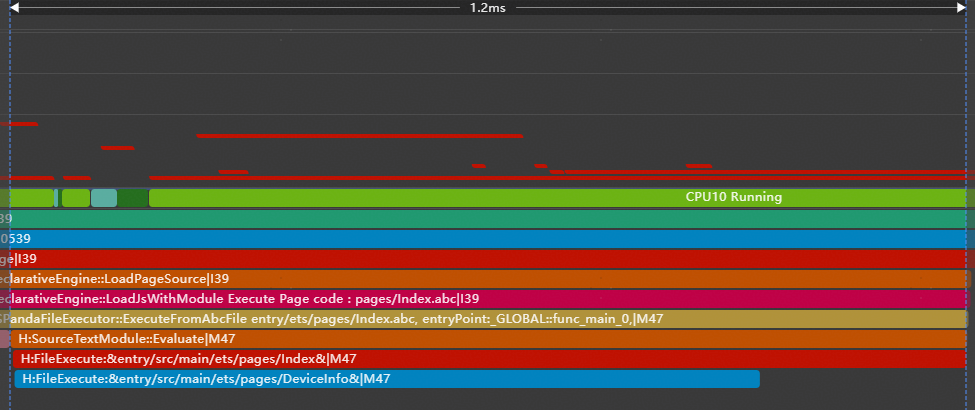
export { name, screen, storage }; 使用体检工具可以查看冷启动阶段未使用的模块和这些模块的加载耗时。将这些未使用模块(storage和screen)从关键路径中剥离,添加lazy标识进行延迟加载。修改后,从下图Trace中可以观察到冷启动阶段仅加载了DeviceName模块。OtherDeviceInfo模块被推迟到用户首次点击文本时才会执行。从修改前后的Trace可以看出,冷启动耗时有所降低。具体请参阅import加载耗时。

// entry\src\main\ets\pages\Index.ets
// After optimization: split variables are exported from different modules
import { hilog } from '@kit.PerformanceAnalysisKit';
import { name } from './DeviceName';
import lazy { screen, storage } from './OtherDeviceInfo';

@Entry
@Component
struct Index {
  build() {
    RelativeContainer() {
      Text(name)
        .id('HelloWorld')
        .fontSize($r('app.float.page_text_font_size'))
        .fontWeight(FontWeight.Bold)
        .alignRules({
          center: { anchor: '__container__', align: VerticalAlign.Center },
          middle: { anchor: '__container__', align: HorizontalAlign.Center }
        })
        .onClick(() => {
          hilog.info(0x0000, 'testTag', 'screen: %{public}s', screen);
          hilog.info(0x0000, 'testTag', 'storage: %{public}s', storage);
        })
    }
    .height('100%')
    .width('100%')
  }
}
// entry\src\main\ets\pages\DeviceName.ets
import { hilog } from '@kit.PerformanceAnalysisKit';
const name = 'Mate 70';
hilog.info(0x0000, 'testTag', 'export %{public}s', name);
export { name }; // entry\src\main\ets\pages\OtherDeviceInfo.ets
import { hilog } from '@kit.PerformanceAnalysisKit';
const screen = 'OLED';
hilog.info(0x0000, 'testTag', 'export %{public}s', screen);
const storage = '512GB';
hilog.info(0x0000, 'testTag', 'export %{public}s', storage);
export { screen, storage }; 下面示例在应用启动时,界面仅需显示基础文本信息,但可以从下图的Trace中看到一个本地so库(libentry.so)被同步导入。该SO库包含数学运算功能,在用户点击界面之前不需要加载和初始化。
// entry\src\main\ets\pages\Index.ets
// Before optimization: statically import the so that is not used in cold start
import { hilog } from '@kit.PerformanceAnalysisKit';
import testNapi from 'libentry.so';
import { title } from './name';

@Entry
@Component
struct Index {
  build() {
    Row() {
      Column() {
        Text(title)
          .fontSize($r('app.float.page_text_font_size'))
          .fontWeight(FontWeight.Bold)
          .onClick(() => {
            hilog.info(0x0000, 'testTag', 'Test NAPI 2 + 3 = %{public}d', testNapi.add(2, 3));
          })
      }
      .width('100%')
    }
    .height('100%')
  }
}
// entry\src\main\ets\pages\name.ets export const title = 'HarmonyOS';
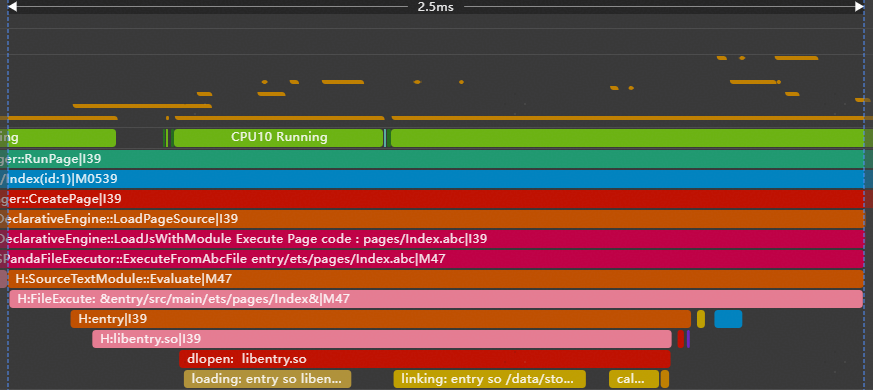
使用体检工具记录冷启动Trace,识别启动阶段未使用的模块及其加载耗时。在该示例中,不需要在用户点击事件前加载libentry.so模块,建议删除import testNapi from 'libentry.so'语句,仅在需要使用时通过import()函数动态加载该模块。下图为修改后采集的冷启动Trace,从图中可以看到冷启动阶段不再加载libentry.so。从修改前后的Trace可以看出降低了冷启动的耗时。
// entry\src\main\ets\pages\Index.ets
import { hilog } from '@kit.PerformanceAnalysisKit';
import { title } from './name';

@Entry
@Component
struct Index {
  build() {
    Row() {
      Column() {
        Text(title)
          .fontSize($r('app.float.page_text_font_size'))
          .fontWeight(FontWeight.Bold)
          .onClick(async () => {
            // After optimization: The SO file is dynamically loaded at the point of use.
            let ns: ESObject | null = null;
            try {
              ns = await import('libentry.so');
              hilog.info(0x0000, 'testTag', 'Test NAPI 2 + 3 = %{public}d', ns.default.add(2, 3));
            } catch (error) {
              hilog.error(0x0000, 'testTag', `Load so failed, code is ${error.code}, message is ${error.message}`);
            }
          })
      }
      .width('100%')
    }
    .height('100%')
  }
} 
延迟执行资源释放操作
将资源关闭和释放操作放在setTimeout函数中执行,使其延迟到系统相对空闲的时刻进行,可以避免在程序忙碌时段占用关键资源,提升整体性能及响应能力。例如相机正常使用后,延迟执行资源释放操作。