概述
随着用户功能的增加,应用逐渐变得复杂,占用的内存也在增加。由于内存是系统中的稀缺资源,当应用程序占用过多内存时,系统可能会频繁进行内存回收和重新分配,导致应用性能下降,甚至出现崩溃和卡顿。因此,降低应用内存占用对于整个系统至关重要。既能提升应用性能和响应速度,也能节省系统资源、提升设备运行效率并延长设备续航时间。开发者在应用开发过程中应注重内存管理,采取措施减少内存占用,优化应用性能和用户体验。
HarmonyOS提供了一些内存管理的工具和接口,帮助开发者有效地管理内存资源:
- onMemoryLevel()接口:开发者可通过该接口监听系统内存的变化,并根据系统内存的实时情况,动态地调整应用的内存,以避免内存过度占用导致的性能问题。
- LRUCache:缓存空间不足时,替换近期最少使用的数据。
- 生命周期管理:释放不再使用的系统资源,包括应用内存、监听事件、网络句柄。
- Purgeable Memory机制:创建PurgeableMemory对象,管理Purgeable内存。
- 图片加载和渲染:调整图片尺寸,使其与组件大小一致,避免显示问题,提高用户体验。
本文介绍五个方面优化应用内存占用问题。
使用onMemoryLevel()监听内存变化
onMemoryLevel()是 HarmonyOS 提供的用于监听系统内存变化的接口,通过该接口,开发者可以调整应用内存。onMemoryLevel()回调包括三种方式:AbilityStage、UIAbility 和 EnvironmentCallback。
- AbilityStage:系统首次加载HAP中的代码到进程时,会创建AbilityStage实例。当系统需要调整内存时,会回调AbilityStage实例的onMemoryLevel()方法。
- UIAbility:UIAbility是ArkUI中用于展示UI的组件容器,提供系统内存变化的回调方法。
- EnvironmentCallback:EnvironmentCallback模块提供对系统环境变化的监听回调能力。
MemoryLevel分为 MEMORY_LEVEL_MODERATE、MEMORY_LEVEL_LOW 和 MEMORY_LEVEL_CRITICAL 三种。
- MEMORY_LEVEL_MODERATE 表示当前系统内存压力适中,应用可以正常运行且受到的影响较小。
- MEMORY_LEVEL_LOW表示当前系统内存较低,应用应释放不必要的内存资源,避免系统卡顿。
- MEMORY_LEVEL_CRITICAL表示当前系统内存非常紧张,应用应尽可能释放更多资源,确保系统稳定性和性能。
开发人员应根据不同的内存级别采取相应措施,例如释放资源、优化内存使用,以确保应用在不同内存状态下均能正常运行。MemoryLevel具体等级定义如下所示:
等级 | 值 | 说明 |
|---|---|---|
MEMORY_LEVEL_MODERATE | 0 | 系统内存达到中等水平。系统将根据LRU(Least Recently Used,最近最少使用)缓存规则开始杀死进程。 |
MEMORY_LEVEL_LOW | 1 | 系统内存不足。此时应释放不必要的资源以提升系统性能。 |
MEMORY_LEVEL_CRITICAL | 2 | 系统内存不足。此时应立即释放所有不必要的资源,因为系统可能会终止所有缓存中的进程,并且开始终止应当保持运行的进程,例如后台服务。 |

后台已冻结的应用,AbilityStage、UIAbility和EnvironmentCallback的onMemoryLevel()不可回调。
使用LRUCache优化ArkTS内存
LRU(最近最少使用)算法基于时间局部性原理,即最近被访问的数据在未来被访问的概率较高。
LRUCache`是 ArkTS 中常用的缓存工具,基于 LRU 算法实现。它主要用于缓存频繁访问的数据,如图片和网络请求结果。通过维护一个缓存空间来存储数据,当缓存空间不足时,根据 LRU 算法替换最近最少使用的数据,确保缓存空间的有效利用。
[h2]原理介绍
LRUCache通过LinkedHashMap来实现LRU。LinkedHashMap继承于HashMap,HashMap用于快速查找数据,LinkedHashMap双向链表用于记录数据的顺序关系。因此,对于get()、put()、remove()等操作,LinkedHashMap除了包含HashMap的功能,还需要实现调整Entry顺序链表的工作。其数据结构如下图所示:
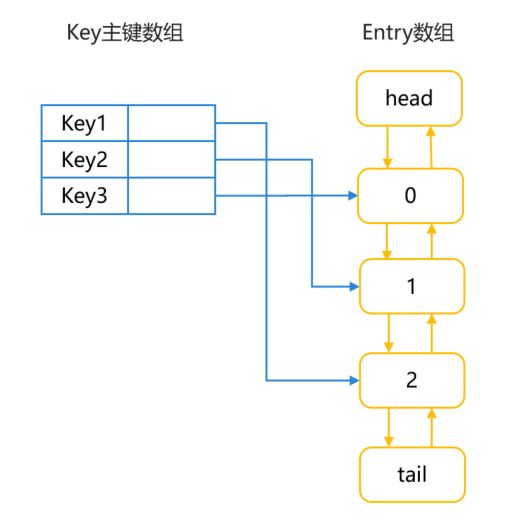
LruCache中将LinkedHashMap的顺序设置为LRU顺序,链表头部的对象为近期最少用到的对象。常用的方法及其说明如下所示:
- 调用get()方法:根据key查询对应,如果没有查到则返回undefined。查询到对应对象后,将该对象移到链表的尾端,并返回查询的对象。
- 调用put()方法:将key-value对添加到缓存中,同时将新对象存储在链表尾端。当内存缓存达到最大值时,移除链表头部的对象。如果key已存在,则更新其对应的value。
- 调用remove()方法:删除key对应的缓存value,如果key对应的value不在,则返回为undefined,否则,返回已删除的key-value键值对。
- 调用updateCapacity()方法,设置缓存存储容量。如果新容量小于原容量,仅保留新容量大小的数据。
[h2]参考案例
设计缓存工具类,包含LRUCache单例及操作LRUCache的方法,如添加、获取、删除数据。通过静态方法获取LRUCache实例,确保全局唯一。缓存工具类支持各组件间共享缓存数据,避免重复创建实例和数据冗余,提高系统性能和效率,减少内存占用,提升数据访问速度。
import { util } from '@kit.ArkTS';

export class LRUCacheUtil {
  private static instance: LRUCacheUtil;
  private lruCache: util.LRUCache<string, Object>;

  private constructor() {
    this.lruCache = new util.LRUCache(64);
  }

  // Get the singleton of LRUCacheUtil
  public static getInstance(): LRUCacheUtil {
    if (!LRUCacheUtil.instance) {
      LRUCacheUtil.instance = new LRUCacheUtil();
    }
    return LRUCacheUtil.instance;
  }

  // Determine whether the lruCache cache is empty
  public isEmpty(): boolean {
    return this.lruCache.isEmpty();
  }

  // Get the capacity of lruCache
  public getCapacity(): number {
    return this.lruCache.getCapacity();
  }

  // Reset the capacity of lruCache
  public updateCapacity(newCapacity: number): void {
    this.lruCache.updateCapacity(newCapacity);
  }

  // Add cache to lruCache
  public putCache(key: string, value: Object): void {
    this.lruCache.put(key, value);
  }

  // Delete the cache corresponding to the key
  public remove(key: string): void {
    this.lruCache.remove(key);
  }

  // Get the cache corresponding to the key
  public getCache(key: string): Object | undefined {
    return this.lruCache.get(key);
  }

  // Determine whether the cache corresponding to the key is included.
  public contains(key: string): boolean {
    return this.lruCache.contains(key);
  }

  // Clear the cached data and reset the size of lruCache
  public clearCache(): void {
    this.lruCache.clear();
    this.lruCache.updateCapacity(64);
  }
}
在对应的组件中设置缓存,示例代码如下所示:
import { LRUCacheUtil } from '../utils/LRUCacheUtil';

@Entry
@Component
struct Index {
  @State message: string = 'Hello World';

  aboutToAppear(): void {
    const lruCache: LRUCacheUtil = LRUCacheUtil.getInstance();
    // Add a <key, value> to lrucache
    lruCache.putCache('nation',10);
    // Add another <key, value> to lrucache
    lruCache.putCache('menu',8);
    // Query value through key
    const result0: number = lruCache.getCache('2') as number;
    console.log('result0:' + result0);
    // Delete the specified key and its associated values from the current buffer
    lruCache.remove('2');
    // Check whether the current buffer contains the specified object
    const result2: boolean = lruCache.contains('1');
    console.log('result2:' + result2);
    // Set a new capacity size
    lruCache.updateCapacity(110);
  }


  build() {
    Row() {
      Column() {
        Text(this.message)
          .fontSize(50)
          .fontWeight(FontWeight.Bold)
        Column() {
          Image($r('app.media.image'))
            .width("500px")
            .height("500px")
        }
      }
      .width('100%')
    }
    .height('100%')
  }
}
可以通过onMemoryLevel()监听内存变化,设置对应清理缓存的机制。示例代码如下:
import { AbilityConstant, UIAbility, Want } from '@kit.AbilityKit';
import { hilog } from '@kit.PerformanceAnalysisKit';
import { window } from '@kit.ArkUI';
import { LRUCacheUtil } from '../utils/LRUCacheUtil';

export default class EntryAbility extends UIAbility {
  // Monitor the changes in memory
  onMemoryLevel(level: AbilityConstant.MemoryLevel): void {
    // Execute memory management policies according to changes in memory
    if (level === AbilityConstant.MemoryLevel.MEMORY_LEVEL_CRITICAL) {
      console.log('The memory of device is critical, release memory.');
      if (!LRUCacheUtil.getInstance().isEmpty()) {
        LRUCacheUtil.getInstance().clearCache();
      }
    }
  }

  onCreate(want: Want, launchParam: AbilityConstant.LaunchParam): void {
    hilog.info(0x0000, 'testTag', '%{public}s', 'Ability onCreate');
  }

  onDestroy(): void {
    hilog.info(0x0000, 'testTag', '%{public}s', 'Ability onDestroy');
  }
}; [h2]原理介绍
在开发过程中,管理对象的生命周期,以释放资源、销毁对象、优化ArkTS内存。
- 在UIAbility组件的生命周期中,调用相应生命周期方法创建或销毁资源。在Create或Foreground方法中创建资源,在Background或Destroy方法中销毁资源。
- 在页面生命周期中,调用对应生命周期的方法,创建或销毁资源。如在onPageShow()方法中创建资源,在onPageHide()方法中销毁对应的资源。
- 在组件生命周期中,调用对应生命周期的方法,创建或销毁资源。如在aboutToAppear()方法中创建资源,在aboutToDisappear()方法中销毁不再使用的对象、注销不再使用的订阅事件。
- 调用组件自带的方法,创建、销毁组件。如调用XComponent的onDestroy()方法。
[h2]aboutToDisappear()中销毁订阅事件
aboutToDisappear函数会在组件销毁前执行。如下示例所示,在完成网络管理的网络连接模块使用后,取消订阅默认网络状态变化的通知。
import { connection } from '@kit.NetworkKit';
import { BusinessError } from '@kit.BasicServicesKit';
import { Logger } from '../utils/Logger';
import { hilog } from '@kit.PerformanceAnalysisKit';

@Entry
@Component
struct Index {
  @State networkId: string = '123';
  @State netMessage: string = '初始化网络成功';
  @State connectionMessage: string = '链接成功';
  @State netStateMessage: string = '';
  @State hostName: string = '';
  @State ip: string = '';
  private netCon: connection.NetConnection | null = null;
  scroller: Scroller = new Scroller();

  aboutToDisappear(): void {
    // unregister NetConnection
    this.unUseNetworkRegister();
  }

  build() {
    Column() {
      Text('Hello World')
        .fontSize(20)
        .fontWeight(FontWeight.Bold)
        .textAlign(TextAlign.Start)
        .margin({ left: 10 })
        .width(100)

      Column() {
        Row() {
          Text('Title')
            .fontSize(16)
            .margin(20)
            .fontWeight(FontWeight.Medium)
          Blank()
          Toggle({ type: ToggleType.Switch, isOn: false })
            .selectedColor(Color.Blue)
            .margin({ right: 20 })
            .width(20)
            .height(100)
            .onChange((isOn) => {
              if (isOn) {
                this.useNetworkRegister();
              } else {
                this.unUseNetworkRegister();
              }
            })
        }
        .height(100)
        .borderRadius(10)
        .margin({ left: 10, right: 10 })
        .width(200)
        .backgroundColor(Color.Black)

        TextArea({ text: this.netStateMessage })
          .fontSize(16)
          .width(200)
          .height(100)
          .margin(10)
          .borderRadius(10)
          .textAlign(TextAlign.Start)
          .focusOnTouch(false)

        Button('Clear')
          .fontSize(18)
          .width(200)
          .height(40)
          .margin({
            left: 10,
            right: 10,
            bottom: 10
          })
          .onClick(() => {
            this.netStateMessage = '';
          })
        Blank()
      }
      .height(100)
      .justifyContent(FlexAlign.Start)
    }
    .width(200)
  }

  getConnectionProperties(): void {
    connection.getDefaultNet().then((netHandle: connection.NetHandle) => {
      connection.getConnectionProperties(netHandle, (error: BusinessError, connectionProperties: connection.ConnectionProperties) => {
        if (error) {
          this.connectionMessage = '连接错误';
          Logger.error('getConnectionProperties error:' + error.code + error.message);
          return;
        }
        this.connectionMessage = '连接' + connectionProperties.interfaceName
          + 'developer.huawei.com' + connectionProperties.domains
          + '/cn' + JSON.stringify(connectionProperties.linkAddresses)
          + '/doc' + JSON.stringify(connectionProperties.routes)
          + '/best-practices' + JSON.stringify(connectionProperties.dnses)
          + 'btpa-memory-optimization' + connectionProperties.mtu + '\n';
      })
    }).catch((error: BusinessError) => {
      hilog.error(0x0000, 'testTag', '%{public}s', 'getConnectionProperties fail');
    });
  }

  useNetworkRegister(): void {
    this.netCon = connection.createNetConnection();
    this.netStateMessage += '连接';
    this.netCon.register((error) => {
      if (error) {
        Logger.error('register error:' + error.message);
        return;
      }
      this.getUIContext().getPromptAction().showToast({
        message: '连接成功',
        duration: 1000
      });
    })
    this.netCon.on('netAvailable', (netHandle) => {
      this.netStateMessage += '连接' + netHandle.netId + '\n';
    })
    this.netCon.on('netBlockStatusChange', (data) => {
      this.netStateMessage += '更换' + data.netHandle.netId + '\n';
    })
    this.netCon.on('netCapabilitiesChange', (data) => {
      this.netStateMessage += 'id' + data.netHandle.netId
        + 'cap' + JSON.stringify(data.netCap) + '\n';
    })
    this.netCon.on('netConnectionPropertiesChange', (data) => {
      this.netStateMessage += 'id' + data.netHandle.netId
        + 'propertis' + JSON.stringify(data.connectionProperties) + '\n';
    })
  }

  unUseNetworkRegister(): void {
    if (this.netCon) {
      this.netCon.unregister((error: BusinessError) => {
        if (error) {
          Logger.error('unregister error:' + error.message);
          return;
        }
        this.getUIContext().getPromptAction().showToast({
          message: 'message',
          duration: 1000
        });
        this.netStateMessage += 'listener';
      })
    } else {
      this.netStateMessage += 'listener_fail';
    }
  }
}
使用purgeable优化C++内存
Purgeable Memory是HarmonyOS中native层的内存管理机制,适用于图像处理中的Bitmap、流媒体应用的一次性数据以及图片等场景。
应用可使用 Purgeable Memory 存放内部缓存数据,系统根据淘汰策略管理所有Purgeable内存。当系统内存不足时,系统通过丢弃Purgeable内存快速回收资源,释放更多内存给其他应用程序,实现高效的全局缓存数据管理,提高系统稳定性和流畅性。
在使用Purgeable内存时,开发者可以调用接口释放Purgeable内存,但需要注意在适当的时机释放Purgeable内存,以确保内存资源能够得到有效管理,避免内存占用过高导致的性能问题和内存泄漏的情况。通过合理使用Purgeable内存,开发者可以更好地管理应用程序的内存,提高用户体验。
[h2]原理介绍
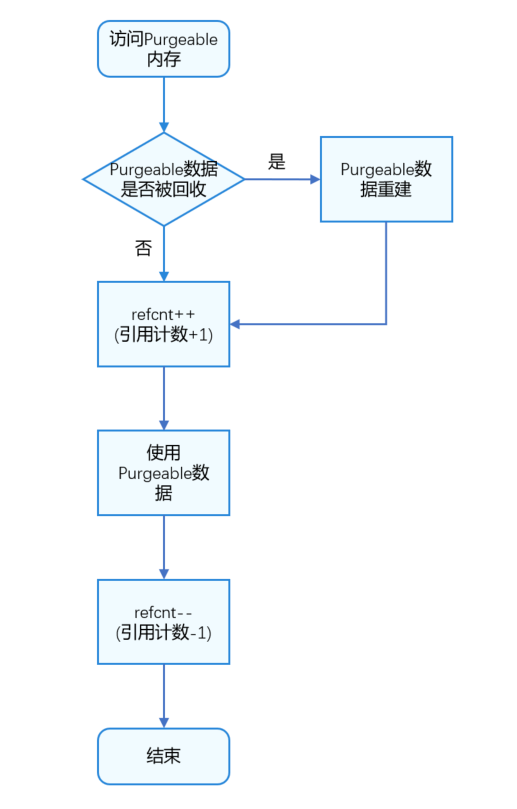
访问Purgeable内存的流程如下图所示。首先,判断Purgeable内存的数据是否已被回收。如果已回收,需重建数据。访问Purgeable内存时,其引用计数refcnt加1;访问结束后,refcnt减1。当refcnt为0时,Purgeable内存可被系统回收。
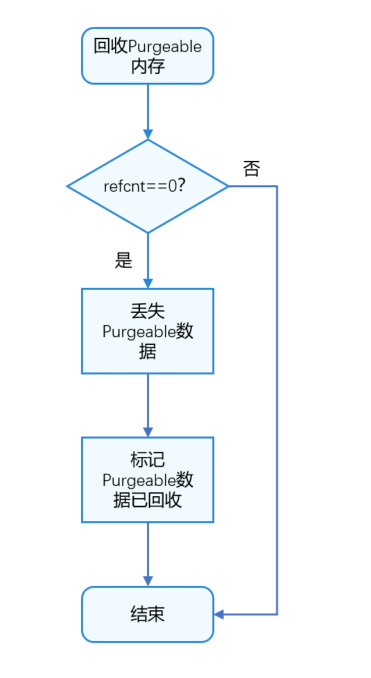
Purgeable内存回收流程图如下所示。当引用计数为0时,丢弃Purgeable内存中的数据,并标记为已回收。
[h2]参考案例
在CMakeLists.txt文件中引入Purgeable对应的动态链接库libpurgeable_memory_ndk.z.so,具体如下所示:
# the minimum version of CMake.
cmake_minimum_required(VERSION 3.4.1)
project(MyNativeApplication)
set(NATIVERENDER_ROOT_PATH ${CMAKE_CURRENT_SOURCE_DIR})
if(DEFINED PACKAGE_FIND_FILE)
    include(${PACKAGE_FIND_FILE})
endif()
include_directories(${NATIVERENDER_ROOT_PATH}
                    ${NATIVERENDER_ROOT_PATH}/include)
add_library(entry SHARED napi_init.cpp)
# Introduce libpurgeable_memory_ndk.z.so dynamic link library.
target_link_libraries(entry PUBLIC libace_napi.z.so libpurgeable_memory_ndk.z.so)
引入purgeable_memory头文件,声明ModifyFunc函数,调用OH_PurgeableMemory_Create创建PurgeableMemory对象。
在读取PurgeableMemory对象的内容时,需要调用OH_PurgeableMemory_BeginRead,读取完成后,需要调用OH_PurgeableMemory_EndRead。其中,OH_PurgeableMemory_GetContent可以获取PurgeableMemory对象的内存数据。
在修改PurgeableMemory对象的内容时,需要调用OH_PurgeableMemory_BeginWrite,修改完成后,需要调用OH_PurgeableMemory_EndWrite。其中,OH_PurgeableMemory_AppendModify可以更新PurgeableMemory对象重建规则。
#include "napi/native_api.h"
#define DATASIZE (4 * 1024 * 1024)
#include "purgeable_memory/purgeable_memory.h"

bool ModifyFunc(void *data, size_t size, void *param) {
    data = param;
    return true;
}
// Business definition object type
class ReqObj;
static napi_value Add(napi_env env, napi_callback_info info)
{
    size_t requireArgc = 2;
    size_t argc = 2;
    napi_value args[2] = {nullptr};
    napi_get_cb_info(env, info, &argc, args , nullptr, nullptr);
    napi_valuetype valuetype0;
    napi_typeof(env, args[0], &valuetype0);
    napi_valuetype valuetype1;
    napi_typeof(env, args[1], &valuetype1);
    double value0;
    napi_get_value_double(env, args[0], &value0);
    double value1;
    napi_get_value_double(env, args[1], &value1);
    double result = value0 + value1;
    // Create a PurgeableMemory object
    OH_PurgeableMemory *pPurgmem = OH_PurgeableMemory_Create(DATASIZE, ModifyFunc, &result);
    // Read the object
    OH_PurgeableMemory_BeginRead(pPurgmem);
    // Get the size of PurgeableMemory object
    size_t size = OH_PurgeableMemory_ContentSize(pPurgmem);
    // Get the content of the PurgeableMemory object
    ReqObj *pReqObj = (ReqObj *)OH_PurgeableMemory_GetContent(pPurgmem);
    // Read the end of the PurgeableMemory object
    OH_PurgeableMemory_EndRead(pPurgmem);

    // Modify the PurgeableMemory object
    OH_PurgeableMemory_BeginWrite(pPurgmem);
    // Declare the parameters of the extended creation function
    double newResult = value0 + value0;
    // Update PurgeableMemory object reconstruction rules
    OH_PurgeableMemory_AppendModify(pPurgmem, ModifyFunc, &newResult);
    // End of modifying the PurgeableMemory object
    OH_PurgeableMemory_EndWrite(pPurgmem);
    // Destroyed object
    OH_PurgeableMemory_Destroy(pPurgmem);
    napi_value sum;
    napi_create_double(env, result, &sum);
    return sum;
}
EXTERN_C_START
static napi_value Init(napi_env env, napi_value exports)
{
    napi_property_descriptor desc[] = {
        { "add", nullptr, Add, nullptr, nullptr, nullptr, napi_default, nullptr }
    };
    napi_define_properties(env, exports, sizeof(desc) / sizeof(desc[0]), desc);
    return exports;
}
EXTERN_C_END

static napi_module demoModule = {
    .nm_version = 1,
    .nm_flags = 0,
    .nm_filename = nullptr,
    .nm_register_func = Init,
    .nm_modname = "entry",
    .nm_priv = ((void*)0),
    .reserved = { 0 },
};
extern "C" __attribute__((constructor)) void RegisterEntryModule(void)
{
    napi_module_register(&demoModule);
} [h2]原理介绍
在定义界面时,应用需根据组件类型绘制相应内容。图片组件用于加载和显示图片,同时会占用内存。ArkTS运行时选择基于对象追踪(即Tracing GC)算法设计GC,对象申请空间到达阈值时触发GC。年轻代GC的阈值较小,若图片的尺寸较大,可能会导致频繁的GC。
一张全屏的图片,不同分辨率的内存占用大小如下:
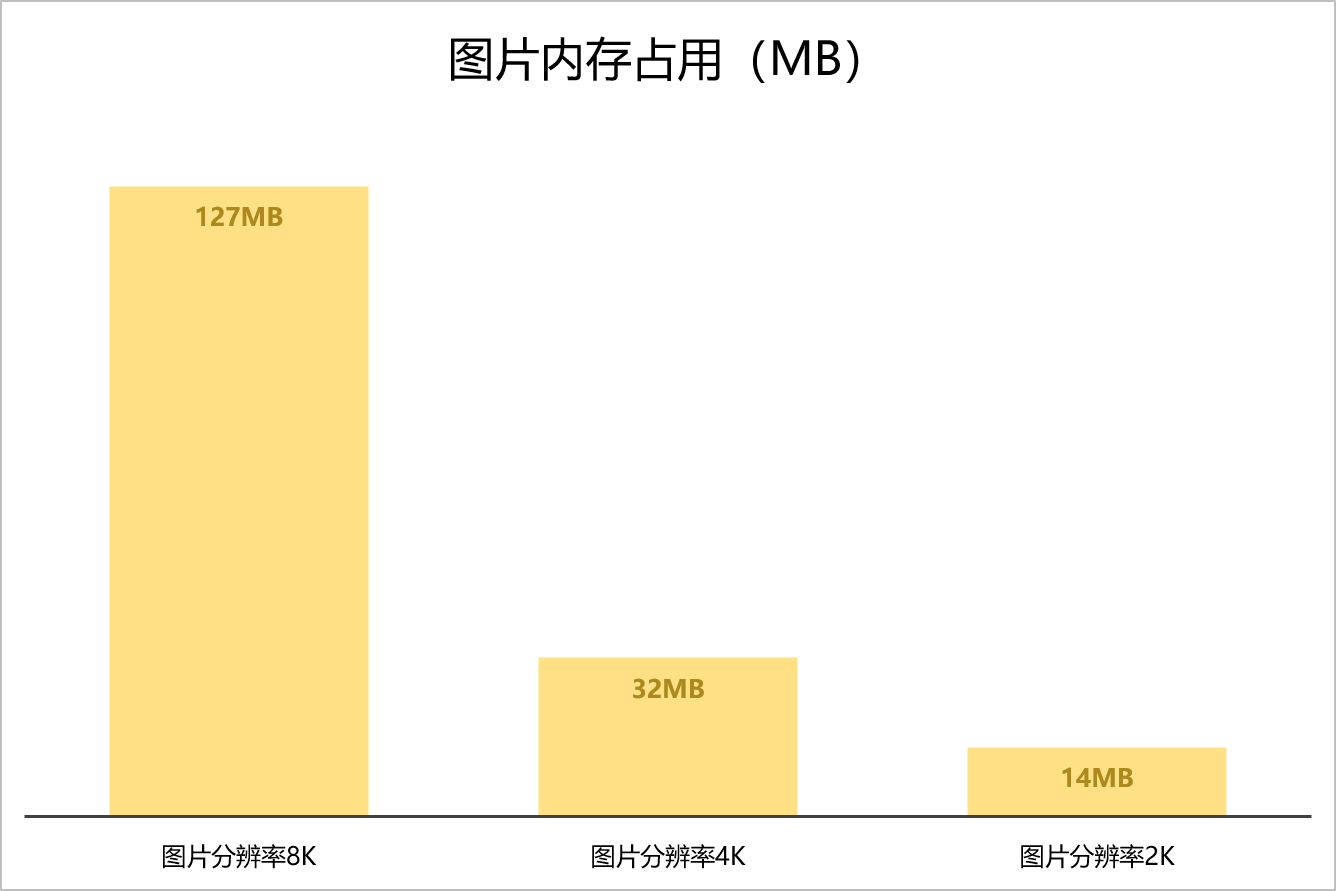
由上图可以看出,对于页面多、图片多、效果丰富的资源密集型应用,内存容易达到较高水平。当应用的内存占用超过系统设定的阈值(例如4GB,不同系统的阈值可能不同)时,系统可能会认为应用存在严重的内存问题,并可能强制终止该应用进程,以保证设备系统的稳定性和性能。为了避免应用被系统终止,开发者可以考虑以下两点:
- 优化资源使用:通过合理设置图片源文件大小,合理使用内存资源,减少图片所占应用内存。
- 布局优化:通过减少布局嵌套层级,减少过度绘制可以产生较大的性能收益。
本章节指导开发者合理设置图片源文件大小,优化内存使用,减少图片占用的应用内存。
[h2]避免加载超过显示尺寸的图片
Column() {
  Image($r('app.media.image'))
    .width("500px")
    .height("500px")
}
使用500×500尺寸的Image组件加载一张4032×3024的RGBA格式图片时,图片申请了约46.5 MB的内存。这是因为图片原始尺寸较大,加载到Image组件中时需要缩放到500×500尺寸,这个过程会占用一定的内存。
纹理图片内存大小 = imageWidth x imageHeight x format(4032*3024 * 4 bytes = 48771072 bytes ≈ 46.5M)。
组件实际需要的尺寸为500*500,所需内存约为1M。
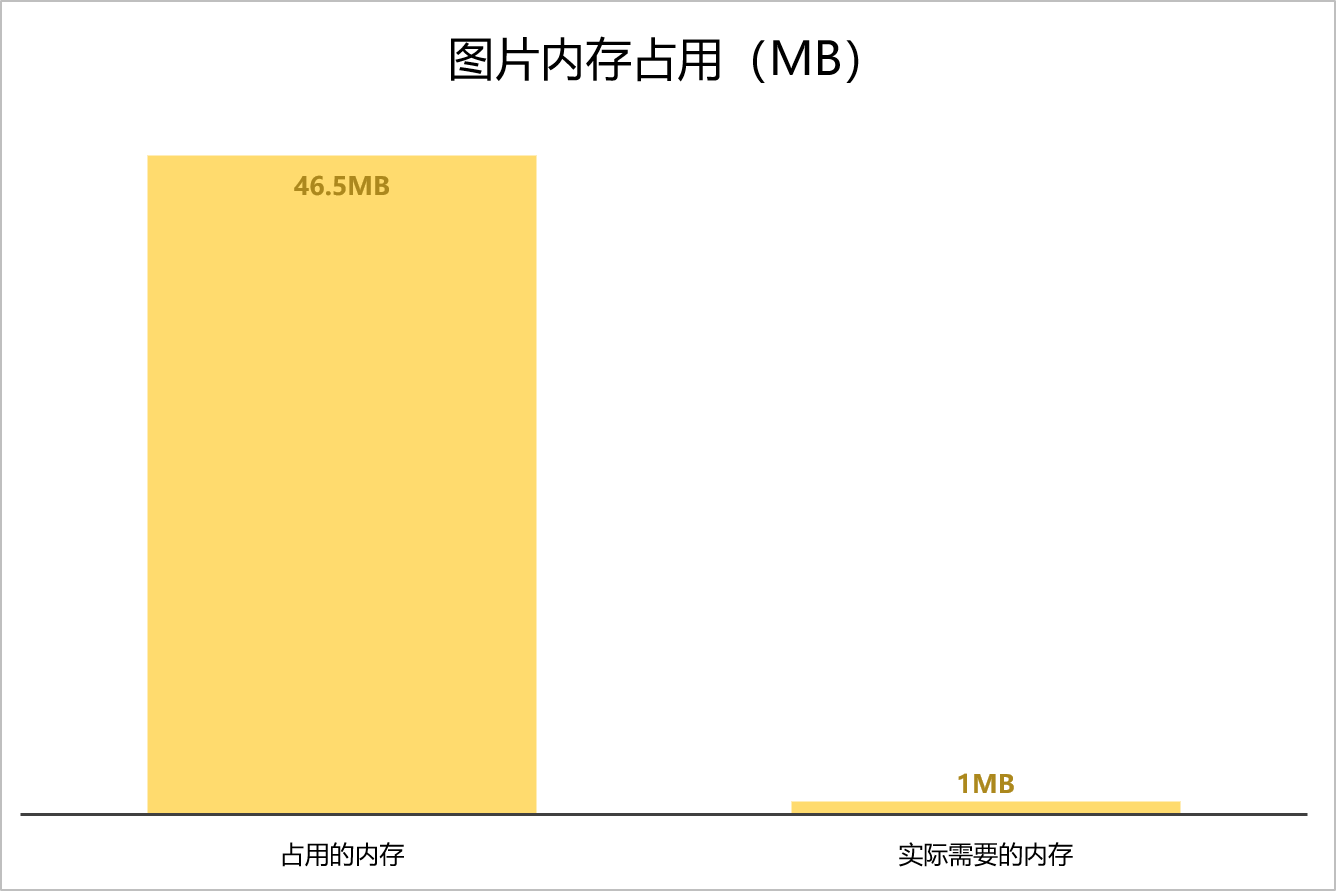
当图片尺寸超过控件显示区域时,图片会被裁剪或缩放。频繁的裁剪和缩放不仅会降低视图效果,还会浪费内存,增加功耗。为了节省内存,开发者可以手动调整源文件的尺寸,使其与组件大小一致。这样可以避免不必要的内存浪费,并提高应用程序的性能和效率。开发者可以使用图像处理工具来调整图像尺寸,进一步节省内存空间。
其他方法
在日常开发中,常见的其他减少内存方式有如下几种:
- 使用弱引用(Weak Reference):在HarmonyOS应用开发中,可以使用弱引用(Weak Reference)来避免内存泄漏。通过使用Weak Reference,可以避免循环引用导致的内存泄漏问题,确保对象在不再需要时能够被正确释放。
- 使用Sendable:符合Sendable协议的数据可以在ArkTS并发实例间传递,从而减少拷贝的开销及其内存。关于Sendable的详细内容可参考《Sendable开发指导》。
- 使用可共享对象:共享对象SharedArrayBuffer,拥有固定长度,可以存储任何类型的数据,包括数字、字符串等。共享对象传输是指SharedArrayBuffer支持在多线程之间传递,传递之后的SharedArrayBuffer对象和原始的SharedArrayBuffer对象指向同一块内存,进而达到内存共享的目的。详细内容可参考《SharedArrayBuffer对象》。