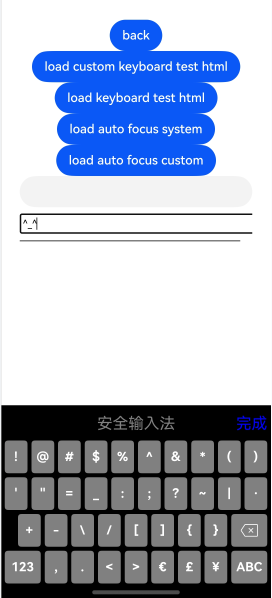
点击网页输入框时,屏幕下方将弹出系统默认的软键盘,用户可以进行文字输入。
type属性影响键盘显示、输入验证和元素外观。
inputmode优化移动设备键盘输入体验,不影响基本行为或验证。
开发者能够通过Web组件对接软键盘,来处理系统软键盘的显示与交互问题,同时实现软键盘的自定义功能。主要有以下场景:
为支持Web页面与系统软键盘、自定义软键盘等的良好交互,ArkWeb遵循并实现了W3C规范中的以下输入控制属性:
type属性
type属性定义了input元素的类型,影响输入的验证、显示方式和键盘类型。常见的type值包括:
| type值 | 描述 |
|---|---|
| text | 默认值。普通文本输入 |
| number | 数字输入 |
| 电子邮件地址输入 | |
| password | 密码输入 |
| tel | 电话号码输入 |
| url | URL输入 |
| date | 日期选择器 |
| time | 时间选择器 |
| checkbox | 复选框 |
| radio | 单选按钮 |
| file | 文件上传 |
| submit | 提交按钮 |
| reset | 重置按钮 |
| button | 普通按钮 |
inputmode属性
inputmode属性用于配置输入法类型,默认值:text。
| inputmode | 描述 |
|---|---|
| decimal | 只显示数字键盘,通常还有一个逗号键。 |
| 文本键盘,键通常用于电子邮件地址,如[@]。 | |
| none | 不应出现键盘。 |
| numeric | 只显示数字键盘。 |
| search | 文本键盘,[enter]键通常显示为[go]。 |
| tel | 只显示数字键盘,通常还有[+]、[*]和[#]键。 |
| text | 默认文本键盘。 |
| url | 文本键盘,键通常用于网址,如[.]和[/],以及特殊的[.com]键,或者其他通常用于本地设置的域名结束符。 |
enterkeyhint属性
enterkeyhint属性用于指定移动设备虚拟键盘上回车键的显示方式。
| enterkeyhint值 | 描述 |
|---|---|
| enter | 显示默认的回车键 |
| done | 表示输入完成 |
| go | 表示跳转或执行 |
| next | 进入下一个输入字段 |
| previous | 返回上一个输入字段 |
| search | 执行搜索 |
| send | 发送信息 |
点击网页输入框时,屏幕下方将弹出系统默认的软键盘,用户可以进行文字输入。
type属性影响键盘显示、输入验证和元素外观。
inputmode优化移动设备键盘输入体验,不影响基本行为或验证。
为提升用户体验,可以在页面完成加载后,输入框自动获焦并弹出软键盘。通过调用showTextInput()设置软键盘自动弹出功能。
- <!-- index.html -->
- <!DOCTYPE html>
- <html>
- <head>
- <title>测试网页</title>
- </head>
- <body>
- <h1>DEMO</h1>
- <input type="text" id="input_a">
- </body>
- </html>
- // Index.ets
- import { webview } from '@kit.ArkWeb';
- import { inputMethod } from '@kit.IMEKit';
-
- @Entry
- @Component
- struct WebComponent {
- controller: webview.WebviewController = new webview.WebviewController();
- build() {
- Column() {
- Web({ src: $rawfile("index.html"), controller: this.controller})
- .onPageEnd(() => {
- this.controller.runJavaScript(`document.getElementById('input_a').focus()`).then(() => {
- setTimeout(() => {
- inputMethod.getController().showTextInput();
- }, 10);
- });
- });
- }
- }
- }
在移动设备上,支持设置Web页面的软键盘避让模式。
在应用代码中设置UIContext的软键盘避让模式setKeyboardAvoidMode()。ArkWeb组件支持Resize和Offset两种模式。
(1)设置UIContext的软键盘避让模式。
- import { KeyboardAvoidMode } from '@kit.ArkUI';
- import { hilog } from '@kit.PerformanceAnalysisKit';
-
- // ···
- onWindowStageCreate(windowStage: window.WindowStage) {
- hilog.info(0x0000, 'testTag', '%{public}s', 'Ability onWindowStageCreate');
-
- windowStage.loadContent('pages/Index', (err, data) => {
- let keyboardAvoidMode = windowStage.getMainWindowSync().getUIContext().getKeyboardAvoidMode();
- // 设置虚拟键盘抬起时压缩页面大小为减去键盘的高度
- windowStage.getMainWindowSync().getUIContext().setKeyboardAvoidMode(KeyboardAvoidMode.RESIZE);
- if (err.code) {
- hilog.error(0x0000, 'testTag', 'Failed to load the content. Cause: %{public}s', JSON.stringify(err) ?? '');
- return;
- }
- hilog.info(0x0000, 'testTag', 'Succeeded in loading the content. Data: %{public}s', JSON.stringify(data) ?? '');
- });
- }
(2)在Web组件中调起软键盘。
- <!-- index.html -->
- <!DOCTYPE html>
- <html>
- <head>
- <title>测试网页</title>
- </head>
- <body>
- <h1>DEMO</h1>
- <input type="text" id="input_a">
- </body>
- </html>
- // Index.ets
- import { webview } from '@kit.ArkWeb';
-
- @Entry
- @Component
- struct KeyboardAvoidExample {
- controller: webview.WebviewController = new webview.WebviewController();
- build() {
- Column() {
- Row().height("50%").width("100%").backgroundColor(Color.Gray)
- Web({ src: $rawfile("index.html"),controller: this.controller})
- Text("I can see the bottom of the page").width("100%").textAlign(TextAlign.Center).backgroundColor(Color.Pink).layoutWeight(1)
- }.width('100%').height("100%")
- }
- }
ArkWeb组件将跟随ArkUI重新布局,效果如图1和图2所示。
图1 Web组件网页默认软键盘避让模式

图2 Web组件网页跟随ArkUI软键盘避让模式
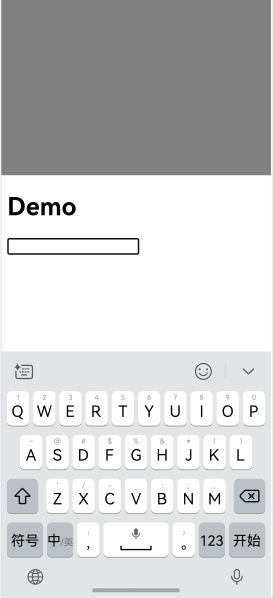
在UIContext的键盘避让模式为Offset模式时,应用可通过WebKeyboardAvoidMode()设置ArkWeb组件的键盘避让模式。Web组件的WebKeyboardAvoidMode()接口优先级高于W3C侧virtualKeyboard.overlayContent。
可视视口指用户正在看到的网站的区域,该区域的宽度等于移动设备的浏览器窗口的宽度。
布局视口指网页本身的宽度。
在应用代码中设置ArkWeb的软键盘避让模式。
- // Index.ets
- import { webview } from '@kit.ArkWeb';
-
- @Entry
- @Component
- struct KeyboardAvoidExample {
- controller: webview.WebviewController = new webview.WebviewController();
- build() {
- Column() {
- Row().height('50%').width('100%').backgroundColor(Color.Gray)
- Web({ src: $rawfile('index.html'),controller: this.controller})
- .keyboardAvoidMode(WebKeyboardAvoidMode.OVERLAYS_CONTENT) // 此时ArkWeb组件不会调整任何视口的大小。
- Text('I can see the bottom of the page')
- .width('100%')
- .textAlign(TextAlign.Center)
- .backgroundColor(Color.Pink)
- .layoutWeight(1)
- }.width('100%').height('100%')
- }
- }
ArkWeb组件根据避让模式进行避让,效果见图3。
图3 Web组件网页自身软键盘避让模式
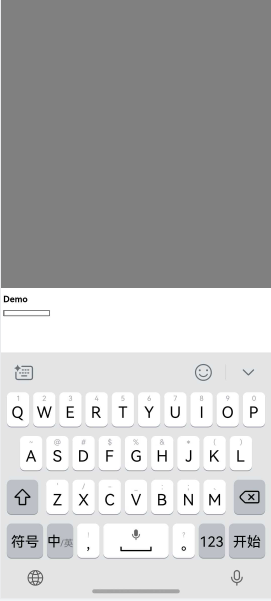
在软键盘弹出时,为使Web组件不发生避让行为,可通过调用expandSafeArea()设置Web组件扩展安全区域。更多详细示例可参考网页中安全区域计算和避让适配。
- // xxx.ets
- import { webview } from '@kit.ArkWeb';
-
- @Entry
- @Component
- struct WebComponent {
- controller: webview.WebviewController = new webview.WebviewController();
-
- build() {
- Column() {
- Web({ src: 'www.example.com', controller: this.controller })
- .width('100%').height('100%')
- .expandSafeArea([SafeAreaType.KEYBOARD, SafeAreaType.SYSTEM])
- }
- }
- }
与其他Web组件行为的交互场景:
| 交叉场景 | 规格 |
|---|---|
| 同层渲染 | 同层Web:软键盘避让方式与普通场景相同。 同层系统组件:由ArkUI负责软键盘避让模式。 |
| 离屏创建组件 | 默认使用与非离屏创建一致的软键盘避让模式,在添加至组件树前设置其他避让模式即可生效。 |
| customDialog | customDialog自身避让。 |
| 折叠屏 | 软键盘避让行为与普通场景行为一致。屏幕软键盘将根据屏幕开合状态进行调整。 |
| 软键盘托管 | 软键盘避让行为与普通场景行为一致。 |
| Web嵌套滚动 | 在嵌套滚动场景下,建议不要使用Web软键盘避让,包括RESIZE_VISUAL和RESIZE_CONTENT。 |
应用可以通过监听onInterceptKeyboardAttach回调,在软键盘拉起前,控制软键盘的显示,包括系统默认软键盘、带有特定Enter键的软键盘,或完全自定义软键盘。借助这一功能,开发者能够实现对软键盘的灵活管理。
- // Index.ets
- import { webview } from '@kit.ArkWeb';
- import { inputMethodEngine } from '@kit.IMEKit';
-
- @Entry
- @Component
- struct WebComponent {
- controller: webview.WebviewController = new webview.WebviewController();
- webKeyboardController: WebKeyboardController = new WebKeyboardController();
- inputAttributeMap: Map<string, number> = new Map([
- ['UNSPECIFIED', inputMethodEngine.ENTER_KEY_TYPE_UNSPECIFIED],
- ['GO', inputMethodEngine.ENTER_KEY_TYPE_GO],
- ['SEARCH', inputMethodEngine.ENTER_KEY_TYPE_SEARCH],
- ['SEND', inputMethodEngine.ENTER_KEY_TYPE_SEND],
- ['NEXT', inputMethodEngine.ENTER_KEY_TYPE_NEXT],
- ['DONE', inputMethodEngine.ENTER_KEY_TYPE_DONE],
- ['PREVIOUS', inputMethodEngine.ENTER_KEY_TYPE_PREVIOUS]
- ])
-
- /**
- * 自定义键盘组件Builder
- */
- @Builder
- customKeyboardBuilder() {
- // 这里实现自定义键盘组件,对接WebKeyboardController实现输入、删除、关闭等操作。
- Row() {
- Text("完成")
- .fontSize(20)
- .fontColor(Color.Blue)
- .onClick(() => {
- this.webKeyboardController.close();
- })
- // 插入字符。
- Button("insertText").onClick(() => {
- this.webKeyboardController.insertText('insert ');
- }).margin({
- bottom: 200,
- })
- // 从后往前删除length参数指定长度的字符。
- Button("deleteForward").onClick(() => {
- this.webKeyboardController.deleteForward(1);
- }).margin({
- bottom: 200,
- })
- // 从前往后删除length参数指定长度的字符。
- Button("deleteBackward").onClick(() => {
- this.webKeyboardController.deleteBackward(1);
- }).margin({
- left: -220,
- })
- // 插入功能按键。
- Button("sendFunctionKey").onClick(() => {
- this.webKeyboardController.sendFunctionKey(6);
- })
- }
- }
-
- build() {
- Column() {
- Web({ src: $rawfile('index.html'), controller: this.controller })
- .onInterceptKeyboardAttach((KeyboardCallbackInfo) => {
- // option初始化,默认使用系统默认键盘
- let option: WebKeyboardOptions = {
- useSystemKeyboard: true,
- };
- if (!KeyboardCallbackInfo) {
- return option;
- }
-
- // 保存WebKeyboardController,使用自定义键盘时候,需要使用该handler控制输入、删除、软键盘关闭等行为
- this.webKeyboardController = KeyboardCallbackInfo.controller;
- let attributes: Record<string, string> = KeyboardCallbackInfo.attributes;
- // 遍历attributes
- let attributeKeys = Object.keys(attributes);
- for (let i = 0; i < attributeKeys.length; i++) {
- console.info('WebCustomKeyboard key = ' + attributeKeys[i] + ', value = ' + attributes[attributeKeys[i]]);
- }
-
- if (attributes) {
- if (attributes['data-keyboard'] == 'customKeyboard') {
- // 根据html可编辑元素的属性,判断使用不同的软键盘,例如这里如果属性包含有data-keyboard,且值为customKeyboard,则使用自定义键盘
- console.info('WebCustomKeyboard use custom keyboard');
- option.useSystemKeyboard = false;
- // 设置自定义键盘builder
- option.customKeyboard = () => {
- this.customKeyboardBuilder()
- }
- return option;
- }
-
- if (attributes['keyboard-return'] != undefined) {
- // 根据html可编辑元素的属性,判断使用不同的软键盘,例如这里如果属性包含有keyboard-return,使用系统键盘,并且指定系统软键盘enterKey类型
- option.useSystemKeyboard = true;
- let enterKeyType: number | undefined = this.inputAttributeMap.get(attributes['keyboard-return']);
- if (enterKeyType != undefined) {
- option.enterKeyType = enterKeyType;
- }
- return option;
- }
- }
-
- return option;
- })
- }
- }
- }
- <!-- index.html -->
- <!DOCTYPE html>
- <html>
-
- <head>
- <meta charset="utf-8">
- <meta name="viewport" content="width=device-width,minimum-scale=1.0,maximum-scale=1.0">
- </head>
-
- <body>
-
- <p style="font-size:12px">input标签,原有默认行为:</p>
- <input type="text" style="width: 300px; height: 20px"><br>
- <hr style="height:2px;border-width:0;color:gray;background-color:gray">
-
- <p style="font-size:12px">input标签,系统键盘自定义enterKeyType属性 enter key UNSPECIFIED:</p>
- <input type="text" keyboard-return="UNSPECIFIED" style="width: 300px; height: 20px"><br>
- <hr style="height:2px;border-width:0;color:gray;background-color:gray">
-
- <p style="font-size:12px">input标签,系统键盘自定义enterKeyType属性 enter key GO:</p>
- <input type="text" keyboard-return="GO" style="width: 300px; height: 20px"><br>
- <hr style="height:2px;border-width:0;color:gray;background-color:gray">
-
- <p style="font-size:12px">input标签,系统键盘自定义enterKeyType属性 enter key SEARCH:</p>
- <input type="text" keyboard-return="SEARCH" style="width: 300px; height: 20px"><br>
- <hr style="height:2px;border-width:0;color:gray;background-color:gray">
-
- <p style="font-size:12px">input标签,系统键盘自定义enterKeyType属性 enter key SEND:</p>
- <input type="text" keyboard-return="SEND" style="width: 300px; height: 20px"><br>
- <hr style="height:2px;border-width:0;color:gray;background-color:gray">
-
- <p style="font-size:12px">input标签,系统键盘自定义enterKeyType属性 enter key NEXT:</p>
- <input type="text" keyboard-return="NEXT" style="width: 300px; height: 20px"><br>
- <hr style="height:2px;border-width:0;color:gray;background-color:gray">
-
- <p style="font-size:12px">input标签,系统键盘自定义enterKeyType属性 enter key DONE:</p>
- <input type="text" keyboard-return="DONE" style="width: 300px; height: 20px"><br>
- <hr style="height:2px;border-width:0;color:gray;background-color:gray">
-
- <p style="font-size:12px">input标签,系统键盘自定义enterKeyType属性 enter key PREVIOUS:</p>
- <input type="text" keyboard-return="PREVIOUS" style="width: 300px; height: 20px"><br>
- <hr style="height:2px;border-width:0;color:gray;background-color:gray">
-
- <p style="font-size:12px">input标签,应用自定义键盘:</p>
- <input type="text" data-keyboard="customKeyboard" style="width: 300px; height: 20px"><br>
-
- </body>
-
- </html>
ArkWeb自定义键盘的示例效果如图4、图5和图6所示。
图4 ArkWeb自定义键盘数字键盘
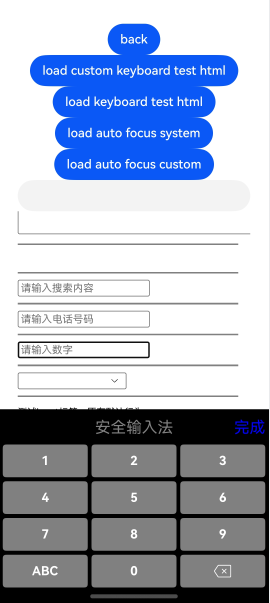
图5 ArkWeb自定义键盘字母键盘
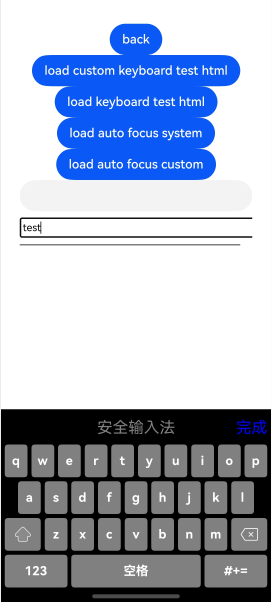
图6 ArkWeb自定义键盘符号键盘