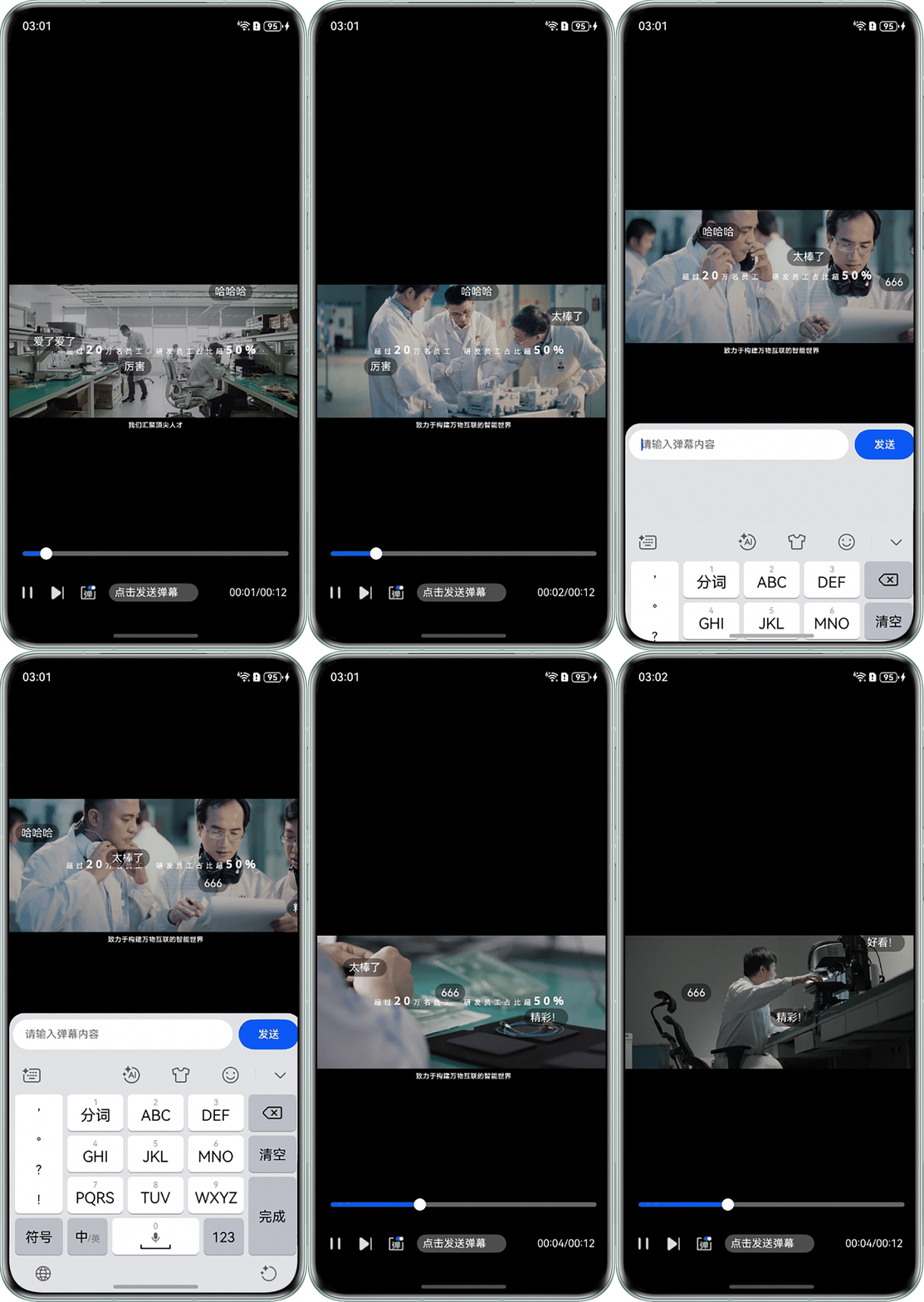
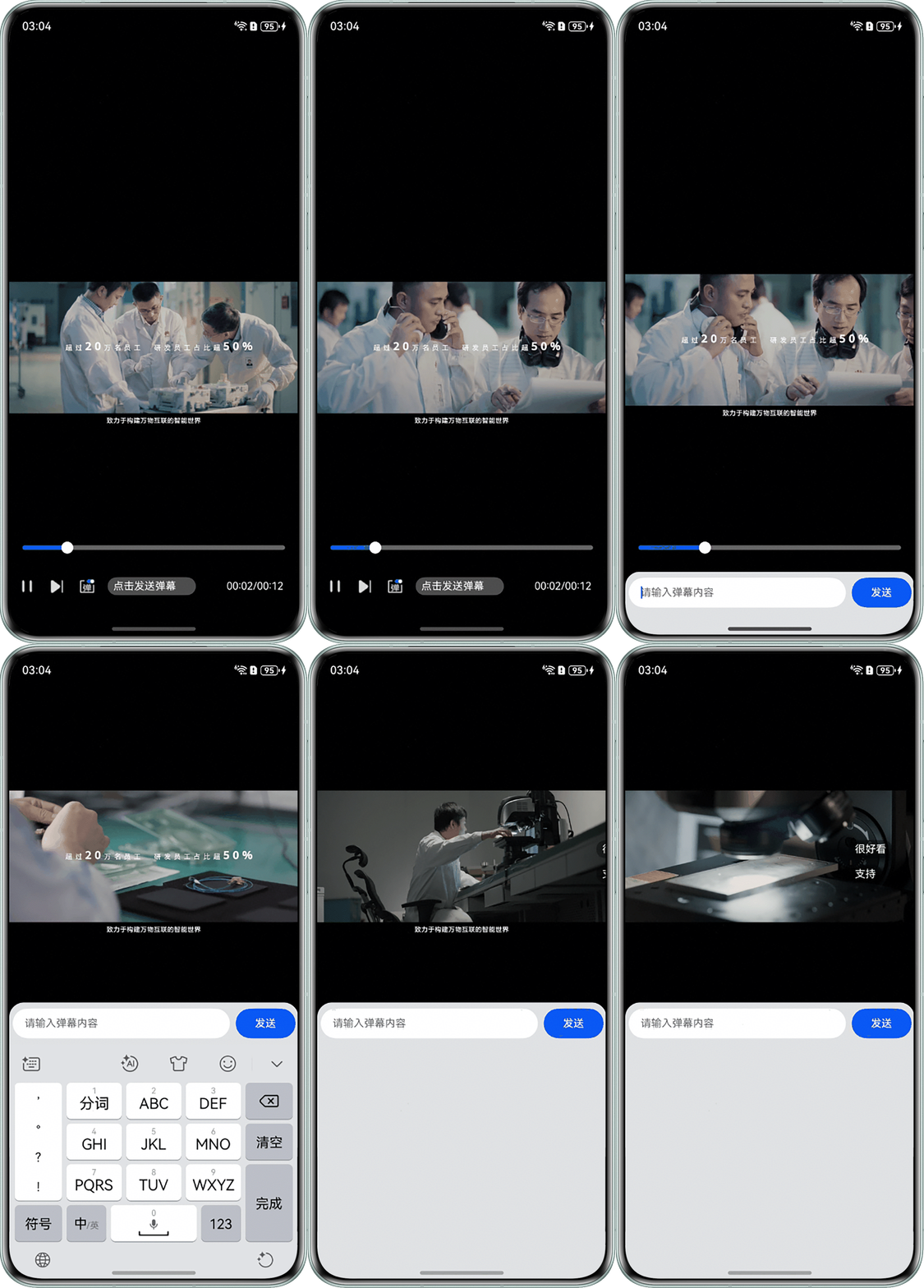
用户关闭键盘后,输入框未下滑吸底,导致底部出现空白遮挡页面
问题现象
打开软键盘时,输入框会主动上滑避让键盘区域。但是关闭软键盘时,输入框没有及时下滑回弹,导致页面底部出现大面积空白。
背景知识
- TextInput为单行文本输入框组件。
- 设置bindSheet属性时可给组件绑定半模态页面,点击后显示模态页面。
- Class (FocusController)提供控制焦点的能力,如清除、移动和激活焦点等功能。requestFocus通过组件的id将焦点转移到组件树对应的实体节点,当前帧生效。
- on('keyboardHeightChange')可开启固定态软键盘高度变化的监听。当软键盘从本窗口唤出且与窗口有重叠区域时,通知键盘高度变化。
问题定位
- 使用DevEco Testing查看问题组件,该问题组件为bindSheet半模态弹窗中的TextInput组件。
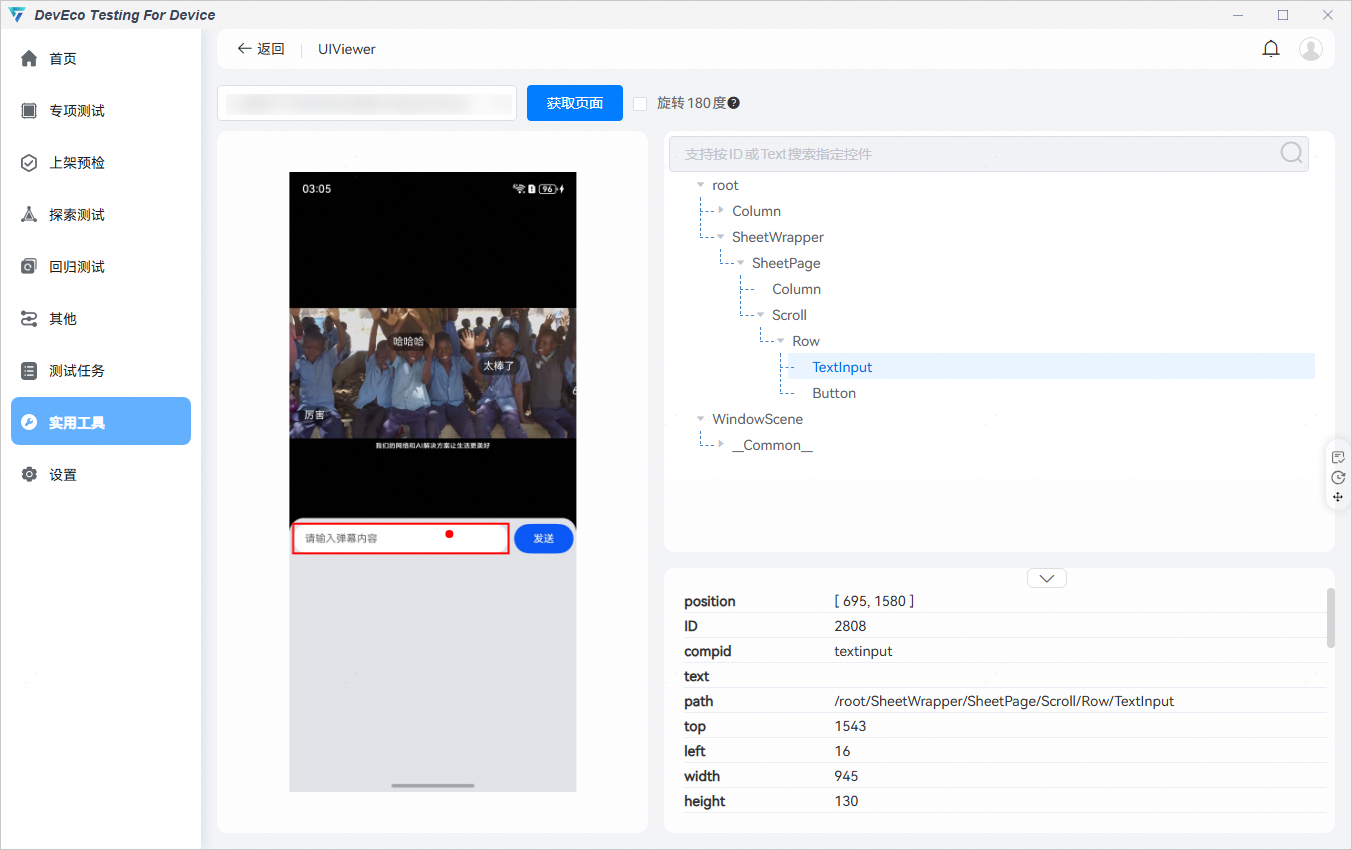
- 查看该bindSheet半模态弹窗所在页面的设置,该页面搜索keyboardHeightChange,页面未使用on('keyboardHeightChange')监听软键盘关闭,导致侧滑退出软键盘时bindSheet半模态弹窗仍然显示。
@Component
export struct VideoPlayer {
  @State showControls: boolean = true;
  @State isInputActive: boolean = false;
  @State content: string = '';

  @Builder
  myBuilder() {
    Row() {
      TextInput({ text: this.content, placeholder: '请输入弹幕内容' })
      Button('发送')
    }
  }

  aboutToAppear() {
    // 未使用on('keyboardHeightChange')监听软键盘关闭
  }

  build() {
    Column() {
      // 视频播放区域
      Stack() {
        // 控制栏
        if (this.showControls) {
          Column() {
            // 控制按钮
            Row() {
              Text('  点击发送弹幕')
                .onClick(() => {
                  this.isInputActive = true; // 显示半模态弹窗
                  setTimeout(() => {
                    this.getUIContext().getFocusController().requestFocus('textinput'); // 拉起输入法
                  }, 10);
                })
                .bindSheet($$this.isInputActive, this.myBuilder(), {
                  height: 370
                })
            }
          }
        }
      }
    }
  }
}
分析结论
页面未使用on('keyboardHeightChange')监听软键盘关闭,导致侧滑退出软键盘时bindSheet半模态弹窗仍然显示。
修改建议
使用on('keyboardHeightChange')监听软键盘关闭,在软键盘关闭时关闭半模态弹窗。
关键代码如下:
aboutToAppear() {
  this.startBulletCommentGenerator();
  let initBulletComments = [
    '很好看', '支持',
  ];
  this.bulletComments = initBulletComments.map(text => new BulletCommentItem(text));
  let context: common.UIAbilityContext = this.getUIContext().getHostContext() as common.UIAbilityContext;
  window.getLastWindow(context).then((lastWindow) => {
    // 设置沉浸式
    lastWindow.setWindowLayoutFullScreen(true);
    let systemBarProperties: window.SystemBarProperties = {
      statusBarColor: '#00000000',
      statusBarContentColor: '#ffffff'
    };
    lastWindow.setWindowSystemBarProperties(systemBarProperties);
    // 监听软键盘关闭
    lastWindow.on('keyboardHeightChange', (data) => {
      if (data === 0) {
        this.isInputActive = false; // 关闭弹窗
      }
    });
  });
}
完整示例:
import { util } from '@kit.ArkTS';
import { common } from '@kit.AbilityKit';
import { LengthMetrics, window } from '@kit.ArkUI';

interface VideoPreparedEvent {
  duration: number;
}

interface VideoUpdateEvent {
  time: number;
}

@Component
export struct BulletCommentView {
  @State forceUpdate: boolean = false; // 强制刷新用
  @Link bulletComments: BulletCommentItem[];
  @Link isPlaying: boolean;
  @Link showBulletComment: boolean;
  private timerId: number = 0;
  myFontSize: number = 14;

  aboutToAppear() {
    this.startAnimation();
  }

  aboutToDisappear() {
    clearInterval(this.timerId);
  }

  build() {
    Stack() {
      if (this.showBulletComment) {
        ForEach(this.bulletComments, (item: BulletCommentItem) => {
          if (item.isUserBulletComment) {
            Text(item.content)
              .fontSize(this.myFontSize)
              .fontColor(item.color)
              .translate({ x: `${item.translateX}vp`, y: 0 })
              .position({ y: `${item.positionY}%` })
              .backgroundColor('rgba(0, 0, 0, 0.4)') // 半透明背景
              .borderRadius(999)
              .padding({
                top: 4,
                left: 8,
                bottom: 4,
                right: 8
              })
              .borderWidth(1)
              .borderColor('rgba(255, 255, 255, 0.6)')
              .key(item.id.toString());
          } else {
            Text(item.content)
              .fontSize(this.myFontSize)
              .fontColor(item.color)
              .translate({ x: `${item.translateX}vp`, y: 0 })
              .position({ y: `${item.positionY}%` })
              .backgroundColor('rgba(0, 0, 0, 0.4)')
              .borderRadius(999)
              .padding({
                top: 4,
                left: 8,
                bottom: 4,
                right: 8
              })
              .key(item.id.toString());
          }
        });
      }
      // 隐藏的刷新触发器
      Text(this.forceUpdate ? ' ' : '  ')
        .size({ width: 0, height: 0 });
    }
    .width('100%')
    .height('100%');
  }

  // 启动弹幕动画
  private startAnimation() {
    // 清除已有定时器
    if (this.timerId) {
      clearInterval(this.timerId);
    }
    // 使用setInterval实现动画
    this.timerId = setInterval(() => {
      if (!this.isPlaying) {
        return;
      }
      let needsUpdate = false;
      // 更新所有弹幕位置
      this.bulletComments.forEach(item => {
        const NEWX = item.translateX - item.speed;
        if (NEWX !== item.translateX) {
          item.translateX = NEWX;
          needsUpdate = true;
        }
      });
      // 移除超出屏幕的弹幕并触发更新
      const BEFORELENGTH = this.bulletComments.length;
      this.bulletComments = this.bulletComments.filter(item => item.translateX > -20);
      if (needsUpdate || this.bulletComments.length !== BEFORELENGTH) {
        this.forceUpdate = !this.forceUpdate; // 触发视图更新
      }
    }, 16); // 60fps
  }
}

class BulletCommentItem {
  private static trackIndex: number = 0;
  id: number;
  content: Resource | string;
  color: string;
  positionY: number;
  translateX: number = 1000; // 初始位置(右侧)
  speed: number; // 移动速度
  isUserBulletComment: boolean = false; // 标记是否用户发送

  constructor(content: Resource | string, isUserBulletComment: boolean = false) {
    this.id = new Date().getTime();
    this.content = content;
    this.color = '#FFFFFF';
    BulletCommentItem.trackIndex = (BulletCommentItem.trackIndex + 1) % 4;
    this.positionY = BulletCommentItem.trackIndex * 33; // 计算Y位置
    this.speed = 2;
    this.isUserBulletComment = isUserBulletComment;
  }
}

@Entry
@Component
struct BulletComment {
  @State isPlaying: boolean = false; // 是否正在播放
  @State currentTime: number = 0; // 当前播放进度
  @State duration: number = 0; // 视频时长
  @State showControls: boolean = true; // 是否显示控制栏
  @State showBulletComment: boolean = true; // 是否显示弹幕
  @State bulletCommentInput: string = ''; // 弹幕输入框内容
  @State bulletComments: BulletCommentItem[] = []; // 弹幕评论
  @State isInputActive: boolean = false; // 是否显示弹幕输入框
  // 指定rawfile中的视频文件名
  private videoSrc: Resource = $rawfile('video.mov'); // $rawfile('video.mov')需要替换为开发者需要的视频资源文件
  private controller: VideoController = new VideoController();
  private bulletCommentIndex: number = 0;
  private presetBulletComments = [
    '很好看', '支持', '再来一个', '爱了爱了', '厉害', '哈哈哈', '太棒了', '666', '精彩!', '好看!', '泪目',
    '针不戳', '好耶', '哈哈哈有趣', '绝了', '妙啊', '点赞', '关注了', '笑死我了', '收藏了', '点我发弹幕吧'
  ];
  private bulletCommentInterval: number = 0;

  // 评论输入框组件
  @Builder
  myBuilder() {
    Row() {
      TextInput({ text: this.bulletCommentInput, placeholder: '请输入弹幕内容' })
        .placeholderFont({ size: 14 })
        .backgroundColor(Color.White)
        .fontSize(14)
        .width('75%')
        .height('100%')
        .id('textinput')
        .borderRadius(20)
        .onChange((value: string) => {
          this.bulletCommentInput = value;
        })
        .margin({ left: 5 });
      Button('发送')
        .margin({ left: 8 })
        .onClick(() => {
          this.sendBulletComment();
        })
        .fontSize(14)
        .width(80)
        .backgroundColor('#0A59F7');
    }
    .width('100%')
    .height(40)
    .margin({ top: 8 });
  }

  aboutToAppear() {
    this.startBulletCommentGenerator();
    let initBulletComments = [
      '很好看', '支持',
    ];
    this.bulletComments = initBulletComments.map(text => new BulletCommentItem(text));
    let context: common.UIAbilityContext = this.getUIContext().getHostContext() as common.UIAbilityContext;
    window.getLastWindow(context).then((lastWindow) => {
      // 设置沉浸式
      lastWindow.setWindowLayoutFullScreen(true);
      let systemBarProperties: window.SystemBarProperties = {
        statusBarColor: '#00000000',
        statusBarContentColor: '#ffffff'
      };
      lastWindow.setWindowSystemBarProperties(systemBarProperties);
      // 监听软键盘关闭
      lastWindow.on('keyboardHeightChange', (data) => {
        if (data === 0) {
          this.isInputActive = false; // 关闭弹窗
        }
      });
    });
  }


  aboutToDisappear() {
    clearInterval(this.bulletCommentInterval);
  }

  // 发送弹幕方法
  private sendBulletComment() {
    if (this.bulletCommentInput.trim()) {
      this.bulletComments = [...this.bulletComments, new BulletCommentItem(this.bulletCommentInput, true)];
      this.bulletCommentInput = '';
      if (this.bulletComments.length > 50) {
        this.bulletComments = this.bulletComments.slice(1);
      }
    }
  }

  // 切换播放状态
  private togglePlay() {
    this.isPlaying = !this.isPlaying;
    if (this.isPlaying) {
      this.controller.start();
    } else {
      this.controller.pause();
    }
  }

  // 根据播放时间均匀生成弹幕
  private startBulletCommentGenerator() {
    // 每3秒生成一条
    this.bulletCommentInterval = setInterval(() => {
      if (!this.isPlaying) {
        return;
      }
      let randomText = this.presetBulletComments[this.bulletCommentIndex];
      this.bulletCommentIndex = (this.bulletCommentIndex + 1) % this.presetBulletComments.length;
      this.bulletComments = [...this.bulletComments, new BulletCommentItem(randomText)];
    }, 1000);
  }

  // 格式化时间
  private formatTime(seconds: number): string {
    let mins = Math.floor(seconds / 60);
    let secs = Math.floor(seconds % 60);
    return util.format('%s:%s', mins.toString().padStart(2, '0'), secs.toString().padStart(2, '0'));
  }

  build() {
    Column() {
      Column() {
        // 视频播放区域
        Stack() {
          Stack() {
            Video({
              src: this.videoSrc,
              controller: this.controller
            })
              .size({ width: '100%', height: '100%' })
              .autoPlay(false)
              .controls(false)
              .onPrepared((event: VideoPreparedEvent) => { // 使用定义好的接口类型
                this.controller.start();
                this.duration = event.duration;
              })
              .objectFit(ImageFit.Contain)
              .onUpdate((event: VideoUpdateEvent) => {
                this.currentTime = event.time;
                // 同步播放状态到弹幕
                if (event.time > 0 && !this.isPlaying) {
                  this.isPlaying = true;
                }
              })
              .onStart(() => {
                this.isPlaying = true;
              })
              .onPause(() => {
                this.isPlaying = false;
              })
              .onFinish(() => {
                this.isPlaying = false;
              })
              .onClick(() => {
                this.showControls = !this.showControls;
              });
            // 弹幕组件
            BulletCommentView({
              bulletComments: $bulletComments,
              isPlaying: $isPlaying,
              showBulletComment: $showBulletComment,
            })
              .width('100%')
              .height(100)
              .position({ x: '0%', y: '40%' })
              .onClick(() => {
                this.showControls = !this.showControls;
              });
          }
          .position({ x: '0%' })
          .height(this.isInputActive ? '60%' : '100%')
          .animation({ duration: 300 });

          // 控制栏
          if (this.showControls) {
            Column() {
              Row() {
                Button() {
                  Image($r('app.media.back')) // $r('app.media.back')需要替换为开发者需要的图片资源文件
                    .width(24)
                    .height(24);
                }
                .backgroundColor('rgba(0, 0, 0, 0.05)')
                .width(40)
                .height(40);
              }
              .width('100%')
              .height(40)
              .margin({ left: 8, top: 16 })
              .backgroundColor(Color.Transparent);
            }
            .position({ x: 8, y: 16 });

            Column() {
              // 进度条
              Row() {
                Slider({
                  value: this.currentTime,
                  min: 0,
                  max: this.duration,
                  step: 1,
                  style: SliderStyle.OutSet
                })
                  .trackThickness(6)
                  .blockSize({
                    width: 16,
                    height: 16
                  })
                  .height(60)
                  .trackColor('rgba(255, 255, 255, 0.4)')
                  .onChange((value: number) => {
                    this.controller.setCurrentTime(value);
                    this.controller.start();
                  });
              }
              .height(30)
              .margin({ left: 8, right: 8 });

              // 控制按钮
              Row() {
                Button() {
                  Image(this.isPlaying ? $r('app.media.pause') :
                    $r('app.media.play')) // $r('app.media.pause')和$r('app.media.play')需要替换为开发者需要的图片资源文件
                    .width(24)
                    .height(24);
                }
                .onClick(() => this.togglePlay())
                .margin({ right: 8 })
                .backgroundColor(Color.Transparent);

                Button() {
                  Image($r('app.media.next')) // $r('app.media.next')需要替换为开发者需要的图片资源文件
                    .width(24)
                    .height(24);
                }
                .backgroundColor(Color.Transparent)
                .margin({ left: 8, right: 8 });

                // 控制弹幕显隐
                Button() {
                  Image(this.showBulletComment ? $r('app.media.bulletComment_hide') :
                    $r('app.media.bulletComment_show')) // $r('app.media.bulletComment_hide')和$r('app.media.bulletComment_show')需要替换为开发者需要的图片资源文件
                    .width(24)
                    .height(24);
                }
                .backgroundColor(Color.Transparent)
                .margin({ left: 8, right: 8 })
                .onClick(() => {
                  this.showBulletComment = !this.showBulletComment;
                });

                Text('  点击发送弹幕')
                  .backgroundColor('rgba(255, 255, 255, 0.3)')
                  .fontSize(14)
                  .padding({ top: 0, bottom: 0 })
                  .fontColor(Color.White)
                  .width(118)
                  .height(24)
                  .margin({ left: 8 })
                  .borderRadius(20)
                  .onClick(() => {
                    this.isInputActive = true;
                    setTimeout(() => {
                      this.getUIContext().getFocusController().requestFocus('textinput');
                    }, 10);
                  })
                  .bindSheet($$this.isInputActive, this.myBuilder(), {
                    height: 370,
                    width: '100%',
                    backgroundColor: '#E2E3E6',
                    showClose: false,
                    preferType: SheetType.BOTTOM,
                    maskColor: '#00000000',
                    radius: { topStart: LengthMetrics.vp(20), topEnd: LengthMetrics.vp(20) },
                  });
                Blank();

                Text(this.formatTime(this.currentTime) + '/' + this.formatTime(this.duration))
                  .fontColor(Color.White)
                  .fontSize(14)
                  .margin({ right: 8 });
              }
              .height('20%')
              .width('100%')
              .padding({ left: 12, right: 12 });
            }
            .backgroundColor('rgba(0, 0, 0, 0.5)')
            .height('40%')
            .width('100%')
            .position({ y: '78%' });
          }
        }
        .height('100%');
      }
      .width('100%')
      .height('100%')
      .expandSafeArea([SafeAreaType.SYSTEM, SafeAreaType.KEYBOARD], [SafeAreaEdge.TOP, SafeAreaEdge.BOTTOM]);
    }
    .width('100%')
    .height('108%');
  }
}
运行效果如下: