














如何读写外置存储设备(如U盘)中的文件
问题现象
如何访问外置存储设备的文件?
如何将沙箱内文件拷贝到外置存储设备?
背景知识
- 三方应用在操作手机文件时,可以通过ohos.file.picker来实现文件的访问。
- 外置存储设备(例如U盘)上的文件,全部以普通文件的形式呈现,和内置存储设备上的文档类文件一样,采用目录树的形式对外展示。需要使用DocumentViewPicker来实现系统文件的访问。
解决方案
一、访问外置存储设备的文件
- 通过picker来访问用户相关文件,拉起对应的应用,引导用户完成界面操作,接口本身无需申请权限。
- 外置存储系统文件的访问,先用文件选择器把系统文件夹里的文件拷贝到沙箱,再对沙箱里的文件进行各种操作。
- 具体方法是:调用DocumentViewPicker可以实现预览系统文件,再把选中的文件写入到对应的沙箱中。
- import { common } from '@kit.AbilityKit';
- import { picker } from '@kit.CoreFileKit';
- import { BusinessError } from '@kit.BasicServicesKit';
- import fs from '@ohos.file.fs';
- @Entry
- @Component
- struct Index {
- build() {
- Row() {
- Column() {
- Button('查看U盘文件并导入到沙箱')
- .fontSize(20)
- .fontWeight(FontWeight.Bold)
- .onClick(() => {
- let context = this.getUIContext().getHostContext() as common.Context;
- let documentPicker = new picker.DocumentViewPicker(context);
- let documentSelectOptions = new picker.DocumentSelectOptions();
- // filePathList:选中的文件集合
- documentPicker.select(documentSelectOptions).then((filePathList: Array<string>) => {
- for (let i = 0; i < filePathList.length; i++) {
- let filePath = filePathList[i];
- let toPath = this.getUIContext().getHostContext()?.filesDir;
- let newFrom = filePath.substring(filePath.lastIndexOf('/'));
- toPath = toPath + newFrom;
- let fromFile = fs.openSync(filePath, fs.OpenMode.READ_ONLY);
- let toFile = fs.openSync(toPath, fs.OpenMode.READ_WRITE | fs.OpenMode.CREATE);
- fs.copyFileSync(fromFile.fd, toFile.fd, 0);
- console.info('成功将[' + filePath + ']文件拷贝到了沙箱');
- }
- }).catch((err: BusinessError) => {
- console.error('DocumentViewPicker.select failed with err: ' + err);
- });
- });
- }
- .width('100%');
- }
- .height('100%');
- }
- }
- 实现效果:
- 点击查看U盘文件并导入到沙箱按钮后,拉起了DocumentViewPicker。
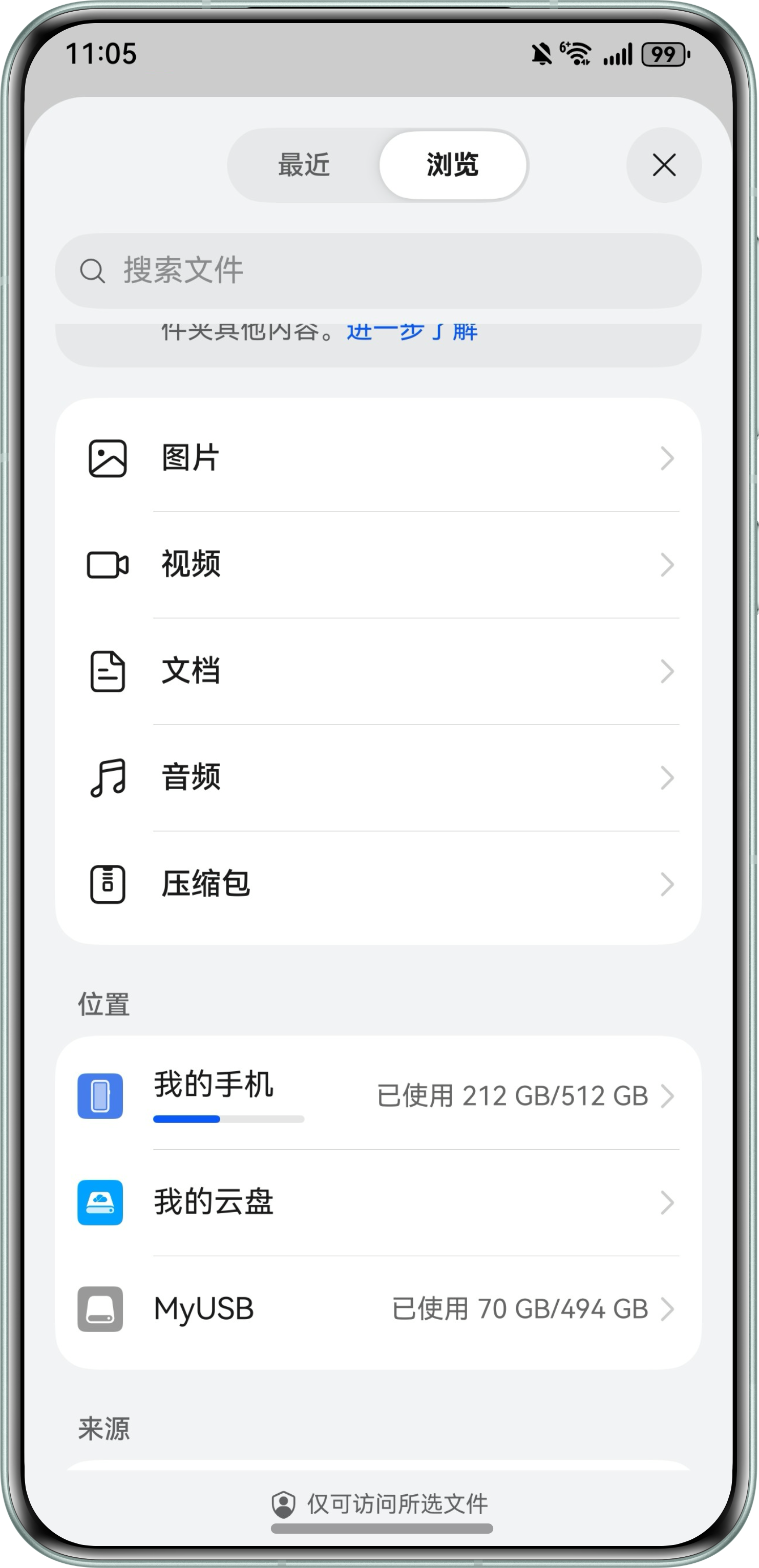
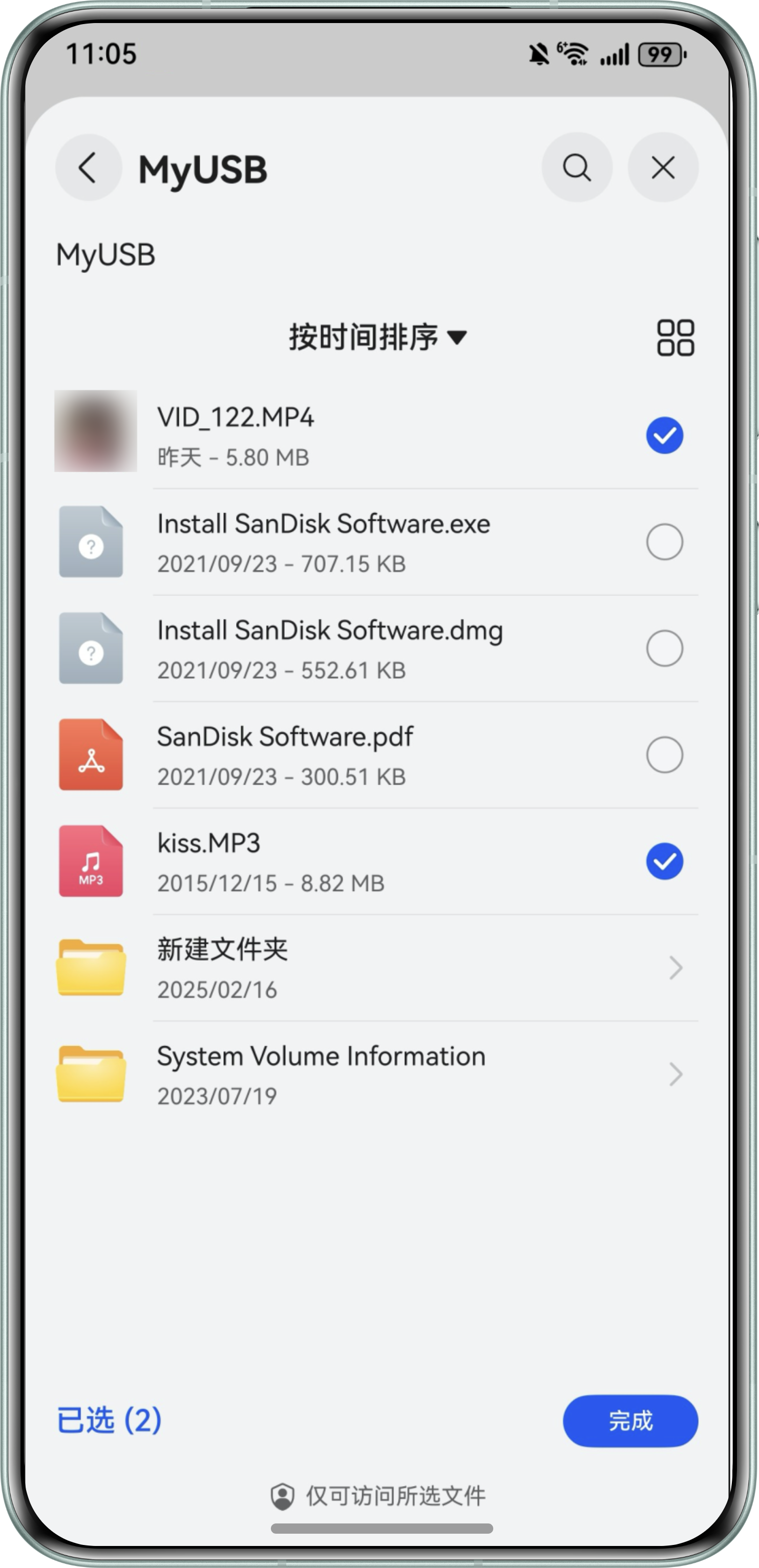
- 点击MyUSB后可以浏览我的U盘。选中要拷贝的文件。
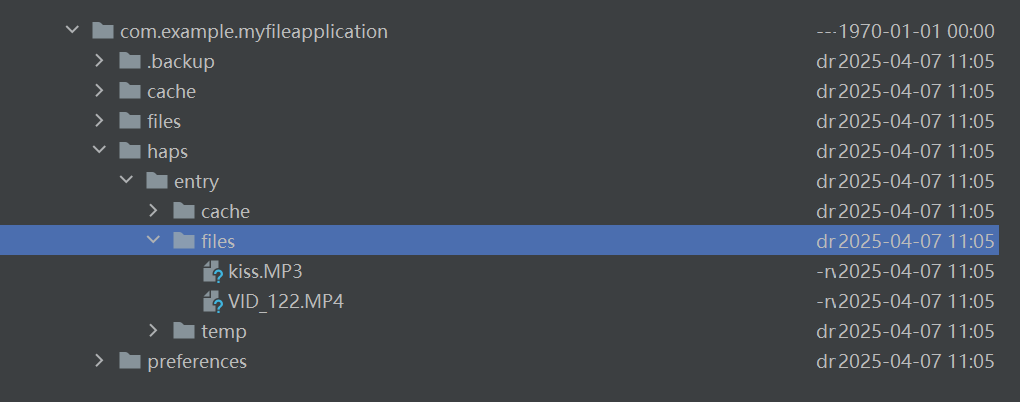
- 点击完成后,成功将U盘中的两个文件拷贝到了沙箱。
- 点击查看U盘文件并导入到沙箱按钮后,拉起了DocumentViewPicker。
二、拷贝文件到外置存储设备的文件
下面以拷贝rawfile文件夹的图片到U盘为例。
- 通过fileStream.writeSync将rawfile文件夹递归拷贝到沙箱中。
- copyRawFileToSdcard(context: common.Context) {
- let destRoot = context.filesDir;
- // rawfile下的文件名
- let srcFileName = 'testaaa.jpg';
- let destFilePath = destRoot + '/test/' + srcFileName;
- // 创建文件目录
- fileIo.mkdir(destRoot + '/test').then(async () => {
- // 创建目录成功
- console.info('copyRawFileToSdcard mkdir success');
- context.resourceManager.getRawFileContent(srcFileName, (error: BusinessError, data: Uint8Array) => {
- if (error != null) {
- promptAction.openToast({ message: '拷贝失败' });
- console.error(`error.code is ${error.code},error.message is ${error.message},`);
- } else {
- let fileStream = fileIo.createStreamSync(destFilePath, 'w+');
- fileStream.writeSync(data.buffer);
- fileStream.close();
- // 文件拷贝成功
- promptAction.openToast({ message: '拷贝成功' });
- console.info('copyRawFileToSdcard write success');
- }
- });
- }).catch((error: BusinessError) => {
- // 可能目录已存在或者没有权限
- promptAction.openToast({ message: '拷贝失败' });
- console.error(`copyRawFileToSdcard mkdir fail: ${error.code}, ${error.code}`);
- });
- }
- 通过DocumentViewPicker(无需额外申请权限)来拉起访问文件管理,选择存储位置(如U盘),然后把需要存储的沙箱文件写入到对应的设备位置中。
- SaveFile(filePath: string) {
- console.info('documentViewPicker SaveFile path: ' + filePath);
- if (!fileIo.accessSync(filePath)) {
- console.info('SaveFile path cant access: ' + filePath);
- return;
- }
- // 创建文件管理器选项实例
- const documentSaveOptions = new picker.DocumentSaveOptions();
- documentSaveOptions.newFileNames = ['test.jpg']; // 保存文件名
- documentSaveOptions.fileSuffixChoices = ['.jpg']; // 保存文件类型
- let uris: Array<string> = [];
- const documentViewPicker = new picker.DocumentViewPicker(); // 创建文件选择器实例
- documentViewPicker.save(documentSaveOptions).then((documentSaveResult: Array<string>) => {
- uris = documentSaveResult;
- console.info('documentViewPicker.save to file succeed and uris are:' + uris);
- let file = fileIo.openSync(filePath, fileIo.OpenMode.READ_WRITE | fileIo.OpenMode.CREATE);
- let uri = uris[0];
- let file2 = fileIo.openSync(uri, fileIo.OpenMode.READ_WRITE | fileIo.OpenMode.CREATE);
- fileIo.copyFileSync(file.fd, file2.fd, 0);
- fileIo.closeSync(file2);
- fileIo.closeSync(file);
- }).catch((err: BusinessError) => {
- console.error(`Invoke documentViewPicker.save failed, code is ${err.code}, message is ${err.message}`);
- });
- }
- 完整示例代码:
- import { common } from '@kit.AbilityKit';
- import { BusinessError } from '@kit.BasicServicesKit';
- import { fileIo, picker } from '@kit.CoreFileKit';
- import { promptAction } from '@kit.ArkUI';
- @Entry
- @Component
- struct Index {
- private message: string = 'copyImg';
- private context = this.getUIContext().getHostContext() as common.UIAbilityContext;
- aboutToAppear(): void {
- this.copyRawFileToSdcard(this.context);
- }
- build() {
- Row() {
- Column() {
- Button(this.message)
- .fontSize($r('app.float.page_text_font_size'))
- .fontWeight(FontWeight.Bold)
- .onClick(() => {
- let filePath: string = this.context.filesDir + '/test/testaaa.jpg';
- this.SaveFile(filePath);
- });
- }
- .width('100%');
- }
- .height('100%');
- }
- SaveFile(filePath: string) {
- console.info('documentViewPicker SaveFile path: ' + filePath);
- if (!fileIo.accessSync(filePath)) {
- console.info('SaveFile path cant access: ' + filePath);
- return;
- }
- // 创建文件管理器选项实例
- const documentSaveOptions = new picker.DocumentSaveOptions();
- documentSaveOptions.newFileNames = ['test.jpg']; // 保存文件名
- documentSaveOptions.fileSuffixChoices = ['.jpg']; // 保存文件类型
- let uris: Array<string> = [];
- const documentViewPicker = new picker.DocumentViewPicker(); // 创建文件选择器实例
- documentViewPicker.save(documentSaveOptions).then((documentSaveResult: Array<string>) => {
- uris = documentSaveResult;
- console.info('documentViewPicker.save to file succeed and uris are:' + uris);
- let file = fileIo.openSync(filePath, fileIo.OpenMode.READ_WRITE | fileIo.OpenMode.CREATE);
- let uri = uris[0];
- let file2 = fileIo.openSync(uri, fileIo.OpenMode.READ_WRITE | fileIo.OpenMode.CREATE);
- fileIo.copyFileSync(file.fd, file2.fd, 0);
- fileIo.closeSync(file2);
- fileIo.closeSync(file);
- }).catch((err: BusinessError) => {
- console.error(`Invoke documentViewPicker.save failed, code is ${err.code}, message is ${err.message}`);
- });
- }
- copyRawFileToSdcard(context: common.Context) {
- let destRoot = context.filesDir;
- // rawfile下的文件名
- let srcFileName = 'testaaa.jpg';
- let destFilePath = destRoot + '/test/' + srcFileName;
- // 创建文件目录
- fileIo.mkdir(destRoot + '/test').then(async () => {
- // 创建目录成功
- console.info('copyRawFileToSdcard mkdir success');
- context.resourceManager.getRawFileContent(srcFileName, (error: BusinessError, data: Uint8Array) => {
- if (error != null) {
- promptAction.openToast({ message: '拷贝失败' });
- console.error(`error.code is ${error.code},error.message is ${error.message},`);
- } else {
- let fileStream = fileIo.createStreamSync(destFilePath, 'w+');
- fileStream.writeSync(data.buffer);
- fileStream.close();
- // 文件拷贝成功
- promptAction.openToast({ message: '拷贝成功' });
- console.info('copyRawFileToSdcard write success');
- }
- });
- }).catch((error: BusinessError) => {
- // 可能目录已存在或者没有权限
- promptAction.openToast({ message: '拷贝失败' });
- console.error(`copyRawFileToSdcard mkdir fail: ${error.code}, ${error.code}`);
- });
- }
- }


