















合作咨询
我们的专家服务团队将竭诚为您提供专业的合作咨询服务
导航组件,默认提供点击响应处理,不需要开发者自定义点击事件逻辑。
该组件从API Version 9开始支持。后续版本如有新增内容,则采用上角标单独标记该内容的起始版本。
必须包含两个子组件,其中第二个子组件必须为NavDestination。
子组件个数异常时:
NavRouter()
元服务API: 从API version 11开始,该接口支持在元服务中使用。
系统能力: SystemCapability.ArkUI.ArkUI.Full
NavRouter(value: RouteInfo)
提供路由信息,指定点击NavRouter时,要跳转的NavDestination页面。
元服务API: 从API version 11开始,该接口支持在元服务中使用。
系统能力: SystemCapability.ArkUI.ArkUI.Full
参数:
| 参数名 | 类型 | 必填 | 说明 |
|---|---|---|---|
| value | RouteInfo | 是 | 路由信息 |
除支持通用属性外,还支持以下属性:
mode(mode: NavRouteMode)
设置指定点击NavRouter跳转到NavDestination页面时,使用的路由模式。
元服务API: 从API version 11开始,该接口支持在元服务中使用。
系统能力: SystemCapability.ArkUI.ArkUI.Full
参数:
| 参数名 | 类型 | 必填 | 说明 |
|---|---|---|---|
| mode | NavRouteMode | 是 | 指定点击NavRouter跳转到NavDestination页面时,使用的路由模式。 默认值:NavRouteMode.PUSH_WITH_RECREATE |
元服务API: 从API version 11开始,该接口支持在元服务中使用。
系统能力: SystemCapability.ArkUI.ArkUI.Full
| 名称 | 类型 | 必填 | 说明 |
|---|---|---|---|
| name | string | 是 | 点击NavRouter跳转到的NavDestination页面的名称。 |
| param | unknown | 否 | 点击NavRouter跳转到NavDestination页面时,传递的参数。 |
元服务API: 从API version 11开始,该接口支持在元服务中使用。
系统能力: SystemCapability.ArkUI.ArkUI.Full
| 名称 | 描述 |
|---|---|
| PUSH_WITH_RECREATE | 跳转到新的NavDestination页面时,替换当前显示的NavDestination页面,页面销毁,但该页面信息仍保留在路由栈中。 |
| PUSH | 跳转到新的NavDestination页面时,覆盖当前显示的NavDestination页面,该页面不销毁,且页面信息保留在路由栈中。 |
| REPLACE | 跳转到新的NavDestination页面时,替换当前显示的NavDestination页面,页面销毁,且该页面信息从路由栈中清除。 |
onStateChange(callback: (isActivated: boolean) => void)
组件激活状态切换时触发该回调。开发者点击激活NavRouter,加载对应的NavDestination子组件时,回调onStateChange(true)。NavRouter对应的NavDestination子组件不再显示时,回调onStateChange(false)。
元服务API: 从API version 11开始,该接口支持在元服务中使用。
系统能力: SystemCapability.ArkUI.ArkUI.Full
参数:
| 参数名 | 类型 | 必填 | 说明 |
|---|---|---|---|
| isActivated | boolean | 是 | isActivated为true时表示激活,为false时表示未激活。 |
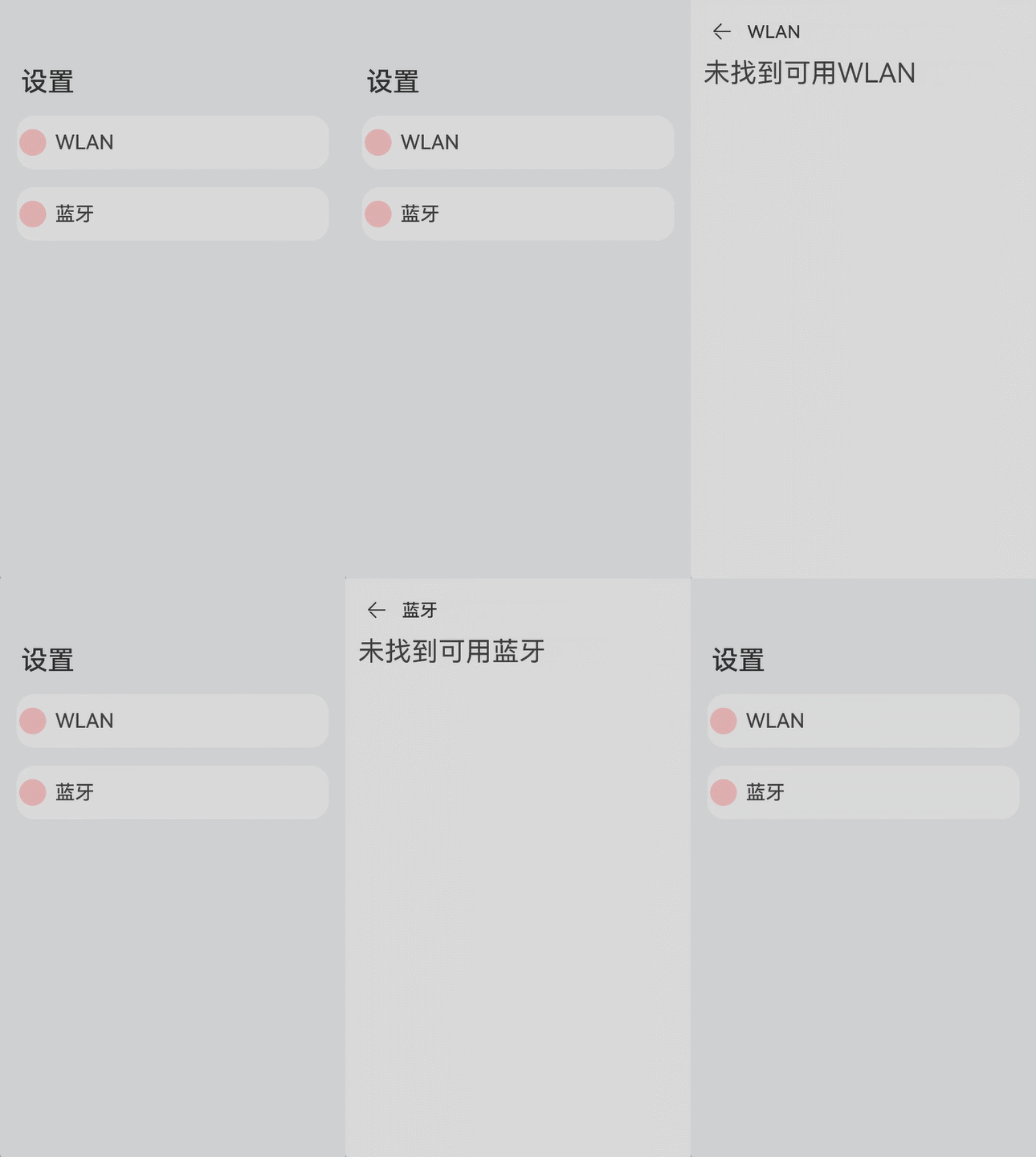
- // xxx.ets
- @Entry
- @Component
- struct NavRouterExample {
- @State isActiveWLAN: boolean = false
- @State isActiveBluetooth: boolean = false
-
- build() {
- Navigation() {
- NavRouter() {
- Row() {
- Row()
- .width(30)
- .height(30)
- .borderRadius(30)
- .margin({ left: 3, right: 10 })
- .backgroundColor(Color.Pink)
- Text(`WLAN`)
- .fontSize(22)
- .fontWeight(500)
- .textAlign(TextAlign.Center)
- }
- .width('90%')
- .height(60)
-
- NavDestination() {
- Flex({ direction: FlexDirection.Row }) {
- Text('未找到可用WLAN').fontSize(30).padding({ left: 15 })
- }
- }.title("WLAN")
- }
- .margin({ top: 10, bottom: 10 })
- .backgroundColor(this.isActiveWLAN ? '#ccc' : '#fff')
- .borderRadius(20)
- .mode(NavRouteMode.PUSH_WITH_RECREATE)
- .onStateChange((isActivated: boolean) => {
- this.isActiveWLAN = isActivated
- })
-
- NavRouter() {
- Row() {
- Row()
- .width(30)
- .height(30)
- .borderRadius(30)
- .margin({ left: 3, right: 10 })
- .backgroundColor(Color.Pink)
- Text(`蓝牙`)
- .fontSize(22)
- .fontWeight(500)
- .textAlign(TextAlign.Center)
- }
- .width('90%')
- .height(60)
-
- NavDestination() {
- Flex({ direction: FlexDirection.Row }) {
- Text('未找到可用蓝牙').fontSize(30).padding({ left: 15 })
- }
- }.title("蓝牙")
- }
- .margin({ top: 10, bottom: 10 })
- .backgroundColor(this.isActiveBluetooth ? '#ccc' : '#fff')
- .borderRadius(20)
- .mode(NavRouteMode.REPLACE)
- .onStateChange((isActivated: boolean) => {
- this.isActiveBluetooth = isActivated
- })
- }
- .height('100%')
- .width('100%')
- .title('设置')
- .backgroundColor("#F2F3F5")
- .titleMode(NavigationTitleMode.Free)
- .mode(NavigationMode.Auto)
- }
- }
合作咨询
我们的专家服务团队将竭诚为您提供专业的合作咨询服务
解决方案
精准高效的一站式服务支持,助力开发者商业成功