简介
折叠面板(collapse)组件用来折叠过长的内容或者列表,点击可以展开折叠部分。主要用于多内容分类项场景,折叠不重要的内容,显示重要内容。
折叠面板一般具有如下特点:
- 可配置面板默认状态、是否展开、是否禁用
- 可开启动画效果,并选择是否有手风琴效果(展开一个会收起其他)
- 可配置图标
效果图如下:
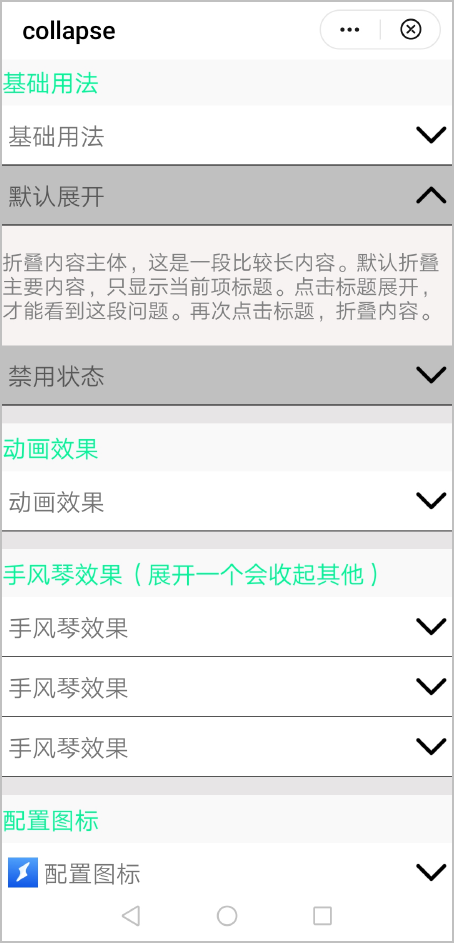
基本布局代码如下:
<div class="container">
    <text class="title" style="margin-top: 30px;">基础用法</text>
    <collapse accordionarray="{{basic1}}" @change="change"></collapse>
</div>
[h2]自定义子组件
- 定义布局样式。
- 简介内容通过image+text+image组件实现。
- 详细内容通过text组件实现。
<template> <!-- Only one root node is allowed in template. --> <div class="container"> <block for="{{accordionarray}}"> <div class="titlebar" style="background-color: {{$item.display?'#c0c0c0':'white'}}; " onclick="click($idx)"> <image if="{{imgdisplay}}" src="{{$item.thumb}}" class="img"></image> <text class="title">{{ $item.title }}</text> <image id="img{{$idx}}" src="{{$item.display?'/Common/xialagrey.jpg':'/Common/xiala.jpg'}}" class="image {{animationimage}}"></image> </div> <div id="{{$idx}}" class="collapse {{$item.animationslot}}"> <text class="txt">{{ $item.content }}</text> </div> </block> </div> </template> - 规划属性和支持的事件。
支持的属性:
属性
类型
默认值
描述
title
String
-
标题文字。
thumb
String
-
标题左侧图标路径。
disabled
Boolean
false
是否禁用。
open
Boolean
false
是否展开折叠面板。
showanimation
Boolean
false
是否开启动画效果。
content
String
-
折叠面板展开内容。
accordion
Boolean
false
是否开启手风琴动画效果。
支持的事件:
事件名称
参数
描述
change
e
返回折叠面板状态的事件。
[h2]实现折叠面板展开和收起的动画效果
- 实现简介内容部分的图标旋转。
- 折叠面板展开时,图标从0度旋转至180度,代码如下:
//图标旋转动画 imageanimation(id) { var options = { easing: 'linear', fill: 'forwards', } var frames = [ { transform: { rotate: 180 } }, { transform: { rotate: 0 } }]; var animation = this.$element('img' + id).animate(frames, options); animation.play(); animation.finish(); animation.pause(); animation.cancel(); animation.reverse(); animation.onfinish = function () { } animation.oncancel = function () { } }, - 折叠面板收起时,图标从180度旋转至0度,代码如下:
//图标恢复动画
imageanimationrecovery(id) {
  var options = {
    easing: 'linear',
    fill: 'forwards',
  }
  var frames = [
    {
      transform: {
        rotate: 0
      }
    },
    {
      transform: {
        rotate: 180
      }
    }];
  var animation = this.$element('img' + id).animate(frames, options);
  animation.play();
  animation.finish();
  animation.pause();
  animation.cancel();
  animation.reverse();
  animation.onfinish = function () {
  }
  animation.oncancel = function () {
  }
},
- 折叠面板展开时,图标从0度旋转至180度,代码如下:
- 通过修改详细内容部分的高度,实现折叠面板展开和收起的状态。
/* 内容动画 */ .noanimationslotstart { animation-name: noanimationslotstart; animation-duration: 0ms; animation-fill-mode: forwards; } @keyframes noanimationslotstart { from { height: 0; } to { height: 200px; } } .noanimationslotend { animation-name: noanimationslotend; animation-duration: 0ms; animation-fill-mode: forwards; } @keyframes noanimationslotend { from { height: 200px; } to { height: 0; } } - 根据showanimation的值来决定折叠面板的展开和收起是否具有动画效果。
- showanimation为false时,不开启动画效果。
//showanimation为false时触发,此时没有动画效果 if (this.accordionarray[index].open === false) { this.imageanimation(index) this.accordionarray[index].animationslot = "noanimationslotstart" this.accordionarray[index].open = true this.accordionarray[index].display = true this.changevalue = "折叠面板展开了" this.status = true } else { this.imageanimationrecovery(index) this.accordionarray[index].animationslot = "noanimationslotend" this.accordionarray[index].open = false this.accordionarray[index].display = false this.changevalue = "折叠面板收起了" this.status = false } - showanimation为true且accordion为false时,开启普通动画效果。
if (this.accordionarray[index].showanimation === true) { this.accordionarray[index].open = true if (this.accordionarray[index].display === false) { this.imageanimation(index) this.accordionarray[index].animationslot = "animationslotstart" this.accordionarray[index].display = true this.changevalue = "折叠面板展开了" this.status = true } else { this.imageanimationrecovery(index) this.accordionarray[index].animationslot = "animationslotend" this.accordionarray[index].display = false this.changevalue = "折叠面板收起了" this.status = false } } - showanimation为true且accordion为true时,开启手风琴动画效果(即展开一个的同时将其他的收起)。
//手风琴动画效果
accordionanimation(index) {
  this.accordionarray[index].open = true
  if (this.accordionarray[index].display === false) {
    this.accordionarray[index].display = true
    this.accordionarray[index].animationslot = "animationslotstart"
    this.imageanimation(index)
    this.changevalue = "折叠面板展开了"
    this.status = true
    if (this.value !== index && this.value !== null) {
      this.accordionarray[this.value].display = false
      this.accordionarray[this.value].animationslot = "animationslotend"
      this.imageanimationrecovery(this.value)
      this.changevalue = "折叠面板收起了"
      this.status = false
    }
  } else {
    this.imageanimationrecovery(index)
    this.accordionarray[index].animationslot = "animationslotend"
    this.accordionarray[index].display = false
    this.changevalue = "折叠面板收起了"
    this.status = false
  }
  this.value = index
},
- showanimation为false时,不开启动画效果。
[h2]父子组件通信
- 父组件中定义change事件并绑定。
<collapse accordionarray="{{animation}}" @change="change"></collapse>change(e) { console.log(e.detail.changevalue + e.detail.status); prompt.showToast({ message: e.detail.changevalue + e.detail.status, duration: 500 }) } - 子组件通过this.$emit方法携带事件及参数通知父组件。
click(num) { if (this.accordion === true) { this.accordionanimation(num) } else { this.easyanimation(num) } this.$emit('change', { changevalue: this.changevalue, status: this.status }) },
示例代码
折叠面板collapse.ux代码:
<template>
<!-- Only one root node is allowed in template. -->
<div class="container">
<block for="{{accordionarray}}">
<div class="titlebar" style="background-color: {{$item.display?'#c0c0c0':'white'}}; " onclick="click($idx)">
<image if="{{imgdisplay}}" src="{{$item.thumb}}" class="img"></image>
<text class="title">{{ $item.title }}</text>
<image id="img{{$idx}}" src="{{$item.display?'/Common/xialagrey.jpg':'/Common/xiala.jpg'}}" class="image {{animationimage}}"></image>
</div>
<div id="{{$idx}}" class="collapse {{$item.animationslot}}">
<text class="txt">{{ $item.content }}</text>
</div>
</block>
</div>
</template>
<style>
.container {
flex-direction: column;
width: 100%;
}
.image {
width: 50px;
height: 50px;
margin-right: 10px;
}
.img {
width: 50px;
height: 50px;
margin-left: 10px;
}
.titlebar {
width: 100%;
height: 100px;
justify-content: center;
align-items: center;
border-bottom: 1px;
}
.txt {
font-size: 35px;
margin-top: 10px;
margin-bottom: 10px;
color: grey;
}
.title {
flex: 1;
font-size: 40px;
margin-left: 10px;
}
.collapse {
width: 100%;
height: 0px;
background-color: rgb(247, 243, 243);
}
.animationimageup {
animation-name: animationimageup;
animation-duration: 0ms;
animation-fill-mode: forwards;
}
@keyframes animationimageup {
from {
transform: rotate(0deg);
}
to {
transform: rotate(180deg);
}
}
.animationimagedown {
animation-name: animationimagedown;
animation-duration: 0ms;
animation-fill-mode: forwards;
}
@keyframes animationimagedown {
from {
transform: rotate(180deg);
}
to {
transform: rotate(0deg);
}
}
/* 内容动画 */
.animationslotstart {
animation-name: animationslotstart;
animation-duration: 300ms;
animation-fill-mode: forwards;
}
@keyframes animationslotstart {
from {
height: 0;
}
to {
height: 200px;
}
}
.animationslotend {
animation-name: animationslotend;
animation-duration: 300ms;
animation-fill-mode: forwards;
}
@keyframes animationslotend {
from {
height: 200px;
}
to {
height: 0;
}
}
/* 内容动画 */
.noanimationslotstart {
animation-name: noanimationslotstart;
animation-duration: 0ms;
animation-fill-mode: forwards;
}
@keyframes noanimationslotstart {
from {
height: 0;
}
to {
height: 200px;
}
}
.noanimationslotend {
animation-name: noanimationslotend;
animation-duration: 0ms;
animation-fill-mode: forwards;
}
@keyframes noanimationslotend {
from {
height: 200px;
}
to {
height: 0;
}
}
</style>
<script>
module.exports = {
props: {
accordionarray: {
type: Array,
default: [
{
//标题
title: '基础用法',
//是否禁用
disabled: false,
//是否展开折叠面板
open: false,
//图标路径
thumb: '',
//折叠面板展开内容
content: '折叠内容主体,可自定义内容及样式',
//折叠面板是否开启动画效果
showanimation: false,
//动画相关属性
animationslot: '',
display: false,
}
]
},
//是否开启手风琴动画
accordion: {
type: Boolean,
default: false
},
status: {
type: Boolean,
default: false
},
},
data: {
imgdisplay: false,
value: null,
default: '0',
changevalue: ''
},
onInit() {
//折叠面板默认展开
if (this.accordionarray[this.default].open === true) {
setTimeout(() => {
this.imageanimation(this.default)
}, 10);
this.accordionarray[this.default].animationslot = "noanimationslotstart"
this.accordionarray[this.default].open = true
this.accordionarray[this.default].display = true
}
//显示图标
if (this.accordionarray[this.default].thumb !== '') {
this.imgdisplay = true
}
},
click(num) {
if (this.accordion === true) {
this.accordionanimation(num)
} else {
this.easyanimation(num)
}
this.$emit('change', { changevalue: this.changevalue, status: this.status })
},
easyanimation(index) {
if (this.accordionarray[index].disabled !== true) {
if (this.accordionarray[index].showanimation === true) {
this.accordionarray[index].open = true
if (this.accordionarray[index].display === false) {
this.imageanimation(index)
this.accordionarray[index].animationslot = "animationslotstart"
this.accordionarray[index].display = true
this.changevalue = "折叠面板展开了"
this.status = true
} else {
this.imageanimationrecovery(index)
this.accordionarray[index].animationslot = "animationslotend"
this.accordionarray[index].display = false
this.changevalue = "折叠面板收起了"
this.status = false
}
} else {
//showanimation 为false时触发,此时没有动画效果
if (this.accordionarray[index].open === false) {
this.imageanimation(index)
this.accordionarray[index].animationslot = "noanimationslotstart"
this.accordionarray[index].open = true
this.accordionarray[index].display = true
this.changevalue = "折叠面板展开了"
this.status = true
} else {
this.imageanimationrecovery(index)
this.accordionarray[index].animationslot = "noanimationslotend"
this.accordionarray[index].open = false
this.accordionarray[index].display = false
this.changevalue = "折叠面板收起了"
this.status = false
}
}
}
},
//手风琴动画
accordionanimation(index) {
this.accordionarray[index].open = true
if (this.accordionarray[index].display === false) {
this.accordionarray[index].display = true
this.accordionarray[index].animationslot = "animationslotstart"
this.imageanimation(index)
this.changevalue = "折叠面板展开了"
this.status = true
if (this.value !== index && this.value !== null) {
this.accordionarray[this.value].display = false
this.accordionarray[this.value].animationslot = "animationslotend"
this.imageanimationrecovery(this.value)
this.changevalue = "折叠面板收起了"
this.status = false
}
} else {
this.imageanimationrecovery(index)
this.accordionarray[index].animationslot = "animationslotend"
this.accordionarray[index].display = false
this.changevalue = "折叠面板收起了"
this.status = false
}
this.value = index
},
//图标旋转动画
imageanimation(id) {
var options = {
easing: 'linear',
fill: 'forwards',
}
var frames = [
{
transform: {
rotate: 180
}
},
{
transform: {
rotate: 0
}
}];
var animation = this.$element('img' + id).animate(frames, options);
animation.play();
animation.finish();
animation.pause();
animation.cancel();
animation.reverse();
animation.onfinish = function () {
}
animation.oncancel = function () {
}
},
//图标恢复动画
imageanimationrecovery(id) {
var options = {
easing: 'linear',
fill: 'forwards',
}
var frames = [
{
transform: {
rotate: 0
}
},
{
transform: {
rotate: 180
}
}];
var animation = this.$element('img' + id).animate(frames, options);
animation.play();
animation.finish();
animation.pause();
animation.cancel();
animation.reverse();
animation.onfinish = function () {
}
animation.oncancel = function () {
}
},
}
</script>
页面hello.ux代码:
<import name="collapse" src="../Collapse/collapse.ux"></import>
<template>
<!-- Only one root node is allowed in template. -->
<div class="container">
<!-- 基础用法 -->
<text class="title" style="margin-top: 30px;">基础用法</text>
<collapse ></collapse>
<!-- 默认展开 -->
<collapse accordionarray="{{basic1}}"></collapse>
<!-- 禁用状态 -->
<collapse accordionarray="{{basic2}}"></collapse>
<!-- 动画效果 -->
<text class="title" style="margin-top: 30px;">动画效果</text>
<collapse accordionarray="{{animation}}" @change="change"></collapse>
<!-- 手风琴效果(展开一个会收起其他) -->
<text class="title" style="margin-top: 30px;">手风琴效果(展开一个会收起其他)</text>
<collapse accordion="{{accordionvalue}}" accordionarray="{{accordion}}" onchange="change"></collapse>
<!-- 配置图标 -->
<text class="title" style="margin-top: 30px;">配置图标</text>
<collapse accordionarray="{{icon}}"></collapse>
</div>
</template>
<style>
.container {
flex-direction: column;
background-color: #e7e5e5;
}
.title {
font-size: 40px;
color: #00fa9a;
height: 80px;
background-color: #faf9f9;
}
</style>
<script>
import prompt from '@system.prompt';
module.exports = {
data: {
//默认展开
basic1: [
{
title: '默认展开',
disabled: false,
open: true,
thumb: '',
display: false,
content: '折叠内容主体,这是一段比较长内容。默认折叠主要内容,只显示当前项标题。点击标题展开,才能看到这段问题。再次点击标题,折叠内容。',
showanimation: false,
animationslot: '',
}
],
//禁用状态
basic2: [
{
title: '禁用状态',
disabled: true,
open: false,
thumb: '',
display: true,
content: '',
showanimation: false,
animationslot: '',
}
],
//一般动画
animation: [
{
title: '动画效果',
disabled: false,
open: false,
thumb: '',
display: false,
content: '折叠内容主体,这是一段比较长内容。默认折叠主要内容,只显示当前项标题。点击标题展开,才能看到这段问题。再次点击标题,折叠内容。',
showanimation: true,
animationslot: '',
}
],
//是否开启手风琴动画
accordionvalue: true,
//手风琴动画
accordion: [
{
title: '手风琴效果',
disabled: false,
open: false,
thumb: '',
display: false,
content: '折叠内容主体,这是一段比较长内容。默认折叠主要内容,只显示当前项标题。点击标题展开,才能看到这段问题。再次点击标题,折叠内容。',
showanimation: true,
animationslot: '',
},
{
title: '手风琴效果',
display: false,
disabled: false,
open: false,
thumb: '',
content: '折叠内容主体,这是一段比较长内容。默认折叠主要内容,只显示当前项标题。点击标题展开,才能看到这段问题。再次点击标题,折叠内容。',
showanimation: true,
animationslot: '',
},
{
title: '手风琴效果',
disabled: false,
display: false,
open: true,
thumb: '',
content: '折叠内容主体,这是一段比较长内容。默认折叠主要内容,只显示当前项标题。点击标题展开,才能看到这段问题。再次点击标题,折叠内容。',
showanimation: true,
animationslot: '',
}
],
//配置图标
icon: [
{
title: '配置图标',
disabled: false,
open: false,
thumb: '/Common/logo.png',
display: false,
content: '折叠内容主体,这是一段比较长内容。默认折叠主要内容,只显示当前项标题。点击标题展开,才能看到这段问题。再次点击标题,折叠内容。',
showanimation: true,
animationslot: '',
}
]
},
onInit() {
},
//折叠面板change事件响应
change(e) {
  console.log(e.detail.changevalue + e.detail.status);
  prompt.showToast({
    message: e.detail.changevalue + e.detail.status,
    duration: 500
  })
}
}
</script>