简介
索引列表组件主要用于展示通讯录、好友列表等场景。索引列表一般具有如下特点:
- 支持展示索引名称和索引内容
- 支持展示复选框
- 支持右侧导航栏显示索引名称,且点击索引名称跳转至对应位置
- 支持触发自定义事件(勾选复选框、点击文字、长按文字)
索引列表(indexes)组件由两个部分组成,一是右侧的导航栏,二是滑动列表,其中,滑动列表中包含两个部分,分别是索引名称和索引内容。索引组件通过data参数,指定上述内容,data参数如下:
data: [
  {
    index: 'A',
    child: [
      {
        text: '澳门',
        uri: 'https://www.huawei.com'
      }
    ]
  },
  {
    index: 'B',
    child: [
      {
        text: '北海',
        uri: 'https://www.huawei.com'
      },
      {
        text: '北京',
        uri: 'https://www.huawei.com'
      }
    ]
  },
]
布局结构如下图:
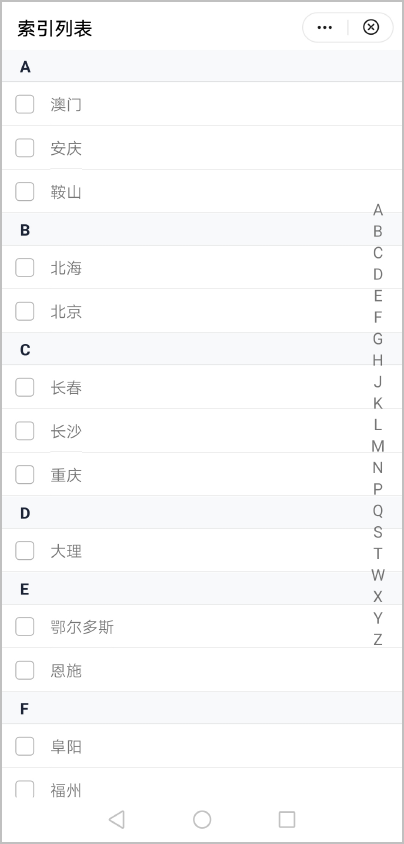
布局代码如下:
<template>
  <indexes data="{{data}}" show-select="{{true}}" @handlecheck="handlecheck" @handleclick="handleclick" @handlelongpress="handleLongpress"></indexes>
</template>
[h2]自定义子组件
- 定义布局样式。
索引列表整体外观都是通用的,但是内部具体的样式有区别,在设计的时候,不能把内部样式固定,否则一旦索引列表的UI有变化,会导致子组件也要修改,违背了对外开源的初衷。
所以,在子组件indexes.ux中,开放多种样式属性,方便开发者自定义样式。
<template> <div class="indexes"> <!-- 右侧导航栏,用于显示索引名称。--> <div style="{{indexScrollStyle}}}" class="indexes-scroll"> <block for="{{compIndexs}}"> <div class="indexes-scroll-item" onclick="handleScroll($idx)"> <text>{{ $item }}</text> </div> </block> </div> <!-- 索引列表组件内部通过list组件展示列表,根据传入的data数据循环创建list-item,每个list-item组件包含一个索引名称和该索引名称下的全部内容。--> <list id="indexes"> <block for="{{data}}"> <list-item type="indexes{{$item.index}}" class="indexes-group"> <!-- 显示索引名称。--> <text class="indexes-group-index {{indexColor}} {{indexBgColor}}">{{ $item.index }}</text> <div class="indexes-group-child"> <block for="{{$item.child}}"> <div class="indexes-group-child-all" onlongpress="handleLongPress($item.text)"> <!-- 显示复选框和索引内容。--> <input show="{{ this.showSelect }}" type="checkbox" style="{{checkboxStyle}}" onchange="handleCheck($item.text)" /> <text class="{{this.showSelect?'indexes-group-child-textselect':'indexes-group-child-textnoselect'}}" onclick="handleClick($item.text,$item.uri)">{{ $item.text }}</text> </div> </block> </div> </list-item> </block> </list> </div> </template> - 规划属性和支持的事件。
data配置项:
属性
类型
参数示例
描述
index
String
A
索引名称。
child
Array
-
索引内容。
child配置项:
属性
类型
参数示例
描述
text
String
大理
文字内容。
uri
String
https://www.huawei.com
文字跳转链接。
支持的事件:
事件名称
参数
描述
handlecheck
evt
勾选复选框事件。
handleclick
evt
点击文字事件。
handlelongpress
evt
长按文字事件。
[h2]父子组件通信
- 子组件的props中定义相关属性值,父组件引用时传入属性值,子组件通过 this.xxx 获取值并进行处理。
props: { data: {}, indexColor: { default: 'title' }, indexBgColor: { default: 'bg-light' }, showSelect: { default: false }, }, - 父组件创建自定义事件并绑定。
<indexes data="{{data}}" show-select="{{true}}" @handlecheck="handlecheck" @handleclick="handleclick" @handlelongpress="handleLongpress"></indexes>//点击复选框事件,evt参数包含选中的文字和复选框选中状态 handlecheck: function (evt) { console.log("handlecheck evt.detail : " + JSON.stringify(evt.detail)); if (evt.detail.checked) { prompt.showToast({ message: evt.detail.text + ' 被选中了!', duration: 500, gravity: 'center' }) } else { prompt.showToast({ message: evt.detail.text + ' 被取消了!', duration: 500, gravity: 'center' }) } }, //点击文字事件,evt参数包含点击的文字和uri链接 handleclick(evt) { console.log("handleclick evt.detail : " + JSON.stringify(evt.detail)); prompt.showToast({ message: evt.detail.text + ' 被点击了!', duration: 500, gravity: 'center' }) if (evt.detail.uri) { router.push({ uri: evt.detail.uri }); } }, //长按文字事件,实现删除功能 handleLongpress: function (evt) { console.log("handleLongPress evt.detail : " + JSON.stringify(evt.detail)); } - 子组件通过this.$emit方法触发父组件的自定义事件。
handleCheck(text, evt) { console.log("checked: " + text + '; evt: ' + JSON.stringify(evt)); this.$emit('handlecheck', { text: text, checked: evt.checked }) }, handleClick(text, uri) { this.$emit('handleclick', { text: text, uri: uri }) }, handleLongPress(text) { this.$emit('handlelongpress', { text: text }) var that = this; prompt.showDialog({ message: `是否删除${text}`, buttons: [ { text: '确定', color: '#33dd44' }, { text: '取消', color: '#33dd44' } ], success: function (data) { console.log("handling callback", data); if (data.index === 0) { var result = [] var index = [] for (var i = 0; i < that.data.length; i++) { var child = [] for (var j = 0; j < that.data[i].child.length; j++) { if (that.data[i].child[j].text !== text) { child.push(that.data[i].child[j]) } } if (child.length) { console.log('index:' + that.data[i].index + "; child:" + JSON.stringify(child)) index.push(that.data[i].index) result.push({ 'index': that.data[i].index, 'child': child }) } } that.compIndexs = index that.data = result } }, cancel: function () { console.log("cancel"); } }) }
[h2]计算style样式
使用计算属性computed方法,通过props属性动态计算style样式,返回给组件使用。
computed: {
checkboxStyle() {
var res = device.getInfoSync()
console.log('checkboxStyle windowLogicWidth= ' + res.windowLogicWidth);
var style = 'width:' + res.windowLogicWidth * 90 / 750 + 'px;'
console.log("checkboxStyle: " + style)
return style
},
indexScrollStyle() {
var res = device.getInfoSync()
console.log("indexScrollStyle windowLogicWidth= " + res.windowLogicWidth)
var left = res.windowLogicWidth * 680 / 750
var right = res.windowLogicWidth * 20 / 750
var indexScrollStyle = 'left:' + left + 'px;right:' + right + 'px;'
console.log("indexScrollStyle: " + indexScrollStyle)
return indexScrollStyle
},
},
示例代码
索引列表组件indexes.ux代码:
<template>
<div class="indexes">
<!-- 右侧导航栏,用于显示索引名称。-->
<div style="{{indexScrollStyle}}}" class="indexes-scroll">
<block for="{{compIndexs}}">
<div class="indexes-scroll-item" onclick="handleScroll($idx)">
<text>{{ $item }}</text>
</div>
</block>
</div>
<!-- 索引列表组件内部通过list组件展示列表,根据传入的data数据循环创建list-item,每个list-item组件包含一个索引名称和该索引名称下的全部内容。-->
<list id="indexes">
<block for="{{data}}">
<list-item type="indexes{{$item.index}}" class="indexes-group">
<!-- 显示索引名称。-->
<text class="indexes-group-index {{indexColor}} {{indexBgColor}}">{{ $item.index }}</text>
<div class="indexes-group-child">
<block for="{{$item.child}}">
<div class="indexes-group-child-all" onlongpress="handleLongPress($item.text)">
<!-- 显示复选框和索引内容。-->
<input show="{{ this.showSelect }}" type="checkbox" style="{{checkboxStyle}}" onchange="handleCheck($item.text)" />
<text class="{{this.showSelect?'indexes-group-child-textselect':'indexes-group-child-textnoselect'}}" onclick="handleClick($item.text,$item.uri)">{{ $item.text }}</text>
</div>
</block>
</div>
</list-item>
</block>
</list>
</div>
</template>
<style lang="less">
@import "../Common/color.less";
@import "../Common/bg-color.less";
.indexes {
width: 100%;
&-group {
flex-direction: column;
&-index {
padding-left: 33px;
font-weight: bold;
line-height: @font-size-base * 1.8;
border-color: #cccccc;
border-bottom-width: 0.5px;
}
&-child {
flex-direction: column;
&-all {
background-color: #ffffff;
border-color: #cccccc;
border-bottom-width: 0.5px;
}
&-textselect {
background-color: #ffffff;
line-height: @font-size-base * 2.5;
border-color: #cccccc;
border-bottom-width: 0.5px;
}
&-textnoselect {
margin-left: 33px;
background-color: #ffffff;
line-height: @font-size-base * 2.5;
border-color: #cccccc;
border-bottom-width: 0.5px;
}
}
}
&-scroll {
position: fixed;
width: 50px;
height: 100%;
align-items: center;
justify-content: center;
flex-direction: column;
&-item {
width: 100%;
height: 40px;
align-items: center;
justify-content: center;
}
}
}
</style>
<script>
import device from '@system.device';
import prompt from '@system.prompt'
export default {
props: {
data: {},
indexColor: {
default: 'title'
},
indexBgColor: {
default: 'bg-light'
},
showSelect: {
default: false
},
},
data: {
compIndexs: []
},
computed: {
checkboxStyle() {
var res = device.getInfoSync()
console.log('checkboxStyle windowLogicWidth= ' + res.windowLogicWidth);
var style = 'width:' + res.windowLogicWidth * 90 / 750 + 'px;'
console.log("checkboxStyle: " + style)
return style
},
indexScrollStyle() {
var res = device.getInfoSync()
console.log("indexScrollStyle windowLogicWidth= " + res.windowLogicWidth)
var left = res.windowLogicWidth * 680 / 750
var right = res.windowLogicWidth * 20 / 750
var indexScrollStyle = 'left:' + left + 'px;right:' + right + 'px;'
console.log("indexScrollStyle: " + indexScrollStyle)
return indexScrollStyle
},
},
onInit() {
var arr = []
for (var i = 0; i < this.data.length; i++) {
arr.push(this.data[i].index)
}
this.compIndexs = arr
},
//点击右侧导航栏索引使列表滑动到指定位置
handleScroll(index) {
this.$element('indexes').scrollTo({ index: index, smooth: true })
},
handleCheck(text, evt) {
console.log("checked: " + text + '; evt: ' + JSON.stringify(evt));
this.$emit('handlecheck', { text: text, checked: evt.checked })
},
handleClick(text, uri) {
this.$emit('handleclick', { text: text, uri: uri })
},
handleLongPress(text) {
this.$emit('handlelongpress', { text: text })
var that = this;
prompt.showDialog({
message: `是否删除${text}`,
buttons: [
{
text: '确定',
color: '#33dd44'
},
{
text: '取消',
color: '#33dd44'
}
],
success: function (data) {
console.log("handling callback", data);
if (data.index === 0) {
var result = []
var index = []
for (var i = 0; i < that.data.length; i++) {
var child = []
for (var j = 0; j < that.data[i].child.length; j++) {
if (that.data[i].child[j].text !== text) {
child.push(that.data[i].child[j])
}
}
if (child.length) {
console.log('index:' + that.data[i].index + "; child:" + JSON.stringify(child))
index.push(that.data[i].index)
result.push({ 'index': that.data[i].index, 'child': child })
}
}
that.compIndexs = index
that.data = result
}
},
cancel: function () {
console.log("cancel");
}
})
}
}
</script>
页面hello.ux代码:
<import name="indexes" src="../Index/indexes.ux"></import>
<template>
<indexes data="{{data}}" show-select="{{true}}" @handlecheck="handlecheck" @handleclick="handleclick" @handlelongpress="handleLongpress"></indexes>
</template>
<script>
import prompt from '@system.prompt'
import router from '@system.router';
export default {
private: {
data: [
{
index: 'A',
child: [
{
text: '澳门',
uri: 'https://www.huawei.com'
},
{
text: '安庆',
uri: 'https://www.huawei.com'
},
{
text: '鞍山',
uri: 'https://www.huawei.com'
}
]
},
{
index: 'B',
child: [
{
text: '北海',
uri: 'https://www.huawei.com'
},
{
text: '北京',
uri: 'https://www.huawei.com'
}
]
},
{
index: 'C',
child: [
{
text: '长春',
uri: 'https://www.huawei.com'
},
{
text: '长沙',
uri: 'https://www.huawei.com'
},
{
text: '重庆',
uri: 'https://www.huawei.com'
}
]
},
{
index: 'D',
child: [
{
text: '大理',
uri: 'https://www.huawei.com'
}
]
},
{
index: 'E',
child: [
{
text: '鄂尔多斯',
uri: 'https://www.huawei.com'
},
{
text: '恩施',
uri: 'https://www.huawei.com'
}
]
},
{
index: 'F',
child: [
{
text: '阜阳',
uri: 'https://www.huawei.com'
},
{
text: '福州',
uri: 'https://www.huawei.com'
},
{
text: '佛山',
uri: 'https://www.huawei.com'
}
]
},
{
index: 'G',
child: [
{
text: '广州',
uri: 'https://www.huawei.com'
},
{
text: '贵阳',
uri: 'https://www.huawei.com'
},
{
text: '桂林',
uri: 'https://www.huawei.com'
}
]
},
{
index: 'H',
child: [
{
text: '哈尔滨',
uri: 'https://www.huawei.com'
},
{
text: '海口',
uri: 'https://www.huawei.com'
}
]
},
{
index: 'J',
child: [
{
text: '济南',
uri: 'https://www.huawei.com'
},
{
text: '井冈山',
uri: 'https://www.huawei.com'
},
{
text: '九寨沟',
uri: 'https://www.huawei.com'
}
]
},
{
index: 'K',
child: [
{
text: '康定',
uri: 'https://www.huawei.com'
},
{
text: '昆明',
uri: 'https://www.huawei.com'
}
]
},
{
index: 'L',
child: [
{
text: '拉萨',
uri: 'https://www.huawei.com'
},
{
text: '丽江',
uri: 'https://www.huawei.com'
}
]
},
{
index: 'M',
child: [
{
text: '牡丹江',
uri: 'https://www.huawei.com'
}
]
},
{
index: 'N',
child: [
{
text: '南昌',
uri: 'https://www.huawei.com'
},
{
text: '南京',
uri: 'https://www.huawei.com'
},
{
text: '宁波',
uri: 'https://www.huawei.com'
}
]
},
{
index: 'P',
child: [
{
text: '澎湖列岛',
uri: 'https://www.huawei.com'
}
]
},
{
index: 'Q',
child: [
{
text: '青岛',
uri: 'https://www.huawei.com'
},
{
text: '泉州',
uri: 'https://www.huawei.com'
}
]
},
{
index: 'S',
child: [
{
text: '三亚',
uri: 'https://www.huawei.com'
},
{
text: '上海',
uri: 'https://www.huawei.com'
},
{
text: '深圳',
uri: 'https://www.huawei.com'
}
]
},
{
index: 'T',
child: [
{
text: '台州',
uri: 'https://www.huawei.com'
},
{
text: '唐山',
uri: 'https://www.huawei.com'
}
]
},
{
index: 'W',
child: [
{
text: '武汉',
uri: 'https://www.huawei.com'
},
{
text: '武夷山',
uri: 'https://www.huawei.com'
},
{
text: '无锡',
uri: 'https://www.huawei.com'
}
]
},
{
index: 'X',
child: [
{
text: '徐州',
uri: 'https://www.huawei.com'
},
{
text: '厦门',
uri: 'https://www.huawei.com'
},
{
text: '香港',
uri: 'https://www.huawei.com'
}
]
},
{
index: 'Y',
child: [
{
text: '伊春',
uri: 'https://www.huawei.com'
},
{
text: '扬州',
uri: 'https://www.huawei.com'
},
{
text: '岳阳',
uri: 'https://www.huawei.com'
}
]
},
{
index: 'Z',
child: [
{
text: '湛江',
uri: 'https://www.huawei.com'
},
{
text: '张家界',
uri: 'https://www.huawei.com'
}
]
}
]
},
onInit() {
},
//点击复选框事件,evt参数包含选中的文字和复选框选中状态
handlecheck: function (evt) {
  console.log("handlecheck evt.detail : " + JSON.stringify(evt.detail));
  if (evt.detail.checked) {
    prompt.showToast({
      message: evt.detail.text + ' 被选中了!',
      duration: 500,
      gravity: 'center'
    })
  }
  else {
    prompt.showToast({
      message: evt.detail.text + ' 被取消了!',
      duration: 500,
      gravity: 'center'
    })
  }
},
//点击文字事件,evt参数包含点击的文字和uri链接
handleclick(evt) {
  console.log("handleclick evt.detail : " + JSON.stringify(evt.detail));
  prompt.showToast({
    message: evt.detail.text + ' 被点击了!',
    duration: 500,
    gravity: 'center'
  })
  if (evt.detail.uri) {
    router.push({
      uri: evt.detail.uri
    });
  }
},
//长按文字事件,实现删除功能
handleLongpress: function (evt) {
  console.log("handleLongPress evt.detail : " + JSON.stringify(evt.detail));
}
}
</script>