















合作咨询
我们的专家服务团队将竭诚为您提供专业的合作咨询服务
日期格式化(dateformat)组件通常用于需要展示友好的日期格式的场景。日期格式化一般具有如下特点:
效果图如下:
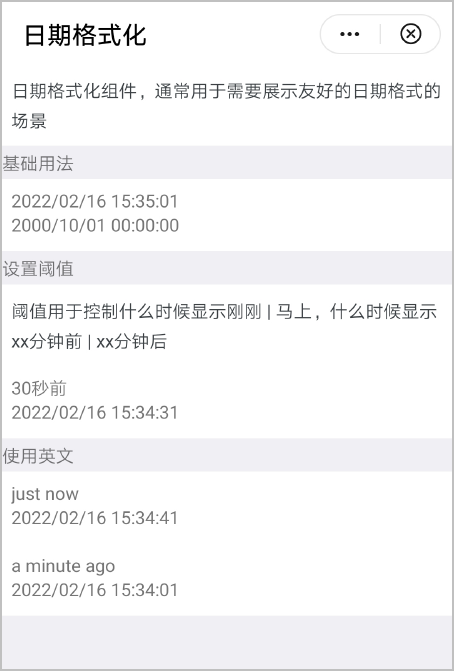
基本布局代码如下:
<text>基础用法</text>
<div class="example-body" >
  <dateformat date="{{now}}" ></dateformat>
  <dateformat date="2000/10/01 12:30:30"></dateformat>
</div>
日期格式化组件结构由text组成。
<template>
    <text>{{dateShow}}</text>
</template> 属性 |
类型 |
默认值 |
描述 |
|---|---|---|---|
date |
Object | String | Number |
Date.now() |
要格式化的日期对象/日期字符串/时间戳。 |
threshold |
Array |
[0,0] |
转化日期类型阈值。 说明
|
format |
String |
yyyy/MM/dd hh:mm:ss |
格式字符串。 |
locale |
Object |
zh |
格式化使用的语言,目前支持zh(中文)、en(英文)。 |
props: {
    date: {
        type: [Object, String, Number],
        default() {
            return Date.now()
        }
    },
    locale: {
        type: String,
        default: 'zh',
    },
    threshold: {
        type: Array,
        default() {
            return [0, 0]
        }
    },
    format: {
        type: String,
        default: 'yyyy/MM/dd hh:mm:ss'
    },
}, <dateformat date="{{now}}" ></dateformat> data() {
return {
now: Date.now()
}
}, 使用计算属性computed方法,通过props属性动态计算数据和样式,返回给组件使用。
computed: {
dateShow() {
return friendlyDate(this.date, {
locale: this.locale,
threshold: this.threshold,
format: this.format
})
}
},
friendlyDate()方法是dateformat.js文件提供的一个方法。
export function friendlyDate(time, {
locale = 'zh',
threshold = [60000, 3600000],
format = 'yyyy/MM/dd hh:mm:ss'
})
日期格式化dateformat.ux代码:
<template>
<text>{{dateShow}}</text>
</template>
<script>
/**
* Dateformat 日期格式化
* @description 日期格式化组件
* @tutorial https://ext.dcloud.net.cn/plugin?id=3279
* @property {Object|String|Number} date 日期对象/日期字符串/时间戳
* @property {String} locale 格式化使用的语言
* @value zh 中文
* @value en 英文
* @property {Array} threshold 应用不同类型格式化的阈值
* @property {String} format 输出日期字符串时的格式absMs
*/
import {
friendlyDate
} from './dateformat.js'
module.exports = {
props: {
date: {
type: [Object, String, Number],
default() {
return Date.now()
}
},
locale: {
type: String,
default: 'zh',
},
threshold: {
type: Array,
default() {
return [0, 0]
}
},
format: {
type: String,
default: 'yyyy/MM/dd hh:mm:ss'
},
},
computed: {
dateShow() {
return friendlyDate(this.date, {
locale: this.locale,
threshold: this.threshold,
format: this.format
})
}
},
}
</script>
dateformat.js代码:
function pad(str, length = 2) {
str += ''
while (str.length < length) {
str = '0' + str
}
return str.slice(-length)
}
const parser = {
yyyy: (dateObj) => {
return pad(dateObj.year, 4)
},
yy: (dateObj) => {
return pad(dateObj.year)
},
MM: (dateObj) => {
return pad(dateObj.month)
},
M: (dateObj) => {
return dateObj.month
},
dd: (dateObj) => {
return pad(dateObj.day)
},
d: (dateObj) => {
return dateObj.day
},
hh: (dateObj) => {
return pad(dateObj.hour)
},
h: (dateObj) => {
return dateObj.hour
},
mm: (dateObj) => {
return pad(dateObj.minute)
},
m: (dateObj) => {
return dateObj.minute
},
ss: (dateObj) => {
return pad(dateObj.second)
},
s: (dateObj) => {
return dateObj.second
},
SSS: (dateObj) => {
return pad(dateObj.millisecond, 3)
},
S: (dateObj) => {
return dateObj.millisecond
},
}
function formatDate(date, format = 'yyyy/MM/dd hh:mm:ss') {
date = new Date(date)
const dateObj = {
year: date.getFullYear(),
month: date.getMonth() + 1,
day: date.getDate(),
hour: date.getHours(),
minute: date.getMinutes(),
second: date.getSeconds(),
millisecond: date.getMilliseconds()
}
const tokenRegExp = /yyyy|yy|MM|M|dd|d|hh|h|mm|m|ss|s|SSS|SS|S/
let flag = true
let result = format
while (flag) {
flag = false
result = result.replace(tokenRegExp, function (matched) {
flag = true
return parser[matched](dateObj)
})
}
return result
}
export function friendlyDate(time, {
locale = 'zh',
threshold = [60000, 3600000],
format = 'yyyy/MM/dd hh:mm:ss'
}) {
if (time === '-') {
return time
}
if (!time && time !== 0) {
return ''
}
const localeText = {
zh: {
year: '年',
month: '月',
day: '天',
hour: '小时',
minute: '分钟',
second: '秒',
ago: '前',
later: '后',
justNow: '刚刚',
soon: '马上',
template: '{num}{unit}{suffix}'
},
en: {
year: 'year',
month: 'month',
day: 'day',
hour: 'hour',
minute: 'minute',
second: 'second',
ago: 'ago',
later: 'later',
justNow: 'just now',
soon: 'soon',
template: '{num} {unit} {suffix}'
}
}
const text = localeText[locale] || localeText.zh
let date = new Date(time)
let ms = date.getTime() - Date.now()
let absMs = Math.abs(ms)
if (absMs < threshold[0]) {
return ms < 0 ? text.justNow : text.soon
}
if (absMs >= threshold[1]) {
return formatDate(date, format)
}
let num
let unit
let suffix = text.later
if (ms < 0) {
suffix = text.ago
ms = -ms
}
//将数字向下舍入到最接近的整数Math.floor
const seconds = Math.floor((ms) / 1000)
const minutes = Math.floor(seconds / 60)
const hours = Math.floor(minutes / 60)
const days = Math.floor(hours / 24)
const months = Math.floor(days / 30)
const years = Math.floor(months / 12)
switch (true) {
case years > 0:
num = years
unit = text.year
break
case months > 0:
num = months
unit = text.month
break
case days > 0:
num = days
unit = text.day
break
case hours > 0:
num = hours
unit = text.hour
break
case minutes > 0:
num = minutes
unit = text.minute
break
default:
num = seconds
unit = text.second
break
}
if (locale === 'en') {
if (num === 1) {
num = 'a'
} else {
unit += 's'
}
}
return text.template.replace(/{\s*num\s*}/g, num + '').replace(/{\s*unit\s*}/g, unit).replace(/{\s*suffix\s*}/g,
suffix)
}
页面hello.ux代码:
<import name="dateformat" src="../Dateformat/dateformat"></import>
<template>
<div class="container">
<text class="example-info">日期格式化组件,通常用于需要展示友好的日期格式的场景</text>
<text>基础用法</text>
<div class="example-body">
<dateformat date="{{now}}"></dateformat>
<dateformat date="2000/10/01"></dateformat>
</div>
<text>设置阈值</text>
<text class="example-info">阈值用于控制什么时候显示刚刚 | 马上,什么时候显示xx分钟前 | xx分钟后</text>
<div class="example-body">
<dateformat date="{{now - 30000}}" threshold="{{[0,3600000]}}" ></dateformat>
<dateformat date="{{now - 30000}}" threshold="{{[0,0]}}"></dateformat>
</div>
<text>使用英文</text>
<div class="example-body">
<dateformat date="{{now - 20000}}" threshold="{{[60000,3600000]}}" locale="en"></dateformat>
<dateformat date="{{now - 20000}}" threshold="{{[0,0]}}"></dateformat>
</div>
<div class="example-body">
<dateformat date="{{now - 60000}}" threshold="{{[60000,3600000]}}" locale="en"></dateformat>
<dateformat date="{{now - 60000}}" threshold="{{[0,0]}}"></dateformat>
</div>
</div>
</template>
<script>
export default {
data() {
  return {
    now: Date.now()
  }
},
}
</script>
<style>
.container {
flex-direction: column;
background-color: #efeff4;
}
text {
font-size: 30px;
line-height: 50px;
}
.example-info {
padding: 15px;
color: #3b4144;
background-color: #ffffff;
}
.example-body {
flex-direction: column;
padding: 15px;
background-color: #ffffff;
height: 120px;
}
</style>