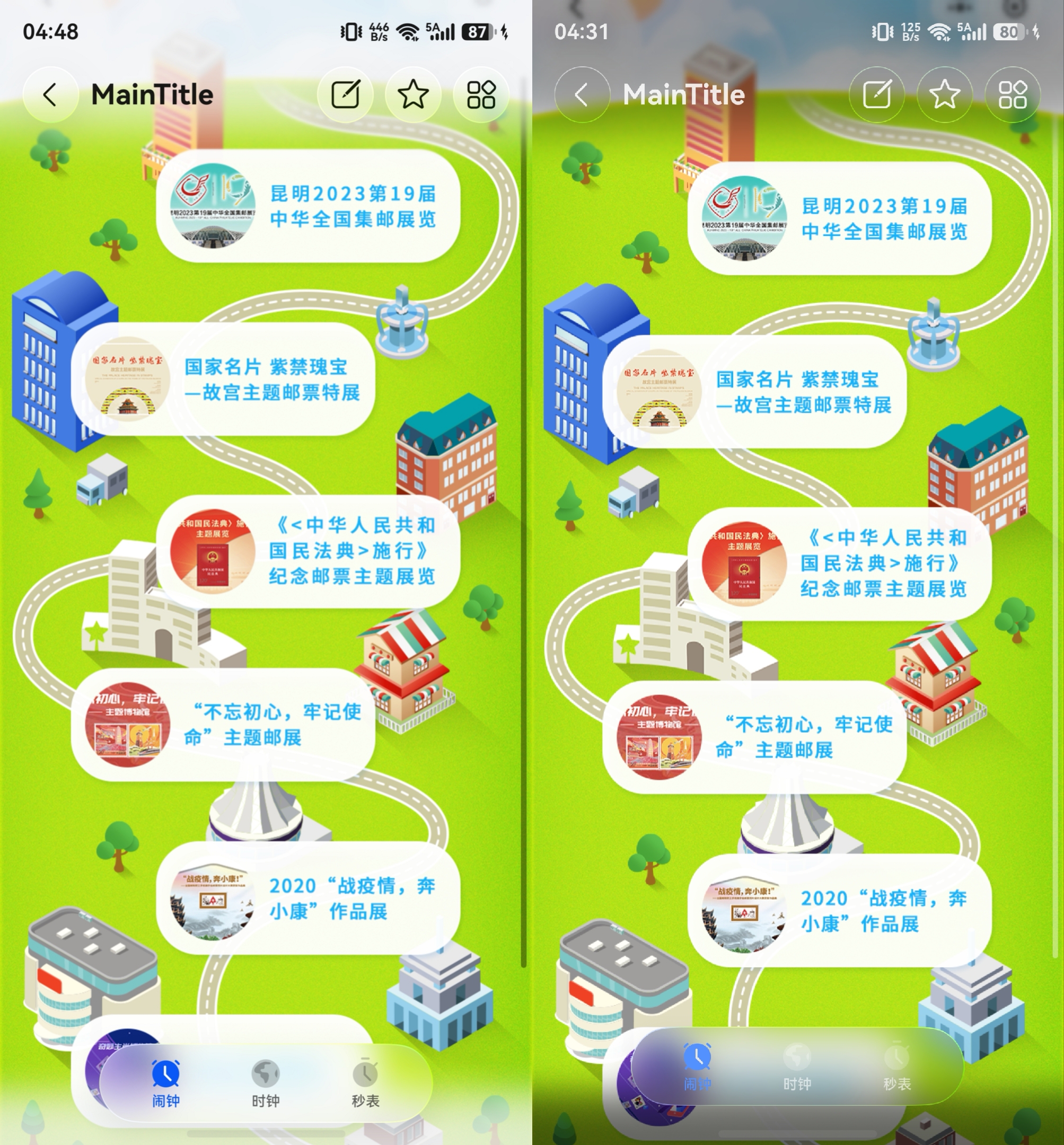
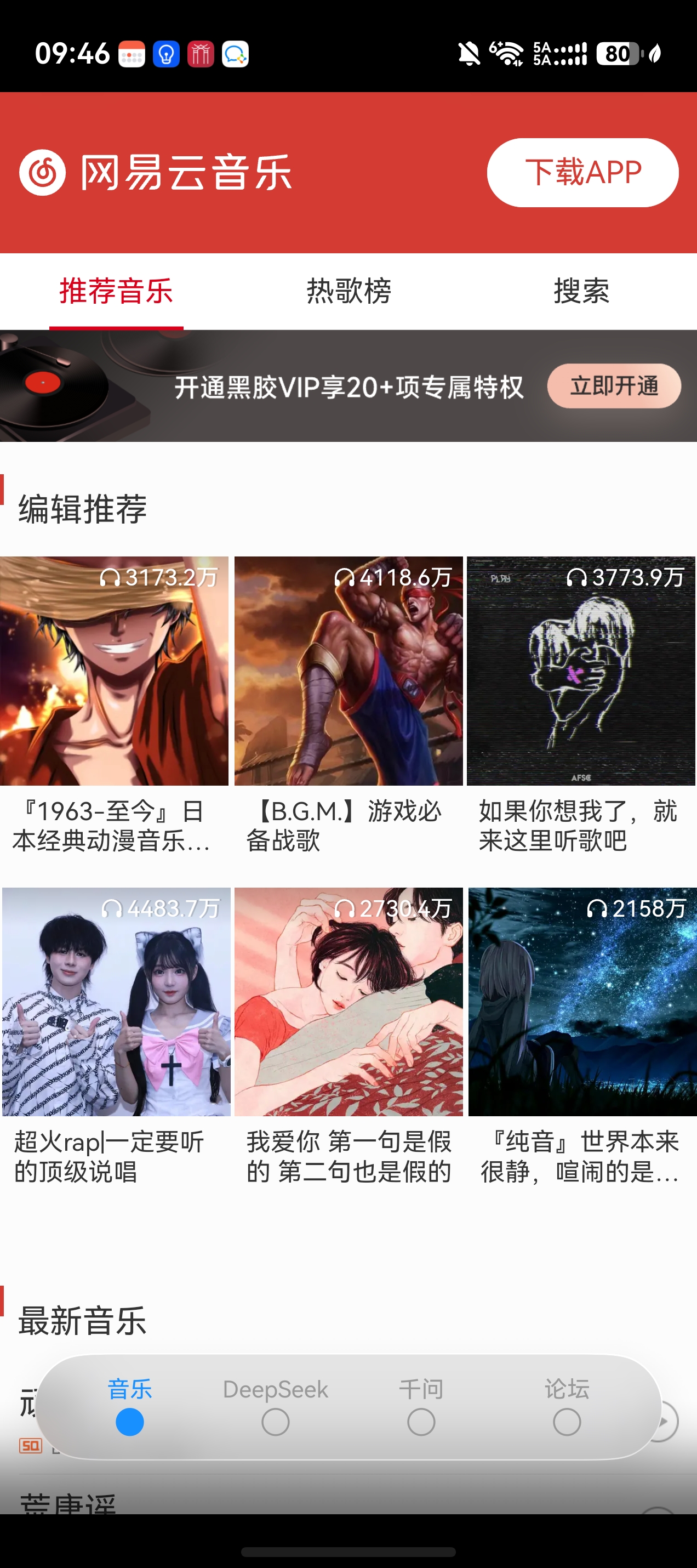
如图,尝试做了一个demo,发现始终解决不了底下的黑块,有没有大佬讲解一下怎么操作感谢🙏🙏

BowenZbw|
开发实例
App开发
HarmonyOS 5
开发指南
HarmonyOS行业解决方案
求沉浸光感tab嵌套web的沉浸式模式安全区扩展适配方法
已解决
1
2
5
浏览153 编辑于2026-04-20 03:08上海
全部评论
最多点赞
最新发布
最早发布

lsbnbdz采纳答复
这个问题课可以查看窗口沉浸,我建议使用setWindowLayoutFullScreen()来实现应用全屏,并且弃用ignoreLayoutSafeArea()和expandSafeArea,这两个使用起来再多层组件嵌套的时候很容易混乱,不容易理清。可以查看以下代码:
收起
自动换行
深色代码主题
复制
onWindowStageCreate(windowStage: window.WindowStage) {
// Main window is created, set main page for this ability
Logger.info(TAG, 'Ability onWindowStageCreate');
windowStage.loadContent('pages/Index', (err, data) => {
if (err.code) {
Logger.error(TAG, `Failed to load the content. Cause: ${JSON.stringify(err) ?? ''}`);
return;
}
Logger.info(TAG, `Succeeded in loading the content. Data: ${JSON.stringify(data) ?? ''}`);
});
try {
windowStage.getMainWindow((err, data) => {
if (err.code) {
Logger.error(TAG, `getMainWindow failed, code=${err.code}, msg=${err.message}`);
return;
}
data.setWindowLayoutFullScreen(true).then(() => {
Logger.info(TAG, `Succeeded to change full-screen state: ${true}.`);
}).catch((err: Error) => {
Logger.error(TAG, `Failed to change full-screen state. Cause message: ${JSON.stringify(err)}`);
});
data.setWindowBackgroundColor(Constants.BACKGROUND_COLOR)
})
} catch (error) {
Logger.error(TAG, `Ability onWindowStageCreate, error=${JSON.stringify(error)}`);
}
}应用设置全屏后,所有界面都会延伸到状态栏和导航栏,使窗口沉浸,如果想规避的话可以手动在顶部和底部添加空白组件,设置topRect和bottomRect,获取逻辑如下:
收起
自动换行
深色代码主题
复制
/**
* 初始化窗口属性
* 获取窗口的初始尺寸、安全区信息等
* 注意:断点由媒体查询系统统一管理,此处不设置断点
* @param windowClass 窗口实例
*/
private initializeWindowProperties(): void {
const windowClass = this.mainWindowClass
try {
// 获取系统状态栏避让区域
const systemAvoidArea = windowClass!.getWindowAvoidArea(window.AvoidAreaType.TYPE_SYSTEM);
this.windowProperties.topRectPx = systemAvoidArea.topRect.height
this.windowProperties.topRect = this.uiContext!.px2vp(systemAvoidArea.topRect.height);
Logger.info(TAG, `顶部安全区高度: ${this.windowProperties.topRectPx}px`);
Logger.info(TAG, `顶部安全区高度: ${this.windowProperties.topRect}vp`);
// 获取导航栏避让区域
const navAvoidArea = windowClass!.getWindowAvoidArea(window.AvoidAreaType.TYPE_NAVIGATION_INDICATOR);
this.windowProperties.bottomRectPx = navAvoidArea.bottomRect.height
this.windowProperties.bottomRect = this.uiContext!.px2vp(navAvoidArea.bottomRect.height);
Logger.info(TAG, `底部安全区高度: ${this.windowProperties.bottomRectPx}px`);
Logger.info(TAG, `底部安全区高度: ${this.windowProperties.bottomRect}vp`);
// 获取窗口尺寸
const windowSize = windowClass!.getWindowProperties().windowRect;
this.windowProperties.winWidthPx = windowSize.width
this.windowProperties.winHeightPx = windowSize.height
this.windowProperties.winWidth = this.uiContext!.px2vp(windowSize.width);
this.windowProperties.winHeight = this.uiContext!.px2vp(windowSize.height);
Logger.info(TAG, `窗口尺寸: ${this.windowProperties.winWidth}x${this.windowProperties.winHeight}vp`);
Logger.info(TAG, `窗口尺寸: ${this.windowProperties.winWidthPx}x${this.windowProperties.winHeightPx}px`);
// 获取窗口装饰高度(如果支持)
if (canIUse('SystemCapability.Window.SessionManager')) {
const height = windowClass!.getWindowDecorHeight();
this.windowProperties.decorHeightPx = height
this.windowProperties.decorHeight = this.uiContext!.px2vp(height);
Logger.info(TAG, `窗口装饰高度: ${this.windowProperties.decorHeight}vp`);
Logger.info(TAG, `窗口装饰高度: ${this.windowProperties.decorHeightPx}px`);
}
} catch (error) {
Logger.error(TAG, `初始化窗口属性失败: ${error.message}`);
}
}获取避让高度后可以在UI中使用AppStorage使用。
展开全部 
2楼回复于2026-04-17 08:54 来自北京
FIEforever
黑块是因为你系统是深色模式,调成浅色模式,底部就是白色遮罩了
其实应该是可以用主题色来控制的,但是要看你的代码支不支持
WithTheme({ colorMode: ThemeColorMode.LIGHT })

3楼回复于2026-04-17 09:03 来自广东
南 筏
在你的UIAbility中的生命周期onWindowStageCreate中设置应用浸式的效果就可以啦,
收起
自动换行
深色代码主题
复制
onWindowStageCreate(windowStage: window.WindowStage): void {
// 设置应用全屏沉浸式
windowStage.getMainWindow((err: BusinessError, data: window.Window) => {
data.setWindowLayoutFullScreen(true)
})
windowStage.loadContent('pages/Index', (err) => {
if (err.code) {
hilog.error(DOMAIN, 'testTag', 'Failed to load the content. Cause: %{public}s', JSON.stringify(err));
return;
}
hilog.info(DOMAIN, 'testTag', 'Succeeded in loading the content.');
});
}5楼回复于2026-04-20 03:48 来自江苏
投资堂学习了
4楼回复于2026-04-17 09:32 来自浙江
CAPTAIN 1275
1楼回复于2026-04-17 01:52 来自广东
写回答
所见即所得编辑器, editor1
工具栏 撤消 快捷键 Ctrl+Z 重做 快捷键 Ctrl+Y 格式刷 快捷键 Ctrl+Shift+C 清除格式 加粗 快捷键 Ctrl+B 倾斜 快捷键 Ctrl+I 下划线 快捷键 Ctrl+U 删除线格式调整字号 文本颜色 背景颜色 增加缩进量 减少缩进量 左对齐 居中 右对齐 两端对齐段落间距行间距 项目列表 编号列表 插入水平线 块引用 插入/编辑超链接 快捷键 Ctrl+K 取消超链接 图片 表格 上传附件 导入Word 插入代码 MD编辑器 全屏模式
0/50000
新增插入模板功能
一键使用模板,快速填写内容,轻松发帖~
知道了
- 为了保障您的信息安全,请勿上传您的敏感个人信息(如您的密码等信息)和您的敏感资产信息(如关键源代码、签名私钥、调试安装包、业务日志等信息),且您需自行承担由此产生的信息泄露等安全风险。
- 如您发布的内容为转载内容,请注明内容来源。
我要提问题
相关推荐
换一批
1
HarmonyOS 嵌套Tab定位 (API12+)
2
HarmonyOS Scroll嵌套的情况下,为什么点击事件不生效? (API12+)
3
HarmonyOS 全文省略demo (API12+)
4
HarmonyOS 全文省略展开收起demo (API12+)
5
HarmonyOS web组件怎么适配沉浸式?(API12+)
6
HarmonyOS Navigation里面嵌套Tabs组件,其中一个TabContent要实现沉浸式状态栏,应该如何实现 (API12+)
7
Scroll嵌套Tabs吸顶及沉浸式效果实现方式
8
HarmonyOS 状态栏颜色覆盖图标颜色(API12+)
了解社区公约,与您携手共创和谐专业的开发者社区。


苏公安网备 32011402010933号