












 匿名用户
RelativeContainer如何自适应高度
已解决
List({ scroller: this.scroller }) { // 设置列表项间距[2](@ref)
  ForEach(this.processList, (item: AlarmProcessLog, index: number) => {
    ListItem() {
      RelativeContainer() {
        Column() {
          Divider().width(2).backgroundColor("#6CB8F9").vertical(true).height(20)
          Image($r("app.media.alarm_process")).fitOriginalSize(true).width(40).height(40)
          Divider().width(2).backgroundColor("#6CB8F9").vertical(true)
        }.id("left").margin({ left: 20, right: 20 }).alignRules({
          // 'top': { 'anchor': '__container__', 'align': VerticalAlign.Top },
          // 'bottom': { 'anchor': 'right', 'align': VerticalAlign.Bottom },
          'left': { 'anchor': '__container__', 'align': HorizontalAlign.Start },
        })

        Column() {
          Row() {
            Text(item.createTime).fontColor("#8C8C8C").fontSize(14)
            Text(item.actionName).fontColor($r("app.color.btn_color_blue")).fontSize(14).margin({ left: 8 })
          }

          Text(item.deptName + "|" + item.createUserName).fontColor(Color.Black).fontSize(15).margin({ top: 10 })
          Text(item.content.replace("<br/>", "\n"))
            .fontColor("#595959")
            .fontSize(15)
            .padding(7)
            .margin({ top: 10 })
            .backgroundColor("#F5F5F5")
            .onClick(() => {
              if (item.action == "2207" || item.action == "2209") {
                router.pushUrl({ url: RouterContent.AlarmDetailPage, params: { "alarmId": item.id } })
              }
            })
        }.id("right").alignItems(HorizontalAlign.Start).margin({ top: 25, left: 20 }).alignRules({
          // 'top': { 'anchor': '__container__', 'align': VerticalAlign.Top },
          'right': { 'anchor': '__container__', 'align': HorizontalAlign.End },
          'left': { 'anchor': "left", 'align': HorizontalAlign.End },
        }).height('auto')
      }.height('auto')
    }.height('auto')
  })
}
.scrollBar(BarState.Off) //滚动条配置
.listDirection(Axis.Vertical)
.width('auto')
.height('auto')
.layoutWeight(1)
我需要RelativeContainer能根据内容高度自适应,该如何实现,
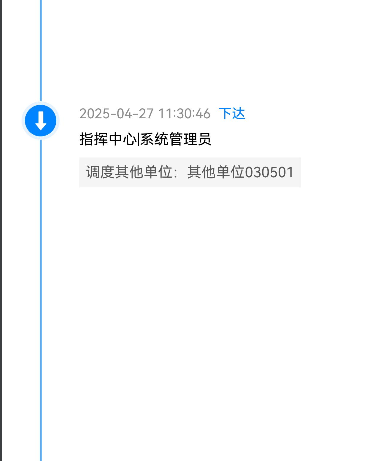
如图。左边的高度要等于右边的高度,RelativeContainer要能自适应右边的高度。现在一个listitem就是一整个屏幕的高度


1

1


浏览504 发布于2025-04-28 07:40江苏
全部评论
最多点赞
最新发布
最早发布

写回答
所见即所得编辑器, editor1
工具栏
0/50000
新增插入模板功能
一键使用模板,快速填写内容,轻松发帖~
知道了
- 为了保障您的信息安全,请勿上传您的敏感个人信息(如您的密码等信息)和您的敏感资产信息(如关键源代码、签名私钥、调试安装包、业务日志等信息),且您需自行承担由此产生的信息泄露等安全风险。
- 如您发布的内容为转载内容,请注明内容来源。
我要提问题
了解社区公约,与您携手共创和谐专业的开发者社区。


 苏公安网备 32011402010933号