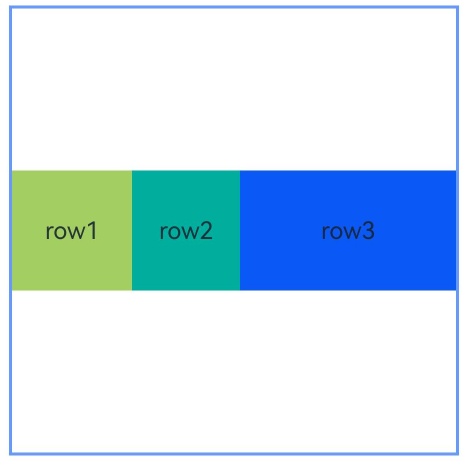
- 该组件从API version 9开始支持。后续版本的新增接口,采用上角标单独标记接口的起始版本。
- 在RelativeContainer组件中,不设置width、height时,对应属性布局表现与设置为100%相同。
- 从API version 11开始,在RelativeContainer组件中,width、height设置"auto"表示自适应子组件。当width设置"auto"时,如果水平方向上子组件以容器作为锚点,则"auto"不生效(即视为不设置width),垂直方向上同理。
- 从API version 20开始,在RelativeContainer组件中,width、height设置LayoutPolicy.wrapContent表示自适应子组件且被祖先节点尺寸约束,设置LayoutPolicy.fixAtIdealSize表示自适应子组件且不被祖先节点尺寸约束。当width设置wrapContent或fixAtIdealSize时,如果水平方向上子组件直接或间接以容器作为锚点,则容器在该方向上的尺寸不自适应该组件,垂直方向上同理。
- RelativeContainer中子组件的margin不同于通用属性margin,指子组件到该方向上锚点的距离。例如,当alignRules设置了left锚点时,margin.left表示子组件到left锚点的距离。若alignRules未设置某个边界方向的锚点(如未设置left或right锚点),则该方向的margin不生效。
您当前正在浏览HarmonyOS最新文档,覆盖已发布的所有API版本,可在API参考中筛选您使用的API版本。详细的版本配套关系请参考版本说明。
RelativeContainer
Phone12+PC/2in113+Tablet12+TV19+Wearable18+
本文导读
相对布局组件,用于复杂场景中元素对齐的布局。通过设置子组件的对齐规则,实现子组件相对于容器或其他子组件的对齐,适用于需要灵活布局、减少嵌套层级的复杂界面。
子组件可以通过设置alignRules来设置自身在相对容器中的对齐规则。
说明
子组件
支持多个子组件。
接口
Phone12+PC/2in113+Tablet12+TV19+Wearable18+
RelativeContainer()
相对布局组件,用于复杂场景中元素对齐的布局。
卡片能力: 从API version 9开始,该接口支持在ArkTS卡片中使用。
元服务API: 从API version 11开始,该接口支持在元服务中使用。
系统能力: SystemCapability.ArkUI.ArkUI.Full
guideLine12+
Phone12+PC/2in113+Tablet12+TV19+Wearable18+
guideLine(value: Array<GuideLineStyle>)
设置RelativeContainer容器内的辅助线,数组中每个元素代表一条辅助线。典型使用场景:子组件基于虚拟参考线对齐、创建可灵活调整的参考线定位、多个子组件基于同一基准线布局。
元服务API: 从API version 12开始,该接口支持在元服务中使用。
模型约束: 此接口仅可在Stage模型下使用。
系统能力: SystemCapability.ArkUI.ArkUI.Full
参数:
| 参数名 | 类型 | 必填 | 说明 |
|---|---|---|---|
| value | Array<GuideLineStyle> | 是 | RelativeContainer容器内的辅助线,定义guideLine的id、方向和位置,用于辅助定位子组件。 |
barrier12+
Phone12+PC/2in113+Tablet12+TV19+Wearable18+
barrier(value: Array<BarrierStyle>)
设置RelativeContainer容器内的屏障,子组件可以以屏障为锚点进行对齐定位。数组中每个元素代表一条屏障。典型使用场景:避免子组件重叠、基于组件边缘创建虚拟边界、实现组件间自动间隔。
元服务API: 从API version 12开始,该接口支持在元服务中使用。
模型约束: 此接口仅可在Stage模型下使用。
系统能力: SystemCapability.ArkUI.ArkUI.Full
参数:
| 参数名 | 类型 | 必填 | 说明 |
|---|---|---|---|
| value | Array<BarrierStyle> | 是 | RelativeContainer容器内的屏障,用于定义屏障的id、方向和依赖组件,子组件可以以屏障为锚点进行对齐定位。 |
barrier12+
Phone12+PC/2in113+Tablet12+TV19+Wearable18+
barrier(barrierStyle: Array<LocalizedBarrierStyle>)
设置RelativeContainer容器内的屏障,子组件可以以屏障为锚点进行对齐定位,支持定义镜像模式的屏障线。数组中每个元素代表一条屏障。典型使用场景:RTL语言布局适配、镜像界面设计、根据阅读方向自动调整屏障位置。
元服务API: 从API version 12开始,该接口支持在元服务中使用。
模型约束: 此接口仅可在Stage模型下使用。
系统能力: SystemCapability.ArkUI.ArkUI.Full
参数:
| 参数名 | 类型 | 必填 | 说明 |
|---|---|---|---|
| barrierStyle | Array<LocalizedBarrierStyle> | 是 | RelativeContainer容器内的屏障,支持定义镜像模式的屏障线。 |
GuideLineStyle12+对象说明
Phone12+PC/2in113+Tablet12+TV19+Wearable18+
guideLine参数,用于定义一条guideLine的id、方向和位置,辅助子组件在RelativeContainer中进行定位和对齐。
元服务API: 从API version 12开始,该接口支持在元服务中使用。
模型约束: 此接口仅可在Stage模型下使用。
系统能力: SystemCapability.ArkUI.ArkUI.Full
| 名称 | 类型 | 只读 | 可选 | 说明 |
|---|---|---|---|---|
| id | string | 否 | 否 | guideLine的id,用于标识辅助线,子组件可通过此id引用该辅助线作为锚点。必须是唯一的并且不可与容器内组件重名。 |
| direction | Axis | 否 | 否 | 指定guideLine的方向。Axis.Vertical表示垂直辅助线,仅能作为组件水平方向的锚点;Axis.Horizontal表示水平辅助线,仅能作为组件垂直方向的锚点。 默认值:Axis.Vertical 非法值:按默认值处理。 |
| position | GuideLinePosition | 否 | 否 | 指定guideLine的位置。 当未声明或声明异常值(如undefined)时,guideLine的位置默认为start: 0。start和end两种声明方式选择一种即可。若同时声明,仅start生效。若容器的width被声明为"auto",则Axis.Vertical类型guideLine的位置只能使用start方式声明(不允许使用百分比);若容器的height被声明为"auto",则Axis.Horizontal类型guideLine的位置只能使用start方式声明(不允许使用百分比)。 默认值: { start: 0 } 非法值:按默认值处理。 |
GuideLinePosition12+对象说明
Phone12+PC/2in113+Tablet12+TV19+Wearable18+
guideLine位置参数,用于定义guideLine的位置。
元服务API: 从API version 12开始,该接口支持在元服务中使用。
模型约束: 此接口仅可在Stage模型下使用。
系统能力: SystemCapability.ArkUI.ArkUI.Full
| 名称 | 类型 | 只读 | 可选 | 说明 |
|---|---|---|---|---|
| start | Dimension | 否 | 是 | guideLine距离容器左侧或者顶部的距离。单位:vp。 默认值:0。与end二选一,若同时声明则仅start生效。若容器的width被声明为"auto",则Axis.Vertical类型的guideLine只能使用start方式声明(不允许使用百分比);若容器的height被声明为"auto",则Axis.Horizontal类型的guideLine只能使用start方式声明(不允许使用百分比)。 |
| end | Dimension | 否 | 是 | guideLine距离容器右侧或者底部的距离。单位:vp。与start二选一,若同时声明则仅start生效。若容器的width被声明为"auto",则Axis.Vertical类型的guideLine不支持使用end方式声明;若容器的height被声明为"auto",则Axis.Horizontal类型的guideLine不支持使用end方式声明。 |
BarrierStyle12+对象说明
Phone12+PC/2in113+Tablet12+TV19+Wearable18+
barrier参数,用于定义一条barrier的id、方向和生成时所依赖的组件,子组件可通过barrier的id引用屏障作为锚点进行对齐定位。
元服务API: 从API version 12开始,该接口支持在元服务中使用。
模型约束: 此接口仅可在Stage模型下使用。
系统能力: SystemCapability.ArkUI.ArkUI.Full
| 名称 | 类型 | 只读 | 可选 | 说明 |
|---|---|---|---|---|
| id | string | 否 | 否 | barrier的id,用于标识屏障,子组件可通过此id引用该屏障作为锚点。必须是唯一的并且不可与容器内组件重名。 |
| direction | BarrierDirection | 否 | 否 | 指定barrier的方向。 水平屏障线(TOP/BOTTOM)仅能作为组件垂直方向锚点(top或bottom),用于水平方向锚点时位置视为0。垂直屏障线(LEFT/RIGHT)仅能作为组件水平方向锚点(left或right),用于垂直方向锚点时位置视为0。 默认值:BarrierDirection.LEFT 非法值:按默认值处理。 |
| referencedId | Array<string> | 否 | 否 | 指定生成barrier所依赖的组件。将需要作为屏障基准的组件id放入数组,至少包含一个有效组件ID,不存在的ID会被忽略。barrier根据组件边界计算位置:LEFT取最左侧,RIGHT取最右侧,TOP取最上方,BOTTOM取最下方。 |
BarrierDirection12+枚举说明
Phone12+PC/2in113+Tablet12+TV19+Wearable18+
定义屏障线的方向。
元服务API: 从API version 12开始,该接口支持在元服务中使用。
模型约束: 此接口仅可在Stage模型下使用。
系统能力: SystemCapability.ArkUI.ArkUI.Full
| 名称 | 值 | 说明 |
|---|---|---|
| LEFT | 0 | 屏障在其所有referencedId的最左侧。 |
| RIGHT | 1 | 屏障在其所有referencedId的最右侧。 |
| TOP | 2 | 屏障在其所有referencedId的最上方。 |
| BOTTOM | 3 | 屏障在其所有referencedId的最下方。 |
LocalizedBarrierStyle12+对象说明
Phone12+PC/2in113+Tablet12+TV19+Wearable18+
barrier参数,用于定义一条支持镜像模式的barrier的id、方向和生成时所依赖的组件,子组件可通过barrier的id引用屏障作为锚点进行对齐定位。
元服务API: 从API version 12开始,该接口支持在元服务中使用。
模型约束: 此接口仅可在Stage模型下使用。
系统能力: SystemCapability.ArkUI.ArkUI.Full
| 名称 | 类型 | 只读 | 可选 | 说明 |
|---|---|---|---|---|
| id | string | 否 | 否 | barrier的id,用于标识屏障,子组件可通过此id引用该屏障作为锚点。必须是唯一的并且不可与容器内组件重名。 |
| localizedDirection | LocalizedBarrierDirection | 否 | 否 | 指定barrier的方向。 水平屏障线(TOP/BOTTOM)仅能作为组件垂直方向锚点(top或bottom),用于水平方向锚点时位置视为0。垂直屏障线(START/END,支持LTR/RTL镜像)仅能作为组件水平方向锚点(start或end),用于垂直方向锚点时位置视为0。 默认值:LocalizedBarrierDirection.START 非法值:按默认值处理。 |
| referencedId | Array<string> | 否 | 否 | 指定生成barrier所依赖的组件。将需要作为屏障基准的组件id放入数组,至少包含一个有效组件ID,不存在的ID会被忽略。支持镜像模式的屏障根据LTR/RTL模式下的实际位置计算屏障位置。 |
LocalizedBarrierDirection12+枚举说明
Phone12+PC/2in113+Tablet12+TV19+Wearable18+
定义支持镜像模式的屏障线的方向。
元服务API: 从API version 12开始,该接口支持在元服务中使用。
模型约束: 此接口仅可在Stage模型下使用。
系统能力: SystemCapability.ArkUI.ArkUI.Full
| 名称 | 值 | 说明 |
|---|---|---|
| START | 0 | 屏障在其所有referencedId的起始侧,LTR模式时为最左侧,RTL模式时为最右侧。 |
| END | 1 | 屏障在其所有referencedId的结束侧,LTR模式时为最右侧,RTL模式时为最左侧。 |
| TOP | 2 | 屏障在其所有referencedId的最上方。 |
| BOTTOM | 3 | 屏障在其所有referencedId的最下方。 |
事件
支持通用事件。
示例
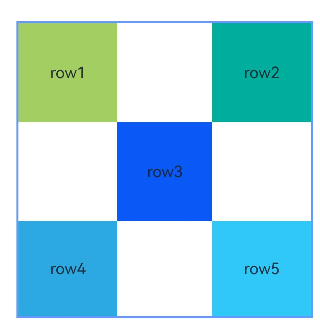
示例1(以容器和容器内组件作为锚点进行布局)
本示例通过alignRules接口实现了以容器和容器内组件作为锚点进行布局的功能。
- @Entry
- @Component
- struct Index {
- build() {
- Row() {
- RelativeContainer() {
- Row() {
- Text('row1')
- }
- .justifyContent(FlexAlign.Center)
- .width(100)
- .height(100)
- .backgroundColor('#a3cf62')
- .alignRules({
- top: { anchor: "__container__", align: VerticalAlign.Top },
- left: { anchor: "__container__", align: HorizontalAlign.Start }
- })
- .id("row1")
-
- Row() {
- Text('row2')
- }
- .justifyContent(FlexAlign.Center)
- .width(100)
- .height(100)
- .backgroundColor('#00ae9d')
- .alignRules({
- top: { anchor: "__container__", align: VerticalAlign.Top },
- right: { anchor: "__container__", align: HorizontalAlign.End }
- })
- .id("row2")
-
- Row() {
- Text('row3')
- }
- .justifyContent(FlexAlign.Center)
- .height(100)
- .backgroundColor('#0a59f7')
- .alignRules({
- top: { anchor: "row1", align: VerticalAlign.Bottom },
- left: { anchor: "row1", align: HorizontalAlign.End },
- right: { anchor: "row2", align: HorizontalAlign.Start }
- })
- .id("row3")
-
- Row() {
- Text('row4')
- }.justifyContent(FlexAlign.Center)
- .backgroundColor('#2ca9e0')
- .alignRules({
- top: { anchor: "row3", align: VerticalAlign.Bottom },
- bottom: { anchor: "__container__", align: VerticalAlign.Bottom },
- left: { anchor: "__container__", align: HorizontalAlign.Start },
- right: { anchor: "row1", align: HorizontalAlign.End }
- })
- .id("row4")
-
- Row() {
- Text('row5')
- }.justifyContent(FlexAlign.Center)
- .backgroundColor('#30c9f7')
- .alignRules({
- top: { anchor: "row3", align: VerticalAlign.Bottom },
- bottom: { anchor: "__container__", align: VerticalAlign.Bottom },
- left: { anchor: "row2", align: HorizontalAlign.Start },
- right: { anchor: "__container__", align: HorizontalAlign.End }
- })
- .id("row5")
- }
- .width(300).height(300)
- .margin({ left: 50 })
- .border({ width: 2, color: "#6699FF" })
- }
- .height('100%')
- }
- }
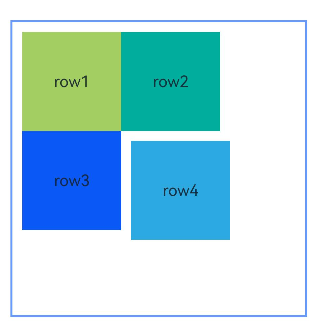
示例2(子组件设置外边距)
本示例展示容器内子组件设置外边距的方法。
- @Entry
- @Component
- struct Index {
- build() {
- Row() {
- RelativeContainer() {
- Row() {
- Text('row1')
- }
- .justifyContent(FlexAlign.Center)
- .width(100)
- .height(100)
- .backgroundColor('#a3cf62')
- .alignRules({
- top: { anchor: "__container__", align: VerticalAlign.Top },
- left: { anchor: "__container__", align: HorizontalAlign.Start }
- })
- .id("row1")
- .margin(10)
-
- Row() {
- Text('row2')
- }
- .justifyContent(FlexAlign.Center)
- .width(100)
- .height(100)
- .backgroundColor('#00ae9d')
- .alignRules({
- left: { anchor: "row1", align: HorizontalAlign.End },
- top: { anchor: "row1", align: VerticalAlign.Top }
- })
- .id("row2")
-
- Row() {
- Text('row3')
- }
- .justifyContent(FlexAlign.Center)
- .width(100)
- .height(100)
- .backgroundColor('#0a59f7')
- .alignRules({
- left: { anchor: "row1", align: HorizontalAlign.Start },
- top: { anchor: "row1", align: VerticalAlign.Bottom }
- })
- .id("row3")
-
- Row() {
- Text('row4')
- }
- .justifyContent(FlexAlign.Center)
- .width(100)
- .height(100)
- .backgroundColor('#2ca9e0')
- .alignRules({
- left: { anchor: "row3", align: HorizontalAlign.End },
- top: { anchor: "row2", align: VerticalAlign.Bottom }
- })
- .id("row4")
- .margin(10)
- }
- .width(300).height(300)
- .margin({ left: 50 })
- .border({ width: 2, color: "#6699FF" })
- }
- .height('100%')
- }
- }
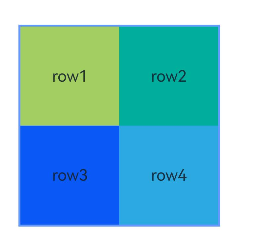
示例3(设置容器大小自适应内容)
本示例展示了容器大小适应内容(声明width或height为"auto")的用法。
- @Entry
- @Component
- struct Index {
- build() {
- Row() {
- RelativeContainer() {
- Row() {
- Text('row1')
- }
- .justifyContent(FlexAlign.Center)
- .width(100)
- .height(100)
- .backgroundColor('#a3cf62')
- .id("row1")
-
- Row() {
- Text('row2')
- }
- .justifyContent(FlexAlign.Center)
- .width(100)
- .height(100)
- .backgroundColor('#00ae9d')
- .alignRules({
- left: { anchor: "row1", align: HorizontalAlign.End },
- top: { anchor: "row1", align: VerticalAlign.Top }
- })
- .id("row2")
-
- Row() {
- Text('row3')
- }
- .justifyContent(FlexAlign.Center)
- .width(100)
- .height(100)
- .backgroundColor('#0a59f7')
- .alignRules({
- left: { anchor: "row1", align: HorizontalAlign.Start },
- top: { anchor: "row1", align: VerticalAlign.Bottom }
- })
- .id("row3")
-
- Row() {
- Text('row4')
- }
- .justifyContent(FlexAlign.Center)
- .width(100)
- .height(100)
- .backgroundColor('#2ca9e0')
- .alignRules({
- left: { anchor: "row3", align: HorizontalAlign.End },
- top: { anchor: "row2", align: VerticalAlign.Bottom }
- })
- .id("row4")
- }
- .width("auto").height("auto")
- .margin({ left: 50 })
- .border({ width: 2, color: "#6699FF" })
- }
- .height('100%')
- }
- }
示例4(设置偏移)
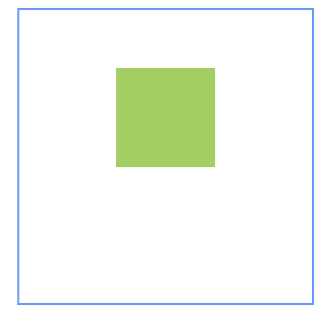
本示例通过bias实现了子组件的位置在垂直方向的两个锚点间偏移的效果。
- @Entry
- @Component
- struct Index {
- build() {
- Row() {
- RelativeContainer() {
- Row()
- .width(100)
- .height(100)
- .backgroundColor('#a3cf62')
- .alignRules({
- top: { anchor: "__container__", align: VerticalAlign.Top },
- bottom: { anchor: "__container__", align: VerticalAlign.Bottom },
- left: { anchor: "__container__", align: HorizontalAlign.Start },
- right: { anchor: "__container__", align: HorizontalAlign.End },
- bias: { vertical: 0.3 }
- })
- .id("row1")
- }
- .width(300).height(300)
- .margin({ left: 50 })
- .border({ width: 2, color: "#6699FF" })
- }
- .height('100%')
- }
- }
示例5(设置辅助线)
本示例展示了相对布局组件通过guideLine接口设置辅助线,子组件以辅助线为锚点的功能。
- @Entry
- @Component
- struct Index {
- build() {
- Row() {
- RelativeContainer() {
- Row()
- .width(100)
- .height(100)
- .backgroundColor('#a3cf62')
- .alignRules({
- left: { anchor: "guideline1", align: HorizontalAlign.End },
- top: { anchor: "guideline2", align: VerticalAlign.Top }
- })
- .id("row1")
- }
- .width(300)
- .height(300)
- .margin({ left: 50 })
- .border({ width: 2, color: "#6699FF" })
- .guideLine([{ id: "guideline1", direction: Axis.Vertical, position: { start: 50 } },
- { id: "guideline2", direction: Axis.Horizontal, position: { start: 50 } }])
- }
- .height('100%')
- }
- }

示例6(设置屏障)
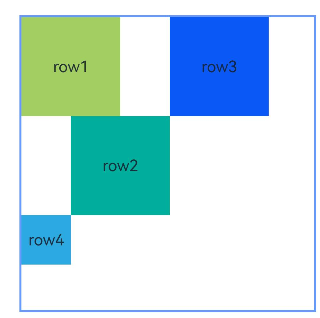
本示例展示了相对布局组件通过barrier接口设置屏障,子组件以屏障为锚点的用法。
- @Entry
- @Component
- struct Index {
- build() {
- Row() {
- RelativeContainer() {
- Row() {
- Text('row1')
- }
- .justifyContent(FlexAlign.Center)
- .width(100)
- .height(100)
- .backgroundColor('#a3cf62')
- .id("row1")
-
- Row() {
- Text('row2')
- }
- .justifyContent(FlexAlign.Center)
- .width(100)
- .height(100)
- .backgroundColor('#00ae9d')
- .alignRules({
- middle: { anchor: "row1", align: HorizontalAlign.End },
- top: { anchor: "row1", align: VerticalAlign.Bottom }
- })
- .id("row2")
-
- Row() {
- Text('row3')
- }
- .justifyContent(FlexAlign.Center)
- .width(100)
- .height(100)
- .backgroundColor('#0a59f7')
- .alignRules({
- left: { anchor: "barrier1", align: HorizontalAlign.End },
- top: { anchor: "row1", align: VerticalAlign.Top }
- })
- .id("row3")
-
- Row() {
- Text('row4')
- }
- .justifyContent(FlexAlign.Center)
- .width(50)
- .height(50)
- .backgroundColor('#2ca9e0')
- .alignRules({
- left: { anchor: "row1", align: HorizontalAlign.Start },
- top: { anchor: "barrier2", align: VerticalAlign.Bottom }
- })
- .id("row4")
- }
- .width(300)
- .height(300)
- .margin({ left: 50 })
- .border({ width: 2, color: "#6699FF" })
- .barrier([{ id: "barrier1", direction: BarrierDirection.RIGHT, referencedId: ["row1", "row2"] },
- { id: "barrier2", direction: BarrierDirection.BOTTOM, referencedId: ["row1", "row2"] }])
- }
- .height('100%')
- }
- }
示例7(设置链)
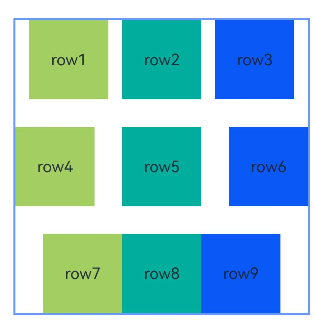
本示例通过chainMode接口从上至下分别实现了水平方向的SPREAD链、SPREAD_INSIDE链和PACKED链。
- @Entry
- @Component
- struct Index {
- build() {
- Row() {
- RelativeContainer() {
- Row() {
- Text('row1')
- }
- .justifyContent(FlexAlign.Center)
- .width(80)
- .height(80)
- .backgroundColor('#a3cf62')
- .alignRules({
- left: { anchor: "__container__", align: HorizontalAlign.Start },
- right: { anchor: "row2", align: HorizontalAlign.Start },
- top: { anchor: "__container__", align: VerticalAlign.Top }
- })
- .id("row1")
- .chainMode(Axis.Horizontal, ChainStyle.SPREAD)
-
- Row() {
- Text('row2')
- }
- .justifyContent(FlexAlign.Center)
- .width(80)
- .height(80)
- .backgroundColor('#00ae9d')
- .alignRules({
- left: { anchor: "row1", align: HorizontalAlign.End },
- right: { anchor: "row3", align: HorizontalAlign.Start },
- top: { anchor: "row1", align: VerticalAlign.Top }
- })
- .id("row2")
-
- Row() {
- Text('row3')
- }
- .justifyContent(FlexAlign.Center)
- .width(80)
- .height(80)
- .backgroundColor('#0a59f7')
- .alignRules({
- left: { anchor: "row2", align: HorizontalAlign.End },
- right: { anchor: "__container__", align: HorizontalAlign.End },
- top: { anchor: "row1", align: VerticalAlign.Top }
- })
- .id("row3")
-
- Row() {
- Text('row4')
- }
- .justifyContent(FlexAlign.Center)
- .width(80)
- .height(80)
- .backgroundColor('#a3cf62')
- .alignRules({
- left: { anchor: "__container__", align: HorizontalAlign.Start },
- right: { anchor: "row5", align: HorizontalAlign.Start },
- center: { anchor: "__container__", align: VerticalAlign.Center }
- })
- .id("row4")
- .chainMode(Axis.Horizontal, ChainStyle.SPREAD_INSIDE)
-
- Row() {
- Text('row5')
- }
- .justifyContent(FlexAlign.Center)
- .width(80)
- .height(80)
- .backgroundColor('#00ae9d')
- .alignRules({
- left: { anchor: "row4", align: HorizontalAlign.End },
- right: { anchor: "row6", align: HorizontalAlign.Start },
- top: { anchor: "row4", align: VerticalAlign.Top }
- })
- .id("row5")
-
- Row() {
- Text('row6')
- }
- .justifyContent(FlexAlign.Center)
- .width(80)
- .height(80)
- .backgroundColor('#0a59f7')
- .alignRules({
- left: { anchor: "row5", align: HorizontalAlign.End },
- right: { anchor: "__container__", align: HorizontalAlign.End },
- top: { anchor: "row4", align: VerticalAlign.Top }
- })
- .id("row6")
-
- Row() {
- Text('row7')
- }
- .justifyContent(FlexAlign.Center)
- .width(80)
- .height(80)
- .backgroundColor('#a3cf62')
- .alignRules({
- left: { anchor: "__container__", align: HorizontalAlign.Start },
- right: { anchor: "row8", align: HorizontalAlign.Start },
- bottom: { anchor: "__container__", align: VerticalAlign.Bottom }
- })
- .id("row7")
- .chainMode(Axis.Horizontal, ChainStyle.PACKED)
-
- Row() {
- Text('row8')
- }
- .justifyContent(FlexAlign.Center)
- .width(80)
- .height(80)
- .backgroundColor('#00ae9d')
- .alignRules({
- left: { anchor: "row7", align: HorizontalAlign.End },
- right: { anchor: "row9", align: HorizontalAlign.Start },
- top: { anchor: "row7", align: VerticalAlign.Top }
- })
- .id("row8")
-
- Row() {
- Text('row9')
- }
- .justifyContent(FlexAlign.Center)
- .width(80)
- .height(80)
- .backgroundColor('#0a59f7')
- .alignRules({
- left: { anchor: "row8", align: HorizontalAlign.End },
- right: { anchor: "__container__", align: HorizontalAlign.End },
- top: { anchor: "row7", align: VerticalAlign.Top }
- })
- .id("row9")
- }
- .width(300).height(300)
- .margin({ left: 50 })
- .border({ width: 2, color: "#6699FF" })
- }
- .height('100%')
- }
- }
示例8(链中设置偏移)
本示例通过chainMode和bias接口实现了水平方向的带偏移的PACKED链。
- @Entry
- @Component
- struct Index {
- build() {
- Row() {
- RelativeContainer() {
- Row() {
- Text('row1')
- }
- .justifyContent(FlexAlign.Center)
- .width(80)
- .height(80)
- .backgroundColor('#a3cf62')
- .alignRules({
- left: { anchor: "__container__", align: HorizontalAlign.Start },
- right: { anchor: "row2", align: HorizontalAlign.Start },
- center: { anchor: "__container__", align: VerticalAlign.Center },
- bias: { horizontal: 0 }
- })
- .id("row1")
- .chainMode(Axis.Horizontal, ChainStyle.PACKED)
-
- Row() {
- Text('row2')
- }
- .justifyContent(FlexAlign.Center)
- .width(80)
- .height(80)
- .backgroundColor('#00ae9d')
- .alignRules({
- left: { anchor: "row1", align: HorizontalAlign.End },
- right: { anchor: "row3", align: HorizontalAlign.Start },
- top: { anchor: "row1", align: VerticalAlign.Top }
- })
- .id("row2")
-
- Row() {
- Text('row3')
- }
- .justifyContent(FlexAlign.Center)
- .width(80)
- .height(80)
- .backgroundColor('#0a59f7')
- .alignRules({
- left: { anchor: "row2", align: HorizontalAlign.End },
- right: { anchor: "__container__", align: HorizontalAlign.End },
- top: { anchor: "row1", align: VerticalAlign.Top }
- })
- .id("row3")
- }
- .width(300).height(300)
- .margin({ left: 50 })
- .border({ width: 2, color: "#6699FF" })
- }
- .height('100%')
- }
- }

示例9(设置镜像模式)
本示例展示了在镜像模式(direction声明Direction.Rtl)下以屏障为锚点时使用LocalizedAlignRuleOptions和LocalizedBarrierDirection设置对齐方式的用法。
- @Entry
- @Component
- struct Index {
- build() {
- Row() {
- RelativeContainer() {
- Row() {
- Text('row1')
- }
- .justifyContent(FlexAlign.Center)
- .width(100)
- .height(100)
- .backgroundColor('#a3cf62')
- .id("row1")
-
- Row() {
- Text('row2')
- }
- .justifyContent(FlexAlign.Center)
- .width(100)
- .height(100)
- .backgroundColor('#00ae9d')
- .alignRules({
- middle: { anchor: "row1", align: HorizontalAlign.End },
- top: { anchor: "row1", align: VerticalAlign.Bottom }
- })
- .id("row2")
-
- Row() {
- Text('row3')
- }
- .justifyContent(FlexAlign.Center)
- .width(100)
- .height(100)
- .backgroundColor('#0a59f7')
- .alignRules({
- start: { anchor: "barrier1", align: HorizontalAlign.End },
- top: { anchor: "row1", align: VerticalAlign.Top }
- })
- .id("row3")
-
- Row() {
- Text('row4')
- }
- .justifyContent(FlexAlign.Center)
- .width(50)
- .height(50)
- .backgroundColor('#2ca9e0')
- .alignRules({
- start: { anchor: "row1", align: HorizontalAlign.Start },
- top: { anchor: "barrier2", align: VerticalAlign.Bottom }
- })
- .id("row4")
- }
- .direction(Direction.Rtl)
- .width(300)
- .height(300)
- .margin({ left: 50 })
- .border({ width: 2, color: "#6699FF" })
- .barrier([{ id: "barrier1", localizedDirection: LocalizedBarrierDirection.END, referencedId: ["row1", "row2"] },
- { id: "barrier2", localizedDirection: LocalizedBarrierDirection.BOTTOM, referencedId: ["row1", "row2"] }])
- }
- .height('100%')
- }
- }

示例10(设置链中节点权重)
本示例展示了链中节点使用chainWeight设置尺寸权重的用法。
必须先通过alignRules设置子组件的链式对齐规则(确保组件在水平或垂直方向形成链),再通过chainMode设置链样式(如SPREAD、SPREAD_INSIDE、PACKED),chainWeight仅在链模式下生效。
- @Entry
- @Component
- struct Index {
- build() {
- Row() {
- RelativeContainer() {
- Row() {
- Text('row1')
- }
- .justifyContent(FlexAlign.Center)
- .width(80)
- .height(80)
- .backgroundColor('#a3cf62')
- .alignRules({
- left: { anchor: "__container__", align: HorizontalAlign.Start },
- right: { anchor: "row2", align: HorizontalAlign.Start },
- center: { anchor: "__container__", align: VerticalAlign.Center },
- })
- .id("row1")
- .chainMode(Axis.Horizontal, ChainStyle.PACKED)
-
- Row() {
- Text('row2')
- }
- .justifyContent(FlexAlign.Center)
- .width(80)
- .height(80)
- .backgroundColor('#00ae9d')
- .alignRules({
- left: { anchor: "row1", align: HorizontalAlign.End },
- right: { anchor: "row3", align: HorizontalAlign.Start },
- top: { anchor: "row1", align: VerticalAlign.Top }
- })
- .id("row2")
- .chainWeight({ horizontal: 1 })
-
- Row() {
- Text('row3')
- }
- .justifyContent(FlexAlign.Center)
- .width(80)
- .height(80)
- .backgroundColor('#0a59f7')
- .alignRules({
- left: { anchor: "row2", align: HorizontalAlign.End },
- right: { anchor: "__container__", align: HorizontalAlign.End },
- top: { anchor: "row1", align: VerticalAlign.Top }
- })
- .id("row3")
- .chainWeight({ horizontal: 2 })
- }
- .width(300).height(300)
- .margin({ left: 50 })
- .border({ width: 2, color: "#6699FF" })
- }
- .height('100%')
- }
- }