














代码:1.index.ets
import { HomeView } from '../Views/HomeView'


@ComponentV2
@Entry
struct Index {
  @Local activeIndex: number = 0

  @Builder
  myTabbar(title: string, index: number) {
    if (title == "") {
      SymbolGlyph($r("sys.symbol.plus"))
        .fontColor([Color.Black])
        .backgroundColor(Color.White)
        .fontSize(35)
        .borderRadius(170)
        .padding(5)
    } else {
      Text(title)
        .fontColor(index == this.activeIndex ? Color.White : "#666")
    }
  }

  build() {
    Column() {
      Tabs() {
        TabContent() {
          HomeView()
        }
        .tabBar(this.myTabbar("首页", 0))

        TabContent() {

        }
        .tabBar(this.myTabbar("朋友", 1))

        TabContent() {
          Text("发布新的创作")
            .fontColor(Color.Blue)
        }
        .tabBar(this.myTabbar("", 2))

        TabContent() {
          Text("接收到的消息")
            .fontColor(Color.Blue)
        }
        .tabBar(this.myTabbar("消息", 3))

        TabContent() {
          Text("我的主页内容")
            .fontColor(Color.Blue)
        }
        .tabBar(this.myTabbar("我的", 4))
      }
      .barPosition(BarPosition.End)
      .onTabBarClick(index => {
        this.activeIndex = index
      })
    }
    .height("100%")
    .width("100%")
    .backgroundColor(Color.Black)
    .expandSafeArea([SafeAreaType.SYSTEM])
  }
}
HomeView.ets
import { VideoComp } from "../Components/VideoComp"

//com
@ComponentV2
export struct HomeView {
  // 视频数组数据
  list: VideoData[] = [
    new VideoData({
      id: 1,
      title: '通过这一部分内容的学习和初步实践,开发者可以快速构建 #鸿蒙',
      src: $rawfile('01.mp4'),
      avatar: $r('app.media.avatar'),
      likeCount: 1012,
      isLike: true,
      commentCount: 304,
      sharedCount: 45
    }),
    new VideoData({
      id: 2,
      title: '出首个HarmonyOS应用,掌握应用程序包结构 #华为',
      src: $rawfile('02.mp4'),
      avatar: $r('app.media.avatar'),
      likeCount: 876,
      isLike: false,
      commentCount: 456,
      sharedCount: 123
    }),
    new VideoData({
      id: 3,
      title: '资源文件的使用以及ArkTS的核心功能和语法等基础知识 #黑马程序员',
      src: $rawfile('03.mp4'),
      avatar: $r('app.media.avatar'),
      likeCount: 1231,
      isLike: false,
      commentCount: 342,
      sharedCount: 564
    }),
    new VideoData({
      id: 4,
      title: '入门可以帮助开发者了解应用开发的基本方法 #音乐',
      src: $rawfile('04.mp4'),
      avatar: $r('app.media.avatar'),
      likeCount: 5432,
      isLike: false,
      commentCount: 1202,
      sharedCount: 459
    }),
    new VideoData({
      id: 5,
      title: '推荐您通过知识地图了解应用开发完整旅程 #zhousg',
      src: $rawfile('05.mp4'),
      avatar: $r('app.media.avatar'),
      likeCount: 400,
      isLike: false,
      commentCount: 213,
      sharedCount: 123
    })
  ]

  //vcontroller:VideoController=new VideoController()
  build() {
    //滑动容器组件
    Swiper() {
      ForEach(this.list, (item: VideoData, index: number) => {
        //堆叠布局组件,将「视频组件」和「侧边头像 + 交互按钮」进行层叠显示
        Stack({ alignContent: Alignment.End }) {
          //下层 视频组件
          VideoComp({
            item: item,
            index: index
          })
          //上层 头像组件 表示垂直方向上组件之间的间距
          Column({ space: 20 }) {
            Image($r("app.media.avatar"))
              .width(40)
              .borderRadius(20)
            //点赞
            Column() { //垂直布局
              SymbolGlyph($r("sys.symbol.heart_fill"))
                .fontSize(40)
                .fontColor([item.isLike ? Color.Red : Color.White])
                .scale({
                  //组件样式变换
                  x: item.isLike ? 1.2 : 1,
                  y: item.isLike ? 1.2 : 1
                })
                //动画属性
                .animation({
                  duration: 300,
                  //线性变化速度曲线
                  curve: Curve.Linear
                })
                .onClick(() => {
                  if (item.isLike) {
                    item.likeCount--
                  } else {
                    item.likeCount++
                  }
                  item.isLike = !item.isLike
                })
              Text(item.likeCount.toString()).fontColor(Color.White)
            }

            //评论
            Column() {
              SymbolGlyph($r("sys.symbol.message_fill"))
                .fontSize(40)
                .fontColor([Color.White])
              Text(item.commentCount.toString()).fontColor(Color.White)
            }

            //分享
            Column() {
              SymbolGlyph($r("sys.symbol.share"))
                .fontSize(40)
                .fontColor([Color.White])
              Text(item.sharedCount.toString()).fontColor(Color.White)
            }
          }
        }
        .margin({ right: 10 })
      })
    }
    .vertical(true)
    //隐藏索引器
    .indicator(false)
  }
}

// 视频数据
//  @ObservedV2  :  V2状态管理其中的一个装饰器,  实现数据深度监听:  被修改时候 触发UI视图更新
@ObservedV2
export class VideoData {
  id: number
  title: string
  src: ResourceStr
  avatar: ResourceStr
  @Trace //标记跟踪
  likeCount: number
  @Trace
  isLike: boolean
  commentCount: number
  sharedCount: number

  constructor(data: ESObject) {
    this.id = data.id
    this.title = data.title
    this.src = data.src
    this.avatar = data.avatar
    this.likeCount = data.likeCount
    this.isLike = data.isLike
    this.commentCount = data.commentCount
    this.sharedCount = data.sharedCount
  }
}
VideoComp.ets
import { VideoData } from '../Views/HomeView'


@ComponentV2
export struct VideoComp {
  @Param
  @Require
  item: VideoData
  vController: VideoController = new VideoController()
  @Param
  @Require
  index: number
  @Local playing: boolean = true //定义一个视频状态变量,仅当前组件内部可见

  build() {
    Video({
      src: this.item.src,
      posterOptions: {
        showFirstFrame: true
      },
      controller: this.vController
    })
    //隐藏自带工具栏
      .controls(false)
      .objectFit(ImageFit.Contain)
      .onPrepared(() => {
        if (this.index === 0) {
          this.vController.start()
        }
      })
      .onVisibleAreaChange([0, 1], (isShow) => {
        if (isShow) {
          this.vController.start()
        } else {
          this.vController.pause()
        }
      })
      //点击触发暂停与播放
      .onClick(() => {
        if (this.playing) {
          this.vController.pause()
        } else {
          this.vController.start()
        }
        this.playing = !this.playing
      })
  }
}
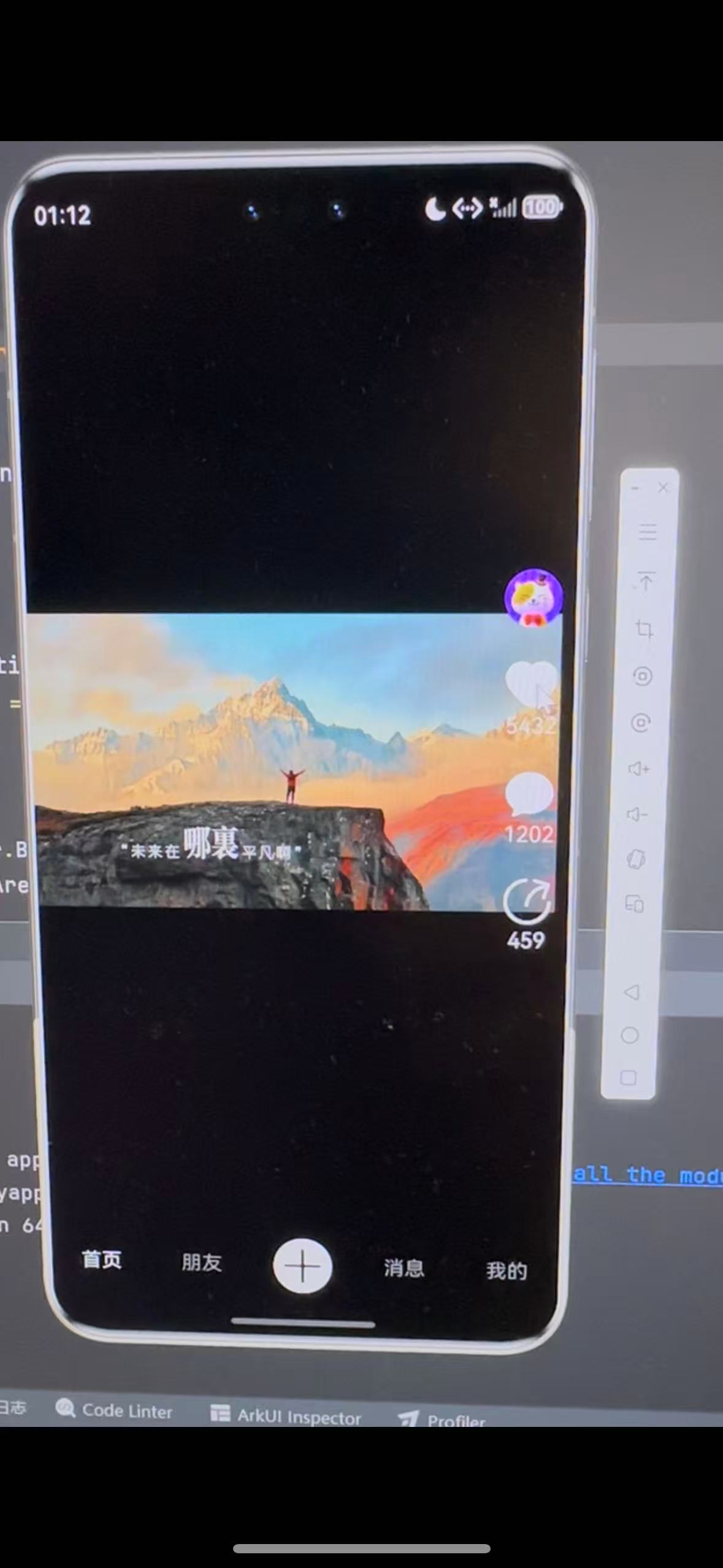
效果预览:


 上一篇


 苏公安网备 32011402010933号