华为分析服务目前已提供导入自定义用户属性和上报用户行为的API接口,为减小API接口的工作量,现提供Java版本的SDK给开发者集成,用以快速的使用API接口能力。
操作步骤
- 集成SDK,引入jar包。
- 在maven工程的“settings.xml”文件中添加SDK所在的仓库地址。
<mirror> <id>central</id> <mirrorOf>central</mirrorOf> <url>https://developer.huawei.com/repo/</url> </mirror> - 指定对应的“profile”属性,需要填写对应的“公共仓库地址”和“华为开发者联盟仓库地址”。其中“公共仓库地址”为您存放公共组件的仓库地址,如官方maven仓库地址, “华为开发者联盟仓库地址”指定为https://developer.huawei.com/repo/。
<profiles> <profile> <id>central</id> <repositories> <repository> <id>test1</id> <url>公共仓库地址</url> <releases><enabled>true</enabled></releases> <snapshots> <enabled>true</enabled> <updatePolicy>always</updatePolicy> </snapshots> </repository> <repository> <id>test2</id> <url>https://developer.huawei.com/repo/</url> <releases><enabled>true</enabled></releases> <snapshots> <enabled>true</enabled> <updatePolicy>always</updatePolicy> </snapshots> </repository> </repositories> </profile> </profiles> - 启用“profile”属性。
<activeProfiles> <activeProfile>central</activeProfile> </activeProfiles> - 在您的项目工程的pom文件中引入对应的jar包。
<dependencies>
    <dependency>
        <groupId>com.huawei.wisecloud</groupId>
        <artifactId>analytics-java</artifactId>
        <version>6.3.2.302</version>
    </dependency>
</dependencies>
- 在maven工程的“settings.xml”文件中添加SDK所在的仓库地址。
- 初始化SDK。
- 登录AppGallery Connect 网站 ,选择“我的项目”。
- 在项目列表中找到您的项目,在项目列表中点击需要集成SDK的应用。
- 在“项目设置”页面中,获取App相关信息。
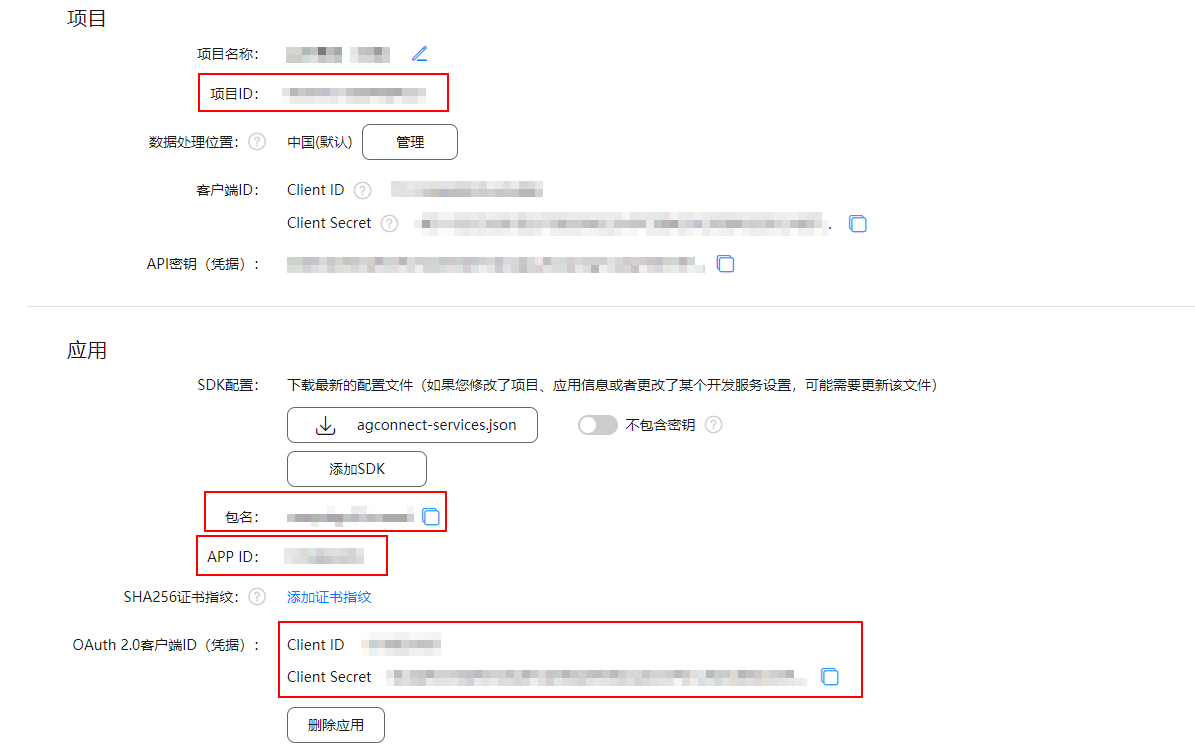
- 添加App信息,如果您的服务端接收多个App的请求,可以初始化多个App信息。

- 当应用类型为iOS时,进入菜单,获取“应用ID”和“应用包名”。 “setAppId”配置为“应用ID”,“setPackageName”配置为“应用包名”。
- 当应用类型为WEB时,“setPackageName”配置为“APP ID”。
HuaweiApp.init("Android", "https://test.test.cn")
     .setAppId("123")
     .setProductId("123")
     .setClientId("123")
     .setClientSecret("456")
     .setPackageName("123.123")
     .build();
其中:
- "Android":需要添加的App的应用类型,如Android、iOS、HarmonyOS、WEB、Quick App。
- "https://test.test.cn":App的数据处理位置的存储地址。
数据处理位置
存储地址
中国
- 选择需要配置分析数据的应用。
- 点击“华为分析 > 管理 > 分析设置 > API管理”,在“API管理”处获取存储地址。
新加坡
俄罗斯
德国
- setAppId:配置为“项目设置”页面中“应用”下的“APP ID”。
- setProductId:配置为“项目设置”页面中“项目”下的“项目ID”。
- setClientId:配置为“项目设置”页面中“应用”下的“Client ID”。
- setClientSecret:配置为“项目设置”页面中“应用”下的“Client Secret”。
- setPackageName:配置为“项目设置”页面中“应用”下的“包名”。
- (可选)设置您的上报策略配置,也可以选择使用默认配置SdkConfig.defaultConfig()。
SdkConfig.init().setMaxCacheSize(10000).setCacheTime(10).setMaxRetry(2).setEventSendSize(100).setUserSendSize(100).build();
参数
参数说明
setMaxCacheSize
最大缓存数量,设置缓存中最大的数据量;当数量达到限制,会对最老的数据进行淘汰并记录到日志中。设置区间为1-1000000,默认存放10000条数据。
setCacheTime
缓存上报的间隔时间,单位为s。设置区间为1-1800s,默认为10s上报一次数据。
setMaxRetry
上报重试次数,当上报失败时,会进行重试处理;当达到配置的最大上报次数还是失败时,则会记录日志处理。默认重试2次。
setEventSendSize
单次“上报用户行为”的发送数量。设置区间为1-100,默认100,表示单次上报的用户行为数据为100条。
setUserSendSize
单次“导入自定义用户属性”的发送数量。设置区间为1-100,默认100,表示单次上报的自定义用户属性为100条。
- 初始化SDK。
@Component
 @Slf4j
 public class AnalyticsSdkInit {
     private HuaweiAnalyticsClient huaweiAnalyticsClient;
     //初始化sdk
     @PostConstruct
     public void init() {
         HuaweiApp huaweiApp = HuaweiApp.init("Android", "http://123")
             .setAppId("123")
             .setProductId("123")
             .setClientId("123")
             .setClientSecret("123")
             .setPackageName("123.123")
             .build();
         SdkConfig sdkConfig = SdkConfig.init().setCacheTime(10).setMaxCacheSize(10000).build();
         HuaweiAnalyticsClient.init(Collections.singletonList(huaweiApp), sdkConfig);
        // 异常结束刷新数据
        flushData();
      }

    private void flushData() {
        Runtime.getRuntime().addShutdownHook(new Thread(new Runnable() {
            @Override
            public void run() {
                HuaweiAnalyticsClient.flush();
            }
        }));
    }
  }
- 发送数据。
 //上报用户行为
 public void addEvent(String appId, EventPojo eventPojo) throws HaServiceException {
 }
 //导入自定义用户属性
 public void addUser(String appId, UserDataPojo userDataPojo) throws HaServiceException {
 }
- 刷新数据,将所有数据立即发送到服务器。

当服务升级、重启等导致进程关闭的场景时,可以调用flush方法,上报所有数据。
 //发送所有收集的信息到服务器
 public void flush() {
 }
其他配置
Java SDK定义了日志打印的接口AnalyticsLog,如您需要打印Java SDK的日志,请在您的代码中实现AnalyticsLog接口的logData方法,然后在初始化SDK时调用initLogger方法设置自定义的logger。
 public static void initLogger(AnalyticsLog logger) {
    }
使用示例
- 上报用户行为
EventPojo eventPojo = new EventPojo(); eventPojo.setAaid("123"); eventPojo.setUserId(""); eventPojo.setEventTime(1631606679895L); eventPojo.setEventId("$EnterScreen"); eventPojo.setEventSessionName("123"); eventPojo.setFirstSessionEvent("true"); eventPojo.setProperties(""); HuaweiAnalyticsClient.addEvent("123", eventPojo); - 导入自定义用户属性
  UserDataPojo userDataPojo = new UserDataPojo();
  userDataPojo.setId("123");
  UserPropertyPojo userPropertyPojo = new UserPropertyPojo();
  userPropertyPojo.setId("123");
  userPropertyPojo.setValue("123");
  userDataPojo.setProperties(Collections.singletonList(userPropertyPojo));
  HuaweiAnalyticsClient.addUser("123", userDataPojo);