在您正式开发应用之前,可以通过本节提供的一个简单的Demo快速体验游戏服务的接入和开发过程。
体验更完整的Demo开发过程,您可以参考Codelab或者最佳实践。
集成SDK
- 登录HarmonyOS 开发者中心,顶部点击“应用管理”,左上角筛选游戏。
- 左侧导航栏选择“基础信息”,右侧页面点击“基本信息”页签,下载“agconnect-services.json”配置文件,并拷贝到应用级根目录下。
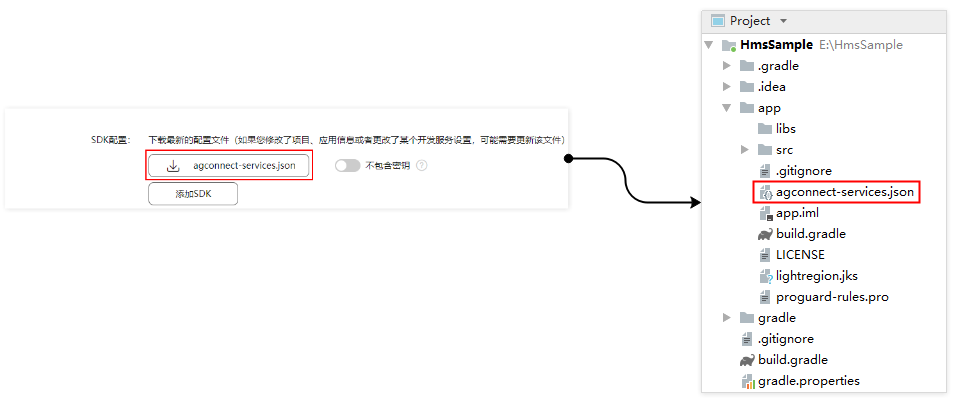
- 配置HMS Core SDK的Maven仓地址,以Gradle版本7.1及以上版本为例,其他版本配置请参考配置HMS Core SDK的Maven仓地址。
- 打开Android Studio项目级“build.gradle”文件,在中增加agcp插件配置。

buildscript { dependencies { ... // 增加agcp插件配置,推荐您使用最新版本的agcp插件。 classpath 'com.huawei.agconnect:agcp:1.6.0.300' } - 打开项目级“settings.gradle”文件,配置HMS Core SDK的Maven仓地址。
pluginManagement {
    repositories {
        gradlePluginPortal()
        google()
        mavenCentral()
        // 配置HMS Core SDK的Maven仓地址。
        maven { url 'https://developer.huawei.com/repo/' }
    }
}
dependencyResolutionManagement {
    ...
    repositories {
        google()
        mavenCentral()
        // 配置HMS Core SDK的Maven仓地址。
        maven { url 'https://developer.huawei.com/repo/' }
    }
}
- 打开Android Studio项目级“build.gradle”文件,在中增加agcp插件配置。
- 添加编译依赖。
- 打开应用级的“build.gradle”文件,在“dependencies”中添加如下编译依赖。

dependencies {
     implementation 'com.huawei.hms:hwid:{version}'
     implementation 'com.huawei.hms:game:6.14.0.300'
}
- 打开应用级的“build.gradle”文件,在“dependencies”中添加如下编译依赖。
- 添加插件配置。请根据实际情况选择:
- 方式一:在文件头部声明下一行添加如下配置。
apply plugin: 'com.huawei.agconnect'
- 方式二:在plugins中添加如下配置。
plugins {
    id 'com.android.application'
    // 添加如下配置
    id 'com.huawei.agconnect'
}
- 方式一:在文件头部声明下一行添加如下配置。
- 在完成以上的配置后,点击工具栏中的gradle同步图标,完成“build.gradle”文件的同步,将相关依赖下载到本地。


如果出现错误,请检查网络连接是否正常,以及检查“build.gradle”文件是否正确。

编写您的页面
| 布局文件配置 | 页面预览 |
|---|---|
<?xml version="1.0" encoding="utf-8"?>
<LinearLayout xmlns:android="http://schemas.android.com/apk/res/android"
  android:layout_width="match_parent"
  android:layout_height="match_parent"
  android:orientation="vertical">
 <LinearLayout
      android:layout_width="wrap_content"
      android:layout_height="wrap_content"
      android:layout_marginBottom="40dp"
      android:orientation="vertical">
      <TextView
          android:layout_width="match_parent"
          android:layout_height="wrap_content"
          android:gravity="center"
          android:layout_marginBottom="20dp"
          android:text="游戏初始化"
          android:textColor="@color/hwid_auth_button_color_black"
          android:textSize="16sp" />
      <Button
          android:id="@+id/btn_init"
          android:layout_width="wrap_content"
          android:layout_height="wrap_content"
          android:background="@drawable/blue_bg_shape"
          android:paddingLeft="100dp"
          android:paddingRight="100dp"
          android:text="@string/init"
          android:textColor="@color/color_white" />
  </LinearLayout>
  <LinearLayout
      android:layout_width="match_parent"
      android:layout_height="wrap_content"
      android:orientation="horizontal">
      <ScrollView
          android:id="@+id/sv_log"
          android:layout_width="match_parent"
          android:layout_height="match_parent">
          <TextView
              android:id="@+id/tv_log"
              android:layout_width="wrap_content"
              android:layout_height="match_parent"
              android:gravity="center"
              android:textColor="#000000"
              android:paddingBottom="30dp"/>
      </ScrollView>
  </LinearLayout>
</LinearLayout> |
|

调用游戏服务初始化接口
在应用启动的第一个Activity中,添加如下代码。
public void init() {
  AccountAuthParams params = AccountAuthParams.DEFAULT_AUTH_REQUEST_PARAM_GAME;
  JosAppsClient appsClient = JosApps.getJosAppsClient(this);
  Task<Void> initTask;
  // 设置防沉迷提示语的Context,此行必须添加
  ResourceLoaderUtil.setmContext(this);
  initTask = appsClient.init(
          new AppParams(params, new AntiAddictionCallback() {
              @Override
              public void onExit() {
                  // System.exit(0);
                  // 该回调会在如下两种情况下返回:
                  // 1.未成年人实名帐号在白天登录游戏,华为会弹框提示玩家不允许游戏,玩家点击“确定”,华为返回回调
                  // 2.未成年实名帐号在国家允许的时间登录游戏,到晚上9点,华为会弹框提示玩家已到时间,玩家点击“知道了”,华为返回回调
                  // 您可在此处实现游戏防沉迷功能,如保存游戏、调用帐号退出接口或直接游戏进程退出(如System.exit(0))
              }
          }));
  initTask.addOnSuccessListener(new OnSuccessListener<Void>() {
      @Override
      public void onSuccess(Void aVoid) {
          showLog("init success");
      }
  }).addOnFailureListener(
          new OnFailureListener() {
              @Override
              public void onFailure(Exception e) {
                  if (e instanceof ApiException) {
                      ApiException apiException = (ApiException) e;
                      int statusCode = apiException.getStatusCode();
                      // 错误码为7401时表示用户未同意华为联运隐私协议
                      if (statusCode == JosStatusCodes.JOS_PRIVACY_PROTOCOL_REJECTED) {
                          showLog("has reject the protocol");
                          // 在此处实现退出游戏或者重新调用初始化接口
                      }
                      // 在此处实现其他错误码的处理
                  }
              }
          });
} 

