您可以在地图的指定位置添加CustomPoi以标识位置、商家、建筑等,并可以通过信息窗口展示详细信息。CustomPoi支持文字标注碰撞和方向选择避让:
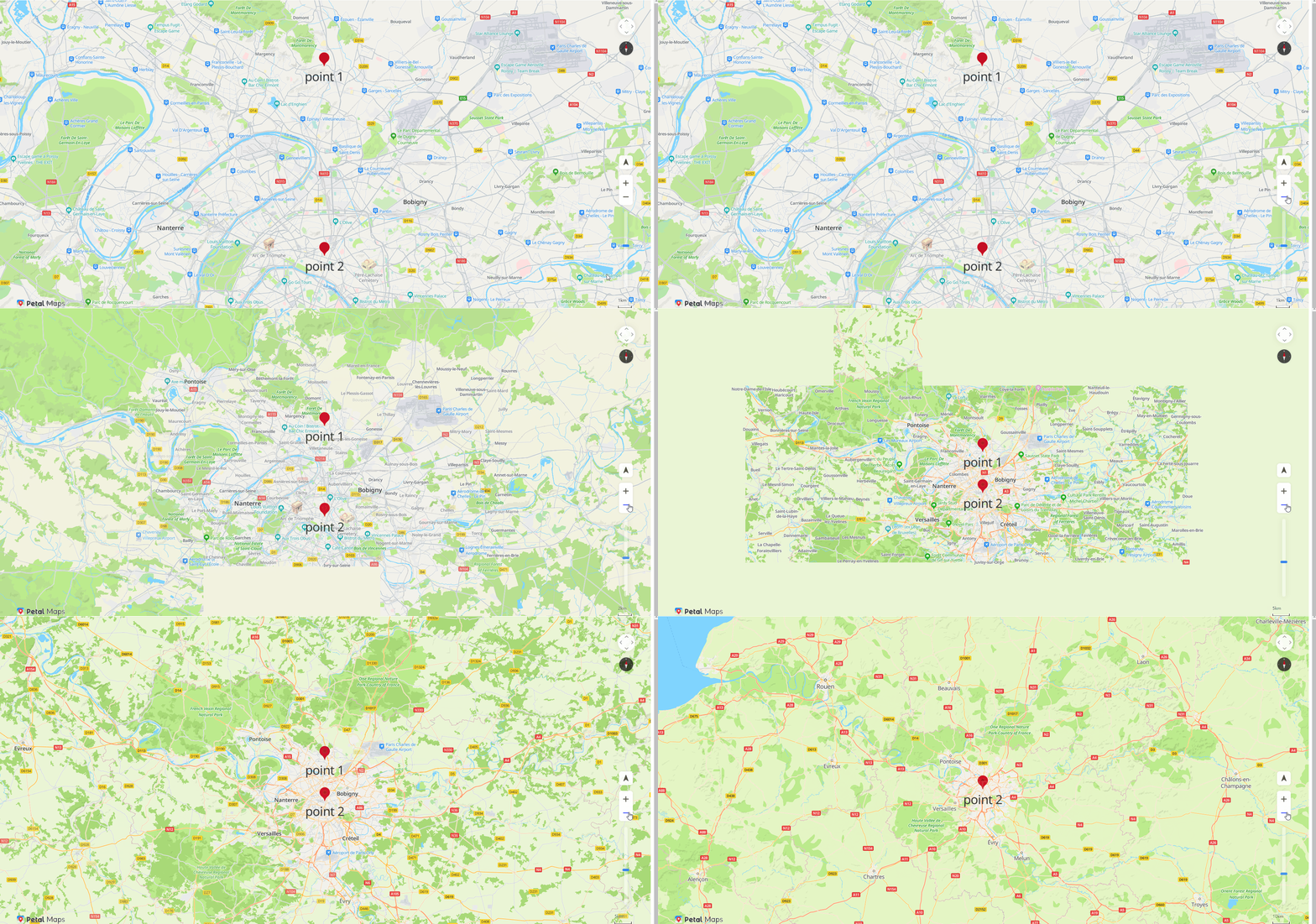
- CustomPoi与文字作为一个整体进行碰撞,根据CustomPoi优先级决定碰撞后显示或消失,发生碰撞时优先级低的CustomPoi不显示,优先级高的CustomPoi显示。
- 支持CustomPoi的图标文字与底图图标文字的碰撞。CustomPoi的图标文字优先级高于底图的图标文字,发生碰撞后,底图的文字不显示。
- CustomPoi的文字标注支持方向选择避让,方向包括:上、下、左、右,支持设置上下左右的优先顺序,以及选择标注的方向(例如,您可以设置仅显示上和下)。当前CustomPoi的文字方向与其他CustomPoi存在碰撞时,会依次选择其它方向进行放置,如果所有方向都无法放置,则这个CustomPoi不显示。
添加CustomPoi
调用HWMapJsSDK.HWCustomPoi(customPoiOptions)添加CustomPoi。
function initMap() {
    var mapOptions = {};
    mapOptions.center = {lng: 2.3506770476074217, lat: 48.93245374505838};
    mapOptions.zoom = 12;
    mapOptions.language = 'en';
    mapOptions.sourceType = 'vector';
    mapOptions.navigationControl = true;
    mapOptions.locationControl = true;
    mapOptions.rotateControl = true;
    mapOptions.zoomControl = true;
    mapOptions.zoomSlider = true;
    mapOptions.scaleControl = true;
    mapOptions.copyrightControl = true;

    map = new HWMapJsSDK.HWMap(document.getElementById('map'), mapOptions);

    // 添加CustomPoi(point 1)
    customPoi1 = new HWMapJsSDK.HWCustomPoi({
        map,
        icon: {
            anchor: 'center',
            scale: 1,
            opacity: 1,
        },
        label: {
            color: '#333',
            fontSize: '36px',
            text: 'point 1',
            offsetX: 0,
            offsetY: 0,
        },
        position: {lat: 49, lng: 2.35},
        zIndex: 1,
        collisionEnabled: true,
        variableLabelAnchor: ['top','bottom','left', 'right'],
    });

    // 添加CustomPoi(point 2)
    customPoi2 = new HWMapJsSDK.HWCustomPoi({
        map,
        icon: {
            anchor: 'bottom',
            scale: 1,
            opacity: 1,
        },
        label: {
            color: '#333',
            fontSize: '36px',
            text: 'point 2',
            offsetX: 0,
            offsetY: 0,
        },
        position: {lat: 48.5, lng: 2.35},
        zIndex: 1,
        collisionEnabled: true,
        variableLabelAnchor: ['top','bottom','left', 'right'],
    });
}
CustomPoi文字标注碰撞效果:
CustomPoi事件
调用HWCustomPoi的addListener(type, callback)、removeListener(type, callback)方法,添加/删除点击事件。
function handleListener(e) {
    console.log(e);
}
// 添加点击事件
customPoi.addListener('click', handleListener);
// 删除点击事件
customPoi.removeListener('click', handleListener);