


智能客服
你问我答,随时在线为你解决问题















辅助测试工具(testhelper),为开发者提供系统状态管理和环境模拟能力,支持时间设置、剪贴板管理、输入法管理、字体管理、显示模式切换和位置模拟等功能,助力开发者快速进行测试环境配置。
搭载HarmonyOS 7.0.0及以上版本的设备支持此工具。
testhelper功能架构设计图如下所示:
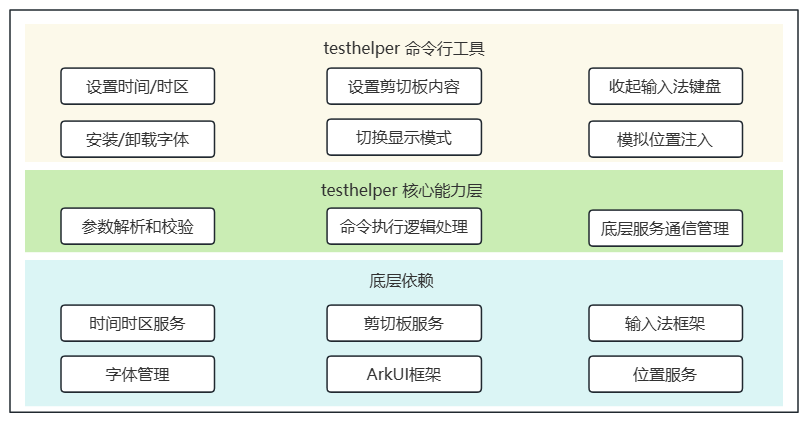
testhelper分为命令行工具层和核心能力层两部分,依赖底层系统服务提供功能支持。
命令行工具层: 作为用户交互入口,负责接收和处理用户输入的命令。
核心能力层: 包含参数解析和校验、命令执行处理、服务通信管理三部分,负责testhelper的核心功能处理。
系统服务依赖: testhelper依赖底层系统服务实现具体功能,包括时间时区服务、剪贴板服务、输入法框架、字体管理、ArkUI框架、位置服务等,testhelper通过IPC调用这些服务。
显示testhelper工具的帮助信息,包括所有可用命令及其用法。
使用示例:
- hdc shell testhelper help
输出示例:
- Usage:
- testhelper <command> [options]
-
- Commands:
- get-time Get current system time
- set-time <time> Set system time (format: YYYY-MM-DD HH:MM:SS)
- get-timezone Get current system timezone
- set-timezone <timezone> Set system timezone (e.g., Asia/Shanghai)
- get-pastedata Get pasteboard text content
- set-pastedata <text> Set pasteboard text content
- clear-pastedata Clear pasteboard content
- hide-keyboard Hide input method keyboard
- get-fontname <font-path> Get font name from font file (/data/local/* files only)
- install-font <font-path> Install font from font file (/data/local/* files only)
- uninstall-font <font-name> Uninstall font by font name
- set-viewmode <dark|light> Set view mode (dark or light)
- enable-location-mock Enable location mock functionality
- disable-location-mock Disable location mock and restore real location
- set-mocked-locations <path> [interval] Set mocked locations from GPX file
- help Show this help message
- --version Show version information
显示testhelper工具的版本信息。
使用示例:
- hdc shell testhelper --version
输出示例:1.0.1
获取当前系统时间。
使用示例:
- hdc shell testhelper get-time
输出示例:Current system time: 2026-05-16 14:30:00
异常场景介绍:
| 场景 | 打印信息 |
|---|---|
| 时间服务不可用。 | Error: Service is not available. |
设置系统时间。
参数说明:
| 参数 | 必填 | 说明 |
|---|---|---|
| time | 是 | 时间字符串,格式必须为YYYY-MM-DD HH:MM:SS。 取值范围: - 年份:1970-2038。 - 月份:1-12。 - 日期:1-31,需符合实际日历(如2月无30日)。 - 小时:0-23。 - 分钟:0-59。 - 秒:0-59。 |
使用示例:
- hdc shell testhelper set-time 2026-05-16 14:30:00
输出示例:Set time to 2026-05-16 14:30:00 successfully.
异常场景介绍:
| 场景 | 打印信息 |
|---|---|
| 时间格式错误。 | Error: Invalid time format. Time must be in 'YYYY-MM-DD HH:MM:SS' format. |
| 时间值无效(如月份为13)。 | Error: Invalid time value. 2026-13-01 00:00:00 is not a valid date and time. |
| 时间服务不可用。 | Error: Service is not available. |
获取当前系统时区。
使用示例:
- hdc shell testhelper get-timezone
输出示例:Current timezone: Asia/Shanghai
异常场景介绍:
| 场景 | 打印信息 |
|---|---|
| 时间服务不可用。 | Error: Service is not available. |
设置系统时区。
参数说明:
| 参数 | 必填 | 说明 |
|---|---|---|
| timezone | 是 | 时区标识符,如Asia/Shanghai。取值参考支持的系统时区。 |
使用示例:
- hdc shell testhelper set-timezone Asia/Shanghai
输出示例:Set timezone to Asia/Shanghai successfully.
异常场景介绍:
| 场景 | 打印信息 |
|---|---|
| 时区值无效。 | Error: Invalid timezone value. xxx is not a valid timezone identifier. |
| 时间服务不可用。 | Error: Service is not available. |
获取剪贴板文本内容。
使用示例:
- hdc shell testhelper get-pastedata
输出示例:Pasteboard text: hello world
异常场景介绍:
| 场景 | 打印信息 |
|---|---|
| 设备不支持剪贴板功能。 | Error: Operation is not supported. Pasteboard is not supported on this device. |
| 服务不可用。 | Error: Service is not available. |
设置剪贴板文本内容。
参数说明:
| 参数 | 必填 | 说明 |
|---|---|---|
| text | 是 | 要设置的文本内容。最大长度:128MB。 |
使用示例:
- hdc shell testhelper set-pastedata "hello world"
输出示例:Pasteboard text set successfully.
异常场景介绍:
| 场景 | 打印信息 |
|---|---|
| 文本过长(超过128MB)。 | Error: Text is too long. Maximum length is 128MB. |
| 设备不支持剪贴板功能。 | Error: Operation is not supported. Pasteboard is not supported on this device. |
| 服务不可用。 | Error: Service is not available. |
清除剪贴板内容。
使用示例:
- hdc shell testhelper clear-pastedata
输出示例:Pasteboard text cleared successfully.
异常场景介绍:
| 场景 | 打印信息 |
|---|---|
| 设备不支持剪贴板功能。 | Error: Operation is not supported. Pasteboard is not supported on this device. |
| 服务不可用。 | Error: Service is not available. |
隐藏输入法键盘。
使用示例:
- hdc shell testhelper hide-keyboard
输出示例:Keyboard hidden successfully.
异常场景介绍:
| 场景 | 打印信息 |
|---|---|
| 设备不支持输入法功能。 | Error: Operation is not supported. IMF is not supported on this device. |
| 没有活跃的输入法键盘。 | Error: No active input method keyboard. |
| 服务不可用。 | Error: Service is not available. |
从字体文件获取字体名称。
参数说明:
| 参数 | 必填 | 说明 |
|---|---|---|
| font-path | 是 | 字体文件的绝对路径。 路径要求: - 路径必须为/data/local/tmp下的绝对路径。 - 文件格式:仅支持.ttf和.ttc。 - 不支持包含..的路径。 |
使用示例:
- hdc shell testhelper get-fontname /data/local/tmp/myfont.ttf
输出示例:Font name: MyFont
异常场景介绍:
| 场景 | 打印信息 |
|---|---|
| 路径无效(非/data/local/tmp下的绝对路径)。 | Error: Invalid font path. Please provide a valid absolute path under the /data/local/tmp |
| 字体文件格式无效(非.ttf或.ttc)。 | Error: Invalid font file format. Only supports .ttf and .ttc files. |
| 字体文件未找到。 | Error: Font file not found: /data/local/tmp/myfont.ttf |
| 设备不支持字体管理功能(字体管理功能仅支持Phone、PC/2in1、Tablet设备)。 | Error: Operation is not supported. Font management is not supported on this device. |
| 服务不可用。 | Error: Service is not available. |
从字体文件安装字体。
参数说明:
| 参数 | 必填 | 说明 |
|---|---|---|
| font-path | 是 | 字体文件的绝对路径。 路径要求: - 路径必须为/data/local/tmp下的绝对路径。 - 文件格式:仅支持.ttf和.ttc。 - 不支持包含..的路径。 |
使用示例:
- hdc shell testhelper install-font /data/local/tmp/myfont.ttf
输出示例:Font installed successfully from /data/local/tmp/myfont.ttf
异常场景介绍:
| 场景 | 打印信息 |
|---|---|
| 路径无效(非/data/local/tmp下的绝对路径)。 | Error: Invalid font path. Please provide a valid absolute path under the /data/local/tmp |
| 字体文件格式无效(非.ttf或.ttc)。 | Error: Invalid font file format. Only supports .ttf and .ttc files. |
| 字体文件未找到。 | Error: Font file not found: /data/local/tmp/myfont.ttf |
| 字体已安装。 | Error: Font is already installed. |
| 设备不支持字体管理功能(字体管理功能仅支持Phone、PC/2in1、Tablet设备)。 | Error: Operation is not supported. Font management is not supported on this device. |
| 服务不可用。 | Error: Service is not available. |
卸载字体。
参数说明:
| 参数 | 必填 | 说明 |
|---|---|---|
| font-name | 是 | 字体名称。可通过testhelper get-fontname命令获取已安装字体文件对应的字体名称。 |
使用示例:
- hdc shell testhelper uninstall-font MyFont
输出示例:Font uninstalled successfully: MyFont
异常场景介绍:
| 场景 | 打印信息 |
|---|---|
| 字体名称为空。 | Error: Font not found: |
| 字体未找到。 | Error: Font not found: MyFont |
| 设备不支持字体管理功能(字体管理功能仅支持Phone、PC/2in1、Tablet设备)。 | Error: Operation is not supported. Font management is not supported on this device. |
| 服务不可用。 | Error: Service is not available. |
设置显示模式(深色/浅色模式)。
参数说明:
| 参数 | 必填 | 说明 |
|---|---|---|
| mode | 是 | 显示模式,取值为dark(深色模式)或light(浅色模式)。 |
使用示例:
- hdc shell testhelper set-viewmode dark
输出示例:Set view mode to dark successfully.
异常场景介绍:
| 场景 | 打印信息 |
|---|---|
| 模式值无效(非dark或light)。 | Error: Invalid view mode. Mode must be 'dark' or 'light'. |
| 设备不支持显示模式。 | Error: Operation is not supported. View mode is not supported on this device. |
| 显示模式已设置为指定值。 | Error: View mode is already set to dark. |
| 服务不可用。 | Error: Service is not available. |
启用位置模拟功能。启用后支持使用testhelper set-mocked-locations命令设置模拟位置信息。
使用示例:
- hdc shell testhelper enable-location-mock
输出示例:Enable location mock successfully.
异常场景介绍:
| 场景 | 打印信息 |
|---|---|
| 设备不支持位置模拟功能。 | Error: Operation is not supported. Location mock is not supported on this device. |
| 服务不可用。 | Error: Service is not available. |
禁用位置模拟功能,恢复真实位置。
使用示例:
- hdc shell testhelper disable-location-mock
输出示例:Disable location mock successfully.
异常场景介绍:
| 场景 | 打印信息 |
|---|---|
| 设备不支持位置模拟功能。 | Error: Operation is not supported. Location mock is not supported on this device. |
| 服务不可用。 | Error: Service is not available. |
从GPX文件设置模拟位置。
参数说明:
| 参数 | 必填 | 说明 |
|---|---|---|
| path | 是 | GPX文件的绝对路径。 路径要求: - 路径必须为/data/local/tmp下的绝对路径。 - 文件格式:仅支持.gpx扩展名。 - 不支持包含..的路径。 - 最大位置数量:1000个。 |
| interval | 否 | 位置更新间隔,单位为秒。 - 取值范围:1-3600(整数)。 - 默认值:1。 |
使用示例:
- hdc shell testhelper set-mocked-locations /data/local/tmp/locations.gpx 2
输出示例:Set mocked locations successfully.
GPX文件格式:
testhelper支持标准的GPX 1.1格式,支持以下三种位置点类型:
每个位置点支持以下属性:
GPX文件模板示例:
<wpt>(航点)模板示例:
- <?xml version="1.0" encoding="UTF-8"?>
- <gpx version="1.1" creator="TestHelper" xmlns="http://www.topografix.com/GPX/1/1">
- <wpt lat="22.5431" lon="114.0579">
- <ele>8.0</ele>
- <time>2024-01-15T09:00:00Z</time>
- <speed>25.0</speed>
- <direction>90.0</direction>
- </wpt>
- <wpt lat="22.5531" lon="114.0679">
- <ele>10.0</ele>
- <time>2024-01-15T09:01:00Z</time>
- <speed>28.0</speed>
- <direction>95.0</direction>
- </wpt>
- </gpx>
<trk>(轨迹)模板示例:
- <?xml version="1.0" encoding="UTF-8"?>
- <gpx version="1.1" creator="TestHelper" xmlns="http://www.topografix.com/GPX/1/1">
- <metadata>
- <name>位置模拟轨迹</name>
- </metadata>
- <trk>
- <name>模拟轨迹</name>
- <trkseg>
- <trkpt lat="22.5431" lon="114.0579">
- <ele>8.0</ele>
- <time>2024-01-15T09:00:00Z</time>
- <speed>25.0</speed>
- <direction>90.0</direction>
- </trkpt>
- <trkpt lat="22.5531" lon="114.0679">
- <ele>10.0</ele>
- <time>2024-01-15T09:01:00Z</time>
- <speed>28.0</speed>
- <direction>95.0</direction>
- </trkpt>
- </trkseg>
- </trk>
- </gpx>
<rte>(路线)模板示例:
- <?xml version="1.0" encoding="UTF-8"?>
- <gpx version="1.1" creator="TestHelper" xmlns="http://www.topografix.com/GPX/1/1">
- <rte>
- <rtept lat="22.5431" lon="114.0579">
- <ele>8.0</ele>
- <speed>25.0</speed>
- <direction>90.0</direction>
- </rtept>
- <rtept lat="22.5531" lon="114.0679">
- <ele>10.0</ele>
- <speed>28.0</speed>
- <direction>95.0</direction>
- </rtept>
- </rte>
- </gpx>
异常场景介绍:
| 场景 | 打印信息 |
|---|---|
| 路径无效(非/data/local/tmp下的绝对路径)。 | Error: Invalid path. Please provide a valid gpx file path under the /data/local/tmp |
| GPX文件扩展名无效(非.gpx)。 | Error: Invalid path. Please provide a valid gpx file path under the /data/local/tmp |
| GPX文件格式无效(XML格式错误、根元素错误、缺少有效位置点等)。 | Error: The parameter validation in gpx file has failed. xxx(具体错误信息) |
| 时间间隔无效(≤0或>3600)。 | Error: The parameter validation has failed. timeInterval must be greater than 0. 或 timeInterval must be less than 3600. |
| GPX文件位置数量超过限制(>1000)。 | Error: The parameter validation in gpx file has failed. locations size must be less than 1000. |
| 设备不支持位置模拟功能。 | Error: Operation is not supported. Location mock is not supported on this device. |
| 服务不可用。 | Error: Service is not available. |
问题现象
执行命令时返回服务不可用(Error: Service is not available.)错误信息。
可能原因
解决措施
重启设备后重试。
问题现象
执行命令时返回参数验证相关的错误信息。
可能原因
解决措施
智能客服
你问我答,随时在线为你解决问题
合作咨询
我们的专家服务团队将竭诚为您提供专业的合作咨询服务
解决方案
精准高效的一站式服务支持,助力开发者商业成功