在系统中,应用可以使用Web组件加载Web网页。当非系统框架的UI组件功能或性能不如系统组件时,可使用同层渲染技术,通过ArkUI组件渲染这些组件(简称为同层组件)。
[h2]三方UI框架
Flutter提供了PlatformView与Texture抽象组件,这些组件可使用系统组件渲染,用于支持Flutter组件功能不足的部分。Weex2.0框架的Camera、Video和Canvas组件可以使用系统组件渲染,以增强功能和性能。
整体架构
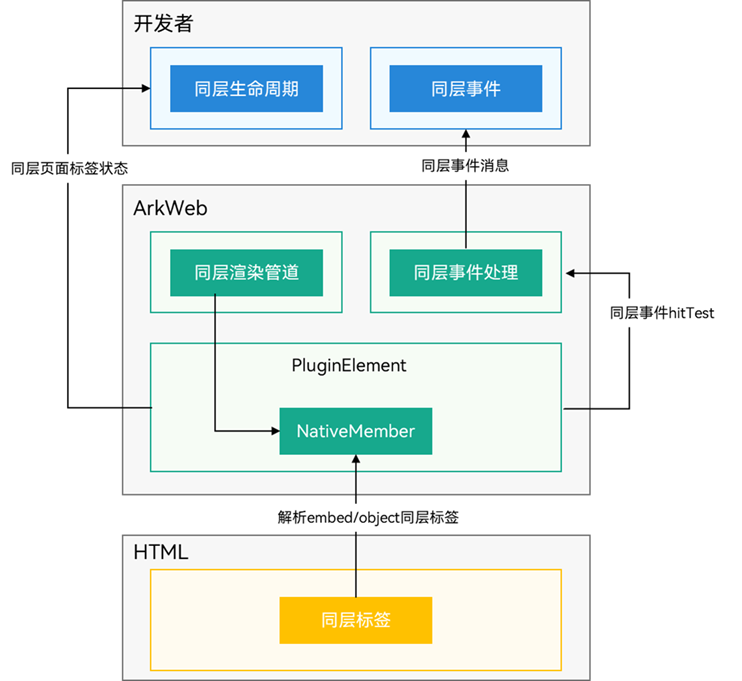
ArkWeb同层渲染特性主要提供两种能力:同层标签生命周期和事件命中转发处理。
同层标签生命周期主要关联前端标签(<embed>/<object>),同时命中到同层标签的事件会被上报到开发者侧,由开发者分发到对应组件树。整体框架如下图所示:
图1 同层渲染整体架构
[h2]可被同层渲染的ArkUI组件
以下规格对Web网页和三方框架场景均生效。
支持的组件范围:
-
基础组件:AlphabetIndexer, Blank, Button, CalendarPicker, Checkbox, CheckboxGroup, ContainerSpan, DataPanel, DatePicker, Divider, Gauge, Hyperlink, Image, ImageAnimator, ImageSpan, LoadingProgress, Marquee, PatternLock, Progress, QRCode, Radio, Rating, Refresh, ScrollBar, Search, Span, Select, Slider, Text, TextArea, TextClock, TextInput, TextPicker, TextTimer, TimePicker, Toggle
-
容器类组件:Badge, Column, ColumnSplit, Counter, Flex, GridCol, GridRow, Grid, GridItem, List, ListItem, ListItemGroup, RelativeContainer, Row, RowSplit, Scroll, Stack, Swiper, Tabs, TabContent, NodeContainer, SideBarContainer, Stepper, StepperItem, WaterFlow, FlowItem
-
自绘制类组件:XComponent, Canvas, Video, Web
-
命令式自定义绘制节点:BuilderNode, ComponentContent, ContentSlot, FrameNode, Graphics, NodeController, RenderNode, XComponentNode, AttributeUpdater, ArkUI_NativeModule(支持同层渲染的组件范围同ArkTS)
支持的组件通用属性与事件:
[h2]Web网页的同层渲染标签
此规格仅针对Web网页,不适用于三方框架场景。
如果应用需要在Web组件加载的网页中使用同层渲染,需要按照以下规格将网页中的<embed>、<object>标签指定为同层渲染组件。
支持的H5标签:
-
支持<embed>标签:在开启同层渲染后,仅支持type类型为native前缀的标签识别为同层组件,不支持自定义属性。
-
支持<object>标签:在开启同层渲染后,支持将非标准MIME type的object标签识别为同层组件,支持通过param/value的自定义属性解析。
-
不支持W3C规范标准标签(如<input>、<video>)定义为同层标签。
-
不支持同时配置<object>标签和<embed>标签作为同层标签。
-
标签类型只支持英文字符,不区分大小写。
同层标签支持的css属性:
display,position,z-index,visibility,opacity, background-color,background-image,width,height,padding,padding-left,padding-top,padding-right,padding-bottom,margin,margin-left,margin-top,margin-right,margin-bottom,border-width,border-style,border-color,border-left-width,border-left-style,border-left-color,border-top-width,border-top-style,border-top-color,border-right-width,border-right-style,border-right-color,border-bottom-width,border-bottom-style,border-bottom-color,border-left,border-right,border-top,border-bottom,border,border-top-left-radius,border-top-right-radius,border-bottom-left-radius,border-bottom-right-radius,border-radius,transition,transform(仅支持translate/scale,scale对应参数只支持大于等于0的值)
除上面支持的css属性范围,其他的css属性均不保证符合预期,比如transform属性中的rotate,skew等。
同层标签的生命周期管理:
当同层标签生命周期变化时触发onNativeEmbedLifecycleChange()回调。
-
支持创建、销毁、位置宽高变化。
-
支持同层组件所在Web页面进入前进后退缓存。
同层标签的输入事件分发处理:
-
支持触摸事件TouchEvent的DOWN/UP/MOVE/CANCEL。支持onNativeEmbedGestureEvent(配置触摸事件消费结果),默认为应用侧消费。
-
不支持同层标签所在的应用页面缩放和initialScale、zoom、zoomIn、zoomOut等缩放接口。
-
暂不支持鼠标、键盘、触摸板事件上报。
-
支持默认将鼠标和触摸板左键事件(MousePress/MouseRelease/MouseMOVE)转换为触摸事件(TouchDOWN/TouchUP/TouchMOVE)上报。
同层标签的可见状态变化:
当同层标签可见状态变化时触发onNativeEmbedVisibilityChange回调。
-
支持同层标签相对于视口的可见状态上报。
-
默认不支持由于同层标签CSS样式或尺寸变化导致的可见状态变化上报,具体规格参考onNativeEmbedVisibilityChange。
同层渲染<object>标签内嵌param元素状态变化:
当同层渲染<object>内嵌标签param元素变化时触发onNativeEmbedObjectParamChange()回调。
-
支持上报param元素的增加、修改、删除三种状态变化。
-
接口每次最多上报500个param元素变化信息,超出部分将分多次上报。
-
详细上报信息参考NativeEmbedParamDataInfo。
约束限制:
-
Web页面内同层标签数量应控制在5个以内。超过5个,渲染性能将会下降。
-
受GPU限制,同层标签最大高度不超过8000px,最大纹理大小为8000px。
-
开启同层渲染后,Web组件打开的所有Web页面将不支持同步渲染模式RenderMode。
-
Video组件:在非全屏Video变为全屏时,Video组件变为非纹理导出模式,视频播放状态保持延续;恢复为非全屏时,变为纹理导出模式,视频播放状态保持延续。
-
Web组件:仅支持一层同层渲染嵌套,不支持多层同层渲染嵌套。输入事件只支持滑动、点击、长按,不支持拖拽、旋转、缩放。
-
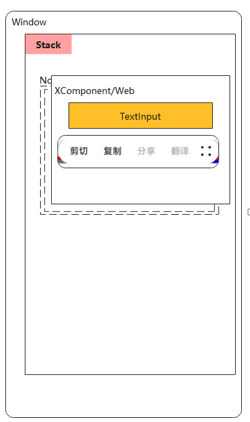
涉及界面交互的ArkUI组件(如TextInput等):建议在页面布局中使用Stack包裹同层组件容器与BuilderNode,并使两者位置一致,NodeContainer要与<embed>/<object>标签对齐,以保障组件正常交互。如两者位置不一致,可能出现的问题有:TextInput/TextArea等附属的文本选择框位置错位(如下图)、LoadingProgress/Marquee等组件的动画启停与组件可见状态不匹配。
图2 未使用Stack包裹,TextInput的位置错位
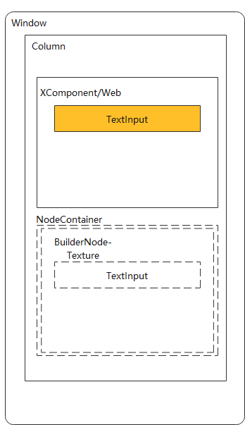
图3 使用Stack包裹,TextInput的位置正常
Web页面中同层渲染输入框
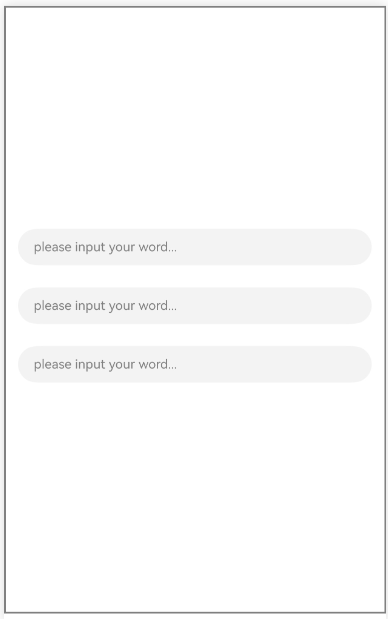
在Web页面中,可以使用ArkUI系统的TextInput组件进行同层渲染。此处利用同层渲染展示三个输入框,渲染效果图如下:
图4 同层渲染输入框
-
在Web页面中标记需要同层渲染的HTML标签。
同层渲染支持<embed>/<object>两种标签。type类型可任意指定,两个字符串参数均不区分大小写,ArkWeb内核将会统一转换为小写。其中,tag字符串使用全字符串匹配,type使用字符串前缀匹配。
若开发者不使用该接口或该接口接收的为非法字符串(空字符串)时,ArkWeb内核将使用默认设置,即"embed" + "native/"前缀模式。若指定类型与W3C定义的<embed>或<object>标准类型重合,如registerNativeEmbedRule("object", "application/pdf"),ArkWeb将遵循W3C标准行为,不会将其识别为同层标签。
-
采用<embed>标签。
<!--HAP's src/main/resources/rawfile/text.html--> <!DOCTYPE html> <html> <head> <title>同层渲染HTML</title> <meta name="viewport"> </head> <body style="background:white"> <embed id = "input1" type="native/view" style="width: 100%; height: 100px; margin: 30px; margin-top: 600px"/> <embed id = "input2" type="native/view2" style="width: 100%; height: 100px; margin: 30px; margin-top: 50px"/> <embed id = "input3" type="native/view3" style="width: 100%; height: 100px; margin: 30px; margin-top: 50px"/> </body> </html> -
采用<object>标签。
需要使用registerNativeEmbedRule注册object标签。
Web({src: $rawfile('test2.html'), controller: this.browserTabController})
  // 注册同层标签为'object',类型为'test'前缀
  .registerNativeEmbedRule('object', 'test')
与registerNativeEmbedRule相对应的前端页面代码,类型可使用"test"及以"test"为前缀的字串。
<!--HAP's src/main/resources/rawfile/test2.html-->
<!DOCTYPE html>
<html>
<head>
    <title>同层渲染HTML</title>
    <meta name="viewport">
</head>

<body style="background:white">

<object id = "input1" type="test/input" style="width: 100%; height: 100px; margin: 30px; margin-top: 600px"></object>

<object id = "input2" type="test/input" style="width: 100%; height: 100px; margin: 30px; margin-top: 50px"></object>

<object id = "input3" type="test/input" style="width: 100%; height: 100px; margin: 30px; margin-top: 50px"></object>

</body>
</html>
-
-
在应用侧开启同层渲染功能。
同层渲染功能默认不开启,如果要使用同层渲染的功能,可通过enableNativeEmbedMode来开启。
Web({src: $rawfile('test2.html'), controller: this.browserTabController}) // ... // 配置同层渲染开关开启。 .enableNativeEmbedMode(true) -
创建自定义组件。
同层渲染功能开启后,展示在对应区域的系统组件。
@Component struct TextInputComponent { @Prop params: Params; @State bkColor: Color = Color.White; build() { Column() { TextInput({text: '', placeholder: 'please input your word...'}) .placeholderColor(Color.Gray) .id(this.params?.elementId) .placeholderFont({size: 13, weight: 400}) .caretColor(Color.Gray) .fontSize(14) .fontColor(Color.Black) } // 自定义组件中的最外层容器组件宽高应该为同层标签的宽高。 .width(this.params.width) .height(this.params.height) } } // @Builder中为动态组件的具体组件内容。 @Builder function textInputBuilder(params:Params) { TextInputComponent({params: params}) .backgroundColor(Color.White) } -
创建节点控制器。
用于控制和反馈对应NodeContainer上的节点行为。
// 用于控制和反馈对应的NodeContainer上的节点的行为,需要与NodeContainer一起使用。 class MyNodeController extends NodeController { private rootNode: BuilderNode<[Params]> | undefined | null; private embedId_: string = ''; private surfaceId_: string = ''; private renderType_: NodeRenderType = NodeRenderType.RENDER_TYPE_DISPLAY; private width_: number = 0; private height_: number = 0; private type_: string = ''; private isDestroy_: boolean = false; setRenderOption(params: NodeControllerParams) { this.surfaceId_ = params.surfaceId; this.renderType_ = params.renderType; this.embedId_ = params.embedId; this.width_ = params.width; this.height_ = params.height; this.type_ = params.type; } // 必须要重写的方法,用于构建节点树、返回节点树挂载在对应NodeContainer中。 // 在对应NodeContainer创建的时候调用、或者通过rebuild方法调用刷新。 makeNode(uiContext: UIContext): FrameNode | null { if (this.isDestroy_) { // rootNode为null。 return null; } if (!this.rootNode) { // rootNode 为undefined时。 this.rootNode = new BuilderNode(uiContext, { surfaceId: this.surfaceId_, type: this.renderType_ }); if (this.rootNode) { this.rootNode.build( wrapBuilder(textInputBuilder), { textOne: 'myTextInput', width: this.width_, height: this.height_ }); return this.rootNode.getFrameNode(); }else{ return null; } } // 返回FrameNode节点。 return this.rootNode.getFrameNode(); } updateNode(arg: Object): void { this.rootNode?.update(arg); } getEmbedId(): string { return this.embedId_; } setDestroy(isDestroy: boolean): void { this.isDestroy_ = isDestroy; if (this.isDestroy_) { this.rootNode = null; } } postEvent(event: TouchEvent | undefined): boolean { return this.rootNode?.postTouchEvent(event) as boolean; } postInputEvent(event: MouseEvent | undefined): boolean { return this.rootNode?.postInputEvent(event) as boolean; } } -
监听同层渲染的生命周期变化。
开启该功能后,当网页中存在同层渲染支持的标签时,ArkWeb内核会触发由onNativeEmbedLifecycleChange注册的回调函数。
开发者则需要调用onNativeEmbedLifecycleChange来监听同层渲染标签的生命周期变化。
// 获取embed标签的生命周期变化数据。 .onNativeEmbedLifecycleChange((embed) => { console.info('NativeEmbed surfaceId' + embed.surfaceId); // 如果使用embed.info.id作为映射nodeController的key,请在H5页面显式指定id。 const componentId = embed.info?.id?.toString() as string; if (embed.status === NativeEmbedStatus.CREATE) { console.info('NativeEmbed create' + JSON.stringify(embed.info)); // 创建节点控制器、设置参数。 let nodeController = new MyNodeController(); // embed.info.width和embed.info.height单位是px格式,需要转换成ets侧的默认单位vp。 nodeController.setRenderOption({surfaceId : embed.surfaceId as string, type : embed.info?.type as string, renderType : NodeRenderType.RENDER_TYPE_TEXTURE, embedId : embed.embedId as string, width : this.uiContext.px2vp(embed.info?.width), height : this.uiContext.px2vp(embed.info?.height)}); this.edges = { left: `${embed.info?.position?.x as number}px`, top: `${embed.info?.position?.y as number}px` }; nodeController.setDestroy(false); // 根据Web传入的embed的id属性作为key,将nodeController存入Map。 this.nodeControllerMap.set(componentId, nodeController); this.widthMap.set(componentId, this.uiContext.px2vp(embed.info?.width)); this.heightMap.set(componentId, this.uiContext.px2vp(embed.info?.height)); this.positionMap.set(componentId, this.edges); // 将Web传入的embed的id属性存入@State状态数组变量中,用于动态创建nodeContainer节点容器,需要将push动作放在set之后。 this.componentIdArr.push(componentId); } else if (embed.status === NativeEmbedStatus.UPDATE) { let nodeController = this.nodeControllerMap.get(componentId); console.info('NativeEmbed update' + JSON.stringify(embed)); this.edges = {left: `${embed.info?.position?.x as number}px`, top: `${embed.info?.position?.y as number}px`}; this.positionMap.set(componentId, this.edges); this.widthMap.set(componentId, this.uiContext.px2vp(embed.info?.width)); this.heightMap.set(componentId, this.uiContext.px2vp(embed.info?.height)); interface UpdateNodeParams { textOne: string; width: number; height: number; } const updateParams: UpdateNodeParams = { textOne: 'update', width: this.uiContext.px2vp(embed.info?.width), height: this.uiContext.px2vp(embed.info?.height) } nodeController?.updateNode(updateParams); } else if (embed.status === NativeEmbedStatus.DESTROY) { console.info('NativeEmbed destroy' + JSON.stringify(embed)); let nodeController = this.nodeControllerMap.get(componentId); nodeController?.setDestroy(true); this.nodeControllerMap.delete(componentId); this.positionMap.delete(componentId); this.widthMap.delete(componentId); this.heightMap.delete(componentId); this.componentIdArr = this.componentIdArr.filter((value: string) => value != componentId); } else { console.info('NativeEmbed status' + embed.status); } }) -
同层渲染手势事件。
开启该功能后,每当在同层渲染的区域进行触摸操作时,ArkWeb内核会触发onNativeEmbedGestureEvent注册的回调函数。
开发者则需要调用onNativeEmbedGestureEvent来监听同层渲染区域的手势事件。
// 获取同层渲染组件触摸事件信息。 .onNativeEmbedGestureEvent((touch) => { console.info('NativeEmbed onNativeEmbedGestureEvent' + JSON.stringify(touch.touchEvent)); this.componentIdArr.forEach((componentId: string) => { let nodeController = this.nodeControllerMap.get(componentId); // 将获取到的同层区域的事件发送到该区域embedId对应的nodeController上。 if (nodeController?.getEmbedId() === touch.embedId) { let ret = nodeController?.postEvent(touch.touchEvent); if (ret) { console.info('onNativeEmbedGestureEvent success ' + componentId); } else { console.info('onNativeEmbedGestureEvent fail ' + componentId); } if (touch.result) { // 通知Web组件手势事件消费结果。 touch.result.setGestureEventResult(ret); } } }) }) -
同层渲染鼠标事件
开启该功能后,在同层渲染的区域进行下述动作时,ArkWeb内核会触发onNativeEmbedMouseEvent注册的回调函数:
- 使用鼠标左键、中键、右键进行点击或长按。
- 使用触摸板进行对应鼠标左键、中键、右键点击长按的操作。
开发者则需要调用onNativeEmbedMouseEvent来监听同层渲染区域的鼠标事件。
.onNativeEmbedMouseEvent((mouse) => {
  console.info('NativeEmbed onNativeEmbedMouseEvent' + JSON.stringify(mouse.mouseEvent));
  this.componentIdArr.forEach((componentId: string) => {
    let nodeController = this.nodeControllerMap.get(componentId);
    // 将获取到的同层区域的事件发送到该区域embedId对应的nodeController上。
    if (nodeController?.getEmbedId() === mouse.embedId) {
      let ret = nodeController?.postInputEvent(mouse.mouseEvent);
      if (ret) {
        console.info('onNativeEmbedMouseEvent success ' + componentId);
      } else {
        console.info('onNativeEmbedMouseEvent fail ' + componentId);
      }
      if (mouse.result) {
        // 通知Web组件鼠标事件消费结果。
        mouse.result.setMouseEventResult(ret);
      }
    }
  })
})
完整示例:
使用前请在module.json5中添加网络权限,添加方法请参考在配置文件中声明权限。
"requestPermissions":[
  {
    "name" : "ohos.permission.INTERNET"
  }
],
应用侧代码。
import { webview } from '@kit.ArkWeb';
import { UIContext, NodeController, BuilderNode, NodeRenderType, FrameNode } from '@kit.ArkUI';

@Observed
declare class Params{
  public elementId: string
  public textOne: string
  public textTwo: string
  public width: number
  public height: number
}

declare class NodeControllerParams {
  public surfaceId: string
  public type: string
  public renderType: NodeRenderType
  public embedId: string
  public width: number
  public height: number
}

// 用于控制和反馈对应的NodeContainer上的节点的行为,需要与NodeContainer一起使用。
class MyNodeController extends NodeController {
  private rootNode: BuilderNode<[Params]> | undefined | null;
  private embedId_: string = '';
  private surfaceId_: string = '';
  private renderType_: NodeRenderType = NodeRenderType.RENDER_TYPE_DISPLAY;
  private width_: number = 0;
  private height_: number = 0;
  private type_: string = '';
  private isDestroy_: boolean = false;

  setRenderOption(params: NodeControllerParams) {
    this.surfaceId_ = params.surfaceId;
    this.renderType_ = params.renderType;
    this.embedId_ = params.embedId;
    this.width_ = params.width;
    this.height_ = params.height;
    this.type_ = params.type;
  }

  // 必须要重写的方法,用于构建节点树、返回节点树挂载在对应NodeContainer中。
  // 在对应NodeContainer创建的时候调用、或者通过rebuild方法调用刷新。
  makeNode(uiContext: UIContext): FrameNode | null {
    if (this.isDestroy_) { // rootNode为null。
      return null;
    }
    if (!this.rootNode) { // rootNode 为undefined时。
      this.rootNode = new BuilderNode(uiContext, { surfaceId: this.surfaceId_, type: this.renderType_ });
      if (this.rootNode) {
        this.rootNode.build(
          wrapBuilder(textInputBuilder), {  textOne: 'myTextInput', width: this.width_, height: this.height_  });
        return this.rootNode.getFrameNode();
      }else{
        return null;
      }
    }
    // 返回FrameNode节点。
    return this.rootNode.getFrameNode();
  }

  updateNode(arg: Object): void {
    this.rootNode?.update(arg);
  }

  getEmbedId(): string {
    return this.embedId_;
  }

  setDestroy(isDestroy: boolean): void {
    this.isDestroy_ = isDestroy;
    if (this.isDestroy_) {
      this.rootNode = null;
    }
  }

  postEvent(event: TouchEvent | undefined): boolean {
    return this.rootNode?.postTouchEvent(event) as boolean;
  }

  postInputEvent(event: MouseEvent | undefined): boolean {
    return this.rootNode?.postInputEvent(event) as boolean;
  }
}

@Component
struct TextInputComponent {
  @Prop params: Params;
  @State bkColor: Color = Color.White;

  build() {
    Column() {
      TextInput({text: '', placeholder: 'please input your word...'})
        .placeholderColor(Color.Gray)
        .id(this.params?.elementId)
        .placeholderFont({size: 13, weight: 400})
        .caretColor(Color.Gray)
        .fontSize(14)
        .fontColor(Color.Black)
    }
    // 自定义组件中的最外层容器组件宽高应该为同层标签的宽高。
    .width(this.params.width)
    .height(this.params.height)
  }
}

// @Builder中为动态组件的具体组件内容。
@Builder
function textInputBuilder(params:Params) {
  TextInputComponent({params: params})
    .backgroundColor(Color.White)
}

@Entry
@Component
struct Page{
  browserTabController: WebviewController = new webview.WebviewController()
  private nodeControllerMap: Map<string, MyNodeController> = new Map();
  @State componentIdArr: Array<string> = [];
  @State widthMap: Map<string, number> = new Map();
  @State heightMap: Map<string, number> = new Map();
  @State positionMap: Map<string, Edges> = new Map();
  @State edges: Edges = {};
  uiContext: UIContext = this.getUIContext();

  build() {
    Row() {
      Column() {
        Stack() {
          ForEach(this.componentIdArr, (componentId: string) => {
            NodeContainer(this.nodeControllerMap.get(componentId))
              .position(this.positionMap.get(componentId))
              .width(this.widthMap.get(componentId))
              .height(this.heightMap.get(componentId))
          }, (embedId: string) => embedId)
          // Web组件加载本地test2.html页面。
          Web({src: $rawfile('test2.html'), controller: this.browserTabController})
            // 注册同层标签为'object',类型为'test'前缀
            .registerNativeEmbedRule('object', 'test')
            // 配置同层渲染开关开启。
            .enableNativeEmbedMode(true)
            // 获取embed标签的生命周期变化数据。
            .onNativeEmbedLifecycleChange((embed) => {
              console.info('NativeEmbed surfaceId' + embed.surfaceId);
              // 如果使用embed.info.id作为映射nodeController的key,请在H5页面显式指定id。
              const componentId = embed.info?.id?.toString() as string;
              if (embed.status === NativeEmbedStatus.CREATE) {
                console.info('NativeEmbed create' + JSON.stringify(embed.info));
                // 创建节点控制器、设置参数。
                let nodeController = new MyNodeController();
                // embed.info.width和embed.info.height单位是px格式,需要转换成ets侧的默认单位vp。
                nodeController.setRenderOption({surfaceId : embed.surfaceId as string,
                  type : embed.info?.type as string,
                  renderType : NodeRenderType.RENDER_TYPE_TEXTURE,
                  embedId : embed.embedId as string,
                  width : this.uiContext.px2vp(embed.info?.width),
                  height : this.uiContext.px2vp(embed.info?.height)});
                this.edges = {
                  left: `${embed.info?.position?.x as number}px`,
                  top: `${embed.info?.position?.y as number}px`
                };
                nodeController.setDestroy(false);
                // 根据Web传入的embed的id属性作为key,将nodeController存入Map。
                this.nodeControllerMap.set(componentId, nodeController);
                this.widthMap.set(componentId, this.uiContext.px2vp(embed.info?.width));
                this.heightMap.set(componentId, this.uiContext.px2vp(embed.info?.height));
                this.positionMap.set(componentId, this.edges);
                // 将Web传入的embed的id属性存入@State状态数组变量中,用于动态创建nodeContainer节点容器,需要将push动作放在set之后。
                this.componentIdArr.push(componentId);
              } else if (embed.status === NativeEmbedStatus.UPDATE) {
                let nodeController = this.nodeControllerMap.get(componentId);
                console.info('NativeEmbed update' + JSON.stringify(embed));
                this.edges = {left: `${embed.info?.position?.x as number}px`, top: `${embed.info?.position?.y as number}px`};
                this.positionMap.set(componentId, this.edges);
                this.widthMap.set(componentId, this.uiContext.px2vp(embed.info?.width));
                this.heightMap.set(componentId, this.uiContext.px2vp(embed.info?.height));
                interface UpdateNodeParams {
                  textOne: string;
                  width: number;
                  height: number;
                }
                const updateParams: UpdateNodeParams = {
                  textOne: 'update',
                  width: this.uiContext.px2vp(embed.info?.width),
                  height: this.uiContext.px2vp(embed.info?.height)
                }
                nodeController?.updateNode(updateParams);
              } else if (embed.status === NativeEmbedStatus.DESTROY) {
                console.info('NativeEmbed destroy' + JSON.stringify(embed));
                let nodeController = this.nodeControllerMap.get(componentId);
                nodeController?.setDestroy(true);
                this.nodeControllerMap.delete(componentId);
                this.positionMap.delete(componentId);
                this.widthMap.delete(componentId);
                this.heightMap.delete(componentId);
                this.componentIdArr = this.componentIdArr.filter((value: string) => value != componentId);
              } else {
                console.info('NativeEmbed status' + embed.status);
              }
            })
            // 获取同层渲染组件触摸事件信息。
            .onNativeEmbedGestureEvent((touch) => {
              console.info('NativeEmbed onNativeEmbedGestureEvent' + JSON.stringify(touch.touchEvent));
              this.componentIdArr.forEach((componentId: string) => {
                let nodeController = this.nodeControllerMap.get(componentId);
                // 将获取到的同层区域的事件发送到该区域embedId对应的nodeController上。
                if (nodeController?.getEmbedId() === touch.embedId) {
                  let ret = nodeController?.postEvent(touch.touchEvent);
                  if (ret) {
                    console.info('onNativeEmbedGestureEvent success ' + componentId);
                  } else {
                    console.info('onNativeEmbedGestureEvent fail ' + componentId);
                  }
                  if (touch.result) {
                    // 通知Web组件手势事件消费结果。
                    touch.result.setGestureEventResult(ret);
                  }
                }
              })
            })
            .onNativeEmbedMouseEvent((mouse) => {
              console.info('NativeEmbed onNativeEmbedMouseEvent' + JSON.stringify(mouse.mouseEvent));
              this.componentIdArr.forEach((componentId: string) => {
                let nodeController = this.nodeControllerMap.get(componentId);
                // 将获取到的同层区域的事件发送到该区域embedId对应的nodeController上。
                if (nodeController?.getEmbedId() === mouse.embedId) {
                  let ret = nodeController?.postInputEvent(mouse.mouseEvent);
                  if (ret) {
                    console.info('onNativeEmbedMouseEvent success ' + componentId);
                  } else {
                    console.info('onNativeEmbedMouseEvent fail ' + componentId);
                  }
                  if (mouse.result) {
                    // 通知Web组件鼠标事件消费结果。
                    mouse.result.setMouseEventResult(ret);
                  }
                }
              })
            })
        }
      }
    }
  }
}
绘制XComponent+AVPlayer和Button组件
-
应用侧代码组件使用示例。
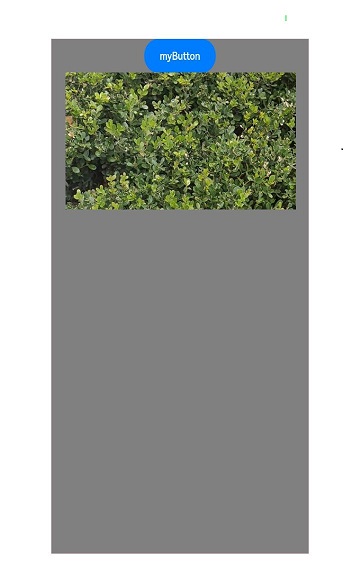
// 创建NodeController import { webview } from '@kit.ArkWeb'; import { UIContext, NodeController, BuilderNode, NodeRenderType, FrameNode } from '@kit.ArkUI'; import { AVPlayerDemo } from './PlayerDemo'; @Observed declare class Params { public textOne : string public textTwo : string public width : number public height : number } declare class NodeControllerParams { public surfaceId : string public type : string public renderType : NodeRenderType public embedId : string public width : number public height : number } // 用于控制和反馈对应的NodeContainer上的节点的行为,需要与NodeContainer一起使用。 class MyNodeController extends NodeController { private rootNode: BuilderNode<[Params]> | undefined | null; private embedId_ : string = ''; private surfaceId_ : string = ''; private renderType_ :NodeRenderType = NodeRenderType.RENDER_TYPE_DISPLAY; private width_ : number = 0; private height_ : number = 0; private type_ : string = ''; private isDestroy_ : boolean = false; setRenderOption(params : NodeControllerParams) { this.surfaceId_ = params.surfaceId; this.renderType_ = params.renderType; this.embedId_ = params.embedId; this.width_ = params.width; this.height_ = params.height; this.type_ = params.type; } // 必须要重写的方法,用于构建节点树、返回节点树挂载在对应NodeContainer中。 // 在对应NodeContainer创建的时候调用、或者通过rebuild方法调用刷新。 makeNode(uiContext: UIContext): FrameNode | null{ if (this.isDestroy_) { // rootNode为null。 return null; } if (!this.rootNode) { // rootNode 为undefined时。 this.rootNode = new BuilderNode(uiContext, { surfaceId: this.surfaceId_, type: this.renderType_}); if (this.type_ === 'native/video') { this.rootNode.build( wrapBuilder(videoBuilder), {textOne: 'myButton', width : this.width_, height : this.height_}); } else { return null; } } // 返回FrameNode节点。 return this.rootNode.getFrameNode(); } updateNode(arg: Object): void { this.rootNode?.update(arg); } getEmbedId() : string { return this.embedId_; } setDestroy(isDestroy : boolean) : void { this.isDestroy_ = isDestroy; if (this.isDestroy_) { this.rootNode = null; } } postEvent(event: TouchEvent | undefined) : boolean { return this.rootNode?.postTouchEvent(event) as boolean; } postInputEvent(event: MouseEvent | undefined): boolean { return this.rootNode?.postInputEvent(event) as boolean; } } @Component struct VideoComponent { @ObjectLink params: Params; @State bkColor: Color = Color.Red; mXComponentController: XComponentController = new XComponentController(); @State playerChanged: boolean = false; player?: AVPlayerDemo; build() { Column() { Button(this.params.textOne); XComponent({ id: 'video_player_id', type: XComponentType.SURFACE, controller: this.mXComponentController}) .border({width: 1, color: Color.Red}) .onLoad(() => { this.player = new AVPlayerDemo(); this.player.setSurfaceID(this.mXComponentController.getXComponentSurfaceId()); this.playerChanged = !this.playerChanged; this.player.avPlayerLiveDemo(); }) .width(300) .height(200) } // 自定义组件中的最外层容器组件宽高应该为同层标签的宽高。 .width(this.params.width) .height(this.params.height) } } // @Builder中为动态组件的具体组件内容。 @Builder function videoBuilder(params: Params) { VideoComponent({ params: params }) .backgroundColor(Color.Gray) } @Entry @Component struct WebIndex { browserTabController: WebviewController = new webview.WebviewController(); private nodeControllerMap: Map<string, MyNodeController> = new Map(); @State componentIdArr: Array<string> = []; @State widthMap: Map<string, number> = new Map(); @State heightMap: Map<string, number> = new Map(); @State positionMap: Map<string, Edges> = new Map(); @State edges: Edges = {}; uiContext: UIContext = this.getUIContext(); aboutToAppear() { // 配置Web开启调试模式。 webview.WebviewController.setWebDebuggingAccess(true); } build(){ Row() { Column() { Stack() { ForEach(this.componentIdArr, (componentId: string) => { NodeContainer(this.nodeControllerMap.get(componentId)) .position(this.positionMap.get(componentId)) .width(this.widthMap.get(componentId)) .height(this.heightMap.get(componentId)) }, (embedId: string) => embedId) // Web组件加载本地test3.html页面。 Web({ src: $rawfile('test3.html'), controller: this.browserTabController }) // 配置同层渲染开关开启。 .enableNativeEmbedMode(true) // 获取<embed>标签的生命周期变化数据。 .onNativeEmbedLifecycleChange((embed) => { console.info('NativeEmbed surfaceId' + embed.surfaceId); // 1. 如果使用embed.info.id作为映射nodeController的key,请在H5页面显式指定id。 const componentId = embed.info?.id?.toString() as string; if (embed.status === NativeEmbedStatus.CREATE) { console.info('NativeEmbed create' + JSON.stringify(embed.info)); // 创建节点控制器,设置参数。 let nodeController = new MyNodeController(); // 1. embed.info.width和embed.info.height单位是px格式,需要转换成ets侧的默认单位vp。 nodeController.setRenderOption({ surfaceId : embed.surfaceId as string, type : embed.info?.type as string, renderType : NodeRenderType.RENDER_TYPE_TEXTURE, embedId : embed.embedId as string, width : this.uiContext.px2vp(embed.info?.width), height : this.uiContext.px2vp(embed.info?.height)}); this.edges = {left: `${embed.info?.position?.x as number}px`, top: `${embed.info?.position?.y as number}px`}; nodeController.setDestroy(false); // 根据Web传入的embed的id属性作为key,将nodeController存入map。 this.nodeControllerMap.set(componentId, nodeController); this.widthMap.set(componentId, this.uiContext.px2vp(embed.info?.width)); this.heightMap.set(componentId, this.uiContext.px2vp(embed.info?.height)); this.positionMap.set(componentId, this.edges); // 将Web传入的embed的id属性存入@State状态数组变量中,用于动态创建NodeContainer节点容器,需要将push动作放在set之后。 this.componentIdArr.push(componentId); } else if (embed.status === NativeEmbedStatus.UPDATE) { let nodeController = this.nodeControllerMap.get(componentId); this.edges = {left: `${embed.info?.position?.x as number}px`, top: `${embed.info?.position?.y as number}px`}; this.positionMap.set(componentId, this.edges); this.widthMap.set(componentId, this.uiContext.px2vp(embed.info?.width)); this.heightMap.set(componentId, this.uiContext.px2vp(embed.info?.height)); interface UpdateNodeParams { textOne: string; width: number; height: number; } const updateParams: UpdateNodeParams = { textOne: 'update', width: this.uiContext.px2vp(embed.info?.width), height: this.uiContext.px2vp(embed.info?.height) } nodeController?.updateNode(updateParams); } else if (embed.status === NativeEmbedStatus.DESTROY) { let nodeController = this.nodeControllerMap.get(componentId); nodeController?.setDestroy(true); this.nodeControllerMap.delete(componentId); this.positionMap.delete(componentId); this.widthMap.delete(componentId); this.heightMap.delete(componentId); this.componentIdArr = this.componentIdArr.filter((value: string) => value != componentId); } else { console.info('NativeEmbed status' + embed.status); } })// 获取同层渲染组件触摸事件信息。 .onNativeEmbedGestureEvent((touch) => { console.info('NativeEmbed onNativeEmbedGestureEvent' + JSON.stringify(touch.touchEvent)); this.componentIdArr.forEach((componentId: string) => { let nodeController = this.nodeControllerMap.get(componentId); // 将获取到的同层区域的事件发送到该区域embedId对应的nodeController上。 if (nodeController?.getEmbedId() === touch.embedId) { let ret = nodeController?.postEvent(touch.touchEvent); if (ret) { console.info('onNativeEmbedGestureEvent success ' + componentId); } else { console.info('onNativeEmbedGestureEvent fail ' + componentId); } if (touch.result) { // 通知Web组件手势事件消费结果。 touch.result.setGestureEventResult(ret); } } }) }) .onNativeEmbedMouseEvent((mouse) => { console.info('NativeEmbed onNativeEmbedMouseEvent' + JSON.stringify(mouse.mouseEvent)); this.componentIdArr.forEach((componentId: string) => { let nodeController = this.nodeControllerMap.get(componentId); // 将获取到的同层区域的事件发送到该区域embedId对应的nodeController上。 if(nodeController?.getEmbedId() === mouse.embedId) { let ret = nodeController?.postInputEvent(mouse.mouseEvent); if(ret) { console.info('onNativeEmbedMouseEvent success ' + componentId); } else { console.info('onNativeEmbedMouseEvent fail ' + componentId); } if(mouse.result) { // 通知Web组件鼠标事件消费结果。 mouse.result.setMouseEventResult(ret); } } }) }) } } } } } -
应用侧代码示例,视频播放,使用时需替换为正确的视频链接地址。
import { media } from '@kit.MediaKit'; import { BusinessError } from '@kit.BasicServicesKit'; export class AVPlayerDemo { private count: number = 0; private surfaceId: string = ''; // surfaceId用于播放画面显示,具体的值需要通过XComponent接口获取,相关文档链接见上面XComponent创建方法。 private isSeek: boolean = true; // 用于区分模式是否支持seek操作。 setSurfaceID(id: string){ console.info('setSurfaceID : ' + id); this.surfaceId = id; } // 注册avplayer回调函数。 setAVPlayerCallback(avPlayer: media.AVPlayer) { // seek操作结果回调函数。 avPlayer.on('seekDone', (seekDoneTime: number) => { console.info(`AVPlayer seek succeeded, seek time is ${seekDoneTime}`); }) // error回调监听函数,当avplayer在操作过程中出现错误时,调用reset接口触发重置流程。 avPlayer.on('error', (err: BusinessError) => { console.error(`Invoke avPlayer failed, code is ${err.code}, message is ${err.message}`); avPlayer.reset(); }) // 状态机变化回调函数。 avPlayer.on('stateChange', async (state: string, reason: media.StateChangeReason) => { switch (state) { case 'idle': // 成功调用reset接口后触发该状态机上报。 console.info('AVPlayer state idle called.'); avPlayer.release(); // 调用release接口销毁实例对象。 break; case 'initialized': // avplayer 设置播放源后触发该状态上报。 console.info('AVPlayer state initialized called.'); avPlayer.surfaceId = this.surfaceId; // 设置显示画面,当播放的资源为纯音频时无需设置。 avPlayer.prepare(); break; case 'prepared': // prepared调用成功后上报该状态机。 console.info('AVPlayer state prepared called.'); avPlayer.play(); // 调用播放接口开始播放。 break; case 'playing': // play成功调用后触发该状态机上报。 console.info('AVPlayer state playing called.'); if(this.count !== 0) { if (this.isSeek) { console.info('AVPlayer start to seek.'); avPlayer.seek(avPlayer.duration); // seek到视频末尾。 } else { // 当播放模式不支持seek操作时继续播放到结尾。 console.info('AVPlayer wait to play end.'); } } else { avPlayer.pause(); // 调用暂停接口暂停播放。 } this.count++; break; case 'paused': // pause成功调用后触发该状态机上报。 console.info('AVPlayer state paused called.'); avPlayer.play(); // 再次播放接口开始播放。 break; case 'completed': // 播放接口后触发该状态机上报。 console.info('AVPlayer state completed called.'); avPlayer.stop(); // 调用停止播放接口。 break; case 'stopped': // stop接口后触发该状态机上报。 console.info('AVPlayer state stopped called.'); avPlayer.reset(); // 调用reset接口初始化avplayer状态。 break; case 'released': // 退出后触发该状态机上报。 console.info('AVPlayer state released called.'); break; default: break; } }) } // 通过url设置网络地址来实现播放直播码流。 async avPlayerLiveDemo(){ try { // 创建avPlayer实例对象。 let avPlayer: media.AVPlayer = await media.createAVPlayer(); // 创建状态机变化回调函数。 this.setAVPlayerCallback(avPlayer); this.isSeek = false; // 不支持seek操作。 // 使用时需要自行替换视频链接。 avPlayer.url = 'xxx/demo.mp4'; } catch (error) { console.error('Failed to create or play video: ', error); } } } -
前端页面示例。
<!--HAP's src/main/resources/rawfile/test3.html--> <!DOCTYPE html> <html> <head> <title>同层渲染测试HTML</title> <meta name="viewport"> </head> <body> <div> <div id="bodyId"> <embed id="nativeVideo" type = "native/video" width="1000" height="1500" src="test" style = "background-color:red"/> </div> </div> </body> </html> -
实现效果:
同层标签设置为最高层级
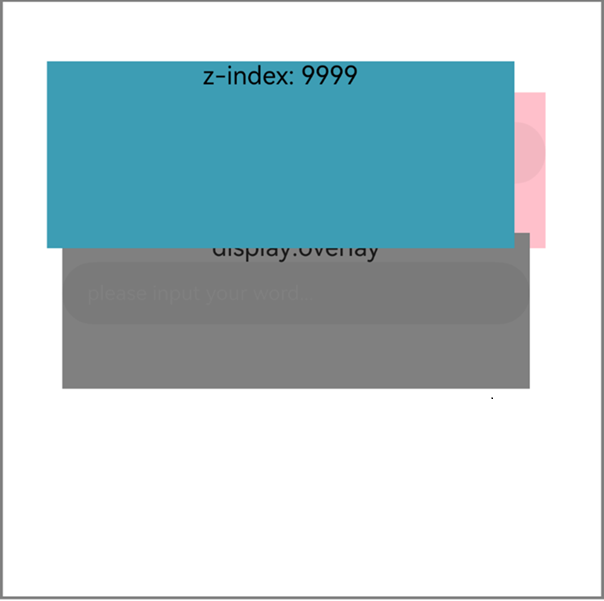
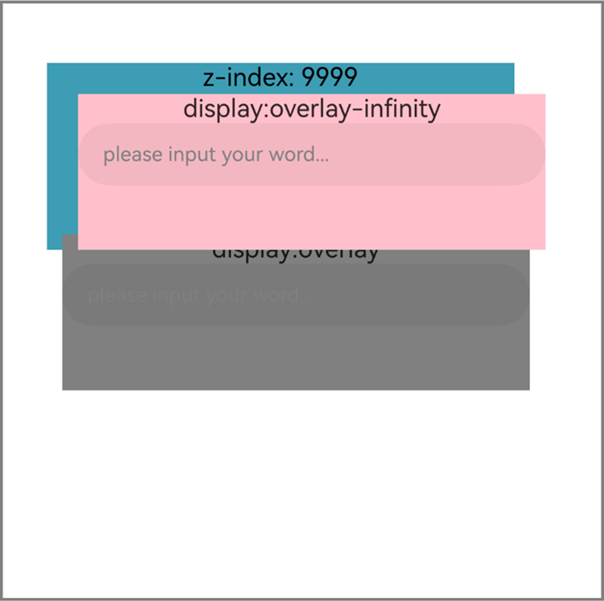
同层渲染支持私有属性arkwebnativestyle,该属性仅在开启同层渲染后的<embed>和<object>中生效,该属性的display属性用于控制同层标签的显示层级,使其高于其他Web元素。如果多个同层标签都设置了arkwebnativestyle的display属性,并且属性相同,则它们的层级顺序将遵循W3C标准层级排序规则:先比较z-index属性值,当z-index相同时,按照元素在DOM中的先后顺序排序。display属性取值说明如下:
| display取值 | 说明 |
|---|---|
| overlay | 设置同层标签层级高于其他Web元素。 |
| overlay-infinity | 设置同层标签层级高于其他Web元素和设置overlay的同层标签。 |
- 应用侧代码:
import { webview } from '@kit.ArkWeb';
import { UIContext, NodeController, BuilderNode, NodeRenderType, FrameNode } from '@kit.ArkUI';

@Observed
declare class Params{
  public elementId: string
  public textOne: string
  public textTwo: string
  public width: number
  public height: number
}

declare class NodeControllerParams {
  public surfaceId: string
  public type: string
  public renderType: NodeRenderType
  public embedId: string
  public width: number
  public height: number
}

// 用于控制和反馈对应的NodeContainer上的节点的行为,需要与NodeContainer一起使用。
class MyNodeController extends NodeController {
  private rootNode: BuilderNode<[Params]> | undefined | null;
  private embedId_: string = '';
  private surfaceId_: string = '';
  private renderType_: NodeRenderType = NodeRenderType.RENDER_TYPE_DISPLAY;
  private width_: number = 0;
  private height_: number = 0;
  private type_: string = '';
  private isDestroy_: boolean = false;

  setRenderOption(params: NodeControllerParams) {
    this.surfaceId_ = params.surfaceId;
    this.renderType_ = params.renderType;
    this.embedId_ = params.embedId;
    this.width_ = params.width;
    this.height_ = params.height;
    this.type_ = params.type;
  }

  // 必须要重写的方法,用于构建节点树、返回节点树挂载在对应NodeContainer中。
  // 在对应NodeContainer创建的时候调用、或者通过rebuild方法调用刷新。
  makeNode(uiContext: UIContext): FrameNode | null {
    if (this.isDestroy_) { // rootNode为null。
      return null;
    }
    if (!this.rootNode) {// rootNode 为undefined时。
      this.rootNode = new BuilderNode(uiContext, { surfaceId: this.surfaceId_, type: this.renderType_ });
      if (this.type_ === 'native/view1') {
        this.rootNode.build(
          wrapBuilder(textInputBuilder1), {  textOne: 'myTextInput', width: this.width_, height: this.height_  });
        return this.rootNode.getFrameNode();
      } else if (this.type_ === 'native/view2') {
        this.rootNode.build(
          wrapBuilder(textInputBuilder2), {  textOne: 'myTextInput', width: this.width_, height: this.height_  });
        return this.rootNode.getFrameNode();
      } else{
        return null;
      }
    }
    // 返回FrameNode节点。
    return this.rootNode.getFrameNode();
  }

  updateNode(arg: Object): void {
    this.rootNode?.update(arg);
  }

  getEmbedId(): string {
    return this.embedId_;
  }

  setDestroy(isDestroy: boolean): void {
    this.isDestroy_ = isDestroy;
    if (this.isDestroy_) {
      this.rootNode = null;
    }
  }

  postEvent(event: TouchEvent | undefined): boolean {
    return this.rootNode?.postTouchEvent(event) as boolean;
  }
}

@Component
struct TextInputComponent1 {
  @Prop params: Params;
  @State bkColor: Color = Color.White;

  build() {
    Column() {
      Text('display:overlay-infinity')
      TextInput({text: '', placeholder: 'please input your word...'})
        .placeholderColor(Color.Gray)
        .id(this.params?.elementId)
        .placeholderFont({size: 13, weight: 400})
        .caretColor(Color.Gray)
        .fontSize(14)
        .fontColor(Color.Black)
    }
    // 自定义组件中的最外层容器组件宽高应该为同层标签的宽高。
    .width(this.params.width)
    .height(this.params.height)
  }
}

// @Builder中为动态组件的具体组件内容。
@Builder
function textInputBuilder1(params:Params) {
  TextInputComponent1({params: params})
    .backgroundColor(Color.Pink)
}

@Component
struct TextInputComponent2 {
  @Prop params: Params;
  @State bkColor: Color = Color.White;

  build() {
    Column() {
      Text('display:overlay')
      TextInput({text: '', placeholder: 'please input your word...'})
        .placeholderColor(Color.Gray)
        .id(this.params?.elementId)
        .placeholderFont({size: 13, weight: 400})
        .caretColor(Color.Gray)
        .fontSize(14)
        .fontColor(Color.Black)
    }
    // 自定义组件中的最外层容器组件宽高应该为同层标签的宽高。
    .width(this.params.width)
    .height(this.params.height)
  }
}


// @Builder中为动态组件的具体组件内容。
@Builder
function textInputBuilder2(params:Params) {
  TextInputComponent2({params: params})
    .backgroundColor(Color.Gray)
}

@Entry
@Component
struct Page{
  browserTabController: webview.WebviewController = new webview.WebviewController();
  private nodeControllerMap: Map<string, MyNodeController> = new Map();
  @State componentIdArr: Array<string> = [];
  @State widthMap: Map<string, number> = new Map();
  @State heightMap: Map<string, number> = new Map();
  @State positionMap: Map<string, Edges> = new Map();
  @State edges: Edges = {};
  uiContext: UIContext = this.getUIContext();

  build() {
    Row() {
      Column() {
        Stack() {
          ForEach(this.componentIdArr, (componentId: string) => {
            NodeContainer(this.nodeControllerMap.get(componentId))
              .position(this.positionMap.get(componentId))
              .width(this.widthMap.get(componentId))
              .height(this.heightMap.get(componentId))
          }, (embedId: string) => embedId)
          // Web组件加载本地test4.html页面。
          Web({src: $rawfile('test4.html'), controller: this.browserTabController})
          // 配置同层渲染开关开启。
            .enableNativeEmbedMode(true)
            // 获取<embed>标签的生命周期变化数据。
            .onNativeEmbedLifecycleChange((embed) => {
              console.info('NativeEmbed surfaceId' + embed.surfaceId);
              // 如果使用embed.info.id作为映射nodeController的key,请在H5页面显式指定id。
              const componentId = embed.info?.id?.toString() as string
              if (embed.status === NativeEmbedStatus.CREATE) {
                console.info('NativeEmbed create' + JSON.stringify(embed.info));
                // 创建节点控制器、设置参数。
                let nodeController = new MyNodeController();
                // embed.info.width和embed.info.height单位是px格式,需要转换成ets侧的默认单位vp。
                nodeController.setRenderOption({surfaceId : embed.surfaceId as string,
                  type : embed.info?.type as string,
                  renderType : NodeRenderType.RENDER_TYPE_TEXTURE,
                  embedId : embed.embedId as string,
                  width : this.uiContext.px2vp(embed.info?.width),
                  height : this.uiContext.px2vp(embed.info?.height)});
                this.edges = {left: `${embed.info?.position?.x as number}px`, top: `${embed.info?.position?.y as number}px`};
                nodeController.setDestroy(false);
                // 根据Web传入的embed的id属性作为key,将nodeController存入Map。
                this.nodeControllerMap.set(componentId, nodeController);
                this.widthMap.set(componentId, this.uiContext.px2vp(embed.info?.width));
                this.heightMap.set(componentId, this.uiContext.px2vp(embed.info?.height));
                this.positionMap.set(componentId, this.edges);
                // 将Web传入的embed的id属性存入@State状态数组变量中,用于动态创建nodeContainer节点容器,需要将push动作放在set之后。
                this.componentIdArr.push(componentId);
              } else if (embed.status === NativeEmbedStatus.UPDATE) {
                let nodeController = this.nodeControllerMap.get(componentId);
                console.info('NativeEmbed update' + JSON.stringify(embed));
                this.edges = {left: `${embed.info?.position?.x as number}px`, top: `${embed.info?.position?.y as number}px`};
                this.positionMap.set(componentId, this.edges);
                this.widthMap.set(componentId, this.uiContext.px2vp(embed.info?.width));
                this.heightMap.set(componentId, this.uiContext.px2vp(embed.info?.height));
                interface UpdateNodeParams {
                  textOne: string;
                  width: number;
                  height: number;
                }
                const updateParams: UpdateNodeParams = {
                  textOne: 'update',
                  width: this.uiContext.px2vp(embed.info?.width),
                  height: this.uiContext.px2vp(embed.info?.height)
                }
                nodeController?.updateNode(updateParams);
              } else if (embed.status === NativeEmbedStatus.DESTROY) {
                console.info('NativeEmbed destroy' + JSON.stringify(embed));
                let nodeController = this.nodeControllerMap.get(componentId);
                nodeController?.setDestroy(true);
                this.nodeControllerMap.delete(componentId);
                this.positionMap.delete(componentId);
                this.widthMap.delete(componentId);
                this.heightMap.delete(componentId);
                this.componentIdArr = this.componentIdArr.filter((value: string) => value != componentId);
              } else {
                console.info('NativeEmbed status' + embed.status);
              }
            })// 获取同层渲染组件触摸事件信息。
            .onNativeEmbedGestureEvent((touch) => {
              console.info('NativeEmbed onNativeEmbedGestureEvent' + JSON.stringify(touch.touchEvent));
              this.componentIdArr.forEach((componentId: string) => {
                let nodeController = this.nodeControllerMap.get(componentId);
                // 将获取到的同层区域的事件发送到该区域embedId对应的nodeController上。
                if (nodeController?.getEmbedId() === touch.embedId) {
                  let ret = nodeController?.postEvent(touch.touchEvent);
                  if (ret) {
                    console.info('onNativeEmbedGestureEvent success ' + componentId);
                  } else {
                    console.info('onNativeEmbedGestureEvent fail ' + componentId);
                  }
                  if (touch.result) {
                    // 通知Web组件手势事件消费结果。
                    touch.result.setGestureEventResult(ret);
                  }
                }
              })
            })
            .border({width: 2, color: Color.Gray})
            .height('50%')
        }
      }
    }
  }
} -
前端页面示例:
示例代码使用<embed>标签,若使用<object>标签,请在ets侧注册<object>标签及type类型。
<!--HAP's src/main/resources/rawfile/test4.html--> <!DOCTYPE html> <html> <head> <title>同层渲染HTML</title> <meta name="viewport" content="initial-scale=1.0"> </head> <body> <div> <div id = "test" style = "position: absolute; z-index: 9999; text-align: center; background-color: rgb(61, 157, 180); top: 40px; left: 30px; width: 300px; height: 120px"> z-index: 9999 </div> <embed id = "input1" type = "native/view1" arkwebnativestyle = "display:overlay-infinity" style = "position: absolute; top: 60px; left: 50px; width: 300px; height: 100px"> <embed id = "input2" type = "native/view2" arkwebnativestyle = "display:overlay" style = "position: absolute; top: 150px; left: 40px; width: 300px; height: 100px"> </div> </body> </html> -
实现效果:
未设置arkwebnativestyle的display属性:
设置arkwebnativestyle的display属性:
同层渲染纹理贴图对齐方式
ArkWeb同层渲染场景下的私有属性arkwebnativestyle,仅在开启同层渲染后的<embed>和<object>标签中生效,从API version 23开始,增加属性object-fit:stretch(默认值,纹理按同层标签bounds尺寸拉伸对齐),object-fit:none(纹理不拉伸,左顶角对齐)两种配置,用于控制单个同层标签的纹理对齐方式以实现灵活展示效果,适用于同层标签宽高动态变化的场景,可解决标签宽高改变时出现的短暂纹理拉伸问题。
属性取值说明如下:
| 属性取值 | 说明 |
|---|---|
| object-fit:stretch | 默认值,纹理按同层标签bounds尺寸拉伸对齐。 |
| object-fit:none | 纹理不拉伸,左顶角对齐。 |
-
应用侧代码:
import { webview } from '@kit.ArkWeb'; import { UIContext, NodeController, BuilderNode, NodeRenderType, FrameNode } from '@kit.ArkUI'; @Observed declare class Params{ elementId: string textOne: string textTwo: string width: number height: number } declare class NodeControllerParams { public surfaceId: string public type: string public renderType: NodeRenderType public embedId: string public width: number public height: number } // 用于控制和反馈对应的NodeContainer上的节点的行为,需要与NodeContainer一起使用。 class MyNodeController extends NodeController { private rootNode: BuilderNode<[Params]> | undefined | null; private embedId_: string = ''; private surfaceId_: string = ''; private renderType_: NodeRenderType = NodeRenderType.RENDER_TYPE_DISPLAY; private width_: number = 0; private height_: number = 0; private type_: string = ''; private isDestroy_: boolean = false; setRenderOption(params: NodeControllerParams) { this.surfaceId_ = params.surfaceId; this.renderType_ = params.renderType; this.embedId_ = params.embedId; this.width_ = params.width; this.height_ = params.height; this.type_ = params.type; } // 必须要重写的方法,用于构建节点树、返回节点树挂载在对应NodeContainer中。 // 在对应NodeContainer创建的时候调用、或者通过rebuild方法调用刷新。 makeNode(uiContext: UIContext): FrameNode | null { if (this.isDestroy_) { // rootNode为null。 return null; } if (!this.rootNode) {// rootNode 为undefined时。 this.rootNode = new BuilderNode(uiContext, { surfaceId: this.surfaceId_, type: this.renderType_ }); if(this.rootNode) { this.rootNode.build(wrapBuilder(imageBuilder), { textOne: 'myImage', width: this.width_, height: this.height_ }) return this.rootNode.getFrameNode(); }else{ return null; } } // 返回FrameNode节点。 return this.rootNode.getFrameNode(); } updateNode(arg: Object): void { this.rootNode?.update(arg); } getEmbedId(): string { return this.embedId_; } setDestroy(isDestroy: boolean): void { this.isDestroy_ = isDestroy; if (this.isDestroy_) { this.rootNode = null; } } postEvent(event: TouchEvent | undefined): boolean { return this.rootNode?.postTouchEvent(event) as boolean } postInputEvent(event: MouseEvent | undefined): boolean { return this.rootNode?.postInputEvent(event) as boolean } } @Component struct ImageComponent { @Prop params: Params private imageOne: Resource = $rawfile('demo.PNG'); @State src: Resource = this.imageOne build() { Column(){ Image(this.src) } .width(this.params.width) .height(this.params.height) } } // @Builder中为动态组件的具体组件内容。 @Builder function imageBuilder(params:Params) { ImageComponent({params: params}) } @Entry @Component struct Page{ browserTabController: WebviewController = new webview.WebviewController() private nodeControllerMap: Map<string, MyNodeController> = new Map(); @State componentIdArr: Array<string> = []; @State widthMap: Map<string, number> = new Map(); @State heightMap: Map<string, number> = new Map(); @State positionMap: Map<string, Edges> = new Map(); @State edges: Edges = {}; uiContext: UIContext = this.getUIContext(); build() { Row() { Column() { Stack() { ForEach(this.componentIdArr, (componentId: string) => { NodeContainer(this.nodeControllerMap.get(componentId)) .position(this.positionMap.get(componentId)) .width(this.widthMap.get(componentId)) .height(this.heightMap.get(componentId)) }, (embedId: string) => embedId) // Web组件加载本地text.html页面。 Web({src: $rawfile('test.html'), controller: this.browserTabController}) // 配置同层渲染开关开启。 .enableNativeEmbedMode(true) // 获取<embed>标签的生命周期变化数据。 .onNativeEmbedLifecycleChange((embed) => { console.info('NativeEmbed surfaceId' + embed.surfaceId); // 如果使用embed.info.id作为映射nodeController的key,请在H5页面显式指定id。 const componentId = embed.info?.id?.toString() as string if (embed.status == NativeEmbedStatus.CREATE) { console.info('NativeEmbed create' + JSON.stringify(embed.info)); // 创建节点控制器、设置参数。 let nodeController = new MyNodeController() // embed.info.width和embed.info.height单位是px格式,需要转换成ets侧的默认单位vp。 nodeController.setRenderOption({surfaceId : embed.surfaceId as string, type : embed.info?.type as string, renderType : NodeRenderType.RENDER_TYPE_TEXTURE, embedId : embed.embedId as string, width : this.uiContext.px2vp(embed.info?.width), height : this.uiContext.px2vp(embed.info?.height)}) this.edges = {left: `${embed.info?.position?.x as number}px`, top: `${embed.info?.position?.y as number}px`} nodeController.setDestroy(false); // 根据Web传入的embed的id属性作为key,将nodeController存入Map。 this.nodeControllerMap.set(componentId, nodeController); this.widthMap.set(componentId, this.uiContext.px2vp(embed.info?.width)); this.heightMap.set(componentId, this.uiContext.px2vp(embed.info?.height)); this.positionMap.set(componentId, this.edges); // 将Web传入的embed的id属性存入@State状态数组变量中,用于动态创建nodeContainer节点容器,需要将push动作放在set之后。 this.componentIdArr.push(componentId) } else if (embed.status == NativeEmbedStatus.UPDATE) { let nodeController = this.nodeControllerMap.get(componentId); console.info('NativeEmbed update' + JSON.stringify(embed)); this.edges = {left: `${embed.info?.position?.x as number}px`, top: `${embed.info?.position?.y as number}px`} this.positionMap.set(componentId, this.edges); this.widthMap.set(componentId, this.uiContext.px2vp(embed.info?.width)); this.heightMap.set(componentId, this.uiContext.px2vp(embed.info?.height)); interface UpdateNodeParams { textOne: string; width: number; height: number; } const updateParams: UpdateNodeParams = { textOne: 'update', width: this.uiContext.px2vp(embed.info?.width), height: this.uiContext.px2vp(embed.info?.height) } nodeController?.updateNode(updateParams); } else if (embed.status == NativeEmbedStatus.DESTROY) { console.info('NativeEmbed destroy' + JSON.stringify(embed)); let nodeController = this.nodeControllerMap.get(componentId); nodeController?.setDestroy(true); this.nodeControllerMap.delete(componentId); this.positionMap.delete(componentId); this.widthMap.delete(componentId); this.heightMap.delete(componentId); this.componentIdArr = this.componentIdArr.filter((value: string) => value !== componentId); } else { console.info('NativeEmbed status' + embed.status); } }) } } } } } -
前端页面示例:
示例代码使用<embed>标签,若使用<object>标签,请在ets侧注册<object>标签及type类型。
  <!--HAP's src/main/resources/rawfile/test.html-->
  <!DOCTYPE html>
  <html>
  <head>
      <title>同层渲染测试HTML</title>
  </head>
  <body>
  <div>
      <!-- 属性设置为object-fit:none,纹理不拉伸,左顶角对齐。-->
      <embed id="nativeVideo"
             type="native/camera"
             arkwebnativestyle="object-fit:none"/>
  </div>
  </body>
  </html>
[h2]同层渲染组件被拉伸该如何解决?
-
组件高度过大
受GPU限制,同层标签存在8000px的高度限制,如果H5中同层标签高度过高,会存在组件被拉伸的情况,这时需要将同层标签的高度设为8000px以下。
-
自定义组件宽高未指定为同层渲染标签的宽高
自定义的同层渲染组件宽高需要与同层标签的宽高保持一致,示例如下:
  @Component
  struct TextInputComponent {
    @Prop params: Params
    @State bkColor: Color = Color.White

    build() {
      Column() {
        TextInput({text: '', placeholder: 'please input your word...'})
          .fontColor(Color.Black)
      }
      // 自定义组件中的最外层容器组件宽高应该为同层标签的宽高。
      .width(this.params.width)
      .height(this.params.height)
    }
  }
[h2]如何将同层渲染组件捕获到的事件透传到Web前端?
同层渲染手势事件通过setGestureEventResult()设置手势事件消费结果,可以选择系统组件侧或ArkWeb侧消费手势事件。如果要实现系统组件侧和ArkWeb侧同时消费手势事件,可以在setGestureEventResult()中将stopPropagation设置为false,即系统组件侧消费的同时可以将手势事件向上冒泡给ArkWeb。
[h2]同层渲染页面显示该插件不支持该如何解决?
-
同层渲染开关enableNativeEmbedMode未开启
使用同层渲染技术需要显式开启同层渲染开关
Web({ src: $rawfile("text.html"), controller: this.controller }) // 配置同层渲染开关开启。 .enableNativeEmbedMode(true) -
同层标签使用有误
如果使用<embed>标签,需要显式书写embed,并且type类型以"native/"开头;如果使用<object>标签,需要注册<object>标签及type类型。
[h2]涉及界面交互的ArkUI组件(如TextInput等)光标与输入框错位该如何解决?
首先,需使用Stack包裹同层组件容器和BuilderNode。其次,同层组件容器NodeContainer应与同层标签的位置绑定。示例如下:
ForEach(this.componentIdArr, (componentId: string) => {
  NodeContainer(this.nodeControllerMap.get(componentId))
    // 同层组件容器应与同层标签的宽高和位置绑定。
    .position(this.positionMap.get(componentId))
    .width(this.widthMap.get(componentId))
    .height(this.heightMap.get(componentId))
}, (embedId: string) => embedId)