该接口集成了Scan Kit的能力,会基于运营目的收集BI数据,详细内容参见“SDK收集数据”。应用中使用该接口前,务必告知用户将收集部分数据,并引导用户阅读相应的隐私政策。
导入模块
在调用接口页面的<script>部分增加如下配置。
import barcode from '@system.barcode'
或
var barcode = require("@system.barcode") [h2]barcode.scan(OBJECT)
描述
扫描二维码。
OBJECT参数
参数 | 类型 | 是否必填 | 说明 |
|---|---|---|---|
success | function | 否 | 成功回调。 |
fail | function | 否 | 失败回调。 |
cancel | function | 否 | 取消回调。 |
complete | function | 否 | 执行结束后的回调。 |
success返回值:
参数名 | 类型 | 说明 |
|---|---|---|
result | string | 解析后的内容。 |
fail返回错误码:
错误码 | 说明 |
|---|---|
201 | 用户拒绝,获取相机权限失败。 |
示例代码
barcode.scan({
  success:function(data){
    console.log("handling success: " + data.result);
  },
  fail: function(data, code) {
    console.log("handling fail, code=" + code);
  }
})
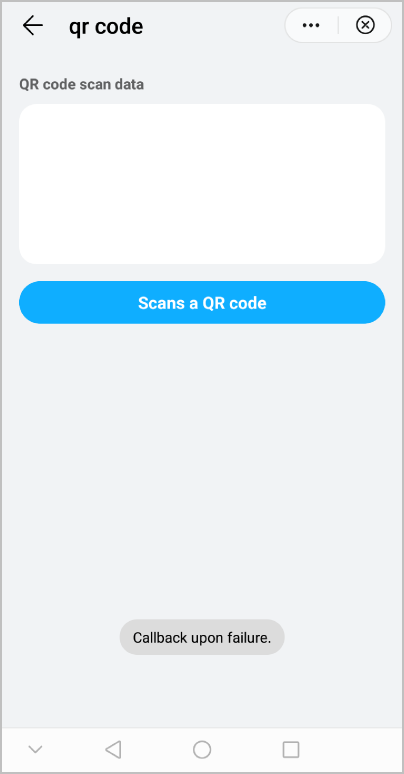
Demo
<template>
  <!-- Only one root node is allowed in template. -->
  <div class="container">
    <div class="case-title">
      <text class="title">QR code scan data</text>
    </div>
    <div class="item-container">
      <text>{{codeData}}</text>
    </div>
    <div class="mlr-container">
      <input onclick="scanCode" type="button" value="Scans a QR code" class="btn-blue"/>
    </div>
  </div>
</template>

<style lang="sass">
.container {
  flex-direction: column;
  padding-bottom: 50px;
}
.case-title {
  margin-left: 32px;
  margin-right: 32px;
  margin-bottom: 20px;
  flex-direction: column;
  margin-top: 40px;
}
.case-title .title {
  color: rgba(0, 0, 0, 0.6);
  font-size: 28px;
  font-weight: 500;
}
.item-container {
  margin-left: 32px;
  margin-right: 32px;
  padding-top: 20px;
  padding-right: 20px;
  padding-bottom: 20px;
  padding-left: 20px;
  background-color: #fff;
  border-radius: 32px;
  flex-direction: column;
  height: 300px;
}
.mlr-container {
  margin-right:32px;
  margin-left:32px;
  margin-top: 32px;
}
.btn-blue {
    background-color: #0faeff;
    width: 100%;
    height: 80px;
    border-radius: 40px;
    color: #fff;
    font-size: 32px;
    font-weight: 500;
  }
</style>

<script>
  import barcode from '@system.barcode';
  import prompt from '@system.prompt';
  module.exports = {
    public: {
        codeData:""
    },
    onInit: function () {
      this.$page.setTitleBar({ text: 'qr code' });
    },
    scanCode(){
      let that = this;

      barcode.scan({
        success: function (data) {
          that.codeData = data.result;
        },
        fail: function (data, code) {
          console.log("handling fail, code=" + code);
          prompt.showToast({
            message: 'Callback upon failure.',
            duration: 2000,
            gravity: 'bottom'
          })
        },
        complete:function (code) {
          console.log("handling complete code: " + code);
        },
        cancel:function (code) {
           console.log("handling cancel: " + code);
        }
      })
    }
  }
</script>
效果图如下: