属性
除了支持 通用属性 以外,还支持如下属性。
名称 | 类型 | 默认值 | 是否必填 | 描述 |
|---|---|---|---|---|
src | uri | - | 否 | 图片的uri,同时支持本地和云端路径,支持的图片格式包括静态类型(png, jpg)、矢量图svg(暂不支持动画和滤镜)和动态类型(gif)。 说明:
|
alt | uri | - | 否 | 加载时显示的占位图。只支持本地图片资源。 从1060版本开始,如果没有设置占位图,快应用引擎自动填充颜色为#ccc的灰色占位图。如果不想使用默认的占位图,alt设置为"blank"。 注意: 只有同时设置了image的宽和高,alt设置的占位图才生效。 |
autoplay (1080+) | boolean | true | 否 | 控制 gif/webp 图片是否自动播放动画。
|
adfield(1111+) | string | - | 否 | 作为ad-native-view一级子组件时使用,用来加载广告素材返回字段中的图片src,参考广告onLoad接口,必须填写直接返回图片链接的字段才能生效,例如"icon"。 |
adIndex(1111+) | number | - | 否 | 作为ad-native-view一级子组件时使用,用来加载广告素材返回imgUrlList列表中的图片,参考广告onLoad接口,例如,设置0时,表示加载imgUrlList中第一张图片 |

当image作为ad-native-view的一级子组件时 src、adfield、adIndex加载图片资源的优先级为adfield > adIndex > src
样式
<image> 支持active伪类,除了支持 通用样式 以外,还支持如下样式。
名称 | 类型 | 默认值 | 是否必填 | 描述 |
|---|---|---|---|---|
resize-mode | cover | contain | stretch | center | cover | 否 | 图片的缩放类型。 |
object-fit(1035+) | contain | cover | fill | none | scale-down | cover | 否 | 图片的缩放类型(resize-mode 即将废弃,如果两个样式同时存在,以object-fit设置的为准)。 |
filter(1090+) | blur | 0 | 否 | 图片的滤镜模式,目前只支持 blur 模糊模式。 注意: blur只支持整数值,并且长度单位为px或dp,例如:filter:blur(4px) |
alt-object-fit(1090+) | contain | cover | fill | none | scale-down | cover | 否 | 占位图片的缩放类型。 |
resize-mode 类型说明:
类型 | 说明 |
|---|---|
cover | 保持宽高比缩小或放大,使得两边都大于或等于显示边界,居中显示。 |
contain | 保持宽高比,缩小或者放大,使得图片完全显示在显示边界内,居中显示。 |
stretch | 不保存宽高比,填充满显示边界。 |
center | 居中,无缩放。 |
object-fit(1035+)和 alt-object-fit (1090+)类型说明:
类型 | 说明 |
|---|---|
cover | 保持宽高比缩小或放大,使得两边都大于或等于显示边界,居中显示。 |
contain | 保持宽高比,缩小或者放大,使得图片完全显示在显示边界内,居中显示。 |
fill | 不保存宽高比,填充满显示边界。 |
none | 保持原有尺寸比例,同时保持替换内容原始尺寸大小。 |
scale-down | 类似依次设置了none或contain,最终呈现的是尺寸比较小的那个。 |
事件
<image> 除了支持 通用事件 以外,还支持如下事件。
名称 | 参数 | 描述 |
|---|---|---|
complete(1020+) | - | 组件加载成功时触发。 |
error(1020+) | errorCode | 图片加载异常时触发。 注意: 当src设置的路径值不符合规范要求,路径值将被忽略,不会触发error的回调。 |
方法
名称 | 参数 | 描述 |
|---|---|---|
startAnimation(1080+) | - | 开始播放 gif/webp 图片的动画。 |
stopAnimation(1080+) | - | 停止播放 gif/webp 图片的动画。 |
示例代码
<template>
  <div class="doc-page">
    <div class="page-title-wrap">
      <text class="page-title">{{componentName}}</text>
    </div>
    <div class="item-container">
      <text class="item-title">Remote
        image:https://tse1-mm.cn.bing.net/th/id/OIP.QFyNrABM6FhaY_0TCuUZqgHaFj?pid=Api&rs=1</text>
      <div class="item-content">
        <image src="https://tse1-mm.cn.bing.net/th/id/OIP.QFyNrABM6FhaY_0TCuUZqgHaFj?pid=Api&rs=1" class="image" style="object-fit: cover"></image>
      </div>
    </div>
    <!-- 指定图片的style宽度高度:750px,250px -->
    <div class="img-layout-header">
      <text>指定图片的style宽度高度:750px,250px</text>
    </div>
    <div class="item-container">
      <text class="item-title">object-fit: cover(默认值)</text>
      <div class="item-content-with-height">
        <image src="https://tse1-mm.cn.bing.net/th/id/OIP.QFyNrABM6FhaY_0TCuUZqgHaFj?pid=Api&rs=1" class="fixed-size-wh"
          style="object-fit: cover"></image>
      </div>
    </div>
    <div class="item-container">
      <text class="item-title">object-fit: contain</text>
      <div class="item-content-with-height">
        <image src="https://tse1-mm.cn.bing.net/th/id/OIP.QFyNrABM6FhaY_0TCuUZqgHaFj?pid=Api&rs=1" class="fixed-size-wh"
          style="object-fit: contain"></image>
      </div>
    </div>
    <div class="item-container">
      <text class="item-title">object-fit: fill</text>
      <div class="item-content-with-height">
        <image src="https://tse1-mm.cn.bing.net/th/id/OIP.QFyNrABM6FhaY_0TCuUZqgHaFj?pid=Api&rs=1" class="fixed-size-wh"
          style="object-fit: fill"></image>
      </div>
    </div>
    <div class="item-container">
      <text class="item-title">object-fit: none</text>
      <div class="item-content-with-height">
        <image src="https://tse1-mm.cn.bing.net/th/id/OIP.QFyNrABM6FhaY_0TCuUZqgHaFj?pid=Api&rs=1" class="fixed-size-wh"
          style="object-fit: none"></image>
      </div>
    </div>
    <div class="item-container">
      <text class="item-title">object-fit: scale-down</text>
      <div class="item-content-with-height">
        <image src="https://tse1-mm.cn.bing.net/th/id/OIP.QFyNrABM6FhaY_0TCuUZqgHaFj?pid=Api&rs=1" class="fixed-size-wh"
          style="width: 100px;height: 100px;object-fit: scale-down;"></image>
      </div>
    </div>
    <!-- 网络图片获取状态回调 -->
    <div class="img-layout-header">
      <text>网络图片获取状态回调: </text>
    </div>
    <input class="input-text" type="text" onchange="onImageUrlChange" value="{{inputImageURL}}"></input>
    <input class="input-button" type="button" onclick="onImageGetClick" value="获取图片"></input>
    <div class="item-container">
      <text class="item-title">网络图片</text>
      <div class="item-content-without-height">
        <image src="{{requestImageURL}}" style="object-fit: contain" oncomplete="onImageComplete" onerror="onImageError"></image>
      </div>
    </div>
  </div>
</template>
<style>
  .doc-page {
    flex: 1;
    flex-direction: column;
  }
  .img-layout-header {
    padding: 20px;
    border-bottom: 1px #808080;
  }
  .item-container {
    margin-top: 40px;
    margin-bottom: 40px;
    flex-direction: column;
  }
  .item-title {
    padding-left: 30px;
    padding-bottom: 20px;
    color: #aaaaaa;
  }
  .item-content {
    height: 200px;
    justify-content: center;
  }
  .image {
    width: 240px;
    height: 160px;
    object-fit: contain;
  }
  .item-content-with-height {
    height: 250px;
    justify-content: center;
    align-items: center;
  }
  .item-content-with-height-bk {
    height: 250px;
    justify-content: center;
    align-items: center;
    background-color: #fff;
  }
  .item-content-without-height {
    justify-content: center;
    align-items: center;
  }
  .fixed-size-wh {
    width: 750px;
    height: 250px;
  }
  .fixed-size-wh2 {
    width: 250px;
    height: 750px;
  }
  .fixed-size-h {
    height: 160px;
  }
  .circle {
    border-radius: 80px;
  }
  .input-button {
    flex: 1;
    padding: 10px 30px;
    margin: 0px 30px;
    font-size: 30px;
    color: #ffffff;
    background-color: #0faeff;
  }
  .input-text {
    height: 80px;
    line-height: 80px;
    padding: 0px 30px;
    margin: 30px;
    border-top-width: 1px;
    border-bottom-width: 1px;
    border-color: #999999;
    font-size: 30px;
    background-color: #ffffff;
  }
</style>
<script>
  import prompt from '@system.prompt'
  export default {
    private: {
      componentName: 'image',
      inputImageURL: 'https://tse1-mm.cn.bing.net/th/id/OIP.QFyNrABM6FhaY_0TCuUZqgHaFj?pid=Api&rs=1',
      requestImageURL: ''
    },
    onInit() {
      this.$page.setTitleBar({ text: 'Image' })
    },
    onImageUrlChange(data) {
      this.inputImageURL = data.value
    },
    onImageGetClick() {
      this.requestImageURL = this.inputImageURL
      prompt.showToast({
        message: '加载' + this.requestImageURL + '图片'
      })
    },
    onImageComplete(data) {
      prompt.showToast({
        message: '图片获取成功\n' + '高度:' + data.height + 'px  ' + '宽度:' + data.width + 'px'
      })
    },
    onImageError() {
      prompt.showToast({
        message: '图片获取失败'
      })
    }
  }
</script>
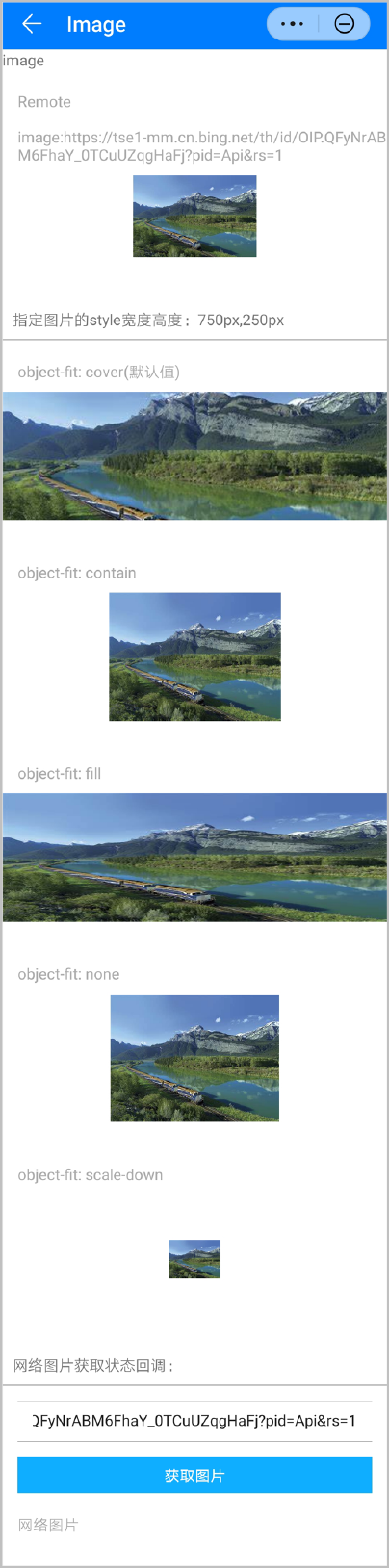
效果图如下:
[h2]属性
支持如下属性。
名称 | 类型 | 默认值 | 是否必填 | 描述 |
|---|---|---|---|---|
id | string | - | 否 | 唯一标识。 |
style | string | - | 否 | 样式声明。 |
class | string | - | 否 | 引用样式表。 |
for | array | - | 否 | 根据数据列表,循环展开当前标签。 |
if | boolean | - | 否 | 根据数据 boolean 值,添加或移除当前标签。 |
src | uri | - | 是 | 图片的 uri,同时支持本地和云端路径,当前支持图片格式:jpg、png、webp、svg。 |
alt | string | - | 是 | 图片加载失败时用于占位显示的文本。 |
[h2]样式
支持如下样式。
名称 | 类型 | 默认值 | 是否必填 | 描述 |
|---|---|---|---|---|
width | length | - | 否 | 图片的宽度,不设置时使用图片原始的宽度。 |
height | length | - | 否 | 图片的高度,不设置时使用图片原始的高度。 |
align | bottom | baseline | baseline | 否 | 图片与文本的对齐方式。 |
版本更新说明
版本 | 发布日期 | 描述 |
|---|---|---|
1100 | 2022-07-07 | 支持作为text、span、a 的子组件。 |
1090 | 2022-05-19 |
|
1080 | 2021-12-28 |
|
1060 | 2019-12-10 | 增加默认占位图设置,如果不想使用默认占位图,则传入blank。 |
1040 | 2019-06-24 | 样式增加object-fit,后续将替代原有的resize-mode。 |
1030 | 2018-10-31 | src属性新增支持矢量图svg(暂不支持动画和滤镜)。 |
1020 | 2018-06-20 | 新增支持complete和error事件。 |
1010 | 2018-04-20 | 支持active伪类效果。 |