















合作咨询
我们的专家服务团队将竭诚为您提供专业的合作咨询服务
在manifest.json文件的 features属性中增加如下配置。
- {"name": "system.bluetooth"}
在调用接口页面的<script>部分增加如下配置。
- import bluetooth from '@system.bluetooth'
或
- var bluetooth = require("@system.bluetooth")
| 限制条件 | 说明 |
|---|---|
| 适用终端 | 手机、平板、车机 |
| 适用区域 | 全球 |
| 接口 | 描述 |
|---|---|
| 初始化蓝牙模块。 | |
| 关闭蓝牙模块。 | |
| 获取本机蓝牙适配器状态。 | |
| 监听蓝牙适配器状态变化事件。 | |
| 开始搜寻附近的蓝牙外围设备。 | |
| 停止搜寻附近的蓝牙外围设备。 | |
| 获取在蓝牙模块生效期间所有已发现的蓝牙设备。包括已经和本机处于连接状态的设备。 | |
| 监听寻找到新设备的事件。 | |
| 根据 uuid 获取处于已连接状态的设备。 | |
| 连接低功耗蓝牙设备。 | |
| 断开与低功耗蓝牙设备的连接。 | |
| 获取蓝牙设备所有服务(service)。 | |
| 获取蓝牙设备某个服务中所有特征值(characteristic)。 | |
| 读取低功耗蓝牙设备的特征值的二进制数据值。 | |
| 向低功耗蓝牙设备特征值中写入二进制数据。 | |
| 启用低功耗蓝牙设备特征值变化时的 notify 功能,订阅特征值。 | |
| 监听低功耗蓝牙设备的特征值变化。 | |
| 监听低功耗蓝牙连接状态的改变事件。 | |
| 查询华为蓝牙耳机的电量。 |
描述
初始化蓝牙模块。
OBJECT参数
| 参数 | 类型 | 是否必填 | 说明 |
|---|---|---|---|
| operateAdapter | boolean | 否 | 是否打开系统蓝牙开关。 设置为true,在系统蓝牙开关关闭的情况下会弹框提示是否打开。 默认值false。 |
| success | function | 否 | 成功回调。 |
| fail | function | 否 | 失败回调。 |
| complete | function | 否 | 执行结束后的回调。 |
示例代码
- bluetooth.openAdapter({
- operateAdapter: true,
- success: function () {
- console.log("success");
- },
- fail: function () {
- console.log("fail");
- },
- complete: function () {
- console.log("complete");
- }
- })
描述
关闭蓝牙模块。调用该方法将断开所有已建立的连接并释放系统资源。建议在使用蓝牙流程后,与bluetooth.openAdapter成对调用。
OBJECT参数
| 参数 | 类型 | 是否必填 | 说明 |
|---|---|---|---|
| operateAdapter | boolean | 否 | 是否关闭系统蓝牙开关。 设置为true,调用时会关闭系统蓝牙开关。 默认值false。 |
| success | function | 否 | 成功回调。 |
| fail | function | 否 | 失败回调。 |
| complete | function | 否 | 执行结束后的回调。 |
示例代码
- bluetooth.closeAdapter({
- success:function(){
- console.log("success");
- },
- fail: function() {
- console.log("fail");
- },
- complete: function (){
- console.log("complete");
- }
- })
描述
获取本机蓝牙适配器状态。
OBJECT参数
| 参数 | 类型 | 是否必填 | 说明 |
|---|---|---|---|
| success | function | 否 | 成功回调。 |
| fail | function | 否 | 失败回调。 |
| complete | function | 否 | 执行结束后的回调。 |
success返回值:
| 参数名 | 类型 | 说明 |
|---|---|---|
| available | boolean | 蓝牙适配器是否可用。 |
| discovering | boolean | 是否正在搜索设备。 |
示例代码
- bluetooth.getAdapterState({
- success:function(){
- console.log("success");
- },
- fail: function() {
- console.log("fail");
- },
- complete: function (){
- console.log("complete");
- }
- })
描述
监听蓝牙适配器状态变化事件。
返回值
| 参数名 | 类型 | 说明 |
|---|---|---|
| available | boolean | 蓝牙适配器是否可用。 |
| discovering | boolean | 蓝牙适配器是否处于搜索状态。 |
示例代码
- bluetooth.onadapterstatechange = function (event) {
- console.log('adapterState changed, now is', event.available)
- }
描述
开始搜寻附近的蓝牙外围设备。此操作比较耗费系统资源,请在搜索并连接到设备后调用 bluetooth.stopDevicesDiscovery 方法停止搜索。
OBJECT参数
| 参数 | 类型 | 是否必填 | 说明 |
|---|---|---|---|
| services | array.<string> | 否 | 要搜索的主service的uuid列表。某些蓝牙设备会广播自己的主service的uuid。如果设置此参数,则只搜索广播包有对应uuid的主服务的蓝牙设备。建议主要通过该参数过滤掉周边不需要处理的其他蓝牙设备。 |
| allowDuplicatesKey | boolean | 否 | 默认值为false。是否允许重复上报同一设备。如果允许重复上报,则 bluetooth.ondevicefound 方法会多次上报同一设备,但是RSSI值会有不同。 |
| interval | number | 否 | 默认值为0。上报设备的间隔。0表示找到新设备立即上报,其他数值根据传入的间隔上报。 |
| success | function | 否 | 成功回调。 |
| fail | function | 否 | 失败回调。 |
| complete | function | 否 | 执行结束后的回调。 |
示例代码
- bluetooth.startDevicesDiscovery({
- services: ['FEE7'],
- success: function () {
- console.log("success")
- }
- })
描述
停止搜寻附近的蓝牙外围设备。若已经找到需要的蓝牙设备并不需要继续搜索时,建议调用该接口停止蓝牙搜索。
OBJECT参数
| 参数 | 类型 | 是否必填 | 说明 |
|---|---|---|---|
| success | function | 否 | 成功回调。 |
| fail | function | 否 | 失败回调。 |
| complete | function | 否 | 执行结束后的回调。 |
示例代码
- bluetooth.stopDevicesDiscovery({
- success:function(){
- console.log("success");
- },
- fail: function() {
- console.log("fail");
- },
- complete: function (){
- console.log("complete");
- }
- })
描述
获取在蓝牙模块生效期间所有已发现的蓝牙设备。包括已经和本机处于连接状态的设备。
OBJECT参数
| 参数 | 类型 | 是否必填 | 说明 |
|---|---|---|---|
| success | function | 否 | 成功回调。 |
| fail | function | 否 | 失败回调。 |
| complete | function | 否 | 执行结束后的回调。 |
success返回值:
| 参数名 | 类型 | 说明 |
|---|---|---|
| devices | array.<string> | uuid对应的的已连接设备列表,devices结构请参见“devices说明”。 |
devices说明:
| 参数名 | 类型 | 说明 |
|---|---|---|
| name | string | 蓝牙设备名称,某些设备可能没有。 |
| deviceId | string | 用于区分设备的id。 |
| RSSI | number | 当前蓝牙设备的信号强度。 |
| advertisData | arraybuffer | 当前蓝牙设备的广播数据段中的 ManufacturerData 数据段。 |
| advertisServiceUUIDs | array.<string> | 当前蓝牙设备的广播数据段中的 ServiceUUIDs 数据段。 |
| localName | string | 当前蓝牙设备的广播数据段中的 LocalName 数据段。 |
| serviceData | string | 当前蓝牙设备的广播数据段中的 ServiceData数据段,返回结构为{"service uuid string": ArrayBuffer}。 |
示例代码
- bluetooth.getDevices({
- success:function(res){
- console.log(res)
- if (res.devices[0]) {
- console.log(res.devices[0].advertisData)
- }
- },
- fail: function() {
- console.log("fail");
- },
- complete: function (){
- console.log("complete");
- }
- })
描述
监听寻找到新设备的事件。
返回值
| 参数名 | 类型 | 说明 |
|---|---|---|
| devices | array.<object> | 新搜索到的设备列表。devices结构请参见“devices说明”。 |
示例代码
- bluetooth.ondevicefound = function (event) {
- console.log('new device list has founded')
- }
描述
根据 uuid 获取处于已连接状态的设备。
OBJECT参数
| 参数 | 类型 | 是否必填 | 说明 |
|---|---|---|---|
| success | function | 否 | 成功回调。 |
| fail | function | 否 | 失败回调。 |
| complete | function | 否 | 执行结束后的回调。 |
| services | array.<string> | 是 | 蓝牙设备主 service 的 uuid 列表。 |
success返回值:
| 参数名 | 类型 | 说明 |
|---|---|---|
| devices | array.<string> | uuid对应的的已连接设备列表,devices结构请参见“连接devices说明”。 |
连接devices说明:
| 参数名 | 类型 | 说明 |
|---|---|---|
| name | string | 蓝牙设备名称,某些设备可能没有。 |
| deviceId | string | 用于区分设备的id。 |
示例代码
- bluetooth.getConnectedDevices({
- services:['uuid'],
- success:function(res){
- console.log(res)
- if (res.devices[0]) {
- console.log(res.devices[0].name)
- }
- },
- fail:function() {
- console.log("fail");
- },
- complete:function (){
- console.log("complete");
- }
- })
描述
连接低功耗蓝牙设备。
若快应用有搜索过某个蓝牙设备,并成功建立连接,可直接传入之前搜索获取的 deviceId 直接尝试连接该设备,无需进行搜索操作。
OBJECT参数
| 参数 | 类型 | 是否必填 | 说明 |
|---|---|---|---|
| deviceId | string | 是 | 用于区分设备的 id。 |
| timeout | number | 否 | 超时时间,单位ms,不填表示不会超时。 |
| success | function | 否 | 成功回调。 |
| fail | function | 否 | 失败回调。 |
| complete | function | 否 | 执行结束后的回调。 |
示例代码
- bluetooth.createBLEConnection({
- deviceId:deviceId,
- success:function(){
- console.log("success");
- },
- fail: function() {
- console.log("fail");
- },
- complete: function (){
- console.log("complete");
- }
- })
描述
断开与低功耗蓝牙设备的连接。
OBJECT参数
| 参数 | 类型 | 是否必填 | 说明 |
|---|---|---|---|
| deviceId | string | 是 | 用于区分设备的 id。 |
| success | function | 否 | 成功回调。 |
| fail | function | 否 | 失败回调。 |
| complete | function | 否 | 执行结束后的回调。 |
示例代码
- bluetooth.closeBLEConnection({
- deviceId:deviceId,
- success:function(){
- console.log("success");
- },
- fail: function() {
- console.log("fail");
- },
- complete: function (){
- console.log("complete");
- }
- })
描述
获取蓝牙设备所有服务(service)。
OBJECT参数
| 参数 | 类型 | 是否必填 | 说明 |
|---|---|---|---|
| deviceId | string | 是 | 蓝牙设备 id。 |
| success | function | 否 | 成功回调。 |
| fail | function | 否 | 失败回调。 |
| complete | function | 否 | 执行结束后的回调。 |
success返回值:
| 参数名 | 类型 | 说明 |
|---|---|---|
| services | array.<object> | 设备服务列表,services结构请参见“services说明”。 |
services说明:
| 参数名 | 类型 | 说明 |
|---|---|---|
| uuid | string | 蓝牙设备服务的 uuid。 |
| isPrimary | boolean | 该服务是否为主服务。 |
示例代码
- bluetooth.getBLEDeviceServices({
- deviceId:deviceId,
- success:function(res){
- console.log('device services:', res.services)
- },
- fail: function() {
- console.log("fail");
- },
- complete: function (){
- console.log("complete");
- }
- })
描述
获取蓝牙设备某个服务中所有特征值(characteristic)。
OBJECT参数
| 参数 | 类型 | 是否必填 | 说明 |
|---|---|---|---|
| deviceId | string | 是 | 蓝牙设备 id。 |
| serviceId | string | 是 | 蓝牙服务uuid,需要使用 getBLEDeviceServices 获取。 |
| success | function | 否 | 成功回调。 |
| fail | function | 否 | 失败回调。 |
| complete | function | 否 | 执行结束后的回调。 |
success返回值:
| 参数名 | 类型 | 说明 |
|---|---|---|
| characteristics | array.<object> | 设备服务列表,characteristics结构请参见“characteristics说明”。 |
characteristics说明:
| 参数名 | 类型 | 说明 |
|---|---|---|
| uuid | string | 蓝牙设备特征值的 uuid。 |
| properties | object | 该特征值支持的操作类型,properties结构请参见“properties说明”。 |
properties说明:
| 参数名 | 类型 | 说明 |
|---|---|---|
| read | boolean | 该特征值是否支持 read 操作 |
| write | boolean | 该特征值是否支持 write 操作 |
| notify | boolean | 该特征值是否支持 notify 操作 |
| indicate | boolean | 该特征值是否支持 indicate 操作 |
示例代码
- bluetooth.getBLEDeviceCharacteristics({
- deviceId:deviceId,
- serviceId:serviceId,
- success:function(res){
- console.log('device getBLEDeviceCharacteristics:',
- res.characteristics)},
- fail: function() {
- console.log("fail");
- },
- complete: function (){
- console.log("complete");
- }
- })
描述
读取低功耗蓝牙设备的特征值的二进制数据值。
必须设备的特征值支持 read 才可以成功调用。
OBJECT参数
| 参数 | 类型 | 是否必填 | 说明 |
|---|---|---|---|
| deviceId | string | 是 | 蓝牙设备 id。 |
| serviceId | string | 是 | 蓝牙特征值对应服务的 uuid。 |
| characteristicId | string | 是 | 蓝牙特征值的 uuid。 |
| success | function | 否 | 成功回调。 |
| fail | function | 否 | 失败回调。 |
| complete | function | 否 | 执行结束后的回调。 |
示例代码
- bluetooth.readBLECharacteristicValue(
- // 这里的 deviceId 需要已经通过 createBLEConnection 与对应设备建立链接
- deviceId:deviceId,
- // 这里的 serviceId 需要在 getBLEDeviceServices 接口中获取
- serviceId:serviceId,
- // 这里的 characteristicId 需要在 getBLEDeviceCharacteristics 接口中获取
- characteristicId,
- success:function() {
- console.log("success")
- })
描述
向低功耗蓝牙设备特征值中写入二进制数据。
必须设备的特征值支持 write 才可以成功调用。
OBJECT参数
| 参数 | 类型 | 是否必填 | 说明 |
|---|---|---|---|
| deviceId | string | 是 | 蓝牙设备 id。 |
| serviceId | string | 是 | 蓝牙特征值对应服务的 uuid。 |
| characteristicId | string | 是 | 蓝牙特征值的 uuid。 说明 uuid中的字母需要是小写,不能是大写,否则会提示10008错误。 |
| value | arraybuffer | 是 | 蓝牙设备特征值对应的二进制值。 |
| success | function | 否 | 成功回调。 |
| fail | function | 否 | 失败回调。 |
| complete | function | 否 | 执行结束后的回调。 |
示例代码
- bluetooth.writeBLECharacteristicValue({
- // 这里的 deviceId 需要在 getBluetoothDevices 或 onBluetoothDeviceFound
- //接口中获取
- deviceId:deviceId,
- // 这里的 serviceId 需要在 getBLEDeviceServices 接口中获取
- serviceId:serviceId,
- // 这里的 characteristicId 需要在 getBLEDeviceCharacteristics 接口中获取
- characteristicId:characteristicId,
- // 这里的value是ArrayBuffer类型
- value: buffer,
- success:function(){
- console.log("success");
- },
- fail: function() {
- console.log("fail");
- },
- complete: function (){
- console.log("complete");
- }
- })
描述
启用低功耗蓝牙设备特征值变化时的 notify 功能,订阅特征值。
必须设备的特征值支持 notify 或者 indicate 才可以成功调用。
必须先启用notifyBLECharacteristicValueChange才能监听到设备 characteristicValueChange 事件。
OBJECT参数
| 参数 | 类型 | 是否必填 | 说明 |
|---|---|---|---|
| deviceId | string | 是 | 蓝牙设备 id。 |
| serviceId | string | 是 | 蓝牙特征值对应服务的 uuid。 |
| characteristicId | string | 是 | 蓝牙特征值的 uuid。 |
| state | boolean | 是 | 是否启用 notify。 |
| success | function | 否 | 成功回调。 |
| fail | function | 否 | 失败回调。 |
| complete | function | 否 | 执行结束后的回调。 |
示例代码
- bluetooth.notifyBLECharacteristicValueChange({
- state: true, // 启用 notify 功能
- // 这里的 deviceId 需要已经通过 createBLEConnection 与对应设备建立链接
- deviceId:deviceid,
- // 这里的 serviceId 需要在 getBLEDeviceServices 接口中获取
- serviceId:serviceId,
- // 这里的 characteristicId 需要在 getBLEDeviceCharacteristics 接口中获取
- characteristicId:characteristicId,
- success:function(){
- console.log("success")
- },
- fail: function() {
- console.log("fail");
- },
- complete: function (){
- console.log("complete");
- }
- })
描述
监听低功耗蓝牙设备的特征值变化。必须先启用 notifyBLECharacteristicValueChange 接口才能接收到设备推送的 notification。
返回值
| 参数名 | 类型 | 说明 |
|---|---|---|
| deviceId | string | 蓝牙设备 id。 |
| serviceId | string | 蓝牙特征值对应服务的 uuid。 |
| characteristicId | string | 蓝牙特征值的 uuid。 |
| value | arraybuffer | 特征值最新的值。 |
示例代码
- bluetooth.onblecharacteristicvaluechange = function (event) {
- console.log(event.value)
- }
描述
监听低功耗蓝牙连接状态的改变事件。包括开发者主动连接或断开连接,设备丢失,连接异常断开等。
callback返回值
| 参数名 | 类型 | 说明 |
|---|---|---|
| deviceId | string | 蓝牙设备id。 |
| connected | boolean | 是否处于已连接状态。 |
示例代码
- bluetooth.onbleconnectionstatechange = function(res){
- console.log(‘device’+ res.deviceId+‘state has changed,connected:’+res.connected)
- }
描述
查询华为蓝牙耳机的电量。
OBJECT参数
| 参数 | 类型 | 是否必填 | 说明 |
|---|---|---|---|
| mac | String | 是 | 蓝牙耳机的mac地址。 |
| success | Function | 否 | 成功回调。 |
| fail | Function | 否 | 失败回调。 |
| complete | Function | 否 | 执行结束后的回调。 |
success返回值:
| 参数 | 类型 | 说明 |
|---|---|---|
| batteryValue | Object | 电量。 -1表示未知状态,0~100表示剩余电量的百分比。 |
| chargeState | Object | 充电状态。
|
| infoStr | String | 整体电量情况。 |
返回数据示例如下:
{"chargeState":{"1":-1,"2":0,"3":1,"4":0},"batteryValue":{"1":-1,"2":55,"3":100,"4":65},"infoStr":"6,2,55,3,0,4,100,5,1,6,65,7,0"}
chargeState和batteryValue信息的参数值含义如下:
fail返回值:
| 参数 | 说明 |
|---|---|
| errCode | 错误码。 |
| errMsg | 错误信息。 |
错误码说明:
| 错误码 | 说明 |
|---|---|
| 200 | 其他通用错误。 |
示例代码
- bluetooth.getDevicesBattery({
- mac: "XX:XX:XX:XX:XX:XX",
- success: function (data) {
- console.log('getDevicesBattery success data = ' + JSON.stringify(data));
- },
- fail: function (errMsg, errCode) {
- console.log('getDevicesBattery fail errMsg = ' + errMsg + '; errCode = ' + errCode);
- },
- complete: function () {
- console.log('getDevicesBattery complete .');
- }
- })
| 错误码 | 错误信息 | 说明 |
|---|---|---|
| 0 | ok | 正常 |
| 10000 | not init | 未启动连接。 |
| 10001 | not available | 当前蓝牙适配器不可用。 |
| 10002 | no device | 没有找到指定设备。 |
| 10003 | connection fail | 连接失败。 |
| 10004 | no service | 没有找到指定服务。 |
| 10005 | no characteristic | 没有找到指定特征值。 |
| 10006 | no connection | 当前连接已断开。 |
| 10007 | property not support | 当前特征值不支持此操作。 |
| 10008 | system error | 其余所有系统上报的异常。 |
| 10009 | system not support | 系统版本低于 5.0 不支持 BLE。 |
- <template>
- <div class="container">
- <div class="item-content">
- <text class="txt">openBluetooth:{{openBluetoothSuccess}}</text>
- </div>
- <input type="button" class="btn" onclick="openAdapter" value="open Bluetooth" />
- <div class="item-content">
- <text class="txt">closeBluetooth:{{closeBluetoothSuccess}}</text>
- </div>
- <input type="button" class="btn" onclick="closeAdapter" value="close Bluetooth" />
- <div class="item-content">
- <text class="txt"> getAdapterState:{{bluetoothstate}}</text>
- </div>
- <input type="button" class="btn" onclick="getAdapterState" value="get Adapter State" />
- <input type="button" class="btn" onclick="onAdapterState" value="on Adapter State" />
- <div class="input-item">
- <text class="input-hint">bluetooth.inputUuid</text>
- <input class="input-text" placeholder="please input bluetooth.uuid" onchange="oninput"></input>
- </div>
- <div class="item-content">
- <text
- class="txt">bluetoothDiscoveryDevices:{{bluetoothdevices}}</text>
- </div>
- <input type="button" class="btn" onclick="startBluetoothDevicesDiscovery" value="bluetooth discoveryDevices" />
- <div class="item-content">
- <text class="txt">stopDiscovery:{{stopDiscoverSuccess}}</text>
- </div>
- <input type="button" class="btn" onclick="stopBluetoothDevicesDiscovery" value="bluetooth stopDiscoveryDevices" />
- <div class="item-content">
- <text class="txt">getBluetoothDevices:{{bluetoothdevices}}</text>
- </div>
- <input type="button" class="btn" onclick="getBluetoothDevices" value="bluetooth getBluetoothDevices" />
- <div class="input-item">
- <text class="input-hint">bluetooth.inputDeviceId</text>
- <input class="input-text" placeholder="deviceId" onchange="oninputdeviceId"></input>
- </div>
- <div class="item-content">
- <text class="txt">connectBluetoothDevice:{{connectionstate}}</text>
- </div>
- <input type="button" class="btn" onclick="createBLEConnection" value="Connects to a BLE device" />
- <div class="item-content">
- <text class="txt"> disconnectBluetooth :{{closeconnectionstate}}</text>
- </div>
- <input type="button" class="btn" onclick="closeBLEConnection" value="Disconnects from a BLE device" />
- <div class="item-content">
- <text
- class="txt">getBluetoothDevicesService:{{deviceservices}}</text>
- </div>
- <input type="button" class="btn" onclick="getBLEDeviceServices" value="getBluetoothAllDevicesService" />
- <div class="item-content">
- <text class="txt">getConnectedDevices:{{connecteddevices}}</text>
- </div>
- <input type="button" class="btn" onclick="getConnectedDevices" value="get ConnectedDevices" />
- <div class="input-item">
- <text class="input-hint">bluetooth.inputServiceId</text>
- <input class="input-text" placeholder="serviceId" onchange="oninputserviceId"></input>
- </div>
- <div class="item-content">
- <text
- class="txt">getBLEDeviceCharacteristics:{{servicecharacters}}</text>
- </div>
- <input type="button" class="btn" onclick="getBLEDeviceCharacteristics" value="get BLEDeviceCharacteristics" />
- <div class="input-item">
- <text class="input-hint">inputCharacteristicId</text>
- <input class="input-text" placeholder="characteristicId" onchange="oninputcharacteristicId"></input>
- </div>
- <div class="input-item">
- <text class="input-hint">bluetooth.toggleNotify</text>
- <input class="input-text" type="checkbox" onchange="oninputnotifystate"></input>
- </div>
- <div class="item-content">
- <text class="txt">notifyBLECharacteristicValueChange:{{notifyBLECharacteristicValue}}</text>
- </div>
- <input type="button" class="btn" onclick="notifyBLECharacteristicValueChange" value="notify BLECharacteristicValueChange" />
- <input type="button" class="btn" onclick="onblecharacteristicvaluechange" value="on blecharacteristicvaluechange" />
- <div class="item-content">
- <text
- class="txt">SpecifyBluetoothServiceFeatureValue:{{characteristicsvalue}}</text>
- </div>
- <input type="button" class="btn" onclick="readBLECharacteristicValue" value="read BLECharacteristicValue" />
- <div class="input-item">
- <text class="input-hint">inputByteStringValue</text>
- <input class="input-text" placeholder="byteStringValue" onchange="oninputbyteStringValue"></input>
- </div>
- <div class="item-content">
- <text
- class="txt">writeCharacteristicValue:{{writecharacteristicsvalue}}</text>
- </div>
- <input type="button" class="btn" onclick="writeBLECharacteristicValue" value="write CharacteristicValue" />
- <div class="item-content">
- <text
- class="txt">lowpowerBleconnectionstate:{{bleconnectionstate}}</text>
- </div>
- <input type="button" class="btn" onclick="onbleconnectionstatechange" value="on bleconnectionstatechange" />
- <div class="input-item">
- <text class="input-hint">inputmac</text>
- <input class="input-text" placeholder="mac" onchange="oninputmac"></input>
- </div>
- <div class="item-content">
- <text class="txt">batteryLevel:{{bluetoothElectricity}}</text>
- </div>
- <input type="button" class="btn" onclick="getBatteryLevel" value="get Devices Battery" />
- </div>
- </template>
- <style>
- .container{
- flex: 1;
- flex-direction: column;
- }
- .item-container {
- margin-bottom: 50px;
- margin-right: 60px;
- margin-left: 60px;
- flex-direction: column;
- }
- .item-content {
- flex-direction: column;
- background-color: #ffffff;
- padding-left: 30px;
- padding-right: 30px;
- padding-top: 20px;
- padding-bottom: 20px;
- margin-bottom: 30px;
- align-items: flex-start;
- }
- .txt {
- padding-top: 15px;
- padding-bottom: 15px;
- }
- .input-item {
- margin-bottom: 80px;
- flex-direction: column;
- }
- .input-hint {
- margin-left: 30px;
- margin-bottom: 30px;
- margin-right: 30px;
- }
- .input-text {
- height: 80px;
- line-height: 80px;
- padding-left: 30px;
- padding-right: 30px;
- margin-left: 30px;
- margin-right: 30px;
- border-top-width: 1px;
- border-bottom-width: 1px;
- border-color: #999999;
- font-size: 30px;
- background-color: #ffffff;
- }
- .btn {
- height: 80px;
- text-align: center;
- border-radius: 5px;
- margin-right: 60px;
- margin-left: 60px;
- margin-bottom: 50px;
- color: #ffffff;
- font-size: 30px;
- background-color: #0faeff;
- }
- </style>
- <script>
- import bluetooth from '@system.bluetooth'
- export default {
- data: {
- componentName: 'bluetooth',
- componentData: {},
- openBluetoothSuccess: '',
- closeBluetoothSuccess: '',
- bluetoothstate: '',
- bluetoothdevices: '',
- connectStatus: '',
- bluetoothElectricity: '',
- stopDiscoverSuccess: '',
- connectionstate: '',
- closeconnectionstate: '',
- connecteddevices: '',
- notifyBLECharacteristicValue: '',
- scanedresult: '',
- deviceservices: '',
- servicecharacters: '',
- characteristicsvalue: '',
- writecharacteristicsvalue: '',
- bleconnectionstate: '',
- deviceIdInput: '',
- serviceId: '',
- serviceMac: '',
- service_psd: '',
- service_uuid: '',
- service_uuidarray: [],
- characteristics_uuid: '',
- byteStringValue: '',
- byteValue: '',
- deviceId: '',
- notifystate: false,
- ble_isonnectting: false,
- characteristics: []
- },
- onInit: function () {
- this.$page.setTitleBar({ text: 'bluetooth' })
- this.componentData = this.$t('message.interface.system.bluetooth')
- },
- openAdapter() {
- var that = this
- that.openBluetoothSuccess = ''
- bluetooth.openAdapter({
- operateAdapter: true,
- success: function (res) {
- console.log('openBluetoothAdapter success')
- that.openBluetoothSuccess = 'success'
- },
- fail: function (erromsg, errocode) {
- console.log('openBluetoothAdapter fail')
- that.openBluetoothSuccess = 'code ' + errocode + ' errormsg ' + erromsg
- },
- complete: function () {
- console.log('openBluetoothAdapter complete')
- }
- })
- },
- closeAdapter() {
- var that = this
- bluetooth.closeAdapter({
- operateAdapter: true,
- success: function () {
- console.log('closeAdapter success')
- that.closeBluetoothSuccess = 'success'
- },
- fail: function (erromsg, errocode) {
- console.log('closeAdapter fail')
- that.closeBluetoothSuccess = 'code ' + errocode + ' errormsg ' + erromsg
- },
- complete: function () {
- console.log('closeAdapter complete')
- }
- })
- },
- getAdapterState() {
- var that = this
- bluetooth.getAdapterState({
- success: function (res) {
- console.log('getBluetoothAdapterState success', res)
- var available = res.available
- var discovering = res.discovering
- that.bluetoothstate = 'available ' + available + ' discovering ' + discovering
- },
- fail: function (erromsg, errocode) {
- console.log('getAdapterState fail')
- that.bluetoothstate = 'code ' + errocode + ' errormsg ' + erromsg
- },
- complete: function () {
- console.log('getAdapterState complete')
- }
- })
- },
- onAdapterState() {
- var that = this
- console.log("on blooth state");
- bluetooth.onadapterstatechange = function (res) {
- console.log('adapterState changed, now is', res)
- var available = res.available
- var discovering = res.discovering
- that.bluetoothstate = 'available ' + available + ' discovering ' + discovering
- }
- },
- startBluetoothDevicesDiscovery: function () {
- var that = this
- console.log('startBluetoothDevicesDiscovery begin ' + that.service_uuidarray)
- bluetooth.startDevicesDiscovery({
- services: that.service_uuidarray,
- allowDuplicatesKey: false,
- success: function (res) {
- console.log('startBluetoothDevicesDiscovery success', res)
- that.onBluetoothDeviceFound()
- },
- fail: function (erromsg, errocode) {
- console.log('startBluetoothDevicesDiscovery fail ', erromsg)
- that.bluetoothdevices = 'code ' + errocode + ' errormsg ' + erromsg
- }
- })
- },
- stopBluetoothDevicesDiscovery: function () {
- var that = this
- console.log('stopBluetoothDevicesDiscovery begin')
- bluetooth.stopDevicesDiscovery({
- success: function (res) {
- console.log('stopBluetoothDevicesDiscovery success ', res)
- that.stopDiscoverSuccess = 'success'
- },
- fail: function (erromsg, errocode) {
- console.log('stopBluetoothDevicesDiscovery fail ', erromsg)
- that.stopDiscoverSuccess = 'code ' + errocode + ' errormsg ' + erromsg
- }
- })
- },
- onBluetoothDeviceFound: function () {
- var that = this
- var devicefound = false
- console.log('onBluetoothDeviceFound begin')
- // Monitor scan
- bluetooth.ondevicefound = function (res) {
- console.log(that.componentData.monitorSearchNewDevices, res)
- that.bluetoothdevices = JSON.stringify(res)
- if (Array.isArray(res.devices)) {
- for (var i = 0; i < res.devices.length; i++) {
- console.log(res.devices[i].name)
- if (res.devices[i].name === 'HUAWEI Mate 20') {
- that.deviceId = res.devices[i].deviceId
- devicefound = true
- break
- }
- }
- }
- if (devicefound) {
- that.stopBluetoothDevicesDiscovery()
- }
- }
- },
- getBluetoothDevices() {
- var that = this
- console.log('getBluetoothDevices begin')
- bluetooth.getDevices({
- success: function (res) {
- console.log('getBluetoothDevices success', res)
- that.bluetoothdevices = JSON.stringify(res)
- if (res.devices[0]) {
- console.log(res.devices[0].deviceId)
- console.log(res.devices[0].name)
- }
- },
- fail: function (erromsg, errocode) {
- console.log('getBluetoothDevices fail ', erromsg)
- that.bluetoothdevices = 'code ' + errocode + ' errormsg ' + erromsg
- },
- complete: function () {
- console.log('getBluetoothDevices complete')
- }
- })
- },
- createBLEConnection() {
- var that = this
- console.log('createBLEConnection begin deviceId ' + that.deviceId)
- bluetooth.createBLEConnection({
- deviceId: that.deviceId,
- success: function (res) {
- console.log('createBLEConnection success', res)
- that.connectionstate = 'success'
- },
- fail: function (erromsg, errocode) {
- console.log('createBLEConnection fail ', erromsg)
- that.connectionstate = 'code ' + errocode + ' errormsg ' + erromsg
- },
- complete: function () {
- console.log('createBLEConnection complete')
- }
- })
- },
- getBatteryLevel() {
- var that = this
- console.log('getBatteryLevel begin deviceId ' + that.mac)
- bluetooth.getDevicesBattery({
- mac: that.mac,
- success: function (res) {
- // console.log('getBatteryLevel success', res)
- console.log('getDevicesBattery success data = ' + JSON.stringify(res));
- that.bluetoothElectricity = res.batteryValue
- },
- fail: function (erromsg, errocode) {
- console.log('getBatteryLevel fail ', erromsg,errocode)
- that.bluetoothElectricity = 'code ' + errocode + ' errormsg ' + erromsg
- },
- complete: function () {
- console.log('getBatteryLevel complete')
- }
- })
- },
- closeBLEConnection() {
- var that = this
- console.log('closeBLEConnection begin deviceId ' + that.deviceId)
- bluetooth.closeBLEConnection({
- deviceId: that.deviceId,
- success: function (res) {
- console.log('closeBLEConnection success', res)
- that.closeconnectionstate = 'success'
- },
- fail: function (erromsg, errocode) {
- console.log('closeBLEConnection fail ', erromsg)
- that.closeconnectionstate = 'code ' + errocode + ' errormsg ' + erromsg
- },
- complete: function () {
- console.log('closeBLEConnection complete')
- }
- })
- },
- getBLEDeviceServices() {
- var that = this
- console.log('getBLEDeviceServices begin deviceId ' + that.deviceId)
- bluetooth.getBLEDeviceServices({
- deviceId: that.deviceId,
- success: function (res) {
- console.log('getBLEDeviceServices success', res)
- that.deviceservices = JSON.stringify(res)
- if (Array.isArray(res.services)) {
- for (var i = 0; i < res.services.length; i++) {
- console.log(res.services[i].uuid)
- if (res.services[i].isPrimary) {
- that.service_uuid = res.services[i].uuid
- console.log('getBLEDeviceServices service_uuid ', that.service_uuid)
- break
- }
- }
- }
- },
- fail: function (erromsg, errocode) {
- console.log('getBLEDeviceServices fail ', erromsg)
- that.deviceservices = 'code ' + errocode + ' errormsg ' + erromsg
- },
- complete: function () {
- console.log('getBLEDeviceServices complete')
- }
- })
- },
- getConnectedDevices() {
- var that = this
- // Here you need to get the device first, then connect, then get the services of the device, and then pass in the main uuid of the service.
- console.log('getConnectedDevices begin')
- bluetooth.getConnectedDevices({
- services: that.service_uuidarray,
- success: function (res) {
- console.log('getConnectedDevices success', res)
- that.connecteddevices = JSON.stringify(res)
- if (res.devices[0]) {
- console.log(res.devices[0].deviceId)
- console.log(res.devices[0].name)
- }
- },
- fail: function (erromsg, errocode) {
- console.log('getConnectedDevices fail ', erromsg)
- that.connecteddevices = 'code ' + errocode + ' errormsg ' + erromsg
- },
- complete: function () {
- console.log('getBluetoothDevices complete')
- }
- })
- },
- getBLEDeviceCharacteristics() {
- var that = this
- console.log('getBLEDeviceCharacteristics begin deviceId ' + that.deviceId)
- bluetooth.getBLEDeviceCharacteristics({
- deviceId: that.deviceId,
- serviceId: that.service_uuid,
- success: function (res) {
- console.log('getBLEDeviceCharacteristics success', res)
- that.servicecharacters = JSON.stringify(res)
- if (Array.isArray(res.characteristics)) {
- for (var i = 0; i < res.characteristics.length; i++) {
- console.log(res.characteristics[i].uuid)
- if (res.characteristics[i].properties.write) {
- that.characteristics_uuid = res.characteristics[i].uuid
- console.log('getBLEDeviceCharacteristics characteristics_uuid ', that.characteristics_uuid)
- break
- }
- }
- }
- },
- fail: function (erromsg, errocode) {
- console.log('getBLEDeviceCharacteristics fail ', erromsg)
- that.servicecharacters = 'code ' + errocode + ' errormsg ' + erromsg
- },
- complete: function () {
- console.log('getBLEDeviceCharacteristics complete')
- }
- })
- },
- readBLECharacteristicValue() {
- var that = this
- console.log('readBLECharacteristicValue begin deviceId ' + that.deviceId)
- console.log('readBLECharacteristicValue begin serviceId ' + that.service_uuid)
- console.log('readBLECharacteristicValue begin characteristicId ' + that.characteristics_uuid)
- bluetooth.readBLECharacteristicValue({
- deviceId: that.deviceId,
- serviceId: that.service_uuid,
- characteristicId: that.characteristics_uuid,
- success: function (res) {
- console.log('readBLECharacteristicValue success', res)
- },
- fail: function (erromsg, errocode) {
- console.log('readBLECharacteristicValue fail ', 'code ' + errocode + ' errormsg ' + erromsg)
- that.characteristicsvalue = 'code ' + errocode + ' errormsg ' + erromsg
- },
- complete: function () {
- console.log('readBLECharacteristicValue complete')
- }
- })
- },
- writeBLECharacteristicValue() {
- var that = this
- console.log('writeBLECharacteristicValue begin deviceId ' + that.deviceId)
- console.log('writeBLECharacteristicValue begin serviceId ' + that.service_uuid)
- console.log('writeBLECharacteristicValue begin characteristicId ' + that.characteristics_uuid)
- // Send a 0x00 hexadecimal data to the Bluetooth device
- let buffer = new ArrayBuffer(1)
- let dataView = new DataView(buffer)
- dataView.setUint8(0, 0)
- that.byteValue = that.stringToByte(that.byteStringValue)
- bluetooth.writeBLECharacteristicValue({
- deviceId: that.deviceId,
- serviceId: that.service_uuid,
- characteristicId: that.characteristics_uuid,
- value: that.byteStringValue,
- success: function (res) {
- console.log('writeBLECharacteristicValue success', res)
- that.writecharacteristicsvalue = 'success'
- },
- fail: function (erromsg, errocode) {
- console.log('writeBLECharacteristicValue fail ', erromsg)
- that.writecharacteristicsvalue = 'code ' + errocode + ' errormsg ' + erromsg
- },
- complete: function () {
- console.log('writeBLECharacteristicValue complete')
- }
- })
- },
- notifyBLECharacteristicValueChange() {
- var that = this
- console.log('notifyBLECharacteristicValueChange begin deviceId ' + that.deviceId)
- console.log('notifyBLECharacteristicValueChange begin serviceId ' + that.service_uuid)
- console.log('notifyBLECharacteristicValueChange begin characteristicId ' + that.characteristics_uuid)
- bluetooth.notifyBLECharacteristicValueChange({
- state: that.notifystate,
- deviceId: that.deviceId,
- serviceId: that.service_uuid,
- characteristicId: that.characteristics_uuid,
- success: function (res) {
- console.log('notifyBLECharacteristicValueChange success', res)
- that.notifyBLECharacteristicValue = 'success'
- },
- fail: function (erromsg, errocode) {
- console.log('notifyBLECharacteristicValueChange fail ', erromsg)
- that.notifyBLECharacteristicValue = 'code ' + errocode + ' errormsg ' + erromsg
- },
- complete: function () {
- console.log('notifyBLECharacteristicValueChange complete')
- }
- })
- },
- onblecharacteristicvaluechange: function () {
- var that = this
- console.log('onblecharacteristicvaluechange begin')
- bluetooth.onblecharacteristicvaluechange = function (res) {
- console.log(that.componentData.monitorCharacteristicChange, res)
- that.characteristicsvalue = JSON.stringify(res)
- }
- },
- onbleconnectionstatechange: function () {
- var that = this
- console.log('onbleconnectionstatechange begin')
- bluetooth.onbleconnectionstatechange = function (res) {
- console.log(that.componentData.monitorConnectChange, res)
- that.bleconnectionstate = JSON.stringify(res)
- }
- },
- stringToByte(str) {
- var bytes = []
- var len, c
- len = str.length
- for (var i = 0; i < len; i++) {
- c = str.charCodeAt(i)
- if (c >= 0x010000 && c <= 0x10FFFF) {
- bytes.push(((c >> 18) & 0x07) | 0xF0)
- bytes.push(((c >> 12) & 0x3F) | 0x80)
- bytes.push(((c >> 6) & 0x3F) | 0x80)
- bytes.push((c & 0x3F) | 0x80)
- } else if (c >= 0x000800 && c <= 0x00FFFF) {
- bytes.push(((c >> 12) & 0x0F) | 0xE0)
- bytes.push(((c >> 6) & 0x3F) | 0x80)
- bytes.push((c & 0x3F) | 0x80)
- } else if (c >= 0x000080 && c <= 0x0007FF) {
- bytes.push(((c >> 6) & 0x1F) | 0xC0)
- bytes.push((c & 0x3F) | 0x80)
- } else {
- bytes.push(c & 0xFF)
- }
- }
- return bytes
- },
- oninput: function (event) {
- var self = this
- var arra = []
- arra.push(event.value)
- self.service_uuidarray = arra
- },
- oninputdeviceId: function (event) {
- var self = this
- self.deviceId = event.value
- },
- oninputmac: function (event) {
- var self = this
- self.mac = event.value
- },
- oninputserviceId: function (event) {
- var self = this
- self.service_uuid = event.value
- },
- oninputcharacteristicId: function (event) {
- var self = this
- self.characteristics_uuid = event.value
- },
- oninputbyteStringValue: function (event) {
- var self = this
- self.byteStringValue = event.value
- },
- oninputnotifystate: function (event) {
- var self = this
- self.notifystate = event.checked
- console.log('notifystate ' + self.notifystate)
- },
- }
- </script>
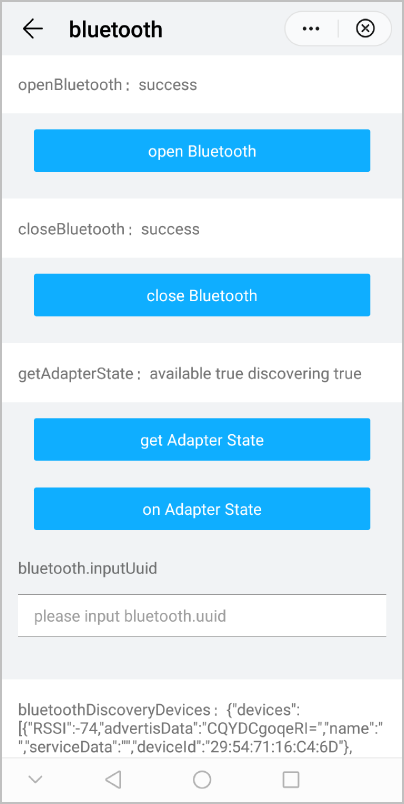
效果图如下:
| 版本 | 发布日期 | 描述 |
|---|---|---|
| 1040 | 2019-06-24 | 第一次正式发布。 |