合作咨询
我们的专家服务团队将竭诚为您提供专业的合作咨询服务
在manifest.json文件的 features属性中增加如下配置。
{"name": "system.calendar"} 在调用接口页面的<script>部分增加如下配置。
import calendar from '@system.calendar'
或
var calendar = require("@system.calendar") 限制条件 | 说明 |
|---|---|
适用终端 | 手机、平板、车机 |
适用区域 | 全球 |
接口 | 描述 |
|---|---|
插入日历事件。 |
描述
插入日历事件。
OBJECT参数
参数 | 类型 | 是否必填 | 说明 |
|---|---|---|---|
title | string | 是 | 事件的标题。 |
description | string | 否 | 事件的描述。 |
startDate | long | 是 | 事件开始时间,以从公元纪年开始计算的协调世界时毫秒数表示。 |
endDate | long | 是 | 事件结束时间,以从公元纪年开始计算的协调世界时毫秒数表示。 |
timezone | string | 否 | 事件的时区。 |
allDay | boolean | 否 |
|
rrule | string | 重复事件必须 | 事件的重复发生规则格式。例如:"FREQ=WEEKLY;COUNT=10;WKST=SU"。 您可以在此处找到更多示例。 |
remindMinutes | array | 否 | 在事件开始前几分钟进行提醒。例如:[5,15,30]。 |
organizer | string | 否 | 事件组织者(所有者)的电子邮件。 |
success | function | 否 | 成功回调,值为插入成功的id(整型)。 |
fail | function | 否 | 失败回调。 |
fail返回错误码:
错误码 | 说明 |
|---|---|
201 | 用户拒绝,获取写日历权限失败。 |
202 | 参数非法,如输入时间格式不对、参数不符合标准。 |
示例代码
calendar.insert({
    title:"事件A",
    startDate:"1490770543000",
    endDate:"1490880543000",
    remindMinutes:[5,15,30],
    rrule:"FREQ=WEEKLY;COUNT=2",
    success:function(data){console.log("handling success");}
}) <template>
<!-- Only one root node is allowed in template. -->
<div class="container">
<!-- 标题 -->
<div class="case-title mt-item">
<text class="title">Title of an event</text>
</div>
<div class="mlr-container">
<input onchange="inputChange('title')" class="input-big" placeholder="title"/>
</div>
<!-- 描述 -->
<div class="case-title mt-item">
<text class="title">Description about an event</text>
</div>
<div class="mlr-container">
<input onchange="inputChange('des')" class="input-big" placeholder="description"/>
</div>
<!-- 开始时间 -->
<div class="case-title mt-item">
<text class="title">Start time of an event</text>
</div>
<div class="mlr-container">
<picker value="{{startDate}}" onchange="pickerChange('startDate')" type="date" class="input-big"></picker>
</div>
<!-- 结束时间 -->
<div class="case-title mt-item">
<text class="title">End time of an event</text>
</div>
<div class="mlr-container">
<picker value="{{endDate}}" onchange="pickerChange('endDate')" type="date" class="input-big"></picker>
</div>
<div class="mlr-container mt-item">
<input onclick="insertEvent" type="button" value="Insert Calendar Event" class="btn-blue"/>
</div>
</div>
</template>
<style lang="sass">
.container {
flex-direction: column;
padding-bottom: 50px;
}
.case-title {
margin-left: 32px;
margin-right: 32px;
margin-bottom: 20px;
flex-direction: column;
}
.mt-item {
margin-top: 40px;
}
.input-big {
width: 100%;
background-color: #fff;
height: 100px;
border-radius: 50px;
padding-left: 30px;
font-size: 32px;
}
.mlr-container {
margin-right:32px;
margin-left:32px;
}
.btn-blue {
background-color: #0faeff;
width: 100%;
height: 80px;
border-radius: 40px;
color: #fff;
font-size: 32px;
font-weight: 500;
}
</style>
<script>
import calendar from '@system.calendar';
import prompt from '@system.prompt';
export const strToDate = function (dateStr) {
let splitArr = dateStr.split(' ');
let dateArr = splitArr[0].split('-');
let timeArr = splitArr[1] ? splitArr[1].split(':') : [];
let newDate = new Date();
newDate.setFullYear(dateArr[0]);
newDate.setMonth(Number(dateArr[1]) - 1);
newDate.setDate(dateArr[2]);
newDate.setHours(timeArr[0] || 0, timeArr[1] || 0, timeArr[2] || 0, timeArr[3] || 0);
return newDate;
}
export const lessTenFormat = function(num){
if(isNaN(num) || num < 0)
{
return '';
}
let newNum = Number(num);
return newNum >= 10 ? newNum : `0${num}`
}
module.exports = {
public: {
title:"",
des:"",
startDate:'',
endDate:'',
},
onInit: function () {
this.$page.setTitleBar({ text: 'Calendar Event' });
let date = new Date();
let year = date.getFullYear();
let month = date.getMonth() + 1;
let day = date.getDate();
this.startDate = `${year}-${lessTenFormat(month)}-${lessTenFormat(day)}`;
this.endDate = `${year}-${lessTenFormat(month)}-${lessTenFormat(day)}`;
},
inputChange(key,{value}){
this[key] = value;
},
pickerChange(key,{year,month,day}){
this[key] = `${year}-${lessTenFormat(Number(month) + 1)}-${lessTenFormat(day)}`;
},
insertEvent(){
if(!this.title || !this.des || !this.startDate || !this.endDate)
{
return;
}
calendar.insert({
title: this.title,
description:this.des,
startDate: strToDate(this.startDate).getTime(),
endDate: strToDate(this.endDate).getTime(),
success: function (data) {
prompt.showToast({
message: 'success',
duration: 2000,
gravity: 'bottom'
})
},
fail:function(){
prompt.showToast({
message: 'fail',
duration: 2000,
gravity: 'bottom'
})
}
})
}
}
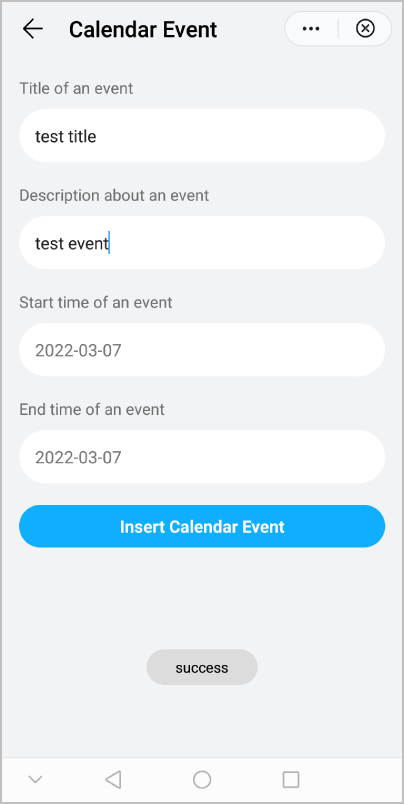
</script> 效果图如下: