导入模块
在调用接口页面的<script>部分增加如下配置。
import configuration from '@system.configuration'
或
const configuration = require("@system.configuration") 接口定义
| 接口 | 描述 |
|---|---|
| 获取应用当前的语言环境。默认使用系统的语言环境,会随着设置或系统语言环境改变而发生变化。 | |
| 获取当前系统的语言方向。 | |
| 设置屏幕方向。 | |
| 基于当前语言环境和设置的格式选项,返回时间戳格式化后的时间字符串。 | |
| 基于当前语言环境和设置的格式选项,返回时间戳格式化后的时间字符串。 | |
| 获取应用当前的主题模式。 | |
| 获取折叠屏的状态。 | |
| 获取屏幕当前的横竖屏状态。 | |
| 设置灰色模式。 | |
| 获取折叠屏展开时应用内容的居中或满屏状态。 |
[h2]configuration.getLocale()(1060+)
描述
获取应用当前的语言环境。默认使用系统的语言环境,会随着设置或系统语言环境改变而发生变化。
返回值
| 参数名 | 类型 | 说明 |
|---|---|---|
| language | string | 语言。 |
| countryOrRegion | string | 国家或地区。 |
示例代码
const locale = configuration.getLocale()
console.log(locale.language)
[h2]configuration.getLayoutDirection()(1070+)
描述
获取当前系统的语言方向。
返回值
| 参数名 | 类型 | 说明 |
|---|---|---|
| ltr | string | 从左向右的方向。 |
| rtl | string | 从右向左的方向。 |
示例代码
const dir = configuration.getLayoutDirection()
console.log("direction="+dir)
[h2]configuration.setScreenOrientation(OBJECT)(1070+)
描述
设置屏幕方向。

横竖屏切换后,屏幕宽度会发生变化,导致开发者即使设置相同的尺寸,实际展示会不一致。所以如果使用横竖屏切换,建议使用“响应式布局”进行开发。
参数
| 参数 | 类型 | 是否必填 | 说明 |
|---|---|---|---|
| orientation | string | 是 | 屏幕方向:portrait、landscape、auto。 |
| success | function | 否 | 接口调用成功的回调函数。 |
| fail | function | 否 | 接口调用失败的回调函数。 |
| complete | function | 否 | 接口调用结束的回调函数(调用成功、失败都会执行)。 |
示例代码
configuration.setScreenOrientation({
    orientation:"portrait",
    success:function (data) {
        console.log('result:' + data); // success
    },
    fail:function () {
    }
})
[h2]configuration.formatDateAndTime(OBJECT)(1070+,非联盟规范)
描述
基于当前语言环境和设置的格式选项,返回时间戳格式化后的时间字符串。
OBJECT参数
| 参数 | 类型 | 是否必填 | 说明 |
|---|---|---|---|
| timeStamp | long | 是 | 时间戳。 |
| flag | int | 是 | 格式选项,可以根据需要显示信息设置多个格式,多个格式之间使用 | 分隔,例如需要显示星期、时、分信息,可以设置为 0x00001 | 0x00002,常见选项有:
更多选项参见Java中的DateUtils的常量取值,各选项的组合规则以及实现效果,与Java的DateUtils实现相同。 |
| success | function | 否 | 接口调用成功的回调函数。 |
| fail | function | 否 | 接口调用失败的回调函数。 |
| complete | function | 否 | 接口调用结束的回调函数(调用成功、失败都会执行)。 |
success返回值:
| 参数 | 类型 | 说明 |
|---|---|---|
| dateStr | string | 返回时间戳格式化后的时间字符串。 |
示例代码
var date = Date.now()
configuration.formatDateAndTime({
    timeStamp: date,
    flag: 0x00001 | 0x00002 ,
    success: function(ret){
        console.log(`dateStr= ${ret.dateStr }`)
    }
})
[h2]configuration.simpleFormatDate(OBJECT)(1070+,非联盟规范)
描述
基于当前语言环境和设置的格式选项,返回时间戳格式化后的时间字符串。
OBJECT参数
| 参数 | 类型 | 是否必填 | 说明 |
|---|---|---|---|
| timeStamp | long | 是 | 时间戳。 |
| format | string | 是 | 时间格式字符串。 |
| success | function | 否 | 接口调用成功的回调函数。 |
| fail | function | 否 | 接口调用失败的回调函数。 |
| complete | function | 否 | 接口调用结束的回调函数(调用成功、失败都会执行)。 |
success返回值:
| 参数 | 类型 | 说明 |
|---|---|---|
| dateStr | string | 返回时间戳格式化后的时间字符串。 |
示例代码
var date = Date.now()
configuration.simpleFormatDate({
    timeStamp: date,
    format:"yyyy年MM月dd日  HH时mm分ss秒",
    success: function(ret){
        console.log(`dateStr= ${ret.dateStr }`)
    }
})
[h2]configuration.getThemeMode()(1083+)
描述
获取应用当前的主题模式。
返回值
返回当前主题模式值,类型为 number,返回值是下表的其中之一:
| 参数值 | 说明 |
|---|---|
| 0 | 浅色模式。 |
| 1 | 深色模式。 |

获取主题模式值有两种情况:
- 如果manifest.json的display属性下的themeMode值为-1(跟随系统主题模式),则此时快应用主题模式会跟随系统主题模式,返回值也跟随系统主题模式,返回0(浅色模式)或1(深色模式)。
- 如果manifest.json的display属性下的themeMode值为0(浅色模式)、1(深色模式)或没有设置(此时主题模式为默认值0(浅色模式)),则此时快应用主题模式会设置为固定模式,返回值会与themeMode值保持一致(没有设置themeMode值则返回 0 )。
示例代码
const themeMode = configuration.getThemeMode()
console.log(`Theme mode is ${themeMode} now~`)
[h2]configuration.getFoldableState()(1083+)
描述
获取折叠屏的状态。
返回值
| 返回值 | 说明 |
|---|---|
| 0 | 未知/不支持状态(如设备不是折叠屏)。 |
| 1 | 展开。 |
| 2 | 折叠。 |
| 3 | 半折叠。 |
| 11 | 三折叠屏完全展开(1118+) |
示例代码
const foldableState = configuration.getFoldableState();
console.log('foldableState ', foldableState);
[h2]configuration.getScreenOrientation()(1083+)
描述
获取屏幕当前的横竖屏状态。
返回值
| 返回值 | 说明 |
|---|---|
| portrait | 竖屏。 |
| landscape | 横屏。 |
| undefined | 未知(内部出错)。 |
示例代码
const orientation = configuration.getScreenOrientation();
console.log('orientation ', orientation);
[h2]configuration.setGrayMode(OBJECT)(1100+)
描述
设置灰色模式相关配置。通过该接口设置的配置项会覆盖manifest中的相应配置。

setGrayMode方法需要在页面渲染前调用。
OBJECT参数
| 参数 | 类型 | 是否必填 | 说明 |
|---|---|---|---|
| enable | boolean | 否 | 是否开启灰色模式。 |
| duration | object | 否 | 灰色模式需要启动的日期,详细内容参见“duration参数”。 |
| excludedPages | array | 否 | 需要禁用灰色模式的页面列表。 |
duration参数
返回值
无
示例代码
configuration.setGrayMode({
    enable: true,
    duration:
    {
        regular: ["06/22"],
        temporary: ["2022/06/22"]
    },
    excludedPages: ["Hello/configuration"]
});
configuration.getWideScreenFitMode()(1109+)
描述
获取折叠屏展开时应用页面的满屏或居中状态。
返回值
| 返回值 | 说明 |
|---|---|
| original | 折叠屏展开时应用页面满屏显示。 |
| fitScreen | 折叠屏展开时应用页面居中显示。 |
示例代码
const foldableScreenState = configuration.getWideScreenFitMode();
console.log('foldableScreenState ', foldableScreenState);
Demo
<template>
  <div class="doc-page">
    <div class="item-container">
      <text>getlocallanguage:{{ localeObject.language }}</text>
      <text>getlocalcountryOrRegion:{{ localeObject.countryOrRegion }}</text>
       <text>getLayoutDirection:{{ layoutDirection}}</text>
    </div>

    <div class="item-container">
      <text>{{ messageTip }}</text>
    </div>

    <div class="item-container">
      <input class="btn" type="button" value="Chinese/English switch" onclick="changeLocaleConfiguration" />
    </div>
    <div class="item-container">
      <input class="btn" type="button" value="getLayoutDirection" onclick="getLayoutDirection" />
    </div>
    <div class="item-container">
      <input class="btn" type="button" value="setScreenOrientation" onclick="setScreenOrientation" />
    </div>
    <div class="item-container">
      <input class="btn" type="button" value="formatDateAndTime" onclick="formatDateAndTime" />
    </div>
     <div class="item-container">
      <input class="btn" type="button" value="simpleFormatDate" onclick="simpleFormatDate" />
    </div>
  </div>
</template>

<style lang="less">
 .doc-page{
  flex: 1;
  flex-direction: column;
}

.item-container {
  margin-bottom: 50px;
  margin-right: 60px;
  margin-left: 60px;
  flex-direction: column;
}

.btn {
  height: 80px;
  text-align: center;
  border-radius: 5px;
  margin-right: 60px;
  margin-left: 60px;
  margin-bottom: 50px;
  color: #ffffff;
  font-size: 30px;
  background-color: #0faeff;
}

</style>
<script>
  import configuration from '@system.configuration'
  import prompt from '@system.prompt';
  export default {
    private: {
      localeObject: {},
      messageTip: '',
      layoutDirection:''
    },
    onInit () {
      this.$page.setTitleBar({ text: 'app configuration' })
    },
    onReady () {
      this.localeObject = configuration.getLocale()
      this.layoutDirection = configuration.getLayoutDirection()
    },
    onConfigurationChanged (evt) {
      console.info(`onConfigurationChanged:${evt.type}`)

      this.messageTip = `onConfigurationChange:${(new Date()).toTimeString().split(' ')[0]}`
      this.localeObject = configuration.getLocale()
      this.layoutDirection = configuration.getLayoutDirection()
    },
    changeLocaleConfiguration () {
      if (this.localeObject.language === 'zh') {
        console.info('Updated to English Locale')

        configuration.setLocale({
          language: 'en',
          countryOrRegion: 'US'
        })
      }
      else {
        console.info('Updated to Chinese Locale')

        configuration.setLocale({
          language: 'zh',
          countryOrRegion: 'CN'
        })
      }
    },
    getLocaleConfiguration() {
      const locale = configuration.getLocale()
    },
    getLayoutDirection(){
      this.layoutDirection = configuration.getLayoutDirection()
       prompt.showToast({
            message: this.layoutDirection,
            duration: 2000,
            gravity: 'bottom'
          });
    },
    setScreenOrientation() {
          configuration.setScreenOrientation({
            orientation: "portrait",
            success: function (data) {
              console.log('result:' + data); // success
              prompt.showToast({
                   message: data,
                   duration: 2000,
                   gravity: 'bottom'
          });
            },
            fail: function () {
            }
          })
        },
        formatDateAndTime() {
              var date = Date.now()
              configuration.formatDateAndTime({
                timeStamp: date,
                flag: 0x00001 | 0x00002,
                success: function (ret) {
                  console.log(`dateStr= ${ret.dateStr}`)
                  prompt.showToast({
                   message: ret.dateStr,
                   duration: 2000,
                   gravity: 'bottom'
          });
                }
              })
        },
        simpleFormatDate() {
              var date = Date.now()
              configuration.simpleFormatDate({
                timeStamp: date,
                format: "yyyy年MM月dd日  HH时mm分ss秒",
                success: function (ret) {
                  console.log(`dateStr= ${ret.dateStr}`)
                  prompt.showToast({
                   message: ret.dateStr,
                   duration: 2000,
                   gravity: 'bottom'
          });
                }
              })
            }
  }
</script>
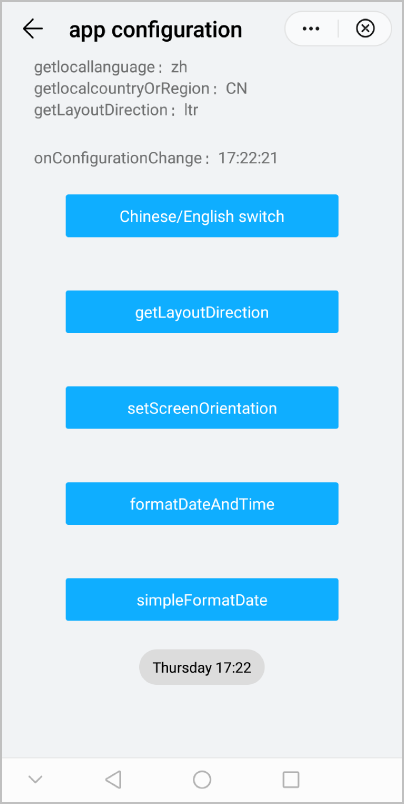
效果图如下:
版本更新说明
| 版本 | 发布日期 | 描述 |
|---|---|---|
| 1109 | 2023-12-19 | 新增getWideScreenFitMode方法,用于获取折叠屏展开时应用内容的居中或满屏状态。 |
| 1100 | 2022-07-07 | 新增setGrayMode方法,用于设置灰色模式。 |
| 1083 | 2022-03-21 |
|
| 1070 | 2020-05-19 |
|
| 1060 | 2019-12-10 | 第一次正式发布。 |