导入模块
在调用接口页面的<script>部分增加如下配置。
import decode from '@system.decode'
或
const decode = require('system.decode') [h2]TextDecoder(ENCODING, OBJECT) (1080+)
描述
创建新TextDecoder对象。
ENCODING参数
参数 | 类型 | 是否必填 | 说明 |
|---|---|---|---|
encoding | string | 是 | 解码器的编码格式。 |
OBJECT参数
参数 | 类型 | 是否必填 | 说明 |
|---|---|---|---|
fatal | boolean | 否 | 是否展示致命错误。 |
ignoreBOM | boolean | 否 | 是否忽略BOM。 |
示例代码
let encoding = "utf-8"
let options = {
    "fatal":true,
    "ignoreBOM":false,
}const decoder = new TextDecoder(encoding, options)
[h2]TextDecoder. decode(ARRAYBUFFER) (1080+)
描述
将数组缓存解码为字符串。
ARRAYBUFFER参数
参数 | 类型 | 是否必填 | 说明 |
|---|---|---|---|
arrayBuffer | byte array | 是 | 待解码的数组缓存。 |
示例代码
let encoding = "utf-8"
let options = {
    "fatal":true,
    "ignoreBOM":false,
}
const decoder = new TextDecoder(encoding, options)
let arrayBuffer = new Uint8Array([229, 191, 171, 229, 186, 148, 231, 148, 168])
const result = decoder.decode(arrayBuffer)
console.log(result) // '快应用'
Demo
<template>
  <!-- Only one root node is allowed in template. -->
  <div class="container">
    <text if="{{display}}" style="width: 700px;font-size:50px">beforedecoder:{{ value }}</text>
    <text if="{{display}}" style="width: 700px;font-size:50px;color: red">decodervalue:{{ decodervalue }}</text>
    <input class="input" type="button" value="Decoder" onclick="Decoder" />
  </div>
</template>

<style>
  .container {
    flex-direction: column;
    justify-content: center;
    align-items: center;
  }
  .input {
    background-color: #0faeff;
    color: #ffffff;
    width:400px;
    height: 100px;
    font-size: 50px;
    border-radius:15px;
  }
</style>

<script>
  module.exports = {
    data: {
      componentData: {},
      display: false,
      value: '',
      decodervalue: ''
    },
     onInit() {
      this.$page.setTitleBar({
        text: 'text decoder',
        textColor: '#ffffff',
        backgroundColor: '#007DFF',
        backgroundOpacity: 0.5,
        menu: true
      });
    },
    Decoder() {
      let encoding = "utf-8"
      let options = {
        "fatal": true,
        "ignoreBOM": false,
      }
      const decoder = new TextDecoder(encoding, options)
      this.value = new Uint8Array([81, 117, 105, 99, 107, 32, 97, 112, 112])
      this.decodervalue = decoder.decode(this.value)
      this.display = true
      console.log(this.decodervalue) // '快应用'
    }
  }
</script>
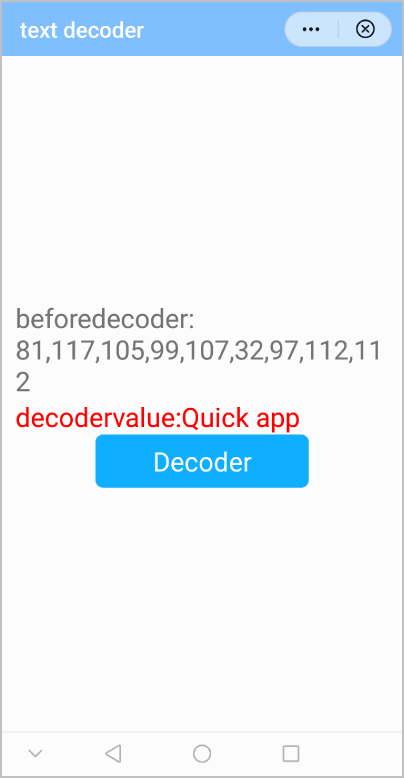
效果图如下: