此接口处理的数据在PC终端使用时,可能会被其它应用读取,所以建议请勿使用此接口存储敏感数据。
导入模块
在调用接口页面的<script>部分增加如下配置。
import exchange from '@service.exchange'
或
var exchange = require('@service.exchange') 接口定义
交互数据提供了一个不同快应用间数据交互的方式。快应用可以利用它发布数据,或从其他快应用获取数据。 数据交互有两个数据空间,分别是应用空间(application)和全局空间(global)。
- application:数据发布在应用空间,读取时需同时指定发布方的包名和签名,并且需要发布方授权。
- global:数据发布在全局空间,多个应用的写操作会相互覆盖,读取时不能指定发布方的包名和签名,不需要发布方授权。

global 数据仅支持 set、get 操作,remove、clear、grantPermission、revokePermission 等操作均不支持。
接口 | 描述 |
|---|---|
读取数据。 | |
发布数据到快应用平台。 | |
从快应用平台删除数据。 | |
从快应用平台清除数据。 | |
授权应用获取数据。同签名的应用不用授权,默认有读取权限。 | |
取消授权应用获取数据。不能取消同签名应用的读取授权。 |
[h2]exchange.get(OBJECT)
描述
读取数据。
OBJECT参数
属性名 | 类型 | 是否必填 | 说明 |
|---|---|---|---|
package | string | 否 | 数据发布方的包名,scope 为 application 时必须提供,为 global 时必须为空。 |
sign | string | 否 | 使用 SHA-256 加密的数据发布方签名,scope 为 application 时必须提供,为 global 时必须为空。 说明: 该签名是pkg.getSignatureDigests接口成功回调时返回的signatureDigests参数里的签名。 |
scope | string | 否 | 数据发布的空间类型,支持 application 和 global,默认为 application。 |
key | string | 是 | 数据的 key。 |
success | function | 否 | 成功回调。 |
fail | function | 否 | 失败回调。 |
complete | function | 否 | 执行结束后的回调(调用成功、失败都会执行)。 |
success返回值:
参数名 | 类型 | 说明 |
|---|---|---|
value | string | 数据的值。 |
fail返回错误码:
错误码 | 说明 |
|---|---|
202 | 参数错误。 |
1000 | 没有权限。 |
示例代码
exchange.get({
    package: 'com.example',
    sign: '7a12ec1d66233f20a20141035b1f7937',
    key: 'token',
    success: function(ret) {
        console.log(`handling success, value = ${ret.value}`)
    },
    fail: function(data, code) {
        console.log(`handling fail, code = ${code}`)
    }
})
[h2]exchange.set(OBJECT)
描述
发布数据到快应用平台。
OBJECT参数
属性名 | 类型 | 是否必填 | 说明 |
|---|---|---|---|
key | string | 是 | 数据的 key。 |
value | string | 是 | 数据的值。 |
scope | string | 否 | 数据发布的空间类型,支持 application 和 global,默认为 application。 |
success | function | 否 | 成功回调。 |
fail | function | 否 | 失败回调。 |
complete | function | 否 | 执行结束后的回调(调用成功、失败都会执行)。 |
package(1080+) | string | 否 | 数据发布方的包名。当scope为application,为其他应用修改数据时,必须提供。scope为global时,必须为空。 |
sign(1080+) | string | 否 | 数据发布方签名的 SHA-256。当scope为application,为其他应用修改数据时,必须提供。scope为global时,必须为空。 |
fail返回错误码:
错误码 | 说明 |
|---|---|
202 | 参数错误。 |
示例代码
exchange.set({
    package: 'com.fastapp.sample',
    sign: '6d3e6a3dcbdadb0aa94f64e33a36b01254cb6ef7e14be282d885cd95aeb952e0',
    key: 'token',
    value: '12347979',
    success: function() {
        console.log(`handling success`)
    },
    fail: function(data, code) {
        console.log(`handling fail, code = ${code}`)
    }
})
[h2]exchange.remove(OBJECT)
描述
从快应用平台删除数据。
OBJECT参数
属性名 | 类型 | 是否必填 | 说明 |
|---|---|---|---|
key | string | 是 | 数据的 key。 |
success | function | 否 | 成功回调。 |
fail | function | 否 | 失败回调。 |
complete | function | 否 | 执行结束后的回调(调用成功、失败都会执行)。 |
package(1080+) | string | 否 | 数据发布方的包名。从其他应用中删除数据时,该参数必填。 |
sign(1080+) | string | 否 | 数据发布方签名的 SHA-256。从其他应用中删除数据时,该参数必填。 |
示例代码
exchange.remove({
    package: 'com.fastapp.sample',
    sign: '6d3e6a3dcbdadb0aa94f64e33a36b01254cb6ef7e14be282d885cd95aeb952e0',
    key: 'token',
    success: function(ret) {
        console.log(`handling success, value = ${ret.value}`)
    },
    fail: function(data, code) {
        console.log(`handling fail, code = ${code}`)
    }
})
[h2]exchange.clear(OBJECT)
描述
从快应用平台清除数据。
OBJECT参数
属性名 | 类型 | 是否必填 | 说明 |
|---|---|---|---|
success | function | 否 | 成功回调。 |
fail | function | 否 | 失败回调。 |
complete | function | 否 | 执行结束后的回调(调用成功、失败都会执行)。 |
示例代码
exchange.clear({
    success: function() {
        console.log(`handling success`)
    },
    fail: function(data, code) {
        console.log(`handling fail, code = ${code}`)
    }
})
[h2]exchange.grantPermission(OBJECT)
描述
授权应用获取数据。同签名的应用不用授权,默认有读取权限。
OBJECT参数
属性名 | 类型 | 是否必填 | 说明 |
|---|---|---|---|
package | string | 是 | 授权应用的包名。 |
sign | string | 是 | 授权应用的签名(SHA-256)。 |
key | string | 否 | 数据的 key。如果为空,则授权当前所有 key 的读取权限。 |
success | function | 否 | 成功回调。 |
fail | function | 否 | 失败回调。 |
complete | function | 否 | 执行结束后的回调(调用成功、失败都会执行)。 |
writable(1080+) | boolean | 否 | 配置授权应用是否可修改/删除数据,默认值为 false。
|
fail返回错误码:
错误码 | 说明 |
|---|---|
202 | 参数错误。 |
示例代码
exchange.grantPermission({
    package: 'com.fastapp.sample',
    sign: '6d3e6a3dcbdadb0aa94f64e33a36b01254cb6ef7e14be282d885cd95aeb952e0',
    writable: true,
    success: function() {
        console.log(`handling success`)
    },
    fail: function(data, code) {
        console.log(`handling fail, code = ${code}`)
    }
})
[h2]exchange.revokePermission(OBJECT)
描述
取消授权应用获取数据。不能取消同签名应用的读取授权。
OBJECT参数
属性名 | 类型 | 是否必填 | 说明 |
|---|---|---|---|
package | string | 是 | 取消授权的应用包名。 |
key | string | 否 | 数据的 key。如果为空,则取消当前所有 key 的权限。 |
success | function | 否 | 成功回调。 |
fail | function | 否 | 失败回调。 |
complete | function | 否 | 执行结束后的回调(调用成功、失败都会执行)。 |
fail返回错误码:
错误码 | 说明 |
|---|---|
202 | 参数错误。 |
示例代码
exchange.revokePermission({
    package: 'com.example',
    success: function() {
        console.log(`handling success`)
    },
    fail: function(data, code) {
        console.log(`handling fail, code = ${code}`)
    }
})
Demo
<template>
  <div class="container">

    <div class="item-container">
      <div class="item-content">
        <div class="item-content-detail">
          <text class="txt">key:</text>
          <input class="input" placeholder=" please input key"  value={{exchangeKey}} onchange="keyFn" />
        </div>
        <div class="item-content-detail">
          <text class="txt">value:</text>
          <input class="input" placeholder="please input value"  value={{exchangeValue}} onchange="valueFn" />
        </div>

      </div>


      <!-- Set data -->
      <input type="button" class="btn" onclick="setAppExchange"  value="setAppExchange" />
      <input type="button" class="btn" onclick="setGlobalExchange"  value="setGlobalExchange" />
      <!-- Read data -->
      <input type="button" class="btn" onclick="getAppExchange"  value="getAppExchange key:{{exchangeKey}}" />
      <input type="button" class="btn" onclick="getGlobalExchange"  value="getGlobalExchange key:{{exchangeKey}}" />>
      <!-- To grant authorization -->
      <input type="button" class="btn" onclick="grantPermission"  value="grantPermission" />
      <input type="button" class="btn" onclick="revokePermission"  value="revokePermission" />
      <!-- Delete operation -->
      <input type="button" class="btn" onclick="clearExchange"  value="clearExchange" />
      <input type="button" class="btn" onclick="removeExchange"  value="removeExchange" />
    </div>
  </div>
</template>

<style>
  .container{
  flex: 1;
  flex-direction: column;
}
  .item-container {
    margin-bottom: 50px;
    margin-right: 60px;
    margin-left: 60px;
    flex-direction: column;
  }

  .item-content {
    flex-direction: column;
    background-color: #ffffff;
    padding-left: 30px;
    padding-right: 30px;
    padding-top: 15px;
    padding-bottom: 15px;
    margin-bottom: 100px;
  }

  .item-content-detail {
    align-items: center;
  }

  .input {
    flex: 1;
    font-size: 30px;
    padding-left: 20px;
  }

  .txt {
    width: 100px;
    padding-top: 15px;
    padding-bottom: 15px;
    text-align: right;
  }
.btn {
  height: 80px;
  text-align: center;
  border-radius: 5px;
  margin-right: 60px;
  margin-left: 60px;
  margin-bottom: 50px;
  color: #ffffff;
  font-size: 30px;
  background-color: #0faeff;
}
</style>

<script>
  import exchange from '@service.exchange'
  import prompt from '@system.prompt'

  export default {
    data: {
      exchangeKey: '',
      exchangeValue: '',
    },
    onInit: function () {
      this.$page.setTitleBar({ text: 'exchange' })
    },
    keyFn: function (e) {
      this.exchangeKey = e.text
    },
    valueFn: function (e) {
      this.exchangeValue = e.text
    },
    setAppExchange: function () {
      var that = this
      if (this.exchangeKey && this.exchangeValue) {
        exchange.set({
          key: this.exchangeKey,
          value: this.exchangeValue,
          scope: 'application',
          success: function (ret) {
            prompt.showToast({
              message: '{key:' + that.exchangeKey + ',value:' + that.exchangeValue + '}',
            })
            console.log("message"+ that.exchangeKey + ',value:' + that.exchangeValue )
          },
          fail: function (erromsg, errocode) {
            prompt.showToast({ message: 'set fail --- ' + errocode + ':' + erromsg })
            console.info('set fail --- ' + errocode + ':' + erromsg)
          },
          complete: function () {
            prompt.showToast({ message: 'set complete' })
            console.info('set complete  ')
          }
        })
      } else {
        prompt.showToast({
          message: 'Please enter the key and value values'
        })
      }
    },
    setGlobalExchange: function () {
      var that = this
      if (this.exchangeKey && this.exchangeValue) {
        exchange.set({
          key: this.exchangeKey,
          value: this.exchangeValue,
          scope: 'global',
          success: function (ret) {
            prompt.showToast({
              message: '{key:' + that.exchangeKey + ',value:' + that.exchangeValue + '}',
            })
          },
          fail: function (erromsg, errocode) {
            prompt.showToast({ message: 'set fail --- ' + errocode + ':' + erromsg })
            console.info('set fail --- ' + errocode + ':' + erromsg)
          },
          complete: function () {
            prompt.showToast({ message: 'set complete' })
            console.info('set complete  ')
          }
        })
      } else {
        prompt.showToast({
          message: 'Please enter the key and value values'
        })
      }
    },
    getAppExchange: function () {
      exchange.get({
        package: 'com.fastapp.sample.global',
        scope: 'application',
        sign: '6d3e6a3dcbdadb0aa94f64e33a36b01254cb6ef7e14be282d885cd95aeb952e0',
        key: this.exchangeKey,
        success: function (ret) {
          console.info('exchange.get(): ', JSON.stringify(ret))
          prompt.showToast({
            message: 'value: ' + ret,
          })
        },
        fail: function (erromsg, errocode) {
          prompt.showToast({ message: 'get fail --- ' + errocode + ':' + erromsg })
          console.info('get fail --- ' + errocode + ':' + erromsg)
        },
        complete: function () {
          console.info('get complete  ')
        }
      })
    },
    getGlobalExchange: function () {
      var that = this
      exchange.get({
        package: '',
        sign: '',
        scope: 'global',
        key: this.exchangeKey,
        success: function (ret) {
          console.info('storage.get(): ', JSON.stringify(ret))
          that.storageShow = ret
          prompt.showToast({
            message: 'value: ' + ret,
          })
        },
        fail: function (erromsg, errocode) {
          prompt.showToast({ message: 'get fail --- ' + errocode + ':' + erromsg })
          console.info('get fail --- ' + errocode + ':' + erromsg)
        },
        complete: function () {
          console.info('get complete  ')
        }
      })
    },
    grantPermission: function () {
      exchange.grantPermission({
        package: 'com.exchang.demo',
        sign: '6f65a2a4fbb1941436f2bfeb23b1c0c4003f30de2b9c4d31a4d188b1de7d0893',
        key: this.exchangeKey,
        success: function (ret) {
          console.info('exchange.grantPermission(): ', JSON.stringify(ret))
          prompt.showToast({
            message: 'value: ' + ret,
          })
        },
        fail: function (erromsg, errocode) {
          prompt.showToast({ message: 'grantPermission fail --- ' + errocode + ':' + erromsg })
          console.info('grantPermission fail --- ' + errocode + ':' + erromsg)
        },
        complete: function () {
          console.info('grantPermission complete  ')
        }
      })
    },
    revokePermission: function () {
      exchange.revokePermission({
        package: 'com.fastapp.sample.global',
        key: this.exchangeKey,
        success: function (ret) {
          console.info('exchange.revokePermission(): ', JSON.stringify(ret))
          prompt.showToast({
            message: 'value: ' + ret,
          })
        },
        fail: function (erromsg, errocode) {
          prompt.showToast({ message: 'revokePermission fail --- ' + errocode + ':' + erromsg })
          console.info('revokePermission fail --- ' + errocode + ':' + erromsg)
        },
        complete: function () {
          console.info('revokePermission complete  ')
        }
      })
    },

    clearExchange: function () {
      exchange.clear({
        success: function () {
          prompt.showToast({
            message: 'success',
          })
        },
        fail: function (erromsg, errocode) {
          prompt.showToast({ message: 'clear fail --- ' + errocode + ':' + erromsg })
          console.info('clear fail --- ' + errocode + ':' + erromsg)
        },
        complete: function () {
          prompt.showToast({ message: 'clear complete' })
          console.info('clear complete  ')
        }
      })
    },
    removeExchange: function () {
      if (this.exchangeKey) {
        exchange.remove({
          key: this.exchangeKey,
          success: function () {
            prompt.showToast({
              message: 'success',
            })
          },
          fail: function (erromsg, errocode) {
            prompt.showToast({ message: 'get fail --- ' + errocode + ':' + erromsg })
            console.info('get fail --- ' + errocode + ':' + erromsg)
          },
          complete: function () {
            console.info('get complete  ')
          }
        })
      } else {
        prompt.showToast({ message: 'key is null' })
      }
    }
  }
</script>
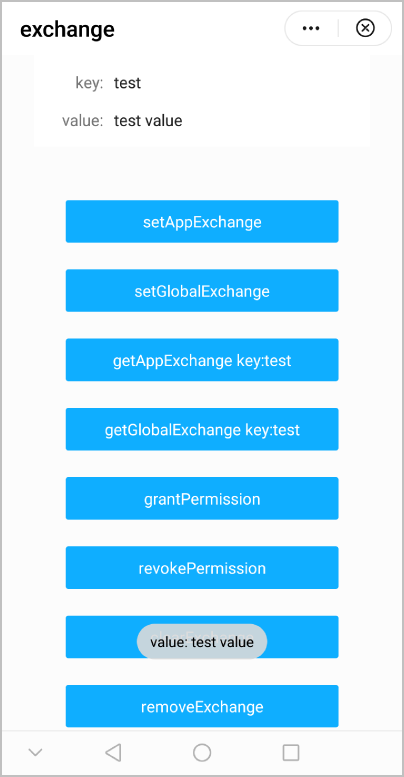
效果图如下: