
此接口处理的数据在PC终端使用时,可能会被其它应用读取,所以建议请勿使用此接口存储敏感数据。
接口定义
| 接口 | 描述 |
|---|---|
| 将源文件移动到指定位置。 | |
| 将源文件复制一份并存储到指定位置。 | |
| 获取指定目录下的文件列表。 | |
| 获取本地文件的文件信息。 | |
| 删除本地存储的文件。 | |
| 将文本内容写入指定文件。 | |
| 将内容写入Buffer。 | |
| 从Buffer中读取内容。 | |
| 读取文本。 | |
| 判断文件/目录是否存在。 | |
| 创建目录。 | |
| 删除目录。 | |
| 复制文件到系统公共目录。 |
[h2]file.move(OBJECT)
描述
将源文件移动到指定位置。
OBJECT参数
| 属性名 | 类型 | 是否必填 | 说明 |
|---|---|---|---|
| srcUri | string | 是 | 源文件的uri,不可以是应用资源路径和tmp类型的uri。 uri描述请参见“文件组织 > URI”。 |
| dstUri | string | 是 | 目标文件的uri,不可以是应用资源路径和tmp类型的uri。 uri描述请参见“文件组织 > URI”。 |
| success | function | 否 | 成功回调,返回目标文件的uri。 |
| fail | function | 否 | 失败回调。 |
| complete | function | 否 | 执行结束后的回调。 |
fail返回错误码:
| 错误码 | 说明 |
|---|---|
| 202 | 参数错误。 |
| 300 | I/O错误。 |
示例代码
file.move({
  srcUri: "internal://cache/path/to/file",
  dstUri: "internal://files/path/to/file",
  success: function(uri) {
    console.log("move success: " + uri);
  },
  fail: function(data, code) {
    console.log("handling fail, code=" + code);
  }
})
[h2]file.copy(OBJECT)
描述
将源文件复制一份并存储到指定位置。
OBJECT参数
| 属性名 | 类型 | 是否必填 | 说明 |
|---|---|---|---|
| srcUri | string | 是 | 源文件的uri,如果是应用内资源路径,不允许是相对路径。 uri描述请参见“文件组织 > URI”。 |
| dstUri | string | 是 | 目标文件的uri,不可以是应用资源路径和tmp类型的uri。 uri描述请参见“文件组织 > URI”。 |
| success | function | 否 | 成功回调,返回目标文件的uri。 |
| fail | function | 否 | 失败回调。 |
| complete | function | 否 | 执行结束后的回调。 |
fail返回错误码:
| 错误码 | 说明 |
|---|---|
| 202 | 参数错误。 |
| 300 | I/O错误。 |
示例代码
file.copy({
  srcUri: "internal://cache/path/to/file",
  dstUri: "internal://files/path/to/file",
  success: function(uri) {
    console.log("copy success: " + uri);
  },
  fail: function(data, code) {
    console.log("handling fail, code=" + code);
  }
})
[h2]file.list(OBJECT)
描述
获取指定目录下的文件列表。
OBJECT参数
| 参数 | 类型 | 是否必填 | 说明 |
|---|---|---|---|
| uri | string | 是 | 目录的uri。 uri描述请参见“文件组织 > URI”。 说明:
|
| success | function | 否 | 成功回调,返回{fileList:[{uri:'file1',lastModifiedTime:1234456, length:123456} ...]} 返回值说明请参见"success返回值",返回值中每个文件元信息请参见“文件元信息说明”。 |
| fail | function | 否 | 失败回调。 |
| complete | function | 否 | 执行结束后的回调。 |
success返回值:
| 参数名 | 类型 | 说明 |
|---|---|---|
| fileList | array | 文件列表,每个文件的格式为{uri:'file1',lastModifiedTime:1234456, length:123456}。 |
文件元信息说明:
| 参数名 | 类型 | 说明 |
|---|---|---|
| uri | string | 文件的uri,该uri可以被其他组件或Feature访问。 uri描述请参见“文件组织 > URI”。 |
| length | number | 文件大小,单位B。 |
| lastModifiedTime | number | 文件保存时的时间戳,从 1970/01/01 00:00:00 GMT 到当前时间的毫秒数。 |
fail返回错误码:
| 错误码 | 说明 |
|---|---|
| 202 | 参数错误。 |
| 300 | I/O错误。 |
示例代码
file.list({
  uri: "internal://files/movies/"
  success: function(data) {
    console.log(data.fileList)
  },
  fail: function(data, code) {
    console.log("handling fail, code=" + code);
  }
})
[h2]file.get(OBJECT)
描述
获取本地文件的文件信息。
OBJECT参数
| 参数 | 类型 | 是否必填 | 说明 |
|---|---|---|---|
| uri | string | 是 | 文件的uri。 uri描述请参见“文件组织 > URI”。 说明: uri为应用内资源路径时,可以是绝对路径,也可以是相对路径。 |
| recursive(1060+) | boolean | 否 | 是否递归获取子目录文件列表。默认为false。 |
| success | function | 否 | 成功回调,返回{uri:'file1', length:123456, lastModifiedTime:1233456} |
| fail | function | 否 | 失败回调。 |
| complete | function | 否 | 执行结束后的回调。 |
success返回值:
| 参数名 | 类型 | 说明 |
|---|---|---|
| uri | string | 文件的uri,该uri可以被其他组件或Feature访问。 uri描述请参见“文件组织 > URI”。 |
| length | number | 文件大小,单位B。 |
| lastModifiedTime | number | 文件保存时的时间戳,从1970/01/01 00:00:00 GMT 到当前时间的毫秒数。 |
| type(1060+) | string | 文件类型。
|
| subFiles(1060+) | string | 文件列表。recursive为true且type为dir时,递归返回子目录文件细信息,否则不返回。 |
fail返回错误码:
| 错误码 | 说明 |
|---|---|
| 202 | 参数错误。 |
| 300 | I/O错误。 |
示例代码
file.get({
  uri: 'internal://files/path/to/file',
  success: function(data) {
    console.log(data.uri);
    console.log(data.length);
    console.log(data.lastModifiedTime);
  },
  fail: function(data, code) {
    console.log("handling fail, code=" + code);
  }
})
[h2]file.delete(OBJECT)
描述
删除本地存储的文件。
OBJECT参数
| 参数 | 类型 | 是否必填 | 说明 |
|---|---|---|---|
| uri | string | 是 | 需要删除的文件uri,不可以是应用资源路径和tmp类型的uri。 uri描述请参见“文件组织 > URI”。 |
| success | function | 否 | 成功回调。 |
| fail | function | 否 | 失败回调。 |
| complete | function | 否 | 执行结束后的回调。 |
fail返回错误码:
| 错误码 | 说明 |
|---|---|
| 202 | 参数错误。 |
| 300 | I/O错误。 |
示例代码
file.delete({
  uri: 'internal://files/path/to/file',
  success: function(data) {
    console.log("handling success");
  },
  fail: function(data, code) {
    console.log("handling fail, code=" + code);
  }
})
[h2]file.writeText(OBJECT)(1010+)
描述
将文本内容写入指定文件。
OBJECT参数
| 属性名 | 类型 | 默认值 | 是否必填 | 说明 |
|---|---|---|---|---|
| uri | string | - | 是 | 本地文件路径,不支持资源文件路径和tmp类型的uri,如果文件不存在会创建文件,主要包含:internal://cache/*, internal://files/*, internal://mass/* uri描述请参见“文件组织 > URI”。 |
| text | string | - | 是 | 需要写入的字符串 |
| encoding | string | UTF-8 | 否 | 编码格式 |
| append(1060+) | boolean | false | 否 | 是否为追加模式。 |
| success | function | - | 否 | 成功回调。 |
| fail | function | - | 否 | 失败回调 |
| complete | function | - | 否 | 执行结束后的回调。 |
fail返回错误码:
| 错误码 | 说明 |
|---|---|
| 202 | 参数错误。 |
| 300 | I/O错误。 |
示例代码
file.writeText({
    uri: 'internal://cache/test/test.txt',
    text: 'nihaadpafsafa fsafass faf  sfsa sf',
    encoding: 'UTF-8',
    success: function() {
        console.log('success');
    },
    fail: function(errmsg, errcode) {
        console.log('failed ' + errmsg+' errcode = '+errcode);
   }
})
[h2]file.writeArrayBuffer(OBJECT)(1010+)
描述
将内容写入Buffer。
OBJECT参数
| 属性名 | 类型 | 默认值 | 是否必填 | 说明 |
|---|---|---|---|---|
| uri | string | - | 是 | 本地文件路径,不支持资源文件路径和tmp类型的uri,如果文件不存在会创建文件。 uri描述请参见“文件组织 > URI”。 |
| buffer | uint8array | - | 是 | 需要写入的字符串。详细参见“Uint8Array”。 |
| position | number | 0 | 否 | 指向文件开始写入数据的位置的偏移量,假如position超过了文档自身的长度,则需要进行填充后扩展。 |
| append(1060+) | boolean | false | 否 | 是否为追加模式。 |
| success | function | - | 否 | 成功回调。 |
| fail | function | - | 否 | 失败回调 |
| complete | function | - | 否 | 执行结束后的回调。 |
fail返回错误码:
| 错误码 | 说明 |
|---|---|
| 202 | 参数错误。 |
| 300 | I/O错误。 |
示例代码
file.writeArrayBuffer({
    uri: 'internal://cache/test/test1.txt',
    buffer: uint8array,
    position: 0,
    success: function() {
        console.log('success ');
    },
    fail: function(errmsg, errcode) {
        console.log('failed ' + errmsg+' errcode = '+errcode);
    }
})
[h2]file.readArrayBuffer(OBJECT)(1010+)
描述
从Buffer中读取内容。
OBJECT参数
| 属性名 | 类型 | 默认值 | 是否必填 | 说明 |
|---|---|---|---|---|
| uri | string | - | 是 | 本地文件路径。 uri描述请参见“文件组织 > URI”。 |
| position | number | 0 | 否 | 读取内容的起始位置 |
| length | number | - | 否 | 读取内容的长度,不填写则读取到文件结尾。 |
| success | function | - | 否 | 成功回调。 |
| fail | function | - | 否 | 失败回调 |
| complete | function | - | 否 | 执行结束后的回调。 |
success返回值:
| 参数 | 类型 | 说明 |
|---|---|---|
| buffer | uint8array | 读取的文件内容 |
fail返回错误码:
| 错误码 | 说明 |
|---|---|
| 202 | 参数错误。 |
| 300 | I/O错误。 |
| 301 | 文件不存在 |
示例代码
file.readArrayBuffer({
    uri: 'internal://cache/test/test1.txt',
    position:0,
    length: 3,
    success: function(data) {
        console.log("data buffer  = "+data.buffer)
    },
    fail: function(errmsg, errcode) {
        console.log('failed ' + errmsg+' errcode = '+errcode);
    }
})
[h2]file.readText(OBJECT)(1010+)
描述
读取文本。
OBJECT参数
| 属性名 | 类型 | 默认值 | 是否必填 | 说明 |
|---|---|---|---|---|
| uri | string | - | 是 | 本地文件路径。 uri描述请参见“文件组织 > URI”。 |
| encoding | string | UTF-8 | 否 | 编码格式 |
| success | function | - | 否 | 成功回调。 |
| fail | function | - | 否 | 失败回调 |
| complete | function | - | 否 | 执行结束后的回调。 |
success返回值:
| 参数 | 类型 | 说明 |
|---|---|---|
| text | string | 读取的文本 |
fail返回错误码:
| 错误码 | 说明 |
|---|---|
| 202 | 参数错误。 |
| 300 | I/O错误。 |
| 301 | 文件不存在 |
示例代码
file.readText({
    uri: 'internal://cache/test/test.txt',
    encoding: 'UTF-8',
    success: function(data) {
        console.log('success data.text = '+data.text);
    },
    fail: function(errmsg, errcode) {
        console.log('failed ' + errmsg+' errcode = '+errcode);
    }
})
[h2]file.access(OBJECT)(1060+)
描述
判断文件/目录是否存在。
OBJECT参数
| 属性名 | 类型 | 默认值 | 是否必填 | 说明 |
|---|---|---|---|---|
| uri | string | - | 是 | 目录的uri。 uri描述请参见“文件组织 > URI”。 说明: uri为应用内资源路径时,可以是绝对路径,也可以是相对路径。 |
| success | function | - | 否 | 成功回调。 |
| fail | function | - | 否 | 失败回调 |
| complete | function | - | 否 | 执行结束后的回调。 |
fail返回错误码:
| 错误码 | 说明 |
|---|---|
| 202 | 参数错误。 |
| 300 | I/O错误。 |
示例代码
file.access({
  uri: 'internal://files/test',
  success: function () {
    console.log('handling success')
  },
  fail: function (data, code) {
    console.log(`handling fail, code `)
  }
})
[h2]file.mkdir(OBJECT)(1060+)
描述
创建目录。
OBJECT参数
| 属性名 | 类型 | 默认值 | 是否必填 | 说明 |
|---|---|---|---|---|
| uri | string | - | 是 | 文件的uri,不可以是应用资源路径和tmp类型的uri。uri路径中不允许出现“../”这类父目录路径。 |
| recursive | boolean | - | 否 | 是否在递归创建该目录的上级目录后再创建该目录。默认false。 |
| success | function | - | 否 | 成功回调。 |
| fail | function | - | 否 | 失败回调 |
| complete | function | - | 否 | 执行结束后的回调。 |
fail返回错误码:
| 错误码 | 说明 |
|---|---|
| 202 | 参数错误。 |
| 300 | I/O错误。 |
示例代码
file.mkdir({
  uri: 'internal://files/dir/',
  success: function () {
    console.log('handling success')
  },
  fail: function (data, code) {
    console.log(`handling fail`)
  }
})
[h2]file.rmdir(OBJECT)(1060+)
描述
删除目录。

删除目录文件夹时,如果存在子目录或者文件,需要将recursive设为true才能删除成功,否则会提示 code = 300 错误。
OBJECT参数
| 属性名 | 类型 | 默认值 | 是否必填 | 说明 |
|---|---|---|---|---|
| uri | string | - | 是 | 文件的uri,不可以是应用资源路径和tmp类型的uri。 |
| recursive | boolean | - | 否 | 是否递归删除子文件和子目录。默认false。 |
| success | function | - | 否 | 成功回调。 |
| fail | function | - | 否 | 失败回调 |
| complete | function | - | 否 | 执行结束后的回调。 |
fail返回错误码:
| 错误码 | 说明 |
|---|---|
| 202 | 参数错误。 |
| 300 | I/O错误。 |
示例代码
file.rmdir({
  uri: 'internal://files/dir/',
  success: function () {
    console.log('handling success')
  },
  fail: function (data, code) {
    console.log(`handling fail`)
  }
})
[h2]file.copyFileToPublicDir(OBJECT)(1078+)
描述
复制文件到系统公共目录。

需要获得用户的存储权限授权。
参数
| 参数 | 类型 | 是否必填 | 说明 |
|---|---|---|---|
| srcPath | string | 是 | 源文件路径,只可以是本地文件。 |
| destPath | string | 是 | 目标文件路径,只支持external://DIRECTORY_TYPE/xxx[optional]/yyy.[extensionName] 格式,例如"external://DIRECTORY_DOCUMENTS/test/test.pdf"。 其中DIRECTORY_TYPE只支持如下类型:
HarmonyOS 2.0及以上或Android 10.0及以上版本需正确配置文件类型,否则会存储异常。HarmonyOS 2.0及以上或Android 10.0及以上版本各目录类型下存储文件类型支持情况如下:
|
| success | Function | 否 | 接口调用成功的回调函数。 |
| fail | Function | 否 | 接口调用失败的回调函数。 |
| complete | Function | 否 | 接口调用结束的回调函数(调用成功、失败都会执行)。 |
fail返回错误码
| 错误码 | 说明 |
|---|---|
| 200 | 通用错误。 |
| 202 | 参数错误。 |
| 300 | IO异常。 |
| 302 | 文件已存在。 |
| 303 | 文件后缀名不存在。 |
| 304 | 文件路径不合法。 |
示例代码
file.copyFileToPublicDir({
    srcPath: '/Common/test.mp3',
    destPath: 'external://DIRECTORY_DOCUMENTS/test.mp3',
    success: function (ret) {
      console.log("copy success: " + ret);
    },
    fail: function (data, code) {
      console.log("handling fail, code=" + code)
    }
})
Demo
<template>
  <div class="container">

    <div class="item-container">
      <!-- download file -->
      <div class="item-content">
        <text class="txt">downloadFile: {{fileDownloadData}}</text>
      </div>
      <input type="button" class="btn" onclick="downloadFile"  value="Download File" />

      <!-- move file -->
      <div class="item-content">
        <text class="txt">moveFile: {{fileMoveData}}</text>
      </div>
      <input type="button" class="btn" onclick="moveFile" value="Move File" />

      <!-- move file to folder -->
      <div class="item-content">
        <text class="txt">moveFileToFolder: {{fileMoveToFolderData}}</text>
      </div>
      <input type="button" class="btn" onclick="moveFileToFolder" value="Move File to Folder" />

      <!-- copy file -->
      <div class="item-content">
        <text class="txt">copyFile: {{fileCopyData}}</text>
      </div>
      <input type="button" class="btn" onclick="copyFile" value="Copy File" />

      <!-- file list -->
      <div class="item-content">
        <text class="txt">getFileList: {{fileGetListData}}</text>
      </div>
      <input type="button" class="btn" onclick="getFileList"  value="Get File List" />

      <!-- get file information -->
      <div class="item-content">
        <text class="txt">getFileInfo: {{fileGetData}}</text>
      </div>
      <input type="button" class="btn" onclick="getFile"
        value="Get File Info" />

      <!-- delete file -->
      <div class="item-content">
        <text class="txt">DeleteFile: {{fileDeleteData}}</text>
      </div>
      <input type="button" class="btn" onclick="deleteFile"  value="Delete File" />

      <!-- write file -->
      <div class="item-content">
        <text class="txt">writeFile: {{fileWriteData}}</text>
      </div>
      <input type="button" class="btn" onclick="writeFile"   value="Write File" />

      <!-- read file -->
      <div class="item-content">
        <text class="txt">readFile: {{fileReadData}}</text>
      </div>
      <input type="button" class="btn" onclick="readFile" value="Read File" />
      <!-- write Buffer -->
      <div class="item-content">
        <text class="txt">writeBuffer: {{writeBufferData}}</text>
      </div>
      <input type="button" class="btn" onclick="writeBuffer"  value="Write Buffer" />

      <!-- read Buffer -->
      <div class="item-content">
        <text class="txt">ReadBuffer: {{readBufferData}}</text>
      </div>
      <input type="button" class="btn" onclick="readBuffer"  value="Read Buffer" />
      <!-- if file is exist -->
      <div class="item-content">
        <text class="txt">fileExist: {{fileAccessData}}</text>
      </div>
      <input type="button" class="btn" onclick="access" value="File Exist" />

      <!-- make directory -->
      <div class="item-content">
        <text class="txt">makeDir: {{makeDir}}</text>
      </div>
      <input type="button" class="btn" onclick="mkDir" value="Make Dir" />

      <!-- delete directory -->
      <div class="item-content">
        <text class="txt">deletDir: {{deletDir}}</text>
      </div>
      <input type="button" class="btn" onclick="rmDir" value="Delet Dir" />
    </div>
    <!-- read text -->
      <div class="item-content">
        <text class="txt">readText: {{textContent}}</text>
      </div>
      <input type="button" class="btn" onclick="readText" value="Read Text" />
      <!-- read text -->
      <div class="item-content">
        <text class="txt">result: {{result}}</text>
      </div>
      <input type="button" class="btn" onclick="copyFileToPublicDir" value="copyFileToPublicDir" />

  </div>
</template>

<style>
.container{
  flex: 1;
  flex-direction: column;
}

  .item-container {
    margin-bottom: 50px;
    margin-right: 60px;
    margin-left: 60px;
    flex-direction: column;
  }

  .item-content {
    flex-direction: column;
    background-color: #ffffff;
    padding-left: 30px;
    padding-right: 30px;
    padding-top: 20px;
    padding-bottom: 20px;
    margin-bottom: 30px;
    align-items: flex-start;
  }

  .txt {
    padding-top: 15px;
    padding-bottom: 15px;
  }
  .btn {
  height: 80px;
  text-align: center;
  border-radius: 5px;
  margin-right: 60px;
  margin-left: 60px;
  margin-bottom: 50px;
  color: #ffffff;
  font-size: 30px;
  background-color: #0faeff;
}
</style>

<script>
  import file from '@system.file'
  import fetch from '@system.fetch'

  export default {
    data: {
      componentName: 'file',
      fileDownloadData: '',
      fileMoveData: '',
      fileMoveToFolderData: '',
      fileCopyData: '',
      fileGetListData: '',
      fileGetData: '',
      fileDeleteData: '',
      fileWriteData: '',
      fileReadData: '',
      writeBufferData: '',
      readBufferData: '',
      fileAccessData: '',
      makeDir: '',
      deletDir: '',
      textContent:'',
      result:''
    },
    onInit: function () {
      this.$page.setTitleBar({ text: 'file' })
    },
    downloadFile: function () {
      var that = this
      fetch.fetch({
        url: 'https://developer.huawei.com/dev_index/img/logo_ch.png',
        success: function (ret) {
          that.fileDownloadData = ret.data
          console.log("wlj"+ret.data);
          that.fileDeleteData = that.fileDownloadData
          console.log('file_download_data--------' + JSON.stringify(ret))
        }
      })
    },
    moveFile: function () {
      var that = this
      var dstUri = 'internal://files/testfile/file.png'
      file.move({
        srcUri: this.fileDownloadData,
        dstUri: dstUri,
        success: function (ret) {
          that.fileMoveData = dstUri
          that.fileDownloadData = dstUri
          that.fileDeleteData = that.fileDownloadData
          console.log('file_save--------success ' + JSON.stringify(ret))
        },
        fail: function (errmsg, errcode) {
          that.fileMoveData = errcode + '---' + errmsg
          console.log('file_save--------fail ' + errcode + ': ' + errmsg)
        }
      })
    },
    moveFileToFolder: function () {
      var that = this
      var dstUri = 'internal://files/testfile/'
      file.move({
        srcUri: this.fileDownloadData,
        dstUri: dstUri,
        success: function (ret) {
          that.fileMoveToFolderData = ret
          that.fileDownloadData = ret
          that.fileDeleteData = ret
          console.log('file_save--------success ' + JSON.stringify(ret))
        },
        fail: function (errmsg, errcode) {
          that.fileMoveToFolderData = errcode + '---' + errmsg
          console.log('file_save--------fail ' + errcode + ': ' + errmsg)
        }
      })
    },
    copyFile: function () {
      var that = this
      var dstUri = 'internal://files/testfile/filecopy.png'
      file.copy({
        srcUri: that.fileDownloadData,
        dstUri: dstUri,
        success: function (ret) {
          that.fileCopyData = ret
          console.log('file_list_data-------- success ' + JSON.stringify(ret))
        },
        fail: function (errmsg, errcode) {
          that.fileCopyData = errcode + '---' + errmsg
          console.log('file_list_data--------complete ' + errcode + ': ' + errmsg)
        }
      })
    },
    getFileList: function () {
      var that = this
      file.list({
        uri: 'internal://files/testfile',
        success: function (ret) {
          that.fileGetListData = JSON.stringify(ret)
          console.log('file_get_data---------success ' + JSON.stringify(ret))
        },
        fail: function (errmsg, errcode) {
          that.fileGetListData = errcode + '---' + errmsg
          console.log('file_get_data---------fail ' + errcode + ': ' + errmsg)
        }
      })
    },
    getFile: function () {
      var that = this
      file.get({
        uri: 'internal://files/testfile',
        recursive: true,
        success: function (ret) {
          that.fileGetData = JSON.stringify(ret)
          console.log('file_get_data---------success ' + JSON.stringify(ret))
        },
        fail: function (errmsg, errcode) {
          that.fileGetData = errcode + '---' + errmsg
          console.log('file_get_data---------fail ' + errcode + ': ' + errmsg)
        }
      })
    },
    deleteFile: function () {
      var that = this
      file.delete({
        uri: that.fileDownloadData,
        success: function (ret) {
          that.fileDownloadData = ''
          that.fileMoveData = ''
          that.fileMoveToFolderData = ''
          that.fileCopyData = ''
          that.fileGetListData = ''
          that.fileGetData = ''
          that.fileDeleteData = JSON.stringify(ret)
          console.log('file_remove_data---------success ' + JSON.stringify(ret))
        },
        fail: function (errmsg, errcode) {
          that.fileDeleteData = errcode + '---' + errmsg
          console.log('file_remove_data---------fail ' + errcode + ': ' + errmsg)
        }
      })
    },

    writeFile: function () {
      var that = this
      file.writeText({
        uri: 'internal://cache/test/test.txt',
        text: 'hello quickapp',
        encoding: 'UTF-8',
        append: true,
        success: function () {
          console.log('file_write_data---------success ')
          that.fileWriteData = 'Success'
        },
        fail: function (errmsg, errcode) {
          that.fileWriteData = 'Fail'
          console.log('file_write_data---------failed ' + errmsg + ' errcode = ' + errcode)
        }
      })
    },

    readFile: function () {
      var that = this
      file.readText({
        uri: 'internal://cache/test/test.txt',
        encoding: 'UTF-8',
        success: function (data) {
          console.log(`success data.text = ${data.text}`)
          that.fileReadData = data.text
        },
        fail: function (errmsg, errcode) {
          console.log('failed ' + errmsg + ' errcode = ' + errcode)
          that.fileReadData = 'Failed'
        }
      })
    },
    writeBuffer: function () {
      var that = this
      var uint8 = new Uint8Array(3)
      uint8[0] = 198
      uint8[1] = 31
      uint8[2] = 219
      file.writeArrayBuffer({
        uri: 'internal://cache/test/test1.txt',
        buffer: uint8,
        position: 0,
        append: true,
        success: function () {
          console.log('success ')
          that.writeBufferData = 'Success'
        },
        fail: function (errmsg, errcode) {
          console.log('failed ' + errmsg + ' errcode = ' + errcode)
          that.writeBufferData = 'Failed'
        }
      })
    },

    readBuffer: function () {
      var that = this
      file.readArrayBuffer({
        uri: 'internal://cache/test/test1.txt',
        success: function (data) {
          that.readBufferData = data.buffer
          console.log('data buffer  = ' + data.buffer)
        },
        fail: function (errmsg, errcode) {
          console.log('failed ' + errmsg + ' errcode = ' + errcode)
        }
      })
    },

    access: function () {
      var that = this
      file.access({
        uri: 'internal://cache/test/test1.txt',
        success: function (data) {
          that.fileAccessData = 'accessible'
          console.log('success')
        },
        fail: function (errmsg, errcode) {
          that.fileAccessData = 'can not access'
          console.log('failed ' + errmsg + ' errcode = ' + errcode)
        }
      })
    },

    mkDir: function () {
      var that = this
      file.mkdir({
        uri: 'internal://cache/../test/',
        recursive: false,
        success: function (data) {
          that.makeDir = 'success'
          console.log('success')
        },
        fail: function (errmsg, errcode) {
          that.makeDir = 'fail'
          console.log('failed ' + errmsg + ' errcode = ' + errcode)
        }
      })
    },

    rmDir: function () {
      var that = this
      file.rmdir({
        uri: 'internal://cache/test/',
        recursive: true,
        success: function (data) {
          console.log('success')
          that.deletDir = 'success'
        },
        fail: function (errmsg, errcode) {
          that.deletDir = 'fail'
          console.log('failed ' + errmsg + ' errcode = ' + errcode)
        }
      })
    },
    readText() {
      var that = this
      file.readText({
        uri: 'internal://cache/test/test.txt',
        encoding: 'UTF-8',
        success: function(data) {
           console.log('success data.text = '+data.text);
           that.textContent = data.text
        },
        fail: function(errmsg, errcode) {
           console.log('failed ' + errmsg+' errcode = '+errcode);
           that.textContent = errcode
        }
      })
    },
    copyFileToPublicDir() {
      var that = this
      file.copyFileToPublicDir({
        srcPath: '/Common/logo.png',
        destPath: 'external://DIRECTORY_DOCUMENTS/test.mp3',
        success: function (ret) {
           console.log("copy success: " + ret);
           that.result = ret
      },
       fail: function (data, code) {
           console.log("handling fail, code=" + code)
           that.result = 'fail'
      }
    })
    }
  }
</script>
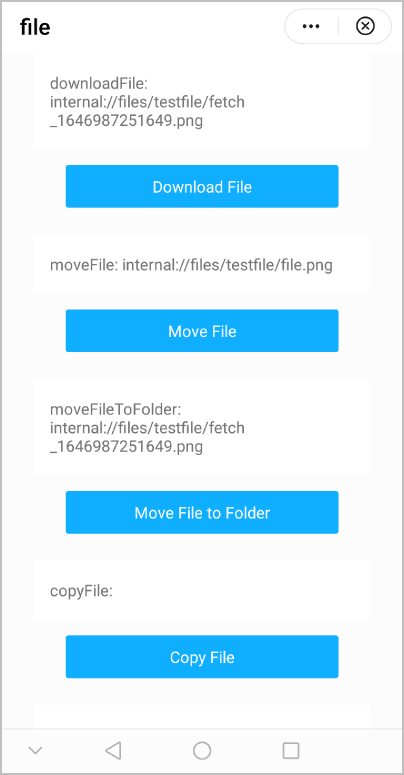
效果图如下:
版本更新说明
| 版本 | 发布日期 | 描述 |
|---|---|---|
| 1090 | 2022-05-19 | 接口copyFileToPublicDir新增错误码:303、304。 |
| 1080 | 2021-12-28 | 为file.list、file.get和file.access新增应用资源文件夹访问方法。 |
| 1060 | 2019-12-10 |
|
| 1040 | 2019-06-24 | file.get的uri支持tmp类型的uri。 |
| 1010 | 2018-04-20 | 新增4个接口:
|