导入模块
在调用接口页面的<script>部分增加如下配置。
import keyring from '@service.keyring'
或
var keyring = require('@service.keyring') [h2]keyring.getProvider()(1079+)
描述
获取服务提供商。
返回值
字符串,服务提供商的代号,如厂商的英文品牌名称,如果无此服务则返回空字符串。返回空字符串时,请勿调用该服务其他接口,否则将抛出异常。
示例代码
functionGetProvider() {
  keyring.getProvider({
    success: function (msg) {
      prompt.showToast({
        message: msg,
        duration: 2000,
        gravity: 'bottom'
      })
    },
    fail: function (msg) {
      prompt.showToast({
        message: msg,
        duration: 2000,
        gravity: 'bottom'
      })
    }
  })
}
[h2]keyring.saveCredential(OBJECT)(1079+)
描述
保存用户的凭证信息,成功返回success,失败返回错误信息。
OBJECT参数
| 参数 | 类型 | 是否必填 | 说明 |
|---|---|---|---|
| avatarUrl | string | 否 | 用户头像URL。 |
| username | string | 是 | 凭据的用户名(更新时不可修改)。 |
| displayName | string | 否 | 显示名称。 |
| owner |
| 凭据的所有者,即最初保存本凭据的应用。 注意: 更新已存在的数据时,需要先调用keyring.findCredential,返回的owner请务必不做修改。 | |
| sharedWith | list<AppIdentity> | 否 | 快应用保存的数据,可以共享给HarmonyOS应用、Android应用和浏览器网址使用。配置对应的身份信息即可共享给特定的应用。 |
| syncable | boolean | 是 | 是否支持在不同设备间进行同步。 说明: 此为预留能力,当前版本不支持同步,请设置为false。 |
| tag | string | 否 | 凭据的标签。 |
| type | int | 否 | 凭据的类型(更新时不可修改),如果不设置,按设置为0的情况处理。
|
| userAuth | boolean | 是 | 是否需要对用户的身份进行验证。 说明: 用于查询密钥时,通过系统的锁屏密码或者指纹来验证身份。 如果有锁屏密码或者指纹,该属性需要设置为true,没有则设置为false。 |
| newContent | string/object/int | 是 | 凭据的敏感信息内容。 |
| success | function | 否 | 成功回调。 |
| fail | function | 否 | 失败回调。 |
AppIdentity说明
| 参数 | 类型 | 是否必填 | 说明 |
|---|---|---|---|
| name | string | 否 | 应用的名称。 |
| packageName | string |
| 应用的包名。 |
| certHash | string |
| 签名SHA256指纹。 各个字节使用HEX格式表示,字节之间以“:”分隔。 说明:
|
| domain | string |
| 浏览器网址域名。 |
| type | string | 是 | 所有者的类型。
|
fail返回错误码
| 错误码 | 说明 |
|---|---|
| 200 | 通用错误。 |
| 202 | 参数错误。 |
| 907300010 | certHash参数错误。 |
| 其他错误码 | 参见“钥匙环服务”中的“错误码”。 |
示例代码
保存新增数据:
keyring.saveCredential({
  type: 0,
  syncable: "false",
  userAuth: "true",
  username: "Zhang San",
  newContent: "123456",
  success: function (msg) {
    prompt.showToast({
      message: msg,
      duration: 2000,
      gravity: 'bottom'
    })
  },
  fail: function (code,msg) {
    prompt.showToast({
      message: code + msg,
      duration: 2000,
      gravity: 'bottom'
    })
  }
})
保存更新数据:
keyring.saveCredential({
  type: 0,
  syncable: false,
  userAuth: true,
  username: "Zhang San",
  newContent: "12345678",
  sharedWith: [{
    certHash: "${签名指纹}",
    name: "${应用名称}",
    packageName: "${应用包名}",
    type: "android_app"
  },
  {
    name: "${网址名称}",
    domain: "${网址域名}",
    type: "web"
  }],
  owner: {
    certHash: "3a:25:d7:19:53:9b:39:b9:67:48:c4:85:86:bb:d7:f1:dd:53:e5:e9:29:12:77:0e:f2:5f:4e:7e:9a:b3:7f:cc",
    name: "Keyring_Test",
    packageName: "com.huawei.keyring",
    type: "quick_app"
  },
  success: function (msg) {
    prompt.showToast({
      message: msg,
      duration: 2000,
      gravity: 'bottom'
    })
  },
  fail: function (msg) {
    prompt.showToast({
      message: msg,
      duration: 2000,
      gravity: 'bottom'
    })
  }
})
[h2]keyring.deleteCredential(OBJECT)(1079+)
描述
删除本应用之前保存的用户凭证信息,成功返回success,失败返回错误信息。

该接口只能删除本应用保存的数据,无法删除共享给本应用的数据。
OBJECT参数
| 参数 | 类型 | 是否必填 | 说明 |
|---|---|---|---|
| username | string | 是 | 凭据的用户名。 |
| owner | 是 | 凭据的所有者,即最初保存本凭据的应用。 | |
| type | int | 否(如果keyring.findCredential返回的type为0,可以不传) 是(如果keyring.findCredential返回的type不为0,则必传) | 凭据的类型。
|
| success | function | 否 | 成功回调。 |
| fail | function | 否 | 失败回调。 |
AppIdentity说明
| 参数 | 类型 | 是否必填 | 说明 |
|---|---|---|---|
| name | string | 否 | 应用的名称。 |
| packageName | string |
| 应用的包名。 |
| certHash | string |
| 签名SHA256指纹。 各个字节使用HEX格式表示,字节之间以“:”分隔。 说明: 签名指纹可从keyring.findCredential的返回值中获取。 |
| domain | string |
| 浏览器网址域名。 |
| type | string | 是 | 所有者的类型。
|
fail返回错误码
| 错误码 | 说明 |
|---|---|
| 200 | 通用错误。 |
| 202 | 参数错误。 |
| 907300010 | certHash参数错误。 |
| 其他错误码 | 参见“钥匙环服务”中的“错误码”。 |
示例代码
keyring.deleteCredential({
  owner: {
    certHash: "3a:25:d7:19:53:9b:39:b9:67:48:c4:85:86:bb:d7:f1:dd:53:e5:e9:29:12:77:0e:f2:5f:4e:7e:9a:b3:7f:cc",
    name: "Keyring_Test",
    packageName: "com.huawei.keyring",
    type: "quick_app"
  },
  "type": 0,
  "username": "Zhang San",
  success: function (msg) {
    prompt.showToast({
      message: msg,
      duration: 2000,
      gravity: 'bottom'
    })
  },
  fail: function (code, msg) {
    prompt.showToast({
      message: code + msg,
      duration: 2000,
      gravity: 'bottom'
    })
  }
})
[h2]keyring.findCredential(OBJECT)(1079+)
描述
查询目标应用中用户已登录的凭证信息,成功返回查询到的信息列表,失败返回错误信息。
OBJECT参数
| 参数 | 类型 | 是否必填 | 描述 |
|---|---|---|---|
| trustedApps | list<AppIdentity> | 否 | 可信应用列表。不传则返回所有应用共享给调用者的凭据。 |
| success | function | 否 | 成功回调。 |
| fail | function | 否 | 失败回调。 |
AppIdentity说明
| 参数 | 类型 | 是否必填 | 说明 |
|---|---|---|---|
| name | string | 否 | 应用的名称。 |
| packageName | string |
| 应用的包名。 |
| certHash | string |
| 签名SHA256指纹。 各个字节使用HEX格式表示,字节之间以“:”分隔。 说明: 签名指纹可从AppGallery Connect上配置的证书指纹处获取。 |
| domain | string |
| 浏览器网址域名。 |
| type | string | 是 | 所有者的类型。
|
success返回值
| 参数 | 类型 | 说明 |
|---|---|---|
| avatarUrl | string | 用户头像URL。 |
| username | string | 凭据的用户名。 |
| displayName | string | 显示名称。 |
| owner | 凭据的所有者,即最初保存本凭据的应用。 | |
| sharedWith | list<AppIdentity> | 凭据的共享关系。 |
| syncable | boolean | 是否支持在不同设备间进行同步。 |
| tag | string | 凭据的标签。 |
| type | int | 凭据的类型。
|
| userAuth | boolean | 是否需要对用户的身份进行验证。 说明: 用于查询密钥时,通过系统的锁屏密码或者指纹来验证身份。 |
| timeCreated | long | 凭据最初创建时间。 |
| timeUpdated | long | 凭据最后更新时间。 |
| timeUsed | long | 凭据最后使用时间。 |
fail返回错误码
| 错误码 | 说明 |
|---|---|
| 200 | 通用错误。 |
| 202 | 参数错误。 |
| 其他错误码 | 参见“钥匙环服务”中的“错误码”。 |
示例代码
keyring.findCredential({
  trustedApps: [{
      type: 'quick_app',
      name: 'AndroidAppIdentity',
      packageName: 'com.huawei.hms.keyring.test',
      certHash: "3C:99:C3:69:27:75:46:FD:E4:14:82:C0:C1:FB:75:54:94:A7:A8:63:CA:9C:A7:BB:4B:9D:48:C4:04:86:9A:93"
    }],
  success: function (data) {
    credential = data // 返回的数据列表
    prompt.showToast({
      message: data,
      duration: 2000,
      gravity: 'bottom'
    })
  },
  fail: function (code, msg) {
    prompt.showToast({
      message: code + msg,
      duration: 2000,
      gravity: 'bottom'
    })
  }
})
[h2]keyring.getCredentialContent(OBJECT)(1079+)
描述
根据keyring.findCredential查询到的凭证列表,获取目标凭证的敏感信息,成功返回查询到的凭证信息,失败返回错误信息。
OBJECT参数
| 参数 | 类型 | 是否必填 | 说明 |
|---|---|---|---|
| username | string | 是 | 凭据的用户名。 |
| owner | 是 | 凭据的所有者,即最初保存本凭据的应用。 | |
| type | int | 否(如果keyring.findCredential返回的type为0,可以不传) 是(如果keyring.findCredential返回的type不为0,则必传) | 凭据的类型。
|
| success | function | 否 | 成功回调。 |
| fail | function | 否 | 失败回调。 |
AppIdentity说明
| 参数 | 类型 | 是否必填 | 说明 |
|---|---|---|---|
| name | string | 否 | 应用的名称。 |
| packageName | string |
| 应用的包名。 |
| certHash | string |
| 签名SHA256指纹。 各个字节使用HEX格式表示,字节之间以“:”分隔。 说明: 签名指纹可从keyring.findCredential的返回值中获取。 |
| domain | string |
| 浏览器网址域名。 |
| type | string | 是 | 所有者的类型。
|
success返回值
| 参数 | 类型 | 说明 |
|---|---|---|
| newContent | string/object/int | 凭据的敏感信息内容。 |
fail返回错误码
| 错误码 | 说明 |
|---|---|
| 200 | 通用错误。 |
| 202 | certHash等参数错误。 |
| 其他错误码 | 参见“钥匙环服务”中的“错误码”。 |
示例代码
keyring.getCredentialContent({
  owner: {
    certHash: "3C:99:C3:69:27:75:46:FD:E4:14:82:C0:C1:FB:75:54:94:A7:A8:63:CA:9C:A7:BB:4B:9D:48:C4:04:86:9A:93",
    name: "AndroidAppIdentity",
    packageName: "com.huawei.hms.keyring.test",
    type: "quick_app"
  },
  type: 0,
  username: "Zhang San",
  success: function (data) {
    prompt.showToast({
      message: data, // 返回的敏感信息内容
      duration: 2000,
      gravity: 'bottom'
    })
  },
  fail: function (msg, code) {
    prompt.showToast({
      message: code + msg,
      duration: 2000,
      gravity: 'bottom'
    })
  }
})
Demo
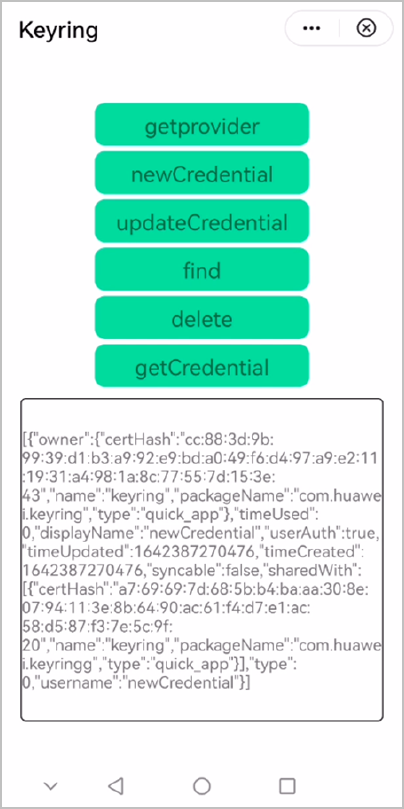
<template>
  <!-- Only one root node is allowed in template. -->
  <div class="container">
    <text class="title" onclick="functionGetProvider">getprovider</text>
    <text class="title" onclick="new">newCredential</text>
    <text class="title" onclick="update">updateCredential</text>
    <text class="title" onclick="find">find</text>
    <text class="title" onclick="delete">delete</text>
    <text class="title" onclick="getCredential">getCredential</text>
    <text class="content">{{content}}</text>
  </div>
</template>

<style>
  .container {
    flex-direction: column;
    justify-content: center;
    align-items: center;
  }

  .title {
    font-size: 40px;
    border-radius: 20px;
    margin-top: 10px;
    width: 400px;
    height: 80px;
    text-align: center;
    background-color: #00fa9a;
  }
  .content {
    margin-top: 20px;
    width: 90%;
    height: 600px;
    border: 2px solid #000000;
    border-radius: 10px;
  }
</style>

<script>
  import prompt from '@system.prompt';
  import keyring from '@service.keyring';
  module.exports = {
    data: {
      componentData: {},
      newcertHash: '',
      arr: [],
      content: '',
    },
    functionGetProvider() {
      keyring.getProvider({
        success: function (msg) {
          prompt.showToast({
            message: msg,
            duration: 2000,
            gravity: 'bottom'
          })
        },
        fail: function (msg) {
          prompt.showToast({
            message: msg,
            duration: 2000,
            gravity: 'bottom'
          })
        }
      })
    },
    new() {
      keyring.saveCredential({
        type: 0,
        syncable: "false",
        userAuth: "true",
        username: "newCredential",
        displayName: "newCredential",
        newContent: "123456",
        sharedWith: [
          {
            'type': "quick_app",
            'name': "keyringg",
            'packageName': "com.huawei.keyringg",
            'certHash': "a7:69:69:7d:68:5b:b4:ba:aa:30:8e:07:94:11:3e:8b:64:90:ac:61:f4:d7:e1:ac:58:d5:87:f3:7e:5c:9f:20",
          }],
        success: function (msg) {
          console.log("newCredential " + msg);
          prompt.showToast({
            message: msg,
            duration: 2000,
            gravity: 'bottom'
          })
        },
        fail: function (code, msg) {
          console.log("newCredential " + code + msg);
          prompt.showToast({
            message: 'newCredential' + code + msg,
            duration: 2000,
            gravity: 'bottom'
          })
        }
      })
    },
    update() {
      keyring.saveCredential({
        type: 0,
        syncable: "false",
        userAuth: "true",
        username: "updateCredential",
        displayName: "updateCredential",
        newContent: "123456",
        owner: {
          type: 'quick_app',
          name: 'keyring',
          packageName: 'com.huawei.keyring',
          certHash: "cc:88:3d:9b:99:39:d1:b3:a9:92:e9:bd:a0:49:f6:d4:97:a9:e2:11:19:31:a4:98:1a:8c:77:55:7d:15:3e:43"
        },
        sharedWith: [
          {
            'type': "quick_app",
            'name': "keyringg",
            'packageName': "com.huawei.keyringg",
            'certHash': "a7:69:69:7d:68:5b:b4:ba:aa:30:8e:07:94:11:3e:8b:64:90:ac:61:f4:d7:e1:ac:58:d5:87:f3:7e:5c:9f:20",
          }],
        success: function (msg) {
          console.log("updateCredential " + msg);
          prompt.showToast({
            message: 'updateCredential success',
            duration: 2000,
            gravity: 'bottom'
          })
        },
        fail: function (code, msg) {
          console.log("updateCredential " + code + msg);
          prompt.showToast({
            message: msg + code,
            duration: 2000,
            gravity: 'bottom'
          })
        }
      })
    },
    find() {
      var that = this
      keyring.findCredential({
        trustedApps: [{
          type: 'quick_app',
          name: 'keyring',
          packageName: 'com.huawei.keyring',
          certHash: "cc:88:3d:9b:99:39:d1:b3:a9:92:e9:bd:a0:49:f6:d4:97:a9:e2:11:19:31:a4:98:1a:8c:77:55:7d:15:3e:43"
        }],
        success: function (data) {
          console.log("findCredential success", JSON.stringify(data));
          that.content = data
        },
        fail: function (code, msg) {
          console.log("findCredential fail" + code + msg);
        }
      })
    },
    delete() {
      keyring.deleteCredential({
        owner: {
          type: 'quick_app',
          name: 'keyring',
          packageName: 'com.huawei.keyring',
          certHash: "cc:88:3d:9b:99:39:d1:b3:a9:92:e9:bd:a0:49:f6:d4:97:a9:e2:11:19:31:a4:98:1a:8c:77:55:7d:15:3e:43"
        },
        "type": 0,
        "username": "newCredential",
        success: function (msg) {
          console.log("delete" + msg);
        },
        fail: function (code, msg) {
          console.log("delete" + code + msg);
        }
      })
    },
    getCredential() {
      keyring.getCredentialContent({
        owner: {
          type: 'quick_app',
          name: 'keyring',
          packageName: 'com.huawei.keyring',
          certHash: "cc:88:3d:9b:99:39:d1:b3:a9:92:e9:bd:a0:49:f6:d4:97:a9:e2:11:19:31:a4:98:1a:8c:77:55:7d:15:3e:43"
        },
        type: 0,
        username: "hanjingjing",
        success: function (msg) {
          console.log("get" + msg);
        },
        fail: function (code, msg) {
          console.log("get" + code + msg);
        }
      })
    }
  }
</script>
效果图如下: