导入模块
在调用接口页面的<script>部分增加如下配置。
import network from '@system.network'
或
var network = require("@system.network")
[h2]network.getType(OBJECT)
描述
获取网络类型。
OBJECT参数
参数 |
类型 |
是否必填 |
说明 |
|---|---|---|---|
success |
function |
否 |
成功回调。 |
fail |
function |
否 |
失败回调,可能是因为缺乏权限。 |
complete |
function |
否 |
执行结束后的回调。 |
success返回值:
参数 |
类型 |
说明 |
|---|---|---|
metered |
boolean |
是否按照流量计费。 |
type |
string |
网络类型。
|
示例代码
network.getType({
    success:function(data){console.log("handling success: " + data.type);}
})
[h2]network.subscribe(OBJECT)
描述
监听网络连接状态。如果多次调用,仅最后一次调用生效。
OBJECT参数
参数 |
类型 |
是否必填 |
说明 |
|---|---|---|---|
callback |
function |
否 |
每次网络发生变化,都会被回调。 |
fail |
function |
否 |
失败回调,可能是因为缺乏权限。 |
callback返回值:
参数 |
类型 |
说明 |
|---|---|---|
metered |
boolean |
是否按照流量计费。 |
type |
string |
网络类型,可能的值为2g、3g、4g、5g(1070+)、wifi、bluetooth(1070+)、others(无法识别网络类型)、none(没有网络)。 |
示例代码
network.subscribe({
    callback:function(data){console.log("handling callback");}
})
[h2]network.getSimOperators(OBJECT)(1070+)
描述
获取SIM卡的运营商信息。需要获取电话权限。
OBJECT参数
参数 |
类型 |
是否必填 |
说明 |
|---|---|---|---|
success |
function |
否 |
成功回调。 |
fail |
function |
否 |
失败回调。 |
complete |
function |
否 |
执行结束后的回调。 |
success返回值 :
参数 |
类型 |
说明 |
|---|---|---|
operators |
array |
SIM卡列表信息。详细内容参见“SIM卡列表说明”。 |
size |
number |
SIM 卡数量。 |
fail返回错误码:
错误码 |
说明 |
|---|---|
1001 |
未插入sim卡。 |
1002 |
获取运营商信息失败。 |
参数 |
类型 |
说明 |
|---|---|---|
operator |
string |
返回数据网络的运营商信息。 运营商信息说明:统一返回MCC+MNC,即移动国家代码 + 移动网络代码。 中国移动:46000,46002,46004,46007。 中国联通:46001,46006,46009。 中国电信:46003,46005,46011。 其余MCC+MNC请参见“https://www.mcc-mnc.com/”。 |
slotIndex |
number |
卡槽序号。 |
isDefaultDataOperator |
boolean |
是否为默认数据卡。 |
示例代码
network.getSimOperators({
    success:function (data) {
        console.log(`size: ${data.size}`)
        for (const i in data.operators) {
            console.log(`operator: ${data.operators[i].operator},
                    slotIndex:${data.operators[i].slotIndex},
                    isDefaultDataOperator:${data.operators[i].isDefaultDataOperator},`
            )
        }
    },
    fail:function (erromsg, errocode) {
        console.log('errocode: ' + errocode + ' – erromsg: ' + erromsg)
    }
})
[h2]network.getNetworkOperator(OBJECT)(1078+)
描述
获取SIM卡的拜访地信息。

需要获取电话权限。
参数
参数 |
类型 |
是否必填 |
说明 |
|---|---|---|---|
success |
function |
否 |
成功回调。 |
fail |
function |
否 |
失败回调。 |
complete |
function |
否 |
执行结束后的回调。 |
success 返回值 :
参数 |
类型 |
说明 |
|---|---|---|
operators |
array |
SIM卡列表信息。详细内容参见“SIM卡列表说明”。 |
size |
number |
SIM卡数量。 |
fail 返回值 :
错误码 |
说明 |
|---|---|
201 |
用户拒绝,获取电话权限失败。 |
1001 |
未插入SIM卡。 |
1002 |
获取运营商信息失败 |
示例代码
network.getNetworkOperator({
    success:function (data) {
        console.log(`size: ${data.size}`)
        for (const i in data.operators) {
            console.log(`operator: ${data.operators[i].operator},
                    slotIndex:${data.operators[i].slotIndex},
                    isDefaultDataOperator:${data.operators[i].isDefaultDataOperator},`
            )
        }
    },
    fail:function (erromsg, errocode) {
        console.log('errocode: ' + errocode + ' – erromsg: ' + erromsg)
    }
})
Demo
<template>
  <div class="container">

    <div class="item-container">
      <div class="item-content">
        <text class="txt">networkType: {{networkType}}</text>
      </div>
      <input type="button" class="btn" onclick="getNetworkType"  value="Get Network Type" />

      <div class="item-content">
        <text class="txt">currentType: {{currentType}}</text>
      </div>
      <input type="button" class="btn" onclick="listenNetwork"  value="listen Network" />
      <input type="button" class="btn" onclick="cancelNetwork"  value="cancel Network" />
      <div class="item-content">
        <text class="txt">carrierInformation:{{simOperatorsInfo}}</text>
      </div>
      <input type="button" class="btn" onclick="getSimOperators"  value="Get Carrier Information" />
    </div>
  </div>
</template>

<style>
.container{
  flex: 1;
  flex-direction: column;
}
  .item-container {
    margin-bottom: 50px;
    margin-right: 60px;
    margin-left: 60px;
    flex-direction: column;
  }

  .item-content {
    flex-direction: column;
    padding: 30px;
    margin-bottom: 100px;
    align-items: flex-start;
  }
  .btn {
  height: 80px;
  text-align: center;
  border-radius: 5px;
  margin-right: 60px;
  margin-left: 60px;
  margin-bottom: 50px;
  color: #ffffff;
  font-size: 30px;
  background-color: #0faeff;
}
</style>

<script>
  import network from '@system.network'
  import prompt from '@system.prompt'

  export default {
    data: {
      networkType: '',
      currentType: '',
      simOperatorsInfo: '',
    },
    onInit: function () {
      this.$page.setTitleBar({ text: 'network' })
    },
    getNetworkType: function () {
      var that = this
      network.getType({
        success: function (ret) {
          that.networkType = JSON.stringify(ret);

        },
        fail: function (erromsg, errocode) {
          console.log('network.getType----------' + errocode + ': ' + erromsg)
        },
        complete: function () {
          prompt.showToast({
            message: "get network type complete!"
          })
        }
      })
    },
    listenNetwork: function () {
      var that = this
      network.subscribe({
        callback: function (ret) {
          that.currentType = JSON.stringify(ret)
          prompt.showToast({ message:"listenSuccess" + JSON.stringify(ret) })
        },
        fail: function (erromsg, errocode) {
          prompt.showToast({ message: "listenFailed" + errocode + ': ' + erromsg })
          console.log('network.subscribe----------' + errocode + ': ' + erromsg)
        }
      })
    },
    cancelNetwork: function () {
      network.unsubscribe()
    },
    getSimOperators: function () {
      var that = this
      var simOperatorsInfo = ''
      network.getSimOperators({
        success: function (data) {
          console.log(`size: ${data.size}`)
          for (const i in data.operators) {
            simOperatorsInfo += `operator: ${data.operators[i].operator},\tslotIndex:${data.operators[i].slotIndex},\tisDefaultDataOperator:${data.operators[i].isDefaultDataOperator},\n`
          }
          that.simOperatorsInfo = JSON.stringify(data)
          console.log(simOperatorsInfo)
        },
        fail: function (erromsg, errocode) {
          console.log('errocode: ' + errocode + ' - erromsg: ' + erromsg)
        }
      })
    }
  }
</script>
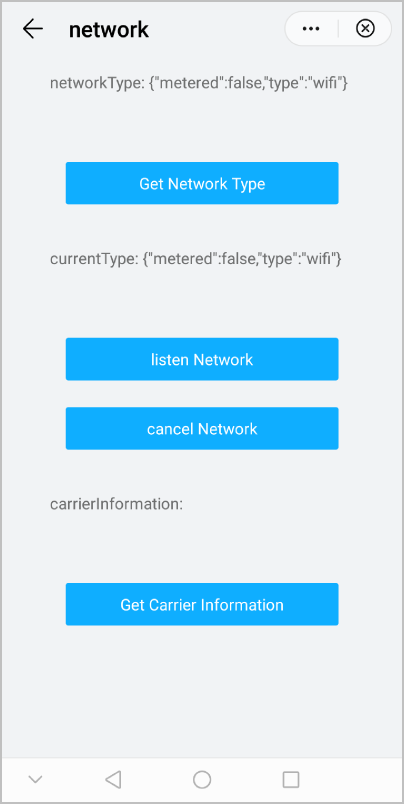
效果图如下: