为了规范通知栏消息,提升用户体验,2023年5月19日起,快应用通知服务将全面升级。
服务升级期间,快应用推送能力整体下线,即快应用的推送/通知(即通知栏消息)均无法触达用户,请您暂停使用,给您造成的不便敬请谅解。
本次服务升级预计于2023年四季度完成,完成后我们将会邮件通知您。如您遇到任何问题,请发邮件至developer@huawei.com与我们联系,感谢您的支持。
导入模块
在调用接口页面的<script>部分增加如下配置。
import notification from '@system.notification'
或
var notification = require("@system.notification") [h2]notification.show(OBJECT)
描述
显示通知。
OBJECT参数
参数 | 类型 | 是否必填 | 说明 |
|---|---|---|---|
contentTitle | string | 否 | 标题。如果未开启通知权限,则不显示通知消息;开启通知权限,此参数不能为空,否则无法显示通知。 |
contentText | string | 否 | 内容。如果未开启通知权限,则不显示通知消息;开启通知权限,此参数不能为空,否则无法显示通知。 |
clickAction | object | 否 | 通知点击后触发动作的信息 |
success(1107+) | function | 否 | 成功回调。 |
fail(1107+) | function | 否 | 失败回调。 |
success返回值
参数 | 类型 | 说明 |
|---|---|---|
data | string | 返回成功信息。 |
fail返回值
参数 | 类型 | 说明 |
|---|---|---|
data | string | 返回错误信息。 |
code | int | 返回的错误码。 |
clickAction说明:
参数 | 类型 | 是否必填 | 说明 |
|---|---|---|---|
uri | string | 是 | 点击通知后跳转的页面地址。支持的格式包括:
可以通过“?param1=value1”的方式添加参数,参数可以在页面中通过this.param1的方式使用 |
示例代码
notification.show({
	contentTitle:'title',
	clickAction: {
	uri:'/index.html?index=1'
	},
	success: function(data) {
		console.log("notification.show succeeded, result data=" + JSON.stringify(data));

	},
	fail: function(data, code) {
		console.log(" notification.show failed, result data=" + JSON.stringify(data) + ", code=" + code);
	}
})
[h2]notification.postDelayedShow(OBJECT) (1070+,华为扩展接口,非厂商联盟规范)
描述
设置延时显示通知。

发送通知消息的快应用进程存在,才会显示通知消息。如果快应用的进程停止,则不会显示通知。
OBJECT参数
参数 | 类型 | 是否必填 | 说明 |
|---|---|---|---|
message | object | 是 | 具体消息信息。 |
buildInfo | object | 是 | 延迟参数。 |
success | function | 否 | 成功回调。 |
fail | function | 否 | 失败回调。 |
complete | function | 否 | 执行结束后的回调。 |
message参数说明
参数 | 类型 | 是否必填 | 说明 |
|---|---|---|---|
contentTitle | string | 否 | 标题。如果未开启通知权限,则不显示通知消息;开启通知权限,此参数不能为空,否则无法显示通知。 |
contentText | string | 否 | 内容。如果未开启通知权限,则不显示通知消息;开启通知权限,此参数不能为空,否则无法显示通知。 |
clickAction | object | 否 | 通知点击后触发动作的消息。 |
buildInfo参数说明
参数 | 类型 | 是否必填 | 说明 |
|---|---|---|---|
latencyTime | long | 是 | 延迟时间(单位:秒)。 |
isPersisted | boolean | 是 | 重启手机是否保留通知消息。必须手动为快应用中心开启开机自启动权限才能生效。 |
success返回值
参数 | 类型 | 说明 |
|---|---|---|
jobId | int | 延时消息的id。 通过此ID可以取消延时消息任务。 |
示例代码
notification.postDelayedShow({
    message:{
           contentTitle: 'title',
           clickAction: {
            uri: '/index.html?index=1'
           }
    },
    buildInfo:{
           latencyTime: 1*60,  //1分钟
           isPersisted:false
    },
    success:function(params){
          console.info("success, id is "+ params.jobId)
    }
})
[h2]notification.cancelDelayedShow(OBJECT)(1070+,华为扩展接口,非厂商联盟规范)
描述
取消处在延时状态的通知消息。
OBJECT参数
参数 | 类型 | 是否必填 | 说明 |
|---|---|---|---|
jobId | int | 是 | 延时消息的任务ID。 |
success | function | 否 | 成功的回调。 |
fail | function | 否 | 失败的回调。 |
complete | function | 否 | 执行结束后的回调。 |
示例代码
notification.cancelDelayedShow({
    jobId:12,
    success:function(params){
          console.info("success")
    }
})
Demo
<template>
  <div class="container">
    <div class="item-container">
      <div class="item-content">
        <div class="item-content-detail">
          <text class="txt">Title:</text>
          <input class="input" placeholder="Please input title" onchange="titleFn" />
        </div>
        <div class="item-content-detail">
          <text class="txt">Content:</text>
          <input class="input" placeholder="Please input content"  onchange="contentFn" />
        </div>
      </div>
      <input type="button" class="btn" value="Send a notification"  onclick="show" />
      <input type="button" class="btn" value="Post delayed show"  onclick="delayedshow" />
      <input type="button" class="btn" value="Cancel delayed show"  onclick="canceldelayedshow" />
    </div>
  </div>
</template>

<style>
 .container{
  flex: 1;
  flex-direction: column;
}

  .item-container {
    margin-top: 50px;
    margin-right: 60px;
    margin-left: 60px;
    flex-direction: column;
  }

  .item-content {
    flex-direction: column;
    background-color: #ffffff;
    padding-left: 30px;
    padding-right: 30px;
    padding-top: 15px;
    padding-bottom: 15px;
    margin-bottom: 100px;
  }

  .item-content-detail {
    align-items: center;
  }

  .input {
    flex: 1;
    font-size: 30px;
    padding-left: 20px;
  }

  .txt {
    width: 150px;
    padding-top: 15px;
    padding-bottom: 15px;
    text-align: right;
  }
  .btn {
  height: 80px;
  text-align: center;
  border-radius: 5px;
  margin-right: 60px;
  margin-left: 60px;
  margin-bottom: 50px;
  color: #ffffff;
  font-size: 30px;
  background-color: #0faeff;
}
</style>

<script>
  import prompt from '@system.prompt'
  import notification from '@system.notification'

  export default {
    data: {
      componentData: {},
      inputTitle: 'title',
      inputContent: 'content',
      testjobId:''
    },
    onInit: function () {
      this.$page.setTitleBar({ text: 'notification' })
    },
    show: function () {
      var that = this
      prompt.showToast({
        message: '标题为: "' + that.inputTitle + ' "的消息已发送,请查看消息通知栏',
      })
      notification.show({
        contentTitle: that.inputTitle,
        contentText: that.inputContent,
        clickAction: {
          uri: '/Hello'
        }
      })
    },
    titleFn: function (e) {
      this.inputTitle = e.text
    },
    contentFn: function (e) {
      this.inputContent = e.text
    },
    delayedshow: function () {
      var that = this;
      notification.postDelayedShow({
         message:{
           contentTitle: 'title',
           contentText:'post delayed show',
           clickAction: {
            uri: '/Hello'
           }
      },
      buildInfo:{
           latencyTime: 1*60,  //1分钟
           isPersisted:false
      },
    success:function(params){
          console.info("success, id is "+ params.jobId);
          that.testjobId =  params.jobId;
    },
    fail:function(code) {
          console.log("failed, code is "+ code);
    },
    complete:function(data) {
         console.log("delayed show complete!");
    }
   })
  },
    canceldelayedshow:function () {
         notification.cancelDelayedShow({
         jobId:this.testjobId,
         success:function(params){
           console.info("success cancel delayed show")
         },
         fail:function(code) {
          console.log("cancel delayed show failed! code is "+code)
         },
         complete:function() {
          console.log("cancel delayed show complete!")
         }
    })
   }
  }
</script>
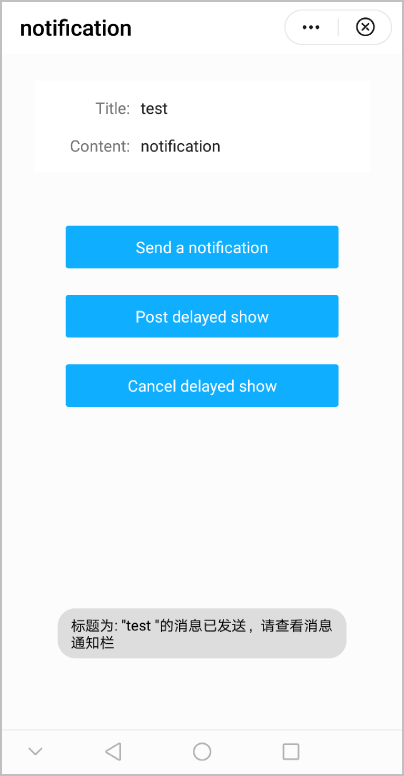
效果图如下: